1
Programmer’s Guide
Configuration
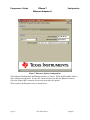
Figure 7 Firmware Update Configuration
Select Manual Configuration and Ethernet interfaces as shown. Fill in the IP and Mac Address
of the adapter being updated. In some PC’s there may be more than one Ethernet interface.
Select the adapter that is connected to the same network as the printer.
Then switch to the Program screen as shown below.