1
Chapter 5. Advanced Use
Chapter 5. Advanced Use
This chapter contains information on performing more advanced tasks with Dr.Web and adjusting its
settings.
Quarantine
Quarantine allows you to isolate detected malicious or suspicious objects that cannot be cured from the
rest of the system in case you need them. Curing algorithms are being constantly improved, therefore
these objects may become curable after one of the updates.
Due to the privacy reasons, the quarantine folder is created for each user in the system. Therefore, if you
switched to the administrator mode, the detected threats which are moved to the administrator
Quarantine and will not be available in the user Quarantine folders.
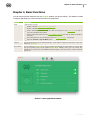
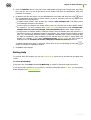
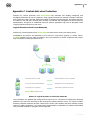
You can view and manage the contents of quarantine using the Quarantine tab on the Threats
section of the main window (see illustration below). In the status bar in the bottom of the window the
total number and size of the threats and also the number and size of the selected threats are displayed.
Picture 4. Objects in quarantine
To view information on the objects in quarantine
1. Click the
button or double-click the object.
2. To read about the type of the threat that the object is supposed to contain on Doctor Web
website, click the
button to the left of the threat name on the details window. This will open the
page with information on this type of threats on Doctor Web website.
User Manual
19