1
3.4 Setting Commands
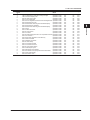
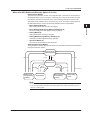
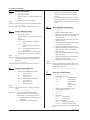
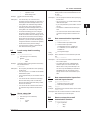
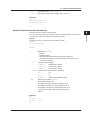
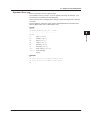
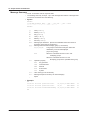
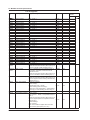
TAG_PRIORITY
Tag prioritized display
DISP_GROUP
Group number display
SEPARATOR
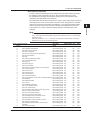
When p2 is set to LOG (select from the
items below)
LOGIN_LOG
Login log
ERROR_LOG
Error log
COMMU_LOG
Communication log
FTP_LOG
FTP log
WEB_LOG
Web log
MAIL_LOG
E-mail log
SNTP_LOG
SNTP log
DHCP_LOG
DHCP log
MODBUS_LOG
Modbus log
OPERATE_LOG
Operation log
SETTING_LOG
Change settings log
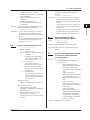
DISP_ITEMSwitches the displayed
items
SEPARATOR
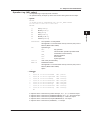
When p2 is set to 4PANEL (select from the
items below)
4PANEL1 to 4PANEL4 Selects 4-panel
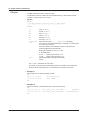
SEPARATOR
When p2 is set to CUSTOM_PANEL (select
from the items below)
INTERNAL1 to INTERNAL3
Selects one from internal 1 to 3
EXTERNAL1 to EXTERNAL25
Selects one from external 1 to 25
NEW
New
When p2 is set to ANNUNCIATOR (select
from the items below)
EXPAND
Expand
SEPARATOR
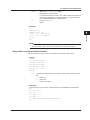
Example
Register the following items to the Trend main
menu’s sub menu: SCALE and DIGITAL.
SM DISP_SUB,TREND,SCALE,DIGITAL
Description• Items that you can set for p3 and subsequent
parameters vary depending on p2.
• If parameter p3 and subsequent parameters
are omitted, all menu items are hidden.
• A command error occurs if you specify the
same menu item multiple times.
• You can specify up to three separators. If you
specify more than three, an error occurs.
• You cannot specify EXPAND for log and
4-panel.
• You cannot omit parameters using delimiters
(, ,).
• The SM DISP_SUB? command causes the
DX to return sub menu items whose display is
turned off.
• You cannot set the first menu item to
“SEPARATOR.”
• The display group parameter “GROUP1” to
“GROUP36” and the auto switching parameter
“AUTO” on/off setting apply to the trend,
3-36
•
•
•
•
digital, bar graph, and historical trend menus.
(For example, if you set AUTO to off for the
trend menu, and then set AUTO to on for the
digital menu, AUTO is turned on for the trend,
digital, bar graph, and historical trend menus.)
When p2 is set to ANNUNCIATOR, the
DX1000 does not have submenus.
When p2 is set to INFORMATION, you can
only set p3 to DISP_GROUP on the DX1000.
When p2 is set to OVERVIEW, you can only
set p3 to ALARMACK on models with the /AS1
advanced security option.
When p2 is set to LOG, you can only set
p3 to OPERATE_LOG, SETTING_LOG,
or DISP_ITEM on models with the /AS1
advanced security option. LOGIN_LOG
cannot be specified on models with the /AS1
advanced security option.
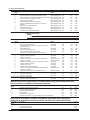
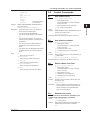
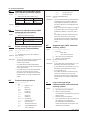
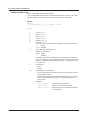
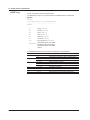
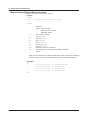
Setting the function menu
p1 Type (FUNC)
p2 ≥ Menu items to display
The DX displays the functions that you select
from below in the menu in the specified order.
The DX does not display menu items that are
not specified.
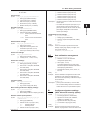
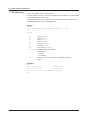
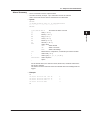
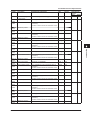
ALARMACK
Alarm acknowledge
ALARM_RESET
Alarm display reset
MESSAGE
FREE_MESSAGE
MEDIA_EJECT
SNAPSHOT
MANUAL_SAMPLE
TRIGGER
Event trigger
SAVE_DISPLAY
SAVE_EVENT
SAVE_STOP
MATH_START/STOP
MATH_RESET
MATH_ACKComputed data dropout
acknowledge
EDGE_SWITCHPresses event edge
switch
TIMER_RESET
MATCH_T_RESETResets single match
time timer
KEYLOCKEnables or disables key
lock
LOGOUT
PASSWORD_CHANGE
RATE_CHANGEDisplay rate 1 or display
rate 2
BATCH
TEXT_FIELD
FAVORITE_REGIST
Registers as favorite
4PANEL
JUMP_DISPLAYRegisters the screen to
return to
IM 04L41B01-17E