1
User’s
Manual
DAQSTATION DX100P/DX200P
Communication Interface
*
4
L
5 A 1
1
7 E 0
4
*
IM 04L05A01-17E
Yokogawa Electric Corporation
4th Edition
Forward
Thank you for purchasing the YOKOGAWA DAQSTATION DX100P/DX200P (hereinafter
“the DXP”).
This Communication Interface User’s Manual contains information about the
communication functions such as the Ethernet/serial interface. To ensure correct use,
please read this manual thoroughly before operation.
Keep this manual in a safe place for quick reference in the event a question arises.
The following five manuals, including this one, are provided as manuals for the DX100P/
DX200P.
Manual Name
Manual No.
Description
DX100P User’s Manual
IM 04L05A01-01E
Explains all functions and procedures of the
DX100P excluding the communication
functions.
DX200P User’s Manual
IM 04L06A01-01E
Explains all functions and procedures of the
DX200P excluding the communication
functions.
DX100P/DX200P
Operation Guide
IM 04L05A01-02E
Briefly explains the basic operations of the
DXP.
DX100P/DX200P
Communication Interface
User’s Manual
IM 04L05A01-17E
This manual. Explains the communication
functions of the Ethernet/serial interface.
DAQSIGNIN
User’s Manual
IM 04L05A01-61E
Describes the functions and operating
procedures of DAQSIGNIN.
Notes
• This manual describes the communication functions of the DX100P/DX200P with the
style number “S5.”
• The contents of this manual are subject to change without prior notice as a result of
continuing improvements to the instrument’s performance and functions. The figures
given in this manual may differ from the actual screen.
• Every effort has been made in the preparation of this manual to ensure the accuracy
of its contents. However, should you have any questions or find any errors, please
contact your nearest YOKOGAWA dealer.
• Copying or reproducing all or any part of the contents of this manual without
YOKOGAWA’s permission is strictly prohibited.
• The TCP/IP software used in this product and the documentation for that TCP/IP
software are based in part on BSD Networking Software, Release 1 licensed from The
Regents of the University of California.
Trademarks
• Microsoft, MS-DOS, Windows, and Windows NT are either registered trademarks or
trademarks of Microsoft Corporation in the United States and/or other countries.
• Modbus is a registered trademark of AEG Schneider Automation Incorporated.
• Adobe, Acrobat, and PostScript are trademarks of Adobe Systems incorporated.
• For purposes of this manual, the TM and ® symbols do not accompany their
respective trademark names or registered trademark names.
• Other company and product names are trademarks or registered trademarks of their
respective holders.
Revisions
• First edition
• Second edition
• Third edition
Disk No. RE33
4rd Edition: August 2004 (YK)
All Rights Reserved, Copyright © 2001 Yokogawa Electric Corporation
IM 04L05A01-17E
September 2001
December 2001
July 2002
• Fourth edition
August 2004
i
How to Use this Manual
Structure of the Manual
The structure of this User’s Manual is as follows.
Chapter 1
Overview of the Communication Functions
Describes the relationship between the communication functions and the interface and
provides an outline of the communication functions.
Chapter 2
Using the Ethernet Interface
Describes the specifications and setup procedures of the Ethernet interface. Also describes
how to use the setting/measurement server, FTP client, FTP server, Web server, e-mail
transmission function, maintenance/test server, and instrument information server.
Chapter 3
Using the Serial Interface (/C2, /C3 Options)
Describes the specifications and setup procedures of the serial interface (option). Also
describes how to use the setting/measurement function and the barcode input function.
Chapter 4
Using the Modbus (/C2, /C3 Options)
Describes the specifications and setup procedures of the Modbus protocol. Also describes
how to use the Modbus STATUS screen.
Chapter 5
Commands
Describes each command that can be used.
Chapter 6
Response
Describes the data format of the measured/computed data and files that are output from this
instrument.
Chapter 7
Status Report
Describes the status information.
Appendix
Provides an ASCII character code table, the flow of operation when outputting data from the
DXP, a list of error messages, and the login process.
Index
Provides an index.
ii
IM 04L05A01-17E
How to Use this Manual
Conventions Used in this Manual
Unit
• k Denotes 1000. Example: 5 kg, 100 kHz
• K Denotes 1024. Example: 720 KB
Symbols
The following symbols are used in this manual.
Improper handling or use can lead to injury to the user or
damage to the instrument. This symbol appears on the
instrument to indicate that the user must refer to the user’s
manual for special instructions. The same symbol appears in
the corresponding place in the user’s manual to identify those
instructions. In the manual, the symbol is used in conjunction
with the word “WARNING” or “CAUTION.”
WARNING
Describes precautions that should be observed to prevent injury
or death to the user.
CAUTION
Describes precautions that should be observed to prevent minor
or moderate injury, or damage to the instrument.
Note
Provides important information for the proper operation of the
instrument.
Displayed characters
Alphanumeric characters enclosed with [ ] refer to characters or setting values that are
displayed on the screen.
Symbols used on pages describing operating procedures
On pages that describe the operating procedures in Chapter 2 through 4, the following
symbols are used to distinguish the procedures from their explanations.
Explanation
This section describes the setting parameters and the limitations
regarding the procedures.
Procedure
Follow the steps indicated with numbers. The procedures are
given with the premise that the user is carrying out the steps for
the first time. Depending on the operation, not all steps need to be
taken.
IM 04L05A01-17E
iii
Names and Uses of Parts
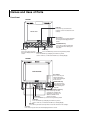
Front Panel
DX100P
ESC key
Press this key to return to the
previous screen or cancel the new
settings.
LCD monitor
Arrow keys
Press these keys to move between
the setup items displayed on the
screen.
DISP/
ENTER
START
USER
STOP
FUNC
ESC
MENU
DISP/ENTER key
Press this key when confirming
the setting or when closing the
entry box.
Soft keys
MENU key
Press these keys to select
Press the MENU key to enter the engineering mode.
the menu displayed on the FUNC key
screen.
Press the FUNC key to display the FUNC key menu,
such as FTP test, e-mail transmission test, and log display.
DX200P
LCD monitor
Arrow keys
Press these keys to
move between the
setup items displayed
on the screen.
START
STOP
ESC
USER
1
2
3
4
5
6
7
8
9
MENU
FUNC
0
DISP
/ENTER
DISP/ENTER key
Press this key when
confirming the setting
or when closing the
entry box.
Character/number input key
Press these keys to enter
characters or numbers for
parameters such as the IP
address, domain name,
and server name.
MENU key
Press the MENU key to enter the engineering mode.
FUNC key
Press the FUNC key to display the FUNC key menu,
such as FTP test, e-mail transmission test, and log display.
ESC key
Press this key to return to the previous screen or cancel the new settings.
Soft keys
Press these keys to select the menu displayed on the screen.
iv
IM 04L05A01-17E
Names and Uses of Parts
Rear Panel
DX100P
Ethernet interface connector
A connector used for Ethernet communications. Comes
standard with the instrument.
RS-232 interface connector
A serial communication connector provided on models
with the optional code /C2.
RS-422A/485 interface terminal
Serial communication terminals
provided on models with the
optional code /C3.
DX200P
Ethernet interface connector
A connector used for Ethernet communications. Comes
standard with the instrument.
RS-232 interface connector
A serial communication connector provided on models
with the optional code /C2.
RS-422A/485 interface terminal
Serial communication terminals
provided on models with the
optional code /C3.
IM 04L05A01-17E
v
Names and Uses of Parts
Flow of Operation using the Operation Keys
This section will describe the basic flow of operation when changing the settings of the
DXP using the front panel keys.
Entering the System Mode
Note
•
•
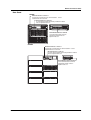
1.
Settings related to communications are configured in the system mode.
You can enter the system mode only if you log in as a registered administrator.
Press the MENU key to display the engineering mode menu.
Note
You cannot enter the engineering mode when Memory Start is in progress*, when the sign
record screen is displayed, when saving data to an external storage medium, or when there is
data that has not been saved to the external storage medium.
* “Memory Start in progress” is a condition in which measured/computed data is being
acquired to the internal memory and the operation of automatically storing data to the
external storage medium is in progress.
2.
3.
Press the soft key corresponding to [System Mode].
A dialog box that asks you whether or not the new settings are to be stored.
Select [Yes] or [No] and press the DISP/ENTER key.
The system mode menu appears.
Note
If an external storage medium is not inserted when you select [Yes], an error message “Media
has not been inserted” appears. In this case, the settings cannot be saved, and the DXP
cannot proceed to the system mode. The error message is cleared by pressing ESC. Insert
an external storage medium into the drive and carry out the procedure again.
Changing the settings
1.
Press the soft key corresponding to the objective settings. This procedure is
described in the procedure for each item.
2.
Press the arrow keys to move the cursor onto the desired parameter.
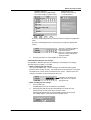
The parameter box containing
the cursor is blue.
3.
vi
For parameters whose selections are shown at the bottom of the screen, press
the soft key under the desired selection.
For parameters that need characters to be entered in the entry box, press the
[Input] soft key to display the entry box, enter the characters, and press the
DISP/ENTER key.
IM 04L05A01-17E
Names and Uses of Parts
Parameter selections
(Selection example for [DNS On/Off]
Press either the [On] or [Off] soft key.)
Parameter entry box
(Example of the entry box
for the IP address)
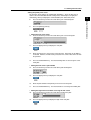
• The boxes containing parameters that have not been changed are displayed in
white.
• The boxes containing parameters that have been changed are displayed in
yellow.
The boxes containing parameters
that have been changed are
displayed in yellow.
The boxes containing parameters
that have not been changed are
displayed in white.
4.
Set other parameters as well according to steps 2 and 3.
Confirming/Canceling the new changes
The operation is different when you are confirming or canceling the new changes
(parameter boxes in yellow). See below.
• When confirming the new changes
Press the DISP/ENTER key. The new changes are confirmed and the yellow
parameter boxes change to white. The cursor returns to the parameter at the upper
left portion of the screen (the first parameter on the screen). However, if the new
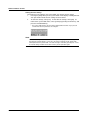
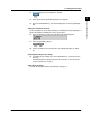
change is not valid, then the parameter box turns red.
Parameters for which the new
changes that are not valid are
displayed in red.
• When canceling the new changes
1.
Press the ESC key.
A window appears for you to confirm the cancellation.
2.
Selecting [YES] and pressing the DISP/ENTER key cancels the new
settings and the screen returns to the previous screen.
Selecting [No] and pressing the DISP/ENTER key does not cancel the
new settings and the screen returns to the original screen.
IM 04L05A01-17E
vii
Names and Uses of Parts
Storing the new settings
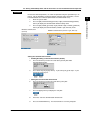
To activate the new settings in the system mode, the settings must be stored.
1.
Pressing the [End] soft key in the system mode menu* displays a dialog box that
asks you whether or not the new settings are to be stored.
2.
To store the settings, select [Yes]. To not store the settings, select [No]. To
return to the system mode menu, select [Cancel] by pressing the arrow key, and
press the DISP/ENTER key.
* The system mode menu is the menu that is displayed when the ESC key is pressed
several times after the parameters are changed.
Note
If an external storage medium is not inserted when you select [Yes], an error message “Media
has not been inserted” appears. In this case, the settings cannot be saved, and the DXP
cannot proceed to the system mode. The error message is cleared by pressing ESC. Insert
an external storage medium into the drive and carry out the procedure again.
viii
IM 04L05A01-17E
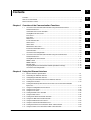
1
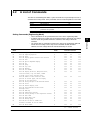
Contents
Forward ........................................................................................................................................... i
How to Use this Manual .................................................................................................................. ii
2
Names and Uses of Parts .............................................................................................................. iv
3
Chapter 1 Overview of the Communication Functions
1.1
Overview of the Communication Function Using the Ethernet Interface ........................... 1-1
Functional Structure .......................................................................................................... 1-1
Connection to the Server Functions .................................................................................. 1-1
Setting/Measurement Server ............................................................................................ 1-2
FTP Server ........................................................................................................................ 1-3
FTP Client ......................................................................................................................... 1-4
Web Server ....................................................................................................................... 1-5
4
5
E-mail Transmission .......................................................................................................... 1-6
SNTP Server ..................................................................................................................... 1-7
SNTP Client ...................................................................................................................... 1-7
Maintenance/Test Server .................................................................................................. 1-8
6
Instrument Information Server ........................................................................................... 1-8
Other Functions ................................................................................................................. 1-8
1.2
Overview of the Configuration ........................................................................................... 1-9
Overview of the Communication Function Using the Serial Interface ............................. 1-10
7
Functional Structure ........................................................................................................ 1-10
Setting/Measurement Function ....................................................................................... 1-11
Modbus Slave ................................................................................................................. 1-12
Modbus Master ............................................................................................................... 1-12
Barcode Input .................................................................................................................. 1-13
Displaying Error/Communication/FTP/Web operation/E-mail logs .................................. 1-13
Overview of the Configuration ......................................................................................... 1-13
Chapter 2 Using the Ethernet Interface
2.1
Ethernet Interface Specifications ...................................................................................... 2-1
2.2
2.3
Connecting the Ethernet Interface .................................................................................... 2-2
Configuring the Ethernet Interface .................................................................................... 2-3
2.4
2.5
Checking the Connection Status of the Ethernet Interface ............................................... 2-9
Setting the FTP Client ..................................................................................................... 2-10
2.6
Setting Timeout/Keep Alive and the User That Is to Use the Communication
Input Data ........................................................................................................................ 2-16
2.7
2.8
Using the Setting/Measurement Server .......................................................................... 2-19
Using the FTP Server ...................................................................................................... 2-26
2.9 Using the FTP Client ....................................................................................................... 2-29
2.10 Setting the Web Server Function .................................................................................... 2-32
2.11 Using the Web Server ..................................................................................................... 2-36
2.12 Setting the E-Mail Transmission Function ....................................................................... 2-42
2.13 Using the E-Mail Transmission Function ......................................................................... 2-51
2.14 Using the Maintenance/Test Server ................................................................................ 2-54
2.15 Using the Instrument Information Server ........................................................................ 2-57
2.16 Setting the SNTP Server Function or SNTP Client Function .......................................... 2-59
2.17 Using the SNTP Server Function or SNTP Client Function ............................................ 2-63
IM 04L05A01-17E
ix
App
Index
Contents
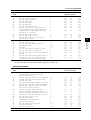
Chapter 3 Using the Serial Interface (/C2, /C3 Options)
3.1
3.2
Serial Interface Specifications ........................................................................................... 3-1
RS-232 Interface Connector Pin Arrangement and Signal Names, the Connection
3.3
Procedure, and Handshaking ............................................................................................ 3-2
RS-422A/485 Interface Pin Arrangement, Signal Names, and the Connection
3.4
Procedure .......................................................................................................................... 3-5
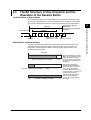
The Bit Structure of One Character and the Operation of the Receive Buffer .................. 3-9
3.5
3.6
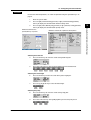
Configuring the Serial Interface ....................................................................................... 3-10
Using the Setting/Measurement Function ....................................................................... 3-13
3.7
Using Barcode Input ........................................................................................................ 3-15
Chapter 4 Using the Modbus (/C2, /C3 Options)
4.1
Modbus Protocol Specifications ........................................................................................ 4-1
4.2
4.3
Register Assignments ....................................................................................................... 4-2
Modbus Error Response (Modbus Slave) ......................................................................... 4-3
4.4
4.5
Setting the Configuration that is Used When the Modbus Protocol is Used ..................... 4-4
Setting the Modbus Master Function ................................................................................ 4-7
4.6
Checking the Operating Status of the Modbus Master Function ..................................... 4-13
Chapter 5 Commands
5.1
Command Syntax .............................................................................................................. 5-1
5.2
5.3
A List of Commands .......................................................................................................... 5-3
Input Range Parameter ..................................................................................................... 5-8
5.4
5.5
5.6
Setting Commands (Engineering Mode) ......................................................................... 5-10
Setting Commands (System Mode) ................................................................................ 5-18
Control Commands ......................................................................................................... 5-28
5.7
5.8
Output Commands .......................................................................................................... 5-35
RS-422A/485 Dedicated Commands .............................................................................. 5-38
5.9
Maintenance/Test Commands ......................................................................................... 5-38
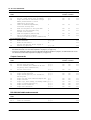
Chapter 6 Response
6.1
Response Syntax (Measurement Server) ......................................................................... 6-1
6.2
6.3
Output Format of ASCII Data ............................................................................................ 6-6
Output Format of BINARY Data ...................................................................................... 6-25
Chapter 7 Status Report
7.1
7.2
The Bit Structure of the Status Information ....................................................................... 7-1
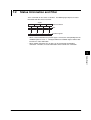
Status Information and Filter ............................................................................................. 7-3
Appendix
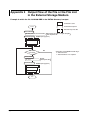
Appendix 1
Appendix 2
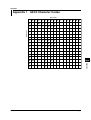
ASCII Character Codes ..................................................................................... App-1
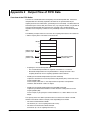
Output Flow of FIFO Data ................................................................................. App-2
Appendix 3
Appendix 4
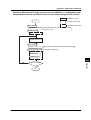
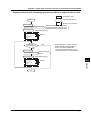
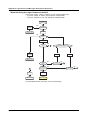
Output Flow of the File or the File List in the External Storage Medium ........... App-4
Login Process and Messages during the Login Process .................................. App-6
Appendix 5
Appendix 6
Data Dropout (Modbus Master) ......................................................................... App-9
A List of Error Messages ................................................................................. App-10
Index
x
IM 04L05A01-17E
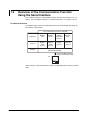
Chapter 1 Overview of the Communication Functions
1.1
1
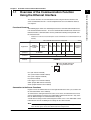
This section describes the communication function using the Ethernet interface that
comes standard with the DXP. For a description of how to use the Ethernet interface,
see chapter 2.
Functional Structure
The following figure shows the relationship between the communication function of the
DXP and the Ethernet interface. To use the communication function of the DXP via the
Ethernet interface, communications must be performed according to the protocol* that
lies in between two.
*
Protocol is a set of rules that two computers use to communicate via a communication line (or
network).
The communication functions of the DXP
Application
Setting/
Measurement
server
Upper layer
protocol
FTP
FTP E-mail SNTP SNTP Instrument
Maintenance/ Web
server server client client server client Information
Test
server
server
Dedicated protocol
for the DXP
HTTP
FTP
SMTP
TCP
Lower layer
protocol
SNTP
UDP
IP
Ethernet interface
(10BASE-T)
Interface
Connect the DXP and the PC
using an Ethernet cable.
PC
FTP (File Transfer Protocol)
TCP (Transmission Control Protocol)
UDP (User Datagram Protocol)
IP (Internet Protocol)
HTTP (Hyper Text Transfer Protocol)
SMTP (Simple Mail Transfer Protocol)
SNTP (Simple Network Time Protocol)
Connection to the Server Functions
Register at least an administrator to use the login function of the DXP (see section 4.4 in
the DX100P/DX200P User’s Manual).
To connect to the setting/measurement server, FTP server, or maintenance/test server,
you are required to log in using the user information registered on the DXP. Only users
that are allowed to log in via communications can log in.
You do not have to log in when connecting to the SNTP server. Time information can be
retrieved from the DXP according to the settings on the client machine.
Note
If no administrators are registered, you cannot use the login function. To comply with 21 CFR
Part11 of FDA, register at least one administrator when using the DXP.
IM 04L05A01-17E
1-1
Overview of the Communication Functions
Overview of the Communication Function
Using the Ethernet Interface
1.1 Overview of the Communication Function Using the Ethernet Interface
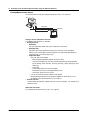
Setting/Measurement Server
For the procedure in using the setting/measurement server, see section 2.7.
PC
Response
Ethernet
Command
DXP
Setting Function and Monitor Function
The following two functions are available.
• Setting Function
• DXP Setup
Sets the engineering mode and system mode items of the DXP.
• DXP Operation
Operations that can be performed using keys of the DXP can be controlled.
However, you cannot apply electronic signature to measured/computed data or
switch the DXP screen to the log screen.
• Output DXP Data
• The DXP data can be output.
• Measured/computed data (outputs the newest data).
• Log (Communication log, FTP log, error log, operation log, Web operation
log, E-mail log, alarm summary, message summary, setting change log, and
SNTP log)
• Setup data
• Screen image data of the DXP (snapshot)
• Information on users that are logged into the DXP.
• Status byte (shows the DXP status).
• Data on the external storage medium can be output.
• Measured/computed data can be output in BINARY or ASCII format. For a
description of the data output format, see chapter 6.
• Monitor Function
The operations described in “Output DXP data” can be carried out. You cannot set or
control the DXP.
Dedicated Commands
Uses dedicated commands for the DXP. See chapter 5.
1-2
IM 04L05A01-17E
1.1 Overview of the Communication Function Using the Ethernet Interface
DXP
Administrator User name
User ID
Password
User
User name
Setting
function
Monitor
function
User ID
Password
A portion of the setting function
• Administrators or users can log into the setting function.
• Multiple users cannot log in simultaneously.
• If an administrator or user is already logged in using the keys on the DXP, you
cannot log into the setting function.
• Login is not possible if there is a user logged into the setting function via the serial
interface.
• Users can only execute a portion of the control commands (see section 2.7) such
as starting/stopping data acquisition.
• An administrator or a user can log into the monitor function. Up to two users can log
in at once.
• You cannot log in using the same user name.
Communication Timeout
This function drops the connection if no data transfer is detected between the PC and
the DXP over a predetermined period of time. This applies to data transfer at the
application level only (see page 1-1). For example, this prevents a PC from being
connected to the DXP indefinitely which would prohibit other users from making new
connections.
For the configuration required to use this function, see section 2.6.
Keepalive (Extended Function of TCP)
This function forcibly drops the connection if there are no responses to the test packets
that are sent periodically at the TCP level.
For the configuration required to use this function, see section 2.6.
FTP Server
You can access the DXP from the PC and retrieve files on the external storage medium
of the DXP. For a description of how to use the FTP server, see section 2.8.
PC
Files on the external storage medium
Ethernet
FTP server
DXP
IM 04L05A01-17E
1-3
1
Overview of the Communication Functions
Login
To use the setting/measurement server, log into the setting function or monitor function
by entering a user name, user ID, and password that are registered in the DXP.
1.1 Overview of the Communication Function Using the Ethernet Interface
Login
To user the FTP server, you log in using a user name, user ID, and password that are
registered in the DXP.
Communication Timeout
See “Setting/Measurement server.”
Keepalive (Extended Function of TCP)
See “Setting/Measurement server.”
FTP Client
For the procedure in using the FTP client, see section 2.9.
Automatic File Transfer
• The display data file, event data file, and report file can be automatically transferred to
a remote FTP server. Setup file when settings are changed and the setting change
log file can also be transferred to an FTP server. The result of the transfer is
confirmed on the FTP log screen (see paragraph “Other functions” described later).
• Up to two file transfer destinations (FTP servers) can be specified (primary and
secondary). If the primary server is down, the file is transferred to the secondary
server.
Data file to be
transferred
Destination(FTP server)
information
Transfer log
(FTP log)
FTP client
DXP
Display data file/event data file/
report file/screen image data file/
setup file/setting change log file
Primary
Ethernet
Secondary
FTP server
FTP Test
• The file transfer can be checked by transferring a test file from the DXP to a remote
FTP server.
• The result of the FTP test can be confirmed on the FTP log screen.
1-4
IM 04L05A01-17E
1.1 Overview of the Communication Function Using the Ethernet Interface
1
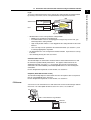
Web Server
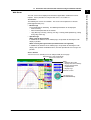
Access Control
You can set access control (user name and password) on each page.
Refreshes the screen automatically
Selects the screen size
Menu
• Refreshes the screen
• Displays the alarm summary
• Displays the measured
/computed data
• Displays logs
Switches screens
Arrow keys and
the DISP/ENTER key
IM 04L05A01-17E
1-5
Overview of the Communication Functions
The DXP screen can be displayed on the browser applications of Microsoft Internet
Explorer. For the procedure in using the Web server, see section 2.11.
Two Screens
The following two screens are available. The screen can be updated at a constant
period (approximately 30 s).
• Monitor Page
Screen dedicated for monitoring. The following information can be displayed.
• Alarm summary
• Measured/computed data of all channels
• Logs (Message summary, error log, FTP log, e-mail log, Web operation log, setting
change log, SNTP log)
• Operator Page
When using the login function
In addition to the functions on the monitor page, the operation of switching the DXP
display is possible.
When not using the login function (no administrators are registered)
In addition to the functions on the monitor page, the operation of switching the DXP
display, ACK operation of individual alarms, and write operation of free messages are
possible.
1.1 Overview of the Communication Function Using the Ethernet Interface
E-mail Transmission
The DXP transmits e-mails to the specified destination. For a description of how to use
the e-mail transmission function, see section 2.13.
Transmitting E-mail Messages
E-mail can be automatically transmitted at the following times. You can specify two
groups of destinations and specify the destination for each item.
• When Alarm Is Active/released
Notifies the alarm information.
• During Recovery from a Power Failure
Notifies the time of the power failure and the time of recovery.
• When Memory End Is Detected (See section 1.8 of the DX100P/DX200P User’s
Manual)
Notifies the detection of memory end.
• When an Error Related to the External Storage Medium and FTP Client
Occurs
Notifies the error code and message in the following cases.
• When an error is detected on the external storage medium or when the data cannot
be saved as the free space on the storage medium is insufficient.
• When data transfer fails using the FTP client function.
• When a user is locked due to password failure
• At the Specified Time
Transmits an e-mail message when the specified time is reached. It can be used to
confirm that the e-mail transmission including the network is working properly. You
can specify the reference time and the e-mail transmission interval for each
destination.
An example of the e-mail transmitted at a specified time
From: [email protected]
Date: Sat, 23 Dec 2000 01:00:09 +0900 (JST)
Subject: (DX) Periodic_data
Subject
To: [email protected]
LOOP1
Scheduled
Header 1
Header 2
Periodic data.
<Host name>
DX
Message
Alarm summary.
Periodic data.
Power failure.
Memory full.
Error.
User locked.
Hourly report.
Daily report.
Weekly report.
Monthly report.
<Time>
Dec.23 01:00:01
• When Report Is Created (Only on Models with the Optional Computation
Function (/M1)
Transmits the report.
Testing E-mail Transmission
• You can send a test message from the DXP to the destination to check e-mail
transmissions.
• You can confirm the result of the e-mail transmission test on the e-mail log screen
(see paragraph “Other functions” described later).
1-6
IM 04L05A01-17E
1.1 Overview of the Communication Function Using the Ethernet Interface
1
SNTP Server
SNTP Client
The time on the DXP can be synchronized to the time of an SNTP server on the network.
For a description of how to set up and use this function, see sections 2.16 and 2.17.
SNTP client
SNTP server
Returns the time
DXP
Time query
Etherne
Periodic Time Adjustment
Queries the time on a server at specified time intervals and synchronizes the time.
Setting the Time When Starting Measurements
Queries the time on a server when measurement is started and synchronizes the time.
Setting the Time Using Keys
Queries the time on a server at an arbitrary time and synchronizes the time. Only an
administrator can carry out this operation.
Note
The operation of time correction varies depending on whether data acquisition is in progress.
For details, see section 1.10 in the DX100P/DX200P User's Manual.
IM 04L05A01-17E
1-7
Overview of the Communication Functions
The DXP operates as an SNTP server. The DXP returns time information in response to
a time query from a client machine on the network. The time resolution is 15.625 ms.
For a description of how to set up and use this function, see sections 2.16 and 2.17.
1.1 Overview of the Communication Function Using the Ethernet Interface
Maintenance/Test Server
For a description of how to use this function, see section 2.14.
Setting Function and Monitor Function
The following two functions are available.
• Setting Function
• Output Ethernet communication information such as connection information and
network information from the DXP.
• Forcibly disconnect other users connected to the DXP.
• Monitor Function
Output Ethernet communication information such as connection information and
network statistics from the DXP.
Dedicated Commands
Uses dedicated commands for the DXP. See chapter 5.
Login
To use the maintenance/test server, log into the setting function or monitor function by
entering a user name, user ID, and password that are registered in the DXP.
Communication Timeout
This function drops the connection if no data transfer is detected between the PC and
the DXP for 15 minutes.
Instrument Information Server
The serial number and model of the DXP connected to Ethernet can be output. For the
operating procedure, see section 2.15.
Other Functions
Confirming the Connection Status of the Ethernet Interface
• The connection status of the Ethernet interface can be confirmed on the rear panel
and on the screen of the DXP.
• For the display position and the meaning of the indicator, see section 2.4.
Displaying Operation/Error/FTP/Communication/E-mail/Web operation/SNTP logs
The operation log can be displayed on the following log screens.
• Operation log screen: A log of operations
• Error log screen: A log of operation errors
• Setting change log screen: A log of setting changes
• Communication log screen: A log of commands and responses executed using the
setting/measurement server function
• FTP log screen: A log of file transfers that were executed using the FTP client function
• Web operation log screen: A log of operations on the Web pages
• E-mail log screen: A log of e-mail transmissions
• SNTP log screen: A log of access to the SNTP server
For the operating procedure to display the log screen, see section 8.9 of the DX100P/
DX200P User’s Manual.
1-8
IM 04L05A01-17E
1.1 Overview of the Communication Function Using the Ethernet Interface
1
Overview of the Configuration
Ethernet settings
Ref. Sections
Functions Related
2.3
All functions
Keepalive/timeout/
communication input
2.6
Setting/measurement server,
FTP server
FTP client
2.5
FTP client
Web server
2.10
Web server
E-mail transmission
2.12
E-mail transmission
SNTP server, SNTP client
2.16
SNTP server, SNTP client
Ethernet interface
IM 04L05A01-17E
1-9
Overview of the Communication Functions
The communication functions of the DXP can be used by setting the DXP according to
the following figure.
1.2
Overview of the Communication Function
Using the Serial Interface
This section describes the communication function using the serial interface (/C2, /C3
option). For a description of how to use the Ethernet interface, see chapters 3 and 4.
Functional Structure
The following figure shows the relationship between the communication function of the
DXP and the serial interface.
The communication functions of the DXP
Application
Modbus
slave
Modbus
master
Setting/
measurement
function
Protocol
Modbus
slave
protocol
Modbus
master
protocol
Normal
protocol
Interface
Barcode
input
Barcode
protocol
Serial interface
(RS-232, RS-422A/485)
Connect the DXP and the PC
using a serial interface cable
PC
When using the serial communications, choose an application from the four in the above
figure.
1-10
IM 04L05A01-17E
1.2 Overview of the Communication Function Using the Serial Interface
1
Setting/Measurement Function
PC
Response
Serial communications
Command
DXP
Setting Function and Monitor Function
Two functions, setting function and monitor function, are available. The functions are the
same as when using the Ethernet network. See page 1-2.
Dedicated Commands
Uses dedicated commands for the DXP. See chapter 5.
Connection
If you set the serial communication function of the DXP and connect the PC and the
DXP, the DXP is ready to receive commands from the PC.
• If the DXP is configured to use the login function
Monitor function commands (output commands) can be executed.
In addition, a portion of the control commands of the setting function can be executed.
Log into the DXP when executing control commands. The commands that you can
execute vary depending on whether you are logged in as an administrator or a user.
However, login is not possible in the following cases.
• When an administrator or a user is already logged in using keys.
• When there is a user logged into the setting function via the Ethernet interface
Administrator User name
Password
User
User name
A portion of the
control commands
User ID
Password
No need to log in
DXP
User ID
A portion of the
control commands
Commands
for monitoring
• If the DXP is configured not to use the login function (no administrators are
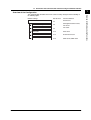
registered), setting function commands can be executed.
IM 04L05A01-17E
1-11
Overview of the Communication Functions
The communication function using a normal protocol is the same as the function of the
setting/measurement server on the Ethernet network. For a description of how to use
the communication function using the normal protocol, see section 3.6.
1.2 Overview of the Communication Function Using the Serial Interface
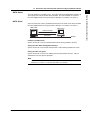
Modbus Slave
For a description of how to use the communication function using the normal protocol,
see chapter 4.
• The PC reads the measured/computed data and alarm status on the DXP.
• The PC writes data to the communication input data or reads the communication input
data on the DXP.
Modbus master device
Read the measured/computed data, alarm status,
and the communication input data.
Serial communications
Write data to the communication
input data.
DXP
Modbus slave device
Modbus Master
For a description of how to use the communication function using the normal protocol,
see chapter 4.
• The DXP loads the measured data of other instruments. The loaded data can be
handled as communication input data of the computation function (/M1 option) on the
computation channel.
• Function for writing data to other instruments is not supported.
Modbus master device
DXP
Read data from slave device.
Serial communications
Modbus slave device
1-12
IM 04L05A01-17E
1.2 Overview of the Communication Function Using the Serial Interface
1
Barcode Input
*
A barcode reader is required.
Bar code reader
DXP
Bar code
B
J
1
B a
t
c
h S
t
a
r
t
• You can enter character strings when a character input window is shown on the DXP
screen.
• You can set batch numbers, lot numbers, and batch comments.
• You can write arbitrary messages.
• You can simplify the login procedure by entering the user name or the user name and
user ID using barcodes.
• You can operate individual keys.
• You can execute the output of measured/computed data, logs, and other types of
data.
Displaying Error/Communication/FTP/Web operation/E-mail logs
The operation log can be displayed on the following log screens.
• Operation log screen: A log of operations
• Error log screen: A log of operation errors
• Setting change log screen: A log of setting changes
• Communication log screen: A log of commands and responses executed using the
setting/measurement server function.
For the operating procedure to display the log screen, see section 8.9 of the DX100P/
DX200P User’s Manual.
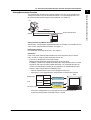
Overview of the Configuration
For the setting procedure, see sections 3.5, 4.4, and 4.5.
IM 04L05A01-17E
1-13
Overview of the Communication Functions
You can control the DXP by reading barcodes* instead of using the front panel keys. For
the operating procedure, see section 3.7.
Chapter 2 Using the Ethernet Interface
2.1
Ethernet Interface Specifications
Basic Specifications
Electrical and mechanical specifications
Transmission medium type
10BASE-T
Protocol
TCP, IP, UDP, ICMP, ARP
Server Functions and Client Functions
Server Functions and the Maximum Number of Connections
The following table indicates the maximum number of connections, and the port
number for each function.
Function
Maximum Number of Connections
*2
Port Number*1
Setting/measurement server
3
34260/tcp
Maintenance/test server
1
34261/tcp
FTP server
2
21/tcp
Web server
1
80/tcp
Instrument information
server
–
34264/udp
SNTP server
–
123/udp
*1 You cannot changed the port number.
*2 Only a single person can connect to the setting function at any given time. Up to two persons
can connect to the monitor function at any given time.
Client Functions
• FTP client
• E-mail transmission (e-mail client)
• SNTP client
IM 04L05A01-17E
2-1
2
Using the Ethernet Interface
Conforms to IEEE 802.3
(Ethernet frames conform to the DIX specifications.)
2.2
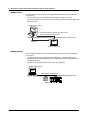
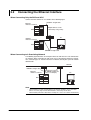
Connecting the Ethernet Interface
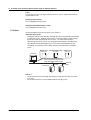
When Connecting Only the DXP and A PC
Connect the DXP and the PC via a HUB as in the following figure.
10BASE-T straight cable
Ethernet
interface connector
(Multiple devices can be
connected by using a hub.)
DXP
HUB
PC
Ethernet
interface connector
DXP
Ethernet cable
10BASE-T straight cable
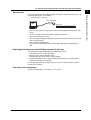
When Connecting to A Preexisting Network
The following figure illustrates an example in which the DXP and a PC are connected to
the network. When connecting the DXP or the PC to a preexisting network, the transfer
rate, connector type, etc. must be matched. For details, consult your system or network
administrator.
Network
10BASE-T straight cable
Ethernet
interface connector
(Adapters that support
the 10BASE-T (hubs and
routers, for example)
PC
DXP
Ethernet cable
Note
•
•
2-2
Communications may take time depending on the network conditions such as when data
traffic is excessively high or when communication is affected by external noise.
Communication performance deteriorates if multiple PCs access the recorder simultaneously.
IM 04L05A01-17E
2.3
Configuring the Ethernet Interface
Explanation
Setting the IP address, subnet mask, default gateway, and DNS
Confirm the settings such as the IP address, subnet mask, default gateway, and DNS
with the administrator of the system or network on which the recorder is to be used.
• IP address
• Set the IP address to assign to the DXP. The default setting is “0.0.0.0.”
• The IP address is used to distinguish between the various devices connected to
the Internet when communicating using the TCP/IP protocol. The address is a
32-bit value normally expressed with four values (0 to 255), each separated by a
period as in 192.168.111.24.
• Subnet mask
• Specify the mask that is used to determine the network address from the IP
address. The default setting is “0.0.0.0.”
• Set this value according to the system or the network to which the DXP belongs.
In some cases, this setting may not be necessary.
• Default gateway
• Set the IP address of the gateway (router, etc.) used to communicate with other
networks. The default setting is “0.0.0.0.”
• Set this value according to the system or the network to which the DXP belongs.
In some cases, this setting may not be necessary.
• DNS (Domain Name System)
You must set the DNS if you are using host names to specify the destination server
of the file transfer on an FTP client, the server of the e-mail recipient, or the SNTP
server.
*
The DNS is a system that correlates the host name/domain name to the IP address. The
host name/domain name can be used instead of the IP address when accessing the
network. The DNS server manages the database that contains the host name/domain
name and IP address correlation.
• DNS server
• Set the address of the DNS server. The default setting is “0.0.0.0.”
• Up to two DNS servers can be specified (primary and secondary). If the
primary DNS server is down, the secondary server is used to search the host
name/domain name and IP address.
• Host name
Set the DXP’s host name using up to 64 alphanumeric characters.
• Domain name
• Set the network domain name to which the DXP belongs using up to 64
alphanumeric characters.
• When the destination server of the file transfer, the server of the e-mail
recipient, or the SNTP server is looked up using the DNS server, this domain
name is appended to the host name as a possible domain name if it is
omitted . The destination name (server name) becomes the “FTP server
name” (see section 2.5), the “SMTP server name” (see section 2.12), or the
“Server name” (see section 2.16).
IM 04L05A01-17E
2-3
2
Using the Ethernet Interface
The following configurations must be made in order to use the Ethernet communication
functions of the DXP.
2.3 Configuring the Ethernet Interface
• Domain suffix
If the IP address corresponding to the “domain name,” described in the previous
paragraph, is not found on the DNS server, then it may be that the system is
configured to use another domain name. In this case, the domain suffix is
specified, so that this domain name is searched after the “domain name”
specified in the previous paragraph is searched.
• Set the domain suffix using up to 64 alphanumeric characters.
• Up to two domain suffixes can be specified (primary and secondary).
Memory out*1
Select the communication type, Ethernet communications or serial communications,
used to output the data on the external storage medium of the DXP using the ME
command.*2
Select [Ethernet]. *3
*1 This item appears if the serial communication function (/C2 or /C3 option) is equipped.
*2 This command can be used on either the Ethernet communications or serial
communications.
*3 When the login function is enabled (when any of administrators are registered), the ME
command cannot be used via the serial communications.
Storing the settings
To activate the settings made in the system mode, the settings must be saved.
Otherwise, the settings return to the previous values.
2-4
IM 04L05A01-17E
2.3 Configuring the Ethernet Interface
Procedure
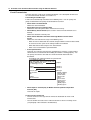
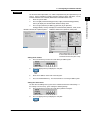
DX100P Communication (Ethernet) menu
DX200P Communication (Ethernet, Serial) menu
These setting items are not displayed
for the models without the serial
communication function (/C2 or /C3).
Setting the IP address
4.
Press the arrow key to move the cursor to the [IP-address] box.
5.
Press the [Input] soft key to display the entry box.
6.
Enter the IP address of the DXP in the entry box.
7.
Press the DISP/ENTER key. The entered value is set in the [IP-address] box.
Setting the subnet mask
Set this value according to the system or the network to which the DXP belongs. If
this setting is not necessary, go to “Setting the default gateway.”
8.
Press the arrow key to move the cursor to the [Subnet mask] box.
9.
IM 04L05A01-17E
Press the [Input] soft key to display the entry box.
2-5
2
Using the Ethernet Interface
For the basic flow of operations, see “Flow of Operation using the Operation Keys” on
page vi. For the procedures related to entering character strings and values, see the
DX100P/DX200P User’s Manual (IM04L05A01-01E/IM04L06A01-01E).
1.
Enter the system mode.
2.
Press the [#8 (Communication)](DX100P) or [#6 (Communication)](DX200P)
soft key to display the communication function setting menu.
3.
Press the [#1 (Ethernet (IP Address))](DX100P) or [#1 (Ethernet,
Serial)](DX200P) soft key to display the communication (Ethernet, serial) menu.
2.3 Configuring the Ethernet Interface
10.
In the entry box, enter the subnet mask of the network to which the DXP
belongs.
11.
Press the DISP/ENTER key. The entered value is set in the [Subnet mask] box.
Setting the default gateway
Set this value according to the system or the network to which the DXP belongs. If
this setting is not necessary, go to “Setting the DNS (Domain Name System).”
12. Press the arrow key to move the cursor to the [Default gateway] box.
13.
Press the [Input] soft key to display the entry box.
14.
In the entry box, enter the default gateway of the network to which the DXP
belongs.
15.
Press the DISP/ENTER key. The entered value is set in the [Default gateway]
box.
For DX100P, confirm the new settings pressing the DISP/ENTER key. To
cancel, press the ESC key.
For detailed operations regarding confirmation and cancellation, see “Flow of Operation
using the Operation Keys” on page vi.
Setting the DNS (Domain Name System)
Set the DNS, if you are using a host name to specify the destination server of the file
transfer on an FTP client or the server of the e-mail recipient.
If the DNS is not going to be used, go to step 38 (for models with the serial
communication function) or step 40 (for models without the serial communication
function).
For the DX100P, when settings are confirmed by step 15, press the ESC key to
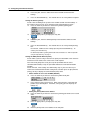
return to the communication function setting menu, and then press the [#2 (Ethernet
(DNS))] soft key to display the communication (DNS) menu.
• Select whether or not to use the DNS (ON/OFF)
16. Press the arrow key to move the cursor to the [DNS On/Off] box.
17.
Press either the [On] or [Off] soft key. When using the DNS, select [ON] and
perform steps 18 through 37. Otherwise, select [Off] (you can skip steps 18
through 37).
• Setting the primary DNS server address
18. Press the arrow key to move the cursor to the [Primary] box under server search
order.
2-6
19.
Press the [Input] soft key to display the entry box.
20.
Enter the primary DNS server address in the entry box.
IM 04L05A01-17E
2.3 Configuring the Ethernet Interface
21.
Press the DISP/ENTER key. The entered value is set in the [Primary] box.
23.
Set the secondary DNS server address using the same method from steps 19
through 21.
• Setting the DXP's host name
24. Press the arrow key to move the cursor to the [Host name] box.
25.
Press the [Input] soft key to display the entry box.
26.
Enter the DXP's host name in the entry box.
27.
Press the DISP/ENTER key. The entered string/value is set in the [Host name]
box.
• Setting the domain name to which the DXP belongs
28. Press the arrow key to move the cursor to the [Domain name] box.
29.
Press the [Input] soft key to display the entry box.
30.
Enter the DXP's domain name in the entry box.
31.
Press the DISP/ENTER key. The entered string/value is set in the [Domain
name] box.
• Setting the primary domain suffix
Set this value when the domain suffix is necessary. Otherwise, go to step 38.
32. Press the arrow key to move the cursor to the [Primary] box under Domain suffix
search order.
33.
IM 04L05A01-17E
Press the [Input] soft key to display the entry box.
2-7
2
Using the Ethernet Interface
• Setting the secondary DNS server address
Set this value when using the secondary DNS server in the system or the network
to which the DXP belongs. If this setting is not necessary, go to step 24.
22. Press the arrow key to move the cursor to the [Secondary] box under server
search order.
2.3 Configuring the Ethernet Interface
34.
Enter the primary domain suffix in the entry box.
35.
Press the DISP/ENTER key. The entered value is set in the [Primary] box.
• Setting the secondary domain suffix
Set this value when the secondary domain suffix exists. If this setting is not
necessary, go to step 38.
36. Press the arrow key to move the cursor to the [Secondary] box under Domain
suffix search order.
37.
Set the secondary domain suffix in the same fashion as in steps 33 to 35.
Setting the [Memory out]
The [Memory out] is displayed if the serial communication function is equipped.
38. Press the arrow key to move the cursor to the [Memory out] box.
39.
Press the [Ethernet] soft key.
Confirming/Canceling the new settings
40. To confirm the new settings, press the DISP/ENTER key. To cancel, press the
ESC key.
For detailed operations regarding confirmation and cancellation, see “Flow of Operation
using the Operation Keys” on page vi.
Storing the new settings
See “Flow of Operation using the Operation Keys” on page vi.
2-8
IM 04L05A01-17E
2.4
Checking the Connection Status of the
Ethernet Interface
Checking the Connection Status Using the Rear Panel
Indicator
Connection Status of the Ethernet Interface
On (green)
The Ethernet interface is electrically connected.
Blinking (green)
Transmitting data
Off
The Ethernet interface is not electrically connected.
Indicator
(Rear Panel)
Checking the Connection Using the DXP’s Screen
Checking using the status display of the screen
The connection status of the Ethernet interface can be checked using the indicator
located on the right hand side of the status display section of the system mode menu.
For the procedure to display the system mode menu, see “Entering the System Mode”
on page vi.
Indicator
Connection Status of the Ethernet Interface
On (green)
The Ethernet interface is electrically connected.
Off
The Ethernet interface is not electrically connected.
Indicator
Checking using the display section located at the upper right corner of the
communication log screen
The connection status of the Ethernet interface can be checked using the indicator
located at the upper right corner of the communication log screen. For the procedures
on how to display the communication log, see section 8.9 of the DX100P/DX200P
User’s Manual.
Indicator
Connection Status of the Ethernet Interface
On (green)
The Ethernet interface is electrically connected.
Off
The Ethernet interface is not electrically connected.
Indicator
IM 04L05A01-17E
2-9
2
Using the Ethernet Interface
The connection status of the Ethernet interface can be confirmed with the indicator that
is located to the upper right of the Ethernet connector on the DXP.
2.5
Setting the FTP Client
Explanation
The display data files, event data files, and other files on the DXP can be transferred
automatically to an FTP server when the file is created. Note that the Ethernet interface
must be configured beforehand (see section 2.3).
Selecting the files to transfer
You can select whether or not to automatically transfer the display/event data file, the
report data file, and the screen image data file. The default setting is [Off].
If the DXP is configured to automatically transfer individual display/event data files,
the setup file when settings are changed and the setting change log file are also
automatically transferred.
Setting the FTP connection
Confirm the settings such as the primary and secondary FTP servers, port number,
login name, password, account, PASV mode, and initial path with your system or
network administrator.
• Setting the primary and secondary servers
Specify the primary and secondary file transfer destinations (FTP servers) as
described in the previous close. When the primary FTP server is down, the data
are transferred to the secondary FTP server.
• FTP server name
Set the FTP server name using up to 64 alphanumeric characters.
• When the DNS is being used, the host name can be used to specify the server
name.
• For DNS settings, see section 2.3.
• You can also specify the IP address. In this case, DNS is not necessary.
• Port number
Set the port number of the destination FTP server in the range from 1 to 65535.
The default setting is 21.
• Login name
Set the login name to use when accessing the FTP server. Up to 32 alphanumeric
characters can be used.
• Password
Set the password to use when accessing the FTP server. Up to 32 alphanumeric
characters can be used.
• Account
Set the account (the ID number) to use when accessing the FTP server. Up to 32
alphanumeric characters can be used.
• PASV mode
When using the DXP behind a firewall that requires the PASV mode, turn this
mode [On]. A firewall is a security feature on a router which is used to prevent
undesired intrusion into the network from outside parties.
• Initial path
Set the destination directory for the file transfer using up to 64 alphanumeric
characters. The directory delimiter varies depending on the FTP server.
Example: When transferring files to the directory “data” which is a sub directory of
the “home” directory on a UNIX file system, use the forward slash “/” as
the directory delimiter:
/home/data
2-10
IM 04L05A01-17E
2.5 Setting the FTP Client
Storing the settings
To activate the settings made in the system mode, the settings must be saved.
Otherwise, the settings return to the previous values.
2
Using the Ethernet Interface
IM 04L05A01-17E
2-11
2.5 Setting the FTP Client
Procedure
For the basic flow of operations, see “Flow of Operation using the Operation Keys” on
page vi. For the procedures related to entering character strings and values, see the
DX100P/DX200P User’s Manual (IM04L05A01-01E/IM04L06A01-01E).
1.
2.
3.
Enter the system mode.
Press the [#8 (Communication)](DX100P) or [#6 (Communication)](DX200P)
soft key to display the communication function setting menu.
Press the [#3 (FTP transfer file)](DX100P) or [#2 (FTP Client)](DX200P) soft key
to display the Communication (FTP client) menu.
DX100P Communication (FTP tramsfer file)
DX200P Communication (FTP client)
Selecting the files to be transferred
• Selecting whether to transfer the display/event data files, setup files when
settings are changed, and setting change log files (On/Off)
4.
Press the arrow key to move the cursor to the [Disp&Event data] box.
5.
Press either the [On] or [Off] soft key.
• Selecting whether or not to transfer the report data file (ON/OFF)
6.
Set whether or not to transfer the report data file using the same method as
steps 4 and 5.
• Selecting whether or not to transfer the screen image data file (ON/OFF)
7.
Set whether or not to transfer the screen image data file using the same method
as steps 4 and 5.
For the DX100P, confirm the new settings pressing the DISP/ENTER key. To
cancel, press the ESC key.
For detailed operations regarding confirmation and cancellation, see “Flow of Operation
using the Operation Keys” on page vi.
2-12
IM 04L05A01-17E
2.5 Setting the FTP Client
Setting the primary FTP server
For DX100P, when settings are confirmed by procedure 7, press the ESC key to
return to the communication function setting menu, and then press the [#4 (FTP
connection)] soft key to display the communication (FTP connection) menu.
8.
Press the arrow key to move the cursor to the [FTP connection] box.
Using the Ethernet Interface
9.
2
Press the [Primary] soft key.
• Setting the FTP server name
10. Press the arrow key to move the cursor to the [FTP server name] box.
11.
Press the [Input] soft key to display the entry box.
12.
Enter the primary FTP server name in the entry box. Generally, the IP address
is entered. However, if DNS is being used, the FTP server's host name can also
be specified.
13.
Press the DISP/ENTER key. The entered string/value is set in the [FTP server
name] box.
• Setting the FTP server’s port number
14. Press the arrow key to move the cursor to the [Port number] box.
15.
Press the [Input] soft key to display the entry box.
16.
Enter the port number of the primary FTP server in the entry box.
17.
Press the DISP/ENTER key. The entered value is set in the [Port number] box.
• Setting the login name used when accessing the FTP server
18. Press the arrow key to move the cursor to the [Login name] box.
19.
IM 04L05A01-17E
Press the [Input] soft key to display the login name entry box.
2-13
2.5 Setting the FTP Client
20.
Enter the login name that is used when accessing the primary FTP server in the
entry box.
21.
Press the DISP/ENTER key. The entered string/value is set in the [Login name]
box.
• Setting the password used when accessing the FTP server
22. Press the arrow key to move the cursor to the [Password] box.
23.
Press the [Input] soft key to display the entry box.
24.
Enter the password that is used when accessing the primary FTP server in the
entry box.
25.
Press the DISP/ENTER key. The entered string/value is set in the [Password]
box.
• Setting the account used when accessing the FTP server
26. Press the arrow key to move the cursor to the [Account] box.
27.
Press the [Input] soft key to display the entry box.
28.
Enter the account that is used when accessing the primary FTP server in the
entry box.
29.
Press the DISP/ENTER key. The entered string/value is set in the [Account]
box.
• Enabling (On)/Disabling (Off) the PASV mode
30. Press the arrow key to move the cursor to the [PASV mode] box.
31.
Press either the [On] or [Off] soft key.
• Setting the initial path (file transfer destination directory)
32. Press the arrow key to move the cursor to the [Initial path] box.
2-14
IM 04L05A01-17E
2.5 Setting the FTP Client
33.
Press the [Input] soft key to display the entry box.
34.
Enter the file transfer destination directory in the entry box.
35.
Press the DISP/ENTER key. The entered string/value is set in the [Initial path]
box.
2
37.
Press the [Secondary] soft key.
38.
Set the secondary FTP server using the same method from steps 10 through
35.
Confirming/Canceling the new settings
39. To confirm the new settings, press the DISP/ENTER key. To cancel, press the
ESC key.
For detailed operations regarding confirmation and cancellation, see “Flow of Operation
using the Operation Keys” on page vi.
Storing the new settings
See “Flow of Operation using the Operation Keys” on page vi.
IM 04L05A01-17E
2-15
Using the Ethernet Interface
Setting the secondary FTP server
Set the secondary FTP server when specifying a secondary file transfer destination. If
you are not using the secondary FTP server, go to step 39.
36. Press the arrow key to move the cursor to the [FTP connection] box.
2.6
Setting Timeout/Keep Alive and the User That
Is to Use the Communication Input Data
Explanation
Communication timeout
When using the DXP as a setting/measurement server or a FTP server, the DXP
disconnects connections if there are no data transfer over a predetermined time
period.
• Enabling/Disabling the timer (ON/OFF)
• On
Communication timeout is enabled.
• Off
Communication timeout is disabled.
• Setting the timeout time
When the communication timeout is enabled and if no data transfer is detected
over the time period specified here, the connection is dropped.
Range: 1 to 120 minutes
Enabling/Disabling keepalive (On/Off)
• On
If there is no response to the test packet that is periodically transmitted (every 30 s)
at the TCP level, the connection is dropped.
• Off
Keepalive is disabled.
Selecting Users That Are to Use the Communication Input Data
This setting applies to the setting/measurement server on Ethernet communications
and the setting/measurement function on serial communications (/C2 or /C3
option).
Only the users specified here can enter values in the communication input data
(DX100P: C01 to C12, DX200P: C01 to C30). Select from the following users.
• Off
No users can use the communication input data.
• Admin1 to Admin3, User1 to User30*
A user that logs into the setting/measurement server** can use the communication
input data.
* User31 to User90 cannot be specified.
** If the login function is disabled (no administrators are registered), a user that connects to
the setting function can use the communication input data.
• Serial
A user that connects to the setting/measurement function using serial
communications (/C2 or /C3 option) can use the communication input data. You
can select [Serial] on models with the serial communications function.
Note
Select [Serial] when using the Modbus master function.
Storing the settings
To activate the settings made in the system mode, the settings must be saved.
Otherwise, the settings return to the previous values.
2-16
IM 04L05A01-17E
2.6 Setting Timeout/Keep Alive and the User That Is to Use the Communication Input Data
Procedure
DX100P Communication
(Control)
DX200P Communication (Control -Login, Time out)
Setting the communication timeout
• Enabling/Disabling communication timeout (On/Off)
4.
Press the arrow key to move the cursor to the [On/Off] box under
communication timeout.
5.
Press either the [On] or [Off] soft key. If you select [On], go to step 6. If you
select [Off], go to step 10.
• Setting the communication timeout time
6.
Press the arrow key to move the cursor to the [Time] box.
IM 04L05A01-17E
7.
Press the [Input] soft key to display the entry box.
8.
In the box, enter the communication timeout time.
9.
Press the DISP/ENTER key. The entered value is set in the [Time] box.
2-17
2
Using the Ethernet Interface
For the basic flow of operations, see “Flow of Operation using the Operation Keys” on
page vi. For the procedures related to entering character strings and values, see the
DX100P/DX200P User’s Manual (IM04L05A01-01E/IM04L06A01-01E).
1.
Enter the system mode.
2.
Press the [#8 (Communication)](DX100P) or [#6 (Communication)](DX200P)
soft key to display the communication function setting menu.
3.
Press the [#5 (Control )](DX100P) or [#3 (Control -Login, Timeout-)](DX200P)
soft key to display the Communication (Control -Login, Time out) menu.
2.6 Setting Timeout/Keep Alive and the User That Is to Use the Communication Input Data
Enabling/Disabling keepalive (On/Off)
10. Press the arrow key to move the cursor to the [On/Off] box under keepalive.
11.
Press either the [On] or [Off] soft key.
Selecting users that are to use the communication input data
12. Press the arrow key to move the cursor to the [Available user] box.
13.
Press one of the soft keys from [Off], [Admin1] to [User30].
Confirming/Canceling the new settings
14. To confirm the new settings, press the DISP/ENTER key. To cancel, press the
ESC key.
For detailed operations regarding confirmation and cancellation, see “Flow of Operation
using the Operation Keys” on page vi.
Storing the new settings
See “Flow of Operation using the Operation Keys” on page vi.
2-18
IM 04L05A01-17E
2.7
Using the Setting/Measurement Server
Required Settings
Logging In
Explanation
Carry out the steps according to the PC, software, and network environment that you are
using.
This section describes the step-by-step procedures on the PC for logging in and the
responses from the DXP.
For a description of the flow of the login process, see appendix 4.
Login Conditions
Users that are registered in the DXP and are allowed to login via communications can
log in.
• An administrator or a user can log into the setting function. However, a user can only
execute some of the control commands.
• Multiple users cannot log in simultaneously.
• If an administrator or user is already logged in using the keys on the DXP, you
cannot log into the setting function.
• Login is not possible if there is a user logged into the setting function via the serial
interface.
• An administrator or a user can log into the monitor function. Up to two users can log
in at once.
• You cannot log in using the same user name.
Note
If you select a function (setting or monitor) when connecting to the DXP from the PC with no
administrators registered, the DXP returns “E0” and is immediately ready to receive
commands.
• If you select the setting function, it is equivalent to logging into the setting function at the
administrator level. This is also true if you enter “admin” in place of “setting.”
• If you select the monitor function, it is equivalent to logging into the monitor function at the
user level. This is also true if you enter “user” in place of “monitor.”
IM 04L05A01-17E
2-19
2
Using the Ethernet Interface
The following settings are required when using the setting/measurement server on the
Ethernet network.
• Section 2.3, “Configuring the Ethernet Interface”
• Section 2.6, “Setting Timeout/Keep Alive and the User That Is to Use the
Communication Input Data”
2.7 Using the Setting/Measurement Server
User Locked
If the login operation is carried out with a wrong password for three consecutive times,
the user is invalidated. From that point, the user can no longer log in.
• Clearing the User Locked Condition
Administrators can clear the user locked condition. For the procedure, see section
6.1 in the DX100P/DX200P User’s Manual.
Error Messages
If an error message is displayed while logging in, see appendix 4 and carry out the
corrective action.
DXP Operation Log
Operations are recorded in the DXP operation log.
2-20
IM 04L05A01-17E
2.7 Using the Setting/Measurement Server
Procedure
2.
To log into the setting function, enter “setting.”
To log into the monitor function, enter “monitor.”
The DXP returns the following message.
E1 400 “Input username.”
3.
Enter the user name.
The DXP returns the following message.
E1 405 “Input user ID.”
4.
Enter the user ID.
The DXP returns the following message.
E1 401 “Input password.”
5.
Enter the default password.
User
Default Password
Administrator 1
Admin1
Administrator 2
Admin2
Administrator 3
Admin3
User 1
User01
User 2
User02
:
:
User 90
User90
The DXP returns the following message.
E1 407 “Password has expired. Please enter a new password.”
6.
Enter a new password.
Note
•
•
•
The combinations of user IDs and passwords that are identical to those specified by other
users or those that have been registered in the past cannot be specified.
Enter the password using 6 to 8 alphanumeric characters.
Spaces cannot be used for the password.
The DXP returns the following message.
E1 408 “Enter password again for confirmation.”
IM 04L05A01-17E
2-21
2
Using the Ethernet Interface
First Login
The password is set to the default password immediately after registering a user in the
DXP login function. When logging in for the first time, you are prompted to change
the password.
1.
Specify the destination DXP using a host name or IP address. The port number
(34260) is used to specify the setting/measurement server.
The DXP returns the following message.
E1 402 “Select function from ‘setting’ or ‘monitor’.”
2.7 Using the Setting/Measurement Server
7.
Enter the password you entered in step 6.
The DXP returns the following message.
E0
You are logged in.
Logging in after the First Time
1.
Specify the destination DXP using a host name or IP address. The port number
(34260) is used to specify the setting/measurement server.
The DXP returns the following message.
E1 402 “Select function from ‘setting’ or ‘monitor’.”
2.
To log into the setting function, enter “setting.”
To log into the monitor function, enter “monitor.”
The DXP returns the following message.
E1 400 “Input username.”
3.
Enter the user name.
The DXP returns the following message.
E1 405 “Input user ID.”
4.
Enter the user ID.
The DXP returns the following message.
E1 401 “Input password.”
5.
Enter the password.
The DXP returns the following message.
E0
You are logged in.
If the password has expired, you are requested to set a new password.
The DXP returns the following message.
E1 407 “Password has expired. Please enter a new password.”
6.
Enter a new password.
Note
•
•
The combinations of user IDs and passwords that are identical to those specified by other
users or those that have been registered in the past cannot be specified.
Enter the password using 6 to 8 alphanumeric characters. Spaces cannot be used for the
password.
The DXP returns the following message.
E1 408 “Enter password again for confirmation.”
7.
2-22
Enter the password you entered in step 6.
The DXP returns the following message.
E0
You are logged in.
IM 04L05A01-17E
2.7 Using the Setting/Measurement Server
Sending Commands
Dedicated commands for the DXP are used.
Commands That Can Be Used
• When logged into the setting function as an administrator
Group
Commands that can be used
2
Ref. sections
All
5.4
Setting commands (system mode)
All
5.5
Control commands
All except BV, BP, and KE commands 5.6
Output commands
All except CS command
5.7
Note
•
•
•
•
The commands below can be executed even when data acquisition is in progress. However,
the operation must be enabled in the DXP settings. For the setup procedure, see section
4.14 in the DX100P/DX200P User's Manual or the RC command.
• User registration: EK, EL, and EI
• Calibration correction: EH
• Date and time setting: SD
When using the EK, EL, EI, and EH commands, use the EE command to switch to the
engineering mode, use the respective command to change the setting, and use the BE
command to apply the setting and return to the operation mode. The SD command can be
used in the operation mode or engineering mode.
If the engineering mode display is shown when the DXP is configured to allow users to be
registered, other logins (login to the setting/measurement server, FTP server, or
maintenance/test server and login via the serial interface) are not possible.
When the serial communication function (/C2 or /C3 option) is installed, the ME command can
be executed on either the Ethernet or serial interface.
The CM command can only used by a single specified user (see section 2.6).
If the DXP is configured not to use the login function (no administrators are registered),
commands for administrators can be executed. However, some commands such as those
that set the range (SR, SO, SW, SK, SJ, BL, and BH commands) cannot be executed when
data acquisition is in progress.
• When logged into the setting function as a user
Group
Commands That Can Be Used*
Ref. Section
Control commands
CC, UD, PS, AK, EV, MS, TL, EM,
BB, BC, BJ, CM, SY, and LO
5.6
Output commands
All commands except CS
5.7
Note
•
•
IM 04L05A01-17E
Commands that correspond to operations that are restricted for the logged-in user cannot be
executed. The relationship between the commands and the setup items in login mode of a
user is indicated below. For the setup procedure, see section 4.4 in the DX100P/DX200P
User's Manual or the EL, BK, BM, and BF commands.
Command
Setup Item in Login Mode
UD
PS0
PS1
AK
EV2
EV0, EV3, EV4
MS, BJ
TL
EM
BB, BC
SY
LO
DISP/ENTER
START
STOP
Alarm ACK
Snapshot
Save data
Message
Computation
E-mail
Batch
Other
MENU
The CM command can only used by a single specified user (see section 2.6).
2-23
Using the Ethernet Interface
Setting commands (engineering mode)
2.7 Using the Setting/Measurement Server
• When logged into the monitor function
Group
Commands that can be used
Ref. sections
Control commands
CC and CM commands
5.6
Output commands
All except CS command
5.7
Note
The CM command can only used by a single specified user (see section 2.6).
For a description of the command syntax, see chapter 5; for a description of the
responses, see chapter 6.
Main Functions and Commands That Are Used
• Output the newest measured/computed data
Command
Function
FD
Outputs the most recent measured/computed data in BINARY or ASCII format.
When output in BINARY format, only the mantissa of the measured/computed
data is output. The correct value is derived by combining with the decimal
position information that is output using the FE command.
Example: If the value is 12.345, “12345” is output in BINARY format.
BO
Specifies whether to output the BINARY data MSB first or LSB first.
FE
Outputs the decimal and unit information of the measured/computed data. This
command is used when the data is output in BINARY format.
• Output measured/computed data at a specified interval
The DXP outputs the data in the FIFO (First-In First-Out) buffer. For a description of
the FIFO buffer, see appendix 2.
Command
Function
FF
Outputs the mantissa of the measured/computed data in BINARY format. The
correct value is derived by combining with the decimal position information that
is output using the FE command.
For an application example, see appendix 2, “Output Flow of FIFO Data.”
BO
See the description in “Output the newest measured/computed data.”
FE
See the description in “Output the newest measured/computed data.”
• Output status information
For a description of the status information, see chapter 7.
Command
Function
IS
Outputs the status information in ASCII format.
IF
Sets the status filter.
• Start/Stop measurement and computation
Command
Function
PS
PS0: Start measurement, PS1: Stop measurement
TL
TL0: Start computation, TL1: Stop computation
• Write a message
Command
Function
MS
BJ
Writes the registered character string (message).
Writes the specified character string (message).
• Set the batch name
2-24
Command
Function
BB
Sets the batch number and lot number.
IM 04L05A01-17E
2.7 Using the Setting/Measurement Server
Using the Output Data
The data retrieved from the DXP can be displayed in the following fashion.
File/Data
Location
Extension
Format*1
Viewing Method
Measured/computed data
Internal memory
-
BINARY*2
ASCII*3
Create a software for displaying*4
Create a software for displaying*5
Log*6
Internal memory
-
ASCII
Viewed using commercially sold software
Setup data
Internal memory
-
Undisclosed
Display using DAQSIGNIN
2
Disconnecting from the DXP (Logging Out)
You are logged out in the following cases.
• Log out by sending a command
Send the CC command.
• When a command for exiting the system mode is executed
If you log into the setting function and initialize the setup data (EC command) or exit
the system mode settings (YE command), you are logged out.
• Log out according to the auto logout setting of the DXP
When logged into the setting function and no commands are sent for the time
specified for the auto logout setting (see section 4.4 in the DX100P/DX200P User’s
Manual), you are automatically logged out.
• When forcibly disconnected from the maintenance/test server
The maintenance/test server can drop the connection of other devices using the close
command (see section 2.14).
• Log out according to the communication timeout setting
See “Setting/Measurement Server” in section 1.1.
• When a communication error occurs
When a transmission error, reception error, or timeout of the keep alive function (see
“Setting/Measurement Server” in section 1.1) occurs, you are logged out.
Note
If you log out from the setting function, the DXP returns to the operation mode screen (logged
out condition).
IM 04L05A01-17E
2-25
Using the Ethernet Interface
*1 For a description of the output format, see sections chapter 6.
*2 Measured/computed data and TLOG data output by the FD command; FIFO buffer data
output by the FF command.
*3 Measured/computed data and TLOG data output by the FD command.
*4 Create a program for displaying the data by referring to the output format described in this
manual.
*5 Create a program for displaying the data by referring to the output format described in this
manual. Since the data is in ASCII format, a commercially sold software can be used to view
the data.
*6 Communication log, FTP log, error log, operation log, Web operation log, E-mail log, alarm
summary, message summary, setting change log, and SNTP log output by the FL command
2.8
Using the FTP Server
Required Settings
Follow the procedures below to use the FTP server function.
• Section 2.3, “Configuring the Ethernet Interface”
• Section 2.6, “Setting Timeout/Keep Alive and the User That Is to Use the
Communication Input Data”
Logging In
Explanation
Login Conditions
• Users that are registered in the DXP and are allowed to login via communications can
log in.
• Users that are registered in the DXP can log in.
• Up to two users can log in at once.
• You cannot log in using the same user name.
If the user is already logged in using the keys on the DXP or if the user is already
logged into the setting/measurement server, maintenance/test server, or FTP server,
the user cannot log in.
• Login is not possible in the following cases. Reset the password using the keys on
the DXP or the setting/measurement server before logging into the FTP server.
• When the password is set to default.
• When the password is expired.
• The items that you can operate are the same whether you log in as an administrator
or a user.
Note
If the login function is not used (no administrators are registered), you can login using the
user name “admin” (administrator level), “user”, or “anonymous.” Password is not required
when logging in (you can log in regardless of whether a password is entered).
User Locked
If the login operation is carried out with a wrong password for three consecutive times,
the user is invalidated. From that point, the user can no longer log in.
• Clearing the User Locked Condition
Administrators can clear the user locked condition. For the procedure, see section
6.1 in the DX100P/DX200P User’s Manual.
Error Messages
If an error occurs during login operation, the DXP returns an FTP error code as a
response. If an error occurs, see the DXP error log and error message (see appendix
4) and carry out the corrective action.
DXP Operation Log
Operations are recorded in the DXP operation log.
2-26
IM 04L05A01-17E
2.8 Using the FTP Server
Procedure
Carry out the steps according to the PC, software, and network environment that you are
using. Here the requirements of the login operation are described.
Displaying the Directory of the External Storage Medium/Retrieving Files
Follow the operating procedures for the software program that you are using.
Note
If the login function is not used (no administrators are registered), you can transfer files to the
external storage medium of the DXP by logging in using the user name “admin”.
Using the Retrieved Files
The following table indicates the format and the display method of the files output by the
FTP server function.
File/Data
Location
Extension
Format
Viewing Method
Display data file
External
DBD
Undisclosed
Viewed using DAQSIGNIN.
Event data file
External
DED
Undisclosed
Viewed using DAQSIGNIN.
Report file
(A report data set)
External
DHR
DDR
DWR
DMR
ASCII*
Viewed using commercially sold software
Manual sampled data file
External
DMN
ASCII*
Viewed using commercially sold software
TLOG data file
External
DTG
Undisclosed
Viewed using DAQSIGNIN.
Setup file
External
PPL
Undisclosed
Viewed using DAQSIGNIN.
Setting change log file
External
DPL
ASCII**
Viewed using commercially sold software
Screen image data file
External
PNG
PNG format
Viewed using commercially sold software
* For a description of the output format, see appendix 2 in the DX100P/DX200P User’s Manual.
** For a description of the output format, see section 6.2.
IM 04L05A01-17E
2-27
2
Using the Ethernet Interface
Specifying the Connection Destination
Specify the destination DXP using a host name or IP address.
The port number (21) is used to specify the FTP server.
The password is specified as follows:
• When the DXP is configured to use the user ID
Use the combination of the user ID and password that is registered in the DXP as
the password for logging into the FTP server.
Example: If the user ID is “5555” and the password is “AAAAAAAA”, the password
used to log into the FTP server is “5555AAAAAAAA”.
• When the DXP is configured not to use the user ID
Use the password registered in the DXP.
2.8 Using the FTP Server
Disconnecting the Connection (Logging Out)
Follow the operating procedures for the software program that you are using to drop the
connection.
You are automatically logged out in the following cases.
• When forcibly disconnected from the maintenance/test server
The maintenance/test server can drop the connection of other devices using the close
command (see section 4.5).
• When a communication error occurs
When a transmission error, reception error, or timeout of the keep alive function (see
“Setting/Measurement Server” in section 1.1) occurs, you are logged out.
• Log out according to the communication timeout setting
See “Setting/Measurement Server” in section 1.1.
Note
The auto logout setting of the DXP is unrelated to the FTP server.
2-28
IM 04L05A01-17E
2.9
Using the FTP Client
Required Settings
2
Performing the FTP Test
Explanation
You can check whether or not files can be transferred via the Ethernet interface by
transferring a test file from the DXP to the FTP server that was configured in section 2.5.
Items to check before performing this test
• Correctly connect the Ethernet cable. For the connection procedures, see section
2.2.
• Check that the Ethernet interface configuration is correct. For the procedures, see
section 2.3 and 2.5.
When configuring Ethernet related settings, check them with the administrator of the
system or network on which the DXP is to be used.
Checking the FTP test results
• The test file is transferred to the initial path on the destination FTP server that was
specified in section 2.5. After the FTP test completes, check whether or not the
test file was received on the FTP server
• The result of the FTP test can be confirmed by displaying the FTP log (displayed
on the DXP (see section 8.9 of the DX100P/DX200P User’s Manual)) or Web
screen (see section 2.11) or by outputting the logs using the FL command (see
section 2.7).
Procedure
IM 04L05A01-17E
1.
Press the FUNC key to display the FUNC menu. The construction of the FUNC
menu varies depending on the basic settings and options.
2.
Press the [FTP test] soft key to display a menu used to select the destination on
which the FTP test to be performed.
3.
Press either the [Primary] or [Secondary] soft key. The FTP test is performed
on the specified FTP server.
2-29
Using the Ethernet Interface
Follow the procedures below to use the FTP client function.
• Section 2.3, “Configuring the Ethernet Interface”
• Section 2.5, “Setting the FTP Client”
2.9 Using the FTP Client
Transferring Files
Starting
When you complete the FTP client settings, the DXP is ready to transfer files.
File transfer
The data files are automatically transferred to the FTP destination (FTP server) at the
following points.
• Display data file/event data file
Display data/event data which acquisition is in progress
• At intervals specified by the auto save interval for the display data or the data
length for the event data.
• At every specified date and time using the Memory Timeup function.
• When you save the data in the internal memory to the external storage medium
using the FUNC key operation.
• When Memory Stop*1 is executed (when “Batch stop sign record”*2 is not used).
• When Memory Stop*1 is executed and electronic signature is applied to the data file
(when “Batch stop sign record”*2 is used).
*1 Memory Stop refers to the action of stopping the data acquisition to the internal memory.
*2 “Batch stop sign record” is used to finish the batch by applying electronic signature to the
acquired data when Memory Stop is executed.
Display data/event data which acquisition is finished
When you load and apply electronic signature to the data file in the external storage
medium using the FUNC key operation.
Note
When a file with the same name exists at the destination,
• Display data/event data which acquisition is in progress
If a file with the same name exists at the destination, the name of the transferred file is
changed at the last character (8th character).
Example:
An hourly report file “X0212000.DBD” is changed to “X021200A.DBD” and
transferred. Characters A to Z are used in order for the last character of the file
name.
• Display data/event data which acquisition is finished
If a file with the same name exists at the destination, it is overwritten by the transferred file.
The file in the external storage medium and the file at the destination can always be kept
identical by overwriting.
• Setup File and Setting Change Log File
Transferred to an FTP server when settings are changed and applied (saved to an
external storage medium).
Note
If a file with the same name exists at the transfer destination, it is overwritten.
2-30
IM 04L05A01-17E
2.9 Using the FTP Client
• Report file
When a report is created, the DXP transfers the report data to the FTP server as a
file.
• Screen image data file
When Snap shot* is executed.
Snap shot executed using the FUNC key, User key, communication command (EV2), or via
the remote control.
Note
•
•
For the format of the report file, see appendix 2 of the DX100P/DX200P User’s Manual
(IM04L05A01-01E/IM04L06A01-01E).
If a file with the same name exists at the destination, the name of the report file or screen
image data file is changed at the last character (8th character) and transferred (see “Display
data/event data which acquisition is in progress” in “Note” above).
Primary FTP Server and Secondary FTP Server
The DXP transfers files to the primary FTP server.
When the primary FTP server is down, the data are transferred to the secondary FTP
server.
Note
If the file transfer to both primary and secondary servers fails, the DXP aborts the file transfer.
• Display data/event data files, setup/setting change log files, and report files that had failed
transmission are transmitted along with the new data files when the connection with the FTP
server recovers. However, the maximum number of files that can be held in the transfer
waiting condition when transmission fails is a total of 20 for display data/event data files and
setup/setting change log files and 50 for report files. When the number of files exceeds this
number, the retransmission is cancelled from the oldest file.
• Screen image data files
The DXP aborts screen image data files once the file transfer to both primary and secondary
servers fails.
Using the Transferred Files
The following table indicates the format and the display method of the files transferred.
File/Data
Location
Extension
Format
Viewing Method
Display data file
Internal memory
DBD
Undisclosed
Viewed using DAQSIGNIN.
Event data file
Internal memory
DED
Undisclosed
Viewed using DAQSIGNIN.
*
Report file
(A report data set)
Internal memory
DHR
DDR
DWR
DMR
ASCII
Viewed using commercially sold software.
Screen image data file
External
PNG
PNG format
Viewed using commercially sold software.
Setup file
External
PPL
Undisclosed
Viewed using DAQSIGNIN.
Setting change log file
External
DPL
ASCII**
Viewed using commercially sold software.
* For a description of the output format, see appendix 2 in the DX100P/DX200P User’s Manual.
** For a description of the output format, see section 6.2.
IM 04L05A01-17E
2-31
Using the Ethernet Interface
*
2
2.10 Setting the Web Server Function
Explanation
To use the web server function, set the following parameters in addition to those
described in section 2.3.
Enabling/Disabling the Web server function
Select Use or Not (don’t use).
Page type (type of screen to be displayed)
Select [Monitor] or [Operator]. For screen examples, see section 2.11.
Monitor page
• Selecting whether or not to use the monitor page
Select [On] to display the monitor page on the browser.
• Selecting whether or not to use the access control
Select [On] to use the access control. You must enter the user name and password
to display the monitor page.
• Setting the user name
Enter the user name using up to 20 alphanumeric characters.
• Setting the password
Set the password using up to eight alphanumeric characters.
Operator page
• Selecting whether or not to use the operator page
Select [On] to display the operator page on the browser.
• Selecting whether or not to use the access control
Select [On] to use the access control. You must enter the user name and password
to display the operator page.
• Setting the user name
Enter the user name using up to 20 alphanumeric characters.
• Setting the password
Set the password using up to eight alphanumeric characters.
Saving the settings
To activate the settings that have been changed in the system mode, the settings must
be saved. Otherwise, the settings that existed before the change are activated.
Setting the time difference from GMT
See section 4.10, “Setting the Time Zone” in the DX100P/DX200P User’s Manual (IM
04L05A01-01E/IM 04L06A01-01E).
2-32
IM 04L05A01-17E
2.10 Setting the Web Server Function
Procedure
For the basic flow of operations, see “Flow of Operation using the Operation Keys” on
page vi. For the procedures related to entering character strings and values, see the
DX100P/DX200P User’s Manual (IM04L05A01-01E/IM04L06A01-01E).
3.
Enter the system mode.
Press the [#9 (Web, E-Mail)](DX100P) or [#7 (Web, E-Mail)](DX200P) soft key
to display the Web and e-mail setting menu.
Press the [#1 (Web)] soft key to display the Web menu.
Web menu (DX100P)
Web menu (DX200P)
Enabling/Disabling the Web server function
4.
Press the arrow key to move the cursor to the [Use/Not] box.
5.
Press either the [Use] or [Not] soft key. If you select [Use], go to step 6. If you
select [Not], go to step 25.
Page type (type of screen to be displayed)
6.
Press the arrow key to move the cursor to the [Page type] box.
7.
Press either the [Operator] or [Monitor] soft key. If you select [Operator], go to
step 8. If you select [Monitor], go to step 20.
Operator page
• Selecting whether or not to use the operator page
8.
Press the arrow key to move the cursor to the [On/Off] box.
IM 04L05A01-17E
2-33
Using the Ethernet Interface
1.
2.
2
2.10 Setting the Web Server Function
9.
Press either the [On] or [Off] soft key. If you select [On], go to step 10. If you
select [Off], go to step 20.
• Selecting whether or not to use the access control
10. Press the arrow key to move the cursor to the [Access control] box.
11.
Press either the [On] or [Off] soft key. If you select [On], go to step 12. If you
select [Off], go to step 20.
• Setting the user name
12. Press the arrow key to move the cursor to the [User name] box.
13.
Press the [Input] soft key to display the entry box.
14.
In the box, enter the user name.
15.
Press the DISP/ENTER key. The entered string/value is set in the [User name]
box.
• Setting the password
16. Press the arrow key to move the cursor to the [Password] box.
2-34
17.
Press the [Input] soft key to display the entry box.
18.
In the box, enter the password.
19.
Press the DISP/ENTER key. The entered string/value is set in the [Password]
box.
IM 04L05A01-17E
2.10 Setting the Web Server Function
Monitor page
• Selecting whether or not to use the monitor page
20. Press the arrow key to move the cursor to the [On/Off] box.
2
Press either the [On] or [Off] soft key. If you select [On], go to step 22. If you
select [Off], go to step 25.
• Selecting whether or not to use the access control
22. Set whether use or not use the access control using the same method as steps
10 and 11.
• Setting the user name
23. Set whether use or not use the access control using the same method from
steps 12 through 15.
• Setting the password
24. Set whether use or not use the access control using the same method from
steps 16 through 19.
Confirming/Canceling the new settings
25. To confirm the new settings, press the DISP/ENTER key. To cancel, press the
ESC key.
For detailed operations regarding confirmation and cancellation, see “Flow of Operation
using the Operation Keys” on page vi.
Storing the new settings
See “Flow of Operation using the Operation Keys” on page vi.
IM 04L05A01-17E
2-35
Using the Ethernet Interface
21.
2.11 Using the Web Server
Required Settings
Follow the procedures below to use the Web server function.
• Section 2.3, “Configuring the Ethernet Interface”
• Section 2.10, “Setting the Web Server Function”
Explanation
This section describes how to display the monitor page and operator page and the
operation on each page.
Browser application that can be used
Operations have been confirmed on the following browsers.
Microsoft Internet Explorer 4.0 to 6.0
Setting the URL
Set the URL (Uniform Resource Locator) appropriately according to the network
environment that you are using. You can access the DXP by setting the URL as
follows:
• http://host name.domain name/file name
• http: Protocol used to access the server. HTTP (HyperText Transfer Protocol).
• Host name.domain name: Host name and domain name of the DXP. You can
also use the IP address in place of the host name and domain name.
• File name: File name of the monitor page and operator page of the DXP.
File name of the monitor page: monitor.htm
File name of the operator page: operator.htm
If the file name is left out, the monitor page is specified. If the monitor page is
not used, however, the operator page is specified.
Example
To display the operator page using Internet Explorer on a PC in the same domain as
the DXP (the domain name, host name, and IP address are taken to be “good.co.jp,”
“DXP,” “and 123.456.789.123,” respectively).
Address: http://DXP.good.co.jp/operator.htm or
Address: http://123.456.789.123/operator.htm
Display
When the DXP is in the engineering mode* or system mode*, the monitor page
cannot be displayed. An error message is displayed.
*
2-36
For details on the engineering mode and system mode, see the DX100P/DX200P User’s
Manual (IM04L05A01-01E/IM04L06A01-01E).
IM 04L05A01-17E
2.11 Using the Web Server
Contents on the monitor page
Refreshes the screen automatically
Selects the screen size
• Screen displayed by the DXP
When the DXP is in the operation mode, the screen displayed on the DXP (trend,
digital, bar graph, and other screens) is displayed on the monitor page.
Note
A character “°” that is set on the DXP is displayed as a character “^” on the Web browser.
• Refreshing the monitor page
The monitor page can be refreshed automatically or manually.
• Auto refresh ON
The monitor page is refreshed at a refresh rate of approximately 30 s.
• Auto refresh OFF
Monitor page is not automatically refreshed. You can refresh the page manually.
However, the page cannot be refreshed in approximately 30 seconds after the
page refreshment.
• Zooming in or out of the screen
The DXP screen that is displayed on the monitor page can be reduced to 75% in size
(DX200P) or expanded to 200% (DX100P).
The size of the DX200P’s
screen is reduced to 75%.
IM 04L05A01-17E
2-37
2
Using the Ethernet Interface
Menu
• Refreshes the screen
• Displays the alarm summary
• Displays the measured
/computed data
• Displays logs
2.11 Using the Web Server
• Displaying the alarm summary
Displays the alarm summary. Click Refresh to refresh the data.
Refreshes the summary.
• Displaying measured/computed data
Displays the measured/computed data of all channels (excludes measurement
channels set to skip and computation channels set to Off). Click Refresh to refresh
the data.
• Displaying the log
Displays the message log, error log, FTP log, Web operation log, e-mail log, setting
change log, and SNTP log. Click Refresh to refresh the data.
An example of the log (message log)
Selects log type.
Refreshes screen.
Contents of the operator page
See a display example in section 1.1. On the operator page, the following operations
can be carried out in addition to the information available on the monitor page.
• Operations using the DISP/ENTER key and arrow keys
You can use the DISP/ENTER key and arrow keys on the operator page to carry out
the same operations as the DISP/ENTER key and arrow keys on the DXP. However,
Alarm ACK operation cannot be performed on individual alarms on the overview
display.
• Switching trend, digital, and bar graph displays
Switch the screen on the DXP by specifying the group that will display the trend,
numerical, or bar graph display.
2-38
IM 04L05A01-17E
2.11 Using the Web Server
Using the Monitor Page
This section gives an overview of the operations. Follow the operating procedures on
your PC.
Procedure
2
Start the browser and open the monitor page of the DXP. If access control is
specified, proceed to step 2. Otherwise, proceed to step 5.
Entering the user name and password
• Entering the user name
2.
A window appears for you to enter the user name and password. Enter the user
name.
• Entering the password
3.
Enter the password. All characters are displayed as asterisks (*).
If the [Save the password] check box is selected, the window appears with the
saved password the next time (all characters are displayed as asterisks (*)).
4.
Click [OK] to display the monitor page.
Auto refreshing the display
Click [Auto Refresh] to specify [ON] or [OFF].
Refreshing the display manually
Click [Refresh] in the display menu section to refresh the page.
Zooming in or out of the display
Click [Zoom] to specify 100% or 75% (DX200P), or 100% or 200% (DX100P).
Displaying the alarm summary
Click [Alarm summary] in the display menu section to display the alarm summary.
Click [Refresh] to refresh the alarm summary information.
Click [Close] to close the alarm summary window.
Displaying measured/computed data
Click [All channels] in the display menu section to display the measured/computed
data.
Click [Refresh] to refresh the measured/computed data.
Click [Close] to close the measured/computed data window.
Displaying the log
Click [Log] in the display menu section to display the log.
Click the box used to select the log type. The selected type of log is displayed.
Click [Refresh] to refresh the log information.
Click [Close] to close the log window.
IM 04L05A01-17E
2-39
Using the Ethernet Interface
1.
2.11 Using the Web Server
Using the Operator Page
This section gives an overview of the operations. Follow the operating procedures on
your PC.
Procedure
Start the browser and open the operator page of the DXP.
The following operations are the same as the monitor page. See “Using the Monitor
Page.”
• Entering the user name and password
• Auto refreshing the display
• Refreshing the display manually
• Zooming in or out of the display
• Displaying the alarm summary
• Displaying measured/computed data
• Displaying the log
The followings are the operations only on the operator page.
Switching trend, digital, and bar graph displays
Click [Select group] of the trend, digital, or bar graph display in the display switch
section to select the group. The DXP screen changes to the specified display. The
operator page is also refreshed.
Operating using the DISP/ENTER key and arrow keys
Click the [DISP/ENTER] key or arrow keys that are displayed on the operator page to
operate the DXP in the same fashion as the corresponding keys on the DXP. The
operator page is also refreshed.
The DISP/ENTER key and arrow keys
Note
The two operations described above cannot be performed in the following cases.
• If there is a user logged in using the keys on the DXP or there is a user who started the login
operation.
• When there is a user logged into the DXP setting function via communications
However, if the DXP is configured to allow screen switching when logged out (see section 4.4
in the DX100P/DX200P User's Manual for the setup procedure), the operation is possible
even when there is a user logged in to the DXP setting function via communications.
2-40
IM 04L05A01-17E
2.11 Using the Web Server
Note
[Message] button
Message operation window
Selects message.
Enters message.
Cancels message entered.
Sets and write message.
Displays the response
from the DXP
•
IM 04L05A01-17E
Performing alarm ACK operation on individual alarms (only when not using the
login function)
Individual alarms can be acknowledged on the overview screen in the same manner as
the key operation on the DXP.
2-41
2
Using the Ethernet Interface
If the DXP is configured not to use the login function (no administrators are registered), free
messages can be written and alarm ACK operation can be performed on individual alarms on
the operator page.
• Writing free messages (only when not using the login function)
When the login function is not being used, the [Message] button appears in the display
menu section. Click [Message] to open the message operation window.
Select the free message number, enter the message string using the keyboard, and click
[Set&Write]. The message will be written.
2.12 Setting the E-Mail Transmission Function
Explanation
To use the e-mail transmission function, set the following parameters in addition to those
described in section 2.3.
Basic settings of e-mail
• SMTP* server name
Set the SMTP server name or IP address of the SMTP server using up to 64
alphanumeric characters.
*
Simple Mail Transfer Protocol
• Port number
Set the port number to use. The default value is 25.
• Recipient 1
Set the transmission destination of the e-mail message using up to 150 alphanumeric
characters. You can specify multiple addresses. To specify multiple addresses,
delimit the addresses using spaces.
• Recipient 2
Set the transmission destination of the e-mail message using up to 150 alphanumeric
characters. You can specify multiple addresses. To specify multiple addresses,
delimit the addresses using spaces.
• Sender
Set the e-mail address using up to 64 alphanumeric characters. If the address is not
set, the first address set in the recipient box is used as the sender’s address instead.
Settings for transmitting alarm information
• Recipient 1, Recipient 2
Turns On (transmits e-mail messages to the recipient) or Off (does not transmit e-mail
messages to the recipient) for each recipient.
• Alarm number of which the alarm information is to be transmitted via the email message (alarm 1, alarm 2, alarm 3, and alarm 4)
You can turn On/Off the function for each alarm number. This setting is common to all
channels.
• On
If any one of the alarms corresponding to the relevant alarm number on all
channels changes (alarm occurrence or release), an e-mail message is
transmitted.
• Off
The alarm information of the alarm number is not transmitted.
• Contents of the transmitted mail
• Add instantaneous values
• On
Adds to the e-mail message the instantaneous values of all channels existing at
the time when the alarm condition changed.
• Off
The instantaneous values are not added to the e-mail message.
2-42
IM 04L05A01-17E
2.12 Setting the E-Mail Transmission Function
Settings when transmitting e-mail messages at the specified time
• Recipient 1, Recipient 2
Turn On/Off for each recipient.
• On
Transmits e-mail messages to the recipient.
• Off
Does not transmit e-mail messages to the recipient.
• Interval
Time interval used to repeat the e-mail transmission starting from the Ref. Time.
Select from the following list of choices for each recipient.
1h, 2h, 3h, 4h, 6h, 8h, 12h, and 24h
• Ref. Time
Specify the time when the e-mail message is transmitted in the following range for
each recipient. The e-mail transmission is repeated every Interval from this point.
00:00 to 23:59
Example: If Ref. Time is 17:15 and Interval is 8h, e-mail messages are transmitted at
17:15, 01:15, and 09:15.
• Contents of the transmitted mail
See “Contents of the transmitted mail” on the previous page. The default value for
[Subject] is “(DX)Periodic_data.”
Settings when transmitting e-mail messages at the time of recovery from a power
failure (System E-Mail settings).
For the transmitted contents of the system mail, see section 1.1.
• Recipient 1, Recipient 2
Turn On/Off for each recipient.
• On
Transmits e-mail messages to the recipient.
• Off
Does not transmit e-mail messages to the recipient.
• Contents of the transmitted mail
See “Contents of the transmitted mail” on the previous page. The instantaneous
values of all channels are not to be added. The default value for [Subject] is
“(DX)System_warning.”
IM 04L05A01-17E
2-43
2
Using the Ethernet Interface
• Add sender URL (Uniform Resource Locator)
• On
If the Web server function is specified on the DXP, the URL of the DXP is
attached to the e-mail.
• Off
The URL of the DXP is not attached to the e-mail.
• Subject
Set the subject of the e-mail message using up to 32 alphanumeric characters.
The default value is “(DX)Alarm_summary.”
• Header1
Set the string to be attached to the e-mail message using up to 64 alphanumeric
characters.
• Header2
Set the string to be attached to the e-mail message using up to 64 alphanumeric
characters.
2.12 Setting the E-Mail Transmission Function
Settings when transmitting e-mail messages at the time of report creation (for
models with the computation function /M1)
• Recipient 1, Recipient 2
Turn On/Off for each recipient.
• On
Transmits e-mail messages to the recipient.
• Off
Does not transmit e-mail messages to the recipient.
• Contents of the transmitted mail
See “Contents of the transmitted mail” on page 2-38. The instantaneous values of all
channels are not to be added. The default value for [Subject] is “(DX)Report_data.”
Saving the settings
To activate the settings that have been changed in the system mode, the settings
must be saved. Otherwise, the settings that existed before the change are activated.
2-44
IM 04L05A01-17E
2.12 Setting the E-Mail Transmission Function
Procedure
For the basic flow of operations, see “Flow of Operation using the Operation Keys” on
page vi. For the procedures related to entering character strings and values, see the
DX100P/DX200P User’s Manual (IM04L05A01-01E/IM04L06A01-01E).
Enter the system mode.
Press the [#9 (Web,E-Mail)](DX100P) or [#7 (Web, E-Mail)](DX200P) soft key to
display the Web and e-mail setting menu.
Basic settings of e-mail
3.
Press the [#2 (Basic E-Mail settings)] soft key to display the Web menu.
Basic E-Mail settings (DX100P)
Basic E-Mail settings (DX200P)
• SMTP* server name
4.
Press the arrow key to move the cursor to the [SMTP server name] box.
5.
Press the [Input] soft key to display the entry box.
6.
In the box, enter the SMTP server name.
7.
Press the DISP/ENTER key. The entered string/value is set in the [SMTP
server name] box.
• Port number
8.
Press the arrow key to move the cursor to the [Port number] box.
9.
IM 04L05A01-17E
Press the [Input] soft key to display the entry box.
2-45
Using the Ethernet Interface
1.
2.
2
2.12 Setting the E-Mail Transmission Function
10.
In the box, enter the port number.
11.
Press the DISP/ENTER key. The entered string/value is set in the [Port
number] box.
• Recipient 1
12. Press the arrow key to move the cursor to the [Recipient 1] box.
13.
Press the [Input] soft key to display the entry box.
14.
In the box, enter the address of the recipient 1.
15.
Press the DISP/ENTER key. The entered string/value is set in the [Recipient 1]
box.
• Recipient 2
16. Press the arrow key to move the cursor to the [Recipient 2] box.
17.
Set the address of the recipient 2 using the same method as setting the address
of the recipient 1.
• Sender
18. Press the arrow key to move the cursor to the [Sender] box.
19.
Press the [Input] soft key to display the entry box.
20.
In the box, enter the address of the sender.
21.
Press the DISP/ENTER key. The entered string/value is set in the [Sender] box.
Confirming/Canceling the new settings
22. To confirm the new settings, press the DISP/ENTER key. To cancel, press the
ESC key.
For detailed operations regarding confirmation and cancellation, see “Flow of Operation
using the Operation Keys” on page vi.
2-46
IM 04L05A01-17E
2.12 Setting the E-Mail Transmission Function
• [Alarm E-Mail]
• Recipient 1, Recipient 2
24. Press the arrow key to move the cursor to the [Recipient 1] box or the [Recipient
2] box.
25.
Press either the [On] or [Off] soft key.
• Alarm number of which the alarm information is to be transmitted via the email message
26. Press the arrow key to move the cursor to one of the [Alarm 1] through [Alarm 4]
boxes.
27.
Press either the [On] or [Off] soft key.
• Add instantaneous values
28. Press the arrow key to move the cursor to the [Include instantaneous value]
(DX100P) or [Include INST] (DX200P) box.
29.
Press either the [On] or [Off] soft key.
• Add sender URL (Uniform Resource Locator)
30. Press the arrow key to move the cursor to the [Include source URL] box.
31.
IM 04L05A01-17E
Press either the [On] or [Off] soft key.
2-47
2
Using the Ethernet Interface
[Alarm E-Mail], [Scheduled E-Mail], [System E-Mail], [Report E-Mail]
23. Press the ESC key to display the Web, e-mail setting menu. Press the soft key
to display the setting menu to be set.
[Alarm E-Mail]: Go to step 24.
[Scheduled E-Mail]: Go to step 41.
[System E-Mail]: Go to step 53.
[Report E-Mail]: Go to step 58.
2.12 Setting the E-Mail Transmission Function
• Subject
32. Press the arrow key to move the cursor to the [Subject] box.
33.
Press the [Input] soft key to display the entry box.
34.
In the box, enter the subject.
35.
Press the DISP/ENTER key. The entered string/value is set in the [Subject]
box.
• Header
36. Press the arrow key to move the cursor to either the [Header 1] box or the
[Header 2] box.
37.
Press the [Input] soft key to display the entry box.
38.
In the box, enter the character strings.
39.
Press the DISP/ENTER key. The entered string/value is set in the [Header] box.
Confirming/Canceling the new settings
40. To confirm the new settings, press the DISP/ENTER key. To cancel, press the
ESC key.
For detailed operations regarding confirmation and cancellation, see “Flow of Operation
using the Operation Keys” on page vi.
• [Scheduled E-Mail]
• Recipient 1, Recipient 2
41. Set the address of the recipient 1 and 2 using the same method as steps 24 and
25.
• Interval
42. Press the arrow key to move the cursor to the [Interval] box.
43.
2-48
Press one of the soft keys from [1h] to [24h] to select the interval.
IM 04L05A01-17E
2.12 Setting the E-Mail Transmission Function
• Ref. Time
44. Press the arrow key to move the cursor to the [Ref. Time] box.
2
Press the [Input] soft key to display the entry box.
46.
In the box, enter the reference time.
47.
Press the DISP/ENTER key. The entered string/value is set in the [Ref. Time]
box.
• Add instantaneous values
48. Set whether add or not the instantaneous values to the e-mail message using
the same method as steps 28 and 29.
• Add sender URL (Uniform Resource Locator)
49. Set whether add or not the sender URL to the e-mail message using the same
method as steps 30 and 31.
• Subject
50. Set the subject using the same method from steps 32 through 35.
• Header
51. Set the header using the same method from steps 36 through 39.
Confirming/Canceling the new settings
52. To confirm the new settings, press the DISP/ENTER key. To cancel, press the
ESC key.
For detailed operations regarding confirmation and cancellation, see “Flow of Operation
using the Operation Keys” on page vi.
• [System E-Mail]
• Recipient 1, Recipient 2
53. Set the address of the recipient 1 and 2 using the same method as steps 24 and
25.
• Add sender URL (Uniform Resource Locator)
54. Set whether add or not the sender URL to the e-mail message using the same
method as steps 30 and 31.
• Subject
55. Set the subject using the same method from steps 32 through 35.
• Header
56. Set the header using the same method from steps 36 through 39.
IM 04L05A01-17E
2-49
Using the Ethernet Interface
45.
2.12 Setting the E-Mail Transmission Function
Confirming/Canceling the new settings
57. To confirm the new settings, press the DISP/ENTER key. To cancel, press the
ESC key.
For detailed operations regarding confirmation and cancellation, see “Flow of Operation
using the Operation Keys” on page vi.
• [Report E-Mail]
• Recipient 1, Recipient 2
58. Set the address of the recipient 1 and 2 using the same method as steps 24 and
25.
• Add sender URL (Uniform Resource Locator)
59. Set whether add or not the sender URL to the e-mail message using the same
method as steps 30 and 31.
• Subject
60. Set the subject using the same method from steps 32 through 35.
• Header
61. Set the header using the same method from steps 36 through 39.
Confirming/Canceling the new settings
62. To confirm the new settings, press the DISP/ENTER key. To cancel, press the
ESC key.
For detailed operations regarding confirmation and cancellation, see “Flow of Operation
using the Operation Keys” on page vi.
Storing the new settings
See “Flow of Operation using the Operation Keys” on page vi.
2-50
IM 04L05A01-17E
2.13 Using the E-Mail Transmission Function
Required Settings
2
Performing an E-Mail Transmission Test
Explanation
You can transmit a test e-mail message to recipient 1 or recipient 2 that you specified in
section 2.12 to confirm whether or not e-mail messages can be transmitted.
Items to check before performing this test
• Connect the Ethernet cable correctly. For the connection procedure, see section 2.2.
• Check that the Ethernet interface settings are correct. For the procedure, see section
2.3.
• Check that the e-mail settings are correct. For the procedure, see section 2.12.
When setting the Ethernet interface or e-mail, check the settings with your system or
network administrator.
Checking the results of the e-mail transmission test
• The result of the e-mail transmission test can be confirmed by displaying the e-mail
log (displayed on the DXP (see section 8.9 of the DX100P/DX200P User’s Manual))
or Web screen (see section 2.11) or by outputting the logs using the FL command
(see section 2.7).
• If an error message is displayed on the DXP, see appendix 6, “A List of Error
Messages.”
Contents of the test e-mail message
The figure below shows the contents of the test e-mail message.
From: [email protected]
Date: Sat, 23 Dec 2000 07:25:20 +0900 (JST)
Subject: (DX) Test_mail
To: [email protected]
Test mail.
<Host name>
DX
<Time>
Dec.23 07:25:20
Procedure
1.
2.
3.
IM 04L05A01-17E
Press the FUNC key. The FUNC menu appears. The structure of the FUNC
menu varies depending on the basic settings and options.
Press the E-Mail test soft key. A menu appears for you to select the recipient
for the e-mail transmission test.
Press the Recipient 1 or Recipient 2 soft key. The e-mail transmission test is
executed for the selected recipient.
2-51
Using the Ethernet Interface
Follow the procedures below to use the e-mail transmission function.
• Section 2.3, “Configuring the Ethernet Interface”
• Section 2.12, “Setting the E-Mail Transmission Function”
2.13 Using the E-Mail Transmission Function
Starting/Stopping E-Mail Transmissions
Explanation
Starting/Stopping e-mail transmissions
• If the e-mail transmission is started, the e-mail transmission function is activated.
• If the e-mail transmission is stopped, the e-mail transmission function is disabled. The
e-mail messages that have not been transmitted are cleared.
Note
•
•
If the DXP enters the system mode while the e-mail transmission is started, the e-mail
transmission is stopped. If the DXP returns to the operation mode from the system mode, the
condition that existed before entering the system mode is resumed.
If a e-mail transmission fails, the DXP retransmits the e-mail twice at intervals of 30 seconds.
If all of the transmission fail, the mail is discarded.
Contents of the e-mail message
The figure below shows an example of an e-mail message.
Alarm e-mail
Report e-mail
From: [email protected]
Date: Sun, 24 Dec 2000 13:08:23 +0900 (JST)
Subject: (DX) Alarm_summary
To: [email protected], [email protected]
From: [email protected]
Date: Sat, 23 Dec 2000 23:00:09 +0900 (JST)
Subject: (DX) Report_data
To:[email protected], [email protected]
LOOP1
TEMPERATURE
Subject
Header1
Header2
Alarm summary.
<Host name>
DX
<CH>03
<Type>1R
<On>Dec.24 13:05:16
<Off>Dec.24 13:08:17
<Inst. value>
Dec.24 13:08:17
01=-0.312V
02=-0.267V
03=-0.245V
.
.
29=-0.645V
30=-0.649V
Access the following URL in order to look at
http://DX.good.co.jp/
Channel no.
Alarm no./type
Dec.23 23:00:00
<CH>01
<Ave>-0.226
Alarm date/time
<Max>0.698
<Min>-0.972
<Sum>-1.537000E+01
<Unit>V
Date/time
Channel no.
Report data
<CH>02
<Ave>-0.225
<Max>0.700
<Min>-0.971
.
Sender URL
System e-mail (power recoery)
From: [email protected]
Date: Sat, 23 Dec 2000 01:00:09 +0900 (JST)
Subject: (DX) Periodic_data
To: [email protected]
From: [email protected]
Date: Sat, 23 Dec 2000 07:31:58 +0900 (JST)
Subject: (DX) System_warning
To: [email protected], [email protected]
Subject
Header1
Header2
Periodic data.
<Host name>
DX
<Time>
Dec.23 01:00:01
Header1
Header2
Hourly report.
<Host name>
DX
Scheduled e-mail
LOOP1
Scheduled
2-52
LOOP1 DAILY
RAW MATERIAL
Subject
Date/time
Subject
LOOP1
RAW MATERIAL
Header1
Header2
Power failure.
<Host name>
DX
Message
(see page 1-6.)
<Power fail>Dec.23 07:30:12
<Power on>Dec.23 07:31:32
Details
IM 04L05A01-17E
2.13 Using the E-Mail Transmission Function
Procedure
transmission function icon (
) is displayed in the status display section of the
DXP.
Stopping the e-mail transmission
1.
Press the FUNC key. The FUNC menu appears. The structure of the FUNC
menu varies depending on the basic settings and options. If Next is displayed
as a choice, this indicates that there are multiple lines of choices. Press the
Next soft key to display the menu with the E-Mail stop item.
2.
Press the E-mail stop soft key. E-mail transmission is stopped. The e-mail
transmission function icon disappears from the status display section of the
DXP.
Note
The [E-Mail START] and [E-Mail STOP] soft keys are displayed on the FUNC key menu when
the [Recipient1] or [Recipient2] for alarm, scheduled, system, or report e-mails is set to [ON].
IM 04L05A01-17E
2-53
2
Using the Ethernet Interface
Starting the e-mail transmission
1.
Press the FUNC key. The FUNC menu appears. The structure of the FUNC
menu varies depending on the basic settings and options. If Next is displayed
as a choice, this indicates that there are multiple lines of choices. Press the
Next soft key to display the menu with the E-Mail start item.
2.
Press the E-mail start soft key. E-mail transmission is started. An e-mail
2.14 Using the Maintenance/Test Server
Required Settings
Follow the procedures below to use the maintenance/test server function.
• Section 2.3, “Configuring the Ethernet Interface”
• Section 2.6, “Setting Timeout/Keep Alive and the User That Is to Use the
Communication Input Data”
Logging In
Explanation
Carry out the steps according to the PC, software, and network environment that you are
using.
For a description of the procedures on the PC up to the step for logging into the DXP and
the responses from the DXP, see “Using the Setting/Measurement Server” in section 2.7.
For a description of the flow of the login process, see appendix 4.
Login Conditions
Users that are registered in the DXP and are allowed to log in via communications can
log into the setting function or monitor function.
• Only administrators can log into the setting function.
• An administrator or a user can log into the monitor function.
• Only a single user can log in at any given time.
Note
If you select a function (setting or monitor) when connecting to the DXP from the PC with no
administrators registered, the DXP returns “E0” and is immediately ready to receive
commands.
• If you select the setting function, it is equivalent to logging into the setting function at the
administrator level. This is also true if you enter “admin” in place of “setting.”
• If you select the monitor function, it is equivalent to logging into the monitor function at the
user level. This is also true if you enter “user” in place of “monitor.”
Error Messages
See “Using the Setting/Measurement Server” in section 2.7.
Procedure
The operating procedures on Windows Telnet are shown below.
When using Windows 98
1.
Start the Telnet application that comes with Windows 98.
2.
Select [Terminal] - [Preferences] from the menu bar.
The [Terminal Preferences] dialog box opens.
3.
2-54
Set the parameters as shown below and click [OK].
Terminal Options
Local Echo: ON
Others: OFF
Emulation: VT-100/ANSI
IM 04L05A01-17E
2.14 Using the Maintenance/Test Server
2
Select [Connect] - [Remote System] from the men bar.
The [Connect] dialog box opens.
5.
Set the parameters as shown below and click [Connect].
Host Name: DXP’s IP address or the host name
Port: 34261
Term Type: vt100
Using the Ethernet Interface
4.
The DXP returns the following message.
E1 402 “Select function from ‘setting’ or ‘monitor’.”
For the operating procedures, see “Logging In” in section 2.7 (page 2-19).
When using Windows 2000
1.
Start the Telnet application that comes with Windows 2000.
2.
Enter [display ?]. The operation parameters are shown.
3.
Set the parameters as shown below using the “set” command (see the figure
below).
Turn ON the Local Echo.
set LOCAL_ECHO
Send both CR and LF.
set CRLF
4.
Connect to the DXP using “open” command.
open “IP address or the host name of the DXP” “34261”
*
Put a space between “IP address or the host name of the DXP” and “34261.”
“34261” is the port number of the maintenance/test server.
Displays operating parameters.
Turns ON Local Echo.
Sends both CR and LF.
Connects to the DXP.
The DXP returns the following message.
E1 402 “Select function from ‘setting’ or ‘monitor’.”
For the operating procedures, see “Logging In” in section 2.7 (page 2-19). Also
see the display example on next page.
IM 04L05A01-17E
2-55
2.14 Using the Maintenance/Test Server
Display example
Function name
User name
User ID
Password
The DXP returns “E0.”
Command example
“con” command and
response from the DXP
Sending Commands
Dedicated commands for the DXP are used.
Commands That Can Be Used
• When logged into the setting function
Parameter
Description
Ref. sections
close
con
eth
help
net
quit
Disconnects the connection between other devices
Outputs connection information
Outputs Ethernet statistical information
Outputs help
Outputs network statistical information
Disconnects the connection of the device being operated
5.9
• When logged into the monitor function
All commands except the close command can be used.
Disconnecting from the DXP (Logging Out)
You are logged out in the following cases.
• Log out by sending a command
Send the quit command.
• Log out according to the communication timeout
The connection with a client is automatically dropped if there is no data transmission
for 15 minutes.
• When a communication error occurs
When a transmission error, reception error, or timeout of the keep alive function (see
“Setting/Measurement Server” in section 1.1) occurs, you are logged out.
2-56
IM 04L05A01-17E
2.15 Using the Instrument Information Server
Required Settings
2
Specifications
The instrument information server function interprets one UDP packet to be one
command and returns a single packet (containing the DXP’s information) in response to
the command.
Item
Specifications
Port number
34264/udp (see section 2.1)
Transfer data
ASCII
Received buffer length
128
Transmit buffer length
512
Maximum number of parameters
32
Command
In the command packet, parameters corresponding to the desired information are placed
one after another. These are the commands for the test server.
Parameter Description
all
serial
model
host
ip
Outputs all information that is output using the parameters below (serial, model,
host, ip).
Outputs the serial number.
Outputs the manufacturer, model, and firmware version.
Outputs the host name (the host name specified in section 2.3).
Outputs the IP address (the IP address specified in section 2.3).
Example
Query the IP address and host name. (Of the two frames below, the top frame
represents the command packet, the bottom frame represents e response packet.)
ip host
EA
ip = 192.168.111.24
host = DX200P-1
EN
Description
• Separate each parameter with one or more blanks (space, tab, carriage return, line
feed).
• Parameters are not case sensitive.
• Undefined parameters will be ignored.
• Parameters beyond the 32nd parameter are ignored.
IM 04L05A01-17E
2-57
Using the Ethernet Interface
Follow the procedures below to use the instrument information server function.
• Section 2.3, “Configuring the Ethernet Interface”
2.15 Using the Instrument Information Server
Response
The parameters of the packet that are returned as a response are lined up according to
the following format.
Note
The “CRLF” used in this section denotes carriage return line feed.
EACRLF
(Parameter 1)_=_(value of parameter 1)CRLF
(Parameter 2)_=_(value of parameter 2)CRLF
························
ENCRLF
• The parameter values are output in the order specified by the command parameter.
• The output order of the parameters when “all” is specified is not constant.
• Even if the same parameters are specified numerous times, only the first
occurrence is output.
• Lower-case characters are used for the parameters.
• “_” indicates a space.
Output Example
Several output examples are indicated below.
Packet Parameter Sent as Commands
Response
The “all” parameter can be used to output all information for parameters serial, model, host, and ip.
all
EA
serial = 12V636848
model = YOKOGAWA,DX200P,1.01
host = DX200P-1
ip = 192.168.111.24
EN
Parameters are not case sensitive.
ip HoSt
EA
ip = 192.168.111.24
host = DX200P-1
EN
Even if the same parameters are specified numerous times, only the first occurrence is output.
host ip host ip host model
EA
host = DX200-1
ip = 192.168.111.24
model = YOKOGAWA,DX200P,1.01
EN
Undefined parameters are ignored.
(Space)
2-58
EA
EN
IM 04L05A01-17E
2.16 Setting the SNTP Server Function or SNTP
Client Function
Explanation
Setting the SNTP Server Function
• Server settings Use/Not
Sets whether to use the SNTP server function.
Setting the SNTP Client Function
• Client settings Use/Not
Sets whether to use the SNTP client function.
• Server name
Set the access destination of time information using up to 64 alphanumeric
characters.
• If the DNS is used, you can set the server host name as a server name.
For details on setting the DNS, see section 2.3.
• You can also set the IP address. In this case, the DNS is not required.
• Port number
Set the port number of the SNTP server in the range from 1 to 65535. The default
value is 123.
• Access interval
Select the time interval for accessing the time on the SNTP server from [Off], [1h],
[8h], [12h], or [24h]. Time is not queried if [Off] is selected.
• Access reference time
The time used as a reference for the time query. The time is queried at the specified
access interval with respect to this time.
Set the time in the range of 00:00 to 23:59.
• Access timeout
The timeout period for a response from the SNTP server. If no response is received
within this time period, time query will not be performed.
Select [10s], [30s], or [90s].
• SNTP synched to start Time adjust on Start action
Set whether to query the time using the SNTP client function (On/Off) when data
acquisition is started.
Saving the settings
To activate the settings that have been changed in the system mode, the settings must
be saved. Otherwise, the settings that existed before the change are activated.
IM 04L05A01-17E
2-59
2
Using the Ethernet Interface
The DXP can operate as an SNTP server or an SNTP client on the Ethernet network. To
use this function, however, the Ethernet interface must be configured as described in
section 2.3.
2.16 Setting the SNTP Server Function or SNTP Client Function
Procedure
For the basic flow of operations, see “Flow of Operation using the Operation Keys” on
page vi. For the procedures related to entering character strings and values, see the
DX100P/DX200P User's Manual (IM04L05A01-01E/IM04L06A01-01E).
1.
2.
3.
Enter the system mode.
Press the [#12 (SNTP)] (DX100P) or [#10 (SNTP)] (DX200P) soft key to display
the SNTP setting menu.
Press the [#1 (Basic settings)] soft key. The SNTP (Basic settings) menu
appears.
SNTP (Basic settings) (DX100P)
SNTP (Basic settings) (DX200P)
Setting the SNTP server function
4.
Press the arrow key to move the cursor to the [Server settings Use/Not] box.
5.
Press the [Use] or [Not] soft key.
This completes the setting of the SNTP server function.
Setting the SNTP client function
6.
Press the arrow key to move the cursor to the [Client settings Use/Not] box.
7.
Press the [Use] or [Not] soft key. If you selected [Use] proceed to step 8; if you
selected [Not] proceed to step 28.
• Setting the server name
8.
Press the arrow key to move the cursor to the [Server name] box.
2-60
9.
Press the [Input] soft key to display the entry box.
10.
In the entry box, enter the server host name or IP address.
11.
Press the DISP/ENTER key. The entered string/value is set in the [Server
name] box.
IM 04L05A01-17E
2.16 Setting the SNTP Server Function or SNTP Client Function
• Setting the port number
12. Press the arrow key to move the cursor to the [Port number] box.
Press the [Input] soft key to display the entry box.
14.
In the entry box, enter the port number of the SNTP server.
15.
Press the DISP/ENTER key. The entered string/value is set in the [Port
number] box.
2
Using the Ethernet Interface
13.
• Setting the access interval
16. Press the arrow key to move the cursor to the [Access interval] box.
17.
Press the [Off], [1h], [8h], [12h], or [24h] soft key.
• Setting the access reference time
18. Press the arrow key to move the cursor to the [Access reference time] box.
19.
Press the [Input] soft key to display the entry box.
20.
In the entry box, enter the starting point of the time queries.
21.
Press the DISP/ENTER key. The entered time is set in the [Access reference
time] box.
• Setting the access timeout
22. Press the arrow key to move the cursor to the [Access timeout] box.
IM 04L05A01-17E
23.
Press the [10s], [30s], or [90s] soft key.
24.
Press the DISP/ENTER key. The setting is entered.
2-61
2.16 Setting the SNTP Server Function or SNTP Client Function
• Setting the time adjustment that is performed while data acquisition is in
progress
25. Press the ESC key to return to the SNTP setting menu.
26.
Press the [#2 (SNTP synched to start)] soft key to display the SNTP synched to
start menu.
27.
Press the [On] or [Off] soft key to set the [Time adjust on Start action] box.
Confirming/Canceling the new settings
28. To confirm the new settings, press the DISP/ENTER key. To cancel the
settings, press the ESC key.
For detailed operations regarding confirmation and cancellation, see “Flow of Operation
using the Operation Keys” on page vi.
Storing the new settings
See “Flow of Operation using the Operation Keys” on page vi.
2-62
IM 04L05A01-17E
2.17 Using the SNTP Server Function or SNTP
Client Function
Note
If the DXP is in the system mode, time transmission by the SNTP server and time query by
the SNTP client are not carried out.
SNTP Server Function
When a time query is received from a client on the network, the DXP returns its time
information. The client does not need to log into the DXP.
The port number that the SNTP server function of the DXP uses is 123.
SNTP Client Function
Periodic Time Adjustment
Queries the time on a server at specified time intervals and sets the time information.
• When Data Acquisition Is in Progress
If the time deviation between the time of the DXP internal clock and the correct time
(the specified time) is within a specified value, the time on the DXP is adjusted
gradually. Otherwise, the time is not corrected. For details, see section 1.10 in the
DX100P/DX200P User's Manual.
• When Data Acquisition Is Stopped
If the time deviation between the time of the DXP internal clock and the correct time
(the specified time) is within ten minutes, the time of the DXP internal clock is
changed immediately. Otherwise, the time is not corrected.
Time Setting When Data Acquisition Is Started
Queries the time on a server when data acquisition is started and sets the time
information. After setting the time, data acquisition starts.
Note
•
•
IM 04L05A01-17E
If a response is not received from the SNTP server within 2 seconds after executing the data
acquisition start operation, the DXP starts data acquisition. If a response is received from the
server afterwards, the time is adjusted according to the time correction operation during data
acquisition.
You can check the status information to see if the time query to the SNTP server was
successful at the time data acquisition was started (see section 7.1).
2-63
2
Using the Ethernet Interface
Required Settings
Follow the procedures below to use the SNTP server function or SNTP client function.
• Section 2.3, "Configuring the Ethernet Interface"
• Section 2.16, "Setting the SNTP Server Function or SNTP Client Function"
2.17 Using the SNTP Server Function or SNTP Client Function
Time Setting Using Keys
Queries the time on a server at an arbitrary time and sets the time information. The
procedure below can be carried out when logged in as an administrator.
• When Data Acquisition Is in Progress
If the time deviation between the time of the DXP internal clock and the correct time
(the specified time) is within a specified value, the time on the DXP is adjusted
gradually. Otherwise, the time is not corrected. For details, see section 1.10 in the
DX100P/DX200P User's Manual.
• When Data Acquisition Is Stopped
The time of the DXP internal clock is changed immediately.
Procedure
1.
2.
Press the FUNC key to display the FUNC menu.
Press the [SNTP] soft key.
Time adjustment using the SNTP client function is executed.
Note
While waiting for a response from the SNTP server, you cannot operate the DXP using keys
and/or the remote control function till the timeout period elapses.
2-64
IM 04L05A01-17E
Chapter 3 Using the Serial Interface (/C2, /C3 Options)
3.1
Serial Interface Specifications
The specifications for the two types of serial interfaces (RS-232 and RS-422A/485) on
the DXP are given below.
RS-232 Interface Specifications
3
D-Sub 9 pin plug
Electrical, mechanical
specifications
Conforms to the EIA-574 standard (for the 9-pin interface of the
EIA-232 (RS-232) standard)
Connection
Point-to-point
Communication
Half-duplex
Synchronization
Start-stop synchronization
Baud rate
Select from 1200, 2400, 4800, 9600, 19200, or 38400[bps]
Start bit
1 bit (fixed)
Using the Serial Interface (/C2, /C3 Options)
Connector type
Data length
Select 7 or 8 bits
(Select 8 bits when outputting data in binary format.)
Parity
Select odd, even, or none
Stop bit
1 bit (fixed)
Hardware handshaking
Select whether to fix the RS and CS signals to TRUE or to use the
signal for flow control.
Software handshaking
Select whether to use the X-ON and X-OFF signals to control the
transmitted data only or both the transmitted and received data.
X-ON (ASCII 11H), X-OFF (ASCII 13H)
Received buffer size
2047 bytes
RS-422A/485 Interface Specifications
Terminal block type
6 point, terminal block, terminal screws: ISO M4/nominal length 6 mm
Electrical, mechanical
specifications
Conforms to EIA-422A (RS-422A) and EIA-485 (RS-485) standards
Connection
Multidrop
Four-wire type
Two-wire type
1 : 32
1 : 31
Communication
Half-duplex
Synchronization
Start-stop synchronization
Baud rate
Select from 1200, 2400, 4800, 9600, 19200, or 38400[bps]
Start bit
1 bit (fixed)
Data length
Select 7 or 8 bits
Parity
Select odd, even, or none
Stop bit
1 bit (fixed)
Received buffer size
2047 bytes
Escape sequence
Open and close
Electric characteristics
FG, SG, SDB, SDA, RDB, RDA (six points)
SG, SDB, SDA, RDB, and RDA terminals and the internal circuit of the
DXP is functionally isolated.
FG terminal is the frame ground.
Communication distance Up to 1.2 km
Terminator
IM 04L05A01-17E
External: recommended resistance 120 Ω, 1/2 W
3-1
3.2
RS-232 Interface Connector Pin Arrangement
and Signal Names, the Connection Procedure,
and Handshaking
Connector Pin Arrangement and Signal Names
Connector pin arrangement
2
1
3
4
5
(Rear panel)
6
7
8
9
Pin No.
Signal Name
Signal Meaning
2
RD (Received Data)
Received data from the PC. Input signal.
3
SD (Send Data)
Send data to the PC. Output signal.
5
SG (Signal Ground)
Signal ground.
7
RS (Request to Send)
Handshaking signal used when receiving data
from the PC. Output signal.
8
CS (Clear to Send)
Handshaking signal used when sending data to
the PC. Input signal.
*
Pins 1, 4, 6, and 9 are not used.
Table of RS-232 Standard Signal and Their JIS and ITU-T Abbreviations
Abbreviation
Pin No.
(9-pin connector)
RS-232
ITU-T
JIS
5
AB (GND)
102
SG
Signal ground
3
BA (TXD)
103
SD
Transmitted data
2
BB (RXD)
104
RD
Received data
7
CA (RTS)
105
RS
Request to send
8
CB (CTS)
106
CS
Clear to send
Description
Connection Procedure
Signal direction
RS[Request to send]
7
CS[Clear to send]
8
SD[Send data]
3
RD[Receive data]
2
PC
3-2
DXP
IM 04L05A01-17E
3.2 RS-232 Interface Connector Pin Arrangement and Signal Names, the Connection Procedure, and Handshaking
Connection example
• OFF-OFF/XON-XON
• CS-RS(CTS-RTS)
PC
DXP
PC
DXP
SD
RD
RS
CS
SG
3
2
7
8
5
SD
RD
RS
CS
SG
3
2
7
8
5
SD
RD
RS
CS
SG
• XON-RS(XON-RTS)
DXP
SD
RD
RS
CS
SG
3
2
7
8
5
SD
RD
RS
CS
SG
3
The RS on the PC side and the CS
on the instrument side do not need
to be connected for control.
However, we recommend that they
be connected so that the cable
can be connected in either direction.
Handshaking
When using the RS-232 interface for transferring data, it is necessary for equipment on
both sides to agree on a set of rules to ensure the proper transfer of data. The set of
rules is called handshaking. Because there are many handshaking methods that can be
used between the instrument and the PC, one must make sure that the same method is
chosen by both the DXP and the PC. You can choose any of the four methods shown in
the following table.
Table of Handshaking Methods (
indicates that it is supported)
Data Transmission Control
(Control used to send data to a PC)
Hardware
Software
handshaking
handshaking
Handshaking method
Stops
transmission
when X-OFF
is received.
Resume
when X-ON
is received.
Stops transmission
No
when CB (CTS)
handshaking
is false.
Resume when
it is true.
Data Reception Control
(Control used to receive data from a PC)
Hardware
Software
handshaking
handshaking
Send X-OFF
when the
received data
buffer is 3/4th
filled. Send
X-ON when the
received data
buffer becomes
1/4th filled.
Set CA (RTS) to
No
False when the
received data buffer handshaking
is 3/4th filled. Set to
True when the
received data buffer
becomes 1/4th filled.
OFF-OFF
XON-XON
XON-RS
CS-RS
OFF-OFF
• Data transmission control
There is no handshaking between the DXP and the PC. The X-OFF and X-ON
signals are treated as data, and the CS signal is ignored.
• Data reception control
There is no handshaking between the DXP and the PC. When the received buffer
becomes full, all overflow data are discarded.
The RS signal is fixed to True.
IM 04L05A01-17E
3-3
Using the Serial Interface (/C2, /C3 Options)
PC
SD
RD
RS
CS
SG
3.2 RS-232 Interface Connector Pin Arrangement and Signal Names, the Connection Procedure, and Handshaking
XON-XON
• Data transmission control
Software handshaking is performed between the DXP and the PC. When an XOFF code is received while sending data to the PC, the DXP stops the data
transmission. When it receives the next X-ON code, it resumes the data
transmission. The CS signal received from the PC is ignored.
• Data reception control
Software handshaking is performed between the DXP and the PC. When the
amount of used space in the received buffer reaches 1537 bytes, the X-OFF code
is transmitted. When the amount of used space in the received buffer falls to 511
bytes, X-ON code is transmitted. The RS signal is fixed to True.
XON-RS
• Data transmission control
Software handshaking is performed between the DXP and the PC. When an XOFF code is received while sending data to the PC, the DXP stops the data
transmission. When it receives the next X-ON code, it resumes the data
transmission. CS signal from the PC is ignored.
• Data reception control
Hardware handshaking is performed between the DXP and the PC. When the
amount of used space in the received buffer reaches 1537 bytes, the RS signal is
set to “False.” When the amount of used space in the received buffer falls to 511
bytes, the RS signal is set to “True.”
CS-RS
• Data transmission control
Hardware handshaking is performed between the DXP and the PC. When the CS
signal becomes False while sending data to the PC, the DXP stops the data
transmission. When the CS signal becomes True, it resumes the data
transmission. X-OFF is treated as data.
• Data reception control
Hardware handshaking is performed between the DXP and the PC. When the
amount of used space in the received buffer reaches 1537 bytes, the RS signal is
set to “False.” When the amount of used space in the received buffer falls to 511
bytes, the RS signal is set to “True.”
Note
•
•
3-4
The PC program must be designed so that the received buffers of both the DXP and the PC
do not become full.
When using XON-XON, output the data in ASCII format.
IM 04L05A01-17E
3.3
RS-422A/485 Interface Pin Arrangement, Signal
Names, and the Connection Procedure
Pin Arrangement and Signal Names
(Rear panel)
FG
SG
Case ground of the DXP.
SG (Signal Ground)
Signal ground.
SDB (Send Data B)
Send data B (+).
SDA (Send Data A)
Send data A (−).
RDB (Received Data B)
Received data B (+).
RDA (Received Data A)
Received data A (−).
SDA
RDB
3
RDA
Connection Procedure
Cable
There are two types of cables available, the four-wire cable and the two-wire cable
(used only for the Modbus protocol). The cable should meet the following
specifications.
Cable
Twisted-pair cable
3 pairs 24 AWG or more (four-wire), 2 pair 24AWG or more (twowire)
Characteristic impedance
100 Ω
Capacitance
50 pF/m
Cable length
Up to 1.2 km*
*
The transmission distance of the RS-422A/485 interface is not the straight-line distance, but
rather the total length of the (twisted-pair shielded) cable.
Cable connection procedure
As shown in the figure below, attach a crimp-style terminal with an isolating sleeve for
4-mm screws to the end of the cable. Keep the section that is exposed from the
shielded cable to 5 cm or less.
Four-wire
Two-wire
FG
SG SDB SDA RDB RDA
Shield potential
Shield
FG
SG SDB SDA RDB RDA
Shield potential
Shield
WARNING
To prevent electric shock, turn OFF the power when connecting cables.
Note
•
•
IM 04L05A01-17E
As shown on the next page, connect the RD pin to the SD (TD) pin on the PC (converter) side
and the SD pin to the RD pin on the PC side.
The two-wire cable can be used only when using the Modbus protocol.
3-5
Using the Serial Interface (/C2, /C3 Options)
FG (Frame Ground)
SDB
3.3 RS-422A/485 Interface Pin Arrangement, Signal Names, and the Connection Procedure
Connection Example with the Host Computer
The instrument can be connected to a host computer that has an RS-232, RS-422A, or
RS-485 port.
• For RS-232, use the converter.
• For recommended converters, see the latter section “Serial Interface converter.”
• The two-wire cable can be used only when using the Modbus protocol. For the
configuration procedure, see section 4.4
Four-wire system
In general, the instrument and the host computer are connected using a four-wire
cable. For the four-wire system, the transmission and reception lines must be
crossed.
Host
computer
Terminator (externally attached) 120 Ω, 1/2 W or more
Terminator (externally attached)
RS-422A/485
pins on the DXP
SDA( – )
SD A
(SDA)
SDB( + )
(SDB)
RDA( – )
(RD A)
RDB( + )
(RD B)
SG
SD A
SD A
(SDA)
SD B
(SDA)
SD B
SD B
(SDB)
RD A
(SDB)
RD A
(RD A)
RD B
RD B
(RD B)
SG
(SG)
RD A
(RD A)
RD B
(RD B)
SG
SG
(SG)
FG
(SG)
FG
#1
FG
#2
#n
(#n ≤ 32)
Do not connect terminator to #1 to #n–1
(The following diagram illustrates the case when the host computer's interface
is RS-232)
Host
computer
Terminator (externally attached) 120 Ω, 1/2 W or more
RS-232
RS-422A/485
pins on the DXP
SD A
TD( – )
(SDA)
TD( + )
(SDB)
RD( – )
(RD A)
SD A
SD B
(SG)
SD B
(SDB)
RD A
(RD A)
RD B
SHIELD
(SDA)
(SDB)
RD A
(RD B)
SD A
(SDA)
SD B
RD( + )
RD A
(RD A)
RD B
(RD B)
SG
RD B
(RD B)
SG
(SG)
FG
Converter
Terminator (externally attached)
#1
SG
(SG)
FG
#2
FG
#n
(#n ≤ 32)
Do not connect terminator to #1 to #n–1
3-6
IM 04L05A01-17E
3.3 RS-422A/485 Interface Pin Arrangement, Signal Names, and the Connection Procedure
Two-wire system
Connect the transmission and reception signals with the same polarity on the RS422A/485 terminal block. The two-wire system can be used only when using the
Modbus protocol.
Host
computer
Terminator (externally attached) 120 Ω, 1/2 W or more
Terminator (externally attached)
RS-422A/485
pins on the DXP
(A)
SDB( + )
(B)
SD A
SD B
RDA( – )
RDB( + )
SD A
(A)
(A)
SD B
SD B
(B)
(B)
RD A
RD A
RD A
RD B
RD B
RD B
SG
(SG)
SG
SG
(SG)
FG
(SG)
FG
#1
FG
#2
#n
(#n ≤ 31)
Do not connect terminator to #1 to #n–1
(The following diagram illustrates the case when the host computer’s interface
is RS-232)
Host
computer
Terminator (externally attached) 120 Ω, 1/2 W or more
RS-422A/485
pins on the DXP
RS-232
RD( – )
RD( + )
SD A
SD A
(A)
(A)
SD B
(B)
TD( – )
TD( + )
SHIELD
Terminator (externally attached)
(B)
SD B
(B)
RD A
RD A
RD A
RD B
RD B
RD B
SG
(SG)
SG
(SG)
FG
#1
Converter
SD A
(A)
SD B
SG
(SG)
FG
#2
FG
#n
(#n ≤ 31)
Do not connect terminator to #1 to #n–1
Note
•
•
IM 04L05A01-17E
The method used to eliminate noise varies depending on the situation. In the connection
example, only the cable shield on the DXP side is connected to ground (one-sided
grounding). This is effective when there is a difference in the electric potential between the
PC’s ground and the DXP’s ground. This may be the case for long distance communications.
If there is no difference in the electric potential between the PC and the DXP, two-sided
grounding, in which the PC side is also grounded, may be effective. Furthermore, using twosided grounding and connecting a serial capacitance on one-side may be effective. Consider
these possibilities to eliminate noise.
When using the two-wire type interface (Modbus protocol), the 485 driver must be set to high
impedance within 3.5 characters after the last data byte is sent by the host computer.
3-7
Using the Serial Interface (/C2, /C3 Options)
SD A
SDA( – )
SG
3
3.3 RS-422A/485 Interface Pin Arrangement, Signal Names, and the Connection Procedure
Serial Interface Converter
Recommended converter: MODEL RC-57 by RA SYSTEMS CORP., or Z-101HE by
Sharp
CAUTION
Some converters not recommended by Yokogawa have FG and SG pins that
are not isolated. In this case, do not connect anything to the FG and SG pins as
shown in the diagram on the previous page. This can generate a potential
difference, especially for long distance communications, and can damage the
instrument or cause communication abnormalities. For converters that do not
have the SG pin, they can be used without using the signal ground. For details,
see the manual that came with the converter.
On some non-recommended converters, the signal polarity may be reversed (A/B or
+/– indication). In this case, reverse the connection.
For a two-wire system, the host computer must control the transmission driver of the
converter in order to prevent collisions of transmit and received data. When using the
recommended converter, the driver is controlled using the RS (RTS) signal on the RS232.
When the instrument that support only the RS-422A interface exist in the system
When using the four-wire type interface, up to 32 DXPs can be connected to a single
host computer. However, this may not be true if the instrument that support only the
RS-422A interface exist in the system.
When YOKOGAWA’s recorders that support only the RS-422A interface exist
in the system
The maximum number of connection is 16. Some of YOKOGAWA’s conventional
recorders (HR2400 and µR, for example) only support the RS-422A driver. In this
case, only up to 16 units can be connected.
Note
In the RS-422A standard, 10 is the maximum number of connections that are allowed on one
port (for a four-wire system).
Terminator
When using a multidrop connection (including a point-to-point connection), connect a
terminal resistance to the DXP on the end of the chain. Do not connect a terminal
resistance to a DXP in the middle of the chain. In addition, turn the terminator on the
host computer ON (see the computer's manual). If a converter is being used, turn ON
its terminator. An external terminator must be attached to the recommended
converter. However, there are converters that have built-in terminations.
3-8
IM 04L05A01-17E
3.4
The Bit Structure of One Character and the
Operation of the Receive Buffer
The Bit Structure of One Character
The serial interface on the DXP communicates using start-stop synchronization. With
the start-stop synchronization, a start bit is added every time a character is transmitted.
The start bit is followed by the data bits, parity bit, and stop bit. (See the figure below.)
Data bits
(7 or 8 bits)
Circuit idle state
Parity bit
(Even, odd, or none)
Start bit
Stop bit (1 or 2 bits)
Receive Buffer and Received Data
The data received from the computer are first placed in the receive buffer of the DXP.
Depending on the available free space in the receive buffer, the received data are
processed as shown in the figure below. When the receive buffer becomes FULL,
overflow data are discarded.
2047 bytes
Amount of used space is 1537 bytes
Amount of used space is 511 bytes
Free
Amount of used space is FULL
IM 04L05A01-17E
Free
When handshaking is used, the
DXP stops data reception when
data in the buffer cannot be
processed fast enough and the
amount of used space reaches
1537 bytes.
After the data reception is
stopped as described above,
data in the buffer continues to
be passed to the internal
program. When the amount of
used space falls to 511 bytes, it
resumes data reception.
If the buffer becomes full in
spite of the handshaking
control, all overflow data are
discarded.
3-9
3
Using the Serial Interface (/C2, /C3 Options)
Circuit back to idle state
(dotted line)
or the start bit of the next data
(solid line)
1 character
3.5
Configuring the Serial Interface
This section describes the setting procedure to use the setting/measurement function or
the barcode input. To configure the interface for the Modbus, see chapter 4.
Explanation
Selecting the baud rate
Select the baud rate from the following list.
1200, 2400, 4800, 9600, 19200, 38400
Selecting the data length
Select the data length from the following list. Make sure to select 8 bits when
outputting data in binary format.
7, 8
Selecting the parity check
Select the parity check from the following list.
Odd, Even, None
Selecting the handshaking method
Select the handshaking method from the following list.
This setting is valid only for the RS-232 interface.
Off:Off, XON:XON, XON:RS, CS:RS
Selecting the address
Select the address from the following values.
This setting is valid for the RS-422A/485 interface and the Modbus protocol.
1 to 32
Selecting the protocol
When using the setting/measurement function, select [Normal].
When using the barcode input function, select [Barcode].
Memory out
Select the communication type, Ethernet communications or serial communications,
used to output the data on the external storage medium of the DXP using the ME
command.*1
To use the serial communications, select [Serial]. *2
*1 This command can be used on either the Ethernet communications or serial communications.
*2 When the login function is enabled (any of administrators are registered), the ME command
cannot be used via the serial communications. Selecting [Serial] causes no effect.
Storing the settings
To activate the settings made in the system mode, the settings must be saved.
Otherwise, the settings return to the previous values.
3-10
IM 04L05A01-17E
3.5 Configuring the Serial Interface
Procedure
For the basic flow of operations, see “Flow of Operation using the Operation Keys” on
page vi.
1.
2.
3.
Enter the system mode.
Press the [#8 (Communication)](DX100P) or [#6 (Communication)](DX200P)
soft key to display the communication function setting menu.
Press the [#6 (Serial, Memory out)](DX100P) or [#1 (Ethernet, Serial)](DX200P)
soft key to display the communication (Serial) menu.
Using the Serial Interface (/C2, /C3 Options)
DX100P Communication
(Serial, Memory out) menu
DX200P Communication (Ethernet, Serial) menu
Selecting the baud rate
4.
Press the arrow keys to move the cursor to the [Baud rate] box.
5.
Press one of the soft keys from [1200] to [38400] to select the baud rate.
Selecting the data length
6.
Press the arrow key to move the cursor to the [Data length] box.
7.
Press the [7] or [8] soft key to select the data length.
Selecting the parity
8.
Press the arrow keys to move the cursor to the [Parity] box.
9.
IM 04L05A01-17E
3
Press one of the soft keys from [Odd] to [None] to select the parity check.
3-11
3.5 Configuring the Serial Interface
Selecting the handshaking
(Valid only for the RS-232 interface.)
10. Press the arrow keys to move the cursor to the [Handshaking] box.
11.
Press one of the soft keys from [Off:Off] to [CS:RS] to select the handshaking
method.
Selecting the address
(Valid for the RS-422A/485 interface and the Modbus protocol)
12. Press the arrow keys to move the cursor to the [Address] box.
13.
Press one of the soft keys from [1] to [32] to select the address.
Setting the protocol to “Normal”
14. Press the arrow keys to move the cursor to the [Protocol] box.
15.
Press the [Normal] soft key or [Barcode] soft key.
Setting the [Memory out]
The [Memory out] is displayed if the serial communication function is equipped.
16. Press the arrow key to move the cursor to the [Memory out] box.
17.
Press the [Ethernet] soft key.
Confirming/Canceling the new settings
18. To confirm the new settings, press the DISP/ENTER key. To cancel, press the
ESC key.
For detailed operations regarding confirmation and cancellation, see “Flow of
Operation
using the Operation Keys” on page vi.
Storing the new settings
See “Flow of Operation using the Operation Keys” on page vi.
3-12
IM 04L05A01-17E
3.6
Using the Setting/Measurement Function
Connecting to the Function
Carry out the steps according to the PC, software, and network environment that you are
using.
For RS-232
Connect the DXP and the PC. The DXP is ready to receive commands.
Connectable Functions
Commands (output commands) of the monitor function and commands (a portion of
the control commands) of the setting function can be used.
Communication Log
The commands and responses are recorded in the communication log.
Sending Commands to the DXP
Commands That Can Be Used without Logging into the DXP
Group Parameter Description
Ref. sections
Control commands
CM
Sets the communication input data
5.6
Output commands (control)
BO
Sets the output byte order
IF
Sets the status filter
CS
Sets the checksum
5.7
Output commands (Setup, measured, and computed data output)
FC
Outputs screen image data
FE
Outputs setup data
FD
Outputs the most recent measured/computed data
FF
Outputs FIFO data
FL
Outputs logs, alarm summary, and message summary
FI
Outputs a selected operation log
IS
Outputs status information
FU
Outputs user level
5.7
RS-422A/485 dedicated commands
Esc o
Opens the instrument
Esc c
Closes the instrument
5.8
Note
•
•
IM 04L05A01-17E
If the login function is not used, the PC connects to the setting function of the DXP. In this
case, setting commands of engineering mode (section 5.4), setting commands of system
mode (section 5.5), and control commands (section 5.6) can be used in addition to the
commands described above.
The CM command can only used by a specified user (see section 2.6).
3-13
Using the Serial Interface (/C2, /C3 Options)
For RS-422A/485
After connecting the DXP and the PC, open the DXP using the open command (ESC
o). The DXP is ready to receive commands.
3
3.6 Using the Setting/Measurement Function
Commands That Can Be Used When Logged into the DXP
Users that are registered in the DXP and are allowed to login via communications can
log in. The following commands can be executed by logging in. To log in, use the LL
command (see section 5.6).
Group
Command
Control commands
FR, UD, PS, AK, EV, MS, TL, EM, BB, BC, BQ,
BJ, EJ, SD, SY, CL, LO, and LL
Ref. Section
5.6
Note
•
•
Only an administrator can execute the commands below.
FR, BQ, SD, and CL commands
Commands that correspond to operations that are restricted for the logged in user cannot be
executed. The relationship between the commands and the setup items in login mode of a
user is indicated below. For the setup procedure, see section 4.4 in the DX100P/DX200P
User's Manual.
Command
Setup Item in Login Mode
UD
PS0
PS1
AK
EV2
EV0, EV3, EV4
MS, BJ
TL
EM
BB, BC
SY
LO
DISP/ENTER
START
STOP
Alarm ACK
Snapshot
Save data
Message
Computation
E-mail
Batch
Other
MENU
Disconnecting the RS-422A/485 Connection
The connection is dropped in the following cases.
• When a command for dropping the connection is sent.
Send the close command (ESC c).
• When another device is opened.
Example: If you open the DXP at address 2 while the DXP at address 1 is open, the
DXP at address 1 is automatically closed.
Note
If the login function is not used, the PC connects to the setting function of the DXP. In this
case, when a command for exiting the system mode (EC or YE command) is executed, the
connection is dropped.
3-14
IM 04L05A01-17E
3.7
Using Barcode Input
Connecting the Barcode Reader
Follow the operating procedures for the barcode reader that you are using.
Procedure
Connecting the Barcode Reader to the DXP
1.
Turn OFF the DXP and connect the barcode reader to the RS-232 interface
connector.
2.
Turn ON the DXP.
The DXP is ready to receive commands.
3
Explanation
Commands That Can Be Used
Parameter Description
BV
Enters characters
This command is valid when the cursor is at an item that requires character strings
to be entered or when a window for entering character strings is displayed.
However, passwords cannot be entered.
BB
Sets batch number and lot number
Enter this command when the DXP is in operation mode to enter the batch number
and lot number.
BC
Sets batch comment
Enter this command when the DXP is in operation mode to enter a batch comment.
BJ
Writes arbitrary message
Enter this command while measurement is in progress (memory start) to enter
arbitrary messages.
BP
Makes login operation easier
Enters the user name or the user name and user ID when logging in. The password
is entered using keys.
KE
Operates individual key operations
Operates in the same fashion as the key on the DXP is pressed.
Output commands
All commands can be used.
*
BB, BC, and BJ commands are the same as for the setting/measurement function.
BV, KE, and BP commands are commands dedicated to barcodes.
For details on commands, see chapter 5.
Usage
The command encoded into barcodes is read by the barcode reader to control the
DXP.
Operations that can be performed using keys of the DXP can be controlled. However,
the limitation on the operation for each user is the same as for key operation. If a user
that is not allowed to perform the operation is logged in, these commands cannot be
executed (see the note under “Commands That Can Be Used When Logged into the
DXP” on the previous page).
Output commands can be executed regardless of the login condition.
Operation Log
Operations are recorded in the DXP operation log.
IM 04L05A01-17E
3-15
Using the Serial Interface (/C2, /C3 Options)
Controlling the DXP Using the Barcode Reader
3.7 Using Barcode Input
Barcode Reader
Operations have been confirmed with barcode readers listed below.
• Model:
MS9540-RS (with the RS-232 interface)
Manufacturer: Metrologic Instruments Inc.
• Model:
LS1902T-RS (with the RS-232 interface)
Manufacturer: Symbol Technologies Inc.
*
As the number of characters that can be assigned to the header is relatively small, you
may have some restrictions on the usage for some DXP applications.
Procedure
Some examples using barcodes is used to explain the procedure.
Note
The “CRLF” used in this section denotes a terminator. For details on terminator, see page 52.
Example 1: Logging in using a user name ABC2001 and user ID 5555
While logged out, enter the command “BP2,ABC2001,5555CRLF” in the barcode
reader.
The user name and user ID are entered, and the password input window appears (the
password is entered using the keys).
Note
•
•
Commands can be entered collectively or in divided segments when using barcodes.
Commands can be divided at an arbitrary point. For example, you can enter the following
sequence of command segments for example 1:
“BP2” “,” “ABC2001” “,” “5555” “CRLF”
For a barcode reader equipped with a function that automatically attaches the header and
footer to the command before transmission, you can set “BP2,” for the header, “CRLF” for the
footer, and enter “ABC2001,5555”.
Example 2: Set the batch number to Process1, lot number to 0031, and wait for
start
With the measurement stopped, enter the command
“BBProcess1,0031;KESTARTCRLF” using the barcode reader.
The batch number and lot number are set, and the start window appears.
Example 3: Set the file header to “process sample” in the engineering mode.
1.
Move the cursor to the [Header] item.*
*
2.
3-16
You can enter the string using the barcode reader also if you open the window for
entering strings by pressing the [Input] soft key.
Enter “BV0,process sampleCRLF” using the barcode reader.
“process sample” is set in the [Header] box.
IM 04L05A01-17E
Chapter 4 Using the Modbus (/C2, /C3 Options)
4.1
Modbus Protocol Specifications
The Modbus protocol can be used over the serial interface (RS-232 or RS-422A/485).
The Modbus specifications of the DXP are as follows.
Specification
Description
Transmission medium
RS-232 or RS-422A/485
Control
(Flow control is not available.)
RS-232: None only
RS-422A/485: None only
Baud rate
Select from 1200, 2400, 4800, 9600, 19200, or 38400 [bps]
Start bit
1 bit (fixed)
Stop bit
1 bit (fixed)
Parity check
Odd, Even, None
Transfer mode
RTU (Remote Terminal Unit) mode only
• Data length: 8 bits
• Data interval: time equivalent to 24 bits or less*
• Error detection: Uses CRC-16
* Time interval equivalent to 3.5 characters or more is used
to detect the end of the message.
Slave address
RS-232: 1 to 32
RS-422A/485: 1 to 32
4
Function Code
Function
Operation
3
Reading the hold register (4xxxx).*1
The master device can read the
communication input data of the DXP
that are written to the communication
input data using function code 6 or 16.
4
Reading the input register (3xxxx).
The master device loads the
computed, measured, and time data
of the DXP.
6
Writing to the hold register (4xxxx)*1
The master device writes to the
communication input data of the DXP.
8
Loopback test
Supports message return (test code
(0x00*2)) in response to a loopback
test by the master device.
16
Writing to the hold register (4xxxx)*1
The master device writes to the
communication input data of the DXP.
*1 Set the user using the communication input data to [Serial] (see section 2.6), otherwise
access to the hold register (function codes 3, 6, and16) are not allowed.
*2 Hexadecimal “00”
Master
Function Code
Function
Operation
3
Reading the hold register
(4xxxx, 4xxxxx).
The DXP reads the hold register data
of another device and make it the
communication input data (Cxx).
4
Reading the input register
(3xxxx, 3xxxxx).
The DXP reads the input register data
of another device and make it the
communication input data (Cxx).
Note
Set the user that uses the communication input data to [Serial] (see section 2.6), otherwise
Modbus mater function is not enabled.
IM 04L05A01-17E
4-1
Using the Modbus (/C2, /C3 Options)
The function code of Modbus protocol that are supported by the DXP are as follows.
Slave
The DXP does not support commands that are broadcasted.
4.2
Register Assignments
The register assignments of the Modbus protocol are given below. The data in the
register do not contain unit and decimal position information. The unit and decimal
position information must be set to the Modbus master (host) beforehand.
A binary value is put into the registers with the upper byte first.
Input register
Data
30001
Measured data of CH01
:
:
30030
Measured data of CH30
• The corresponding registers: 30001 to 30002 on the DX102P. 30001 to 30004 on the
DX104P. 30001 to 30006 on the DX106P. 30001 to 30012 on the DX112P. 30001 to
30004 on the DX204P. 30001 to 30008 on the DX208P. 30001 to 30010 on the DX210P.
30001 to 30020 on the DX220P. 30001 to 30030 on the DX230P.
• Measured data is a “16-bit signed integer.” For the values, refer to the measured data in
binary format (page 6-21).
31001
Alarm status of the measured data of CH01
:
:
31030
Alarm status of the measured data of CH30
• The corresponding registers: 31001 to 31002 on the DX102P. 31001 to 31004 on the
DX104P. 31001 to 31006 on the DX106P. 31001 to 31012 on the DX112P. 31001 to
31004 on the DX204P. 31001 to 31008 on the DX208P. 31001 to 31010 on the DX210P.
31001 to 31020 on the DX220P. 31001 to 31030 on the DX230P.
• Alarm status is a “16-bit unsigned integer.” For the values, refer to the alarm status in
binary format (page 6-21). The register holds the data in the order as A2A1A4A3.
32001
Computed data of CH31 (upper byte)
32002
Computed data of CH31 (lower byte)
32003
Computed data of CH32 (upper byte)
:
:
32060
Computed data of CH60 (lower byte)
• The corresponding registers: 32001 to 32016 on the DX102P/DX104P/DX204P/DX208P.
32001 to 32024 on the DX106P/DX112P.. 32001 to 32060 on the DX210P/DX220P/
DX230P.
• These registers are for models with the computation function option /M1.
• Computed data is a “32-bit signed integer.” Two registers are assigned per a computed
data. For the values, refer to the computed data in binary format (page 6-21).
33001
Alarm status of the computed data of CH31
:
:
33030
Alarm status of the computed data of CH60
• The corresponding registers: 33001 to 33008 on the DX102P/DX104P/DX204P/DX208P.
33001 to 33012 on the DX106P/DX112P. 33001 to 33030 on the DX210P/DX220P/
DX230P.
• These registers are for models with the computation function option /M1.
• Alarm status is a “16-bit unsigned integer.” For the values, refer to the alarm status in
binary format (page 6-21). The register holds the data in the order as A2A1A4A3.
39001
39002
39003
39004
39005
39006
39007
39008
Year (4 digits)
Month
Day
Hour
Minute
Second
Millisecond
Summer/Winter time
Hold register
Data
40001
Communication input data of C01
:
:
40030
Communication input data of C30
A value in the range from –32768 to 32767 can be written in the hold register.
For DX100P, the hold register is from 40001 to 40012 (from C01 to C12.)
4-2
IM 04L05A01-17E
4.3
Modbus Error Response (Modbus Slave)
When using the Modbus slave function, the DXP returns the error codes below to the
master device. For the error messages related to communications that the DXP
displays, see appendix 6.
Code
Meaning
Cause
1
Bad function code
Requested a function that is not supported. For
supported functions, see section 4.1, “Modbus
Protocol Specifications.”
2
Bad register number
Tried to read/write to a register that has no
corresponding channel.
3
Bad number of registers
The number of specified registers is zero.
7
Cannot be executed.
Tried to read a computation register from a model
that has no computation option.
4
IM 04L05A01-17E
4-3
Using the Modbus (/C2, /C3 Options)
However, no response is returned for the following cases.
• CRC error
• Errors other than the ones shown above.
4.4
Setting the Configuration that is Used When
the Modbus Protocol is Used
Explanation
Selecting the baud rate
Select the baud rate from the following list.
1200, 2400, 4800, 9600, 19200, 38400
Selecting the parity check
Select the parity check from the following list.
Odd, Even, None
Selecting the slave address (valid when Modbus slave function is engaged)
Select the address from the following values.
1 to 32
Selecting the protocol
• Modbus
Use Modbus slave protocol.
• Modbus-M
Use Modbus master protocol.
Storing the settings
To activate the settings made in the system mode, the settings must be saved.
Otherwise, the settings return to the previous values.
Note
•
•
4-4
When using the Modbus protocol, [Data length] and [Handshaking] settings are invalid.
The [Memory output] setting is not related to Modbus.
IM 04L05A01-17E
4.4 Setting the Configuration that is Used When the Modbus Protocol is Used
Procedure
For the basic flow of operations, see “Flow of Operation using the Operation Keys” on
page vi.
1.
Enter the system mode.
2.
Press the [#8 (Communication)](DX100P) or [#6 (Communication)](DX200P)
soft key to display the communication function setting menu.
3.
Press the [#6 (Serial, Memory out)](DX100P) or [#1 (Ethernet, Serial)](DX200P)
soft key to display the communication (Serial) menu.
DX100P Communication
(Serial, Memory out) menu
DX200P Communication (Ethernet, Serial) menu
4
Using the Modbus (/C2, /C3 Options)
Selecting the baud rate
4.
Press the arrow keys to move the cursor to the [Baud rate] box.
5.
Press one of the soft keys from [1200] to [38400] to select the baud rate.
Selecting the parity check
6.
Press the arrow keys to move the cursor to the [Parity] box.
7.
IM 04L05A01-17E
Press one of the soft keys from [Odd] to [None] to select the parity check.
4-5
4.4 Setting the Configuration that is Used When the Modbus Protocol is Used
Selecting the slave address (valid when Modbus slave function is engaged)
8.
Press the arrow keys to move the cursor to the [Address] box.
9.
Press one of the soft keys from [1] to [32] to select the address.
Setting the protocol
10. Press the arrow keys to move the cursor to the [Protocol] box.
11.
Press the [Modbus] soft key when using the Modbus slave function.
Press the [Modbus-M] soft key when using the Modbus master function.
Confirming/Canceling the new settings
12. To confirm the new settings, press the DISP/ENTER key. To cancel, press the
ESC key.
For detailed operations regarding confirmation and cancellation, see “Flow of Operation
using the Operation Keys” on page vi.
Storing the new settings
See “Flow of Operation using the Operation Keys” on page vi.
4-6
IM 04L05A01-17E
4.5
Setting the Modbus Master Function
Explanation
Selecting the read cycle
The cycle at which data is read from other devices. Select the read cycle from the
following:
125 ms, 250 ms, 500 ms, 1 s, 5 s, 2 s, 10 s
Operation when there is no response from the slave device (the number of
retrials is set to 2)
: Commands are sent to the slave device at the read cycle.
: The slave device responds.
X : The slave devide does not respond.
Retrials
Time
X
X
The slave device responds to the retrial.
Command sending is stopped.
Retrials
Time
X
X
X
Select the timeout time from the following:
125 ms, 250 ms, 500 ms, 1 s, 2 s, 5 s, 10 s, and 1 min
Selecting the number of retrials
The number of times to retransmit the command when there is no response from the
specified slave device. If there is no response from the slave device after the specified
number of retrials, the DXP stops sending commands to the slave device. Select the
number of retrials from the following:
Off (0), 1, 2, 3, 4, 5, 10 and 20
Setting the command
The commands are used to read data from slave devices at the read cycle, and put them
to the communication input data of the DXP. Data from the consecutive registers with
the same type of data in a slave device, can be read and put to the consecutive
communication input data of the DXP using a command.
• Turning On/Off the command
Turn On the command registration line to be used. Up to eight commands can be
registered.
IM 04L05A01-17E
4-7
4
Using the Modbus (/C2, /C3 Options)
Selecting the timeout time
If there is no response from the specified slave device after transmitting a command from
the DXP over the time specified here (timeout time), the DXP repeats the operation of
sending the command the specified number of retrials (see below) and waiting. If there
is no response from the slave device after the specified number of retrials, the DXP
stops sending commands to the slave device.
4.5 Setting the Modbus Master Function
• Read channel (start CH, end CH)
Specify which communication input data will be assigned the data that is read from
the slave device (DX100P: C01 to C12, DX200P: C01 to C30).
Communication input
data of the DXP
(Modbus master)
Registers in slave
device A
C01
C02
•
C30
Registers in slave
device B
30001
30002
30001
30002
(Two registers are used
for a 32-bit datum)
• Address
Specify the address of the slave device from the following:
1 to 247
• Register
Specify the register number of the slave device. 32-bit data is assigned to two
registers. Thus, specify the smaller register number (see “Type” below).
Input register: 30001 to 39999, 300001 to 365535
Hold register: 40001 to 49999, 400001 to 465535
• Type
Specify the type of data that is assigned to the Modbus register of the slave device
(the DXP reads all data as floating point data).
• INT16
Specify this parameter when a “16-bit signed integer” is assigned to the Modbus
register.
Communication input
data of the DXP
Cxx
Modbus
register
16-bit signed integer
• UINT16
Specify this parameter when a “16-bit unsigned integer” is assigned to the Modbus
register.
• INT32_B
Specify this parameter when a “32-bit signed integer” is assigned to the Modbus
register in the order upper 16 bits followed by the lower 16 bits.
Specify the smaller register number (the higher register number in this case) in
Register.
Communication input
data of the DXP
Cxx
Modbus
register
(Upper 16 bits)
(Lower 16 bits)
32-bit signed integer
• INT32_L
Specify this parameter when a “32-bit signed integer” is assigned to the Modbus
register in the order lower 16 bits followed by the upper 16 bits.
Specify the smaller register number (the lower register number in this case) in
Register.
Communication input
data of the DXP
Cxx
Modbus
register
(Lower 16 bits)
(Upper 16 bits)
4-8
32-bit signed integer
IM 04L05A01-17E
4.5 Setting the Modbus Master Function
• UINT32_B
Specify this parameter when a “32-bit unsigned integer” is assigned to the Modbus
register in the order upper 16 bits followed by the lower 16 bits.
Specify the smaller register number (the higher register number in this case) in
Register.
• UINT32_L
Specify this parameter when a “32-bit unsigned integer” is assigned to the Modbus
register in the order lower 16 bits followed by the upper 16 bits.
Specify the smaller register number (the lower register number in this case) in
Register.
4
Using the Modbus (/C2, /C3 Options)
• FLOAT_B
Specify this parameter when a “32-bit floating-point data” is assigned to the
Modbus register in the order upper 16 bits followed by the lower 16 bits.
Specify the smaller register number (the higher register number in this case) in
Register.
• FLOAT_L
Specify this parameter when a “32-bit floating-point data” is assigned to the
Modbus register in the order lower 16 bits followed by the upper 16 bits.
Specify the smaller register number (the lower register number in this case) in
Register.
Setting Example
If you set as shown in the figure below, the DXP reads an “INT16” value from register
30001 to put it to C01, and an “INT16” value from register 30002 to C02.
Displaying the read data
The data that is read can be displayed by writing a computing equation using C01
through C30 (C01 to C12 for DX100P) on a computation channel (/M1 option). The
decimal position and the unit are specified by the slave device. Convert the read value
to a value with an appropriate unit using the computation equation (see an example
below). For information on the use of the computation channel, see the DX100P/
DX200P User’s Manual (IM04L05A01-01E/IM04L06A01-01E).
Example
Assigns the communication input data C01 to the computation channel 31.
Read an “INT16” value from register 30001 of the slave device with the address “1,” to
put it to the communication input data C01 of the DXP. Change the value to have two
digits of decimal fraction (multiply 0.01) and a unit “V.”
• Command
First communication data: 01, Address: 1, Register: 30001, Type: INT16
• Computation channel
Computation equation for Channel 31: C01*K01
Unit: V
Constant: K01=0.01
IM 04L05A01-17E
4-9
4.5 Setting the Modbus Master Function
Procedure
For the basic flow of operations, see “Flow of Operation using the Operation Keys” on
page vi. For the procedures related to entering character strings and values, see the
DX100P/DX200P User’s Manual (IM04L05A01-01E/IM04L06A01-01E).
1.
2.
3.
Enter the system mode.
Press the [#8 (Communication)](DX100P) or [#6 (Communication)](DX200P)
soft key to display the communication function setting menu.
Press the [#7 (Modbus master (BASIC))] or [#4 (Modbus Master)] soft key to
display the Modbus master (BASIC) menu.
DX100P Modbus master (BASIC) menu
DX200P Modbus master menu
Selecting the read cycle
4.
Press the arrow keys to move the cursor to the [Read cycle] box.
5.
Press one of the soft keys from [125ms] to [10s] to select the read cycle.
Selecting the timeout time
6.
Press the arrow keys to move the cursor to the [Time out] box.
7.
4-10
Press one of the soft keys from [125ms] to [1min] to select the timeout time.
IM 04L05A01-17E
4.5 Setting the Modbus Master Function
Selecting the number of retrials
8.
Press the arrow keys to move the cursor to the [Retrials] box.
9.
Press one of the soft keys from [Off] to [20] to select the address.
For DX100P, confirm the new settings pressing the DISP/ENTER key. To
cancel, press the ESC key.
4
Setting the command
For DX100P, when settings are confirmed by step 9, press the ESC key to
return to the communication function setting menu, and then press the [#8
(Modbus master (COMMAND))] soft key to display the command setting menu.
10. Press the arrow keys to move the cursor to the [On/Off] box.
11.
Press either the [On] or [Off] soft key. If you select [On], go to step 12. If you
select [Off], go to step 23.
• Communication input data (First, Last)
12. Press the arrow key to move the cursor to the [First channel] box.
13.
Press one of the soft keys from [C01] to [C12] (DX100P) or [C01] to [C30]
(DX200P) to select the first communication input data.
14.
Set the last communication input data using the same method as steps 12 and
13.
• Slave address
15. Press the arrow key to move the cursor to the [Address] box.
IM 04L05A01-17E
4-11
Using the Modbus (/C2, /C3 Options)
For detailed operations regarding confirmation and cancellation, see “Flow of Operation
using the Operation Keys” on page vi.
4.5 Setting the Modbus Master Function
16.
Press the [Input] soft key to display the entry box.
17.
Enter the slave address in the entry box.
• Register
18. Press the arrow key to move the cursor to the [Register] box.
19.
Press the [Input] soft key to display the entry box.
20.
Enter the slave address in the entry box
• Type
21. Press the arrow key to move the cursor to the [Type] box.
22.
Press one of the soft keys from [INT16] to [FLOAT_L] to select the register type.
Confirming/Canceling the new settings
23. To confirm the new settings, press the DISP/ENTER key. To cancel, press the
ESC key.
For detailed operations regarding confirmation and cancellation, see “Flow of Operation
using the Operation Keys” on page vi.
Storing the new settings
See “Flow of Operation using the Operation Keys” on page vi.
4-12
IM 04L05A01-17E
4.6
Checking the Operating Status of the Modbus
Master Function
Displaying the read data
The data that is read can be displayed by writing a computing equation using the
communication input data on a computation channel (/M1 option). For information on the
use of the computation channel, see the DX100P/DX200P User’s Manual (IM04L05A0101E/IM04L06A01-01E).
Confirming the Modbus Status
Explanation
4
Using the Modbus (/C2, /C3 Options)
MODBUS STATUS screen
You can check the operating status of the Modbus master function on the MODBUS
STATUS screen.
Communication conditions
Status code Communication input Address and register
Status lamp data of the DXP
of the slave device
Communication condition
The communication status is displayed through the status lamp and the detail code.
Status Lamp
Detail Code
Meaning
Green
GOOD
Communication is operating normally.
Yellow
Retrying.
Red
Communication is suspended as it is not recovered after the
specified number of retrials.
NONE
FUNC
REGI
ERR
(Space)
No response from the slave device.
The slave device cannot execute the command from the DXP.
The slave device does not have the specified register.
There is an error in the response data from the slave device.
The detail code is not displayed until the status is confirmed
when communication is started.
Resuming command transmission
Through key operation, you can resume command transmission to the slave device to
which the command transmission is stopped (indicated by a red status lamp).
Data while retrying/when command transmission is stopped
While retrying, the communication input data (Cxx) is held at the latest value. When
command transmission is stopped, the communication input data turns to be an error
data. In this case, computation channels display “+
.”
IM 04L05A01-17E
4-13
4.6 Checking the Operating Status of the Modbus Master Function
Data dropout
Data dropout occurs when commands 1 through 8 cannot be completed in a read
cycle (see appendix 5). The communication input data (Cxx) is held at the previous
value. Take measures such as making the read cycle longer or reducing the number
of commands.
Procedure
Displaying the MODBUS STATUS screen
1.
Press the FUNC key. The FUNC menu appears. The structure of the FUNC
menu varies depending on the basic settings and options.
2.
Press the [Modbus master] soft key. The Modbus status screen appears.
Data dropout
When a data dropout occurs, the message “Data dropout” is displayed on the
MODBUS STATUS screen.
Press the right arrow key to clear the message.
Resuming command transmission to the slave device to which command
transmission is stopped due to timeout
1.
Using the up and down arrow keys, select the command corresponding to the
slave device to which transmission will be resumed.
A message “Push [right arrow] key to refresh” appears.
2.
4-14
Press the right arrow key to start command transmission to the specified slave
device.
IM 04L05A01-17E
Chapter 5 Commands
5.1
Command Syntax
Command Syntax
The syntax of the engineering mode setting/system mode setting/control/output
commands (see sections 5.4 to 5.7) of the instrument is given below. ASCII codes are
used for the character codes. For the syntax of the maintenance/test commands (see
section 5.9) and instrument information output commands (see section 2.15), see the
corresponding sections or the examples for each command.
?
Command name
Parameter
Terminator
Delimiter
Sub delimiter
5
Command example
Commands
SR 02,SKIP;SR 03,VOLT,2V,-1500,1800
Parameter (02 SKIP ... 1800)
Delimiter (,)
Command name (SR)
Sub delimiter (;)
Command name
Defined using two alphabet characters.
Parameter
• Command parameters.
• Set using alphabet characters or numerical values.
• Parameters are separated by delimiters.
• When the parameter is a numerical value, the valid range varies depending on the
command.
• Spaces before and after of the parameter are ignored (except for parameters that
are specified using an ASCII character string (unit), when spaces are valid.)
• You can omit the parameters that do not need to be changed from their current
settings. However, delimiters cannot be omitted.
Example
SR 01,,2V
<terminator>
If multiple parameters are omitted and delimiters occur at the end of the command,
those delimiters can be omitted.
Example
SR 01,VOLT,,,<terminator> → SR 01,VOLT<terminator>
• The number of digits of the following parameters is fixed. If the number of digits is
not correct when entering the command, a syntax error results.
• Date
YY/MM/DD (8 characters)
YY: Year (Enter the lower two digits of the year.)
MM: Month
DD: Day
• Time HH:MM:SS (8 characters)
HH: Hour
MM: Minute
SS: Second
• Channel number: 2 characters
• Relay number: 3 characters (example: I02)
IM 04L05A01-17E
5-1
5.1 Command Syntax
Query
• A question mark is used to specify a query.
• By placing a query after a command or parameter, the setting information of the
corresponding command can be queried. Some commands cannot execute
queries. For the query syntax of each command, see sections 5.4 to 5.7.
Example 1 SR[ p1]?
SR? or SR p1? can be executed.
Example 2 SA[ p1[,p2]]?
SA?, SA p1? or SA p1,p2? can be executed.
Delimiter
• A comma is used as a delimiter.
• Parameters are separated by delimiters.
Sub delimiter
• A semicolon is used as a sub delimiter.
• By separating each command with a sub delimiter, up to 10 commands can be
specified one after another. However, the following commands that make the DXP
output data and the commands that disconnect the connection cannot be specified
one after another. Use them independently.
• FC, FE, FD, FF, IS, FU, FL, ME, YE, EC,
and EJ
CC,commands.
• Queries
*
If there are consecutive sub delimiters, they are considered to be single. In addition, sub
delimiters at the front and at the end are ignored.
Example
;SR01,VOLT;;;SR02,VOLT;<terminator> is taken to be
SR01,VOLT;SR02,VOLT<terminator>.
Terminator (Terminating character)
Use either of the following two characters for the terminator.
• CR + LF (0DH 0AH in ASCII code.)
• LF (0AH in ASCII code.)
Note
•
•
•
•
•
Do not specify a channel or relay number that is not available on the DXP. An error will
occur.
The total data length from the first character to the terminator must be less than 2047 bytes.
Commands are not case sensitive (with the exception of user-specified character strings).
All the commands that are listed using sub delimiters are executed even if one of the
commands is erroneous.
Spaces that are inserted before and after a parameter are ignored. However, if spaces are
inserted before a command, after a sub delimiter, or after a query, an error occurs.
Response
The DXP returns a response (affirmative/negative response) to a command that is
delimited by a single terminator*. The controller should follow the one command to one
response format. When the command-response rule is not followed, the operation is not
guaranteed. For the response syntax, see chapter 6.
*
5-2
Commands dedicated to RS-422A/485 (see section 5.8) and instrument information output
commands (section 2.15) are exceptions.
IM 04L05A01-17E
5.2
A List of Commands
The DXP has the following four modes. Syntax error will occur if you attempt to execute a
command in the wrong mode. Query commands can be executed regardless of the mode.
Mode
Description
Sign used in the table
Log out
No user logs in.
LO
Operation mode
Mode in which measurement is performed.
O
Engineering mode
Mode in which measurement range and other
parameters are specified.
E
System mode
Mode in which basic information is specified.
S
Setting Commands (Engineering Mode)
Command Function
Name
Execution
Mode
Setting
Monitor
Function Function
Page
SR
Sets the input range
E
Yes
No
5-10
SO
Sets the computing equation
E
Yes
No
5-11
SA
Sets the alarm
E
Yes
No
5-11
SW
Sets the display update rate/auto-save interval
E
Yes
No
5-12
SZ
Sets the zone
E
Yes
No
5-12
SP
Sets the partial expanded display
E
Yes
No
5-12
ST
Sets the tag
E
Yes
No
5-13
SX
Sets the group
E
Yes
No
5-13
SL
Sets the trip line
E
Yes
No
5-13
SG
Sets the message
E
Yes
No
5-13
SH
Sets the file header
E
Yes
No
5-13
SE
Sets the display direction, background color,
E
Yes
No
5-14
E
Yes
No
5-14
trend line width, trip line width, number
of grids, scroll time, and scale digit
SB
Sets the number of scale divisions, base
position of the bar graph, and the display
position of the trend scale
SV
Sets the moving average of the measured channel
E
Yes
No
5-14
SF
Sets the filter
E
Yes
No
5-14
SC
Sets the channel display color
E
Yes
No
5-14
SQ
Sets the LCD brightness and the screen
E
Yes
No
5-15
SU
Sets the USER key
E
Yes
No
5-15
SK
Sets the computation constant
E
Yes
No
5-15
SI
Sets the rolling average of the computation channel
E
Yes
No
5-15
SJ
Sets the TLOG timer
E
Yes
No
5-15
BD
Sets the alarm delay time
E
Yes
No
5-16
BG
Sets the message group
E
Yes
No
5-16
BL
Sets use/not use the lot number and
E
Yes
No
5-16
E
Yes
No
5-16
backlight saver
automatic increment of the lot number
BH
Sets the batch header
Yes: Command usable
No : Command unusable
IM 04L05A01-17E
5-3
5
Commands
• These commands can be specified when the DXP is in the engineering mode.
• In order to activate the settings that are changed using the commands, the settings
must be saved using the BE command. Otherwise, new settings will not be
activated.
• The settings that are returned in response to a query in the engineering mode will
contain the new settings even if they are not saved with the BE command.
However, the new settings will not be activated until they are saved.
5.2 A List of Commands
Command Function
Name
Execution
Mode
Setting
Monitor
Function Function
Page
EH
Sets the calibration correction
E*
Yes
No
5-16
RD
Sets whether to use DST
E
Yes
No
5-17
RT
Sets the DST start/end time
E
Yes
No
5-17
*
If the DXP is configured to allow the calibration correction settings to be changed while data acquisition is in progress, an
administrator can use the EH command even when data acquisition is in progress (see page 2-23).
Setting Commands (System Mode)
• These commands can be specified when the DXP is in the system mode.
• In order to activate the settings that are changed using the commands, the settings
must be saved using the YE command. Otherwise, new settings will not be
activated.
• The settings that are returned in response to a query in the system mode will
contain the new settings even if they are not saved with the YE command.
However, the new settings will not be activated until they are saved.
Command Function
Execution Mode
Name
Setting
Monitor
Page
Function Function
XA
Sets alarm related settings
S
Yes
No
XI
Sets the A/D integral time
S
Yes
No
5-18
XB
Sets the burn out
S
Yes
No
5-18
XJ
Sets the RJC
S
Yes
No
5-18
XV
Sets the scan interval
S
Yes
No
5-18
BI
Sets the application
S
Yes
No
5-18
XT
Selects the temperature unit
S
Yes
No
5-19
Sets the channels to display the trend
S
Yes
No
5-19
S
Yes
No
5-19
S
Yes
No
5-19
XS
5-18
and acquire the data
XM
Sets the conditions used to acquire
display/event data to the internal memory or
save the data to the external storage medium
XU
Sets the channel identification display,
memory alarm time, language, whether or
not to use the partial expanded display,
and the remote controller ID
XR
Sets the remote action
S
Yes
No
5-19
XQ
Sets the timer
S
Yes
No
5-20
RO
Sets the report type and generation time
S
Yes
No
5-20
RM
Sets the report channel
S
Yes
No
5-21
XO
Selects the communication interface used to
S
Yes
No
5-21
output files on the external storage
medium using ME command
XG
Sets the time zone
S
Yes
No
5-21
XP
Sets the date and time for the memory timeup
S
Yes
No
5-21
BR
Sets the system relays
S
Yes
No
5-22
YA
Sets the IP address, subnet mask, and default
S
Yes
No
5-22
YK
Sets keepalive
S
Yes
No
5-22
YN
Sets the DNS
S
Yes
No
5-22
YQ
Sets the communication timeout
S
Yes
No
5-22
Sets the user that can use the communication
S
Yes
No
5-23
gateway
EQ
input data
YS
Sets the serial interface
S
Yes
No
5-23
YT
Sets the files to be transferred using FTP
S
Yes
No
5-23
5-23
client
5-4
YG
Sets whether or not to use the Web server
S
Yes
No
YL
Sets the Modbus master
S
Yes
No
5-23
YM
Sets the commands for Modbus master
S
Yes
No
5-23
IM 04L05A01-17E
5.2 A List of Commands
Command Function
Name
Execution Mode
Setting
Monitor
Function Function
Page
YU
Sets the contents of the e-mail
S
Yes
No
5-24
YV
Sets the recipient’s address
S
Yes
No
5-24
YW
Sets the sender’s address
S
Yes
No
5-25
YX
Sets the SMTP server
S
Yes
No
5-25
EF
Sets the FTP client
S
Yes
No
5-25
EG
Sets the Web server
S
Yes
No
5-25
RG
Sets the time deviation limit
S
Yes
No
5-25
XC
Sets the cyclical use of the storage area
S
Yes
No
5-25
S
Yes
No
5-25
5-25
of the external storage medium (Media FIFO)
RC
Enables/Disables setting changes when data
acquisition is in progress
WA
Sets the SNTP server function
S
Yes
No
WB
Sets the SNTP client function
S
Yes
No
5-26
WC
Sets the SNTP client function when data
S
Yes
No
5-26
acquisition is started
5
Commands used to set the login information*
Sets the login function
S
Yes
No
5-26
BS
Sets the electronic signature function
S
Yes
No
5-26
EK
Sets administrators
E*, S
Yes
No
5-26
EL
Sets users
E*, S
Yes
No
5-27
BW
Sets the login mode: sign authority level
S
Yes
No
5-27
BK
Sets the login mode: key operations
S
Yes
No
5-27
BM
Sets the login mode: alarm ACK and removal of
S
Yes
No
5-27
Zip disk
BF
Sets the login mode: FUNC key operations, etc.
S
Yes
No
5-27
EI
Sets whether or not to use the setting of
E*, S
Yes
No
5-28
calibration correction and measuring range
*
If the DXP is configured to allow users to be registered while data acquisition is in progress, an administrator can use the EK,
EL, and EI commands even when data acquisition is in progress (see page 2-23).
Control Commands
Command Function
Name
Execution Mode
Setting
Monitor
Function Function
Page
CC
O, E, S
Yes
Yes
5-28
Disconnects an Ethernet connection
(This command can be used only during
Ethernet communications)
FR
Sets the acquiring interval to the FIFO buffer
O, E
Yes
No
5-28
EE
Switches the mode from the operation mode
O*
Yes
No
5-28
UD
Switches the screen
O
Yes
No
5-29
PS
Starts/stops measurements (Memory start/stop)
O
Yes
No
5-30
AK
Confirms the alarm status (alarm acknowledge)
O
Yes
No
5-30
EV
Manual sample, snapshot, saving the display
O
Yes
No
5-30
data, and saving the event data
MS
Writes the message (display and save)
O
Yes
No
5-30
TL
Starts/stops/resets computation (MATH)/
O
Yes
No
5-31
Clears the computation dropout status display
EM
Starts/stops the e-mail transmission function
O
Yes
No
5-31
BB
Sets the batch No. ans lot No.
O
Yes
No
5-31
BC
Sets the batch comment
O
Yes
No
5-31
BQ
Acknowledges user locked status
O
Yes
No
5-31
BJ
Writes the free message
O
Yes
No
5-31
CM
Sets the communication input data
O, E
Yes
Yes
5-31
EJ
Changes the password
O
Yes
No
5-31
SD
Sets the date and time
O, E**
Yes
No
5-31
IM 04L05A01-17E
5-5
Commands
BN
5.2 A List of Commands
Command Function
Name
Execution Mode
Setting
Monitor
Function Function
Page
BE
Saves the setup data for the engineering mode
E*
Yes
No
5-32
SY
Sets the 4 panel display (only for DX200P)
O, E
Yes
No
5-32
ME
Outputs data saved in the external storage
O, E
Yes
No
5-32
S
Yes
No
5-33
medium (Either Ethernet or serial
communication can be used)
EC
Clears the measured/computed data,
initializes the setup data
YE
Saves the setup data for the system mode
S
Yes
No
5-33
CL
Executes the time adjustment using
E
Yes
No
5-33
the SNTP client function
LO
Loads the engineering mode settings
E
Yes
No
5-33
LL
Log in via the serial interface
E
Yes
No
5-34
(can only be used during serial communication)
Barcode Dedicated Commands
BV
Enters characters
O, E, S,LO
5-34
BP
Enters the user name or
LO
5-34
O, E, S,LO
5-34
the user name and user ID when logging in
KE
Executes key operations
*
If the DXP is configured to allow settings to be changed while data acquisition is in progress, an administrator can use the
EE and BE commands even when data acquisition is in progress (see page 2-23).
** If the DXP is configured to allow the time to be adjusted while data acquisition is in progress, an administrator can use the
SD command even when data acquisition is in progress (see page 2-23).
Output Commands
Command Function
Name
Execution Mode
Setting
Monitor
Function Function
Page
Control
BO
Sets the output byte order
O, E, S
Yes
Yes
5-35
CS
Sets the checksum (This command can be used
O, E, S
Yes
Yes
5-35
O, E, S
Yes
Yes
5-35
only during serial communications)
IF
Sets the status filter
Setup, measured, and computed data output
FC
Outputs screen image data
O, E, S
Yes
Yes
5-35
FE
Outputs decimal position, unit information,
O, E, S
Yes
Yes
5-35
5-35
and setup data
FD
Outputs the most recent measured/computed data
O, E
Yes
Yes
FF
Outputs FIFO data
O, E
Yes
Yes
5-36
FL
Outputs logs, alarm summary, and message summary O, E, S
Yes
Yes
5-36
FI
Outputs a selected operation log
O, E, S
Yes
Yes
5-36
IS
Outputs status information
O, E, S
Yes
Yes
5-37
FU
Outputs user information
O, E, S
Yes
Yes
5-37
RS-422A/485 dedicated commands
5-6
Command Function
Name
Execution Mode
Page
Esc O
Opens the instrument
O, E, S
5-38
Esc C
Closes the instrument
O, E, S
5-38
IM 04L05A01-17E
5.2 A List of Commands
Maintenance/Test Commands (Available when using the maintenance/test server
function via Ethernet communications)
Command Function
Name
Setting
Monitor
Function Function
Page
close
Disconnects the connection between other devices
Yes
No
5-38
con
Outputs connection information
Yes
Yes
5-38
eth
Outputs Ethernet statistical information
Yes
Yes
5-39
help
Outputs help
Yes
Yes
5-39
net
Outputs network statistical information
Yes
Yes
5-39
quit
Disconnects the connection of the device being operated
Yes
Yes
5-39
5
Commands
IM 04L05A01-17E
5-7
5.3
Input Range Parameter
The following tables show which measurement ranges of the instrument correspond to
the input types of the SR command (input range setting command), VOLT, TC, RTD, DI,
and SQRT. The table also shows the ranges for the upper and lower limits of the span.
DC Voltage (VOLT), Square Root (SQRT)
Measurement
Range
Parameter for the Value of the Upper and
Value of the Upper and
SR Command
Lower Limits of the Span
Lower Limits of the SR
(Upper and Lower Limits
Command
of the Measurement Range)
20 mV
60 mV
200 mV
2 V
6 V
20 V
50 V
20 mV
60 mV
200 mV
2 V
6 V
20 V
50 V
–20.00
–60.00
–200.0
–2.000
–6.000
–20.00
–50.00
to
to
to
to
to
to
to
20.00
60.00
200.0
2.000
6.000
20.00
50.00
mV
mV
mV
V
V
V
V
–2000
–6000
–2000
–2000
–6000
–2000
–5000
to
to
to
to
to
to
to
2000
6000
2000
2000
6000
2000
5000
Thermocouple (TC)
Measurement
Range
Parameter for the Value of the Upper and
Value of the Upper and
SR Command
Lower Limits of the Span
Lower Limits of the SR
(Upper and Lower Limits
Command
of the Measurement Range)
R
S
B
K
E
J
T
N
W
L
U
R
S
B
K
E
J
T
N
W
L
U
0.0 to
0.0 to
0.0 to
–200.0
–200.0
–200.0
–200.0
0.0 to
0.0 to
–200.0
–200.0
1760.0 °C
1760.0 °C
1820.0 °C
to 1370.0 °C
to 800.0 °C
to 1100.0 °C
to 400.0 °C
1300.0 °C
2315.0 °C
to 900.0 °C
to 400.0 °C
0 to 17600
0 to 17600
0 to 18200
–2000 to 13700
–2000 to 8000
–2000 to 11000
–2000 to 4000
0 to 13000
0 to 23150
–2000 to 9000
–2000 to 4000
Resistance Temperature Detector (RTD)
Measurement
Range
Parameter
for the SR
Command
Value of the Upper
and Lower Limits of
the Span (Upper and
Lower Limits of the
Measurement Range)
Pt100
JPt100
Cu10 (GE)*
Cu10 (L&N)*
Cu10 (WEED)*
Cu10 (BAILEY)*
Cu10 α = 0.00392 at 20 °C*
Cu10 α = 0.00393 at 20 °C*
Cu25 α = 0.00425 at 0 °C*
PT
JPT
CU1
CU2
CU3
CU4
CU5
CU6
CU25
–200.0
–200.0
–200.0
–200.0
–200.0
–200.0
–200.0
–200.0
–200.0
*
5-8
to
to
to
to
to
to
to
to
to
600.0
550.0
300.0
300.0
300.0
300.0
300.0
300.0
300.0
°C
°C
°C
°C
°C
°C
°C
°C
°C
Value of the Upper
and Lower Limits of
the SR Command
–2000
–2000
–2000
–2000
–2000
–2000
–2000
–2000
–2000
to
to
to
to
to
to
to
to
to
6000
5500
3000
3000
3000
3000
3000
3000
3000
Measurement range that can be specified on models with the Cu10, Cu25 resistance
temperature detector option /N1.
IM 04L05A01-17E
5.3 Input Range Parameter
Digital Input (DI)
Measurement
Range
Parameter for the
SR Command
Value of the Upper and
Value of the Upper and
Lower Limits of the Span
Lower Limits of the SR
(Upper and Lower Limits
Command
of the Measurement Range)
Voltage
Contact
LEVEL
CONT
0 or 1*1
0 or 1*2
0 or 1
0 or 1
*1: “0” when less than 2.4 V, “1” when greater than or equal to 2.4 V.
*2: “0” when contact is OFF, “1” when contact is ON.
Note
For the measurement accuracy of each measurement range, see the DX100P/DX200P
User’s Manual (IM04L05A01-01E/IM04L06A01-01E)
5
Commands
IM 04L05A01-17E
5-9
5.4 Setting Commands (Engineering Mode)
5.4
Setting Commands
(Engineering Mode)
Example
Set the range mode of channel 10 to the
difference computation between channels
with the reference channel set to 01 and
set the input type to TC.
to R.
SR
Sets the input range
and span upper limit to 100.0°C.
SR 10,DELTA,TC,R,100,1000,01
When setting channels to skip
Syntax
SR p1,p2<terminator>
p1
Channel number (DX100P: 01 to 12,
DX200P: 01 to 30)
p2
Query
Example
Range mode (SKIP)
SR[ p1]?
Skips channel 01.
SR 01,SKIP
Description Measurements are not made on channels that
are set to SKIP.
Description • Set parameters p4, p5, and p6 according to
the table in section 5.3.
• For parameters p5 and p6, enter a value
using 5 digits or less, excluding the decimal.
The decimal position is fixed to the position
indicated in the table in section 5.3.
When setting the scaling
Syntax
SR p1,p2,p3,p4,p5,p6,p7,p8,p9,p10
<terminator>
When setting the channels to voltage,
thermocouple, RTD, or digital input
p1
Syntax
SR p1,p2,p3,p4,p5<terminator>
p2
Range mode (SCALE)
p1
p3
Input type
p2
DX200P: 01 to 30)
VOLT
DC VOLTAGE
Input type
TC
Thermocouple
VOLT
DC VOLTAGE
RTD
Resistance temperature detector
Thermocouple
DI
Digital input
RTD
Resistance temperature detector
p4
DI
Digital input
p5
Lower limit of span
Measurement range
p6
Upper limit of span
Lower limit of span
p7
Scaling lower limit (-30000 to 30000)
Upper limit of span
p8
Scaling upper limit (-30000 to 30000)
SR[ p1]?
p9
Scaling decimal position (0 to 4)
Set the input type for channel 01 to
p10 Unit (Up to 6 characters)
p3
p4
p5
Example
Query
SR[ p1]?
0°C, and span upper limit to 1760.0°C.
Example
Convert the DC voltage measured on
Description • Set parameters p3, p4, and p5 according to
the table in section 5.3.
• For parameters p4 and p5, enter a value
using 5 digits or less excluding the decimal.
The decimal position is fixed to the position
indicated in the table in section 5.3.
When computing the difference between channels
SR p1,p2,p3,p4,p5,p6,p7<terminator>
p1
Channel number (DX100P: 01 to 12,
DX200P: 01 to 30)
Query
5-10
Measurement range
thermocouple type R, span lower limit to
channel 02 to a DC current.
SR 01,TC,R,0,17600
Syntax
Channel number (DX100P: 01 to 12,
DX200P: 01 to 30)
Channel number (DX100P: 01 to 12,
TC
Query
Set the range
Set the span lower limit to 10.0°C
p2
Range mode (DELTA)
p3
Input type
limit to 1 V, span upper limit to 5 V,
scaling lower limit to 1.00 A, and
scaling upper limit to 5.00 A.
SR 02,SCALE,VOLT,6V,1000,5000,100,500,2,A
Description • Set parameters p4, p5, and p6 according to
the table in section 5.3.
• For parameters p5 and p6, enter a value
using 5 digits or less excluding the decimal.
The decimal position is fixed to the position
indicated in the table in section 5.3.
• For parameters p7, p8, and p9, either set all
three parameters or omit all three parameters.
VOLT
DC VOLTAGE
TC
Thermocouple
When setting the square root
RTD
Resistance temperature detector
Syntax
DI
Digital input
SR p1,p2,p3,p4,p5,p6,p7,p8,p9<terminator>
p1
Channel number (DX100P: 01 to 12,
DX200P: 01 to 30)
p4
Measurement range
p5
Lower limit of span
p2
Range mode (SQRT)
p6
Upper limit of span
p3
Measurement range
p7
Reference channel (DX100P: 01 to 12,
p4
Lower limit of span
DX200P: 01 to 30)
p5
Upper limit of span
p6
Scaling lower limit
SR[ p1]?
Set the
measurement range to 6 V, span lower
IM 04L05A01-17E
5.4 Setting Commands (Engineering Mode)
SA
(-30000 to 30000)
p7
Query
Example
(-30000 to 30000)
When not using the alarm
p8
Scaling decimal position (0 to 4)
Syntax
p9
Unit (Up to 6 characters)
p1
31 to 42, DX200P: 01 to 60)
Convert the DC voltage measured on
Alarm number (1 to 4)
channel 01 to the amount of flow using
p3
Alarm ON/OFF state (OFF)
Set the
Query
SA[ p1[,p2]]?
Example
Set off the alarm number 1 of channel 10.
SA 10,1,OFF
limit to 1 V, span upper limit to 5 V,
scaling lower limit to 10.0 m3/s, and
scaling upper limit to 100.0 m3/s.
SR 01,SQRT,6V,1000,5000,100,1000,1,m3/S
Description Computation channels (DX100P: 31 to 42,
DX200P: 31 to 60) can be configured on
products with the computation function option /
M1.
When using the alarm
Syntax
SA p1,p2,p3,p4,p5,p6,p7<terminator>
p1
31 to 42, DX200P: 01 to 60)
p2
Alarm number (1 to 4)
p3
Alarm ON/OFF state (ON)
p4
Alarm type
H Upper limit alarm
Sets the computing equation
L Lower limit alarm
SO p1,p2,p3,p4,p5,p6,p7<terminator>
h Difference upper-limit alarm
p1
Computation channel number (DX100P:
l Difference lower-limit alarm
31 to 42, DX200P: 31 to 60)
R Upper limit on rate-of-change alarm
p2
Turn ON/OFF computation
r Lower limit on rate-of-change alarm
p3
Computing equation (Up to 40
T Delay upper limit alarm
characters)
t Delay lower limit alarm
Lower limit of span(–9999999 to
(Upper and lower case letters are
p4
99999999)
p5
Example
Channel number (DX100P: 01 to 12 or
distinguished.)
Upper limit of span(–9999999 to
p5
Alarm value
99999999)
p6
Relay setting
p6
Decimal position of span (0 to 4)
ON
Relay setting ON
p7
Unit (Up to 6 characters)
OFF
Relay setting OFF
SO[ p1]?
p7
Set the computation channel to 31, the
Relay number (DX100P: I01 to I06,
DX200P: I01 to I06/ I11 to I16/ I21
computation to ON, the computing equation
to I26, I31 to I36)
to the sum of channel 01 and 02, span
Query
SA[ p1[,p2]]?
lower limit to –10.0000, span upper limit
Example
Set an upper limit alarm (alarm value =
to 15.0000, and the unit to V.
1000) in alarm number 1 of channel 02,
SO 31,ON,01+02,–100000,150000,4,V
and activate relay number 1 when an alarm
Description • This command can be used on models with
the computation function option /M1.
• For computing equations, see the DX100P/
DX200P User’s Manual.
• For parameters p4 and p5, enter a value
using 7 digits or less ,excluding the decimal,
for negative numbers and 8 digits or less for
positive numbers.
• For parameters p4, p5, and p6, either set all
three parameters or omit all three parameters.
IM 04L05A01-17E
5
Commands
Description • Set parameters p3, p4, and p5 according to
the table in section 5.3.
• For parameters p4 and p5, enter a value
using 5 digits or less excluding the decimal.
The decimal position is fixed to the position
indicated in the table in section 5.3.
• For parameters p6, p7, and p8, either set all
three parameters or omit all three parameters.
Query
Channel number (DX100P: 01 to 12 or
p2
measurement range to 6 V, span lower
Syntax
SA p1,p2,p3<terminator>
SR[ p1]?
the square root computation.
SO
Sets the alarm
Scaling upper limit
occurs.
SA 02,1,ON,H,1000,ON,I01
Description • When the input range setting (SR command)
is set to SKIP, p3 cannot be turned ON.
• When the computation channel setting (SO
command) is turned OFF, p3 cannot be
turned ON.
• The alarm settings are all turned OFF for the
following cases.
• When the input type is changed (VOLT,
TC······).
• When the measurement range is changed.
5-11
5.4 Setting Commands (Engineering Mode)
•
•
•
•
•
•
•
•
•
•
SW
Syntax
• When the span and scaling values are
changed during scaling display (includes
changing the decimal position).
• When the computation channel is turned
ON/OFF or when the computing equation
or the span value is changed on the
computation channel.
The h and l settings of p4 are valid only when
the measurement range is set to computation
between channels.
If p4 is set to R or r, set the interval for the
upper/lower limit on the rate-of-change using
the XA command.
If p4 is set to T or t, set the alarm delay time
for the delay upper/lower limit alarm using the
BD command.
For the range of alarm values of p5, see the
table in section 5.3.
Set the alarm value of a computation channel
within the range of the span.
For the alarm value of p5, enter a value using
5 digits or less, excluding the decimal. For
computation channels, enter a value using 8
digits or less, excluding the decimal.
An error occurs if a number of a relay that is
not installed is specified in p7. For the
procedures used to set the relay numbers,
see the DX100P/DX200P User’s Manual.
Computation channels (DX100P: 31 to 42,
DX200P: 31 to 60) can be configured on
products with the computation function option
/M1.
For computation channels, the alarm types
that can be specified are only H (upper limit
alarm), L (lower limit alarm), T (delay upper
limit alarm), and t (delay lower limit alarm).
Use the XA command to set the alarm
hysteresis. However, for computation
channels, the alarm hysteresis is fixed to zero.
Sets the display update rate/
auto-save interval
SW p1,p2<terminator>
p1
p1
Channel number (DX100P: 01 to 12 or
31 to 42, DX200P: 01 to 60)
p2
Zone lower limit (0 to 95)[%]
p3
Zone upper limit (5 to 100)[%]
Query
SZ[ p1]?
Example
Display channel 02 in a zone between 30%
and 50%.
SZ 02,30,50
Description • Computation channels (DX100P: 31 to 42,
DX200P: 31 to 60) can be configured on
products with the computation function option
/M1.
• The total display width of the screen in the
direction of the amplitude is taken to be 100%.
• The zone width must be at least 5%.
• Set the parameters for the zone upper and
lower limits so that the upper limit is greater
than the lower limit.
SP
Syntax
Sets the partial expanded
display
SP p1,p2,p3,p4<terminator>
p1
Channel number (DX100P: 01 to 12 or
31 to 42, DX200P: 01 to 60)
p2
Enable/disable (ON/OFF) the partial
expansion setting.
p3
Boundary position (1 to 99)[%]
p4
Boundary value
Query
SP[ p1]?
Example
Partially expand the display of channel
the boundary value to 1.00 V.
Auto-save interval (10MIN, 20MIN,
14DAY, 31DAY)
SW?
Set the display update rate to one minute
and the auto-save interval to 10 minutes.
SW 1MIN,10MIN
5-12
Sets the zone
SZ p1,p2,p3<terminator>
01.
1DAY, 2DAY, 3DAY, 5DAY, 7DAY, 10DAY,
Example
Syntax
2MIN, 5MIN, 10MIN, 15MIN, 20MIN,
30MIN, 1H, 2H, 3H, 4H, 6H, 8H, 12H,
Query
SZ
Display update rate (15s, 30s, 1MIN,
30MIN, 1H, 2H, 4H, 10H)
p2
Description • The selectable auto-save interval (p2) varies
depending on the display update rate (p1)
setting. For details, see the DX100P/DX200P
User’s Manual.
• 15S and 30S of p1 apply only to models
DX102P, DX104P, DX204P, and DX208P.
• When the application setting (BI command) is
“Batch,” the auto-save interval is fixed to an
available maximum value. parameter p3
cannot be set arbitrarily.
Set the boundary position to 25% and
SP 01,ON,25,100
Description • Computation channels (DX100P: 31 to 42,
DX200P: 31 to 60) can be configured on
products with the computation function option
/M1.
• When the input range setting (SR command)
is set to SKIP, p2 cannot be turned ON.
• When the computation channel setting (SO
command) is turned OFF, p2 cannot be
turned ON.
IM 04L05A01-17E
5.4 Setting Commands (Engineering Mode)
• The range of the upper and lower limits of the
span (scaling upper and lower limits when
scaling is enabled) is taken to be 100% for
parameter p3.
• Parameter p4 can be set in the range (span
upper limit –1) to (span lower limit +1). If
scaling is enabled, the range is (scaling upper
limit –1) to (scaling lower limit +1).
• The decimal position and the number of digits
become the same as the span and scaling
settings (see the SR command).
• This command cannot be specified unless the
partial expanded display function (p4) of the
XU command is set to USE.
• This command cannot be specified if the
partial expanded display range does not exist
(when the span width is set to 1, for example).
Syntax
Sets the tag
ST p1,p2<terminator>
p1
Syntax
Sets the trip line
SL p1,p2,p3,p4,p5<terminator>
p1
Group number (1 to 4)
p2
Number of trip line (1 to 4)
p3
Turn ON/OFF the trip line display
p4
Display position (0 to 100)[%]
p5
Display color (RED, GREEN, BLUE,
B.VIOLET, BROWN, ORANGE, Y.GREEN,
LIGHTBLUE, VIOLET, GRAY, LIME, CYAN,
DARKBLUE, YELLOW, LIGHTGRAY, PURPLE)
Query
SL[ p1[,p2]]?
Example
Display trip line 1 in red for group 1.
SL 1,1,ON,RED
Description The total display width of the screen in the
direction of the amplitude is taken to be 100%.
Channel number (DX100P: 01 to 12 or
31 to 42, DX200P: 01 to 60)
p2
SL
Tag (Up to 16 characters)
SG
Syntax
Sets the message
SG p1,p2,p3<terminator>
Query
ST[ p1]?
p1
Message group number (1 to 7)
Example
Set the tag of channel 02 to TAG2.
p2
Message number (1 to 8)
ST 02,TAG2
p3
Message (Up to 32 characters)
Description • For the characters that can be used for the
tags, see appendix 1, “ASCII Character
Codes.” Note that semicolons and commas
cannot be used.
• Computation channels (DX100P: 31 to 42,
DX200P: 31 to 60) can be configured on
products with the computation function option
/M1.
SX
Syntax
Sets the group
SX p1,p2,p3<terminator>
p1
Group number (1 to 6)
p2
Group name (Up to 16 characters)
p3
Channel construction
Query
SG[ p1,p2]?
Example
Set character string "MESSAGE1" to
message number 1 of the message group 2.
SG 2,1,MESSAGE1
Description For the characters that can be used for the
message, see appendix 1, “ASCII Character
Codes.” Note that semicolons and commas
cannot be used.
SH
Syntax
Sets the file header
SH p1,p2<terminator>
p1
Header for the files saved to the
external storage medium (Up to 32
characters)
Query
SX[ p1]?
Example
Set channels 01, 03, 04 to 06 to group
Query
SH?
number 1, and group name is GROUP2.
Example
Add a header, DATA1 and save the file to
Set the channel configuration by using
periods "." to separate each channel or
by using a hyphen "-" to specify a range
of channels.
SX 1,GROUP2,01.03.04-06
Description • An error occurs if a number of a channel that
is not installed in the instrument is specified.
• An error occurs if a number of a computation
channel that is not provided on the instrument
is specified.
IM 04L05A01-17E
p2
Directory (Up to 8 characters)
the DATAFILE directory.
SH DATA1,DATAFILE
Description “Data to be saved to the external storage
medium” includes the display, event, TLOG,
manual sampled, report data, and screen image
data.
5-13
5
Commands
ST
• For the characters that can be used for the
group name, see appendix 1, “ASCII
Character Codes.” Note that semicolons and
commas cannot be used.
5.4 Setting Commands (Engineering Mode)
SE
Syntax
Sets the display direction,
background color, trend line
width, trip line width, number of
grids, scroll time, and scale digit
SE p1,p2,p3,p4,p5,p6,p7,p8<terminator>
p1
Display direction of the trend
waveform (HORIZONTAL, VERTICAL,
HORIZON2)
p2
Display direction of the bar graph
waveform (HORIZONTAL, VERTICAL)
p3
Background color (WHITE, BLACK)
p4
The line width of the trend (1 to
Description • Computation channels (DX100P: 31 to 42,
DX200P: 31 to 60) can be configured on
products with the computation function option
/M1.
• The base position (p3) is valid when the
display direction of the bar graph is set to
HORIZONTAL. Use the SE command to set
the display direction of the bar graph.
SV
Syntax
p2
Number of times to measure the moving
average (OFF, 2 to 16) [times]
p6
Number of grids (4 to 12, AUTO)
p7
The time interval (scroll time) for
Query
SV[ p1]?
switching displayed group (5s, 10s,
Example
Set the number of times to measure the
moving average on channel 02 to 12.
20s, 30s, 1min)
p8
Example
Channel number (DX100P: 01 to 12,
DX200P: 01 to 30)
The width of the trip line (1 to
3)[dot]
Query
SV p1,p2<terminator>
p1
3)[dot]
p5
Sets the moving average of the
measured channel
SV 02,12
Scale digit (NORMAL, FINE)
SE?
Set the display direction of the trend
Description This command can be used on models DX106P,
DX112P, DX210P, DX220P, and DX230P.
waveform to horizontal, the direction of
the bar graph to vertical, the background
color to white, the line width of the
SF
Syntax
trend to 1 dot, the width of the trip
Sets the filter
SF p1,p2<terminator>
p1
line to 2 dots, the number of grids to
DX200P: 01 to 08)
10, the time interval for switching
p2
Query
SF[ p1]?
digit to NORMAL.
Example
Set the filter on channel 02 to 2 s.
NORMAL
Syntax
Filter (OFF, 2S, 5S, 10S)
displayed group to 20s, and the scale
SE HORIZONTAL,VERTICAL,WHITE,1,2,10,20s,
SB
Channel number (DX100P: 01 to 04,
Sets the number of scale
divisions, base position of the
bar graph, and the display
position of the trend scale
SB p1,p2,p3,p4<terminator>
p1
SF 02,2s
Description • An error occurs if a channel number other
than those shown above is specified.
• This command can be used on models
DX102P, DX104P, DX204P and DX208P.
SC
Syntax
Channel number (DX100P: 01 to 12 or
Sets the channel display color
SC p1,p2<terminator>
p1
31 to 42, DX200P: 01 to 60)
p2
p3
31 to 42, DX200P: 01 to 30)
Number of scale divisions (4 to 12,
p2
Display color (RED, GREEN, BLUE,
C10)
B.VIOLET, BROWN, ORANGE, Y.GREEN,
Base position of the bar graph
LIGHTBLUE, VIOLET, GRAY, LIME, CYAN,
display (NORMAL, CENTER)
p4
Channel number (DX100P: 01 to 12 or
DARKBLUE, YELLOW, LIGHTGRAY, PURPLE)
Position of the scale for the trend
Query
SC[ p1]?
display (OFF, DX100P: 1 to 6, DX200P:
Example
Set the display color of channel 02 to
1 to 10)
Query
SB[ p1]?
Example
Set the number of scale divisions of the
SC 02,BLUE
bar graph of channel 02 to 5, and display
the bar graph from the span lower limit
(scaling lower limit if scaling is
enabled).
blue.
Description Computation channels (DX100P: 31 to 42,
DX200P: 31 to 60) can be configured on
products with the computation function option /
M1.
Display the scale at the third
position.
SB 02,5,NORMAL,3
5-14
IM 04L05A01-17E
5.4 Setting Commands (Engineering Mode)
SQ
Sets the LCD brightness and the
screen backlight saver
SK
Syntax
When the screen backlight saver function is OFF
Syntax
SK p1,p2<terminator>
p1
SQ p1,p2<terminator>
p1
p2
p2
The range is –9.9999E+29 to –1.0000E
Screen backlight saver function ON/
–30, 0, and 1.0000E–30 to 9.9999E+29.
OFF (OFF)
(The + sign of "E+" can be omitted.)
Example
Set the LCD brightness to 2 and the
The maximum number of significant
digits is 5.
screen backlight saver function to OFF.
Query
SK[ p1]?
SQ 2,OFF
Example
Set constant 1.0000E-10 for computation
constant number K01.
When the screen backlight saver function is ON
SQ p1,p2,p3,p4<terminator>
p1
LCD brightness (DX100P: 1 to 8,
DX200P: 1 to 4)
p2
Screen backlight saver function ON/
p3
SI
Time after which to enable the screen
saver function (1MIN, 2MIN, 5MIN,
10MIN, 30MIN, 1H)
p4
SK K01,1.0000E-10
Description This command can be used on models with the
computation function option /M1.
Factors that causes the screen to
Sets the rolling average of the
computation channel
When the rolling average of a computation
channel is OFF
Syntax
SI p1,p2<terminator>
p1
return from the saver mode (KEY,
31 to 42, DX200P: 31 to 60)
KEY+ALM)
p2
SQ?
Set the LCD brightness to 2, the screen
backlight saver function to ON, the time
SI[ p1]?
Example
Turn OFF the rolling average of
computation channel number 31.
SI 31,OFF
backlight saver function to 1MIN, and the
factor that causes the screen to return
Syntax
Rolling average ON/OFF (OFF)
Query
after which to enable the screen
SU
Computation channel number (DX100P:
from the saver mode to KEY.
When the rolling average of a computation
channel is ON
SQ 2,ON,1MIN,KEY
Syntax
SI p1,p2,p3,p4<terminator>
p1
Sets the USER key
Computation channel number (DX100P:
31 to 42, DX200P: 31 to 60)
SU p1<terminator>
p2
Rolling average ON/OFF (ON)
p1
p3
Sampling interval (1S, 2S, 3S, 4S,
Key action
NONE
No action
5S, 6S, 10S, 12S, 15S, 20S, 30S,
ALARMACK
Alarm acknowledge
1MIN, 2MIN, 3MIN, 4MIN, 5MIN, 6MIN,
MANUALSAMPLE
10MIN, 12MIN, 15MIN, 20MIN, 30MIN,
Manual sampling
1H)
MESSAGE1
Write message 1
MESSAGE2
Write message 2
Query
SI[ p1]?
MESSAGE3
Write message 3
Example
Turn the rolling average of computation
MESSAGE4
Write message 4
channel 31 ON, set the sampling interval
MESSAGE5
Write message 5
to 1 minute, and the number of samples to
MESSAGE6
Write message 6
20.
MESSAGE7
Write message 7
MESSAGE8
Write message 8
SNAPSHOT
Snapshot of the screen
p4
Number of samples (1 to 64)
SI 31,ON,1MIN,20
Description This command can be used on models with the
computation function option /M1.
MATHSTART/STOP
Start/Stop MATH
MATHRESET
Reset MATH
Query
SU?
Example
Set the key action to the snapshot of the
SJ
Syntax
Sets the TLOG timer
SJ p1,p2,p3<terminator>
p1
Computation channel number (DX100P:
31 to 42, DX200P: 31 to 60)
screen.
p2
Timer (1 to 3)
SU SNAPSHOT
p3
Conversion of the time unit for TLOG.
IM 04L05A01-17E
5-15
5
Commands
OFF (ON)
Example
Constant (Up to 11 characters)
DX200P: 1 to 4)
SQ?
Query
Computation constant number (DX100P:
K01 to K12, DX200P: K01 to K30)
LCD brightness (DX100P: 1 to 8,
Query
Syntax
Sets the computation constant
5.4 Setting Commands (Engineering Mode)
SUM computation
OFF
No conversion.
/S
Convert to a physical amount in
unit of seconds that are
BL
Syntax
integrated.
/MIN Convert to a physical amount in
unit of minutes that are
/H
p1
Use/not use the lot number (USE, NOT)
p2
Use/not use the auto increment of the
integrated.
Query
BL?
Convert to a physical amount in
Example
Use the lot number and the auto increment
of the lot number.
integrated.
Example
BL p1,p2<terminator>
lot number (ON, OFF)
unit of hours that are
Query
Sets use/not use the lot number
and automatic increment of the
lot number
SJ[ p1]?
BL USE,ON
Description Parameter p2 is valid when p1=USE.
Set timer 1 to computation channel number
31.
No conversion of time unit.
SJ 31,1
Description • This command can be used on models with
the computation function option /M1.
• About p3
In the sum computation, sampled data are
summed over the scan interval. However,
when a physical value is measured over a
period of time, the actual value may not match
the computed result. (This is due to the fact
that the scan interval and the time unit are
different.) In these cases, set p3 to the same
unit as the time unit of the physical value.
The summed value is calculated according to
the following converting equation depending
on the parameter.
OFF
∑(measured value)
/S
∑(measured value) x scan interval
/MIN
∑(measured value) x scan interval/
60
/HOUR ∑(measured value) x scan interval/
3600
The scan interval unit is in seconds.
BH
Syntax
Sets the batch header
BH p1,p2<terminator>
p1
Header number (1 to 3)
p2
Character string (up to 64
characters)
Query
BH[ p1]?
Example
Set “Manager A” to the header 1.
BH 1,Manager A
EH
Sets the calibration correction
Set the calibration correction in the following order. You must
carry out the steps in order to set it correctly.
1. Set the number of break points (BEGIN).
2. Set the break points for the number of break points (SET).
3. Confirm the settings (END).
Set the number of break points
Syntax
EH p1,p2,p3<terminator>
p1
Channel number (DX100P: 01 to 12,
DX200P: 01 to 30)
p2
Type of operation (BEGIN)
p3
Number of break points (OFF, 2 to 16)
OFF
Do not use the calibration
correction
BD
Syntax
Sets the alarm delay time
BD p1,p2<terminator>
p1
Channel number (DX100P: 01 to 12 or
31 to 42, DX200P: 01 to 60)
p2
Query
Example
Alarm delay time (1 to 3600)[s]
BD[ p1]?
Set the alarm delay time for channel 01
to 120 s.
BD 01,120
BG
Syntax
Sets the message group
BG p1,p2<terminator>
p1
Message group number (1 to 7)
p2
Group name (up to 16 characters)
Query
BG[ p1]?
Example
Set the group name of the message group 7
Description • This command is valid when the cal.
correction setting (/CC1 option) is installed.
• When the input range setting (SR command)
is set to SKIP, p3 cannot be set to a value in
the range of 2 to 16..
• The cal. correction setting is turned OFF on
the channel in the following cases.
• The input type (mode) is changed.
• The measurement range is changed.
• Span, scale, or decimal point position is
changed when the input type (mode) is
scaling or square root computation.
Set the break points for the number of break
points
Syntax
EH p1,p2,p3,p4,p5<terminator>
p1
Channel number (DX100P: 01 to 12,
DX200P: 01 to 30)
to “Process2.”
BG 7,Process2
5-16
IM 04L05A01-17E
5.4 Setting Commands (Engineering Mode)
p2
Type of operation (SET)
p3
Break point number (1 to 16)
p4
Input value
p5
Output value
The number of the week in the month
in which the DST end day falls (1 to
4, LAST)
p7
Description • Set parameters p4 and p5 in the selectable
range of values in the range specified for the
channel. However, for channels set to
scaling, set the value in the range of –30000
to 30000.
In addition, set the decimal point position to
match the notation of the channel.
• Set p4 so that the value increases as the p3
value increases.
Confirm the settings
Syntax
p6
Day of the week when DST ends (SUN,
MON, TUE, WED, THU, FRI, SAT)
p8
DST end hour (0 to 23)
Query
RT?
Example
Set the DST start time to "0 hour on the
2nd Sunday in June" and the DST end time
to "0 hour on the 2nd Sunday in
December."
RT 6,2,SUN,0,12,2,SUN,0
Description The start time and end time cannot be set to the
same value.
EH p1,p2<terminator>
p1
Channel number (DX100P: 01 to 12,
5
DX200P: 01 to 30)
p2
Commands
Query
Type of operation (END)
EH p1?
“EH?” is not specified.
The confirmed settings are output to the
query command.
Example
Set the calibration correction with the
three break points to Channel 2.
No. of B.P.
Inpur value Output Value
1
0
1
2
50
49
3
100
101
EH 2,BEGIN,3
EH 2,SET,1,0,1
EH 2,SET,2,50,49
EH 2,SET,3,100,101
EH 2,END
RD
Syntax
Sets whether to use DST
RD p1<terminator>
p1
Query
Example
Use/Not use DST (USE, NOT)
RD?
Use DST.
RD USE
RT
Syntax
Sets the DST start/end time
RT p1,p2,p3,p4,p5,p6,p7,p8<terminator>
p1
DST start month (1 to 12)
p2
The number of the week in the month
in which the DST start day falls (1
to 4, LAST)
p3
Day of the week when DST starts (SUN,
MON, TUE, WED, THU, FRI, SAT)
p4
DST start hour (0 to 23)
p5
DST end month (1 to 12)
IM 04L05A01-17E
5-17
5.5 Setting Commands (System Mode)
5.5
XA
Syntax
Setting Commands
(System Mode)
Sets alarm related settings
Query
XB[ p1]?
Example
Set to UP (+ overflow) when channel 01
burns out.
XB 01,UP
XJ
Sets the RJC
XA p1,p2,p3,p4,p5,p6,p7,p8<terminator>
When using the internal compensation circuit
p1
Turn ON/OFF reflash (ON, OFF)
Syntax
p2
Relay number set to AND logic (NONE,
XJ p1,p2<terminator>
p1
I01, I01-Ixx)
DX200P: 01 to 30)
Ixx: I02 to I06
p2
I11 to I16 (only for DX200P)
p3
p4
selection (INTERNAL)
Query
XJ[ p1]?
I31 to I26 (only for DX200P)
Example
Set the RJC of channel 01 to the internal
Energize/De-energize the relay
compensation circuit.
(ENERGIZE, DE_ENERGIZE)
XJ 01,INTERNAL
Hold/Not hold the relay (HOLD,
Hold/Not hold the alarm status
When using an external RJC
Syntax
p2
Turn ON/OFF the alarm hysteresis (ON,
OFF).
Reference junction compensation
selection (EXTERNAL)
Interval for the lower limit on the
p3
rate-of-change (1 to 15)
p8
Channel number (DX100P: 01 to 12,
DX200P: 01 to 30)
Interval for the upper limit on the
rate-of-change (1 to 15)
p7
XJ p1,p2,p3<terminator>
p1
display (HOLD, NONHOLD)
p6
Reference junction compensation
I21 to I26 (only for DX200P)
NONHOLD)
p5
Channel number (DX100P: 01 to 12,
External RJC value (–20000 to 20000)
Query
XJ[ p1]?
Example
Set the reference junction compensation
of channel 02 to external and set the
Query
XA?
Example
Set relay numbers I01 to I12 to AND
logic.
Enable reflash.
energizing and hold.
Set the alarm to
Set the alarm
status display to hold.
Set the interval
for the upper limit on the rate-of-change
to 10 and the interval for the lower
compensation value to 0 µV.
XJ 02,EXTERNAL,0
Description The unit of p3 is µV.
XV
Syntax
Sets the scan interval
XV p1<terminator>
p1
limit on the rate-of-change to 12.
Scan interval
Enable alarm hysteresis.
Select from 125MS or 250MS on models
XA ON,I01-I12,ENERGIZE,HOLD,HOLD,10,12,ON
DX102P, DX104P, DX204P, and DX208P.
Description • The interval is set in units of the scan interval.
The XV command is used to set the scan
interval.
• The hysteresis setting does not apply to
computation channels.
Select from 1S or 2S on models
DX106P, DX112P, DX210P, DX220P, and
DX230P.
Query
XV?
Example
Set the scan interval to 1s.
XV 1S
XI
Syntax
Sets the A/D integral time
XI p1<terminator>
p1
A/D integral time (AUTO, 50HZ, 60HZ,
100MS)
Query
XI?
Example
Set the A/D integral time to 50 Hz.
XI 50HZ
Description When the A/D integration time (p1 of XI
command) is set to 100 MS on models DX106P,
DX112P, DX210P, DX220P, and DX230P, the
scan interval can only be set to 2 s.
BI
Syntax
Description 100 MS is available only on models DX106P,
DX112P, DX210P, DX220P, and DX230P.
Sets the application
BI p1,p2<terminator>
p1
Process type (BATCH, CONTINUE)
p2
Whether or not to clears the waveform
display when starting measurement
XB
Syntax
Sets the burn out
XB p1,p2<terminator>
p1
Channel number (DX100P: 01 to 12,
DX200P: 01 to 30)
p2
5-18
Burn out procedure (OFF, UP, DOWN)
(ON, OFF)
Query
BI?
Example
Set BATCH to the process type, and clear
the waveform display when starting
measurement.
IM 04L05A01-17E
5.5 Setting Commands (System Mode)
• The event data length selection (p3) varies
depending on the p2 setting and the number
of channels that are measuring and
computing. For details, see the DX100P/
DX200P User’s Manual.
• When the application setting (BI command) is
“Batch,” the data length is fixed to an available
maximum value. parameter p3 cannot be set
arbitrarily.
BI BATCH,ON
XT
Syntax
Selects the temperature unit
XT p1<terminator>
p1
Query
Example
Temperature unit
C
Celsius (°C)
F
Fahrenheit (°F)
XT?
Set the temperature unit to Fahrenheit.
XT F
Description This command can be used on models with the
display language code “-2”.
XS
Syntax
XU
Sets the channels to display the
trend and acquire the data
XS p1,p2<terminator>
p1
Channel number (DX100P: 01 to 12 or
Syntax
XU p1,p2,p3,p4,p5<terminator>
p1
31 to 42, DX200P: 01 to 60)
measurement/computation channels
Enable/disable (ON, OFF) displaying
(TAG, CHANNEL)
the trend and acquiring the data
Query
XS[ p1]?
Example
Enable displaying the trend and acquiring
p2
Syntax
p4
p1
Data type (DISPLAY, EVENT)
p2
Sample rate of event data (125MS,
250MS, 500MS, 1S, 2S, 10S, 30S, 60S,
120S, 300S, 600S)
p3
Event data length (3MIN, 5MIN, 10MIN,
20MIN, 30MIN, 1H, 2H, 3H, 4H, 6H, 8H,
12H, 1DAY, 2DAY, 3DAY, 5DAY, 7DAY,
10DAY, 14DAY, 31DAY)
Use/Not use partial expanded display
function (USE, NOT)
p5
Remote controller ID (0 to 31)
Query
XU?
Example
Set the display used to identify the
Sets the conditions used to
acquire display/event data to the
internal memory or save the
data to the external storage
medium
XM p1,p2,p3<terminator>
Language (ENGLISH, JAPANESE, GERMAN,
FRENCH)
XS 01,ON
XM
Memory alarm time (1H, 2H, 5H, 10H,
20H, 50H, 100H)
p3
the data on channel 01.
Description Computation channels (DX100P: 31 to 42,
DX200P: 31 to 60) can be configured on
products with the computation function option /
M1.
measurement/computation channels to
channel numbers, the memory alarm length
to 1 hour, the language to English, use
the partial expansion function, and the
remote controller ID to “5.”
XU CHANNEL,1H,ENGLISH,USE,5
Description • The SP command cannot be specified unless
the partial expanded display function (p4) of
the XU command is set to USE.
• Parameter p5 (remote controller ID) is valid on
models with the easy text entry option, /KB1
or /KB2.
XR
Syntax
Sets the remote action
XR p1,p2<terminator>
Query
XM?
Example
Set the data types to event data, the
p1
Remote number (1 to 8)
sample rate to 10 s, and the event data
p2
Remote action
length to 30 minutes.
NONE
No action
XM EVENT,10S,30MIN
ALARMACK
Alarm acknowledge
Description • Parameters p2 and p3 are valid when p1 is
set to EVENT.
• Parameter p2 can be set to 125MS, 250MS,
or 500MS on models DX102P, DX104P,
DX204P, or DX208P.
IM 04L05A01-17E
5
The display used to identify the
MEMORYSTART/STOP
Start/stop measurement
MANUALSAMPLE
Manual sampling
MESSAGE1
Write message 1
MESSAGE2
Write message 2
MESSAGE3
Write message 3
MESSAGE4
Write message 4
MESSAGE5
Write message 5
5-19
Commands
p2
Sets the channel identification
display, memory alarm time,
language, whether or not to use
the partial expanded display
function, and the Remote
Controller ID
5.5 Setting Commands (System Mode)
MESSAGE6
Write message 6
MESSAGE7
Write message 7
hh
Hour (00 to 24)
MESSAGE8
Write message 8
mm
Minute (00 to 59)
p3
MATHSTART/STOP
Set in the range 00:01 to 24:00
Start/stop MATH
MATHRESET
SNAPSHOT
Example
p4
Reset/not reset the integrated value
p5
Action to take when the timer expires
Reset MATH
when the timer expires. (ON/OFF)
TIMEADJUST Adjust time
Query
Interval (hh:mm fixed form)
Snapshot
(OFF, DATA SAVE)
XR[ p1]?
Query
XQ[ p1]?
Set the remote action of remote terminal
Example
Set a relative timer to timer number 1.
1 to a manual sampling.
Set the sampling interval to 1 hour 15
XR 1,MANUALSAMPLE
minutes, reset the integrated value when
the timer expires, and set no action when
XQ
Sets the timer.
the timer expires.
XQ 1,RELATIVE,01:15,ON,OFF
When not using the timer
Syntax
Query
Example
XQ p1,p2<terminator>
p1
Timer number (1 to 3)
p2
Timer type (OFF)
XQ[ p1]?
Turn the number 1 timer OFF.
XQ 1,OFF
Description This command can be used on models with the
computation function option /M1.
When using the absolute timer
Syntax
XQ p1,p2,p3,p4,p5,p6<terminator>
p1
Timer number (1 to 3)
p2
Timer type (ABSOLUTE)
p3
Interval (1MIN, 2MIN, 3MIN, 4MIN,
5MIN, 6MIN, 10MIN, 12MIN, 15MIN,
20MIN, 30MIN, 1H, 2H, 3H, 4H, 6H, 8H,
12H, 24H)
p4
Reference Time (hh fixed form)
hh
p5
p6
Hour (00 to 23)
Reset/not reset the integrated value
Description • This command can be used on models with
the computation function option /M1.
• The timer expires at the interval specified by
parameter p3 from the time the computation is
started, and performs the operation set with
parameters p4 and p5.
RO
Sets the report type and
generation time.
When report type is set to none
Syntax
RO p1<terminator>
Query
RO?
Example
Set report to none.
p1
RO OFF
Description This command can be used on models with the
computation function option /M1.
For hourly, daily, and daily + monthly reports
Syntax
RO p1,p2,p3<terminator>
when the timer expires. (ON/OFF)
p1
Report type (HOUR, DAY, DAY+MONTH)
Action to take when the timer expires
p2
Date of creation (dd fixed form)
dd
(OFF, DATA SAVE)
Query
Example
p3
XQ[ p1]?
hh
Set an absolute timer to timer number 1.
hour (00 to 23)
Query
RO?
the reference time to 7 O'clock, reset
Example
Create a daily report at 9 o'clock
the integrated value when the timer
everyday (Parameter p2 is invalid in this
expires, and set no action when the timer
example).
XQ 1,ABSOLUTE,30MIN,07,ON,OFF
Description • This command can be used on models with
the computation function option /M1.
• The timer expires at the interval specified by
parameter 3 from the time specified by p4,
and performs the operation set with
parameters p5 and p6.
RO DAY,05,09
Description This command can be used on models with the
computation function option /M1.
For daily+weekly reports
Syntax
RO p1,p2,p3<terminator>
p1
Report type (DAY+WEEK)
p2
Day of creation (SUN, MON, TUE, WED,
THU, FRI, SAT)
When using the relative timer
5-20
Day (01 to 28)
Time of creation (h h fixed form)
Set the sampling interval to 30 minutes,
expires.
Syntax
Report type (OFF)
p3
hh
XQ p1,p2,p3,p4,p5<terminator>
p1
Timer number (1 to 3)
p2
Timer type (RELATIVE)
Time of creation (hh fixed form)
Query
hour (00 to 23)
RO?
IM 04L05A01-17E
5.5 Setting Commands (System Mode)
Example
Tuesday.
RO DAY+WEEK,TUE,09
Description This command can be used on models with the
computation function option /M1.
RM
Sets the report channel
When not using the report channel
Syntax
RM p1,p2<terminator>
p1
Report channel number (DX100P: 01 to
12, DX200P: 01 to 30)
p2
Query
Example
Use/Not use the report channel (OFF)
RM[ p1]?
Set the report channel of number 1 to
unused.
RM 01,OFF
Description This command can be used on models with the
computation function option /M1.
When using the report channel
Syntax
XO
RM p1,p2,p3,p4<terminator>
p1
Report channel number (DX100P: 01 to
12, DX200P: 01 to 30)
p2
Use/Not use the report channel (ON)
p3
The measurement/computation channel
number for which to create reports
Syntax
Selects the communication
interface used to output files on
the external storage medium
using ME command
XO p1<terminator>
p1
(DX100P: 01 to 12 or 31 to 42,
DX200P: 01 to 30)
p4
Summation conversion of the waveform
on which integration is to be
performed.
no conversion
/S
Convert as though the physical
of seconds.
Convert as though the physical
values are integrated in units
of minutes.
Convert as though the physical
values are integrated in units
Example
Set the communication interface to
used to output files on the external
storage medium using the ME command).
XO ETHERNET
Description The p1 parameter can be set on models with the
serial interface (/C2 or /C3 option).
XG
Syntax
Sets the time zone
XG p1<terminator>
p1
values are integrated in units
of days.
RM[ p1]?
Example
Use the report channel number 1.
Set the
the summation conversion of the waveform
Upper two digits
Hours (00 to 12)
Lower two digits
Minutes (00 to 59)
Query
XG?
Example
Set the offset time to 9 hours lead.
XG 0900
measurement/computation channel number
for which to create reports to 01, and
The offset time from GMT (-1200 to
1200)
Convert as though the physical
Query
Serial communications
XO?
of hours.
/DAY
Ethernet communications
SERIAL
Query
values are integrated in units
/H
ETHERNET
Ethernet (the communication interface is
OFF
/MIN
Communication type
XP
on which integration is to be performed
Sets the data and time for the
memory timeup
to 1 s.
When the memory timeup is set to none
RM 01,ON,01,/S
Syntax
XP p1<terminator>
Query
XP?
Example
Set the memory timeup to none.
Description • This command can be used on models with
the computation function option /M1.
IM 04L05A01-17E
p1
Timeup type (OFF)
5-21
5
Commands
• About p4
Because the sampled data are integrated over
each scan interval, the physical value
integrated over a given period of time may be
different from the actual integrated value. This
occurs if the given period is not equal to the
scan interval. In these cases, set p4 to the
unit of the integration time desired. The
integrated value is found according to the
following conversion equations that depend
on the p4 parameter.
OFF
∑(Measured value)
/S
∑(Measured value) × scan interval
/MIN
∑(Measured value) × scan
interval/60
/HOUR ∑(Measured value) × scan
interval/3600
/DAY
∑(Measured value) × scan
interval/86400
The unit of the scan interval is seconds.
Create a daily report at 9 o'clock
everyday, and a weekly report every
5.5 Setting Commands (System Mode)
YA
XP OFF
When the timeup type is set to “HOUR”
Syntax
XP p1<terminator>
p1
Timeup type (HOUR)
p2
Date of timeup (dd fixed form)
dd
p3
Example
YA p1,p2,p3<terminator>
p1
IP address (0.0.0.0 to
255.255.255.255)
p2
Day (01 to 28)
Subnet mask
(0.0.0.0 to 255.255.255.255)
Time of timeup (hh fixed form)
hh
Query
Syntax
Sets the IP address, subnet
mask, and default gateway
p3
hour (00 to 23)
Default gateway
(0.0.0.0 to 255.255.255.255)
XP?
The memory timeup occurs every hour on
Query
YA?
the hour.
Example
Set the IP address to 192.168.111.24,
subnet mask to 255.255.255.0, and default
XP HOUR
gateway to 0.0.0.0.
When the timeup type is set to “DAY” or “MONTH”
Syntax
YA 192.168.111.24,255.255.255.0,0.0.0.0
XP p1,p2,p3<terminator>
p1
Timeup type (DAY, MONTH)
p2
Date of timeup (dd fixed form)
dd
p3
Day (01 to 28)
Time of timeup (hh fixed form)
hh
hour (00 to 23)
Query
XP?
Example
The memory timeup occurs at 9 o'clock
everyday (Parameter p2 is invalid in this
example).
YK
Syntax
YK p1<terminator>
Query
YK?
Example
Disable keepalive
p1
YK OFF
YN
YN p1<terminator>
XP p1,p2,p3<terminator>
Query
YN?
p1
Timeup type (WEEK)
Example
Do not use the DNS.
p2
Day of timeup (SUN, MON, TUE, WED,
THU, FRI, SAT)
p3
Time of timeup (hh fixed form)
hh
Example
Sets the DNS.
Syntax
When the timeup type is set to “WEEK”
Query
Enable/Disable keepalive (ON, OFF)
When not using the DNS
XP DAY,05,09
Syntax
Sets keepalive
hour (00 to 23)
p1
Use/Not use the DNS (OFF)
YN OFF
When using the DNS
Syntax
XP?
The memory timeup occurs at 9 o'clock
YN p1,p2,p3,p4,p5,p6,p7<terminator>
p1
Use/Not use the DNS (ON)
p2
Address of the primary DNS server
(0.0.0.0 to 255.255.255.255)
every Tuesday.
p3
XP WEEK,TUE,09
Address of the secondary DNS server
(0.0.0.0 to 255.255.255.255)
BR
Syntax
Sets the system relays
BR p1,p2<terminator>
p1
System relay number (1, 2)
p2
Action
FAIL
Outputs CPU failure
MemoryEnd
Outputs memory end alarm
Outputs Memory Start/Stop
Login
Example
Domain suffix 1 (Up to 64 characters)
p7
Domain suffix 2 (Up to 64 characters)
Example
Use the DNS server at 192.168.0.1.
YN 192.168.0.1
YQ
Sets the communication timeout
a user locked condition
When not using the timeout
Outputs the presence of a
Syntax
YQ p1<terminator>
p1
Enable/Disable communication timeout
(OFF)
BR[ p1]?
Set the memory end alarm optput to the
Query
YQ?
system relay 1.
Example
Disable timeout.
YQ OFF
BR 1, MemoryEnd
Description This command can be used on models with the
FAIL/memory end option /F1.
5-22
Domain name (Up to 64 characters)
p6
YN?
logged-in user
Query
Host name (Up to 64 characters)
p5
Query
BatchStart/Stop
UserLocked Outputs the occurrence of
p4
When using the timeout
Syntax
YQ p1,p2<terminator>
IM 04L05A01-17E
5.5 Setting Commands (System Mode)
p1
Enable/Disable communication timeout
YT
(ON)
p2
Timeout time (1 to 120) [minutes]
Query
YQ?
Example
Enable communication timeout and set the
Syntax
Sets the files to be transferred
using FTP client
YT p1,p2,p3<terminator>
p1
files. Transfer setup file/setting
timeout period to 3 min.
change log file (ON, OFF)
YQ ON,3
EQ
Syntax
Transfer display and event data
p2
Transfer report data files (ON, OFF)
p3
Transfer screen image data files by
Sets the user that can use the
communication input data
Query
YT?
EQ p1<terminator>
Example
Transfer the display and event data
p1
snapshot operation (ON, OFF)
User that can use the communication
files.
input data
file and screen image data file.
OFF
No user can use the
Do not transfer the report data
YT ON,OFF,OFF
communication input data
Admin1 to 3
YG
Administrators on the
Ethernet communications
YO p1<terminator>
Query
YG?
communications
Serial
Example
Use Web server.
p1
User on the serial
Use/Not Web server (USE, NOT)
YG USE
communications
Query
EQ?
Example
Set the administrator 1 as the user that
YL
can use the communication input data.
Syntax
Description • This command can specify a single user.
• If no administrators are registered, specifying
any user from “Admin1” to “User30” is
equivalent to specifying the user connected to
the setting/measurement server using the
Setting function.
• “Serial” is valid on products with serial
communications option, /C2 or /C3.
YS
Syntax
Sets the serial interface
Baud rate (1200, 2400, 4800, 9600,
19200, 38400)
p2
Data length (7, 8)
p3
Parity check (NONE, ODD, EVEN)
p4
Handshaking (OFF:OFF, XON:XON,
XON:RS, CS:RS)
p5
RS-422A/485 address (01 to 32)
p6
Protocol (OFF, NORMAL, MODBUS,
YL p1,p2,p3<terminator>
Read cycle (125MS, 250MS, 500MS, 1S,
2S, 5S, 10S)
p2
Timeout time (125MS, 250MS, 500MS,
1S, 2S, 5S, 10S, 1MIN)
p3
Number of retrials
(OFF, 1, 2, 3, 4, 5, 10, 20)
Query
YL?
Example
Set the read cycle to 500MS, timeout time
to 250MS, and number of retrials to 2.
Yl 500MS,250MS,2
YM
YS p1,p2,p3,p4,p5,p6<terminator>
p1
Sets the Modbus master
p1
EQ Admin1
Sets the commands for Modbus
master
When the command is not used
Syntax
YM p1,p2<terminator>
p1
Registration number (1 to 8)
p2
Command ON/OFF (OFF)
Query
YM[p1]?
Example
Set the command registration number 1 to
OFF.
YM 1,OFF
MODBUS-M, BARCODE)
Query
YS?
When the command is used
Example
Set the baud rate to 9600, the data
Syntax
YS p1,p2,p3,p4,p5,p6,p7<terminator>
length to 8, the parity check to ODD,
p1
Registration number (1 to 8)
handshaking to OFF:OFF, the RS-422A/485
p2
Command ON/OFF (ON)
address to 02, and the protocol to
p3
First channel number (DX100P: C01 to
NORMAL.
YS 9600,8,ODD,OFF:OFF,02,NORMAL
Description This command can be used on models with the
serial interface option /C2 or /C3.
IM 04L05A01-17E
C12, DX200P: C01 to C30)
p4
5
Commands
Syntax
User1 to 30
Users on the Ethernet
Sets whether or not to use the
Web server
Last channel number (DX100P: C01 to
C12, DX200P: C01 to C30)
5-23
5.5 Setting Commands (System Mode)
p5
p6
p7
Slave device address number (1 to
p10
Subject (Up to 32 characters)
247)
p11
Header 1 (Up to 64 characters)
Register number (30001 to 39999,
p12
Header 2 (Up to 64 characters)
40001 to 49999, 300001 to 365535,
Query
YU[p1]?
400001 to 465535)
Example
Send scheduled mails to the recipient 1
Data type (INT16, UINT16, INT32_B,
at 17:15 everyday.
INT32_L, UINT32_B, UINT32_L, FLOAT_B,
instantaneous values.
FLOAT_L)
Set the subject and the header 1 to
Do not attach the
Attach the URL.
Query
YM[ p1]?
"GOOD" and "LP2" respectively.
Example
Take a 32-bit signed integer assigned to
YU TIME,ON,24H,17:15,OFF,,,OFF,ON,GOOD
registers 30003 (upper 16 bits) and 30004
,LP2
(lower 16 bits) in slave device (address
number is 5) to the communication input
data channel C02.
When setting the system mail
Syntax
YM 2,ON,C02,C02,5,30003,INT32_B
YU
Sets the contents of the e-mail
When setting the alarm mail
Syntax
YU p1,p2,p3,p4,p5,p6,p7,p8,p9,p10,p11,p12
<terminator>
Query
Example
YU p1,p2,p3,p4,p5,p6,p7<terminator>
p1
Type (SYSTEM)
p2
Recipient 1
(ON, OFF)
p3
Recipient 2
(ON, OFF)
p4
URL of the DXP (ON, OFF)
p5
Subject (Up to 32 characters)
p6
Header 1 (Up to 64 characters)
p7
Header 2 (Up to 64 characters)
p1
Type (ALARM)
p2
Recipient 1
(ON, OFF)
p3
Recipient 2
(ON, OFF)
p4
Alarm No.1 (ON, OFF)
p5
Alarm No.2 (ON, OFF)
p6
Alarm No.3 (ON, OFF)
p7
Alarm No.4 (ON, OFF)
p8
Instantaneous values (ON, OFF)
When setting the report mail
p9
URL of the DXP (ON, OFF)
Syntax
Query
YU[p1]?
Example
Send system mails to the recipient 1 with
the URL of the DXP attached.
Set the
subject and the header 1 to "SystemAlart"
and
"LP2" respectively.
YU SYSTEM,ON,OFF,ON,SystemAlart,LP2
YU p1,p2,p3,p4,p5,p6,p7<terminator>
p10
Subject (Up to 32 characters)
p1
Type (REPORT)
p11
Header 1 (Up to 64 characters)
p2
Recipient 1
(ON, OFF)
p12
Header 2 (Up to 64 characters)
p3
Recipient 2
(ON, OFF)
p4
URL of the DXP (ON, OFF)
Send alarm mails from alarm no. 1 to 4,
p5
Subject (Up to 32 characters)
to the recipient 1.
p6
Header 1 (Up to 64 characters)
p7
Header 2 (Up to 64 characters)
YU[p1]?
Attach the
instantaneous values but the URL.
Set
the subject and the header 1 to "ALM" and
Query
YU[p1]?
"LP2" respectively.
Example
Send report mails to the recipient 1 with
YU ALARM,ON,OFF,ON,ON,ON,ON,ON,OFF,ALM
the URL of the DXP attached.
,LP2
subject and the header 1 to "Report" and
Set the
"LP2" respectively.
When setting the scheduled mail
Syntax
YU REPORT,ON,OFF,ON,Report,LP2
YU p1,p2,p3,p4,p5,p6,p7,p8,p9,p10,p11,p12
<terminator>
p1
Type (TIME)
p2
Recipient 1
p3
Interval for recipient 1 (1H, 2H, 3H,
(ON, OFF)
Description • For details on the system mail, see section
1.1.
• The report mail can be used on models with
the computation function option /M1.
4H, 6H, 8H, 12H, 24H)
p4
Time to send mail to recipient 1
(HH:MM)
p5
Recipient 2 (ON, OFF)
p6
Interval for recipient 2 (1H, 2H, 3H,
YV
Syntax
Sets the recipient’s address
YV p1,p2<terminator>
p1
1 Recipient 1
4H, 6H, 8H, 12H, 24H)
p7
5-24
2 Recipient 2
Time to send mail to recipient 2
(HH:MM)
p8
Instantaneous values (ON, OFF)
p9
URL of the DXP (ON, OFF)
Recipient
p2
Query
Addresses (Up to 150 characters)
YV[p1]?
IM 04L05A01-17E
5.5 Setting Commands (System Mode)
Example
Set the addresses for the recipient 1 to
Example
YV 1,[email protected] [email protected]
and “AAAAAAAA” respectively.
EG OPERATOR,ON,ON,ABC2001,AAAAAAAA
RG
Syntax
User name and
password for access control are “ABC2001”
Description To specify multiple addresses, delimit the
addresses using spaces.
YW
Use the operator page.
"[email protected]" and "[email protected]."
Sets the sender’s address
Syntax
YW p1<terminator>
p1
Sets the time deviation limit
RG p1<terminator>
p1
Sender’s address (Up to 64
characters)
Time deviation limit (OFF, 10s, 20s,
30s, 1min, 2min, 3min, 4min, 5min)
Query
RG?
Example
When the time deviation between the
Query
YW?
Example
Set the sender’s addresses to "DX210P."
specified time and the time on the DXP is
YW DX210P
within ±10 s, gradually adjust the DXP
time.
YX
Syntax
Sets the SMTP server
YX p1,p2<terminator>
p1
SMTP server’s name (Up to 64
RG 10s
XC
characters)
Port number (0 to 65535)
Syntax
YX?
Example
Set the SMTP server’s name to
5
XC p1<terminator>
p1
Cyclical use of the storage area of
the external storage medium (ON, OFF)
"mhs.good.co.jp" and the port number to
"25."
Query
XC?
YX 1,mhs.good.co.jp,25
Example
Use the storage area of the external
storage medium cyclically.
EF
Syntax
Query
Sets the FTP client
EF p1,p2,p3,p4,p5,p6,p7,p8<terminator>
XC ON
RC
Enables/Disables setting
changes when data acquisition
is in progress
p1
Priority (PRIMARY, SECONDARY)
p2
FTP server name (up to 64 characters)
p3
Port No. (0 to 65535)
p4
Login name (up to 32 characters)
p5
Password (up to 32 characters)
p1
Time adjustment (ON, OFF)
p6
Account (up to 32 characters)
p2
User registration setting (ON, OFF)
p7
Use/not use PASV (PRIMARY, SECONDARY)
p3
Calibration correction (ON, OFF)
p8
Initial path (up to 64 characters)
p4
Auto message writing during
Syntax
RC p1,p2,p3,p4<terminator>
EF[ p1]?
calibration correction setting change
Only an administrator can use the query.
Example
(ON, OFF)
Set the connection to the primary server
Query
RC?
“SS.”
Example
Enable all.
Login name, password, account,
port number, and initial path are “ABC,”
“AAAAAAAA,” “super,” “21,” and “/home/
data” respectively.
EF PRIMARY,SS,21,ABC,AAAAAAAA,super,OFF,/
home/data
EG
Syntax
Query
Sets the Web server
EG p1,p2,p3,p4,p5<terminator>
RC ON,ON,ON,ON
Description • Parameters p3 and p4 are valid when the
calibration correction (/CC1 option) is
installed.
• The setting of p4 is valid when p3 is ON.
WA
Syntax
Sets the SNTP server
WA p1<terminator>
p1
Page type (OPERATOR, MONITOR)
p2
Use/not use the page (ON, OFF)
p1
Use/not use the SNTP server function
p3
Use/not use access control (ON, OFF)
Query
WA?
p4
User name (up to 20 characters)
Example
Use the SNTP server function.
p5
Password (up to 8 characters)
(USE, NOT)
WA USE
EG[ p1]?
Only an administrator can use the query.
IM 04L05A01-17E
5-25
Commands
p2
Query
Sets the cyclical use of the
storage area of the external
storage medium (Media FIFO)
5.5 Setting Commands (System Mode)
WB
Syntax
Sets the SNTP client
Query
BS?
WB p1,p2,p3,p4,p5,p6<terminator>
Example
Use electronic signature function, user
p1
p2
Use/not use the SNTP client function
ID to apply electronic signature.
(USE, NOT)
the screen to the sign record display at
SNTP server name (up to 64
Memory Stop.
BS USE,ON,USE
characters)
p3
SNTP port number (0 to 65535)
p4
Access interval (OFF, 1h, 8h, 12h,
24h)
p5
p6
Switch
Description Parameters p2 and p3 are valid when p1=USE.
EK
Sets administrators
Access reference time (00:00 to
When using the user ID
23:59)
Syntax
Access timeout (10s, 30s, 90s)
EK p1,p2,p3,p4,p5,p6<terminator>
p1
Registration No. (1 to 3)
p2
Login method
Query
WB?
Example
Retrieve time information SNTP server ABC
OFF
at hour 0 every day.
KEY
Key operation
KEY+COM
Key operation and via
Set the server port
to 123 and access timeout to 10 s.
Ethernet
WB ON,ABC,123,24h,00:00,10s
Description Parameter p2 to p6 are valid when p1 is set to
USE.
WC
Syntax
Sets the SNTP client function
when data acquisition is in
progress
Time adjustment when data acquisition
p3
User name (up to 20 characters)
p4
User ID (up to 8 characters)
p5
Password (arbitrary characters)
p6
Password expiration time (OFF,
1Month, 3Month, 6Month)
Query
EK[ p1]?
Example
Set login method, user name, user ID, and
Only an administrator can use the query.
WC p1<terminator>
p1
Disabled
password expiration time to KEY+COM,
is in progress (ON, OFF)
Query
WC?
“ABC,” “5555,” and 3 months respectively
Example
Retrieve time information from an SNTP
for administrator 1.
server when data acquisition is in
EK 1,KEY+COM,ABC,5555,*,3Month
progress and adjust the time.
WC ON
BN
Syntax
When not using the user ID
Syntax
Sets the login function
Registration No. (1 to 3)
p2
Login method
OFF
p1
Use/not use the user ID to login
KEY
Key operation
(USE, NOT)
KEY+COM
Key operation and via
Auto logout (OFF, 1MIN, 2MIN, 5MIN,
OFF
p3
Do not use auto logout
Screen change when logged out (ON,
OFF)
BN?
p3
User name (up to 20 characters)
p4
Password (arbitrary characters)
p5
Password expiration time (OFF,
1Month, 3Month, 6Month)
Query
EK[ p1]?
Example
Set login method, user name, and password
Use the user ID when logging in and set
the auto logout time to 5 minutes.
Disabled
Ethernet
10MIN)
Example
p1
BN p1,p2<terminator>
p2
Query
EK p1,p2,p3,p4,p5<terminator>
Only an administrator can use the query.
Change the screen when logged out.
expiration time to KEY, “EFG,” and a
BN USE,5MIN,ON
month respectively for administrator 2.
EG 2,KEY,EFG,*,1Month
BS
Syntax
Sets the electronic signature
function
BS p1,p2,p3<terminator>
p1
Use/not use the electronic signature
function (USE, NOT)
p2
Whether or not to sign the data at
Memory Stop (ON, OFF)
p3
Description • You cannot specify “quit” as a user name. A
space or spaces are not allowed.
• If this command is executed, the password is
reset to its default.
• The response to query command is,
********: Valid password
--------: Invalidated password
Use/not use the user ID to apply
electronic signature (USE, NOT)
5-26
IM 04L05A01-17E
5.5 Setting Commands (System Mode)
EL
Sets users
BW
When using the user ID
Syntax
EL p1,p2,p3,p4,p5,p6,p7<terminator>
Registration No. (1 to 90)
p1
Login mode number (1 to 30)
p2
Login method
p2
Sign authority level (OFF,
OFF
Disabled
KEY
Key operation
Query
BW[ p1]?
COM
via Ethernet
Example
Set the sign authority level for the
KEY+COM
Key operation and via
login mode 1 to “SIGNATURE1.”
Ethernet
BW 1,SIGNATURE1
p3
User name (up to 20 characters)
p4
User ID (up to 8 characters)
p5
Password (arbitrary characters)
p6
Password expiration time (OFF,
SIGNATURE1, SIGNATURE2, SIGNATURE3)
BK
Syntax
Sets the login mode: key
operations
BK p1,p2,p3,p4,p5,p6<terminator>
1Month, 3Month, 6Month)
p1
Login mode No. (1 to 30)
Login mode number (1 to 30)
p2
START key (FREE, LOCK)
EL[p1]?
p3
STOP key (FREE, LOCK)
Only an administrator can use the query.
p4
MENU key (FREE, LOCK)
Set login method, user name, user ID,
p5
USER key (FREE, LOCK)
password expiration time, and login mode
p6
DISP/ENTER key (FREE, LOCK)
5
number to KEY+COM, “ope1,” “7777,” 3
Query
BK[ p1]?
months, and “3” respectively for user 1.
Example
Set FREE to keys other than MENU key for
EL 1,KEY+COM,ope1,7777,*,3Month,3
login mode 1.
EG 1,FREE,FREE,LOCK,FREE,FREE
When not using the user ID
Syntax
EG p1,p2,p3,p4,p5,p6<terminator>
p1
Registration No. (1 to 90)
p2
Login method
OFF
Disabled
KEY
Key operation
COM
via Ethernet
KEY+COM
Key operation and via
Ethernet
p3
User name (up to 20 characters)
p4
Password (arbitrary characters)
p5
Password expiration time (OFF,
1Month, 3Month, 6Month)
p6
Query
Login mode number (1 to 30)
Syntax
Sets the login mode: alarm ACK
and removal of Zip disk
BM p1,p2,p3<terminator>
p1
Login mode No. (1 to 30)
p2
Alarm ACK (FREE, LOCK)
p3
Removal of Zip disk (FREE, LOCK)
Query
BM[ p1]?
Example
Set FREE to both operations for login
mode 1.
EG 1,FREE,FREE
BF
EL[ p1]?
Only an administrator can use the query.
Example
BM
Syntax
Sets the login mode: FUNC key
operations, etc.
BF p1,p2,p3,p4,p5,p6,p7,p8,p9<terminator>
Set login method, user name, user ID,
p1
Login mode No. (1 to 30)
password expiration time, and login mode
p2
Batch (FREE, LOCK)
number to KEY, “ope2,” “7777,” a months,
p3
Message (FREE, LOCK)
and “4” respectively for user 2.
p4
Snapshot (FREE, LOCK)
EG 2,KEY,ope2,*,1Month,4
p5
Math (FREE, LOCK)
p6
Data save (FREE, LOCK)
p7
Data load (FREE, LOCK)
p8
E-mail (FREE, LOCK)
p9
Others (FREE, LOCK)
Description • This command can be used when at least an
administrator is registered.
• You cannot specify “quit” as a user name. A
space or spaces are not allowed.
• If this command is executed, the password is
reset to its default.
• The response to query command is,
********: Valid password
--------: Invalidated password
• Parameters p3 to p7 are valid when p2 is not
OFF.
IM 04L05A01-17E
Query
BF[ p1]
Example
Set FREE to operations other than “Email” for login mode 1.
BF 1,FREE,FREE,FREE,FREE,FREE,FREE,LOCK,
FREE
5-27
Commands
Example
BW p1,p2<terminator>
p1
p7
Query
Syntax
Sets the login mode: sign
authority level
5.5 Setting Commands (System Mode)/5.6 Control Commands
EI
Syntax
Sets whether or not to use the
setting of calibration correction
and measuring range
EI p1,p2<terminator>
p1
User registration number (1 to 90)
p2
whether or not to use the setting of
5.6
CC
Query
EI[ p1]
Example
Allow user 1 to change the calibration
correction settings.
EI 1,USE
Description • This command can be used on models with
the calibration correction option /CC1.
• This command can be used when a user is
valid (login type is not OFF).
Disconnects an Ethernet
connection
Syntax
CC p1<terminator>
Example
Disconnect the connection.
calibration correction and measuring
range (USE, NOT)
Control Commands
p1
Disconnect the connection (0)
CC 0
Description • This command can be used only during
Ethernet communications.
• When this command is executed, you are
logged out.
FR
Syntax
Sets the acquiring interval to the
FIFO buffer
FR p1<terminator>
p1
FIFO acquiring interval (125MS,
250MS, 500MS, 1S, 2S)
Query
FR?
Example
Set the FIFO acquiring interval to 1 s.
FR 1S
Description • 125 MS, 250 MS, and 500 MS apply only to
models DX102P, DX104P, DX204P, and
DX208P.
• Set the acquiring interval to a value greater
than the scan interval.
• If the scan interval is set to a value less than
the acquiring interval using the XV command
or from the screen, the acquiring interval is
automatically set equal to the scan interval.
• The DXP has a circular FIFO buffer. The
measured/computed values are acquired to
the internal memory at predetermined time
intervals from the time the power is turned
ON, and the data are output when a FF
command is received. The previous output
position is held for each connection and is
updated when the next set of data is output
with the FF command. Using this
functionality, data can be collected without
data dropouts if the PC reads the data in the
circular buffer before the data are
overacquired. This compensates for the
communication time differences that result
from periodically retrieving data from the DXP
at a rate determined by the processing power
of the measurement PC. For the output flow
of FIFO data, see appendix 4.
EE
Syntax
Switches the mode from the
operation mode
EE p1<terminator>
p1
5-28
Mode
ENG
Engineering mode
SYS
System mode
IM 04L05A01-17E
5.6 Control Commands
Example
Switches to the engineering mode
OVERVIEW
Overview display
ALARM
Alarm summary display
MESSAGE
Message summary display
MEMORY
Memory summary display
ALARMACK
Alarm ACK summary display
(Alarm indicator)
EE ENG
Description • This command cannot be executed when data
acquisition is in progress. However, if the
operation of changing the settings when data
acquisition is in progress is enabled (see the
RC command), this command can be
executed even when data acquisition is in
progress.
• This command cannot be executed when the
sign record screen is displayed.
• This command cannot be executed when data
is being saved to an external storage medium.
• This command cannot be executed when
there is data that has not been saved to the
external storage medium.
• Can be executed even when data acquisition
is in progress if the login function is not being
used.
p3
The group number (1 to 6) to display
in the upper left quadrant of the
divided screen (screen 1)
p4
The display item of the lower left
quadrant of the divided screen
(screen 2), same as the selections
for p2.
p5
The group number (1 to 6) to display
in the lower left quadrant of the
divided screen (screen 2)
p6
The display item of the upper right
quadrant of the divided screen
for p2.
UD
Switches the screen.
p7
The group number (1 to 6) to display
in the upper right quadrant of the
divided screen (screen 3)
Refreshing the screen
Syntax
UD p1<terminator>
p1
Example
p8
quadrant of the divided screen
Switching the screen (0)
(screen 4), same as the selections
Refresh the screen.
for p2.
UD 0
p9
Changing to 1 panel display (only for DX200P)
Syntax
p1
Switching the screen (1)
p2
Display item
Example
divided screen (screen 4)
Example
Set the screen to four screen display,
the display item of screen 1 to trend
TREND
Trend display
display, the group number to display in
DIGITAL
Digital display
screen 1 to 1, the display item of screen
BAR
Bar graph display
2 to digital display, the group number to
OVERVIEW
Overview display
display in screen 2 to 2, the display
(Alarm indicator)
item of screen 3 to bar graph display,
ALARM
Alarm summary display
the group number to display in screen 3
MESSAGE
Message summary display
to 3, the display item of screen 4 to
MEMORY
Memory summary display
message summary display, and the group
ALARMACK
Alarm ACK summary display
number to display in screen 4 to 4,
Group number (1 to 6)
Set the display to 1 screen display,
display the trend, and set the group
number to 4.
UD 1,TREND,4
Description Parameter p3 is valid when p2 is set to TREND,
DIGITAL, or BAR.
Switching to 4 panel display (only for DX200P)
Syntax
The group number (1 to 6) to display
in the lower right quadrant of the
UD p1,p2,p3<terminator>
p3
The display item of the lower right
UD 2,TREND,1,DIGITAL,2,BAR,3,MESSAGE
Description The p3, p5, p7, and p9 parameters are valid
when p2, p4, p6, and p8 are set to TREND,
DIGITAL, or BAR.
Switches the 4 panel display (only for DX200P)
Syntax
UD p1,p2<terminator>
p1
Switching the screen (3)
p2
4 panel display number (0 to 4)
UD p1,p2,p3,p4,p5,p6,p7,p8,p9<terminator>
0
Refresh the 4 panel display.
p1
Switching the screen (2)
1
Display the screen of 4 panel
p2
The display item of the upper left
quadrant of the divided screen
display number 1.
2
(screen 1)
IM 04L05A01-17E
Display the screen of 4 panel
display number 2.
TREND
Trend display
DIGITAL
Digital display
BAR
Bar graph display
3
Display the screen of 4 panel
display number 3.
5-29
Commands
(screen 3), same as the selections
5
5.6 Control Commands
4
Display the screen of 4 panel
AK
display number 4.
Example
Display the screen of 4 panel display
number 1.
Syntax
Turning ON or OFF automatic switching of the
displayed groups, switching to all channel display
from group display or vice versa, turning ON or
OFF the scales, turning ON or OFF the numerical
section on the trend screen, and switching the
message display
Syntax
Switching the screen (4)
p2
Enables/disables automatic switching
p3
p4
Example
Example
alarm number 3 on channel 02.
AK 1,02,3
Description Parameters p2 and p3 are valid when p1=1.
EV
Syntax
Manual sample, snapshot,
saving display data, and saving
event data
EV p1<terminator>
p1
Perform manual sampling.
Switches all channel display and
2
Snapshot.
group display (ALL, GROUP)
3
Save the display data to the
storage medium.
Turns the scale display ON/OFF (ON/
4
Example
ON the scale display, turns OFF the
numerical section, and switches the
message display to 2.
UD 4,ON,GROUP,ON,OFF,2
Description • Parameter p2 is valid on the trend, digital, or
bar graph screens. Automatically switches
the displayed groups. Use the SE command
to set the switching interval (scroll time).
• Parameters p3 and p4 are valid on the trend
screen.
• Parameters p5 and p6 are valid on the trend
screen or on the trend screen on the 4 panel
display (DX200P only).
Description • EV3 is valid when the process type is set to
[BATCH] (BI command), and the display data
are being acquired to the internal memory
(XM command). The display data residing in
the internal memory can be stored to the
external storage medium at arbitrary times.
• EV4 is valid when the process type is set to
[CONTINUE] (BI command), and the event
data are being acquired to the internal
memory (XM command). The event data
residing in the internal memory can be stored
to the external storage medium at arbitrary
times.
MS
Syntax
Starts/Stops measurements
(Memory Start/Stop)
PS p1<terminator>
p1
Example
Starts/Stops measurements
0
Start
1
Stop
Start measurement.
PS 0
Description Acquires the display, event, and report data to
the internal memory when the measurement is
started.
5-30
Perform manual sampling.
EV 0
Switches the message display (1, 2)
Enables the automatic switching of the
Save the event data to the
storage medium.
Turns the numerical display section
display from all channel display, turns
Syntax
Operation type
0
displayed groups, switches to group
PS
Alarm number (1 to 4)
Executes alarm acknowledge against the
of the displayed groups (ON, OFF)
ON/OFF (ON, OFF)
p6
Channel number (DX100P: 01 to 12/31
to 42, DX200P: 01 to 60)
p3
OFF)
p5
0 Acknowledge all alarms
1 Acknowledge alarms individually
p2
UD p1,p2,p3,p4,p5,p6<terminator>
p1
AK p1,p2,p3<terminator>
p1
UD 3,1
Description • Parameter p2=0 is valid when a 4 panel
display is on the screen.
• 4 panel displays can be set using the SY
command.
Confirms the alarm status
(alarm acknowledge)
Example
Writes the message (display and
save)
MS p1,p2<terminator>
p1
Message group number (1 to 7)
p1
Message number (1 to 8)
Write the message of message number 8
from the message group 1.
MS 1,8
Description • This command displays the message to the
screen and writes the message to the internal
memory.
• This command cannot be executed when
measurement is stopped.
IM 04L05A01-17E
5.6 Control Commands
TL
Syntax
Starts/stops/resets computation
(MATH)/Clears the computation
dropout status display
Syntax
TL p1<terminator>
p1
Operation type
0
Start computation
1
Stop computation
2
Reset computation
3
Clear the computation dropout
status display
Example
BJ
Start computation.
Example
Writes the free message
BJ p1,p2<terminator>
p1
Message number (1 to 8)
p2
Message (Up to 32 characters)
Write the free message 1, “Start abc.”
BJ 1,Start abc
Description • This command displays the message to the
screen and writes the message to the internal
memory.
• This command cannot be specified when
measurement is stopped.
TL 0
Description This command can be used on models with the
computation function option /M1.
EM
CM p1,p2<terminator>
p1
Start
1
Stop
p2
Communication input data
The range is –9.9999E+29 to –1.0000E
–30, 0, and 1.0000E –30 to
9.9999E+29.
Start the e-mail function.
(The + sign of "E+" can be omitted.)
EM 0
The maximum number of significant
BB
Syntax
BB p1,p2<terminator>
Batch number (Up to 32 characters)
p2
Lot number (0 to 99999999)
Query
BB?
Example
Set the batch number to "LOT", the lot
BB LOT,2
Description • Parameter p2 cannot be specified unless the
the DXP is set to use the lot number (p1, BL
command).
• This command cannot be specified while
measurement is in progress.
Syntax
Query
CM?
Example
Set the communication input data 1.0000E–
10 in the communication input data number
C01.
CM C01,1.0000E-10
number to "2."
BC
digits is 5.
Sets the batch No. ans lot No.
p1
Description • This command can be used on models with
the computation function option /M1.
• A specified user (EQ command) can use this
command.
EJ
Syntax
Sets the batch comment
Comment number (1 to 3)
Example
p2
Character string (Up to 32
BC[ p1]?
Set the character string "COMMENT" to the
comment number 1.
BC 1,COMMENT
Description This command cannot be specified while
measurement is in progress.
BQ
Syntax
Acknowledges user locked
status
BQ p1,p2<terminator>
p1
Example
EJ p1,p2,p3<terminator>
p1
Password in use (up to 8 characters)
p2
New password (up to 8 characters)
p2
New password for confirmation (up to
8 characters)
Example
Acknowledges user locked status (0)
Acknowledge user locked status.
Change password to “BBBBBBBB” from
“AAAAAAAA.”
characters)
Query
Changes the password
BC p1,p2<terminator>
p1
EJ AAAAAAAA,BBBBBBBB,BBBBBBBB
Description • Set the new password using 6 to 8
alphanumeric characters.
• When you logged into the monitor function,
this command cannot be executed if there is a
user who logged in using keys or a user
logged into the setting function via the
communications.
SD
Syntax
Sets the date and time
SD p1,p2<terminator>
p1
Date (YY/MM/DD fixed form)
YY
Year (00 to 99)
BQ 0
IM 04L05A01-17E
5
C30)
Starts/Stops the e-mail function
0
Communication input data number
(DX100P: C01 to C12, DX200P: C01 to
EM p1<terminator>
p1
Example
Syntax
Sets the communication input
data
5-31
Commands
Syntax
Starts/stops the e-mail
transmission function
CM
5.6 Control Commands
p2
Query
Example
MM
Month (01 to 12)
MEMORY
Memory summary display
DD
Day (01 to 31)
ALARMACK
Alarm ACK summary display
Time (HH:MM:SS fixed form)
HH
Hour (00 to 23)
MM
Minute (00 to 59)
SS
Second (00 to 59)
p4
The group number (1 to 4) to display
in the upper left quadrant of the
divided screen (screen 1)
p5
The display item of the lower left
SD?
quadrant of the divided screen
Set the internal clock to 13:00:00,
(screen 2), same as the selections
October 1, 2002.
for p3.
SD 02/10/01,13:00:00
p6
Description • The form of p1 and p2 is fixed to 8 characters.
Use the following form. Do not enter spaces
in between the digits, as an error will occur.
p1 = YY/MM/DD (Lower two digits of the year/
month/day)
p2 = HH:MM:SS (Hour:minute:second)
• This command cannot be executed when data
acquisition is in progress. However, if the
operation of changing date and time when
data acquisition is in progress is enabled (see
the RC command), this command can be
executed even when data acquisition is in
progress.
• This command cannot be executed when data
is being saved to an external storage medium.
The group number (1 to 4) to display
in the lower left quadrant of the
divided screen (screen 2)
p7
The display item of the upper right
quadrant of the divided screen
(screen 3), same as the selections
for p3.
p8
The group number (1 to 4) to display
in the upper right quadrant of the
divided screen (screen 3)
p9
The display item of the lower right
quadrant of the divided screen
(screen 4), same as the selections
for p3.
p10 The group number (1 to 4) to display
in the lower right quadrant of the
divided screen (screen 4)
BE
Syntax
Example
Saves the setup data for the
engineering mode
Query
SY[ p1]?
Example
Set the four panel display number to 1,
BE p1<terminator>
four panel display name to 4DISPLAY1, the
p1
Store or discard the settings (STORE,
display item of panel 1 to trend display,
ABORT)
the group number to display in panel 1 to
Store the engineering mode settings.
1, the display item of panel 2 to digital
BE STORE
display, the group number to display in
panel 2 to 2, the display item of panel 3
Description • When this command is executed, the DXP
returns to the operation mode.
• When settings are changed, this command
cannot be executed unless the external
storage medium is inserted to the drive.
to bar graph display, the group number to
display in panel 3 to 3, the display item
of panel 4 to message summary display.
SY 1,4DISPLAY1,TREND,1,DIGITAL,2,BAR,3,
MESSAGE
SY
Syntax
Sets the 4 panel display (only
for DX200P)
SY p1,p2,p3,p4,p5,p6,p7,p8,p9,
p10<terminator>
p1
Four screen display number (1 to 4)
p2
Four screen display name (Up to 16
Description The p4, p6, p8, and p10 parameters are valid
when p3, p5, p7, and p9 are set to a trend,
digital, or bargraph displays.
ME
characters)
p3
The display item of the upper left
quadrant of the divided screen
ME p1,p2,p3<terminator>
p1
(screen 1)
Operation type
Trend display
DIR
Digital display
GET
Output (first time)
BAR
Bar graph display
NEXT
Output (succeeding times),
OVERVIEW
Overview display
this parameter is used to
(Alarm indicator)
output the remaining data
ALARM
Alarm summary display
when the first output
MESSAGE
Message summary display
operation is not adequate.
TREND
DIGITAL
5-32
Syntax
Outputs data saved in the
external storage medium (Either
Ethernet or serial
communication can be used)
Output the file list
IM 04L05A01-17E
5.6 Control Commands
RESEND
Retransmit the previous
1
output
and initialize the setup data of
DIRNEXT Outputs the succeeding file
the setting mode.
list after the file list is
output using the DIR command.
2
Example
The number of output lists is
the p3 value specified with
the DIR command.
If this
command is executed after all
lists have been output, only
the free space of the storage
medium is output.
CHCDSK
Outputs the free space of the
storage medium.
p2
File name (Up to 26 characters)
Specify with a full path.
p3
The maximum number of file lists to
be output (1 to 100). All file lists
when p3 is omitted.
• Output the list of all files in the
root directory.
Clear all measured/computed data.
Clear all measured/computed data.
EC 2
Description • When this command is executed, you are
logged out.
• When settings are changed, this command
with p1=0 or 1 cannot be executed unless the
external storage medium is inserted to the
drive.
• The login information and the batch system
settings are not initialized even if parameter
p1 is 0.
• When parameter p1 is 0, settings related to
communications are initialized. To login via
the communications, resume the
communication settings on the DXP.
• When settings are changed, this command
cannot be executed unless the external
storage medium is inserted to the drive.
ME DIR,/
• Output 10 files of the file list of the
YE
root directory.
ME DIR,/,10
Syntax
• Output the list of all files in the
Saves the setup data for the
system mode
YE p1<terminator>
p1
DATA0 directory.
ME DIR,/DATA0/*.*
ABORT)
Example
• Output the list of all display data
files in the DATA0 directory.
ME DIR,/DATA0/*.DDS
• Output the data in the file
72615100.DDS in the DATA0 directory.
ME GET,/DATA0/72615100.DDS
Description • Parameter p2 is valid when p1 is set to DIR or
GET.
• Parameter p3 is valid when p1 is set to DIR.
• This command can be used to output data
over the communication interface (Ethernet or
serial) that was selected with the XO
command.
• If an error occurs during data transmission,
(p1=) RESEND can be used to retransmit the
data.
EC
Syntax
Clears the measured/computed
data, initializes the setup data
EC p1<terminator>
p1
Type of data to be cleared or
Clear all measured/computed data
and initialize the setup data of
the setting mode and basic
setting mode.
IM 04L05A01-17E
Store the basic settings.
YE STORE
Description • When this command is executed, you are
logged out.
• When settings are changed, this command
cannot be executed unless the external
storage medium is inserted to the drive.
CL
Executes the time adjustment
using the SNTP client function
Syntax
CL p1<terminator>
Example
Execute time adjustment.
p1
Fixed to 0
CL 0
Description When this command is executed, time
information is retrieved from the SNTP server,
and the time is adjusted.
LO
Syntax
initialized
0
Store or discard the settings (STORE,
Loads the engineering mode
settings
LO
p1<terminator>
p1
Setup file name (up to 8 characters
excluding the extension)
Example
Load the engineering mode settings of
setup file ABC.PPL
LO ABC
Description • Only the engineering mode settings are
loaded from the setup file in the root directory
of the storage medium. System mode
5-33
5
Commands
in the specified directory are output
Example
Clear all measured/computed data
5.6 Control Commands
settings are not loaded.
• This command cannot be executed when data
acquisition is in progress.
LL
Logs in via the serial interface
Command used to log in via the serial interface.
When this command is used, list the commands
to be executed using sub delimiter (;). The
command is executed after logging in and then
automatically logs out.
Syntax
KE
This command is used for barcode input only.
Syntax
Syntax
p1,p2,p3,p4,p5<terminator>
F1 to F5
Soft keys 1 to 5
User name
ESC
ESC key
p2
User ID
MENU
MENU key
p3
Password
FUNC
FUNC key
p4
New password when the password is
START
START key
expired
STOP
STOP key
New password (for confirmation)
USER
USER key
Login as User ABC (User ID: 5555 and
DISP
DISP/ENTER key
password: f2gyk6) and start data
UP
Up arrow key
acquisition.
DOWN
Down arrow key
LL ABC,5555,f2gyk6;PS 0
RIGHT
Right arrow key
LEFT
Left arrow key
DX200P
F1 to F7
Soft keys 1 to 7
ESC
ESC key
MENU
MENU key
FUNC
FUNC key
START
START key
STOP
STOP key
USER
USER key
Enters characters
0 TO 9
Number "0" to "9" key
This command is used for barcode input only.
MINUS
"-" key
BV p1,p2<terminator>
DOT
"." key
p1
0 (fixed)
DISP
DISP/ENTER key
Character string (up to 100
UP
Up arrow key
characters)
DOWN
Down arrow key
Enter “sample ABC.”
RIGHT
Right arrow key
LEFT
Left arrow key
BV 0,sample ABC
Description • This command is valid when the cursor is at
an item that requires character strings to be
entered or when a window for entering
character strings is displayed.
• You cannot enter password.
BP
Keys
DX100P
p1
p2
Example
KE p1<terminator>
p1
Description • Users that are allowed to log in via
communication can log in (see the EK and EL
commands).
• If the user ID is not used, p2 is invalid.
• If the password is not expired, p4 and p5 are
invalid. They can be omitted.
• This command cannot be used on the
Ethernet interface.
BV
Executes key operations
LO
p5
Example
Description • If this command with parameter p1=1 is
executed, the DXP waits user ID entered.
• If this command with parameter p1=2 is
executed, the DXP waits password entered.
Example
Press the DISP/ENTER key.
KE DISP
Description Operates in the same fashion as the key
operation on the DXP. For consecutive key
operations, transmit the commands in the same
order as the key operation on the DXP.
Enters the user name or the
user name and user ID when
logging in
This command is used for barcode input only.
Syntax
BP p1,p2,p3<terminator>
p1
Input type (1, 2)
1 Enter user name
2 Enter user mane and user ID
Example
p2
User name (up to 20 characters)
p3
User ID (up to 8 characters)
Enter “ABC2001” and “5555” as a user name
and user ID respectively.
BP 2,ABC2001,5555
5-34
IM 04L05A01-17E
5.7 Output Commands
5.7
BO
Syntax
Output Commands
Sets the output byte order
FC
FC p1<terminator>
Example
Outputs screen image data from the DXP.
p1
BO p1<terminator>
p1
Byte order
0
Sends MSB first.
1
Sends LSB first.
BO?
Example
Output MSB first
BO 0
FC GET
Syntax
Description • This command is used to specify the byte
order for the numerical data during binary
output.
• A binary value 01011111, 00001010 is output
in the order 00001010 first and 01011111 last,
when LSB first is specified.
p1
Query
Example
information
3
the most recent TLOG value
4
p2
12 or 31 to 42, DX200P: 01 to 30)
Example
p3
Last channel number (DX100P: 01 to 12
or 31 to 42, DX200P: 01 to 30)
Example
Output the decimal position and unit
information of channel 1 through 5 from
the DXP.
1
Use
Use the checksum.
IF p1<terminator>
FE 0,01,05
Description • Set the parameters for the first and last
channel numbers so that the last channel
number is greater than or equal to the first
channel number.
• Parameters p2 and p3 are valid when p1 = 1
or 3.
Status filter value
(0.0.0.0 to 255.255.255.255)
Query
5
Setup data file
First channel number (DX100P: 01 to
Not use
CS?
p1
Decimal and unit information of
0
Sets the status filter
Syntax
Decimal position and unit
Use/not use checksum
CS 1
IF
Output data type
1
Sets the checksum
CS p1<terminator>
FE p1,p2,p3<terminator>
p1
This command can be used only during serial
communications.
Syntax
Outputs decimal position, unit
information, and setup data
FD
IF?
Set the status value to 1.0.4.0.
Syntax
IF 1.0.4.0
Outputs the most recent
measured/computed data
FD p1,p2,p3<terminator>
p1
Output data type
Description For details, see chapter 7.
0
Note
1
Output the most recent measured/
computed data in ASCII format
Initialization of BO/CS/IF Command Settings
• For Serial Communications
Settings entered using the BO/CS/IF commands revert to
their initial values (output byte order, checksum = 0,
status filter = 000.000.000.000) when the DXP is reset
(when the power is turned OFF then ON, or the user exits
the basic setting mode).
If the DXP is reset, you must restore these settings.
• For Ethernet Communications
Settings entered using the BO/IF commands revert to
their initial values when the connection to the DXP is cut.
After reconnecting the DXP, you must reenter the
settings.
Output the most recent measured/
computed data in binary format.
4
Output the most recent TLOG data
in ASCII format.
5
Output the most recent TLOG data
in binary format.
6
p2
Output the relay status.
First channel number (DX100P: 01 to
12 or 31 to 42, DX200P: 01 to 60)
p3
last channel number (DX100P: 01 to 12
or 31 to 42, DX200P: 01 to 60)
Example
Output the most recent measured/computed
data from channel 1 to 5 in ASCII format.
FD 0,01,05
Description • Set the parameters for the first and last
channel numbers so that the last channel
number is greater than or equal to the first
channel number.
IM 04L05A01-17E
5-35
Commands
CS
Outputs screen image data (GET)
Description Obtains the screen image data of the current
screen and outputs the data in PNG format.
FE
Query
Outputs screen image data
Syntax
5.7 Output Commands
• Parameters p2 and p3 are valid when p1 = 0,
1, 4, or 5.
FF
Syntax
Outputs FIFO data
•
FF p1,p2,p3,p4<terminator>
p1
•
Operation type
GET
Output the data starting
•
from the next to the
previous read position
RESEND
Retransmit the previous
output
RESET
•
Set the read position to the
most recent acquire position
GETNEW
p2
Output the newest data
First channel number (DX100P: 01 to
FL
12 or 31 to 42, DX200P: 01 to 30)
p3
last channel number (DX100P: 01 to 12
Syntax
p4
Outputs logs, alarm summary,
and message summary
FL p1,p2<terminator>
p1
or 31 to 42, DX200P: 01 to 30)
Log type
The upper limit of number of blocks
COM
Communication
that are to be loaded (1 to 120)
FTPC
FTP client
1 to 240 for models DX102P, DX104P,
ERR
Operation error
DX204P and DX208P
KEY
Operation
1 to 60 for models DX106P, DX112P,
WEB
Web operation
DX210P, DX220P, and DX230P
EMAIL
E-mail transmission
If the measured/computed data is less
ALARM
Alarm summary
than the specified number of blocks,
MSG
Message summary
only the available data are
PANEL
Setting change
SNTP
Access to SNTP server
transmitted.
Example
Output the specified number of blocks (p4) of
FIFO data back starting from the recent
acquire position (block).
Parameters p2 and p4 are valid when p1 is
set to GET or GETNEW.
If p4 is omitted, all the data of all blocks
acquired in the FIFO buffer are output.
Set the parameters for the first and last
channel numbers so that the last channel
number is greater than or equal to the first
channel number.
For the output flow of FIFO data, see
appendix 2.
p2
Output two blocks of FIFO data from
Maximum read length of the log
channels 1 to 10.
When p1 is COM: 1 to 200
FF GET,01,10,2
When p1 is ALARM: 1 to 200
Description • The FIFO buffer is of a circular type which
overacquires from the oldest data when it is
full. The FR command is used to set the
acquiring interval.
• There are two types of output method, GET
and GETNEW.
GET
Output the specified number of blocks (p4) of
FIFO data starting from the next to the
previous read position (block). Make sure to
read the data within the following buffer period
to prevent data dropouts.
• For models DX102P, DX104P, DX204P,
and DX208P
FIFO buffer length: 240 intervals (scan
interval)
Maximum buffer period: 240 x (acquiring
period)
• For models DX106P, DX112P, DX210P,
DX220P, and DX230P
FIFO buffer length: 60 intervals (scan
interval)
Maximum buffer period: 60 x (acquiring
period)
GETNEW
When p1 is MSG: 1 to 200
When p1 is KEY: 1 to 200
When p1 is PANEL: 1 to 200
When p1 is FTPC, ERR, WEB, or EMAIL:
1 to 50
Example
Output the ten most recent operation
error logs.
FL ERR,10
Description • Outputs logs that are saved in the DXP.
• If p2 is omitted, all logs saved are output.
FI
Syntax
Outputs a selected operation log
FI p1,p2,p3,p4<terminator>
p1
Output format
0 Fixed length
The user name of the operation log
is output using 20 characters.
If
the user name is not 20 characters
long, spaces are inserted to make
the name 20 characters.
The
detailed information of the
operation is not output.
1 Operation log format
Same as the operation log.
p2
User name (up to 20 characters per
user)
5-36
IM 04L05A01-17E
5.7 Output Commands
Specify multiple user names (up to
2 Output the simplified user
five) by delimiting each name with a
colon.
p3
information of all users logged in
Example
Operations (up to 10 characters per
operation)
Specify the operation using the
Output user information.
FU 0
Description Outputs the information of the user currently
connected to the DXP.
character string that is output in
the ASCII output of the operation log
using the FL command
Specify multiple operations (up to
five) by delimiting each name with a
colon.
p4
Maximum number of output (1 to 10)
Example 1 Output the ten most recent operation logs
whose operation is "login" for user
tatsuya and kensuke at fixed length.
FI 0,tatsuya:kensuke,login,10
5
Example 2 Output the five most recent operation
Commands
logs whose operation is "error" for all
users at fixed length.
FI 0,,error,5
(All errors)
FI 0,,error2,5 (Errors 200 to 299)
Description • The operation log saved in the DXP is
extracted according to the specified conditions
and output.
• If p2 is omitted, all users are specified.
• If more than 5 users are specified for p2,
users after the 5th user are invalid.
• If the p2 is delimited using ":::::" without
specifying users, designations after the 5th
user are invalid.
• If p3 is omitted, all operations are specified.
• If more than 5 items are specified for p3, items
after the 5th item are invalid.
• If the p3 is delimited using ":::::" without
specifying items, designations after the 5th
item are invalid.
• Parameter p4 can be omitted.
• If the following operation is specified, a
number can be specified after the operation.
• Error
• Warning
IS
Syntax
Outputs status information
IS p1<terminator>
p1
Example
0 (Fixed)
Output status information.
IS 0
Description The output status can be masked using the
status filter (IF command).
FU
Syntax
Outputs user information
FU p1<terminator>
p1
Output information
0 Output user information
1 Output the detailed user
information of all users logged in
IM 04L05A01-17E
5-37
5.8 RS-422A/485 Dedicated Commands/5.9 Maintenance/Test Commands
5.8
ESC O
RS-422A/485 Dedicated
Commands
Opens the instrument
5.9
Maintenance/Test
Commands
close
Disconnects the connection
between other devices
The ASCII code of ESC is 1BH. See appendix 1.
Syntax
ESC O p1<terminator>
p1
Example
Syntax
close,p1,p2:p3<terminator>
Instrument's address (01 to 32)
Open the instrument at address 01, and
p1
Port on the DXP side (0 to 65535)
p2
IP address on the PC side
enable all commands.
(0.0.0.0 to 255.255.255.255)
ESC O 01
Description • Specifies the address of the device with which
to communicate.
• Only one instrument can be opened at any
given time.
• When an instrument is opened with the ESC
O command, any other instrument that is
currently open is automatically closed.
• When this command is received correctly, the
DXP transmits the data “ESC 0
.”
• Normally, either CR+LF or LF can be used as
terminators for communication commands.
However, the terminator for this command
must be CR+LF.
ESC C
Closes the instrument
The ASCII code of ESC is 1BH. See appendix 1.
Syntax
Port on the PC side (0 to 65535)
close,34159,192.168.111.24:1054
E0
Description This command cannot be used to disconnect a
server port. Also, it cannot disconnect the DXP
being operated. Use the quit command for this
purpose.
con
Outputs connection information
Syntax
con<terminator>
Example
con
EA
00/00/00 12:34:56
Active connections
Proto Local Address
Foreign Address
Close the instrument with the address 01.
TCP
192. 168.111. 24:1053 ESTABLISHED
ESC C 01
TCP
0.
0.
0.
0:34155
0.
0.
0.
0:
0 LISTEN
TCP
0.
0.
0.
0:34159
0.
0.
0.
0:
0 LISTEN
TCP
0.
0.
0.
0:34150
0.
0.
0.
0:
0 LISTEN
Instrument's address (01 to 32)
Description • Clears the current connection with the
instrument.
• When this command is received correctly, the
DXP transmits the data “ESC C
.”
• Normally, either CR+LF or LF can be used as
terminators for communication commands.
However, the terminator for this command
must be CR+LF.
5-38
Example
ESC C p1<terminator>
p1
Example
p3
192.168.111. 24:34159
State
EN
TCP
Protocol used.
Local Address
The DXP's socket address.
Displays “IP address : port number.”
Foreign Address
The destination socket address.
Displays “IP address : port number.”
State
Connection status
ESTABLISHED
Connection established
IM 04L05A01-17E
5.9 Maintenance/Test Commands
eth
Syntax
Outputs Ethernet statistical
information
TCP: keepalive
eth<terminator>
TCP: connects
Keepalive check cycle
Total number of established
Example
connections.
TCP: closed
eth
Total number of dropped connections.
EA
TCP: timeoutdrop
00/00/00 12:34:56
Total number of dropped connections
due to TCP retransmission timeout.
Ethernet Statistics
When the transmitted packet (the unit
Name
In Pkt
In Err
Out Pkt
Out Err
16 Coll
of transmitted data) is not received,
lo0
0
0
0
0
0
the packet is automatically
mb0
74
0
64
0
0
retransmitted at a predetermined time
interval.
EN
If the packet is not
received after 14 retransmissions,
help
Syntax
Outputs help
timeout occurs and the connection is
dropped.
help [,p1]<terminator>
TCP: keepdrops
Command name
Total number of dropped connections
(close, con, eth, help, net, quit)
Example
due to TCP keepalive timeout.
help
TCP: sndtotal
EA
con
- echo connection information
eth
- echo Ethernet information
help
- echo help
net
- echo network status
quit
- close this connection
Total number of transmitted packets.
TCP: sndbyte
Total number of transmitted bytes.
TCP: sndrexmitpack
Total number of retransmitted
packets.
EN
net
TCP: sndrexmitbyte
Total number of retransmitted bytes.
Outputs network statistical
information
Syntax
net<terminator>
Example
net
TCP: rcvtotal
Total number of received packets.
TCP: rcvbyte
Total number of received bytes.
EA
DLC: 16 collisions
00/00/00 12:34:56
Number of collision incidents.
A
collision occurs when two or more
Network Status
devices on the network attempt to
transmit simultaneously.
APP: power on time = 00/00/00 12:34:56
APP: applalive
= disable
APP: genedrops
= 0
APP: diagdrops
= 0
APP: ftpsdrops
= 0
TCP: keepalive
= 30 s
TCP: connects
= 14
TCP: closed
= 0
TCP: timeoutdrop
= 0
TCP: keepdrops
= 0
TCP: sndtotal
= 53
TCP: sndbyte
= 0
The
tendency for collisions to occur
increases when the network is
congested.
16 collisions would mean
16 consecutive collision incidents.
quit
Syntax
Disconnects the connection of
the device being operated
quit<terminator>
TCP: sndrexmitpack = 0
TCP: sndrexmitbyte = 1
TCP: rcvtotal
= 0
TCP: rcvbyte
= 0
DLC: 16 collisions = 0
EN
IM 04L05A01-17E
5-39
Commands
p1
5
Chapter 6 Response
6.1
Response Syntax (Measurement Server)
Describes the responses to the commands in chapter 5.
The DXP returns a response (affirmative/negative/Output response) to a command that
is separated by a single delimiter. The controller should follow the one command to one
response format. When the command-response rule is not followed, the operation is not
guaranteed.
Note
The “CRLF” used in this section denotes carriage return line feed.
Affirmative Response
When the command is processed correctly, an affirmative response is returned.
Syntax
E0CRLF
Example
E0
Single Negative Response
When the command is not processed correctly, a single negative response is returned.
Syntax
Response
E1_nnn_mmm···mCRLF
nnn
Error number (001 to 999)
mmm···m
Message (Variable length, one line)
_
Space
Example
E1 001 "System error"
Multiple Negative Responses
• If there is an error in any one of the multiple commands that are separated by sub
delimiters, multiple negative response are returned.
• The response is generated for each erroneous command.
• If there are multiple commands that have errors, the negative responses are
separated by commas.
• The error position number is assigned to the series of commands in order starting with
“1” assigned to the first command.
Syntax
E2_ee:nnnCRLF
(When there is only one error)
E2_ee:nnn,ee:nnn,···,ee:nnnCRLF
(When there are multiple errors)
ee
Error position (01 to 10)
nnn
Error number (001 to 999)
_
Space
Example
E2 02:001
IM 04L05A01-17E
6
6-1
6.1 Response Syntax
ASCII Output
The following types of ASCII data are available. For the data formats, see section 6.2.
ASCII data
Output command
Decimal position/unit information
FE
Measured/computed data
FD
Communication log, FTP log, Error log, Operation log,
Web operation log, E-mail log, Alarm summary, Message summary,
Setting change log, SNTP log
FL
Outputs a selected operation log
FI
Status information
IS
Relay status
FD
User information
FU
Setting information output by a query command
See sections 5.4 and 5.5.
Syntax
EACRLF
···············CRLF
:
···············CRLF
···············CRLF
ENCRLF
BINARY Output
The following types of BINARY data are available.
BINARY Data
Output Command
Measured/computed data
FD
FIFO data (measured/computed data)
FF
Screen image data
FC
Setup data
FE
Files on the external storage medium
ME
Conceptual diagram
1 byte
'E'
'B'
BINARY header
(12 bytes)
LF
ASCII
Data length
Flag
ID
Header sum
BINARY data
BINARY data
BINARY footer
(2 bytes)
CR
BINARY
Data sum
EBCRLF
Indicates that the data are BINARY.
Data length
The byte value of “flag + identifier + header sum + BINARY data + data sum.”
Note
The data length of the BINARY header section is output according to the byte order specified
with the BO command.
6-2
IM 04L05A01-17E
6.1 Response Syntax
Header sum
The sum value of “data length + flag + identifier” (during serial communications)
Note
On the Ethernet network, checksum is carried out automatically in the TCP/IP layer.
Therefore, “Header sum” and “Data sum” are not used. Their values are fixed to 0.
BINARY data
For the output format of various data types, see section 6.3.
Data sum
The sum value of “BINARY data” (during serial communications)
Flag
Bit
Name (abbreviation) Flag
0
1
Meaning of the flag
7
6
BO
CS
MSB
No
LSB
Yes
5 to 1
0
–
END
–
–
Middle End
Output byte order
Existence of a check sum (on the serial
communications only)
In the middle or at the end of the continuous data
Identifier
ID number
BINARY data type
Type
Format
0
Reserved
–
–
–
1
1
Measured/computed data
FIFO data
data
Section 6.3
Section 6.3
FD
FF
2, 3
Reserved
–
–
–
4
Manual sampled data file
File (DMN)
Appendix 2*
ME
*
5
Hourly report file
File (DHR)
Appendix 2
ME
6
Daily report file
File (DDR)
Appendix 2*
ME
7
Weekly report file
File (DWR)
Appendix 2*
ME
*
ME
8
Monthly report file
File (DMR)
Appendix 2
9
TLOG data file
File (DTG)
Undisclosed
ME
10 to 12
Reserved
–
–
–
13
Screen image data
File (PNG)
PNG format
FC
14
Reserved
–
–
–
15 to 19
Not used
–
–
–
20
Setup data
File (PPL)
Undisclosed
FE
21
Display data file
File (DBD)
Undisclosed
ME
22
Event data file
File (DBE)
Undisclosed
ME
23
Setting change log file
File (DPL)
Appendix 2*
ME
24
Reserved
–
–
–
*
IM 04L05A01-17E
Output command
See the DX100P/DX200P User’s Manual.
6-3
6
Response
• When the BO flag is 0, the data length and output data are output MSB first. When
the BO flag is 1, the data is output LSB first.
• If the check sum is enabled (parameter = 1) using the CS command parameter on the
serial communications, each sum value is inserted in the header sum and data sum
sections in the “Conceptual diagram” on the previous page. If the check sum is
disabled (parameter = 0), a zero is inserted in the header sum and data sum sections.
For a sample program that calculates the sum value, see “Calculating the sum value”
on the next page.
• When the amount of data output in response to a ME command is large, all of the
data may not be able to be returned in one output request (parameter GET). In this
case the END flag becomes “0.” You must send output requests (parameter NEXT) to
receive the rest of the data until the END flag becomes “1.”
• The bits that have “–” for the name and flag are not used. The value is undefined.
6.1 Response Syntax
Calculating the sum value
If you set the parameter of the CS command to “1 (enabled),” the checksum value is
output only during serial communications. The sum value can be derived from the
following algorithm.
*
On the Ethernet network, checksum according to the following algorithm is carried out
automatically in the TCP/IP layer. Therefore, this checksum is not used. Header sum” and
“data sum” are fixed to 0.
Buffer on which the sum value is calculated
• For the header sum, it is calculated from “data length + flag + identifier” (fixed to 6
bytes).
• For the data sum, it is calculated from “BINARY data.”
Padding
1 byte
0
(1)
(2)
(3)
(4)
(5)
(6)
If the data length of the buffer is odd, a “0” is padded so that it is even. (1) through (6)
are summed as unsigned two-byte integers (unsigned short). When the digit
overflows a “1” is added. Finally, the result is bit-wise inverted.
Sample program
The sum value is determined using the following sample program, and the calculated
result is returned. The sum determined by the sample program can be compared with
the header sum of the output BINARY header section and the data sum of the output
BINARY footer section.
/*
* Sum Calculation Function (for a 32-bit CPU)
*
* Parameter buff
: Pointer to the top of the data on which the sum is calculated
*
len
: Length of the data on which the sum is calculated
* Returned value
: Calculated sum
*/
int
{
cksum(unsigned char *buff, int len)
unsigned short *p;
/* Pointer to the next two-byte data word in the buffer that is to be summed. */
unsigned int csum;
/* Checksum value */
int
i;
int
odd;
csum = 0;
/* Initialize. */
odd = len%2;
/* Check whether or not the number of data points is even. */
len >>= 1;
/* Determine the number of data points using a "short" data type. */
p = (unsigned short *)buff;
for(i=0;i<len;i++)
csum += *p++;
/* Sum using an unsigned short data type. */
if(odd){
/* When the data length is odd */
union tmp{
/* Pad with a 0, and add to the unsigned short data. */
unsigned short s;
unsigned char c[2];
}tmp;
tmp.c[1] = 0;
tmp.c[0] = *((unsigned char *)p);
csum += tmp.s;
}
if((csum = (csum & 0xffff) + ((csum>>16) & 0xffff)) > 0xffff)
/* Add the overflowed digits */
csum = csum - 0xffff;
/* If the digit overflows again, add a 1. */
return((~csum) &
0xffff); /* bit inversion */
}
6-4
IM 04L05A01-17E
6.1 Response Syntax
RS-422A/485 Dedicated Response
The following table shows dedicated commands for the RS-422A/485 interface and their
responses.
Command syntax Meaning
Response
ESC O_xx CRLF
• Response from the instrument with the specified
address
ESC_O_xx_CRLF
• Response when the instrument with the specified
address does not exist*
None
(_ Space)
ESC C_xx CRLF
(_ Space)
*
Open the instrument
Close the instrument • Response from the instrument with the specified
address
ESC_C_xx_CRLF
• Response when the instrument with the specified
address does not exist*
None
The causes that the condition become “The instrument with the specified address does not
exist” is such as a command error, the address not matching that of the instrument, the
instrument is not being turned ON, and the instrument not being connected via the serial
interface.
Note
The ASCII code of ESC is 1BH. See appendix 1.
IM 04L05A01-17E
6-5
6
Response
• The “xx” in the table indicates the instrument's address. Specify the address that is
assigned to the instrument from 01 to 32.
• Only one instrument can be opened at any one time.
• When an instrument is opened with the ESC O command, all commands on the
instrument become active.
• When an instrument is opened with the ESC O command, any other instrument that is
open is automatically closed.
• Normally, either CR+LF or LF can be used as terminators. However, the terminator
for this command must be CR+LF.
6.2
Output Format of ASCII Data
Note
The “CRLF” used in this section denotes carriage return line feed.
Decimal Position/Unit Information
• The FE command is used to output the data.
• The physical value can be obtained from the mantissa of the measured/computed
data that is output in BINARY format using the FD command or FF command (see
section 6.3) and the decimal point position and unit information obtained using the FE
command.
Syntax
EACRLF
s_kccuuuuuu,ppCRLF
··················
ENCRLF
s
Data status
N : Normal
D : Differential input
S : Skip (When the measurement range is set to SKIP for a
measurement channel or when the channel is turned
OFF for a computation channel)
k
Channel type
0 : Measurement channel
A : Computation channel
cc
Channel number
01 to 60
uuuuuu
Unit information (6 characters, left-justified)
mV____ : mV
V_____ : V
^C____ : °C
xxxxxx : (user-defined character string)
pp
Decimal position (00 to 04)
No decimal (00000) for 00.
One digit below the decimal (0000.0) for 01.
Two digits below the decimal (000.00) for 02.
Three digits below the decimal (00.000) for 03.
Four digits below the decimal (0.0000) for 04.
_
Space
Example
EA
N 001mV
,01
N 002mV
,01
EN
6-6
IM 04L05A01-17E
6.2 Output Format of ASCII Data
Most Recent Measured/Computed Data
The FD command is used to output the data.
Syntax
EACRLF
DATE_yy/mo/ddCRLF
TIME_hh:mi:ss.mmmtCRLF
s_kcca1a2a3a4uuuuuufdddddE-ppCRLF
····························
ENCRLF
yy
Year (00 to 99)
mo
Month (01 to 12)
dd
Day (01 to 31)
hh
Hour (00 to 23)
mi
Minute (00 to 59)
ss
Second (00 to 59)
mmm
Millisecond (000 to 999.
A period is placed between
seconds and milliseconds.)
t
6
Summer time or winter time
S: summer time
Response
(Space): winter time
s
Data status
N : Normal
D : Differential input
S : Skip
O : Over
E : Error
k
Channel type
0 : Measurement channel
A : Computation channel
cc
Channel number
01 to 60
a1a2a3a4
a1
Alarm status (alarm number 1)
a2
Alarm status (alarm number 2)
a3
Alarm status (alarm number 3)
a4
Alarm status (alarm number 4)
(Each status is set to H, L, h, l, R, r, T, t, or space.)
(H : upper limit alarm, L : lower limit alarm, h :
difference upper-limit alarm, l : difference lower-limit
alarm, R : upper limit on rate-of-change alarm, r : lower
limit on rate-of-change alarm, T : delay upper limit
alarm, t : delay lower limit alarm, space : no alarm)
uuuuuu
Unit information (6 characters, left-justified)
mV____: mV
V_____: V
^C____: °C
xxxxxx: (user-defined character string)
IM 04L05A01-17E
6-7
6.2 Output Format of ASCII Data
f
Sign (+, -)
ddddd
Mantissa (00000 to 99999, 5 digits)
• 8 digits for computed data.
• For abnormal data (data status is E) or data of which
the mantissa or the exponent exceeds the range (data
status is O), the mantissa is set to 99999 (99999999 for
computed data).
pp
Exponent (00 to 04)
_
Space
Example
EA
DATE 99/02/23
TIME 19:56:32.500
N 001h
mV
+12345E-03
N 002
mV
-67890E-01
S 003
EN
Note
•
•
Data for non-existing channels are not output (not even the channel number).
For channels set to Skip, output values from alarm status to exponent are spaces.
Communication Log
• The FL command is used to output the data.
• A log of commands and responses is output. Up to 200 logs are retained. Logs that
exceed 200 are cleared from the oldest data.
Syntax
EACRLF
yy/mo/dd_hh:mi:ss_n_uuu···ufd_mmm···mCRLF
······································
ENCRLF
yy
Year (00 to 99)
mo
Month (01 to 12)
dd
Day (01 to 31)
hh
Time (00 to 23)
mi
Minute (00 to 59)
ss
Second (00 to 59)
n
Connection ID.
A number used to identify the connection.
0 : serial
1 or 2 : Ethernet
uuu···u
User name (up to 20 characters). For serial communications,
the user name is set to “serial.”
If no administrators are registered, the user logged into
Ethernet/setting function is “admin”; the user logged into
Ethernet/monitor function is “user.”
f
Multiple command flag
(Space) : single
* : multiple
If multiple commands are separated by sub delimiters and
6-8
IM 04L05A01-17E
6.2 Output Format of ASCII Data
output at once, “*” is displayed.
The multiple commands
are divided at each sub delimiter and stored as
individual logs (1 log for 1 command and 1 log for 1
response).
d
Input/Output
> : input
< : output
mmm···m
Message (up to 20 characters)
• The communication log contains only the error number
and not the error message section..
• Normally, the transfer data are transmitted as they are,
but in some cases, a special message is output.
The
special messages are shown below.
Reception
(Over length) : Command length exceeded.
(Over number) : Number of commands exceeded
(Serial error) : Received an error character through
serial communications.
Transmission
6
(login): Ready to receive commands via the Ethernet
(logout): Not ready to receive commands via the Ethernet
interface.
(ddd byte) : data output (ddd is the number of data
points)
(Login) : login
(Logout) : logout
(Disconnected) : Forced disconnection (occurs when the
connection was disconnected by the maintenance/*test
server, etc.)
(Time out) : Disconnection caused by a timeout,
keepalive, etc.
E1 nnn : single negative response.
nnn is the error
number.
E2 ee:nnn : multiple negative response.ee is the error
position, nnn is the error number.
_
Space
Example
The following example shows the log when multiple commands separated by sub
delimiters, “B01;???;BO1,” are transmitted. The commands are separated and
output in order with the multiple command flags “*.”
EA
99/05/11 12:31:11 1 user
*> BO1
99/05/11 12:31:11 1 user
*< E0
99/05/11 12:31:11 1 user
*> ???
99/05/11 12:31:11 1 user
*< E2 01:124
99/05/11 12:31:11 1 user
*> BO1
99/05/11 12:31:11 1 user
*< E0
EN
IM 04L05A01-17E
6-9
Response
interface.
6.2 Output Format of ASCII Data
FTP Log
• The FL command is used to output the data.
• The FTP client log is output. Up to 50 file transfer logs are retained. Logs that
exceed 50 are cleared from the oldest log.
Syntax
EACRLF
yy/mo/dd_hh:mi:ss_nnn_xxxxxxxxx_k_ffffffff_eeeCRLF
···································
ENCRLF
yy
Year (00 to 99)
mo
Month (01 to 12)
dd
Day (01 to 31)
hh
Hour (00 to 23)
mi
Minute (00 to 59)
ss
Second (00 to 59)
nnn
Error number (__1 to 999, see appendix 6)
xxxxxxxxx Detailed code (9 characters)
k
Server type (FTP destination)
P : Primary
S : Secondary
ffffffff
File name (8 characters)
eee
Extension (3 characters)
_
Space
Example
EA
99/07/26 10:00:00
P 72610000 DDR
99/07/27 10:00:00
P 72710000 DDR
99/07/28 10:00:00 123 HOSTADDR P 72810000 DDR
99/07/29 10:00:00 123 HOSTADDR P 72910000 DDR
EN
Error Log
• The FL command is used to output the data.
• The operation error log is output. Up to 50 operation error logs are retained. Logs
that exceed 50 are cleared from the oldest log.
• Other communication messages (400 to 999) and status messages (500 to 599) are
not output.
Syntax
EACRLF
yy/mo/dd_hh:mi:ss_nnn_uuu···uCRLF
································
ENCRLF
6-10
yy
Year (00 to 99)
mo
Month (01 to 12)
dd
Day (01 to 31)
hh
Hour (00 to 23)
mi
Minute (00 to 59)
IM 04L05A01-17E
6.2 Output Format of ASCII Data
ss
Second (00 to 59)
nnn
Error code (__1 to 999, see appendix 6)
uuu···u
Error message (Up to 80 characters)
_
Space
Example
EA
99/05/11 12:20:00 210 "Media has not been inserted."
99/05/11 12:30:00 217 "Unknown file type."
EN
Operation Log
• The FL command is used to output the data.
• The log of key operation and the remote control operation is output. Up to 2000
operation logs are retained. Logs that exceed 2000 are cleared from the oldest log.
Syntax
EACRLF
yy/mo/dd_hh:mi:ss_xxxxxxxxxx_mmm_uuu···u_ccc···cCRLF
6
············································
yy
Year (00 to 99)
mo
Month (01 to 12)
dd
Day (01 to 31)
hh
Hour (00 to 23)
mi
Minute (00 to 59)
ss
Second (00 to 59)
xxx•••x
Operation(10 characters)
Response
ENCRLF
Login: Logging in
Logout: Logging out
UserLocked: The user is invalidated.
MemStart: Memory Start
MemStop: Memory Stop
AlarmACK: Releasing the alarm indication and output relay
Message: Writing a message
Manual: Manual sampling
MathStart: Starting the computation
MathStop: Stopping the computation
MathReset: Resetting the computation
MathACK: Clearing the computation dropout display
Snapshot: Saving the screen image
MailStart: Starting the e-mail transmission
MailStop: Stopping the e-mail transmission
DispSave: Saving the display data
EventSave: Saving the event data
DispLoad: Loading the display data
EventLoad: Loading the event data
NewTime: Newly set time
TimeChg: Setting the date and time using operation keys
TimeAdj: Adjusting the internal clock
Clear1: Executing Clear 1 Initialization
IM 04L05A01-17E
6-11
6.2 Output Format of ASCII Data
Clear2: Executing Clear 2 Initialization
Clear3: Executing Clear 3 Initialization
TRevStart: Starting time adjustment
TRevEnd: Ending time adjustment
SNTPtimset: Adjusting the time at once using SNTP
TimeDST: Changing the DST start/end time
LoginLoad: Loading the login information*1
BatchNoSet: Setting the batch number
LotNoSet: Setting the lot number
PowerOff: The power is turned Off.
PowerOn: The power is turned On.
EngLoad: Loading the setup data on the engineering mode
SysLoad: Loading the setup data on the system mode
EngSet: Changing the engineering mode setup data
SysSet: Changing the system mode setup data*2
LoginSet: Changing the login information*1
Log&SysSet: Changing the system mode setup data*2 and the
login information
Eng&SysSet: Changing the engineering mode and the system
mode setup data*2
Log&EngSet: Changing the engineering mode settings and
login information*1 settings
AllSet:
Changing the engineering mode settings, system
mode settings*2, and login information*1 settings
EngSave: Saving the setup data on the engineering mode
SysSave: Saving the setup data on the system mode
ErrorXXX: Error operation (XXX: Error code)
WarningXXX: Warning (XXX: code)
ChgPasswd: Changing password
ConctClose: Being closed by the maintenance/test server
FileGet: Getting files from the DXP
FilePut: Putting files to the DXP
UsrLockACK: Clearing the User Locked icon
A/DCalDisp: Entering the AD calibration mode*3
A/DCalExec: Executing the AD calibration*3
CCSet##:
Changing the calibration correction settings
while data acquisition is in progress (where ##
is the channel number)
MemorySave: Executing the data save operation of the
internal memory while data acquisition is
stopped
*1 Information on the registered users
*2 Excludes the login information.
*3 For maintenance purposes. The operating procedure is not described in this
manual.
mmm
6-12
Operation type
KEY:
Key operation
REM:
Remote control
MRS:
Setting function (setting/measurement server)
FTP:
FTP server
IM 04L05A01-17E
6.2 Output Format of ASCII Data
uuu•••u
ccc•••c
ms_:
Monitor function (setting/measurement server)
TST:
Setting function (maintenance/test server)
ts_:
Monitor function (maintenance/test server)
SRL:
Serial communications
SYS:
Automatic operation by the DXP
User name (20 characters)
Detailed information
Outputs detailed information for the following operations.
• When xxxxxxxxxx = CCSet##
When the number of set points is changed
Point: aaa -> bbb
aaa: The number of set points before the change (Off, 01 to 16)
bbb: The number of set points after the change (Off, 01 to 16)
When the measured value or true value of a certain point is
changed
pp: ccccccc/ddddddd -> eeeeeee/fffffff
Set point that was changed
ccccccc:
Measured value of pp before the change
ddddddd:
True value of pp before the change
eeeeeee:
Measured value of pp after the change
fffffff:
True value of pp after the change
Response
pp:
6
• When xxxxxxxxxx = TRevStart
Adjust time = amm:ss.xxx.yyy
amm:ss.xxx.yyy
a:
Deviation from the adjustment time
Sign (-: behind, +: ahead)
mm.ss.xxx.yyy: mm: minutes, ss: seconds, xxx: milliseconds,
yyy: microseconds
_
Space
Example
EA
99/05/11 12:20:00 AlarmACK
KEY administrator4567890
01/06/12 12:30:00 CCset01
KEY uchiyama Point: 002 -> 003
01/06/12 12:30:00 CCset01
KEY uchiyama 03: 1234567/1234555 ->
1234567/1234666
01/06/12 12:30:00 TRevStart
KEY uchiyama Adjust time = -01:01.125.000
01/06/12 12:30:00 TRevEnd
SYS uchiyama
01/06/12 12:30:00 Error085
KEY
EN
IM 04L05A01-17E
6-13
6.2 Output Format of ASCII Data
Output of a Selected Operation Log
• The FI command is used to output the data.
• The log of operations using the DXP keys or the remote control function is output. Up
to 2000 logs are retained in the internal memory. Logs that exceed 2000 are cleared
from the oldest data.
Syntax
Same as the operation log.
Example
Assume that an operation log of the following 8 items is stored.
EA
99/05/11 12:20:00 AlarmACK
KEY yoshino
99/05/11 12:30:00 ChgPasswd
KEY tsuchiya
01/06/11 10:00:00 TimeAdj
REM tsuchiya
01/06/12 12:30:00 MathStart
KEY uchiyama
01/06/13 12:30:00 MathStop
KEY uchiyama
01/06/14 12:30:00 Message
KEY uchiyama
01/06/15 12:30:00 MathStart
KEY tsuchiya
01/06/16 12:30:00 MathStop
KEY tsuchiya
EN
As shown below, the logs that match the conditions specified by the command are
extracted and output.
• For the command "FI0, ,MathStart,1", the log at line 7 is output
EA
01/06/15 12:30:00 MathStart
KEY tsuchiya
EN
• For the command "FI0,yoshino:tsuchiya,,10", logs at lines 1, 2, 3, 7, and 8
are output
• For the command "FI0,,MathStart:MathStop,10", logs at lines 4, 5, 7, and 8
are output
• For the command "FI0,,MathStart:MathStop,2", logs at lines 7 and 8 are
output
• For the command "FI0,uchiyama,MathStart,10", the log at line 4 is output
6-14
IM 04L05A01-17E
6.2 Output Format of ASCII Data
Web Operation Log
• The FL command is used to output the data.
• The log of operations on the operator page is output. Up to 50 logs are retained.
Logs that exceed 50 are cleared from the oldest log.
Syntax
EACRLF
yy/mo/dd_hh:mi:ss_ffffff_eee_???···CRLF
···································
ENCRLF
yy
Year (00 to 99)
mo
Month (01 to 12)
dd
Day (01 to 31)
hh
Hour (00 to 23)
mm
Minute (00 to 59)
ss
Second (00 to 59)
ffffff
Operation code
SCREEN : Switching screens
6
KEY : Key operation
Error code
Response
eee
All space : succeeded
001 to 999 : Error code
???···
Detailed operation code
When ffffff=SCREEN
yy/mo/dd_hh:mm:ss_ffffff_eee_ddddd...nnCRLF
ddddd : Screen
TREND : Trend screen
DIGIT : Digital screen
BAR : Bar graph screen
nn : Group number (01 to 06)
When ffffff=KEY
yy/mo/dd_hh:mm:ss_ffffff_eee_kkkkkCRLF
kkkkk : Key
DISP : The DISP/ENTER key
UP : The up arrow key
DOWN : The down arrow key
LEFT : The left arrow key
RIGHT : The right arrow key
_
Space
Example
EA
01/02/11 12:20:00 SCREEN 275 TREND 01
01/02/11 12:21:00 SCREEN
BAR
01/02/11 12:30:00 KEY
UP
01/02/11 12:31:00 KEY
RIGHT
01
EN
IM 04L05A01-17E
6-15
6.2 Output Format of ASCII Data
E-Mail Log
• The FL command is used to output the data.
• The log of e-mail transmission is output. Up to 50 logs are retained. Logs that
exceed 50 are cleared from the oldest log.
Syntax
EACRLF
yy/mo/dd_hh:mi:ss_fffff_eee_n_uuu···uCRLF
···································
ENCRLF
yy
Year (00 to 99)
mo
Month (01 to 12)
dd
Day (01 to 31)
hh
Hour (00 to 23)
mi
Minute (00 to 59)
ss
Second (00 to 59)
fffff
E-mail type
ALARM : Mail at the alarm occurrence/release
TIME : Mail at the scheduled time
REPORT : Mail at the report creation
FAIL : Mail at the recovery from the power failure
FULL : Mail at the memory end
TEST : Test mail
ERROR : Error message mail
PASSWD: User lock occurrence mail
eee
Error code
All space : Succeeded
__1 to 999 : Error code (see appendix 6)
n
Recipient code
1 : Recipient 1
2 : Recipient 2
+ : Recipient 1 and Recipient 2
uuu···u
Recipient’s e-mail address (Up to 30 characters)
_
Space
Example
EA
01/05/11 12:20:00 ALARM
+ notice
01/05/11 12:30:00 REPORT 375 1 user1 user2
EN
6-16
IM 04L05A01-17E
6.2 Output Format of ASCII Data
Alarm Summary
• The FL command is used to output the data.
• The alarm summary is output. Up to 240 alarms are retained. Alarms that exceed
240 are cleared from the oldest alarm.
Syntax
EACRLF
yy/mo/dd_hh:mi:ss_kcc_ls_YY/MO/DD_HH:MI:SS, _Ya/Ma/
Da_ha:ma:sa_mmm_uuu···uCRLF
···································
ENCRLF
yy/mo/dd_hh:mi:ss
k
Alarm occurrence time
yy
Year (00 to 99)
mo
Month (01 to 12)
dd
Day (01 to 31)
hh
Hour (00 to 23)
mi
Minute (00 to 59)
ss
Second (00 to 59)
6
Channel type
Response
0 : Measurement channel
A : Computation channel
cc
Channel number
01 to 60
l
Alarm number (1 to 4)
s
Alarm type (H,h,L,l,R,r,T,t)
01 to 60
YY/MO/DD_HH:MI:SS
Alarm release time (filled with spaces when the alarm is
not released)
YY
Year (00 to 99)
MO
Month (01 to 12)
DD
Day (01 to 31)
HH
Hour (00 to 23)
MI
Minute (00 to 59)
SS
Second (00 to 59)
Ya/Ma/Da ha:ma:sa
Alarm ACK time (filled with spaces when the alarm ACK is
not carried out yet, or the alarm occurrence time when
alarm
mmm
IM 04L05A01-17E
ACK is not in use)
ya
Year (00 to 99)
Ma
Month (01 to 12)
Da
Day (01 to 31)
ha
Hour (00 to 23)
ma
Minute (00 to 59)
sa
Second (00 to 59)
Operation type
KEY:
Key operation
REM:
Remote control
MRS:
Setting function (setting/measurement server)
SRL:
Serial communications
uuu···u
User name that carried out alarm ACK (Up to 20 characters)
_
Space
6-17
6.2 Output Format of ASCII Data
Example
EA
01/05/11 12:20:00 001 1L 01/05/11 12:25:00, 01/05/11 12:25:00 KEY
USER1234567890123456
01/05/11 12:30:00 A31 3t
,
EN
Message Summary
• The FL command is used to output the data.
• The message summary is output. Up to 250 messages are retained. Messages that
exceed 250 are cleared from the oldest message.
Syntax
EACRLF
yy/mo/dd_hh:mm:ss_gg/nn_mmm···m_ppp_uuu···uCRLF
···································
ENCRLF
yy
Year (00 to 99)
mo
Month (01 to 12)
dd
Day (01 to 31)
hh
Hour (00 to 23)
mi
Minute (00 to 59)
ss
Second (00 to 59)
gg
Message group number (01 to 08 (08: Free message))
nn
Message number (01 to 08)
mmm···m
Message (32 characters.
Spaces are embedded when the
number of characters is less than 32.)
ppp
Operation type
KEY:
Key operation
REM:
Remote control
MRS:
Setting function (setting/measurement server)
SRL:
Serial communications
uuu···u
User name (Up to 20 characters.)
_
Space
Example
EA
01/05/11 12:20:00 01/01 HelloHello-HelloHello-HelloHello KEY sh
01/05/11 12:20:00 03/05 morning
KEY US
EN
6-18
IM 04L05A01-17E
6.2 Output Format of ASCII Data
Setting Change Log
• The FL command is used to output the log of setting changes in the internal memory.
• Up to 200 logs are retained in the internal memory. Logs that exceed 200 are cleared
from the oldest log.
Syntax
EACRLF
yy/mo/dd_hh:mm:ss_xxxxxxxx_ppp_uuu···uCRLF
...................................
ENCRLF
yy
Year (00 to 99)
mo
Month (01 to 12)
dd
Day (01 to 31)
hh
Hour (00 to 23)
mm
Minute (00 to 59)
ss
Second (00 to 59)
xxx···x
File name (8 characters.
Spaces are embedded when the
number of characters is less than 8 characters.)
ppp
6
Operation type
Key operation
MRS:
Setting function (setting/measurement server)
SRL:
Serial communications
uuu···u
User name (Up to 20 characters)
_
Space
Response
KEY:
Example
EA
01/05/11 12:20:00 51112200 KEY administrator4567890
01/05/11 12:30:00 51112300 MRS user1
EN
SNTP Log
• The FL command is used to output the data.
• The access log of the SNTP server is output. Up to 50 logs are retained in the
internal memory. Logs that exceed 50 are cleared from the oldest data.
Syntax
EACRLF
yy/mo/dd_hh:mi:ss_nnn_xxxxxxxxxCRLF
···································
ENCRLF
yy
Year (00 to 99)
mo
Month (01 to 12)
dd
Day (01 to 31)
hh
Hour (00 to 23)
mi
Minute (00 to 59)
ss
Second (00 to 59)
nnn
IM 04L05A01-17E
Error code
All spaces:
Success
_ _1 to 999:
Error code (See appendix 6.)
6-19
6.2 Output Format of ASCII Data
xxx···x
Detailed code (up to 9 characters)
SUCCESS:
Success
OVER:
Exceeds the deviation time.
DORMANT:
Internal processing error
HOSTNAME:
Failed to look up the host name.
TCPIP:
Internal processing error
SEND:
Failed to send the request, because the IP
address of the DXP was not assigned
correctly.
TIMEOUT:
A response timeout occurred.
BROKEN:
The response from the server is indefinite
data.
LINK:
_
The data link is disconnected.
Space
Example
EA
03/11/10 11:40:00
SUCCESS
03/11/10 11:41:00
SUCCESS
03/11/10 11:45:00 292 HOSTNAME
EN
Status Information
• The IS command is used to output the data.
• The operation status of the DXP is output.
• For details related to the status information, see section 7.1, “The Bit Structure of the
Status Information.”
Syntax
EACRLF
ddd.ccc.bbb.aaaCRLF
ENCRLF
aaa
Status information 1 (000 to 255)
bbb
Status information 2 (000 to 255)
ccc
Status information 3 (000 to 255)
ddd
Status information 4 (000 to 255)
Example
EA
000.000.032.000
EN
6-20
IM 04L05A01-17E
6.2 Output Format of ASCII Data
File List
• The ME command is used to output the data.
• The file list and the file data sizes of the specified directory on the DXP’s external
storage medium are output.
• Free space of the DXP’s external storage medium is output.
Syntax
EACRLF
ffffffff_eee_ssssssss_yy/mo/dd_hh:mi:ssCRLF
······················································
zzzzzzz_Kbyte_freeCRLF
ENCRLF
yy
Year (00 to 99)
ffffffff
File name (8 characters)
When this is a directory, the characters <DIR> is shown at
the position displaying the file data size.
eee
Extension (3 characters)
ssssssss
Data size of the file (_______0 to 99999999) [byte]
yy
Year (00 to 99)
mo
Month (01 to 12)
dd
Day (01 to 31)
hh
Hour (00 to 23)
mi
Minute (00 to 59)
ss
Second (00 to 59)
6
Response
zzzzzzz
Free space on the medium (______0 to 9999999)
_
Space
Example (File list)
EA
XV1
DEV
124 99/02/24 20:07:12
XV1
PNL
1204 99/01/19 01:52:37
DATA
12310
<DIR> 99/01/19 01:23:64
523 Kbytes free
EN
Example (Check disk)
EA
523 Kbytes free
EN
IM 04L05A01-17E
6-21
6.3 Output Format of BINARY Data
Relay Status
• The FD command is used to output the data.
• The ON/OFF status of the installed alarm output relay is output.
Syntax
EACRLF
I01-I06:aaaaaaCRLF
I11-I16:bbbbbbCRLF
I21-I26:ccccccCRLF
I31-I36:ddddddCRLF
ENCRLF
aaaaaa
The status* of I01, I02, I03, I04, I05, and I06 is
indicated from the left.
bbbbbb
The status* of I11, I12, I13, I14, I15, and I16 is
indicated from the left.
cccccc
The status* of I21, I22, I23, I24, I25, and I26 is
indicated from the left.
dddddd
The status* of I31, I32, I33, I34, I35, and I36 is
indicated from the left.
1 : Relay ON
0 : Relay OFF
- : Relay not installed
*
Only the I01-I06 line is output for the DX100P; all four lines are output for the DX200P.
Example
For the DX200P
EA
I01-I06:1111-I11-I16:1111-I21-I26:-----I31-I36:-----EN
User Information
• The FU command is used to output the data.
When p1 = 0
Outputs the own user name, user level, and other information about the user currently
logged in.
Syntax
EACRLF
p_l_uuu···uCRLF
sss_eeeeee_mmm_cCRLF
ENCRLF
p
Physical layer
E: Ethernet
S: RS-232 or RS-422A/485
l
User level
A: Administrator
U: User
6-22
IM 04L05A01-17E
6.3 Output Format of BINARY Data
uuu•••u
User name (up to 20 characters)
It is set to "serial" for serial communications.
If the login function is not used and connection is
established with the setting function or the monitor
function via the Ethernet interface, it is set to "admin"
or "user", respectively.
sss
eeeeee
Connected function
SET:
Setting function
MON:
Monitor function
User type
ADMIN1 to ADMIN3:
Administrator 1 to administrator 3
USER01 to USER90:
User 1 to user 90
All spaces if the login function is not used or when using
serial communications.
mmm
c
DXP mode
OPE:
Operation mode
ENG:
Engineering mode
SYS:
System mode
Whether the logged-in user is specified to use the
6
communication input data.
Space: Not specified as a user to use the communication
input data
_
Space
Example
EA
E U uchiyama
MON USER01 OPE C
EN
When p1 = 1
Outputs the name and login information of all users that are logged in.
Syntax
EACRLF
nnCRLF
ppp_uuuuuuuuuuuuuuuuuuuuCRLF
···
ENCRLF
nn
ppp
The number of users logged in
Login information
KEY:
MSR:
Login using keys
Login to the setting function via the Ethernet
interface
ms_:
Login to the monitor function via the Ethernet
interface (_: Underscore)
FTP:
TST:
Login using FTP client
Login to the setting function of the maintenance/
test server
IM 04L05A01-17E
6-23
Response
C: Specified as a user to use the communication input data
6.2 Output Format of ASCII Data
ts_:
Login to the monitor function of the maintenance/
test server (_: Underscore)
SRL:
Logs in via the serial interface
uuu•••u User name (fixed to 20 characters)
_
Space
Example
EA
03
KEY UCHIYAMA
ms_ TSUCHIYA
ms_ YOSHINO
EN
When p1 = 2
Outputs the number of users that are logged in by each login method.
Syntax
EACRLF
KMSTFmtCRLF
ENCRLF
K: The number of users logged in using keys (0 or 1)
M: The number of users logged into the setting function via the
serial interface (0 or 1)
S: The number of users logged in via the serial interface (0 or 1)
T: The number of users logged into the setting function of the
maintenance/test server (0 or 1)
F: The number of users logged in using FTP client (0 to 2)
m: The number of users logged into the monitor function via the
serial interface (0 to 2)
t: The number of users logged into the monitor connection of the
maintenance/test server (0 or 1)
Example
EA
1000020
EN
6-24
IM 04L05A01-17E
6.3
Output Format of BINARY Data
Measured/Computed Data and FIFO Data
• The FD command is used to output the measured/computed data.
• The FF command is used to output the FIFO data.
• The ID number of the output format is “1.” See “Identifier” on page 6-3.
2 bytes
2 bytes
Number of blocks
Number of bytes
Block 1
···
Block n
BINARY data
(The BINARY data section
on the “Conceptual diagram”
on page 6-2.)
Number of blocks
This is the number of blocks.
Number of bytes
This is the size of one block in bytes.
Block
1 byte
1 byte
1 byte
Year
Month
Day
Hour
Minute Second
A4A3
Measured data
Measurement
/Computation
Channel A2A1
1 byte
2 bytes
1 byte
Millisecond
···
···
···
···
···
···
···
···
···
···
/Computation
Channel
A2A1
A4A3
Computed data
···
···
···
···
···
···
···
···
···
···
Measurement
1 byte
6
1 byte
Response
1 byte
S/W time* Flag
4 bytes
*
Summer time or Winter time
Block member
Name
BINARY value
Year
Month
Day
0 to 99
1 to 12
1 to 31
Hour
Minute
Second
Millisecond
0 to 23
0 to 59
0 to 59
0 to 999
Summer, Winter
0, 1
Measurement/ Computation
Channel
00H : measurement, 80H : computation
01 to 60
Alarm status*
A1 (Bit 0 to 3)
A2 (Bit 4 to 7)
A3 (Bit 0 to 3)
A4 (Bit 4 to 7)
0 to 8
*
IM 04L05A01-17E
BINARY value 0 to 8 is entered in the upper and lower 4 bits of a byte (8 bits) for the alarm
status. The binary values 0 to 8 correspond to H (upper limit alarm), L (lower limit alarm), h
(difference upper-limit alarm), l (difference lower-limit alarm), R (upper limit on rate-of-change
alarm), r (lower limit on rate-of-change alarm), T (delay upper limit alarm), and t (delay lower
limit alarm) as follows:
0: no alarm, 1: H, 2: L, 3: h, 4: l, 5: R, 6: r, 7: T, and 8: t.
6-25
6.3 Output Format of BINARY Data
• Flag
The meaning of the flags are given on the table below. The flags are valid during
FIFO data output. The flags are undefined for other cases.
Bit
Flag
0
1
Meaning of the flag
7
6
5
4
3
2
No
No
–
–
–
No
Yes
Yes
–
–
–
Yes
Indicates that the screen snap shot was executed.
Sum check
1
0
No
No
Yes
Yes
Indicates that the decimal position or unit information was changed during
measurement.
Indicates that the acquiring interval to the FIFO buffer was changed.
Indicates that the internal process (computation, for example) took too much
time and that the measurement could not keep up at the specified scan
interval.
The flags that have “–” for the flag column are not used. The value is undefined.
• Measured/computed data
The FD and FF commands output the mantissa of the measured/computed data. The
measured data is a 16-bit signed integer; the computed data is a 32-bit signed
integer. By combining with the decimal position information obtained with the FE
command, the correct measured/computed data can be derived.
Binary value
(Integer)
Decimal position
code
Measured value | Binary value Decimal position
| (Integer)
code
Measured value
10000
0
10000
| 10000
3
10.000
10000
1
1000.0
| 10000
4
1.0000
10000
2
100.00
|
• Special data value
The measured/computed data take on the following values under special
conditions.
Special data value
Measured data
Computed data
+ over
– over
Skip
Error
Undefined
7FFFH
8001H
8002H
8004H
8005H
7FFF7FFFH
8001H8001H
8002H8002H
8004H8004H
8005H8005H
Note
The number of blocks, number of bytes, and measured/computed data are output according
to the byte order specified with the BO command.
6-26
IM 04L05A01-17E
Chapter 7 Status Report
7.1
The Bit Structure of the Status Information
The following four groups of status information are output in response to a status
information output request using the IS command. Status information 1 and 2 are
cleared when they are output. Status information 3 and 4 are not cleared when it is
output, and remains at “1” while the event is occurring.
For the output format, see “Status Information” in section 6.2, “Output Format of ASCII
Data.”
Status Information 1
Bit
Name
0
A/D conversion complete
1
2
3
4 to 5
6
7
Description
Set to “1” when the A/D conversion of the
measurement is complete.
Medium access complete Set to “1” when the display, event, manual
sampled, report, TLOG, or screen image data file
are finished being saved to the external storage medium.
Set to “1” when setting data is successfully saved or loaded.
Report generation complete Set to “1” when report generation is complete.
Timeout
Set to “1” when the timer expires.
–
–
USER key detection
Set to “1” when the USER key is pressed.
–
–
Status Information 2
7
Name
Description
0
Measurement drop
1
Decimal/unit information
change
Command error
Execution error
SNTP error when starting
data acquisition
–
Set to “1” when the measurement process could not keep
up.
Set to “1” when the decimal/unit information is changed.
2
3
4
5 to 7
Set to “1” when there is a command syntax error.
Set to “1” when an error occurs during command execution.
Set to “1” when the time could not be adjusted using SNTP
when data acquisition is started.
–
Status Information 3
IM 04L05A01-17E
Bit
Name
Description
0
1
2
–
–
Memory end
3
Logged in
4
Login not allowed
5 to 7
–
–
–
Set to “1” while the following condition is true.
• When the free space on the storage medium is less than
or equal to 10% or 6 MB if the storage area of the
external storage medium is not used cyclically (Media
FIFO).
• When an error is detected in the storage medium if the
storage area of the external storage medium is used
cyclically (Media FIFO).
• When the remaining amount of time of the internal
memory (time until overwriting starts) is less than or
equal to the specified time (memory alarm time) if an
external storage medium is not inserted in the drive.
Set to “1” when logged in using keys, logged into the setting
function via the Ethernet interface, or logged in via the serial
interface.
Set to “1” while login using keys, login to the setting function
via the Ethernet interface, or login via the serial interface
are not allowed.
–
7-1
Status Report
Bit
7.1 The Bit Structure of the Status Information
Status Information 4
Bit
Name
0
1
System mode
Memory sampling
2
3
4
5
6
7
7-2
Description
Set to “1” during system mode.
Set to “1” while data are being acquired into the internal
memory.
Computing
Set to “1” only when computation is executed.
Alarm generating
Set to “1” while the alarm is occurring.
Accessing medium
Set to “1” while the display, event, manual sampled, report,
TLOG, or screen image data file are being saved to the
external storage medium.
Activating e-mail
Set to “1” while the e-mail function is engaged.
User lock ACK not executed Set to “1” only when the user lock ACK operation has not
been carried out (user lock icon is displayed).
–
–
IM 04L05A01-17E
7.2
Status Information and Filter
The IF command can be used to set the filter. The following figure depicts the status
information and filter on this instrument.
4 bytes
4
3
2
1
Status information
Filter
4
3
2
1
Condition register
• When a status indicated on the previous page is entered, the corresponding bit in the
condition register is set to “1.” The logical AND of the condition register and the filter
becomes the status information.
• When multiple connections are up, filters can be specified for the individual
connection. Therefore, the status information can be held for each connection.
7
Status Report
IM 04L05A01-17E
7-3
Appendix
Appendix 1 ASCII Character Codes
Upper 4 bits
Lower 4 bits
7
3
4
5
SP
0
@
P
1
1
A
Q
a
q
2
2
B
R
b
r
3
C
S
c
s
4
D
T
d
t
0
3
1
#
4
%
5
E
U
e
u
6
&
6
F
V
f
v
7
G
W
g
w
8
(
8
H
X
h
x
9
)
9
I
Y
i
y
*
:
J
Z
j
z
A
LF
k
L
l
–
M
m
E
.
N
°
n
F
/
O
_
o
ESC +
C
D
CR
9
A
B
C
D
E
F
App
Appendix
K
B
8
p
5
7
IM 04L05A01-17E
6
2
0
App-1
Appendix 2 Output Flow of FIFO Data
Overview of the FIFO Buffer
The DXP has a dedicated buffer for outputting measured/computed data. Measured/
computed data are constantly acquired to the buffer at the specified interval (the
acquiring interval to the FIFO buffer, specified by the FR command). The oldest data are
overwritten by the newest data (First-In-First-Out). By using this function, it is possible to
read measured/computed data that have been sampled at the specified intervals
regardless of the frequency at which the PC periodically reads the measured/computed
data.
The following example shows the case when the acquiring interval to the FIFO buffer is 1
s and the capacity of the FIFO buffer is for 8 intervals.
Block1
2
3
Previous read
position : RP1
4
5
Current read
position : RP2
6
Most recent acquire
position : WP
7
Block8
• Acquiring the measured/computed data
• The measured/computed data are acquired to the buffer at 1 s intervals.
• Measured/computed data are acquired to blocks 1 through 8 in order. After
acquiring to block 8, the next acquiring operation returns to block 1.
• Reading the measured/computed data (FF GET command)
Outputs the data from the next to the previous read position (RP1) to the most recent
acquire position (WP).
In this example, more than 2 s has elapsed from the previous read operation.
Therefore, data in blocks 5 and 6 are output.
• Reading the measured/computed data (FF GETNEW command)
Output the specified number of blocks of FIFO data back starting from the recent
acquire position (WP).
In this example, if you specify the number of blocks to “5,” data in blocks 2 to 6 are
output.
The capacity of the FIFO buffer (number of data sets that the FIFO buffer can hold,
number of the blocks in above example) varies depending on the model.
• DX102P/DX104P/DX204P/DX208P
240 intervals (30 s at an acquiring interval of 125 ms)
• DX106P/DX112P/DX210P/DX220P/DX230P
60 intervals (60 s at an acquiring interval of 1 s)
App-2
IM 04L05A01-17E
Appendix 2 Output Flow of FIFO Data
Example in Which the FIFO Acquiring Interval on the DX230P is 1 s and the Measured/
Computed Data from CH1 to CH60 are Continuously Output Using the FIFO Function
Command to send
START
Command description
Received response data
Send command
Move the FIFO read position to the most recent
acquire position.
FF RESET
Receive response
E0
Wait for the FIFO
acquiring interval (1 s)
Send command
FF GET,1,60
Receive response
Output the measured/computed data using the FIFO.
BINARY (see pages 6-2 and 6-25)
BINARY header
BINARY data
BINARY footer
App
Stop measurement?
Appendix
NO
YES
END
IM 04L05A01-17E
App-3
Appendix 3 Output Flow of the File or the File List
in the External Storage Medium
Example in which the file 10101000.DBD in the DATA0 directory is output
Command to send
START
Command description
Received response data
Send command
ME GET,/DATA0/10101000.DBD
Receive response
Specify the file name using the full path,
and output the file.
BINARY (See page 6-2)
BINARY header
BINARY data
BINARY footer
Are there
more data? *
NO
YES
* When bit 0 of the BINARY header flag is
0 : More data exist.
1 : Data transmission is complete.
Send command
Output
subsequent data
ME NEXT
Receive response
BINARY (See page 6-2)
BINARY header
BINARY data
BINARY footer
END
App-4
IM 04L05A01-17E
Appendix 3 Output Flow of the File or the File List in the External Storage Medium
Example in which the file list belonging to directory DATA0 is output 10 files at a time
Command to send
START
Command description
Received response data
Send command
Output command for the first file list
Specify the number of file lists to be
output when issuing this command.
ME DIR,/DATA0/,10
Receive response
ASCII (See page 6-21)
EA
....................
....................
xxxKbyte free
EN
File lists
Are there
more file lists?*
NO
YES
Send command
ME DIRNEXT
Receive response
Output subsequent
file lists
ASCII (See page 6-21)
App
File lists
Appendix
EA
....................
....................
xxxKbyte free
EN
* When the number of output file lists is
smaller than the maximum number of
file lists specified by the ME DIR
command (10 in this example), one can
conclude that there are no more file lists.
END
IM 04L05A01-17E
App-5
Appendix 4
Login Process and Messages during
the Login Process
To use the setting/measurement server or the maintenance/test server via the Ethernet
interface, the user logs into the DXP from the PC. If you complete the process
successfully up to login complete in the following figure, the commands in become
functional.
When Using the Login Function of the DXP
Connect
communications
No
3
Symbols
No
Within
2 minutes?
2
Within
the number of
connections*1
Start
Decision
End
Transition
User name
User entry
E1 402
Yes
Entered
“quit”?
1
No
E1 403
Within
2 minutes?
2
Response from the DXP
(messages are omitted)
Code
E1 405
E1 403
Function name*2
Recorded to the operation log
No
1
Within
2 minutes?
2
No
Correct?
User ID
1
2
3
E1 401
E1 420
E1 422
E1 421
Within
2 minutes?
Disconnect
communications
Disconnect
communications
Disconnect
communications
E1 400
No
2
E1 407
Password
No
Within
2 minutes?
2
No
a
b
c
Expired?
Wait 5 s.
Wait 5 s.
Wait 5 s.
E0
E1 450
E1 451
E1 085
Login complete
Disconnect
communications
Verification
match?
New password
E1 409
d
Yes
*3
Correct?
E1 117
E1 408
No
2
Within
2 minutes?
Password
(2nd time)
Correct?
Password
changed
a: The number of simultaneous users (see section 2.1) is exceeded.
Incorrect user name. Incorrect user ID.
b: There is a user logged in using the keys on the DXP, or there is
a user logged in using the same user name.
c: Incorrect password (total number of failures is less than 3).
d: Incorrect password (total number of failures is 3).
User is invalidated.
*1 Connections cannot exceed the maximum number of connections (see section 2.1).
*2 “setting” or “monitor”.
*3 Enter the password using 6 to 8 alphanumeric characters. Spaces cannot be used.
Passwords used in the past are not allowed.
App-6
IM 04L05A01-17E
Appendix 4 Login Process and Messages during the Login Process
Messages during the Login Process
An English error message is returned via the communication interface. Codes other than
085 and 117 are not displayed on the DX100P/DX200P screen.
Code
Message and Description
085
The login password is incorrect.
The password is incorrect.
Check the password.
117
This password is not effective.
The user is invalidated.
If the login operation is carried out with a wrong password for three consecutive times, the user is invalidated. From
that point, the user can no longer log in.
Clearing the user locked condition
Administrators can clear the user locked condition. For the procedure, see section 6.1 in the DX100P/DX200P
User’s Manual.
400
Input username.
Enter a user name that is registered in the DXP.
401
Input password.
Enter the password.
402
Select function from ‘setting’ or ‘monitor’.
Specify the function to be connected, “setting” or “monitor”.
403
Login incorrect, try again!
Login failed. Restart from the user name.
404
No more login at the specified level is acceptable.
Attempting to connect exceeding the number of simultaneous connections allowed (setting function: 1, monitor
function: up to 2).
Connect to a different function or use “quit” to exit.
405
Input user ID.
Input user ID.
407
Password has expired. Please enter a new password.
The password is expired.
Enter a new password.
App
Enter password again for confirmation.
Reenter the password for confirmation.
409
This password is not correct or was already used.
The password is incorrect. Or, the password has been used in the past.
The combinations of user IDs and passwords that are identical to those specified by other users or those that have
been registered in the past cannot be specified.
Enter the password using 6 to 8 alphanumeric characters.
Spaces cannot be used for the password.
420
Connection has been lost.
The specified function name (setting or monitor) is incorrect. Or, “quit” was used for the user name. Communication
has been disconnected.
Enter the correct function name using lowercase letters.
You cannot use “quit” as a user name.
421
The number of simultaneous connection has been exceeded.
Attempted to connect exceeding the maximum number of simultaneous connections.
Drop other connections first.
422
Communication has timed-out.
Connection has been dropped due to communication timeout.
Enter the function name, user name, user ID, and password within two minutes.
450
This entry is incorrect.
User information is incorrect. Communication has been disconnected.
Check the user name, user ID, and password.
451
Login prohibited because another user is logged in.
There is a user with the same user name already logged into the setting/measurement server, maintenance/test
server, or FTP server. Or, there is a user logged in using keys on the DXP (administrator or user) when attempting
to log into the setting function of the setting/measurement server.
Check the login status.
IM 04L05A01-17E
App-7
Appendix
408
Appendix 4 Login Process and Messages during the Login Process
When Not Using the Login Function of the DXP
Log in using “setting”, “admin”, “monitor”, or “user” for the function name.
• If you use “setting” or “admin”, you log into the setting function.
• If you use “monitor” or “user”, you log into the monitor function.
Connect
communications
No
E1 421
Within
the number of
connections
Disconnect
communications
E1 402
No
Within
2 minutes?
Function name
Yes
Entered
“quit”?
1
E1 422
Increment retry count
E1 403
E1 404
Disconnect
communications
No
1
Within
the number of
simultaneous
uses?*3
E1 420
E0
Disconnect
communications
Login complete
No
Within
three retries?*2
Verification
match?
No
1
No
Within
three retries?
1
For a description of error messages, see the previous page.
App-8
IM 04L05A01-17E
Appendix 5 Data Dropout (Modbus Master)
If the DXP does not have received the response from the slave device corresponding to
the command it transmitted until the time for the next command transmission, data
dropout occurs. Take appropriate measures referring to the figures below.
1. When slave deice takes time to respond
Read cycle
Slave device1
G
G
G
Slave device2
G
G
Slave device3
G
Data dropout
(Slave2 and 3)
Data dropout
(Slave3)
2. When slave device does not respond
Read cycle
Slave device1
G
G
G
Timeout time
G
Slave device2
Y
G
Appendix
G
Slave device3
App
G
G
Data dropout
(Slave2 and 3)
3. When slave device is disconnected (Number of retrials is set to “1”)
Read cycle
Slave device1
G
G
Timeout time
Timeout time
(Retrial)
Y
Slave device2
G
Slave device3
Data dropout
(Slave2 and 3)
G
Y
G
R
G
G
Slave device 2 disconnected
Data dropout
(Slave2 and 3)
R : Status lamp, G: Green, Y: Yellow, R: Red
: Command from the DXP
: Response from slave device
IM 04L05A01-17E
App-9
Appendix 6 A List of Error Messages
The list of error codes and messages is given below.
Errors Related to Parameter Settings
• Setting Errors
Code
Message
Explanation/Countermeasures/Ref. section
1
System error.
Contact your nearest YOKOGAWA dealer.
2
Incorrect date or time setting.
See section 5.15.*1
3
A disabled channel is selected.
See section 5.3.
4
Incorrect function parameter.
See section 5.3.
5
The input numerical value exceeds the set range.
Enter a proper value.
6
Incorrect input character string.
Enter a proper character string.
7
Too many characters.
Enter specified number of characters.
8
Incorrect input mode.
See section 5.1.*1
9
Incorrect input range code.
See section 5.1.*1
21
Cannot set an alarm for a skipped channel.
See section 5.1.*1
22
The upper and lower span limits are equal.
See section 5.1.*1
23
The upper and lower scale limits are equal.
See section 5.1.*1
30
The partial boundary value exceeds the range of the span.
See section 5.11.*1
31
Partial expansion display is set ON for a SKIPPED channel.
See section 5.1.
35
The upper and lower limits of the display band are equal.
See section 5.11.*1
36
The lower limit of the display band is greater than the upper limit.
See section 5.11.*1
37
The display band is narrower than 4% of the entire display.
See section 5.11.*1
40
Incorrect group set character string.
See section 5.9.*1
41
There is no specified input channel.
Check the number of input channels.
42
Exceeded the number of channels which can be set.
Check the number of input channels.
43
A channel number cannot repeat in a group.
See section 5.9.*1
45
There is no character string saved in the clipboard.
Copy a character string to the clipboard.
46
The character string saved in the clipboard is too long.
Paste a character string with the specified number
of characters.
61
There is no channel specified by the MATH expression.
See section 5.18.*1
62
MATH expression grammar is incorrect.
See section 5.18.*1
63
MATH expression sequence is incorrect.
See section 5.18.*1
64
MATH upper and lower span values are equal.
See section 5.18.*1
70
MATH constant description is incorrect.
See section 5.18.*1
71
The range of the MATH constant is exceeded.
See section 5.18.*1
80
This username is already registered.
See section 4.4.*1
81
All space or ‘quit’ string cannot be specified.
See section 4.4.*1
83
Duplicate used combination of user ID and password.
See section 4.4.*1
85
The login password is incorrect.
See section 6.1.*1
86
The key-lock release password is incorrect.
–
87
This key is locked.
See section 4.4.*1
88
This function is locked.
See section 4.4.*1
89
Press [FUNC] key to login.
See section 6.1.*1
90
No permission to enter to the SETUP mode.
–
91
Password is incorrect.
Enter the correct password.
See sections 6.1 and 6.3.*1
*1 See the DX100P/DX200P User’s Manual (IM04L05A01-01E, IM04L06A01-01E).
App-10
IM 04L05A01-17E
Appendix 6 A List of Error Messages
Code
Message
Explanation/Countermeasures/Ref. section
92
Press [ESC] key to change to the operation mode.
Press the ESC key.
93
String including space or all space cannot be specified.
Spaces are not allowed in the Web user name and
password.
94
More than one address cannot be specified.
Multiple addresses cannot be specified. Only a
single sender is allowed.
95
This function is locked.
Unlock the function. See section 4.4.*1
100
IP address doesn’t belong to class A, B, or C.
See section 2.3.
101
The result of the masked IP address is all 0s or 1s.
See section 2.3.
102
SUBNET mask is incorrect.
See section 2.3.
103
The net part of default gateway is not equal to that of IP address.
See section 2.3.
110
This user name is not registered.
Enter a registered user name.
See sections 4.4 and 6.1.*1
111
The login user ID is incorrect.
Enter the correct user ID.
See sections 4.4, 6.1, and 6.3.*1
112
Password must use more than 6 alphanumeric characters.
A space or spaces cannot be used.
See section 6.1.*1
113
Password entered is incorrect.
Enter the correct password.
See sections 6.1 and 8.10.*1
114
This user name is invalid.
Use a valid user name.
115
Relay behavior Hold and Indicator Nonhold can not be selected.
See section 4.1.*1
116
This user name cannot be specified.
See section 4.4.*1
117
This password is not effective.
See section 6.1.*1
118
You are logged out, because of invalid access.
Register the user again. See section 4.4.*1
119
This user name is unable to use this mode.
Use other user name to log in. See section 4.4.*1
120
Measured value is incorrect. (in ascending order)
See section 5.21.*1
121
A user is already logged in.
See section 1.5.*1
122
Measured value exceeds the range setting.
See section 5.21.*1
123
Measure function cannot be used until range settings are stored.
See section 5.21.*1
124
Password entry cannot be performed.
Errors when entering characters using barcode.
Section 3.7
125
Character entry cannot be performed.
Errors when entering characters using barcode.
Section 3.7
App
Code
Message
Explanation/Countermeasures/Ref. section
150
This action is not possible because sampling is in progress.
Execute Memory Stop if the action is necessary.
151
This action is not possible during sampling or calculating.
Execute Memory Stop or stop computation if the
action is necessary.
152
This action is not possible because saving is in progress.
Wait till the saving ends.
153
This action is not possible because formatting is in progress.
-
155
The message is not written while sampling is stopped.
Messages can be written after Memory Start.
157
This function is not possible at this time.
-
158
Exceeds time deviation setting.
Set a time within the deviation time.
See section 4.15.*1
170
End process can't proceed, because setting file is not saved
to Media.
Check the external storage medium.
See section 3.5.*1
171
The selected configuration file is not compatible with this system.
Select other configuration file.
172
Data save is not possible in the current operating mode.
Save engineering mode settings first.
See section 5.24.*1
173
Data save is not possible because of insufficient media capacity.
Use another storage medium. See section 5.24.*1
IM 04L05A01-17E
App-11
Appendix
• Execution Errors
Appendix 6 A List of Error Messages
Operation Errors
• Errors Related to External Storage Medium
Code
Message
Explanation/Countermeasures/Ref. section
200
Operation aborted because an error was found on media.
Check the storage medium.
201
Not enough free space on media.
Use another storage medium.
202
Media is read-only.
Release the write protection.
210
Media has not been inserted.
Insert a storage medium into the drive.
211
Media is damaged or not formatted.
Use another storage medium or carry out formatting.
212
Format error.
Try formatting again or use another storage medium.
213
The file is read-only.
Access to other files or make the file write-enable.
214
There is no file or directory.
See section 5.3.
215
Exceeded the allowable number of files.
Delete files or change storage medium.
216
The file or directory name is incorrect.
See sections 4.11, 4.12, 5.7 and 5.21.*1
217
Unknown file type.
Access to other files.
218
Directory exists. Delete the directory or change directory name.
See section 5.7.*1
219
Invalid file or directory operation.
Cannot handle files and directories in the 2nd and
deeper layers.
220
The file is already in use. Try again later.
Wait till file is free.
230
There is no setting file.
Access to other files.
231
Abnormal setting exists in file.
Access to other files.
*1 See the DX100P/DX200P User’s Manual (IM04L05A01-01E, IM04L06A01-01E).
• Errors Related to Historical Trend
Code
Message
Explanation/Countermeasures/Ref. section
232
There is no available data.
This message may appear when recalling historical
trend. Access to other files.
233
The specified historical data do not exist.
This message may appear when recalling historical
trend.
234
The specified channel is not assigned to the display group.
This message may appear when switching to trend
or bar graph from overview.
See section 5.9.*1
*1 See the DX100P/DX200P User’s Manual (IM04L05A01-01E, IM04L06A01-01E).
• Errors Related to Sign Record
Code
Message
Explanation/Countermeasures/Ref. section
240
You cannot sign this record, because a signature is already present .
Sign at the same authority level is allowed once.
243
This file is not allowed to sign record.
244
Data is damaged or changed.
You cannot sign this file.
245
This function cannot be used in the record signature display.
End the sign record screen. See sections 6.3.*1
246
This function cannot be used due to no data file saved in media.
Check the external storage medium.
247
This function cannot be used in the engineering mode display.
End the engineering mode. See section 3.5.*1
248
Signature function cannot be performed.
Check the external storage medium.
Only files saved at Memory Stop can be signed.
*1 See the DX100P/DX200P User’s Manual (IM04L05A01-01E, IM04L06A01-01E).
App-12
IM 04L05A01-17E
Appendix 6 A List of Error Messages
• Errors Related to E-mail and Web server
Code
Message
Explanation/Countermeasures/Ref. section
260
IP address is not set or ethernet function is not available.
The IP address is not specified. Check the IP
address.
261
SMTP server is not found.
Occurs when the SMTP server is specified by
name.
• Check the DNS setting.
• Check the SMTP server name.
262
Cannot initiate E-mail transmission.
• The host name of the DXP is not correct. Check
the host name.
• The port number for SMTP server is not correct.
Check the port number.
263
Sender’s address rejected by the server.
Check the sender’s address.
264
Some recipients’ addresses are invalid.
Check the recipient’s address.
265
SMTP protocol error.
May occur if a network failure (cable problems,
duplicate addresses, network device failure, and so
on) occurs in the middle of the e-mail transmission.
266
Ethernet cable is not connected.
Check the cable connection.
267
Could not connect to SMTP server.
• Check to see that the SMTP server is connected
to the network.
• If the SMTP server name is specified using an IP
address, check to see that the IP address is correct.
268
E-mail transmission request failed.
Contact your nearest YOKOGAWA dealer.
269
E-mail transfer error.
May occur if a network failure (cable problems,
duplicate addresses, network device failure, and so
on) occurs in the middle of the e-mail transmission.
275
The current image cannot be output to the Web.
The setup screen cannot be output to the Web.
This message is displayed on the Web screen.
276
Image data currently being created. Unable to perform key operation.
Try again a little later.
This message is displayed on the Web screen.
Could not output screen to Web.
Failed to create the image.
This message is displayed on the Web screen.
278
Web control denied because a user has control.
If there is a user logged in using the keys on the
DXP or if there is a user logged into the setting
function of the setting/measurement server of the
DXP via the communication interface, you cannot
operate the DXP from the browser.
IM 04L05A01-17E
App-13
Appendix
277
App
Appendix 6 A List of Error Messages
• Errors Related to FTP Client
An error messages returned via the communication interface does not include “Character
Strings” in the table. They are displayed on the FTP log screen of the DXP. FTP logs
can be output via the communication.
Code
Message
280
IP address is not set or FTP function is not available.
Further details are provided by the character string that appears after error code 280.
Character String and Details
HOSTADDR
The DXP’s IP address has not been specified.
Check the IP address.
DORMANT
Internal processing error.*1
LINK
Data link is disconnected.
Check the cable connection.
281
FTP mail box operation error.
Further details are provided by the character string that appears after error code 281.
Character String and Details
MAIL
Internal processing error.*1
STATUS
Internal processing error.*1
TIMEOUT
Internal processing error.*1
PRIORITY
Internal processing error.*1
NVRAM
Internal processing error.*1
282
FTP control connection error.
Further details are provided by the character string that appears after error code 282.
Character String and Details
HOSTNAME
Failed the DNS lookup (search the IP address corresponding to the host name).
Check the DNS setting and the destination host name.
TCPIP
Internal processing error.*1
UNREACH
Failed to connect to a control connection server.
Check the address setting and that the server is running.
OOBINLINE
Internal processing error.*1
NAME
Internal processing error.*1
CTRL
The control connection does not exist.
Check that the server does not drop the connection and that it responds within the proper
time period.
IAC
Failed to respond in the TELNET sequence.
Check that the server does not drop the connection and that it responds within the proper
time period.
ECHO
Failed to transmit data on the control connection.
Check that the server does not drop the connection and that it responds within the proper
time period.
REPLY
Failed to receive data on the control connection.
Check that the server does not drop the connection and that it responds within the proper
time period.
SERVER
The server is not in a condition to provide the service.
Check that the server is in a condition in which service can be provided.
App-14
IM 04L05A01-17E
Appendix 6 A List of Error Messages
Code
Message
283
FTP command was not accepted.
Further details are provided by the character string that appears after error code 283.
Character String and Details
USER
Failed user name verification.
Check the user name setting.
PASS
Failed password verification
Check the password setting.
ACCT
Failed account verification.
Check the account setting.
TYPE
Failed to change the transfer type.
Check that the server supports the binary transfer mode.
CWD
Failed to change the directory.
Check the initial path setting.
PORT
Failed to set the transfer connection.
Check that the security function is disabled.
PASV
Failed to set the transfer connection.
Check that the server supports PASV commands.
SCAN
Failed to read the transfer connection settings.
Check that proper response to the PASV command is received from the server.
284
FTP transfer setting error.
Further details are provided by the character string that appears after error code 284.
Character String and Details
App
Appendix
MODE
Internal processing error.*1
LOCAL
Internal processing error.*1
REMOTE
The destination file name is not correct.
Check that you have the authority to create or overwrite files.
ABORT
File transfer abort was requested by the server.
Check the server for the reason for the abort request.
*1 Contact your nearest YOKOGAWA dealer.
IM 04L05A01-17E
App-15
Appendix 6 A List of Error Messages
Code
Message
285
FTP data connection error.
Further details are provided by the character string that appears after error code 285.
Character String and Details
SOCKET
Failed to create a socket for the transfer connection.*2
BIND
Failed the transfer connection command.*2
CONNECT
Failed the transfer connection.*2
LISTEN
Failed the transfer connection reception.*2
ACCEPT
Failed to accept the transfer connection.*2
SOCKNAME
Internal processing error.*2
RECV
Failed to receive data over the transfer connection.*2
SEND
Failed to send data over the transfer connection.*2
287
FTP is failed because of file acquirement from external media.
*2 These errors may occur if the network experiences trouble during the data transmission (bad
cable connection, duplicate addresses, network equipment failure).
Note
•
•
App-16
The FTP client function on the DX100P/DX200P has a timer function that drops the
connection if there is no data transfer for two minutes. If the server does not respond within
this time period, the transfer fails.
The FTP client function on the DX100P/DX200P may overwrite the file of the same name in
the destinaton directory without warning, unless the server returns a denial response.
IM 04L05A01-17E
Appendix 6 A List of Error Messages
Errors Related to SNTP Client
290
SNTP access failure.
Further details are provided by the character string that appears after error code 290.
Character String and Details
DORMANT
Internal processing error.*1
LINK
The link is dropped.
Check the cable connection.
291
SNTP server does not respond.
Further details are provided by the character string that appears after error code 291.
Character String and Details
TIMEOUT
Confirm the SNTP server is in service.*2
292
Incorrect SNTP server setting.
Further details are provided by the character string that appears after error code 292.
Character String and Details
HOSTNAME
Failed to specify the IP address from a hostname using the DNS.
Check the DNS settings and the name of the SNTP server.
TCPIP
Internal processing error.*1
293
Invalid SNTP server reply.
Further details are provided by the character string that appears after error code 293.
Character String and Details
294
No time correction because excess time deviation with SNTP server.
Further details are provided by the character string that appears after error code 294.
Character String and Details
OVER
This error occurs when a periodic time adjustment does not operate because the time
deviation between the time of the DXP internal clock and the SNTP server exceeds ten
minutes. Check the time on the DXP and the SNTP server.
*1 Contact your nearest YOKOGAWA dealer.
*2 These errors may occur if the network experiences trouble during the data transmission (bad
cable connection, duplicate addresses, network equipment failure).
IM 04L05A01-17E
App-17
App
Appendix
SEND
The DXP’s IP address has not been specified correctly.
Check the IP address.
BROKEN
Access to the SNTP server manually several times. If this error occurs check the SNTP
server.
Appendix 6 A List of Error Messages
Communication Errors
An English error message is returned via the communication interface. It is not
displayed on the screen.
• Errors Related to Engineering Mode Setting, System Mode Setting, Control, and
Output Command Execution
Code
Message
300
Command is too long.
301
Too many number of commands delimited with ‘;’.
302
This command has not been defined.
303
Data request command can not be enumerated with sub-delimiter.
350
Command is not permitted to the current user level.
351
This command cannot be specified in the current mode.
352
The option is not installed.
353
This command cannot be specified in the current setting.
354
This command is not available during sampling or calculating.
360
Output interface must be chosen from Ethernet or Serial.
362
There are no data to send ‘NEXT’ or ‘RESEND’.
363
All data have already been transferred.
367
Password change denied because another user is logged in.
App-18
IM 04L05A01-17E
Appendix 6 A List of Error Messages
• Maintenance and Test Communication Command Errors
An English error message is returned via the communication interface. It is not
displayed on the screen.
Code
Message
390
Command error.
391
Delimiter error.
392
Parameter error.
393
No permission.
394
No such connection.
395
Use ‘quit’ to close this connection.
396
Failed to disconnect.
397
No TCP control block.
• Other Communication Errors
See appendix 4.
• Status Messages
Code
Message
559
This command must be used with LL command.
• Cautions
Code
Message
Ref. section
600
Measured data and Settings have been initialized.
See section 4.13.*1
601
Measured data have been initialized.
See sections 4.13 and 3.5.*1
610
This user name is already registered.
See section 4.4.*1
611
There is no user who can enter to the SETUP mode.
–
612
Please acknowledge all active alarms before stopping this record.
See section 8.12.*1
613
You can’t sign this record because of being made by memory time up.
See sections 1.4 and 1.5.*1
614
Calibration settings are reset because of range setting change.
See section 5.21.*1
615
Setting changes are aborted while data is saved.
See section 3.4.*1
App
Appendix
*1 See the DX100P/DX200P User’s Manual (IM04L05A01-01E, IM04L06A01-01E).
IM 04L05A01-17E
App-19
Index
A
access control ................................................................... 2-32
access interval .................................................................. 2-59
access reference time ....................................................... 2-59
access timeout .................................................................. 2-59
account ............................................................................. 2-10
address ............................................................... 3-10, 4-4, 4-6
affirmative response ............................................................ 6-1
alarm ACK ......................................................................... 2-41
arrow key .............................................................................. iv
ASCII character code ..................................................... App-1
ASCII Output ....................................................................... 6-2
B
barcode input .................................................................... 1-13
barcode reader .................................................................. 3-16
baud rate .................................................................... 3-10, 4-4
BINARY data section .......................................................... 6-2
BINARY data type ............................................................... 6-3
BINARY footer section ........................................................ 6-2
BINARY header section ...................................................... 6-2
BINARY Output ................................................................... 6-2
bit structure ......................................................................... 3-9
bit structure of the status information ........................... 7-1, 7-2
block (measured/computed/FIFO data) ............................ 6-25
block member ................................................................... 6-25
browser ............................................................................. 2-36
C
IM 04L05A01-17E
Index-1
Index
Index
cable ................................................................................... 3-5
cable connection procedure ................................................ 3-5
calculating the sum value .................................................... 6-4
canceling operation ............................................................... vii
carriage return code ....................................................... App-1
character/number input key .................................................. iv
checking the connection status ........................................... 2-9
command
AK ............................................................................... 5-30
all ................................................................................ 2-57
BB ............................................................................... 5-31
BC ............................................................................... 5-31
BD ............................................................................... 5-16
BE ............................................................................... 5-32
BF ............................................................................... 5-27
BG .............................................................................. 5-16
BH ............................................................................... 5-16
BI ................................................................................ 5-18
BJ ............................................................................... 5-31
BK ............................................................................... 5-27
BL ............................................................................... 5-16
BM .............................................................................. 5-27
BN ............................................................................... 5-26
BO .............................................................................. 5-35
BP ............................................................................... 5-34
BQ .............................................................................. 5-31
BR ............................................................................... 5-22
BS ............................................................................... 5-26
BV ............................................................................... 5-34
BW .............................................................................. 5-27
CC .............................................................................. 5-28
CL ............................................................................... 5-33
close ........................................................................... 5-38
CM .............................................................................. 5-31
con .............................................................................. 5-38
CS ............................................................................... 5-35
EC ............................................................................... 5-33
EE ............................................................................... 5-28
EF ............................................................................... 5-25
EG .............................................................................. 5-25
EH ............................................................................... 5-16
EI ................................................................................ 5-28
EJ ............................................................................... 5-31
EK ............................................................................... 5-26
EL ............................................................................... 5-27
EM .............................................................................. 5-31
EQ .............................................................................. 5-23
ESC C ......................................................................... 5-38
ESC O ........................................................................ 5-38
eth ............................................................................... 5-39
EV ............................................................................... 5-30
FC ............................................................................... 5-35
FD ............................................................................... 5-35
FE ............................................................................... 5-35
FF ............................................................................... 5-36
FI ................................................................................ 5-36
FL ............................................................................... 5-36
FR ............................................................................... 5-28
FU ............................................................................... 5-37
help ............................................................................. 5-39
host ............................................................................. 2-57
IF ................................................................................ 5-35
ip ................................................................................. 2-57
IS ................................................................................ 5-37
KE ............................................................................... 5-34
LL ................................................................................ 5-34
LO ............................................................................... 5-33
ME .............................................................................. 5-32
model .......................................................................... 2-57
MS .............................................................................. 5-30
net ............................................................................... 5-39
PS ............................................................................... 5-30
quit .............................................................................. 5-39
RC .............................................................................. 5-25
RD .............................................................................. 5-17
RG .............................................................................. 5-25
RM .............................................................................. 5-21
RO .............................................................................. 5-20
RT ............................................................................... 5-17
SA ............................................................................... 5-11
SB ............................................................................... 5-14
SC ............................................................................... 5-14
SD ............................................................................... 5-31
SE ............................................................................... 5-14
serial ........................................................................... 2-57
SF ............................................................................... 5-14
SG .............................................................................. 5-13
SH ............................................................................... 5-13
SI ................................................................................ 5-15
SJ ............................................................................... 5-15
SK ............................................................................... 5-15
SL ............................................................................... 5-13
SO .............................................................................. 5-11
SP ............................................................................... 5-12
SQ .............................................................................. 5-15
Index
SR ............................................................................... 5-10
ST ............................................................................... 5-13
SU ............................................................................... 5-15
SV ............................................................................... 5-14
SW .............................................................................. 5-12
SX ............................................................................... 5-13
SY ............................................................................... 5-32
SZ ............................................................................... 5-12
TL ............................................................................... 5-31
UD .............................................................................. 5-29
WA .............................................................................. 5-25
WB .............................................................................. 5-26
WC .............................................................................. 5-26
XA ............................................................................... 5-18
XB ............................................................................... 5-18
XC ............................................................................... 5-25
XG .............................................................................. 5-21
XI ................................................................................ 5-18
XJ ............................................................................... 5-18
XM .............................................................................. 5-19
XO .............................................................................. 5-21
XP ............................................................................... 5-21
XQ .............................................................................. 5-20
XR ............................................................................... 5-19
XS ............................................................................... 5-19
XT ............................................................................... 5-19
XU ............................................................................... 5-19
XV ............................................................................... 5-18
YA ............................................................................... 5-22
YE ............................................................................... 5-33
YG .............................................................................. 5-23
YK ............................................................................... 5-22
YL ............................................................................... 5-23
YM .............................................................................. 5-23
YN ............................................................................... 5-22
YQ .............................................................................. 5-22
YS ............................................................................... 5-23
YT ............................................................................... 5-23
YU ............................................................................... 5-24
YV ............................................................................... 5-24
YW .............................................................................. 5-25
YX ............................................................................... 5-25
command (instrument information server) ........................ 2-57
command (Modbus master) ................................................ 4-7
command name .................................................................. 5-1
command syntax ................................................................. 5-1
command-response ............................................................ 6-1
commands that can be used (barcode input) .................... 3-15
commands that can be used (maintenance/test server .... 2-56
commands that can be used (setting/meas server) .......... 2-23
communication condition .................................................. 4-13
communication distance ..................................................... 3-1
communication timeout ....................................... 1-3, 1-8, 2-16
conceptual diagram (BINARY) ............................................ 6-2
configuring the Ethernet interface ....................................... 2-3
confirming operation ............................................................. vii
confirming the connection status ........................................ 1-8
connecting the Ethernet interface ....................................... 2-2
connection status ................................................................ 1-8
connection to the server functions ...................................... 1-1
connector pin arrangement (RS-232) ................................. 3-2
control command ....................................................... 5-5, 5-28
converter ............................................................................. 3-8
CR + LF ............................................................................... 5-2
CS-RS ................................................................................. 3-4
Index-2
D
data dropout (Modbus master) .............................. 4-14, App-9
data length ........................................................................ 3-10
data length (BINARY output) .............................................. 6-2
data reception control ......................................................... 3-3
data sum ............................................................................. 6-3
data transmission control .................................................... 3-3
default gateway ................................................................... 2-3
default password ............................................................... 2-21
delimiter .............................................................................. 5-2
disconnecting the RS-422A/485 connection ..................... 3-14
DISP/ENTER key .................................................................. iv
DNS .................................................................................... 2-3
DNS server ......................................................................... 2-3
domain name ...................................................................... 2-3
domain suffix ....................................................................... 2-4
E
e-mail message ................................................................. 2-52
e-mail transmission ............................................................. 1-6
e-mail transmission function setting .................................. 2-42
e-mail transmission test .................................................... 2-51
END flag .............................................................................. 6-3
error Log ........................................................................... 6-10
error message .............................................................. App-10
ESC key ................................................................................ iv
escape code ................................................................... App-1
Ethernet interface connector .................................................. v
execution mode ..................................................... 5-3, 5-4, 5-6
F
FIFO buffer ..................................................................... App-2
file transfer destination directory ....................................... 2-14
filter ..................................................................................... 7-3
first login ............................................................................ 2-21
flag ...................................................................................... 6-3
flag (FIFO) ......................................................................... 6-26
FLOAT_B ............................................................................ 4-9
FLOAT_L ............................................................................ 4-9
flow of operation .................................................................... vi
free messages .................................................................. 2-41
front panel ............................................................................. iv
FTP ..................................................................................... 1-1
FTP client ................................................................... 1-4, 2-29
FTP client setting .............................................................. 2-10
FTP connection ................................................................. 2-10
FTP server ................................................................. 1-3, 2-26
FTP server name .............................................................. 2-10
FTP test ..................................................................... 1-4, 2-29
FUNC key ............................................................................. iv
functional structure (Ethernet interface) .............................. 1-1
functional structure (serial interface) ................................. 1-10
H
handshaking ............................................................... 3-3, 3-10
header sum ......................................................................... 6-3
hold register ........................................................................ 4-2
host name ........................................................................... 2-3
HTTP ................................................................................... 1-1
IM 04L05A01-17E
Index
I
O
identifier (BINARY data) ...................................................... 6-3
indicator .............................................................................. 2-9
initial path .......................................................................... 2-10
input range parameter ......................................................... 5-8
input register ....................................................................... 4-2
instrument information server .................................... 1-8, 2-57
INT16 .................................................................................. 4-8
INT32_B .............................................................................. 4-8
INT32_L .............................................................................. 4-8
IP ......................................................................................... 1-1
IP address ........................................................................... 2-3
ITU-T ................................................................................... 3-2
OFF-OFF ............................................................................ 3-3
operator page .................................................................... 2-32
output command ........................................................ 5-6, 5-35
output flow of FIFO data ................................................ App-2
output flow of the file ...................................................... App-4
output flow of the file list ................................................. App-5
output format (alarm summary) ......................................... 6-17
output format (communication log) ..................................... 6-8
output format (decimal position/unit information) ................ 6-6
output format (e-mail log) .................................................. 6-16
output format (FIFO BINARY data) ................................... 6-25
output format (file list) ....................................................... 6-21
output format (FTP log) ..................................................... 6-10
output format (measured/computed BINARY data) .......... 6-25
output format (measured/computed data) ........................... 6-7
output format (message summary) ................................... 6-18
output format (operation log) ............................................. 6-11
output format (output of a selected operation log) ............ 6-14
output format (relay status) ............................................... 6-22
output format (setting change log) .................................... 6-19
output format (SNTP log) .................................................. 6-19
output format (status information) ..................................... 6-20
output format (web operation log) ..................................... 6-15
output format of ASCII data ................................................ 6-6
output format of BINARY data ........................ 6-22, 6-23, 6-25
output format of instrument information ............................ 2-58
overview of the configuration .............................................. 1-9
K
keepalive .................................................................... 1-3, 2-16
L
LF ........................................................................................ 5-2
line feed code ................................................................. App-1
list of commands ................................................................. 5-3
log .............................................................................. 1-8, 1-13
log out ................................................................................. 5-3
logging in (FTP server) ..................................................... 2-26
logging in (maintenance/test server) ................................. 2-54
logging in (setting/measurement server) ........................... 2-19
logging in after the first time .............................................. 2-22
logging out (FTP server) ................................................... 2-28
logging out (maintenance/test server) ............................... 2-56
logging out (setting/measurement server) ........................ 2-25
login (FTP server) ............................................................... 1-4
login (setting/measurement server) .................................... 1-3
login name ........................................................................ 2-10
login process .................................................................. App-6
maintenance/test command ....................................... 5-7, 5-38
maintenance/test server ............................................. 1-8, 2-54
master ................................................................................. 4-1
maximum number of connections ....................................... 2-1
memory out ....................................................................... 3-10
MENU key ............................................................................. iv
messages during the login process ............................... App-7
Modbus error response ....................................................... 4-3
Modbus master ................................................................. 1-12
Modbus protocol specification ............................................. 4-1
Modbus slave .................................................................... 1-12
MODBUS STATUS screen ............................................... 4-13
monitor function (setting/measurement function) .............. 1-11
monitor function (setting/measurement server) .................. 1-2
monitor page ..................................................................... 2-32
monitor page (contents) .................................................... 2-37
multiple negative responses ............................................... 6-1
N
name of part .......................................................................... iv
negative response ............................................................... 6-1
number of bytes ................................................................ 6-25
IM 04L05A01-17E
parameter ............................................................................ 5-1
parameter (instrument information) ................................... 2-57
parity check ................................................................ 3-10, 4-4
password .................................................................. 2-10, 2-32
password (FTP server) ..................................................... 2-27
PASV mode ...................................................................... 2-10
pin arrangement (RS-422A/485) ......................................... 3-5
port number ............................................. 2-1, 2-10, 2-42, 2-59
primary ....................................................................... 2-3, 2-10
protocol (Modbus) ............................................................... 4-4
protocol (normal, barcode) ................................................ 3-10
Q
query ................................................................................... 5-2
R
read cycle ............................................................................ 4-7
rear panel ............................................................................... v
receive buffer ...................................................................... 3-9
recipient ............................................................................ 2-42
refreshing the monitor page .............................................. 2-37
register assignments ........................................................... 4-2
response ............................................................................. 5-2
response (instrument information) .................................... 2-58
response syntax .................................................................. 6-1
resuming command transmission ..................................... 4-13
retrials ................................................................................. 4-7
RS-232 interface connector ................................................... v
RS-232 interface specification ............................................ 3-1
RS-232 standard ................................................................. 3-2
RS-422A/485 dedicated command ............................ 5-6, 5-38
RS-422A/485 dedicated response ...................................... 6-5
RS-422A/485 interface specification ................................... 3-1
Index-3
Index
Index
M
P
Index
RS-422A/485 interface terminal ............................................. v
S
secondary .................................................................. 2-3, 2-10
sender ............................................................................... 2-42
sender URL ....................................................................... 2-43
serial interface converter ..................................................... 3-8
serial interface specification ................................................ 3-1
server name ...................................................................... 2-59
setting command (control) ....................................... 5-18, 5-21
setting command (engineering mode) ....................... 5-3, 5-10
setting command (system mode) ............................... 5-4, 5-18
setting function (setting/measurement function) ............... 1-11
setting function (setting/measurement server) .................... 1-2
setting/measurement function ........................................... 3-13
setting/measurement server ...................................... 1-2, 2-19
signal direction .................................................................... 3-2
signal name (RS-232) ......................................................... 3-2
signal name (RS-422A/485) ................................................ 3-5
single negative response .................................................... 6-1
slave .................................................................................... 4-1
SMTP .................................................................................. 1-1
SMTP server ..................................................................... 2-42
SNTP .................................................................................. 1-1
SNTP client ................................................................ 1-7, 2-63
SNTP server .............................................................. 1-7, 2-63
SNTP synched to start ...................................................... 2-59
soft key .................................................................................. iv
space code ..................................................................... App-1
special data value ............................................................. 6-26
special message ................................................................. 6-9
starting/stopping e-mail transmissions .............................. 2-52
status display ...................................................................... 2-9
status information ................................................................ 7-3
status report ........................................................................ 7-1
storing operation .................................................................. viii
sub delimiter ........................................................................ 5-2
subnet mask ........................................................................ 2-3
W
Web server ........................................................................ 2-36
web server .......................................................................... 1-5
Web server setting ............................................................ 2-32
X
XON-RS .............................................................................. 3-4
XON-XON ........................................................................... 3-4
T
TCP ..................................................................................... 1-1
terminator ............................................................. 3-1, 3-8, 5-2
time difference from GMT ................................................. 2-32
time out ........................................................................ 1-3, 1-8
timeout time ............................................................... 2-16, 4-7
transferring files (FTP client) ............................................. 2-30
type (Modbud resister data) ................................................ 4-8
type of ASCII data ............................................................... 6-2
type of BINARY data ........................................................... 6-2
U
UDP .................................................................................... 1-1
UINT16 ................................................................................ 4-8
UINT32_B ........................................................................... 4-9
UINT32_L ............................................................................ 4-9
URL ................................................................................... 2-36
use of part ............................................................................. iv
user that is to use the communication input data ............. 2-16
user information ................................................................ 6-22
user locked ............................................................... 2-20, 2-26
user name ......................................................................... 2-32
Index-4
IM 04L05A01-17E