1
At this point the interface can be run in Recovery mode (using only /rst and optional /ret
parameters) to backfill data into PI Points and PI Batch database.
Data Recovery
The Batch interface can perform recovery of historical data. The Recovery mode of the
interface can be used to perform recovery based on the clean PI archives or recover missing
data for already existing PIModule, PIBatch and PIPoint objects. These objects include: PI
modules, PI units, unit level aliases, phase level aliases, PIBatches, PIUnitBatches,
PISubbatches (Operations, Phases, Phase States and Phase Steps), PIProperties, PIPoints,
PIPoint events. When a PI object exists but contains incorrect data comparing to the source,
the interface attempts to correct the PI object to match the data from the source. In the worst
case, the interface prints the error message to the PIPC.log file. In such case the PI server
needs to be cleaned first by using /mode=delete, then the recovery steps have to be
performed again.
In Recovery mode, all open batches are processed only when there are no completed batches
left to be processed, i.e. the interface reached the current time. If the Interface starts in
Recovery mode without defining the Recovery End Time (parameter /ret=<date and
time>), it prints the results of the recovery process and changes to RealTime mode as soon
as it reaches current time. Recovery mode is enabled when the Recovery Start Time
parameter (/rst=<date and time>) is specified in command line parameters. The
Recovery End Time parameter (/ret) is optional and has no effect without the /rst
parameter.
Note: If you specify the Recovery End Time parameter, the interface stops on
completion.
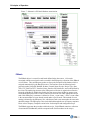
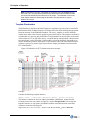
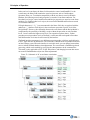
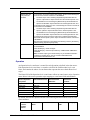
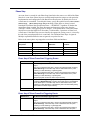
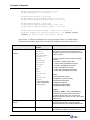
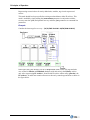
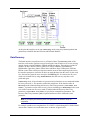
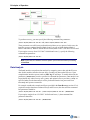
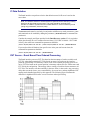
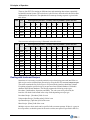
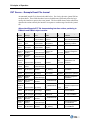
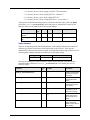
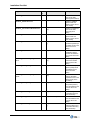
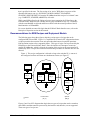
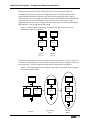
For example consider recovering data from 12/15/2007 16:00:00 through 05/11/2008 2:00:05.
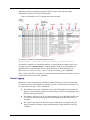
Assume that 7 batches exist on the data source as shown in figure below:
PI Interface for Emerson DeltaV Batch
97