1
Chapter 3 BIOS Configuration
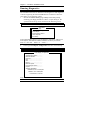
CPU L2 Cache ECC Checking
When enabled, this allows ECC checking of the CPU’s L2 cache. By
default, this field is Enabled.
Quick Power On Self Test
When enabled, this field speeds up the Power On Self Test (POST) after
the system is turned on. If it is set to Enabled, BIOS will skip some items.
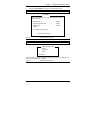
Boot Sequence
This field determines the drive that the system searches first for an
operating system. The default value is A, C, SCSI. The options are :
A, C, SCSI
D, A, SCSI
SCSI, C, A
C, A, SCSI
E, A, SCSI
C only
C, CDROM, A
F, A, SCSI
LS/ZIP, C
CDROM, C, A
SCSI, A, C
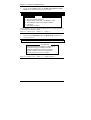
Swap Floppy Drive
This item allows you to determine whether to enable Swap Floppy Drive
or not. When enabled, the BIOS swaps floppy drive assignments so that
Drive A becomes Drive B, and Drive B becomes Drive A. By default,
this field is set to Disabled.
Boot Up Floppy Seek
When enabled, the BIOS will seek whether or not the floppy drive
installed has 40 or 80 tracks. 360K type has 40 tracks while 760K, 1.2M
and 1.44M all have 80 tracks. By default, this field is set to Enabled.
Boot Up NumLock Status
This allows you to activate the NumLock function after you power up the
system. By default, the system boots up with NumLock On.
Boot Up System Speed
This has no function and selects the default system speed (High).
Gate A20 Option
This field allows you to select how Gate A20 is worked. Gate A20 is a
device used to address memory above 1 MB. The default setting is Fast.
Typematic Rate Setting
When disabled, continually holding down a key on your keyboard will
generate only one instance. When enabled, you can set the two typematic
controls listed next. By default, this field is set to Disabled.
CI7BM User’s Manual
47