1
Programming
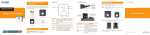
Select the mode in which the modulator will operate; Cable
TV or Antenna mode. Press the button below channel 1, 2, or
3. Press and hold the Mode key until the LED flashes. Select
the mode by pressing the Up or Down button. Follow these
steps to select the mode for each channel; 1, 2, or 3.
MODE
0
1
2
3
Channel Range
14 ~ 78
65 ~ 135
14 ~ 39n 91 ~ 135
21 ~ 69
Select the Channel to which each device will be assigned.
Press and hold the button until the LED flashes. Select the
channel by pressing the Up or Down button. Follow these
steps to select the channel for each channel; 1, 2, or 3.
Specifications
Output Frequency Range:
Output Channels:
470 ~ 860 MHz
UHF: 14~78
CATV: 65~135
+/-1dB
4.5 MHz +/-3KHz
75 Ohms
>10K Ohms
+/-5KHz
1V p-p
10dBmV
20dB
Warranty
This product is warranted free from defects in material and
workmanship for a period of five years from date of purchase.
Warranty does not apply to misuse, abuse, neglect, accident,
improper use, etc. Contact your reseller for a Return
Merchandise Authorization.
Video Frequency Response:
Aural Intercarrier Stability:
Video Input / RF Output Impedance:
Audio Input Impedance:
Frequency Accuracy / Stability:
Video Input Level:
Output Level:
Gain Control:
Dual Sideband
Aural / Visual Carrier Ratio:
-15dB
Video S/N Ratio:
52dB
Audio S/N Ratio:
50dB
Weight:
290g
Power:
120VAC / 60Hz
Dimensions:
85mm (L) x 140 (W) x 13 (H) mm
3
4