1
2
Chapter 1
SIC Card Description
1.3 Model & Appearance
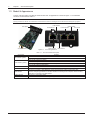
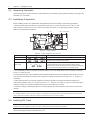
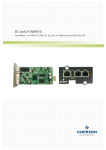
The SIC card is a built-in card with the model of RDU-SIC. Its appearance is shown in Figure 1-1. Its hardware
functions are described in Table 1-1.
Note
During installation, the SIC card should be inserted into the intellislot intelligent slot of the Emerson intelligent equipment.
LAN indicator
COM interface
RUN indicator
1-Wire interface
Front panel
Front panel
RJ45 interface
SIC card interface
USB interface
Figure 1-1 SIC card appearance
Table 1-1 SIC card hardware description
Component
LAN indicator (green)
RUN indicator (yellow)
RJ45 interface
SIC card interface
USB interface
1-Wire interface
COM interface
Function
Off: The network cable is not connected
On: The network cable is connected
Off: The SIC card has no alarms
Blink once every second: The SIC card has observation alarms
Blink once every 0.2 seconds: The SIC card has major alarms
On: The SIC card has critical alarms
Connect to the network
To be inserted into the intellislot intelligent slot of intelligent equipment
Connect to computer or SMS Modem by means of the accessory USB communication cable.
Used for configuring parameters of the SIC card when connecting to the computer; used for sending
SMS when connecting to the SMS Modem
Connect to 1-Wire series sensor
Connect to IRM series sensor or intelligent equipment
RDU-SIC Card
User Manual