1
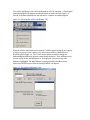
/BASINS/data folder. The watersheds will be listed in a tree diagram, and within each
watershed will be listed the ‘Projects’ within that watershed. The term ‘Project’ will be
defined as any saved file from a BASINS tool or model, including the BASINS .apr for
ArcView 3.x, the .mxd for ArcView 8.x, the GenScn .sta file, the HSPF UCI file, and
status files from SWAT, PLOAD, and AQUATOX. There may be more than one of each
of these per watershed, because a user may have several projects, representing different
subsections of the same HUC or different model simulation scenarios, within one
watershed. Double-clicking on a project will open that project.
Above the Watersheds list will be a series of command buttons that apply to the
Watersheds list. The ‘Build’ button will be used to extract a watershed or create a new
Project. If no watersheds are selected in the Watersheds list, but one or more HUCs are
selected on the map, a click of the ‘Build’ button implies that the user wants to extract a
watershed. Doing so will prompt the user for the name of the new watershed and the map
projection to use. The new watershed will be added to the Watersheds list. If a
watershed is selected in the Watersheds list when the ‘Build’ button is clicked, the
software will assume that the user wants to create a new Project. A message box will
prompt the user to specify whether the new Project should be type ‘ArcView 3’,
‘ArcView 8’, or ‘GenScn’. If ‘ArcView 3’ or ‘ArcView 8’ is specified, the equivalent of
the BASINS 3.0 Project Builder will be run. If ‘GenScn’ is specified, a new GenScn
project will be created.
Another command button associated with the Watersheds list will be a ‘Delete’ button.
This button will be used to delete a watershed or project, depending upon which is
selected in the Watersheds list. The user will be prompted to confirm the request before
anything is deleted. If nothing is selected in the Watersheds list, the user will be asked to
specify a watershed or project to delete.
The ‘Re-Project’ button will be used to re-project the GIS data of an existing watershed,
and save the re-projected data under a new watershed name. If no watershed is selected,
clicking the ‘Re-Project’ button will result in a message prompting the user to specify
which watershed to re-project.
Three additional command buttons associated with the Watersheds list will be the
‘Archive’, ‘Restore’, and ‘Compare’ buttons. With an ArcView 3 project selected, the
‘Archive’ command will start the Archive tool with the specified project. Clicking the
‘Restore’ button will start the Restore tool. Once a BASINS project is restored it will be
reflected in the Watersheds list. The ‘Compare’ button will invoke the Compare function
within the Archive/Restore tool. The Compare tool requires two BASINS projects
selected. If one BASINS project is selected in the Projects list, the user will be prompted
to select the other project for comparison.
To the right of the map will be two frames, each containing command buttons. Each of
these frames will be populated at run-time based upon the software available on the
user’s computer. The ‘Tools’ frame will contain buttons including ‘Data Download’,
‘ArcView 3’, ‘ArcView 8’, ‘GenScn’, and ‘WDMUtil’. Each of these buttons will be