1
User Manual
Corded phones
Name:
Model:
Table of Contents
1. Introduction to Bittel 38 Series Cordless Phone
1.1 Features
1.2 Specfications
2. Installation
3. Operation
3.1 Placing a call
3.2 Recieving a call
3.3 Adjust the handset and speaker Volume
3.4 Using the Hold Key
3.5 Speakerphone tips
3.6 Redial Function
3.7 Adjust ringer volume
3.8 Message Waiting Light
3.9 Data Port
3.10 Data Port Switch
3.11 Mute
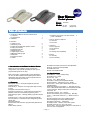
38 Series
38-T10
38-10S
( Two line)
(Single line)
HA9888(38)TSD-S (1 line)
HA9888(38)TSD-T ( 2 line)
3.12 Memory keys (Only work when outside
power is available)
1
1
2
2
2
3
3
3
3
3
3
3
3
3
4. How To Use the Telephone
4.1 Off-Hook
4.2 On-Hook
3
3
5. Approval
5.1 FCC Approval
5.2 CE Approval
5.3 Jacks
5.4 Hearing Aid Compatibility
4
4
4
4
6.Service
6.1 Warranty
6.2 FCC Warranty
4
4
►SPKR and Handset volume three-step adjustable
►Ringer Volume HI/LOW adjustable
►Handset with HAC
►Desk and Wall Mountable
1. Introduction to the Bittel 38 Series Phone.
Bittel’s 38 series is available in single- and two-line
configurations, with optional speakerphone and up to 10
programmable guest service keys.
1.2 Specfications
Built to the industry’s highest quality control standards in
our own ISO 9001 certified factories, Bittel phones deliver
outstanding value and quality, and are engineered for the
demanding hospitality environment.
1.1 Feature
s
Features
►Faceplate Plus™, full length faceplate and placard
faceplate optional
►SmartTray™, keep the cord in right place tidily and easy
to clean
►Support 10/5 Guest Service keys ™
►Express Programmer™, Support Remote Programming
►Master Cloner and Hand-held Programming Cloner
►EZ Message Light™, Message Waiting Light with retrieval
function
►AutoConnect™, Busy tone disconnected automatically
►PrivacyGuard™, Last dialed number disappearing after a
definite time
►Flexible Data Port
►Flash button with Flash time programmable (Standard as
600ms)
►Mute button optional
►Dimensions:225(L)*165(W)*90(H)
►Handset cord:3.66m
►Line cord:2.0m
►Color:Ivory、Black optional
►Handset:Hearing Aid Compatible Handset
►Dial Character:Standard 12 group(DTMF)
►Flash time:80ms,100ms,300ms,600ms optional ,
standard 600ms
►Message Waiting Light Voltage:1. Standard 90~150V
DC2. Customizedd various MWL card compatible with PBX:
AVAYA, Siemens, Philips, Alcatel, NEC, Nortel, Mitel,
Panasonic, etc.
►Operating Voltage:24V~60V DC
►One-Touch Memory Key Programming:Manually
Store(√) Hand-held Cloner R.P.(√) Master Cloner on
line(√)
►Paper packaging size: 487(L) *380(W)*263(H)
►Box Packaging size: 480(L) *360(W)*255(H)
►Package (set/carton):10set/Carton
►Quality Control:ISO9001, ISO 14001 System
►Quality Approval, CCC, FCC, CE, RoHS
►FCC rules:The unit complies with part 15 and part 68 of
the FCC rules and regulations
---- Page 1----
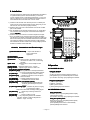
2. Installation
The Uranus Series is designed for hotel applications and behind
a registered PBX system in hotel. Determine you have the
correct modular jack for connecting the telephone. If you do not
have a modular jack, one may be obtained at minimal cost at a
local hardware store, discount store or home center.
1) Located on the left side of the Uranus phone is a modular jack.
Insert one end of the coiled handset cord into this jack (you will
hear the coil cord click when properly inserted.)
2) Insert the other end of the coiled handset cord into the modular
jack on the handset.
3) Turn the telephone so the back panel is facing you. Insert either
end of the line cord into the jack on the back of the telephone
labeled “TO TEL
TEL””.
4) Insert the other end of the line cord into a telephone wall jack.
Once your telephone is connected, place the paper faceplate
over the keys. The plastic overlay slips into place by hooking the
tabs on the overlay into the recessed slots located on both sides.
The overlay is easiest to insert when the left or right side tabs
are inserted first, and the middle of the overlay is slightly bowed
to allow for insertion of the other tabs.
3
4
5
6
7
8
9
2
1
R
1
2
4
7
ABC
3
DEF
GHI
5
JKL
6
MNO
PQRS
8
TUV
9
WXYZ
*
Controls
Controls,, Connections and Function keys
10
(1) Handset Wall Mount Clip – Clip to hold handset on
hook in wall mount
application
(2) Hook Switch.
(3) Insert hole for placard.
(4) Data Port
– Provides access to the telephone line for
connection of modem, fax, or answering
machine.
(5)Tel. Jack
– Modular jack to connect telephone line
cord.
(6) Data Switch –Adjust the data in Line 1 or Line2.
(7)Ring Volume – Adjusts ringer volume to LOW or HI.
(8)/(9) Plastic and paper faceplate.
(10) Memory Keys – Programmable to add special features
or one touch dial frequently dialed numbers.
(11) Dial Keys
– Oversized keypad for ease of dialing.
(12) [Pause] key -- Hidden key inserts a 3.6 second pause
in stored numbers
(13) SPKR Key – Activates speakerphone function
(14) Redial Key – Redials the last number dialed.
(15) MIC. of Speaker ( For Speaker phone).
(16) Flash Key
- Enters a 600ms hook switch flash for
accessing special telephone system
features.
(17) Message Waiting Light – Indicates the phone is ringing
or a message is waiting.
Responds to Neon/90V message waiting signal.
(18) Store Key – Hidden key for storing numbers to
Memory.
(19) Hold Key
– Places a calling on hold.
(20) VOL key – Key steps through the three available
handset /speaker volume levels [Normal –
Medium – High – Normal]
20
VOL
HOLD
11
#
0
STORE
PAUSE
MUTE
FLASH
REDIAL
SPKR
12
13
14
1918 17 16 15
3.Operation
3.1 PLACING A CALL
Using the Handset
1) Lift the handset.
2) Listen for dial tone. Dial the desired number, or
press [REDIAL] key to automatically dial a number.
3) To end the call, hang up by replacing the handset.
Using the Speakerphone
1) Press the [SPKR] key
2) Wait for a dial tone.
3) Dial a phone number.
4) Press [SPKR] key when finished.
3.2 RECEIVING A CALL
---- Page 2----
Using the Handset
When the phone rings, the [MWL] flashes rapidly.
1)Pick up the handset.
2)To end the call, hang up by replacing the handset.
Using the speaker phone
When the phone rings, the [MWL] flashes rapidly.
1)Press the [SPKR] key.
2)The speakerphone comes on automatically.
3)Press [SPKR] when finished.
3.3 ADJUSTING HANDSET AND SPEAKER
VOLUME
3.9 DATA PORT
During conversation, press [VOL] key to adjust the handset
and speaker volume, there are three levels. Press the key
once and the volume level will increase one level (to
medium volume.) Press the key once more and the volume
level will increase an additional level (to high.) After put
down handset, the volume resume to normal but speaker
mode can keep the adjusted volume level.
4 USING THE [HOLD] KEY
3.
3.4
Place a call on hold
Press [HOLD] key to place the calling on hold.
The [Hold] key indicator will get red.
TO REMOVE A CALL FROM HOLD
–To release hold, in handset mode, press [HOLD]
key; in speakerphone mode, press [SPKR] key.
TO CHANGE PHONES AFTER PLACING A CALL
ON HOLD
1)Place the calling on hold by pressing [HOLD] key.
2)Replace the handset in its cradle. When using
speakerphone, just press [HOLD] to place the
calling on hold.
3)Pick up the call at another telephone. The BITTEL
phone will detect the current status
and remove the hold condition at the original phone.
3.5 SPEAKERPHONE TIPS
To activate the handset from speakerphone mode:
Lift the handset.
To activate the Speakerphone from handset mode:
1) Press the [SPKR] key.
2) Hang up the handset.
3.6 REDIAL FUNCTION
Off-hook and press redial key will dial the last
dialed phone number out . The last dialed number
will disappear in 5 minutes after on-hook.
This phone is equipped with a DATA PORT jack for guests to
connect an auxiliary phone device, such as a computer modem or
a fax machine.
3.10 DATA PORT SWITCH
There are two lines from the wall socket, so put the data switch in
position 1 means connect to the phone line. If put the data switch
in position 2 it works as a two line phone.
11 Mute
3.
3.11
Off-hook mode, press MUTE key to stop the sending, repress MUTE remove the mute mode (The MUTE indicator
of the base will turn on).
3.
12 Memory keys (Only work when outside
3.1
able)
power is avail
availa
a. How to Store:
On-hook mode, press HOLD (for one-line , hold indicator
will turn and for two-line CONF indicator will turn on)+
Desired number ( twenty-four number at most)
+MEMORY key / MWL key
b. How to use
The use of the memory keys of the base: The handset is
in off-hook status, press the memory key of the base, the
number will be dialed out. The base is in off-hook status,
just need directly press certain memory keys; On-hook
status, directly press the memory buttons, the base will
auto off-hook and dial out the number of the memory key,
which can be set as followed:
Base is in on-hook status: press HOLD+#+ Memory key
will make the base auto off-hook and dial out the number
stored in the memory keys
c. How to delete the stored number in the memory key
With outside power, press the HOLD + Memory
keys/MWL of the base can delete the stored number.
4 HOW TO USE THE TELEPHONE
4.1 OFF-HOOK
7 ADJUSTING RING VOLUME
3.
3.7
Locate the adjustment controls on the back of the
telephone labeled RINGER LOW/HI. Slide the
switch to the desired LOW or HI ring volume.
3.
8 MESSAGE WAITING LIGHT
3.8
It is compatible with high voltage neon/90V
systems.
It indicates the phone is ringing or a message is
waiting.
There are two ways to realize off-hook when
phone in idle mode
1).Pick up handset
2).Press SPKR
4.2 ON-HOOK
There are two ways to realize on-hook when phone
in conversation mode
1).Put down handset
2).Press SPKR
---- Page 3----
5 Approval
6 Service
5.1 FCC APPROVAL
6.1 WARRANTY
Complies with Part 68 of the FCC rules. On the
bottom of this telephone is a label that contains,
among other information, the FCC registration
number and the ringer equivalence number (REN) for
this telephone. If requested, you must provide this
information to the Telephone Company.
5.2 CE APPROVAL
Complies with CE approval.
5.3 JACKS
Uses RJ11C USOC standard modular jacks.
5.4 Hearing Aid Compatibility
This product is warranted for a period of 12 months
from the date of purchase against faulty materials or
workmanship. If during this period a defect arises, we
may repair or replace the product, at Bittel ’s discretion,
provided that:
1) The product has not been used for any purpose other
than normal use,
2) Unauthorized product repair or modifications have not
been attempted.
3) The product has never been used in a harsh or
corrosive environment.
4) No damage in transit
6.2 FCC WARNING
The Uranus Series is hearing aid compatible.
This device complies with part 15 of the FCC Rules.
Operation is subject to the following two conditions:
(1) This device may not cause harmful interference, and
(2) this device must accept any interference received,
including interference that may cause undesired
operation.
CUSTOMER SERVICE CENTER
Telephone:
(86) 633-2212160/2212103/2212125
Internet: www.bittelgroup.com
Email: [email protected]
Address: No. 1 Rizhao North Road,
Rizhao,
Shandong, 276800, China
Copyright © 2013 Bittel Inc. All rights
reserved.
BITTEL ELECTRONICS CO., LTD.
---- Page 4----