1
4/18/13
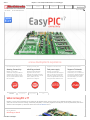
EasyPIC v7 - PIC Development Board with In-Circuit Debugger
What makes this board so unique is that it comes with
powerful on-board mikroProg programmer and
In-C ircuit Debugger, capable of programming more
than 250 microcontrollers. This makes development
with EasyPIC v7 a whole new experience. Whether you
are just a beginner, or a well-trained professional,
this remarkable feature is an irreplaceable advantage.
New modules on your demand
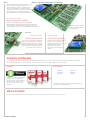
Buzzer, Temp sensors, EEPROM
EasyPIC v7 has modules for all kinds of development.
Beside standard DS1820 digital thermometer we introduced LM35,
analog temperature sensor. Piezo buzzer will help you test your
sound signalization, and you can use I2C EEPROM to store config data.
Organized to make sense
PORTs, buttons and LEDs
We have put a lot of thought in making this
EasyPIC so much better than it’s predecessor.
With better organization ports are now logically
grouped and contain related buttons and LEDs.
Tri-state switches simplify settings of pull up
and pull down resistors on each pin.
Note: 2x16 C haracter LC D and
Graphic LC D with Touch Screen
are sold separately.
We have it all covered
LCD, GLCD & 7seg displays
We have returned 4-digit 7seg display to
EasyPIC v7 so you can now build
applications for LC D, GLC D and 7seg, all
on the same board! We have
organized them in a clean and
elegant way, thus increasing their
usability.
Examples and Manuals
All you need to get started: well commented and easy to understand examples and colour user-friendly manuals. Examples demonstrate each on-board module
and are a great starting point for your future projects. User manuals are easy to read, with good explanations and lots of photos.
Examples
User Manuals
EasyPIC v7
User Manual
[8.01MB]
Examples are written for all mikroE PIC
compilers: mikroC , mikroBasic and
mikroPascal. They are well commented
and each example contains working
HEX file which you can load and use
right away.
EasyPIC v7
Schematic
[541KB]
For drivers and software for on-board mikroProg programmer
and debugger visit Programming tab.
What’s on board
Hover your cursor over the desired module and instantly get more information. Get to know your board even before you buy it.
www.mikroe.com/easypic/
2/5