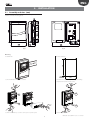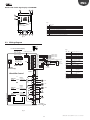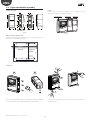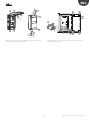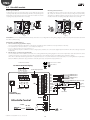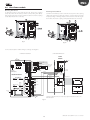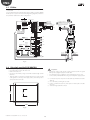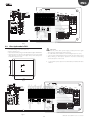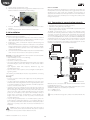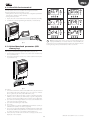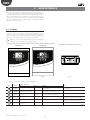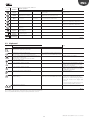
1
UltraCella Electronic control for Cold Rooms User manual NO POWER & SIGNAL CABLES TOGETHER READ CAREFULLY IN THE TEXT! H i g h E f f i c i e n c y S o l u t i o n s ENG WARNING DISPOSAL CAREL developed its products thanks to the several years of experience in the HVAC field, continuous investment in technological innovation of the product, rigorous quality procedures and processes with in-circuit and function tests on 100% of its production, as well as the most innovative production technologies available on the market. CAREL and its branch offices/affiliates do not guarantee, in any case, that all the aspects of the product and the software included in the product will respond to the demands of the final application, even if the product is built according to state-of-the-art techniques. The client (builder, developer or installer of the final equipment) assumes every responsibility and risk relating to the configuration of the product in order to reach the expected results in relation to the specific final installation and/or equipment. CAREL, in this case, through specific agreements, can intervene as consultant for the positive result of the final start-up machine/application, but in no case can it be held responsible for the positive working of the final equipment/apparatus. INFORMATION FOR THE USERS REGARDING THE CORRECT HANDLING OF WASTE ELECTRIC AND ELECTRONIC EQUIPMENT (WEEE) With reference to European Parliament and Council Directive 2002/96/EC issued on 27 January 2003 and the related national implementation legislation, please note that: • WEEE cannot be disposed of as municipal waste, said waste must be collected separately; • the public or private waste collection systems defined by local legislation must be used. Moreover, the equipment can be returned to the distributor at the end of its working life when buying new equipment; • this equipment may contain dangerous substances: improper use or incorrect disposal of such may have negative effects on human health and on the environment; • the symbol (crossed-out wheeley bin) shown on the product or on the packaging and on the instruction sheet indicates that the equipment has been introduced onto the market after 13 August 2005 and that it must be disposed of separately; • in the event of illegal disposal of electrical and electronic waste, the penalties are specified by local waste disposal legislation. The CAREL product is a state-of-the-art product, whose operation is specified in the technical documentation supplied with the product or can be downloaded, even prior to purchase, from the website www.carel.com. Each CAREL product, in relation to its advanced technological level, needs a phase of definition / configuration / programming / commissioning so that it can function at its best for the specific application. The lack of such phase of study, as indicated in the manual, can cause the final product to malfunction of which CAREL cannot be held responsible. Only qualified personnel can install or carry out technical assistance interventions on the product. The final client must use the product only in the manner described in the documentation related to the product itself. Materials warranty: 2 years (from the date of production, excluding consumables). Type-approval: the quality and safety of CAREL S.P.A. products are guaranteed by the design system and ISO 9001 certified production. Without excluding proper compliance with further warnings present in the manual, it is stressed that in any case it is necessary, for each CAREL product: • Not allow the electronic circuits getting wet. Rain, humidity and all types of liquids or condensate contain corrosive mineral substances that can damage the electrical circuits. In any case, the product should be used and stored in environments that respect the temperature and humidity limits specified in the manual; • Not to install the device in a particularly hot environments. Temperatures that are too high can shorten the duration of the electronic devices, damaging them and distorting or melting the parts in plastic. In any case, the product should be used and stored in environments that respect the temperature and humidity limits specified in the manual; • Not to try to open the device in any way different than that indicated in the manual; • Not to drop, hit or shake the device, because the internal circuits and mechanisms could suffer irreparable damage. • Not to use corrosive chemical products, aggressive solvents or detergents to clean the device; • Not to use the product in application environments different than those specified in the technical manual. HACCP: CAUTION The Food Safety programs based on HACCP procedures and on certain national standards, require that the devices used for food preservation are periodically checked to make sure that the measuring errors are within the allowed limits of the application of use. Carel recommends compliance with the indications of European standard “Temperature recorders and thermometers for transport, storage and distribution of chilled, frozen, deep-frozen/ quick-frozen food and ice cream – PERIODIC VERIFICATION “, EN 13486 -2001 (or subsequent updates)or similar standards and prescriptions applicable in the country of use. The manual contains further indications regarding technical feature, proper installation and configuration of the product. All the above reported suggestions are also valid for the control, serial boards, programming keys or however for any other accessory in the CAREL product portfolio. CAREL adopts a continuous development policy. Therefore, CAREL reserves the right to carry out modifications and improvements on any product described in this document without prior notice. The technical data in the manual can undergo modifications without forewarning. NO POWER & SIGNAL CABLES TOGETHER The liability of CAREL in relation to its products is specified in the CAREL general contract conditions, available on the website www.carel.com and/or by specific agreements with customers; specifically, to the extent where allowed by applicable legislation, in no case will CAREL, its employees or subsidiaries be liable for any lost earnings or sales, losses of data and information, costs of replacement goods or services, damage to things or people, downtime or any direct, indirect, incidental, actual, punitive, exemplary, special or consequential damage of any kind whatsoever, whether contractual, extra-contractual or due to negligence, or any other liabilities deriving from the installation, use or impossibility to use the product, even if CAREL or its subsidiaries are warned of the possibility of such damage. READ CAREFULLY IN THE TEXT! WARNING: separate the probe cables and the digital input cables as much as possible from the inductive load and power cables to prevent possible electro-magnetic interference. Never introduce power cables and signal cables (including those of electric control board) into the same cable troughs. 3 UltraCella +0300083EN - rel. 1.6 - 31.10.2015 ENG Content 1. INTRODUCTION 1.1 1.2 9 20 Display ...........................................................................................................................20 Keyboard .....................................................................................................................21 Programming............................................................................................................22 Procedures ..................................................................................................................24 Multifunction menu .............................................................................................26 Message language selection ..........................................................................30 4. COMMISSIONING 4.1 4.2 4.3 4.4 4.5 4.6 4.7 4.8 4.9 4.10 4.11 4.12 6.1 6.2 6.3 6.4 6.5 6.6 6.7 6.8 6.9 6.10 6.11 6.12 6.13 6.14 6.15 6.16 6.17 6.18 Assembly and sizes (mm) ...................................................................................9 Structure ......................................................................................................................10 Wiring diagram ........................................................................................................11 Expansion modules assembly ........................................................................12 Ultra EVD module...................................................................................................14 Ultra Power module..............................................................................................15 EVDice ...........................................................................................................................16 Ultra 3ph module EVAPORATOR ...................................................................16 Ultra 3ph module FULL ......................................................................................17 Installation ..................................................................................................................18 Connection in supervisoring network ......................................................18 UltraCella Service terminal ...............................................................................19 Upload/download parameters (USB memory key) .........................19 3. USER INTERFACE 3.1 3.2 3.3 3.4 3.5 3.6 6. CONTROL Codes ................................................................................................................................7 Expansion modules .................................................................................................8 2. INSTALLATION 2.1 2.2 2.3 2.4 2.5 2.6 2.7 2.8 2.9 2.10 2.11 2.12 2.13 7 First commissioning .............................................................................................31 Parameters to be set for the commissioning........................................31 Single digit display models cod. WB000S* commissioning.........31 Double digit display models cod. WB000D* commissioning.....32 Commissioning with UltraCella Service Terminal ..............................33 Main function commissioning .......................................................................33 Light management ...............................................................................................37 Other configuration parameters ..................................................................37 Ultra EVD EVO module commissioning ...................................................38 Avviamento EVDice ..............................................................................................39 Ultra 3Ph Evaporator module commissioning.....................................41 Ultra 3Ph Full module commissioning......................................................41 61 8. SIGNALS AND ALARMS 69 Signalling .....................................................................................................................69 Alarms............................................................................................................................69 Reset alarms...............................................................................................................69 HACCP alarms and display ...............................................................................69 EVD EVO alarms .......................................................................................................70 EVDice alarms ...........................................................................................................70 3PH module alarms...............................................................................................71 Alarm parameters ..................................................................................................72 HACCP Alarm parameters and monitoring activation .................73 High condenser temperature alarm .........................................................73 9. TECHNICAL SPECIFICATIONS 9.1 9.2 9.3 9.4 9.5 5. OUTPUTS CONFIGURATION AND PROTECTIONS 43 5.1 5.2 Switching the controller ON and OFF ......................................................44 Virtual probe..............................................................................................................44 Set point.......................................................................................................................44 Pump down ...............................................................................................................46 Autostart in pump down ..................................................................................47 Continuous cycle....................................................................................................47 Door switch control ..............................................................................................47 Defrost...........................................................................................................................48 Evaporator Fans .......................................................................................................50 Condenser fans........................................................................................................51 Duty setting ...............................................................................................................53 Bowl resistance ........................................................................................................53 Defrosting with 2 evaporators .......................................................................53 Second compressor with rotation ...............................................................54 Control with dead band.....................................................................................55 AUX output activation by time band.........................................................55 Humidity management......................................................................................56 Generic functions ...................................................................................................57 7. PARAMETERS TABLE 8.1 8.2 8.3 8.4 8.5 8.6 8.7 8.8 8.9 8.10 31 44 UltraCella technical characteristics..............................................................74 EVD Modules technical characteristics .....................................................75 Power Modules technical characteristics ................................................75 3PH EVAPORATOR Modules technical characteristics .....................75 3PH FULL Modules technical characteristics ........................................76 10. ELECTRICAL WIRING 3PH MODULES Analogue output ....................................................................................................43 Digital Outputs ........................................................................................................43 74 77 10.1 Electrical wiring 3PH EVAPORATOR Module ..........................................77 10.2 Electrical wiring 3PH FULL Module .............................................................84 11. SOFTWARE RELEASE 92 11.1 Software release table .........................................................................................92 5 UltraCella +0300083EN - rel. 1.6 - 31.10.2015 ENG 1. INTRODUCTION Ultracella is a family of products consisting of a control system for the basic functions of a cold room to which can be added further modules for accessory functionalities (e.g. electronic valve, power relays, etc.). The accessory modules allow: • the installation of the electronic expansion valve, using the module with CAREL EVD Evolution driver dedicated to the control of superheat; • compressor control with power relay of up to 3 Hp; • the use of a single-phase circuit breaker switch in addition to the power relay. The user interface ensures ease in use and it consists, depending on the models, of: • wide led display on which can be viewed the operating temperature and the active loads; • a graphic terminal with text strings in multiple languages, which guide the user during commissioning (wizard). It is also equipped with contextual help menus accessible during programming, that provide an accurate description of the alarms. The graphic terminal is also available as a “service tool”, which is useful when the control has the only LED interface. UltraCella has a port for the insertion of a USB memory key to: • load the languages for the graphic terminal during the first commissioning; • parameters upload/download; • other operations reserved for the service centre (e.g. software update); • download log of temperature recorded. UltraCella When mounting the optional modules are matched to the right of the main control system and connected to it with watertight coupling, to ensure the IP degree of protection of the assembly. Fig. 1.a Main characteristics: • 6 relay outputs: compressor, defrost, fan, light, AUX1, AUX2; • assembly on guide DIN or wall; • LED board with bright display with 3 digits, with decimal point and icons that indicate the operating status; • integration of the keys in the front panel (LED board) to ensure a high degree of protection (IP65) and safety during operation and cleaning; • availability of 10 sets of parameters (recipes) preloaded by CAREL but modifiable, corresponding to the same number of parameters configurations, to adapt the control to the specific conservation needs required by the cold room; • navigation on intuitive user interface with contextual backlight keyboard; • defrost can be driven using the keyboard, digital input and supervisor; • various types of defrost managements, on one or two evaporators: natural (with stop compressor), resistance, hot gas; • control of compressors with up to 2 Hp or up to 3 Hp with the accessory power module; • temperature control with virtual adjustment probe; • digital inputs that can be configurated for alarm activation, enabling or activating defrost, door switch, auxiliary output, on / off, etc; • control of 1 compressor with double step or of two compressors, even with rotation; • keyboard safety: operation of the single keys can be disabled to avoid tampering; • light management by door switch or dedicated key; • alarm buzzer; • HACCP function: temperature monitoring and adjustment in case of alarm due to high temperature during operation or after black out; • RS485 network connection for remote monitoring and supervision sytems. 1.1 Codes Codes WB000S**F0 WB000D**F0 Description UltraCella, led display with single row UltraCella, led display with double row Tab. 1.a Fig. 1.b 7 Fig. 1.c UltraCella +0300083EN - rel. 1.6 - 31.10.2015 ENG 1.2 Expansion modules EVD Module (cod. WM00E***00) Expansion module containing the supply transformer and the driver EVD Evo to control the electronic expansion valve. Codes WM00ENS000 WM00ENSI00 WM00ENNI00 Description Ultra EVD Module without EVD display Ultra EVD Module with EVD I/E display Ultra EVD Module “blind” - commissioning through UltraCella Tab. 1.b Fig. 1.g Three phases expansion Modules Ultra 3PH Evaporator Modules are expansion modules to control threephase evaporators. They have to be combined with UltraCella controls P/Ns WB000S% or WB000D% and have inside high power actuators to handle directly three-phase loads of the evaporator. Fig. 1.d Ultra 3PH Full Modules are expansion modules to control three-phase condensing and evaporator units. They have to be combined with UltraCella controls P/Ns WB000S% or WB000D% and have inside high power actuators to handle directly three-phase loads of the condensing and evaporator units. Fig. 1.e Code WT00E600N0 WT00E900N0 WT00F4B0N0 WT00F7C0N0 Description Ultra 3PH module Evaporator 6kW Ultra 3PH module Evaporator 9kW Ultra 3PH module Full 4HP Ultra 3PH module Full 7,5Hp Tab. 1.d Fig. 1.h Fig. 1.i Fig. 1.f UltraCella Service Terminal (cod. PGDEWB0FZ0) Power module (cod. WM00P000*N) The UltraCella control can be connected to an external terminal, without having to open the unit, for easy commissioning and programming of the control parameters, to be used with the controls having LED display. When connecting the UltraCella Service Terminal the LED interface is temporarily disabled. Expansion module that contains the circuit breaker switch and 3 Hp relay for compressor control. There is also a version without relay, to give way to the installer to insert devices suitable for the application (contactors, safety devices, etc.) Codes Description WM00P0003N Ultra Power Module main switch and 3HP relay WM00P000NN Ultra Power Module main switch Tab. 1.c Fig. 1.j UltraCella +0300083EN - rel. 1.6 - 31.10.2015 8 ENG 2. INSTALLATION 2.1 Assembly and sizes (mm) The control system has holes on the lower and right side, in which the installer can insert the cable glands. 290 87,5 47,5 30 47,5 107,5 N 200 32 100 62 380 Fig. 2.a 62 Fig. 2.b Mounting B: without DIN rail 1 260 A: with DIN rail 2 Ø 4,5 1.a: Fix the DIN rail and insert the controller 156 1.b: Make 4 holes (Ø 4,5 mm) according to the drilling template and insert the dowels (mm) 1 1 1 2 1 2 1 2 1 1 2 2 1 2 2 1 1 1 2.a: Remove the frames, loosen the screws (1) and open the panel 2.b: Remove the frames 9 UltraCella +0300083EN - rel. 1.6 - 31.10.2015 ENG A A 1 2 1 1 B 2 N 1 2 1 1 B A A 3.a: Mark on the wall the positions of the lower holes, remove the panel and perform the drills (Ø 4.5 mm); insert the plugs. Replace the panel on the DIN guide and fix it fastening the lower screws. 1 2 3.b: Fasten the screws (1) and fix the panel. Loosen the screws (2) and open the panel. 2 connexion connection to option d'éventuels modules accessoires N A alimentation, power supply,compresseur compressor ventilateur, fan, actionneurs actuators 4: Use the holes and mount the cable glands to connect: • on the lower side: supply cables, probes, actuators; • on the right side: cables for the connection of accessory modules; 5: Close the panel fastening the screws (2). sondes, probes, entrées digital inputs numériques Caution: separate the power cables (supply, actuators) from the signal cables (probes, digital inputs). Note: use a hole saw to drill the knock-outs (A). 2.2 Structure Models with single digit display cod. WB000S* 3 4 3 2 1 Key 3 8 7 6 5 4 1 Keyboard 2 Display 3 Wall mounting holes 4 Locking screws 5 Connector for UltraCella Service (*) 6 Green LED (*) 7 Red LED (*) 8 USB Port (*) (*) Visible after removing the bottom frame 3 Fig. 2.c UltraCella +0300083EN - rel. 1.6 - 31.10.2015 10 ENG Models with double digit display cod. WB000D* 3 4 3 2 1 Key 3 8 7 6 5 4 1 Keyboard 2 Display 3 Wall mounting holes 4 Locking screws 5 Connector for UltraCella Service (*) 6 Green LED (*) 7 Red LED (*) 8 USB port (*) (*) Visible after removing the bottom frame 3 Fig. 2.d 2.3 Wiring diagram to remote terminal display VL GND GND Rx/Tx+ Rx/TxGND Key to LED display board 48 47 46 45 44 43 49 50 51 52 53 54 Rx/Tx+ Rx/TxGND Rx/Tx+ Rx/TxGND GND FieldBus BMS to graphic terminal display 31 32 33 34 35 36 37 38 39 40 41 42 24 Vac UltraCella Control R6 EN60730-1 250 V UL 873 R5 - R6 12 (10) A 12 A res. 2HP 12FLA 72 LRA 30 29 28 27 26 25 24 23 22 21 20 19 B3 B2 B1 Y1 B4 B5 GND 5 VREF + Vdc DI1 DI2 DI3 CAREL NTC, PT1000 CAREL NTC, PT1000 CAREL NTC, PT1000 analog output (0 to 10 Vdc) CAREL NTC, analog input 0 to 10 Vdc 0 to 5 Vdc DI1 Door switch 18 17 16 15 R5 14 13 OUT B5 analog M input +V (4 to 20 mA) B1…B5 DI1 DI2, DI3 Y1 GND 5 VREF Analogue inputs 1…5 Door switch Digital inputs 2, 3 0…10 V analogue output Grounding for signals Ratiometric pressure probe power supply +Vdc Active probe supply (humidity) CMP DO1 (*) Compressor DEF DO2 (*) Defrost FAN DO3 (*) Evaporator fan LIGHT DO4 (*) Light AUX1 DO5 (*) Auxiliary output 1 AUX2 DO6 (*) Auxiliary output 2 L, N Power Supply Fieldbus Fieldbus Serial BMS BMS Serial (*) Digital outputs display in the multifunction module (see chap. 3). DEF 12 to connector board EN60730-1 250 V UL 873 EN60730-1 250 V UL 873 R3 - R4 10 A res. 5 (3) A 10 A res. 5FLA 18 LRA R1 - R2 8 (4) A N.O. 8 A res. 2FLA 12 LRA R4 11 FAN 10 R3 R2 9 LIGHT 8 7 6 R1 5 4 3 2 1 230 V 20 A max Fig. 2.e 11 UltraCella +0300083EN - rel. 1.6 - 31.10.2015 ENG 2.4 Expansion modules assembly Dimensions (mm) 30 Layout If more than one expansion modules it is to assemble, use the arrangement of figure to optimize the wiring. 30 47,5 47,5 Power Module 107,5 107,5 260 290 Ø32 drilling template Ø32 Ø 4,5 47,5 128 EVD Module 87,5 87,5 UltraCella Control 1 2 47,5 110 WM00ENS000 WM00ENSI00 101 103 WM00ENNI00 Fig. 2.f Fig. 2.h 43 33 Overall drilling template (mm) If UltraCella and expansion modules have to be mounted at the same time, use the overall drilling template. UltraCella Expansion Module 214 260 DIN RAIL Ø 4,5 mm 156 24 103 Fig. 2.g Mounting A 1 B 3 2 1 1 1 2 2 2 3 2 1 1: Use a hole saw to drill the panel in correspondence with the predrilled holes (steps A, B). If present, fasten the DIN rail for the module. UltraCella +0300083EN - rel. 1.6 - 31.10.2015 2: Remove the faceplates. Unscrew the screws (3) and open the UltraCella control 12 ENG 1 1 1 A A B A A 2 B 1 N 2 1 1 3: Raise the cover or remove the faceplates and unscrew the screws to remove the panel and open the module. 4: Put the module close to UltraCella control and insert the coupling clamps supplied as standard. 13 UltraCella +0300083EN - rel. 1.6 - 31.10.2015 ENG 2.5 Ultra EVD module Mounting with DIN rail Mounting without DIN rail 5.a Mark the positions of the bottom holes on the wall (A), remove the coupling clamps (B), extract the module (C). Drill the corresponding holes (Ø 4,5 mm) and insert the anchors. Place again the module: mount the coupling clamps (B) and fasten the screws (A). 5.b Mark the positions of the 4 holes (A), remove the coupling clamps (B), extract the module (C). Drill the corresponding holes (Ø 4,5 mm), depending on drilling template and insert the anchors. Place again the module: mount the coupling clamps (B) and fasten the screws (A). B A B A 2 4 N 1 3 2 4 NOA B COMA 3 G G0 VBAT 1 PRI 230 V NOA N G G0 VBAT B COMA PRI 230 V SEC 24 V SEC 24 V GND S1 DI1 DI2 S4 VREF S2 S3 C GND S1 DI1 DI2 S4 VREF S2 S3 GND C GND Tx/Rx Tx/Rx B A B A A A Fig. 2.j Fig. 2.i WM00ENNI00: Connect UltraCella to EVD module by serial cable in according with following wiring diagram e refer to below parameters table about EVD Evo driver commissioning. WM00ENSI00 and WM00ENS000: 1. Driver commissioning by EVD Evo display. Connect auxiliary UltraCella output AUX1 or AUX2 relay to digital input DI1 of EVD Evo and set parameters in this way: • H1=7 (for AUX1) or H5=7 (for AUX2) -> second delayed compressor • C11=0 -> delay activation second compressor = 0 In this way auxiliary output is set like free contact cooling request, suitable to be connected to digital input DI1 of EVD Evo driver. No setting is requested in UltraCella. 2. EVD Evo driver commissioning by UltraCella Connect UltraCella to EVD module by serial cable in according with following wiring diagram e refer to below parameters table about EVD Evo driver commissioning. If its’ connected by serial cable, driver parameters can be displayed only (not modifiable) by local EVD Evo display. Once driver is abled by UltraCella (parameter P1=1) its parameters are ones communicated and set by UltraCella, in according with below parameters table (modifiable by UltraCella only); parameters eventually previously set by EVD Evo display will be lost. ULTRACELLA CONTROL ULTRA EVD MODULE BLIND cod. WM00ENNI00 to remote terminal display VL GND GND Rx/Tx+ Rx/TxGND to LED display board 48 47 46 45 44 43 49 50 51 52 53 54 Rx/Tx+ Rx/TxGND Rx/Tx+ Rx/TxGND FieldBus BMS to graphic terminal display GND 30 29 28 27 26 25 24 23 22 21 20 19 31 32 33 34 35 36 37 38 39 40 41 42 DI1 Door switch 16 R6 15 14 R5 Fig. 2.k UltraCella +0300083EN - rel. 1.6 - 31.10.2015 0 to 5 Vdc 17 UltraCella Control R5 - R6 12 (10) A 12 A res. 2HP CAREL NTC, PT1000 CAREL NTC, PT1000 CAREL NTC, PT1000 analog output (0 to 10 Vdc) CAREL NTC, analog input 0 to 10 Vdc 18 24 Vac EN60730-1 250 V UL 873 B3 B2 B1 Y1 B4 B5 GND 5 VREF + Vdc DI1 DI2 DI3 14 DEF OUT B5 analog M input +V (4 to 20 mA) ENG 2.6 Ultra Power module Mounting with DIN rail Mounting without DIN rail 5.a Mark the positions of the bottom holes (A), remove the coupling clamps (B), extract the module (C). Drill the corresponding holes (Ø 4,5 mm) and insert the anchors. Place again the module: mount the coupling clamps (B) and fasten the screws (A). 5.b Mark on the wall the positions of the 4 holes (A), remove the coupling clamps (B), extract the module (C). Drill the corresponding holes (Ø 4,5 mm), depending on drilling template and insert the anchors Place again the module: mount the coupling clamps (B) and fasten the screws (A). B A A B B C N 2 B 3 6 C N 5 2 3 6 B A 5 A B Fig. 2.l A A Fig. 2.m Connect electrically the mudule wiring according to the diagram. ULTRACELLA CONTROL ULTRA POWER MODULE VL GND GND Rx/Tx+ Rx/TxGND Power Module 48 47 46 45 44 43 31 32 33 34 35 36 37 38 39 40 41 42 49 50 51 52 53 54 Rx/Tx+ Rx/TxGND Rx/Tx+ Rx/TxGND GND FieldBus BMS to graphic terminal display 30 29 28 27 26 25 24 23 22 21 20 19 B3 B2 B1 Y1 B4 B5 GND 5 VREF + Vdc DI1 DI2 DI3 CMP CAREL NTC, PT1000 CAREL NTC, PT1000 CAREL NTC, PT1000 analog output (0 to 10 Vdc, PWM) CAREL NTC, analog input 0 to 10 Vdc 230 V~ L N OUT B5 analog input 0 to 5 Vdc M (4 to 20 mA) +V (**) DI1 1 2 PE Circuit Breaker Door switch BLACK 18 24 Vac UltraCella Control BLACK R6 EN60730-1 250 V UL 873 R5 - R6 12 (10) A 12 A res. 2HP 12FLA 72 LRA BLUE 17 WHITE 16 Relay 3Hp (*) 15 BROWN R5 14 DEF 6 3 FAN 5 2 2 3 13 12 EN60730-1 250 V UL 873 R3 - R4 10 A res. 5 (3) A 10 A res. 5FLA 18 LRA R4 11 6 R3 R2 9 LIGHT 8 7 EN60730-1 250 V UL 873 to connector board R1 - R2 8 (4) A N.O. 8 A res. 2FLA 12 LRA 5 10 2 6 R1 6 5 3 5 4 3 2 1 230 V 20 A max (*) Note: highlighted wires and 3hp relay supplied with the module code WM00P0003N Fig. 2.n 15 UltraCella +0300083EN - rel. 1.6 - 31.10.2015 ENG 2.7 EVDice For details on assembling EVD ICE on the evaporator, see the user manual, +0300037EN Connect UltraCella to the EVD ICE driver via the Fieldbus serial line (RS485 Modbus protocol), as shown in the following wiring diagram, and refer to the parameter table for the driver configuration VL GND GND Rx/Tx+ Rx/TxGND to LED display board 48 47 46 45 44 43 49 50 51 52 53 54 Rx/Tx+ Rx/TxGND Rx/Tx+ Rx/TxGND GND BMS to graphic terminal FieldBus 31 32 33 34 35 36 37 38 39 40 41 42 CAP 30 29 28 27 26 25 24 23 22 21 20 19 B3 B2 B1 Y1 B4 B5 GND 5 VREF + Vdc DI1 DI2 DI3 CAREL NTC, PT1000 CAREL NTC, PT1000 CAREL NTC, PT1000 B Non rimuovere il cappuccio di protezione! Do not remove the protection cap! ULTRACAP Module analog output (0 to 10 Vdc, PWM) C D CAREL NTC, analog input 0 to 10 Vdc 0 to 5 Vdc OUT B5 analog M input +V (4 to 20 mA) CAREL E2V / E3V unipolar valve A (**) DI1 Door switch 18 24 Vac R6 EN60730-1 250 V UL 873 R5 - R6 12 (10) A 12 A res. 2HP 12FLA 72 LRA 17 16 15 R5 S2 S1 CMP 14 GASType DEF 13 Mode Super Heat 12 EN60730-1 250 V UL 873 R3 - R4 10 A res. 5 (3) A 10 A res. 5FLA 18 LRA R4 11 FAN 10 R3 R2 9 LIGHT 8 to connector board 7 EN60730-1 250 V UL 873 R1 - R2 8 (4) A N.O. 8 A res. 2FLA 12 LRA 6 R1 5 4 E F 3 marrone / brown L blu / blue N nero / black DI verde/ green GND Tx / Rxnero / black bianco / white Tx / Rx+ 2 1 230 V 20 A max 230 Vac shield shield Fig. 2.o 2.8 Ultra 3ph module EVAPORATOR 1. Following drilling template, drill 4 (6) holes on the wall: Important: • Unscrew 6 fixing screws of frontal cover • Remove frontal cover • Fix panel to the wall by using screws with suitable length to wall • separate the power cable (power supply, actuators) from the signal cables (probes, digital inputs) and serial cable • use cable with section suitable to current rating they have to carry • connect clamp marked with PE to the ground of power supply system thickness • Drill side surface of expansion module where it’s necessary and fit cable glands to connect: power supply cables, serial cable, probes and power cables for loads 2. Connect three-phase expansion to UltraCella by shielded serial cable AWG 22 3. Close frontal by screwing the 6 screws 4. Power on UltraCella (230 Vac) and expansion three-phase module (400 Vac) 160 290 5. Activate magnetothermic switch. 300 Fig. 2.p UltraCella +0300083EN - rel. 1.6 - 31.10.2015 16 1 M P L N 1 M P P 17 48 47 46 40 129 TC1 PE109 162 161 160 147 146 145 144 143 142 141 140 24 25 24 32 34 35 32 29 33 30 31 27 29 28 26 48 47 46 40 45 40 42 40 41 40 39 Ultra 3PH I/O module 45 40 42 40 41 40 128 127 126 125 124 123 122 121 120 119 118 117 116 115 25 28 25 24 KM3:A1 XA1:122 KM3:A2/XA1:129 ??:J12/NC6/XA1:113 XA1:127/KR2:A2 ??:J2/U1 XA1:143 ??:J2/U2 XA1:145/XA1:141 ??:J2/U3 ??:J2/GND/XA1:143 ??:J2/U6 KR1:11 AP:AP:+ AP:GND TC1:PE Unscrew 6 fixing screws of frontal cover Remove frontal cover Fix panel to the wall by using screws with suitable length to wall thickness Drill side surface of expansion module where it’s necessary and fit cable glands to connect: power supply cables, serial cable, probes and power cables for loads 39 24 25 111 113 112 114 XA1:103 QF2:N2/XA1:106 XA1:101/KM3:14 XA1:105 XA1:104 XA1:108/XA1:102 KM3:62 XA1:106 KR2:11 KR2:14 FU2:2/XA1:113 KR1:A2/FU1:2 XA1:128/XA1:111 XA1:115 XA1:114 KR1:A1 ??:J10/NO1 KM2:A1 ??:J10/NO2 KM1:A1 ??:J11/C3/4/5 XA1:126/??:J11/NO3 AUX 1 AUX 1 termostato di sicurezza termostato di sicurezza Clicson evaporatore Clicson evaporatore UltraCella UltraCella defrost defrost defrost aux defrost aux ventilatore evaporatore 0-10 Vdc ventilatore evaporatore 0-10 Vdc consenso unita' motocondensante consenso unita' motocondensante controllo controllo controllo AUX1:1 AUX1:2 TS1 TS1 SP3 SP3 AP3:L AP3:N ST1 ST1 ST2 ST2 Y TS2:Y GND TS2:GND AUX2:1 AUX2:2 AP1:J6/+ AP1:J6/+ GND AP1:J6/GND 34 33 32 24 25 29 31 29 30 29 28 15 16 22 19 20 18 26 27 PE3 PE2 PE1 162 161 160 149 148 147 146 143 142 141 140 129 128 120 119 118 117 110 109 17 34 33 32 24 25 29 31 29 30 29 28 15 16 22 19 20 18 26 27 CAREL NTC, PT1000 CAREL NTC, PT1000 CAREL NTC, PT1000 24 32 34 35 35 33 30 31 27 29 28 28 25 37 38 18 21 18 20 20 19 18 LIGHT 24 110 109 108 107 106 105 104 19 DEF 25 37 38 18 21 18 20 101 103 102 0 to 5Vdc B5 analog input (4 to 20 mA) 19 analog output (0 to 10 Vdc, PWM) CAREL NTC, analog input 0 to 10 Vdc B5 analog input (4 to 20 mA) TK1 TK1 YV1 YV1 ULTRACELLA:L ULTRACELLA:N ST1 ST1 ST2 ST2 ST3 ST3 Y 7AP1:Y GND 7AP1:GND AP1:J6/+ AP1:J6/+ GND AP1:J6/GND 19 CAREL NTC, PT1000 CAREL NTC, PT1000 CAREL NTC, PT1000 18 0 to 5Vdc 20 to connector board analog output (0 to 10 Vdc, PWM) CAREL NTC, analog input 0 to 10 Vdc pump down pump down liquid valve liquid valve ultracella ultracella defrost defrost defrost aux defrost aux temp condensatore temp condensatore fan evaporatore 0-10vdc fan evaporatore 0-10vdc controller controller controller LIGHT MV3:1 MV3:2 SP1 SP1 MV4:1 MV4:2 RR2 RR2 AUX1:1 AUX1:2 AP2:L AP2:N AP2:11 AP2:14 SP2 SP2 TS1 TS1 SP3 SP3 160 290 • • • • condenser fan 1 condenser fan 1 partialization pressure switch condenser fan partialization pressure switch condenser fan condenser fan 2 condenser fan 2 crankcase heater crankcase heater aux 1 aux 1 kriwan kriwan kriwan kriwan pressure switch pressure switch security thermostat security thermostat evaporator clicson evaporator clicson to connector board ENG KR2 AP1 KR3 AP1 KM2 XA1 KR3 KR R3 KM3 XA1 KM1 Ultra 3PH I/O module KM2 QF1 CMP FAN QF2 XP1 X Fig. 2.q 2.9 Ultra 3ph module FULL 1. Following drilling template, drill 4 (6) holes on the wall: • separate the power cable (power supply, actuators) from the signal Important: • use cable with section suitable to current rating they have to carry • connect clamp marked with PE to the ground of power supply system • after powering on three-phase expansion check the correct rating cables (probes, digital inputs) and serial cable current absorption on the loads 2. Connect three-phase expansion to UltraCella by shielded serial cable AWG 22 300 Fig. 2.r KR2 KM1 FAN XP1 QF1 CMP DEF QF2 QM1 63 70 80 90 Fig. 2.s UltraCella +0300083EN - rel. 1.6 - 31.10.2015 ENG 3. Close frontal by screwing the 6 screws 4. At the first start-up of the unit, it’s suggested to calibrate motor circuit HACCP - CAUTION When the temperature measurement is relevant for Food Safety (see HACCP), will be used only temperature probes suggested by Carel. The standards in force may require the compilation and preservation of appropriate documentation, as well as periodic checks on instrumentation and sensors. If in doubt, consult the person in charge of food safety or the manager of the plant. breaker on effective compressor absorption rating 2.11 Connection in supervisoring network Warnings: • properly fix the converter to avoid disconnections; • perform the wiring without power supply; • keep the cables of the converter CVSTDUMOR0 separate from power cables (supply and relay outputs). The RS485 converter allows you to connect to the UltraCella control network to the monitoring network for complete control and monitoring of controls connected. The system provides a maximum of 207 units with a maximum length of 1000 m. For the connection it is requested the accessory standard (RS485-USB converter cod. CAREL CVSTDUMOR0) and a terminating resistor of 120 Ω to be placed on the terminals connected to the last control. Connect RS485 converter to the controls as shown in the figure. For assigning the serial address see the parameter H0. See the instruction sheet of the converter for further information. 5. Power on UltraCella (230Vac) and expansion three-phase module (400Vac) 6. Activate magnetothermic switch and motor circuit breaker 2.10 Installation Proceed as follows for installation, making reference to the wiring diagrams in the previous paragraphs: 1. Connect the supply and probes: the probes can be remote-controlled up to a maximum distance of 10 metres from the controller as long as cables with minimum section of 1 mm2 are used. 2. Program the control: as indicated in chapter “Commissioning” and “User interface”; 3. Connect the actuators: the actuators should only be connected after having programmed the controller. It is recommended to carefully evaluate the maximum capacities of the relays indicated in table “Technical specifications”. 4. Connection to the serial network (if present): all controls are fitted with a serial connector for connection to the supervisory network. CVSTDUMOR0 Warnings: avoid installing UltraCella control system in environments with the following characteristics: • relative humidity over 90% non-condensing; • strong vibrations or knocks; • exposure to continuous jets of water; • exposure to aggressive and polluting atmospheric agents (e.g.: sulphur and ammonia gases, saline mist, smoke) to avoid corrosion and/or oxidation; • high magnetic and/or radio frequency interference (e.g. near transmitting antennas); • exposure of the control system to direct sunlight and atmospheric agents in general. USB-485 Converter TT+ GND T+ TGND to BMS port UltraCella ...n The following recommendations must be respected when connecting the controllers: Warnings: • incorrect connection of the power supply may seriously damage the control system; • use cable ends that are suitable for the terminals. Loosen every screw and fit the cable end, next tighten the screws and gently pull the cables to check their tightness. If using an automatic screwdriver, adjust the torque to a value less than 0.5 N · m; • separate as much as possible (by at least 3 cm) the probe signal and digital input cables from inductive loads and power cables, to avoid any electromagnetic disturbance. Never lay power cables and probe cables in the same cable conduits (including those for the electrical panels). Do not install the probe cables in the immediate vicinity of power devices (contactors, circuit breakers or other). Reduce the length of the sensor cables as much as possible, and avoid spirals around power devices; • only use IP67 guaranteed probes as end defrost probes; place the probes with the vertical bulb upwards, so as to facilitate drainage of any condensate. Remember that the thermistor temperature probes (NTC) have no polarity, so the order of connection of terminals is not important. 120 Ω T+ TGND to BMS port Fig. 2.t UltraCella can be connected to both PlantVisor and PlantWatch via BMS port (RS485 Carel protocol). Starting from 1.5 release software, both CAREL and Modbus protocols are available from BMS port, selectable by H7 parameter. - H7 = 0 CAREL protocol - H7 = 1 Modbus protocol Note: To make the change active, switch on and switch off the unit. Caution: in order to ensure the safety of the unit in the event of serious alarms, all the electromechanical safety devices required to guarantee correct operation must be fitted on the unit. UltraCella +0300083EN - rel. 1.6 - 31.10.2015 UltraCella 1 USB 18 ENG 2.12 UltraCella Service terminal The UltraCella Service Terminal has to be connected via a dedicated connector, that can be accessed after removing the lower frame Using the “UltraCella Service Terminal” you can: • during the first commissioning: insert the first configuration parameters following the guided procedure (wizard); • during normal operation: 1 2 1 2 1 2 1 2 1. display the active loads and the main variables: temperature, humidity; 2. perform the control programming, facilitated by contextual help. 1 1 2 2 1 2 Note: the figure refers to the screens on models with single row display, P/Ns WB000S*. In models with two rows, P/Ns WB000D*, as well as the message indicated, during navigation the display shows the scrolling message "recipes in USB device” on the second row. Fig. 2.u 2.13 Upload/download parameters (USB memory key) The USB memory key must be placed in the connector accessible after removing the lower frame. Using the USB memory key you can: 1. download the parameters set (r01...r10): control saves inside the key the 10 parameters set; 2. upload the parameters set (r01...r10): control loads from the key the 10 parameters set); 1 2 USB key Fig. 2.v Procedure: 1. remove the lower frame and insert the USB memory key. The red and green LED beside the key will light up once in sequence to indicate the recognition by the unity of the USB memory key; 2. bring the control to OFF to upload (to copy the configurations from the USB key to the controller); to download (to copy the configurations from the controller to the USB key), the controller can be in ON status; 3. press at the same time Prg and Set for 2 s and access the multifunction menu: the message “HcP” will appear; 4. press “UP” until reaching the entry “USb”; 5. press “Set”; 6. choose whether you want to DOWNLOAD the parameters (= dnL), to UPLOAD them (=uPd) or to exit the page (EXt); 7. press “Set”; the green LED will light up and will remain lit to indicate that the upload / download of parameters occurred; if, for some reason, the procedure should not be successful, the red LED will turn on; 8. extract the key. The LED turns off. The file is “.txt”type, and it can be displayed on the computer. 19 UltraCella +0300083EN - rel. 1.6 - 31.10.2015 ENG 3. USER INTERFACE The front panel contains the display and keyboard, made up from 10 or 11 keys (depending on the model), which, pressed individually or together, allow to perform all of the controller programming operations. The accessory UltraCella Service terminal, accessory terminal, allows the commissioning of the control system via a guided procedure (Wizard) and also programming the parameters with a contextual help that explains the various functions. 3.1 Display On the LED display is shown the temperature range from -50 °C (-58 °F) to +150 °C (302 °F). The resolution of the tenth for temperatures in the range -19,9…99,9. In case of alarm the value of the probe is displayed in alternance with the codes of the active alarms. During programming, it displays the codes that identify the parameters and their value. Note: you can select the standard display by properly configuring parameter /t1 (/t1 and /t2 for double digit models). Front panel for single row display models Front panel for double row display models cod. WB000S* cod. WB000D* UltraCella Service Terminal (accessories) H E L P Multifunction menu PRG ESC Fig. 3.a Fig. 3.b M E N U SET HACCP Fig. 3.c Icons table on models with single row display P/Ns WB000S* Icon Function Normal operation ON OFF HACCP function enabled - HACCP alarm saved (HA and/or HF) Door open Door Close Door open and door alarm active Off Waiting for activation Off Waiting for activation Technical support HACCP Door Compressor On Fan Clock On Note Flashing Alarms, for example alarm due to EEprom Serious problem detected. Please contact or probe fault technical service Blinks when the activation of the compressor is delayed by safety times. Blinks when the activation of the compressor is delayed by safety times. On if a scheduled defrost is requested Tab. 3.a UltraCella +0300083EN - rel. 1.6 - 31.10.2015 20 ENG Icons table on models with two rows display P/Ns. WB000D* Icon Function Normal operation ON OFF HACCP function enabled - HACCP alarm saved (HA and/or HF) Door open Door Close Door open and door alarm active Off Waiting for activation Off Waiting for activation Technical support HACCP Door Compressor On Fan Clock On On if a scheduled defrost is requested Temperature visualization in Celsius degrees Temperature visualization in Farenheit degrees Celsius degrees Farenheit degrees humidity Humidity visualization percentage Note Flashing Alarms, for example alarm due to EEprom Serious problem detected. Please contact or probe fault technical service Blinks when the activation of the compressor is delayed by safety times. Blinks when the activation of the compressor is delayed by safety times. . - Tab. 3.b 3.2 Keyboard Key Normal operation Pressing the individual key • Pressed for 2 s, turns the control OFF • Pressed for 2 s, turns the control ON Blink Combined pressure with other keys On/Off ALARM • ESC function, return to higher level • Pressed for 2 s, enters the programming menu • In case of alarm: mutes the audible alarm (buzzer) and deactivates the alarm relay • Pressed for 2 s, reset the manual reset alarms • Turns the light on/off Prg + Set: if pressed at the same time for 2 s, allow access to the multifunction menu Available only in case of alarm • Turns auxiliary output 1 on/off (*) Flashing for 5 seconds: attempt to activate auxiliary output 1 from button, yet output has different configuration Flashing for 5 seconds: attempt to activate auxiliary output 1 from button, yet output has different configuration Awaiting activation • Turns auxiliary output 2 on/off (*) • Activates/deactivates manual defrost DEF • Set point setting • Value setting Prg + Set: if pressed at the same time for 2 Indicates that the set point is not that s, allow access to the multifunction menu the value set for parameter St but rather defined by one of the following algorithms: • Set point variation from digital input (St+r4) • Set point variation by time band (St+ r4) • Set point ramps (variable set point) • Value increase/ decrease / UP/DOWN Tab. 3.c (*) To activate outputs AUX1 / AUX2 by button, set H1/H5=2. If parameters are not set, if AUX1/AUX2 key are pressed, they blink for 5 seconds 21 UltraCella +0300083EN - rel. 1.6 - 31.10.2015 ENG 3.3 Programming The parameters can be modified using the keyboard. Access to the configuration parameters is protected by a password that prevents unwanted modifications or access by unauthorised persons. With the password you can access and change all the parameters of the control. 1 Note: in the LED display model the keys are illuminated according to the menu where the user is operating, in order to facilitate navigation. 3.3.1 2 1 2 Note: in the parameters or set point modification procedures, the new value is saved every time the Set key is pressed. Category Probes Control Compressor Defrost Alarms Fan Configuration HACCP Changing the set point In order to change the set point St (default =0°C): 1. the control system displays the standard display visualization; 2. press Set for 2 s: on the display appears the current value of the set point; 3. press UP/DOWN to reach the desired value; 4. press Set to confirm the new set point value. The control returns to standard display visualization. Text Pro CtL CMP dEF ALM FAn CnF HcP Category Clock Door and light Recipes Generic functions EVD EVO EVDice Three-phase modules Text rtc doL rcP GEF EVO ICE 3PH Tab. 3.d Note: if no key is pressed, after about 120 s the control automatically returns to standard display.. 1 2 1 2 3.3.3 Procedure: 1. to modify the parameters, first switch the controller OFF (press ON/ OFF button); 2. press Prg for 2 sec: the second row of the display will show “PASS” (password required); 3. press UP/DOWN to enter the password: 22; 4. press Set; the second row of the display will scroll the name of the first category of parameters: Probes (see the previous table and the parameter table); 5. press Set: the second row of the display will scroll the code and description of the first parameter in the category: /21 – Probe1 meas. stab.; the first row of the display will show the current value of the parameter; 6. press Set: the value on the first row of the display flashes, to indicate that the value can be modified; 7. press UP/DOWN until reaching the desired value; 8. press Set to confirm the new value; the value will stop flashing; 9. press UP/DOWN to scroll the other parameters; 10. repeat steps 6) to 9) to modify other parameters; 11. press Prg to return to the top level of parameter categories, or UP/ DOWN to move the next category: CtL (Control). Then repeat steps from 5) to 9) to access the category and modify other parameters; 12. press Prg once or more than once to exit the parameter setting procedure and return to the standard display. 1 2 1 2 Note: the figure refers to the screens on models with single row display, P/Ns WB000S*. In models with two rows, P/Ns WB000D*, as well as the message indicated, during navigation the display shows the scrolling message “Setpoint” on the second row 3.3.2 Modification of the parameters (for models with single digit display cod. WB000S*) Procedure: 1. to modify the parameters, first switch the controller OFF (press ON/OFF button); 2. press Prg for 2 s: on the display appears the message “PAS” - password request; 3. press UP/DOWN and insert the password: 22. If you press Set, the code of the first parameters category will appear: Probes (see the following table and parameters table); 4. press Set: the first parameter of the category will appear: /21; 5. press UP/DOWN until reaching the parameter to be modified; 6. press Set key to display the parameter value; 7. press UP/DOWN to reach the desired value; 8. press Set to confirm the new value and return to parameter code display; 9. repeat the operations from 5) to 8) to change other parameters; 10. press Prg to return to higher level of the parameters categories and UP/ DOWN to pass to the next category: CtL. Repeat steps from 4) to 8) to access the category and change other parameters; 11. press one or more times Prg to exit the parameters modification procedure and return to standard display visualization. 1 2 UltraCella +0300083EN - rel. 1.6 - 31.10.2015 1 Modification of the parameters (for models with double digit display cod. WB000D*) 2 22 ENG Par. Description tcE Enabling date modification procedure 0/1=No/Yes tcT Date/ time change Action on change 01 or 10 y__ Date/ time: year M__ Date/ time: month d__ Date/ time: day of the month h__ Date/ time: hour n__ Date/ time: minute Def Min Max U.o.M. 0 0 1 0 0 1 - 0 1 1 0 0 0 1 1 0 0 37 12 31 23 59 - 1 2 1 2 Note: the figure refers to the screens on models with single row display, P/Ns WB000S*. In models with two rows, P/Ns WB000D*, as well as the message indicated, during navigation the display shows with a scrolling message, parametercode and description: “tce - enable data modification”. 3.3.5 Example 2: set the scheduled defrosting periods Procedure: 1. access the parameters modification menu as described in the relative paragraph; 2. enter category “rtc”; 3. press UP and select the parameters “ddi (i = 1…8”) to select the frequency of the ith defrost, based on the indications in the table below; 4. press UP and pass to the defrost hour and minute; 5. press once or more times Prg to save and return to standard visualization. 0 1…7 8 9 10 11 ith defrosting disabled Monday…Sunday From Monday to Friday From Monday to Saturday Saturday and Sunday Daily Note: in the parameters or set point modification procedures, the new value is saved every time the Set key is pressed. Note: if no key is pressed, after about 120 s the control automatically returns to standard display. 3.3.4 1 2 1 2 Note: the figure refers to the screens on models with single row display, P/Ns WB000S*. In models with two rows, P/Ns WB000D*, as well as the message indicated, during navigation the display shows with a scrolling message, parameter code and description: “dd1 - defrost1-day” Example 1: current date/time setting Procedure: 1. access the parameters modification menu as described in the relative paragraph; 2. enter category “rtc”; 3. select parameter “tcE” and set it to 1 to enable the date exchange; 4. press UP 2 times and then set the parameters regarding the year (Y), month (M), day of the month (d), hour (h), minutes (n) (see table below); 5. press UP, select tct parameter and set it from 0 to 1 or from 1 to 0 to perform the data/ time change; 6. select again parameter tcE and set it to 0; 7. press one or more times Prg to save the date/ time and return to standard display. 23 UltraCella +0300083EN - rel. 1.6 - 31.10.2015 ENG 3.4 Procedures 3.4.1 Parameter set selection The control can work with 10 sets of parameters, pre-set in the factory by Carel, but modifiable to suit your requirements, indicated with r01 r10 (recipe 1 ... recipe 10); In order to select the current parameters set (control in OFF): 1. from parameters modification menu, access the category “rcP” and press Set; the message "bni" will appear; press Set again; the message “r0i” will appear where "r0i" ranges from 1 to 10 and indicates the currently active configuration on UltraCella; 2. press UP/DOWN to select the parameters set to be loaded; you can choose between r01…r10; for example r02 (figure); 3. Press Set to confirm. The control system loads the chosen parameters set; 4. Press once or more times Prg to return to standard display.. Param Std CAREL /4 /t2 /A2 /A3 /A4 /A5 St rd StH rdH r1 r2 r3 c11 d0 dI dt1 dP1 AL AH Ad A5 A9 F0 F1 F2 F3 F4 H1 H5 HO1 c12 d8d tLi A4 r01 0 6 1 0 0 0 0 2 90 5 -50 60 0 4 0 8 4 30 0 0 120 0 0 0 5 30 1 1 1 1 0 5 30 120 0 11 22 Poultry 22 11 22 1 2 Note: the figure refers to the screens on models with single row display, P/Ns WB000S*. In models with two rows, P/Ns WB000D*, as well as the message indicated, during navigation the display shows the scrolling message “bni - recipe index now active” on the second row. Recipes (configurations) Vegetables Fruit Summer and Frozen tropical fruit Heater Heater Heater defrost Heater defrost Timed defrost No defrost, Heater defrost defrost defrost with probe, with probe, by stopping evap. fans with probe, with probe, with probe, evap. fans evap. fans compressor, on with evap. fans evap. fans evap. fans controlled by on with evap. fans on compressor on with controlled by controlled by temperature compressor with compressor on, humidity compressor on temperature temperature and off during on and on on and on control and off during and off and off defrost during defrost, during defrost, defrost during during humidity humidity control defrost defrost control r02 r03 r04 r05 r06 r07 r08 0 0 0 0 0 0 0 4 4 4 4 4 11 4 1 1 1 1 0 0 1 0 0 0 0 0 0 0 0 0 0 0 0 0 0 0 0 0 1 1 1 0 -0,5 0 1 4 4 10 -22 2 2 2 2 2 2 2 90 90 90 95 95 85 90 5 5 5 5 5 5 5 -5 -5 -5 0 0 5 -25 10 10 10 10 10 15 -15 0 0 0 0 0 1 0 4 4 4 4 4 4 4 0 0 0 0 2 0 0 12 12 12 24 24 8 15 20 15 10 8 4 4 15 60 60 60 45 30 30 60 4 4 4 4 5 5 10 5 5 10 5 5 5 6 60 60 120 60 60 60 60 0 0 0 0 0 0 0 0 0 0 0 0 0 0 1 1 1 0 0 0 0 -8 0 0 5 5 5 5 30 30 30 15 15 10 30 1 1 1 0 0 0 1 1 1 1 1 1 1 1 0 0 0 0 0 0 0 2 2 2 15 15 15 3 0 0 0 0 0 0 0 5 5 5 5 5 5 5 30 30 30 30 30 30 30 120 120 120 120 120 120 120 0 0 0 0 0 0 0 Red meat 11 Fish Restaurant Bakery fresh food Heater defrost Heater with probe, defrost evap. fans with probe, on with evap. fans compressor on controlled by and on during temperature defrost and off during defrost r09 r10 0 0 4 4 1 1 0 0 0 0 0 0 3 -20 2 2 90 90 5 5 0 -25 10 -10 0 0 4 4 0 0 13 15 10 15 90 60 4 10 5 6 60 60 0 0 0 0 0 1 5 -22 30 30 0 1 1 1 0 0 2 3 0 0 5 5 30 30 120 120 0 0 Tab. 3.e For all other parameters not included in this table, the default values will be used for all configurations, as shown in chap.7 Parameter table. UltraCella +0300083EN - rel. 1.6 - 31.10.2015 24 ENG 3.4.2 DEACTIVATION MANUAL DEFROST Press DEF: message “Off ” will appear and the control ends the defrost Parameters set to default values In order to set all parameters sets to the factory values (default): 1. from parameters modification menu, access the category “rcP” and press Set; the message “r0i” will appear, where "i" indicates the currently active configuration ; 2. press UP/DOWN and display the message “bnr”; 3. press Set: the message “no” will appear; 4. press UP/DOWN: the message “Std” will appear; 5. press set: the control system brings all parameters sets to default values; 6. press one or more times Prg to return to standard display. 1 Note: in this manner all the modifications are erased and the original factory values are restored to the default ones, indicated in parameters table. 3.4.3 2 1 2 Note: The Figures refer to the screens on models with single row display, P/Ns WB000S*. In models with two rows, P/Ns WB000D*, the message “Off ” appears on the second row of the display. Defrost In order to activate the defrost by temperature, the defrost probe must detect a temperature lower than the temperature relative to defrost end (par. dt1). The defrost by time is activated setting dI parameter to a value >0. 3.4.4 Procedure: 1. press DEF. There can be 3 cases: 2. if the defrost probe detects a temperature greater than the value of the defrost end temperature, the control displays the message “no” and the defrost is not activated; 3. if there are protections in progress, the control waits before entering the defrost. The DEF button blinks and when conditions permit, the control enters the defrost; 4. control comes into defrost, it shows the message “On”. The DEF key is lit and the defrost output is enabled. The display depends on parameter d6. Par. Description d6 Terminal display during defrost 0 = Temperature alternated with dEF 1 = Last temperature shown before defrost 2 = dEF Def 1 Min 0 AUX1/AUX2/Light In order to activate/deactivate the digital outputs AUX1/AUX2 (auxiliary mode outputs) from keyboard set the parameters H1/H5=2. The light output is fixed and cannot be configured. ACTIVATION Press keys AUX1/AUX2/Light: message “On” will appear and the control activates the relative output. 1 1 2 2 1 2 DEACTIVATION Press keys AUX1/AUX2/Light: message “Off ” will appear and the control deactivates the relative output. Max U.o.M. 2 - 1 2 1 2 1 2 ACTIVATION MANUAL DEFROST Note: if output AUX1/2 was not enabled by setting H1/H5 = 2, the relative key blinks to signal that the output is not active. However, the messages “On” and “Off ” will appear 1 Note: The Figures refer to the screens on models with single row display, P/Ns WB000S*. In models with two rows, P/Ns WB000D*, the message “On” and “Off ” appear on the second row of the display. 2 Request a manual defrost 1 2 1 2 3.4.5 1 2 On/Off In order to turn off the control from keyboard: • press On/Off for 2 s. The display will alternate Off to the standard display. The key On/Off lights up and any active output relay will be deactivated. 1 2 Case 1 1 2 Case 2 1 2 Case 3 Note: The Figures refer to the screens on models with single row display, P/Ns WB000S*. In models with two rows, P/Ns WB000D*, the message “no” and “On” appear on the second row of the display. 1 2 1 2 Note: The Figures refer to the screens on models with single row display, P/Ns WB000S*. In models with two rows, P/Ns WB000D*, the message “On” and “Off ” appear on the second row of the display. 25 UltraCella +0300083EN - rel. 1.6 - 31.10.2015 ENG In order to turn on the control from keyboard: • press On/Off for 2 s. Par. HA HA1 HA2 Han HF HF1 HF2 HFn Hcr “On” will appear on the display and then control returns to the standard display. The output relay will be re-activated. 1 2 1 2 Description Date/time of last HA alarm Date/time of penultimate HA alarm Date/time of third from last HA alarm Number of HA alarms Date/time of last HF alarm Date/time of penultimate HF alarm Date/time of third from last HF alarm Number of HF alarms HACCP alarms cancelling Action on variation 01 or 10 Def Min Max U.o.M. 0 0 0 0 0 15 0 0 0 0 0 15 0 0 1 - Each alarm is displayed with scrolling text, which contains the day of week, hour, minute, and the temperature that caused the alarm. This is a list (FIFO) in which are stored only the last 3 alarms. Instead, the alarm counters (HAn, HFn), after reaching 15, they stop. Note: The Figures refer to the screens on models with single row display, P/Ns WB000S*. In models with two rows, P/Ns WB000D*, the message “On” and “Off ” appear on the second row of the display. Example: HA alarm triggered Thursday at 13:17, with detected temperature of 36.8 °C. 3.5 Multifunction menu The multifunction menu allows you to access: • “HcP”: HACCP alarms display, type HA and HF alarms and reset; • “cc”: continuous cycle activation/deactivation; • “rEc”: display maximum and minimum temperature, cancellation and re-start recording; • “I/O”, input/output: displaying the temperature read by the probe and digital input status; • “USB”: USB key; • “InF”: information • “Log”: datalogging function • "SOF" UltraCella software update Par. Description cc Continuous cycle duration Def 0 Min 0 1 1 2 1 2 1 2 Note: the figure refers to the screens on models with single row display, P/Ns WB000S*. In models with two rows, P/Ns WB000D*, as well as the message indicated, during navigation the display shows the scrolling message “HACCP Alarms” on the second row. 1 2 3.5.2 Continuous cycle For explanation of continuous cycle, see chapter 6. In order to activate the continuous cycle • the control must be on; • the value of the parameter cc must be >0. Par. Description cc Continuous cycle duration HACCP alarms display Def 0 Min 0 Max U.o.M. 15 hour After entering the multifunction menu (see previous par.), select with UP / DOWN the message “cc”. For explanations regarding HACCP alarms, consult chapter “Alarms”. In the multifunction menu you can see the date and time of the last 3 alarms HA and HF. After entering the multifunction menu (see previous par.), select with UP / DOWN the message “HcP”. ACTIVATION Procedure: 1. press Set; the message “OFF” will appear (continuous cycle disabled); 2. press UP/DOWN: the message “ON” appears; 3. after about 1 s the control returns to standard display and the compressor icon appears, to show the activation of the function. Procedure: 1. press Set, and then UP / DOWN to display the parameters in the following table: you can see the number of alarms, the relative date and you can also cancel the alarms; 2. press Set to display the alarm date and time; 3. press Prg until you return to standard display. UltraCella +0300083EN - rel. 1.6 - 31.10.2015 2 Note: the figure refers to the screens on models with single row display, P/Ns WB000S*. In models with two rows, P/Ns WB000D*, as well as the message indicated, during navigation the display shows the scrolling message “Menu” on the second row. 3.5.1 2 Max U.o.M. 15 ora 2 1 1 Procedure: 1. press Prg and Set for 2 s; the first menu will appear: HcP; 2. press UP/DOWN to view other entries; 3. press Set to enter: follow the steps described in the following sections for the relative explanations; 4. Press one or more times Prg to return to standard display. 1 2 26 ENG 1 2 1 2 1 2 1 2 Note: by pressing UP you will cancel both the maximum and the minimum recorded temperature. 1 2 1 Note: the Figures refer to the screens on models with single row display, P/Ns WB000S*. In models with two rows, P/Ns WB000D*: • MAX --> Max temp recorder (scrolling) • 36,9 --> Max • 13.Y --> year • 11.M --> month • 22.d --> day • 9.H --> hour • 34.m --> minute 2 Note: the figure refers to the screens on models with single row display, P/Ns WB000S*. In models with two rows, P/Ns WB000D*, as well as the message indicated, during navigation the display shows the scrolling message “Continuous cycle” on the second row. DEACTIVATION Follow the same activation steps and set “OFF”. 3.5.4 Note: the activation of the continuous cycle function does not appear on display in standard mode. 3.5.3 Input/output status display After entering the multifunction menu (see previous par.), select with UP / DOWN the message “I/O”. Procedure: 1. Press Set: the message “b1” appears regarding the probe B1; 2. Press Set once again: the value read on probe B1 will appear alternating with the message b1; 3. Press Prg to return to upper level; 4. Press UP/DOWN and repeat steps 1)…3) to display the inputs/outputs indicated in table; 5. Press one or more times Prg to return to standard display Maximum and minimum temperature monitoring The control allows you to continuously record the minimum and maximum temperature measured by the control probe. The monitoring is always active. The values can be reset, as described below. After entering the multifunction menu (see previous par.), select with UP / DOWN the message “rEc”. Procedure: 1. press Set; the message “MAX” will appear (maximum registered temperature); in order to see the maximum temperature, registration date and time pass to point 3 or: 2. press UP/DOWN: the message “MIn” appears (minimum temperature registered); 3. press Set: the maximum/minimum recorded temperature will appear along with the date/time of record (y=year, m = month, d = day, h = hour, m = minutes. Press UP to cancel (both temperatures), appears RES and the control exits the menu, or press Prg for more than once and exit the display. Text b1 b2 b3 b4 b5 di1 di2 di3 do1 Description Analogue input 1 Analogue input 2 Analogue input 3 Analogue input 4 Analogue input 5 Digital input 1 Digital input 2 Digital input 3 Digital output 1 do2 do3 do4 Digital output 2 Digital output 3 Digital output 4 Example: maximum registered temperature 36.9°C on 22/11/2013 at 9.34. Text do5 do6 Y1 ESu ESA ISu ISa U1 U2 Description Digital output 5 Digital output 6 Analog output 1 EVD EVO suction temp. EVD EVO evap. temp. EVD ICE suction temperature EVD ICE evaporation temperature Defrost probe Sd1 (3PH model) Auxiliary defrost probe Sd2 (3PH model) U3 Condenser probe Sc (3PH model) dU4 Motor protector (3PH model) dU5 High/low pressure switch or Kriwan alarm (3PH model) Tab. 3.f Note: the opened digital inputs/outputs are displayed along with the message “oP” (=open), those closed with “cLo” (=closed). Example 1: probe B1 measures the temperature of -1.0 °C.. 1 2 1 2 1 1 2 2 1 2 1 2 1 1 2 1 2 1 2 Note: the figure refers to the screens on models with single row display, P/Ns WB000S*. In models with two rows, P/Ns WB000D*, as well as the message indicated, during navigation the display shows the scrolling message “Probe1 status” on the second row “. 2 27 UltraCella +0300083EN - rel. 1.6 - 31.10.2015 ENG Example 2: digital input 1 is closed. 1 1 2 2 1 2 1 Note: the figure refers to the screens on models with single row display, P/Ns WB000S*. In models with two rows, P/Ns WB000D*, as well as the message indicated, during navigation the display shows the scrolling message “Digital input 1 status” on the second row. 3.5.5 2 Note: the figures refer to the screens on models with single row display, P/Ns WB000S*. In models with two rows, P/Ns WB000D*, as well as the message indicated, during navigation the display shows the scrolling message “recipes in USB device” on the second row USB memory key Download saved alarms Parameters upload/download Starting from software release 1.5, the last 64 alarms activated and saved on UltraCella can be downloaded to a USB flash drive, in order from the most recent to the oldest, in csv format. When the 64th alarm is saved, the next one will overwrite the oldest. Alarms that have been saved and are no longer active can only be displayed on the UltraCella Service terminal, but can be downloaded both from the terminal and the LED interface. Preliminary operations: 1. remove the lower frame and insert the USB memory key; 2. set the control to OFF. 1 • 2 Alarm log file name: AlarmLog.csv 1. remove the bottom frame and plug in the USB flash drive. The red 2. 3. 4. 5. USB key and green LEDs on the side of the key will come on individually in sequence to indicate that the unit recognises the USB flash drive; press Prg and Set for 2 sec; the first menu is displayed: “HcP”; press UP 4 times until reaching the “USB” menu item; press Set; the first submenu is shown: “rcP”; press UP to access the “ALG” submenu;. Fig. 3.d After entering the multifunction menu (see previous par.), select with UP / DOWN the message “USb”. Procedure: 1 Press Set: the following commands will appear by scrolling UP/DOWN: • rcP: press Set to confirm; • EXt: press Set to exit; • dnL: press Set, the control saves inside the key the 10 parameters set: r01…r10; • uPd: press Set, the control loads from the key the 10 parameters set: r01…r10; 2 6. press SET to confirm the download of the saved alarms. The message “ALG” will flash during the download procedure; at the end, “ALG” will stop flashing and the green LED next to the USB port will come on, indicating the end of the procedure; if for some reason the procedure is not successful, the alarm icon Note will be shown on the display; 7. unplug the key; to exit the “ALG” menu, press PRG twice. • the parameters are saved in a text file type. txt, which can be viewed on the computer; Note: If for some reason the procedure is not successful, when • for information regarding the switching of the LEDs, see chapter 2.10. on the display, the exiting the menu, as well as the alarm icon error message “ALM” will be displayed. The error message will be cleared the next time the alarms are downloaded successfully or when restarting the controller. 1 1 2 Example: alarms saved starting 2 April 2014 at 10:30:00. The alarm log was downloaded to the USB flash drive at 16:22:45 on the same day. Start -> alarm activated Stop -> alarm reset 2 TIME ID NAME EVENT VAR1 VAR2 2014-04-02 T10:30:00+00:00 11 ALARM_Ed1.Active Start 2014-04-02 T16:22:45+00:00 11 ALARM_Ed1.Active Stop 1 2 UltraCella +0300083EN - rel. 1.6 - 31.10.2015 1 2 28 ENG 3.5.6 Information In the information menu you can view the software release. After entering the multifunction menu (see chapter 3.4), select with UP / DOWN the message “InF”. 1 USB key 2 1 2 1 Fig. 3.f 2 Fig. 3.e Procedure: 1. press Set: the message “vEr” appears regarding the software revision; 2. press Set once again: the software revision will appear (e.g. 1.6); 3. press one or more times Prg to return to standard display . To activate the data logging function, the probe/probes to be recorded must be configured (up to max 2) through the parameters tr1 and tr2. The sample time (for both the variables) is selectable between 2 and 60 minuts (default 5). Par. Note: the figure refers to the screens on models with single row display, P/Ns WB000S*. In models with two rows, P/Ns WB000D*, as well as the message indicated, during navigation the display shows the scrolling message “Application version” on the second row 3.5.7 tr1 Data logging function UltraCella introduces the data logging function to cold room control, offering the possibility to record the temperature or the humidity read by two probes. tr2 How to download the file with variables recorded by UltraCella: 1. remove the bottom frame and insert the USB flash drive. The red and green LEDs next to the flash drive will come on once in sequence to indicate the that unit has recognised the USB flash drive; 2. press Prg and Set for 2 s; the first menu will be displayed: “HcP” 3. press UP or DOWN until reaching the “LoG” menu item; 4. press SET to confirm the download of the recorded variables (log file) to the USB flash drive. The message “LoG” will flash during downloading; at the end, “LoG” will stop flashing to indicate that the download has been completed; if the procedure fails for some reason, the alarm icon trc will be shown on the display; 5. remove the flash drive; to exit the “LoG” menu, press PRG and/or SET. Description First temperature to be recorded selection 0 = no log 1 = Sv 2 = Sm (sonda letta da B1) 3 = Sr 4 = Sd1 5 = Sd2 6 = Sc 7 = SA 8 = Su (humidity probe) Second temperature to be recorded selection 0 = no log 1 = Sv 2 = Sm (sonda letta da B1) 3 = Sr 4 = Sd1 5 = Sd2 6 = Sc 7 = SA 8 = Su (humidity probe) Sample time temperature recording Def 0 Min 0 Max 8 U.o.M. - 0 0 8 - 5 2 60 min • Channels recorded: two probes selected through tr1 and tr2 parameters • Start logging: as soon as parameter tr1/tr2 is set to a value >0. The • • 1 2 • Note: the figure refers to the screens on models with single row display, P/Ns WB000S*. In models with two rows, P/Ns WB000D*, as well as the message indicated, during navigation the display shows the scrolling message “recorder” on the second row. • • Note: if the procedure fails for some reason, when exiting the • menu, as well as the alarm icon the error message “LoG” will also be shown on the display. The message error will be cleared after the next correct download or when restarting the controller. instant the setting is confirmed is recorded in the log under event name “Start” Sample time: trc (minutes) for both the variables Logging period: 2 years from recording the first sample. After this period, the controller overwrites the oldest samples saved Data extraction: any USB flash drive available on the market can be used Extracted log file names: Log_UltraCella_1.csv for the first variable selected through the parameter tr1, Log_UltraCella_2.csv for the second variable selected through the parameter tr2 Other events: as well as the “Start” event, the log also records “Stop” events (tr1=0 or tr2=0) and “Boot” (starting or restarting the controller) Log data format: the data is organised in columns: date (in standard ISO 8601 format) , type of event, value of the variable specify as Src1 (first variable) and Src2 (second variable) Example: recording temperature probe Sv started on 2 April 2014 at 17:19:49. The data were extracted by USB flash drive at 18:10 on the same day. When the probes to be recorded are suitably configured through the parameters tr1 and tr2 and the sample time through the parameter trc, the unit starts recording the variables every trc minutes (sample time) for a maximum period of 2 years each. After the second year, the controller overwrites the oldest data saved. The variables log is available as a csv file via USB flash drive, which can be analysed in Excel or other widely-available programs. TIME 2014-04-02T17:19:49+00:00 2014-04-02T17:24:49+00:00 2014-04-02T17:29:49+00:00 2014-04-02T17:34:49+00:00 2014-04-02T17:39:49+00:00 2014-04-02T17:44:49+00:00 2014-04-02T17:49:49+00:00 2014-04-02T17:54:49+00:00 2014-04-02T17:59:49+00:00 2014-04-02T18:04:49+00:00 2014-04-02T18:09:49+00:00 EVENT Boot Sv_Probe 0 25,2 25,0 24,6 24,1 21,9 18,8 15,1 12,7 10,1 7,3 Tab. 3.g 29 UltraCella +0300083EN - rel. 1.6 - 31.10.2015 ENG 3.5.8 UltraCella software update from LED display interface 3.6 Message language selection The only messages that change according to the selected language are those shown on the UltraCella Service terminal screens (PGDEWB0FZ0. Starting from software release 1.5, the UltraCella software can also be updated from the LED interface, as well as from the UltraCella Service terminal. The update.ap1 file needed to perform the update from the UltraCella LED interface must only be supplied by CAREL personnel. 1. Create an “upgrade” folder in the main directory on the USB flash drive. Copy the update.ap1 file to the new folder; 2. remove the bottom frame and plug in the USB flash drive. The red and green LEDs on the side of the key will come on individually in sequence to indicate that the unit recognises the USB flash drive; 3. press Prg and Set for 2 sec; the first menu is displayed: “HcP”; 4. press UP or DOWN until reaching the “SOF” menu item; 5. press SET to confirm the software update. The message “SOF” will flash during the update; at the end, “SOF” will stop flashing, indicating the end of the procedure; if for some reason the procedure is not Selecting the language 1. On the UltraCella Service terminal, access the multifunction menu by pressing the UP button; 2. The HACCP icon is displayed. Press UP or DOWN until reaching the “i” successful, the alarm icon will be shown on the display; icon (information); 6. unplug the key; to exit the “SOF” menu, press PRG and/or SET 3. Press SET to access the language setting; 4. Select the desired language (in software release 1.6, the languages available are Italian, English, German, French and Spanish) by pressing UP or DOWN. Press SET to confirm. The change is effective immediately; 5. Press ESC twice to exit the language selection menu and return to the main screen 1 2 Note: The figure refers to navigation on models with single-row display, WB000S%. On models with double row display, WB000D%, as well as the message described above, during the update the message “Software update” also scrolls on the second row. Note: If for some reason the procedure is not successful, when on the display, the error exiting the menu, as well as the alarm icon message “SOF” will be displayed. In this case UltraCella retains the previously installed software. The error message will be cleared the next time the software is updated successfully or when restarting the controller. UltraCella +0300083EN - rel. 1.6 - 31.10.2015 30 ENG 4. COMMISSIONING 4.1 First commissioning 4.3 Single digit display models cod. WB000S* commissioning After wiring the electrical connections and the power supply (see installation chapter), the operations required for commissioning the UltraCella control system depend on the type of interface used. Refer to some parameters such as: 1. Set-point and differential; 2. Probes and digital inputs configuration; 3. Selection of the type of defrost and fans operation; 4. Cold room light management. UltraCella with single row display Types of interfaces: • board with LED display: parameters configuration is performed using the display and the keyboard based on the procedure described in chap.3 “parameters change”. Alternatively, you can connect the remote graphic terminal “UltraCella Sevice Terminal” and enter the wizard menu for first commissioning (wizard); • USB memory key: put the control on OFF and load the programming parameters from USB memory key (uPd command, UPLOAD, see Chapter 3); • supervisor: in order to facilitate the launch of a large number of controls UltraCella using only the supervisor you can limit the operation of the first commissioning to the serial address setting. The configuration is postponed to a later time using the supervisor. Fig. 4.a After the configuration you can enable the control of the cold room by pressing the ON/OFF key. 1 2 1 2 1 2 1. First switch the controller OFF (press ON/OFF). 4.2 Parameters to be set for the commissioning Par St rd /P /A2 /A3 /P4 /A4 /P5 /A5 A5 A9 d0 dt1 Description Categ. Set point CtL Differential CtL Type B1 to B3 Pro B2 configuration Pro B3 configuration Pro Type B4 Pro B4 configuration Pro Type B5 Pro B5 configuration Pro Digital input configuration 2 (DI2) ALM Digital input configuration 3 (DI3) ALM Type of defrost dEF End defrost temperature, main dEF evaporator dP1 Maximum defrost duration dEF dd Dripping time after defrost (fans dEF off ) Fd Post dripping time (fans off ) Fan F3 Evaporator fan during defrost Fan 0/1=on/off c12 Compressor safety for door switch doL 0 = disable door management d8d Compressor restart time for door doL switch A3 Disable door microswitch doL 0=enabled 1=disabled tLi Light on with door open doL A4 Light management doL 0 = door switch + light key 1 = light key c1 Minimum time between CmP compressor starts c2 Minimum compressor off time CmP c3 Minimum compressor on time CmP Def Min Max 0 r1 r2 2.0 0.1 20 0 0 2 1 0 3 0 0 5 0 0 2 0 0 4 0 0 1 0 0 5 0 0 15 0 0 15 0 0 3 4.0 -50.0 200.0 U.o.M. °C/°F °C/°F °C/°F 30 2 1 0 250 30 min min 1 1 0 0 30 1 min - 5 0 5 min 30 c12 240 min 0 0 1 - 120 0 0 0 240 1 min - 6 0 30 min 3 3 0 0 15 15 min min Tab. 4.a 1 2 2. Press Prg for 2 sec: the password prompt is displayed (PAS). 1 2 4. Press Set: the first category is displayed: Pro (Probes). 1 2 6. Press repeatedly UP to reach the parameter /P. 1 2 8. Press UP to modify the value. 31 3. Press UP and enter the password: 22. 1 2 5. Press Set: the first parameter is displayed: /21. 1 2 7. Press Set to set the value of the parameter (see settings in the parameter table). 1 2 9. Press Set to confirm and return to the parameter code. The new value has now been saved on the controller. UltraCella +0300083EN - rel. 1.6 - 31.10.2015 ENG 1 1 2 10. Press UP to move to parameters /A2.../ A5; make any required settings. 1 2 11. Press Prg to return to the parameter categories. 5. Press Set: the second row of the display will scroll the code and description of the first parameter in the category: /21 – Probe1 meas. stab.; the first row of the display will show the current value of the parameter 6. Press UP repeatedly until reaching parameter /P. The second row of the display will scroll the code and description of the parameter: /P – type B1 to B3; the first row of the display will show the current value of the parameter 7. Press Set and UP/DOWN to set the desired value of the parameter. 8. Press Set to confirm. The new value entered is now saved on the controller. 9. Press UP to move to parameters /A2…/A5; make any required settings . 10. Press Prg to return to the categories of parameters. 2 12. Press UP to move to category CtL and follow the previous steps to set St and the following parameters. 4.4 Double digit display models cod. WB000D* commissioning UltraCella with double row display Fig. 4.b 11. Press UP to move to category CtL (the second row scrolls the name of the second category of parameters: Control) and follow the previous steps to set St and the subsequent parameters, as shown in the previous table and in the parameter table. 1. First switch the controller OFF (press ON/OFF). 2. Press Prg for 2 sec: the second row of the display will show “PASS” (password required). 3. Press UP/DOWN to enter the password: 22. 4. Press Set; the second row of the display will scroll the name of the first category of parameters: Probes. UltraCella +0300083EN - rel. 1.6 - 31.10.2015 32 ENG 4.5 Commissioning with UltraCella Service Terminal H E L P Parameters Modification M E N U Password: 1234 PRG SET ESC + UltraCella with LED display H E L P Multifunction menu PRG M E N U SET HACCP ESC Fig. 4.g UltraCella Service terminal 2. To enter programming mode: Press Prg and enter the password: 1234 H E L P Fig. 4.c If the UltraCella controller has never been configured, as soon as the terminal is connected, the wizard is shown automatically. The Wizard menu can also be accessed to repeat the guided commissioning procedure before the first commissioning. M E N U Parameters Categ. 1/2 1-Probes 2-Control 3-Compressor PRG SET ESC Fig. 4.h 3. Press DOWN until reaching the “Wizard” menu 1 H E L P 2 Parameters Categ. 12/12 M E N U 10-Door/Light 11-Recipes 12-Wizard PRG SET ESC Fig. 4.d Fig. 4.i Remove the bottom faceplate and connect the UltraCella Service Terminal to the controller. 4. Confirm by selecting Set. H E L P 4.5.1 First start - up PRG When starting for the first time, once the Service Tool is connected, the wizard is shown automatically. Set “Yes” to change the set point and then answer the questions to set the other parameters. H E L P Param. Cat Wizard M E N U SET YES ESC Fig. 4.j M E N U Do you want to modify the main set point? YES PRG Param.Cat Wizard Do you want to use the Wizard to configure the cold room ? 5. Press Up and SET to enter the guided commissioning procedure. SET 4.6 Main function commissioning ESC 4.6.1 4.5.2 Set-point and differential The reference output is the compressor output (CMP). The set point and differential determine the compressor activation and deactivation temperatures. The control probe is the virtual probe Sv. At start-up it corresponds to probe B1. If the temperature inside the cold room is not uniform the control can be set (by placing /4> 0) to regulate on a “virtual” probe obtained from the average of two measurement points (probes B1 and B2). Fig. 4.e Repeated commissioning procedure The commissioning procedure can be repeated by accessing the Wizard menu. CMP ON H E L P 03/12/13 17:52:30 Setpoint 0.0 °C PRG M E N U OFF SET rd OFF Sv St ESC Fig. 4.k Key St Sv rd CMP Fig. 4.f 1.Switch the controller OFF (press DOWN and select the On/Off icon; press Set twice and then UP to switch the controller OFF; press Esc twice to exit) Set point Virtual probe Differential Compressor Note: see par. "6.3 Set point" for the options related to the regulation of the control set point 33 UltraCella +0300083EN - rel. 1.6 - 31.10.2015 ENG 4.6.2 Probes configuration Par. /4L The UltraCella controls have a maximum of 5 analog inputs, of which 3 can be configured as temperature probes (NTC probes, NTC high temperature probes, PT1000), the fourth as temperature probe or input 0 ... 10 V, the fifth can be configured as input 4 ... 20 mA or 0...5 Vrat. Analogue Inputs B1 B2 B3 B4 B5 /4H /5L /5H Type NTC10 kΩ a 25°C, range -50T90°C, NTC extended range, NTC50 kΩ a 25°C, range 0T150°C; PT1000, 1000 Ω a 0°C, range -50T90°C NTC10 kΩ a 25°C, range -50T90°C, NTC extended range, NTC50 kΩ a 25°C, range 0T150°C 0…10 V 4…20 mA 0...5Vrat Tab. 4.b Example: if input B5 is connected to a pressure sensor with 4 to 20 mA output and a range of -1 to 9.3 bars, set - /5L = -1.0 - /5H = 9.3 In this case, when the probe reads a value of 12 mA, the value associated with the reading of B5 will be 4.1 (middle of the scale). 4.6.4 Below the parameters with the selection: Par. /P /P4 /P5 4.6.3 Description Type B1 to B3 0 = NTC Standard Range -50T90°C 1 = NTC Enhanced Range 0T150°C 2 = PT1000 Type B4 0 = NTC Standard Range -50T90°C 1 = NTC Enhanced Range 0T150°C 2 = 0 to 10 V Type B5 0 = 4 to 20 mA 1 = 0 to 5 Vrat Description Def Min Max U.o.M. Probe 4 minimum value (only for 0...10V 0 -50,0 /4H input) Probe 4 maximum value (only for 0...10V 100,0 /4L 200,0 input) Probe 5 minimum value 0,0 -50,0 /5H Probe 5 maximum value 100,0 /5L 999 - Def 0 Min 0 0 0 2 - 0 0 1 - Probes reading correction The values read by the probes can be corrected by adding/removing an offset from the measure with the parameters /c1, ..., /c5. Max U.o.M. 2 - Par. /c1 /c2 /c3 /c4 /c5 Description Offset B1 Offset B2 Offset B3 Offset B4 Offset B5 T2 Probes function assignment B1, B2, B3, B4, B5 A T1 Probe B1 is configured as environment probe and its function cannot be changed. /A3 /A4 /A5 Description Configuration B2 0 Absent 1 Defrost probe 1 (Sd1) 2 Intake probe (Sr) 3 Generic temperature probe 2 Configuration B3 0 Absent 1 Defrost probe 2 (Sd2) 2 Cond. probe (Sc) 3 Defrost probe 1 (Sd1) 4 Ambient probe (SA) 5 Generic temperature probe 3 Configuration B4 0 Absent 1 Ambient temperature probe (SA) 2 Humidity probe 3 Generic temperature probe 4 4 Generic humidity probe 4 Configuration B5 0 Absent 1 Humidity probe 2 Generic temperature probe 5 3 Generic humidity probe 5 4 Generic pressure probe 5 5 Condensing pressure probe (Scp) Def 1 Min 0 0 0 min max Fig. 4.l Max U.o.M. 3 - 5 Min Max U.o.M. -20.0 20.0 °C/°F -20.0 20.0 °C/°F -20.0 20.0 °C/°F -20.0 20.0 °C/°F/%rH -20.0 20.0 °C/°F/%rH/bar/psi The offset may need to comply with HACCP requirements. In this case, the offset should be calculated using a calibrated instrument. Setting these parameters affects the measurement and the value shown on the display, and consequently may not be allowed. If in doubt, contact the food safety manager or site manager. The control, inside the cold room, can use the probes: • outlet; • intake; • defrost, placed in the evaporator, preferably where the ice resides most; • condenser, used to protect the compressor due to high discharge temperature, associated with fowling of the condenser or fan failure. Par. /A2 Def 0 0 0 0 0 Key T1 T2 A min, max Temperature measured by the probe Temperature measured by the probe after offset correction Offset value Measurement range - 0 0 4 - 0 0 5 - HACCP - CAUTION The modification of these parameters, influencing the measurement and display, may not be allowed in some applications or might require special approval because it may affect the operation of HACCP systems. If in doubt, consult the person in charge of food safety or the manager of the plant. 4.6.5 Digital inputs Note: the digital input 1 (DI1) is suited for door switch and is not programmable. If the door switch is not used, input DI1 can be disabled, and will no longer be available for other functions, by setting A3=1 Par. A3 For probe B4, if configured as a 0 to 10 V input (/P4=2) and for probe B5, the logical control values corresponding to the physical end scale values can be configured. Description Disable door microswitch 0= enabled 1= disabled Def 0 Min 0 Max U.o.M. 1 - If A3=0 and the door microswitch is not connected, the controller will activate the "door open" icon. To prevent incorrect messages being UltraCella +0300083EN - rel. 1.6 - 31.10.2015 34 ENG displayed, set A3=1 or short-circuit pin 21 (DI1) to one of the GND pins. Note: this function is useful to prevent defrosts on the units accessible by the public during opening times. You can link multiple contacts to multifunction digital inputs to activate various functions, such as alarm, enable / start defrost, low pressure, etc.. Caution: in order to ensure the safety of the unit in the event of serious alarms, all the electromechanical safety devices required to guarantee correct operation must be fitted on the unit. 4 = Start defrost from external contact Application: this feature is useful in case you need to perform synchronized defrost across multiple units or otherwise manually controlled by an external contact. To perform the defrosts, connect a cyclical, mechanical or electronic timer to the digital input. You can connect multiple units at the same timer and set different values for the parameter d5 (defrost delay from multifunction input) to avoid simultaneous defrosts. Operation of the digital inputs DI2, DI3 PARAMETERS A5, A9 Selection Contacts OPEN ON CLOSE Timer 0 = Not active 1 = Immediate external alarm 2 = Do not select 3 = Enable defrost 4 = Start defrost 5 = Do not select 6= Remote On/Off 7 = Do not select 8 = Low pressure switch 9 = Do not select 10 = Do not select 11 = Do not select 12 = AUX activation 13 = Do not select 14 = Continuous cycle activation 15 = Alarm from generic function OFF active not active not enabled enabled not active active OFF ON low pressure status normal status deactivated activated contact opening contact closing (deactivation) (activation) active / not active active / not active Tab. 4.c ON UNIT 1 Defrost OFF ON UNIT 2 Defrost OFF UNIT 3 ON Defrost OFF dP(1) dP(2) dP(3) t d5(2) d5(3) Below are indicated the parameters used to explain the selections for A5 and A9. Fig. 4.m Key 1 = Immediate external alarm dP UNIT 1…3 d5 t Application: external alarm that requires immediate activation (for example, high pressure alarm or compressor thermal overload). The activation of the alarm: 1. • shows the message on the display (IA); • activates the buzzer, if enabled; • activates the alarm relay, if selected; 2. involves the following actions on the actuators: • compressor: operates depending on the values assigned to parameter A6 (stop compressor on external alarm). • fans: continue to operate according to the fan parameters (F). Maximum defrost duration Unit 1…3 Defrost delay form digital input Time 5 = Do not select 6=On/Off remote The digital input can also be programmed as a remote ON/OFF switch. When the control is set to OFF: • the temperature is displayed alternately with the message “OFF”, the internal timer relative to the parameter dI is updated. If dI expires when the unit is OFF, a defrost is performed when the unit is switched on again; • the auxiliary relays remain active set as an auxiliary output and light, the other auxiliary outputs are off ; • the buzzer and the alarm relay are off; • the control does not perform the control functions, defrosts, continuous cycle, temperature alarm signalling and all the other functions; • the compressor protection times are respected. Note: • when stopping the compressor, the minimum ON time (c3) is ignored. • if more than 1 input is configured on immediate alarm, the alarm is generated when one of the inputs is opened. 2 = Do not select 3 = Enable defrost Application: Any defrost request arriving when the contact is open will remain pending until the contact closes. At control restart, all functions are reactivated, except: • defrost at start-up; • compressor and fan delay at start-up. A5/ A9 = 3 Contacts Open Closed Close with active defrost Note: The ON/OFF from external digital input has priority over the keypad and the supervisor. Defrost Not enabled Enabled (defrost start is still determined by the control) when the digital input is opened, the defrost is immediately stopped and the unit restarts normal operation (without performing the dripping or postdripping phases). The LED starts flashing to indicate that the defrost request is pending, waiting for the next enabling signal (closing of the contact), when the defrost will be performed completely. Tab. 4.d 7 = Do not select 8 = Low pressure switch By setting A5/A9=8 you can manage the low pressure switch. The low pressure alarm “LP” is signalled when the low pressure switch is triggered: • during normal regulation, with active compressor and pump down function is disabled (c7=0) 35 UltraCella +0300083EN - rel. 1.6 - 31.10.2015 ENG • with pump-down function enabled (c7 >0), if the pump down valve is 4.6.8 opened and the compressor is active. The low pressure alarm signal is delayed by the time set for parameter A7. The low pressure alarm ‘LP’ stops the compressor. 1 2 1 Door opening If the door is left open, the signalling control is made via the door switch (if A3=0, digital input DI1, already configured as the door switch, is enabled). When the door is open, the evaporator fans are turned off if configured at fixed speed (F0=0,1), otherwise operate at minimum speed defined by parameter F7 (if F7<50) if set as variable speed fans (F0= 2); the compressor continues to operate for the time c12, then turns off. Once passed the period of time d8d from door opening, compressor and evaporator fans are running again and the error “dor” is displayed. Par. Description c12 Compressor safety time, door switch 0 = disabled door management d8d Compressor restart time for door switch 2 Def 5 Min 0 Max U.o.M. 5 min 30 c12 240 min Special cases refer figure 4.n and 4.o: • to disable door alarm, set d8d =0. If d8d = 0, c12 is also considered =0; • to keep only phase 2 (figure), in which the compressor is on, and to eliminate phase 3 in which the compressor/ evaporator fan is off, set d8d=c12; • to keep only phase 3 (figure), c12=0; • during phase 3 the compressor may be on if: 1. pump down is activated; 2. hot gas defrost is activated. 9, 10, 11 = Do not select 12 = Auxiliary output Setting H1/H5 = 2 the corresponding output AUX1/ AUX2 is activated by the key AUX1/ AUX2 or from DI if set. Besides, it is possible to use alternatively one digital input DI2 or DI3 (set A5 or A9=12) to drive output AUX2 or AUX3. In this case the key and the digital input have the same priority as regards the switch on. 13 = Do not select Note: If the door switch digital input DI1 is disabled (A3=1): • Parameters C12 and d8d have no meaning, as the controller cannot know whether the door is open or closed 14 = Continuous cycle activation Activation: passage of the contact from opened to closed; Deactivation: passage of the contact from closed to opened. • The door open icon 15 = Alarm from generic function Compressor on before door opening Digital inputs DI2 and DI3 can be associated with special alarms, using the generic functions, and can be activated with the input open or closed (see the paragraph on Generic functions). 4.6.6 open open Door switch close close ON ON Evaporator fan Evaporator fan OFF OFF ON ON CMP CMP OFF OFF For further explanations please see chap. 6. Par. Description d0 Type of defrost 0 heater by temperature. 1 hot gas by temperature 2 heater by time 3 hot gas by time dt1 End of defrost temperature, main evaporator dP1 Maximum defrost duration Def 0 Min 0 Max U.o.M. 3 - ON ON Door alarm Door alarm 1 2 3 4 OFF c12 4.0 -50.0 200.0 Compressor off before door opening Door switch Type of defrost UltraCella allows you to manage the following types of defrost, depending on parameter d0: 0. electric heater defrost by temperature; 1. hot gas defrost by temperature; 2. electric heater defrost by time; 3 hot gas defrost by time. will always be off t 1 250 2 °C/°F 3 c12 4 t d8d d8d Fig. 4.n 30 1 OFF Fig. 4.o min Key 4.6.7 t Door_sw Evap_fan CMP Dor alarm Evaporator Fans During the dripping periods (parameter dd > 0) and post-dripping periods (parameter Fd > 0) the evaporator fans are always off. This is useful to allow the evaporator to return to normal temperature after defrost. There is the possibility to force the start of the evaporator fans during control (parameter F2) and during defrost (parameter F3). See chap. 6 Par. dd F2 F3 Fd Description Dripping time after defrost (fans off ) Fan activation time with compressor OFF Evaporator fan during defrost 0/1=on/off Post dripping time (fans off ) Def 2 30 1 Min 0 0 0 1 0 Time door switch Evaporator fan Compressor Door alarm “dor” Note: to render the time settings operational, the control must restart. Otherwise, the settings will be used only at the next use, when the inner timers are set. Max U.o.M. 30 min 60 1 - 4.6.9 Compressor management • c1 determines the minimum time between two consecutive starts of 30 min the compressor; • c2 sets the minimum turn off time for the compressor. • c3 sets the minimum running time for the compressor. UltraCella +0300083EN - rel. 1.6 - 31.10.2015 36 ENG Par. Description Def c1 Minimum time between two successive 6 starts of the compressor c2 Compressor minimum switch-off time 3 c3 Compressor minimum switch-on time 3 Min 0 Key Max U.o.M. 30 min 0 0 15 15 Light_k Li Door_sw tLi t min min Light key Light Door switch Light turn off delay Time c1 c3 c2 ON Step1 4.8 Other configuration parameters The configuration parameters must be set during the commissioning of the controller and concern: • date/time set; • measurement stability of the analogue probes; • display of the decimal point on control; • serial address for monitoring network connection; • ithe type of protocol on the BMS serial port for connection to the supervisor network • temperature (°C / °F) and pressure (bar/psi) measurement unit • disabling of keyboard, keys and buzzer; • display view during defrost. OFF ON Step2 OFF Power_ON t c0 c11 Fig. 4.p Note: c2 parameter used to ensure the balance of the pressure after the compressor stop and to avoid blocking at the next reboot of those compressors that do not have sufficient starting torque. Date/ time set See example 2 in chap.3. 4.7 Light management Analogue probes measuring stability It defines the filter coefficient used to stabilize the temperature measurement. Low values assigned to this parameter allow a prompt response of the sensor to temperature variations, but the reading becomes more sensitive to disturbance. High values slow down the response, but guarantee greater immunity to disturbance, that is, a more stable and more precise reading. The light can be managed: • from door switch (if A3=0) and/or light key; • only from light key. Below are indicated the involved parameters. Par. Description tLi Light on with door open A4 Light management Def 120 0 Min 0 0 Max U.o.M. 240 min 1 - Par. /21 /22 /23 /24 /25 0 Door switch + light key 1 Light key Note: if the control is OFF, the light output is controlled only by the light key. If the control is set to ON, the light is controlled by a door switch + light key or just light key according to the setting of the parameter A4. 4.7.1 Def 4 4 4 4 4 Min 0 0 0 0 0 Max U.o.M. 9 9 9 9 9 - Display view On models with single row display, P/Ns WB000S*, it is possible to show a single characteristic, selectable through /t1 parameter. On models with two rows, P/Ns WB000D*, and on the UltraCella Service terminal, it is possible to show two different characteristics, the first selectable through /t1 parameter, and the second through /t2 parameter. Door switch + light key If A4=1 the light is on/off only using the light key. The open/closed status of the door is ignored. If A4=0, when the cold room door is opened, the light is always on. When the door is closed, the light can be turned on or off using the light key. Once turned on, the light will automatically turn off after the time set in parameter tLi. Par. Description /t1 Display variable 1 0 None 1 Virtual probe 2 Outlet probe 3 Intake probe 4 Defrost probe 1 5 Defrost probe 2 6 Set point LIGHT CONTROL FROM DOOR SWITCH AND LIGHT KEY A4=0 ON Description Stability measuring probe 1 Stability measuring probe 2 Stability measuring probe 3 Stability measuring probe 4 Stability measuring probe 5 Def 1 7 8 9 10 11 12 13 Min 0 Max U.o.M. 13 - B1 B2 B3 B4 B5 Sc Variable speed condenser fans set point Light_K OFF OP Door_sw CL ON Li OFF tLi tLi t Fig. 4.q 37 UltraCella +0300083EN - rel. 1.6 - 31.10.2015 ENG /t2 Display variable 2 0 None 1 Virtual probe 6 0 23 - Set-point modification Defrost AUX1output PRG+SET (menu) AUX2 output On/Off management Light management 12 rd 13 superheat (EVD EVO) 2 Outlet probe 14 valve opening % (EVD EVO) 3 Intake probe 15 valve opening step (EVD EVO) 4 Defrost probe 1 16 Sc 5 Defrost probe 2 17 Sd1 (3PH mod.) 6 Set point 18 Sd2 (3PH mod.) 7 B1 19 Sc (3PH mod.) 8 B2 20 Variable speed condenser fans set point 9 B3 21 Superheat (EVDice) 10 B4 22 Apertura valvola % (EVDice) 11 B5 23 Step valve opening (EVDice) Example: to disable the activation functions of the outputs AUX1 and AUX2, set H6 = 8+32 = 40. 4.9 Ultra EVD EVO module commissioning WM00ENNI00: Connect UltraCella to the EVD module via serial, as shown in the wiring diagram in Figure 2.k, and refer to the following parameter table for configuration of the EVD EVO driver. The module will become active when enabled by UltraCella, setting P1=1. Par. Description Def P1 Enable communication with EVD EVO 0 module 1 = EVD EVO module enabled Serial address (parameter H0) H0 assigns an address to check for serial connection to a supervision system and / or remote assistance. Par. H0 Description Serial Address Def 193 Min 0 Max U.o.M. 247 - Note: H0 maximum value is 207 for CAREL protocol and 247 for Modbus protocol. Description BMS serial protocol 0= CAREL protocol 1= Modbus protocol Def 0 Min 0 Par. H1 Max U.o.M. 1 - H5 C11 /SP /6 H4 Def 0 Min 0 0 0 1 - 0 0 1 - 0 0 1 - Description Terminal keys block configuration 0 = all keys enabled. 255 = all keys disabled Def 0 Min 0 UltraCella +0300083EN - rel. 1.6 - 31.10.2015 Min 0 Max U.o.M. 17 - 1 0 17 - 4 0 250 sec Connect UltraCella to the EVD EVO module via serial, as shown in the wiring diagram in Figure 2.k, and refer to the following parameter table for configuration of the EVD EVO driver. The module will become active when enabled by UltraCella, setting P1=1. If connected via serial, the driver parameters can only be displayed (not modified) on the EVD EVO local display. Once the driver has been enabled (parameter P1=1), its parameter settings will be sent by UltraCella, in accordance with the parameter table below (only modifiable from UltraCella); any parameters previously configured on the EVD EVO display will be overwritten. Max U.o.M. 1 - Par. Description Def P1 Enable communication with EVD EVO 1 module 1 = EVD EVO module enabled Max U.o.M. 255 - Configuration table FUNCTION Def 1 2. Configuring the EVD EVO driver from UltraCella Disable keypad You can inhibit some functions relating to the use of the keypad, for example, the modification of the parameters and the set point if the unit is accessible to the public Par. H6 Description AUX1 output configuration 7 = Delayed compressor AUX2 output configuration 7 = Delayed compressor Second compressor start delay 0 = instant start with main compressor output In this way, the auxiliary output will be configured as a voltage-free contact to control the compressor, suitable to be connected to digital input DI1 on the EVD EVO driver. No configuration is required on UltraCella. Temperature unit of measure and decimal point display The control allows: • choosing the temperature measuring unit between Celsius (°C) and Fahrenheit (° F) degrees; • to enable/disable the display of the decimal point and buzzer. Description Temperature unit of measure 0/1 = °C / °F Pressure unit of measure 0/1 = bar / psi Display decimal point 0/1 = yes/no Buzzer 0/1 = enabled/disabled Max U.o.M. 1 - • H1=7 (for AUX1) or H5=7 (for AUX2) -> delayed second compressor • C11=0 -> second compressor activation delay = 0 Note: to make the changes active, switch the unit off and on again. Par. /5t Min 0 WM00ENSI00 & WM00ENS000: 1. Using the EVD EVO display to configure the driver Connect an auxiliary output on UltraCella (AUX1 or AUX2) electrically to digital input DI1 on the EVD EVO and set the parameters as follows: Starting from software release 1.5, both CAREL and Modbus protocols are available on the BMS serial port, selected by parameter H7. Par. H7 1 2 4 8 16 32 64 128 Tab. 4.e par. H6 38 Min 0 Max U.o.M. 1 - ENG EVD EVO parameter table The following parameters corresponding to the EVD EVO driver can be configured from UltraCella Category: EVO 4.10 Avviamento EVDice Connect UltraCella to the EVD ICE driver via the serial line, as shown in the wiring diagram in Figure 2.o, and then refer to the following parameter table for configuring the EVD EVO driver. EVD ICE will be active when activated on UltraCella, setting parameter IPE=1. Par. Description Def Min Max U.o.M. P1 Enable communication with EVD module 0 0 1 0/1=no/yes 0 0 3 P1t S1 probe type 0 RAZ. 0-5V 1 4 to 20mA P1M Max value of S1 probe P1n Min value of S1 probe PVt Valve type PH PrE P0 P3 P4 P5 P6 P7 P8 P9 PL1 PL2 PL3 cP1 Pdd PSb PMP PMu Pnr 12,8 -1 1 1 Carel exv 2 Alco ex4 3 Alco ex5 4 Alco ex6 5 Alco ex7 6 Alco ex8 330hz CAREL recommended 7 Alco ex8 500hz alco specification 8 Sporlan sei 0.5-11 9 Sporlan ser 1.5-20 10 Sporlan sei 30 11 Sporlan sei 50 12 Sporlan seh 100 13 Sporlan seh 175 14 Danfoss ets 12.5 - 25b 15 Danfoss ets 50b 16 Danfoss ets 100b 17 Danfoss ets 250 18 Danfoss ets 400 19 two CAREL exv connected together 20 Sporlan ser(i) g, j, k 21 Danfoss ccm 10-20-30 22 Danfoss ccm 40 Refrigerant type 2 0 1 2 3 4 5 6 7 8 R22 R134a R404A R407C R410A R507A R290 R600 R600a Par. IPE 2 4 to 20mA REMOTE 3 4 to 20mA EXTERNAL 9 10 11 12 13 14 15 16 R717 R744 R728 R1270 R417A R422D R413A R422A 17 18 19 20 21 22 23 24 -20 -20 1 200 bar/psi 200 Bar/psi 22 - Description Enable EVD ICE communication 1 = EVD ICE module enabled Def 0 Min 0 Max U.o.M. 1 - Once connected to UltraCella via the serial line, the EVD ICE driver parameters can only be displayed (and not modified) on the driver’s own display. Once connected and enabled (IPE=1), its parameters will be sent by UltraCella, in accordance with the following parameter table (only modifiable on UltraCella); any parameters previously configured on the EVD ICE local display will be lost. Note: in the event where the system features both the EVD ICE driver and the Ultra 3PH three-phase module (Evaporator or Full), the EVD ICE serial address needs to be modified, as on both devices the default address is 1: 1. Set, on EVD ICE (using the built-in display), parameter n1 to a value other than 1 (e.g. n1 = 2) 2. Set, on UltraCella, parameter In1 to the same value as n1 (e.g. In1 = 2) 3. Set the other parameters on EVD ICE as shown in the table below 0 24 - 2 1 4 - 198 10 15 150 2 3 600 600 -50 1 -72 0 0 0 -72 0 0 -76 247 324 800 999 800 324 800 999 392 K sec sec K sec sec °C/°F 600 600 0 0 800 sec 999 sec 50 10 0 0 0 0 0 0 0 0 0 0 100 60 100 1 999 1 R423A R407A R427A R245Fa R407F R32 HTR01 HTR02 Main regulation type 1 centralized cabinet cold room 2 self contained cabinetcold room 3 perturbated cabinet cold room 4 subcritical CO2 cabinet/cold room EVD Modbus address Superheat setpoint Proportional gain Integral time Derivative time LowSH: threshold low superheat Low Superheat protection integral time LowSH: low superheat alarm delay LOP: threshold for low temperature of evaporation LOP: integral time LOP: low evaporation temperature alarm delay Open valve startup, Percentage Post defrost delay, only for single driver Valve position in stand-by Enable manual positioning Manual valve positioning Reset EVD setting 0 -> 1 Reset all EVD EVO parameters % min step step - 39 UltraCella +0300083EN - rel. 1.6 - 31.10.2015 ENG EVD ICE parameter table The following parameters correspond to the EVD ICE driver, and are configured on UltraCella. Category: ICE Parameter name Description on EVD ICE Def Min Max U.o.M. Type Operating mode 1=Multiplexed cabinet/cold room 2=Air-conditioner/chiller with plate heat exchanger 3=Air-conditioner/chiller with tube bundle heat exchanger 4=Air-conditioner/chiller with finned coil heat exchanger 5=Reserved 6=Reserved 1 1 6 (modes 2, 3, 4, 5 and 6 can only be selected on UltraCella service pGD) - Initial configuration IrE Superheat Superheat set point 11 C1 55 K IP3 Type of gas 0=R22 1=R134a 2=R404A 3=R407C 4=R410A 5=R507A 6=R290 7=R600 8=R600a 9=R717 10=R744 11=R728 12=R1270 13=R417A 14=R422D 15=R413A 16=R422A 17=R423A 18=R407A 19=R427A 20=R245FA 21=R407F 22=R32 Type of probe S1 1=-1 to 4.2 barg 2=0.4 to 9.3 barg 3=-1 to 9.3 barg 4=0 to 17.3 barg 5=0.85 to 34.2 barg 6=0 to 34.5 barg 7=0 to 45 barg 8=-1 to 12.8 barg 9=0 to 20.7 barg 10=1.86 to 43.0 barg 11 = Reserved PID: proportional gain PID: integral time LowSH protection: threshold LowSH protection: integral time LOP protection: threshold LOP protection: integral time MOP protection: threshold MOP protection: integral time MOP protection: disable threshold Low suction temperature alarm threshold Enable operating mode modification 0/1 = enabled/not enabled Enable manual valve positioning 0/1 = enabled/not enabled Manual valve position Valve control steps: 1/2 = 480/960 step Valve opening at start (evaporator/valve capacity ratio) Serial address Enable EVD ICE /1 = not enabled/ enabled 2 0 22 - Initial configuration Initial configuration PH 3 1 11 - Advanced IS1 15 150 5 15 -50 0 50 20 30 -50 0 0 0 5 0 -85 0 C3 0 -85 -85 0 800 999 IP3 800 C5 800 200 800 200 200 1 sec K sec °C sec °C sec °C °C - Advanced Advanced Advanced Advanced Advanced Advanced Advanced Advanced Advanced Advanced Advanced ICP Iti IC1 IC2 IC3 IC4 IC5 IC6 IC7 IC8 IIA - 0 0 1 - Advanced IU1 - 0 1 50 0 1 0 999 2 100 step Advanced Advanced % Advanced IU2 IU3 IU4 - 192 0 1 0 192 1 In1 IPE S1 CP ti C1 C2 C3 C4 C5 C6 C7 C8 IA U1 U2 U3 U4 n1 - - Advanced Avanzato Parameter Present on name on UltraCella UltraCella Service pGD (LED display) Present in wizard (UltraCella Service pGD) Note: as EVD ICE has a two digit display, when its parameters are displayed on UltraCella, the letter “I” has been added to every parameter code: e.g. S1 -> IS1 Note: all EVD ICE parameters are visible both on the LED user interface and on the UltraCella Service terminal (pGD). UltraCella +0300083EN - rel. 1.6 - 31.10.2015 40 ENG 4.11.3 Function 4.11 Ultra 3Ph Evaporator module commissioning Ultra 3PH Evaporator Module has to be combined with UltraCella controls (P/Ns WB000S% or WB000D%). Module has inside high power actuators to handle directly three-phase loads of the evaporator, but logic and regulation algorithms are inside UltraCella. In the table below details of where probes and loads can be connected. Ultra 3PH Evaporator module has to be configured by UltraCella. 1. Please make sure that, inside Ultra 3PH Evaporator module, dip-switches of I/O expansion are set as per following figure (default setting): Note: • Although three-phase loads have to be physically connected to Ultra 3PH Evaporator module, UltraCella maintains its standard configuration of relays. Address UltraCella Ext Baud Prot 1 2 3 4 5 6 7 8 9 10 11 12 13 14 15 Input Ambient probe 19.2 K 9.6 K 38.4 K 57.6 K with offset no offset Defrost probe Sd1 - CAREL Modbus Defrost probe auxiliary evaporator Sd2 ON OFF - Address Ext. Baud Prot Output Compressor command / Condensing unit enabling / Solenoid valve Fig. 4.r which corresponds to following configuration: • Address = 1 • No offset • Baudrate = 19200bit/sec • Protocol = Modbus Defrost heaters Evaporator fans 2. In UltraCella, access to parameter category “3PH” Light 3. Make sure that first two parameters are set as follows (Carel default setting): • cH1 = 1 (Address) • cH2 = 0 (Offset) AUX1 AUX2 Connected Ultra 3PH Evaporator module cA1 = 0 cA1 = 1 cA2 = 0 cA2 = 1 UltraCella Ultra 3PH Evaporator module (1PH) (1PH) (1PH) (1PH) (1PH) (1PH) (1PH) (3PH) (3PH) (1PH) - 4. For 3PH Evaporator module, set (Carel default setting) Tab. 4.g • cH3 = 0 5. If defrost probe and auxiliary evaporator defrost probe have to be connected to Ultra 3PH Evaporator module, set: • cA1 = 1 • cA2 = 1 For Ultra 3PH Evaporator module, don’t consider parameter cA3 4.12 Ultra 3Ph Full module commissioning 6. Enable 3PH Evaporator module by setting: • cEn = 1 Ultra 3PH Full module has to be configured by UltraCella. 1. Please make sure that, inside Ultra 3PH Full module, dip-switches of I/O expansion are set as per following figure (default setting): 4.11.2 Parameters (UltraCella) UltraCella has a subset of parameters dedicated to Ultra 3PH Evaporator module configuration. Category: 3PH Par cH1 cH2 cH3 cA1 cA2 cA3 cEn Description 3PH module serial address 3PH module offset serial address Type of three phase module 0 = Evaporator 1 = Full Sd1 probe connection 0 = in UltraCella 1 = in 3PH module Sd2 probe connection 0 = in UltraCella 1 = in 3PH module Sc probe connection (Full module only) 0 = in UltraCella 1 = in 3PH module Enable 3PH mod. 0 = disable 1 = enable Def 1 0 0 Min 1 0 0 Max 247 232 1 UOM - 0 0 1 - 0 0 1 - 0 0 1 - Address Ext Baud Prot 1 2 3 4 5 6 7 8 9 10 11 12 13 14 15 with offset no offset 19.2 K 9.6 K 38.4 K 57.6 K CAREL Modbus ON OFF Address Ext. Baud Prot Fig. 4.s 0 0 1 - Tab. 4.f 41 UltraCella +0300083EN - rel. 1.6 - 31.10.2015 ENG which corresponds to following configuration: • Address = 1 • No offset • Baudrate = 19200bit/sec • Protocol = Modbus Input Ambient probe Defrost probe Sd1 2. In UltraCella, access to parameter category “3PH” UltraCella - Defrost probe auxiliary evaporator Sd2 3. Make sure that first two parameters are set as follows (Carel default setting): • cH1 = 1 (Address) • cH2 = 0 (Offset) - Condensing probe Sc 4. For 3PH Full expansion module, set - • cH3 = 1 Uscita 5. If defrost probe and auxiliary evaporator defrost probe have to be Compressor command connected to Ultra 3PH Full module, set: • cA1 = 1 • cA2 = 1 Defrost heaters Evaporator fans 6. If condenser probe has to be connected to Ultra 3PH Full module, set: • cA3 = 1 Light AUX1 7. Enable 3PH Full module by setting: • cEn = 1 AUX2 UltraCella (1PH) (1PH) (1PH) (1PH) (1PH) (1PH) Connected Ultra 3PH Full module cA1 = 0 cA1 = 1 cA2 = 0 cA2 = 1 cA3 = 0 cA3 = 1 Ultra 3PH Full module (3PH) (3PH) (3PH) (1PH) - Tab. 4.h 4.12.1 Parameters (UltraCella) UltraCella ha un sottoinsieme di parametri dedicati alla configurazione del modulo Ultra 3PH Full. Par cH1 cH2 cH3 cA1 cA2 cA3 cEn Description 3PH module serial address 3PH module offset serial address Type of three phase module 0 = Evaporator 1 = Full Sd1 probe connection 0 = in UltraCella 1 = in 3PH module Sd2 probe connection 0 = in UltraCella 1 = in 3PH module Sc probe connection (Full module only) 0 = in UltraCella 1 = in 3PH module Enable 3PH mod. 0 = disable 1 = enable Def 1 0 0 Min 1 0 0 Max 247 232 1 U.o.M. - 0 0 1 - 0 0 1 - 0 0 1 - 0 0 1 - 4.12.2 Function Ultra 3PH Full Module has to be combined with UltraCella controls (P/ Ns WB000S% or WB000D%). Module has inside high power actuators to handle directly three-phase loads of the condensing and evaporator units, but logic and regulation algorithms are inside UltraCella. In the table below details of where probes and loads can be connected. Nota: • Although three-phase loads have to be physically connected to Ultra 3PH Full module, UltraCella maintains its standard configuration of relays. UltraCella +0300083EN - rel. 1.6 - 31.10.2015 42 ENG 5. OUTPUTS CONFIGURATION AND PROTECTIONS 5.1 Analogue output 5.2.3 It is available analog output Y1, to drive the evaporator fans designed to be operated with input 0 ... 10 V. See the chapter 6.9. The AUX1 and AUX2 outputs can be associated with different functions, such as alarm, auxiliary output controlled by AUX button, the pump down valve, condenser fan, compressor, second compressor with rotation. For further explanations, please consult chapter 3.2. Par. HO1 Description Configuration output Y1 0 Not active 1 Modulating output (generic function) 2 Variable speed evaporator fans set on Sd probe 3 Variable speed condenser fans Def 0 Min 0 Max U.o.M. 3 - Par. H1 5.2 Digital Outputs 5.2.1 Delay start for compressor output Par. Description c0 Compressor/ fan start delay at power on Def 0 Min 0 Max U.o.M. 15 min • c0: from the moment in which the control is powered-up, turning on the compressor and the evaporator fan is delayed by a time (in minutes) equal to the value assigned to this parameter. This delay helps to protect the compressor against repeated starts in the case of frequent power failures. H5 Output operation AUX1/AUX2 Description Def Configuration of output AUX1 1 0 = Normally energized alarm 1 = Normally deenergized alarm 2 = Activation by AUX1 key or by Digital Input 3 = Bowl resistance activation 4 = Auxiliary evaporator defrost 5 = Pump down valve 6 = Condenser fan 7 = Delayed compressor 8 = Control output 1 ON/OFF 9 = Control output 2 ON/OFF 10 = Do not select 11 = Do not select 12 = Do not select 13 = Second compressor step 14 = Second compressor step with rotation 15 = humidity output 16 = reverse mode output (heat) 17 = auxiliary output managed by time bands Configuration of output AUX2 1 See H1 Min 0 0 Max U.o.M. 17 - 17 - Note: for the other protection parameters (c1, c2, c3) see chapter 4. 5.2.2 Par. c11 Safety devices for outputs with different relays Description Second compressor start delay Def 4 Min 0 Max U.o.M. 250 s • c11 sets the activation delay between the first and the second compressor (or between the first and the second step of the compressor). c1 c3 c2 ON Step1 OFF ON Step2 OFF Power_ON t c0 c11 Fig. 5.a Key Step1 Step2 t Step 1 compressor Step 2 compressor Time 43 UltraCella +0300083EN - rel. 1.6 - 31.10.2015 ENG 6. CONTROL 6.1 Switching the controller ON and OFF 6.3 Set point The state of ON/OFF can be controlled by more than one source, keyboard, digital input and supervisor. When the controller is off, the display will show the temperature selected for parameter /t1 alternating with the OFF message. The digital input can be used to switch the controller on/ off, setting parameter A5/A9 to “6”. The activation state of ON / OFF from digital input has priority over the one from the supervisor and keyboard. The reference output is the compressor (CMP). The controller can operate in two different modes, that can be selected using parameter r3: • direct with defrost; • direct without defrost; Origin Digital input Keyboard Supervisor Par. St rd r1 r2 r3 Priority Notes 1 Disable On/Off from keypad and supervisor 2 3 Tab. 6.a Description Set point Differential Minimum set point Maximum set point Operating mode 0 Direct with defrost 1 Direct without defrost The control output of the controller is the compressor output. The control probe is the ambient probe B1 (default setting), while the probes B2, B3, B4, B5 may be associated with the functions of defrost probe 1/2, outlet probe, intake probe, condenser probe. If the cold room is very large you should also use a second probe to control the temperature of the room. The controller will activate the compressor based on the requirements of the virtual probe (Sv), obtained from weighed average of the 2 probes (B1, B2). Description Virtual probe composition 0 = probe B1 100 = probe B2 Def 0 Min 0 Max r2 20 r2 200 1 U.o.M. °C/°F °C/°F °C/°F °C/°F - OFF rd Sv St Fig. 6.b Key St rd Sv CMP Max U.o.M. 100 - Set point Differential Virtual probe Compressor If you have activated the second compressor output (H1, H5 = 13, 14) on AUX output, the activation of the compressor is at St + rd/2 and that of the auxiliary compressor AUX in St + rd, according to the figure below. The /4 parameter is used to determine the virtual probe (Sv) as a weighted average of the control sensor probe B1 and B2, according to the formula: Sv= Min r1 0.1 -50 r1 0 CMP ON 6.2 Virtual probe Par. /4 Def 0 2.0 -50 60 0 [(B1*(100-/4)+B2*/4] 100 AUX ON OFF ON CMP OFF rd/2 rd rd/2 Sv St Fig. 6.c Key UltraCella St rd Sv CMP AUX Fig. 6.a The control set point, in normally operating conditions, is indicated by parameter St. This value may however change based on other algorithms: • Set point variation from digital input (St+r4) • Set point variation by time band (St+r4) • Set point variation by ramp (variable set point) with the following priority: Key B1 B2 Outlet probe Intake probe Priority Function 1 Set point variation from digital input (A5/A9=7) Set point variation by time band St+r4 Set point variation (ramps) Variable according to parameters PS1, PS2, PS3 and PH1, PH2, PH3 Set point by parameter St St 2 3 4 UltraCella +0300083EN - rel. 1.6 - 31.10.2015 Set point Differential Virtual probe Compressor Auxiliary output 44 Control set point value St+r4 ENG 6.3.1 08:30 to 18:30, and 9°C at all other times, set: • St = 4; • r4 = 5; • dSn = 9; • hSn = 8; • MSn = 30; • hSF = 18; • MSF = 30; • H9 = 1 -> se H9=0 the time band will never be active Set point variation from digital input With UltraCella, the control set point can be changed using digital inputs DI2 and DI3. This function may be useful in applications where the control set point can be increased when the store is not open to the public (for example, at night), thus guaranteeing energy savings and the certainty that the product is ready for display and sale when needed. Digital input DI2 is associated with parameter A5, while digital input DI3 is associated with parameter A9. To enable set point variation from digital input, set A5=7 (for DI2) or A9=7 (for DI3). Par. A5 A9 Description Configuration of digital input 2 (DI2) 7 = set point variation Configuration of digital input 3 (DI3) 7 = set point variation Def 0 Min 0 0 0 Note: when set point variation is enabled, the SET button flashes to indicate that the control set point is not the value set for parameter St. Max U.o.M. 15 15 - Note: if the second row of the display shows the set point (/t2 = 6, on models where featured), the value displayed will be the effective control set point (therefore, either St or St + r4, depending on whether or not the time band is active). When the digital input is active (closed), the control set point will be the sum of the values of parameters St and r4; when the digital input is not active (open), the control set point will be the value set for parameter St (normal operation). 6.3.3 • DI2 / DI3 not active (open) -> control set point = St • DI2 / DI3 active (close) -> control set point = St + r4 Par. r4 Description Offset set point Def 3,0 Very large cold rooms used to preserve food at below-zero temperatures (freezers) may, for logistics or constructional reasons, require concrete floors. Initially, the cold room, and thus its floor, which are initially at ambient temperature, if cooled to the set point in the shortest possible time (pull down), cracks may form in the floor, causing significant damage. For this reason, in these types of cold rooms ramps of variable duration and intensity are used to bring the cold room to the set point over a time that is suitable for the concrete floor. On UltraCella, ramps can be configured that are divided into three phases. The slope of the ramp depends on the final temperature set point and the duration of each phase. Phase 1: typically this is an initial cooling ramp, from ambient temperature to a final temperature around 0°C, lasting several days (default 6 days). Phase 2: typically this is a phase in which the temperature reached in phase 1 is maintained, lasting several days (default 2 days) Phase 3: this is the second and final cooling ramp to the final temperature set point for storing the frozen food and, being the most critical phase, typically lasts longer (default 10 days). Min Max U.o.M. -20,0 20,0 °C/°F Note: when set point variation is enabled, the SET button flashes to indicate that the control set point is no longer the value set for parameter St. Note: if the second row of the display shows the set point (/t2 = 6, on models where featured), the value displayed will be the effective control set point (therefore, either St or St + r4, depending on the status of the digital input) 6.3.2 Set point variation by time band With UltraCella, the control set point can also be changed based on time bands, using the RTC fitted on the device. The function is similar to the one described in the previous paragraph, however this is more useful when needing to change the set point repeatedly at fixed times. When the time band is active, the control set point will be the sum of the values of parameters St and r4. Par. PS1 PS2 PS3 PH1 PH2 PH3 • Time band not active -> control set point = St • Time band active -> control set point = St + r4 Par. r4 Description Offset set point Def 3,0 Set point ramps Description Ramps: final set point, phase 1 Ramps: final set point, phase 2 Ramps: final set point, phase 3 Ramps: duration of phase 1 Ramps: duration of phase 2 Ramps: duration of phase 3 Def Min Max U.o.M. 0 -50,0 200,0 °C/°F 0 -50,0 200,0 °C/°F -30,0 -50,0 200,0 °C/°F 6 0 10 days 2 0 10 days 10 0 10 days Example: ramp starting from an ambient temperature of 30°C, the first phase reaches 0°C in 6 days (phase 1), maintained at 0°C for 2 days (phase 2) and final cooling ramp to the set point of -30°C over 10 days (phase 3). Min Max U.o.M. -20,0 20,0 °C/°F To activate set point variation by time band, a time band needs to be enabled by setting the following parameters: REFRIGERATION CURVE FOR COLD ROOMS 30 °C hSn MSn hSF MSF H9 Description Def Set point variation by time band: day 0 0 = disable 1, 2, …7 = Sunday, Monday, … Saturday 8 = Monday to Friday 9 = Monday to Saturday 10 = Saturday & Sunday 11 = every day Start set point variation by time band: 0 hours Start set point variation by time band: 0 minutes End set point variation by time band: 0 hours End set point variation by time band: 0 minutes Enable set point variation by time band 0 0/1=disabled/enabled Min 0 Max U.o.M. 11 days 20 °C internal temperature Par. dSn 2,5 K /12 h 10 °C 48 hours at 0°C 0 °C 1,5 K /12 h -10 °C 0 23 hours -20 °C 0 59 min -30 °C 0d 0 23 hours 0 59 min 0 1 - h 00 1d h 00 2d h 00 3d h 00 4d h 00 5d h 00 6d h 00 i 7d h 00 f 8d h 00 9d 0h h 00 10 d0 0h 11 d0 0h 12 d0 0h 13 d0 0h 0h 14 d0 15 d0 0h 16 d0 0h 17 d0 0h 18 d0 f Note: when the ramps are active, and throughout their duration, the control set point is no longer the value indicated by parameter St, but is automatically recalculated, depending on the values set for parameters PSi and PHi, every 12 hours. Note: in the event of a blackout when a ramp is in progress, when power returns, the ramp resumes from where it was interrupted if Example: to have a control set point of 4°C from Monday to Saturday, 45 UltraCella +0300083EN - rel. 1.6 - 31.10.2015 ENG the temperature in the cold room during the blackout has not increased by a value greater than parameter Pdt from the set point reached just before the blackout • if (set point before blackout – current cold room temperature) ≤ Pdt -> brief blackout -> resume ramp from the phase where it was interrupted, with a new starting set point equal to the temperature reached by the cold room, and the phase lasts the remaining duration (as if the blackout had not occurred); • if (set point before blackout – current cold room temperature) > Pdt -> extended black-out, the temperature has increased too much -> restart the ramp from the beginning (phase 1, PS1, PH1). This aims to avoid damage to the floor due to an excessively fast pull down. Par. Pdt Description Ramps: maximum set point variation after blackout Def 20,0 Min 10,0 The pump down has the aim to completely empty the evaporator of the refrigerant at each stop of the compressor. After this phase, you can safely turn off the compressor, so that the liquid is not present the next time the compressor is started. When the set point is reached, the control closes the pump down valve to stop the flow of refrigerant to the evaporator, and, after a certain time, the compressor. In the application diagram there are the pump down valve and the low pressure switch. When the control requires turning on the compressor, if the safety periods c1 and c2 have passed, the pump down valve is opened and after the time set in parameter c8 the compressor is activated. Par. Description Def c7 Maximum pump down time (PD) 0 0 = Pump down disabled. c8 Compressor start delay after opening of 5 pump down valve PD H1 Configuration of output AUX1 1 …5 = pump down valve H5 Configuration of output AUX2 1 …5 = pump down valve Max U.o.M. 30,0 °C/°F Note: At the end of the third phase, the control set point returns to the value set for parameter St -> to avoid abrupt variations, it is recommended to set PS3 = St. Min 0 Max U.o.M. 900 s 0 60 s 0 17 - 0 17 - C CMP Enable ramps The ramps need to be enabled by setting parameter Pon=1 Par. Pon Description Enable set point ramps 1 = ramps enabled Def 0 Min 0 Max 1 L U.o.M. - F P S 1. Set Pon=1; 2. The evaporator fans are activated for 3 minutes (fan relay ON and T V2 analogue output at the maximum value corresponding to parameter F6, if enabled); 3. Initial ramp set point = Sv (virtual control probe, which coincides with the current cold room temperature); 4. The controller adjusts the control set point based on parameters PS1, PS2, PS3 and PH1, PH2, PH3. During each phase, the control set point is recalculated every 12 hours; 5. At the end of the phase (duration PH3), the ramps are automatically disabled (Pon=0) and the control set point is once again the value of St. PDV E M Fig. 6.d Key CMP C L P F E S V2 PDV Note: when the ramps are enabled, and throughout their duration, the SET button flashes to indicate that the control set point is no longer the value set for parameter St. Note: if the second row of the display shows the set point (/t2 = 6, on models where featured), the value displayed will be the effective control set point. Compressor Condenser Liquid receiver Low pressure switch Dehydrator filter Evaporator Liquid indicator Thermostatic expansion valves Pump down valve Note: time c8 is ignored when pump down is disabled (c7=0). In this case, the pump down valve (H1=5 or H5=5) can be used to control a solenoid valve, whose operation always matches the compressor output. c8 is also ignored when pump down is enabled (c7>0) and the compressor OFF time is 0 (c2= 0). Note: to restart the ramps, reset Pon=1 Note: the ramps are always disabled if set point variation from digital input / time band is active You can select the pump down: • on pressure (pressure switch mandatory): once the pump down Note: the ramps can be activated even when UltraCella is OFF valve closes, the compressor continues to operate until reaching the low pressure value (contact opened). At this point the compressor is turned off. If the pressure switch does not change within the time c7, alarm “Pd” triggers, pump down ended due to time-out. The Pd alarm is reset automatically if in the next pump down low pressure is reached within the time c7. • on time (pressure switch optional): after the valve closes, the compressor operates for the time c7. The ‘Pd’ alarm, Pump down ended by time-out, is deactivated. Note: to skip a specific phase of the ramp, set PHi=0 (i=1, 2 or 3) c10 = 0: Pressure pump down Pressure switch changes within c7 Pressure switch changes after c7 6.4 Pump down UltraCella +0300083EN - rel. 1.6 - 31.10.2015 46 ENG ON ON CMP, FAN CMP, FAN OFF OFF ON ON PDV VPD OFF OFF ON ON Pressure switch Pressure switch OFF OFF ON ON Alarm Pd AtS OFF OFF Sv Sv St St c7 c7 Fig. 6.e t Fig. 6.f Fig. 6.g Key Note: low pressure = pressure off/open. CMP, FAN PDV Pressure switch Sv c7 Pd t St Compressor, fan pump down valve Pressure switch Virtual probe Pump down maximum time Pump down alarm Time Set point Key CMP, FAN VPD St Sv Compressor, fan Pump down valve Set point Control probe t AtS Pressure switch Time Autostart in pump down Pressure switch Notes: Note: • if during the pump down there is a new demand for cooling, the pump • at compressor autostart, the safety times c1 and c2, not c3 are down procedure terminates, and the pump down valve is opened (the compressor is already on from the previous pump down phase); • in case of “Pd” alarm the auto-start function is disabled. • the message “AtS” is reset automatically on the next correct pump respected; down cycle. 6.6 Continuous cycle 6.5 Autostart in pump down To activate the continuous cycle by keyboard see Chapter 3 (parameter value cc> 0). During operation in a continuous cycle, the compressor continues to operate regardless the control, for the time “cc”, to lower the temperature even below the set point. The continuous cycle is stopped after the time cc or when reaching the minimum specified temperature, corresponding to the minimum temperature alarm threshold (AL). If, after the end of the continuous cycle, the temperature falls below the minimum temperature threshold, the low temperature alarm signal can be ignored by suitably setting the c6 parameter: the alarm bypass delay time after continuous cycle. As seen in the previous paragraph, once you reach the set point, the control closes the pump down valve and then the pressure switch changes and signals low pressure. If, due to problems of sealing of the valve, the pressure switch changes again, you can reactivate the compressor with the Auto start function, signalled by the message “Ats”. This message is erased on the next correct pump down cycle Par. c9 Description Autostart in pump down 0 whenever pump down valve closes 1 whenever pump down valve closes & every request of low pressure switch without regulation request Def 0 Min 0 Max U.o.M. 1 - Par. cc c6 A5 A9 Description Continuous cycle duration Low temperature alarm delay after continuous cycle Digital input configuration 2 (DI2) … 14 = Continuous cycle activation Digital input configuration 3 (DI3) … 14 = Continuous cycle activation Def 0 2 Min 0 0 Max U.o.M. 15 hour 250 hour 0 0 15 - 0 0 15 - 6.7 Door switch control See chap. 4 47 UltraCella +0300083EN - rel. 1.6 - 31.10.2015 ENG 6.8 Defrost Sd Introduction These parameters (dd1…dd8) can be used to set up to 8 defrost events linked to the system clock (RTC) Par. dd1…8 hh1…8 nn1…8 Description Defrost 1…8: day 0 Disabled 1…7 Monday…Sunday 8 From Monday to Friday 9 From Monday to Saturday 10 Saturday and Sunday 11 Daily Defrost 1…8: hour Defrost 1…8: minute Def 0 Min 0 dt1 dt1-1 Max U.o.M. 11 t ON OFF 0 0 0 0 23 59 t hour min. DEF OFF Fig. 6.h Key t dt1 dP1 Sd d0 DEF Note: Ed1 and Ed2 alarms can be disabled by A8 parameter. Def 0 Min 0 Max U.o.M. 1 - dt1 dt2 dP1 dP2 d6 Description Type of defrost 0 Heater by temperature 1 Hot gas by temperature 2 Heater by time 3 Hot gas by time End defrost temperature, main evaporator End defrost temperature, auxiliary evaporator Maximum defrost duration Maximum defrost duration, auxiliary evaporator Terminal display during defrost 0 = Temperature alternated with dEF 1 = Last temperature shown before defrost 2 = dEF Def 0 Min 0 Time End of defrost temperature Maximum defrost duration Defrost Probe Type of defrost Defrost 1. electric heater defrost (d0 = 0, 2): operating cycle. The operating cycle refers to default values of the parameters F2 and F3. The end of the defrost cycle can be by temperature, and in this case it is necessary to install the defrost probe Sd (to select between B2 and B3) or by time. In the first case the defrost ends if the probe Sd measures a value greater than the value of dt1 or dP1 time has elapsed, in the second case if the defrosting phase exceeds the maximum time dP1. At the end of the defrost the controller can enter in dripping status (present if dd> 0), in which the compressor and the fans are turned off, and subsequently in the state of post-dripping (if present Fd> 0), in which the control resumes with fans off. You can choose the display on the user terminal during defrost, using parameter d6. Par. d0 C CMP L F Max U.o.M. 3 - S PDV T V2 M 4 -50 200 °C/°F 4 -50 200 °C/°F 30 30 1 1 250 250 min min 1 0 2 - t dP1 Note: Ed1 and Ed2 indicate that the defrost ended due to timeout. Description Ed1, Ed2 enable 0/1= disabled/enabled d0=2, 3 ON UltraCella allows you to manage the following types of defrost, depending on parameter d0: 0. electric heater defrost by temperature (placed near the evaporator); 1. hot gas defrost by temperature. 2. electric heater defrost by time; 3. hot gas defrost by time. Par. A8 d0=0, 1 DEF B3 E Fig. 6.i REFRIG PUMP DOWN DEF (REF) ON DRIP (dd) POST DRIP (Fd) REFRIG c8 CMP OFF ON PDV OFF ON FAN OFF F0=0 F3=1 ON RES OFF t Fig. 6.j Key UltraCella +0300083EN - rel. 1.6 - 31.10.2015 48 ENG CMP Refrig PDV Pump down FAN Def RES Drip E Post drip C V2 F t B3 L S Key Compressor Refrigeration Pump down valve Pump down phase Evaporator fan Defrost Resistance (defrost heater) Drip Evaporator Post drip Condenser Thermostatic expansion valve Dehydrator filter Time Defrost probe Liquid receiver Liquid indicator CMP Refrig FAN Def V_def Drip E Post drip C B3 V2 L F S t The defrost is activated, upon priority: • from keyboard, using the defrost key; • from clock, setting the event and the starting mode, with maximum 8 defrosts a day (parameters dd1...dd8); • setting the cyclic range “dI”; • from digital input; • from supervisor. Note: • in pump-down the fan activation is determined by F0; • in defrost the fan activation is determined by F3. 2. hot gas defrost (d0 = 1, 3): operating cycle. The operating cycle refers to default values of the parameters F2 and F3. C The defrost is disabled: • defrost by temperature: when the defrost probe detects a temperature greater than the defrost end temperature dt1; • defrost by time: in the absence of the defrost probe, the defrost ends after the maximum time set by parameter dP1. V_def M Compressor Refrigeration Evaporator fan Defrost Hot gas valve Drip Evaporator Post drip Condenser Defrost probe Thermostatic expansion valve Liquid receiver Dehydrator filter Liquid indicator Time CMP L 6.8.1 Maximum period of time between consecutive defrosts F Par. Description dI Maximum interval between consecutive defrosts 0 = defrost not performed S T V2 B3 E Note: the defrost output (DEF) is used for command of the hot gas valve V_def. DEF (hot gas) DRIP Min 0 Max U.o.M. 250 hour The parameter dI is a security parameter that allows cyclical defrosts every “dI” hours even in the absence of the Real Time Clock (RTC). At the beginning of each defrost cycle, regardless of duration, a count is started. If the dl time is exceeded without performing any defrost, the defrost is automatically activated. The counter remains active even if the controller is off. Fig. 6.k REFRIG Def 8 POST DRIP Example: in case of failure for example at RTC the scheduled defrost by td3 (= dd3, hh3, nn3) is not made, after the safety time dI starts a new defrost. REFRIG dl ON ON c8 CMP DEF OFF OFF dd2 FAN OFF t dd1 ON F0=0 dd3 F3=1 Fig. 6.m Key ON V_def dI dd1…dd3 DEF t OFF t Maximum interval of time between consecutive defrosts Scheduled defrosts Defrost Time Note: Fig. 6.l • if the interval dI expires when the controller is OFF, when it is started again a defrost is performed; • to ensure regular defrosts, the interval between defrosts must be greater than the maximum defrost duration, plus the dripping time and post-dripping time; • if setting dl=0 the defrost is performed only if activated from keyboard or by setting the scheduled defrosts (ddi). 49 UltraCella +0300083EN - rel. 1.6 - 31.10.2015 ENG 6.8.2 Par. d3 d4 d5 d8 dpr Other defrost parameters Description Defrost activation delay Defrost at start-up 0/1=No/Yes Defrost delay at start-up High temperature alarm delay after defrost (and door open) Defrost priority over continuos cycle 0/1=No/Yes Def 0 0 Min 0 0 Max U.o.M. 250 min 1 - 0 1 0 0 250 250 min hour OFF 0 0 1 - ON ON CMP F0=0 Evap. fan • d3 determines the time that must elapse, when the defrost is activated, PWM mod. between the stopping of the compressor (electric heater defrost) or the starting of the compressor (hot gas defrost), and the activation of the defrost relays on the main and auxiliary evaporators. In the hot gas defrost, the delay d3 is useful for ensuring a sufficient amount of hot gas before activation of the hot gas valve; • d4 determines whether to activate or not the defrost at the controller start-up. The defrost at start-up request has priority over the activation of the compressor and the continuous cycle. Force a defrost at controller start-up may be useful in special situations. Sd Sv-F1 (Sv-F1)-Frd ON F0=1 Evap. fan Example: frequent power drops inside the plant. In case of lack of voltage the tool resets the inner clock that calculates the period of time between two defrosts, starting from zero. If, in an extreme case, the frequency of the power failure were greater than the defrost frequency (e.g. a power failure every 8 hours, against a defrost every 10 hours) the controller would never perform a defrost. In a situation of this type, it is preferable to activate defrost on start-up, above all if the defrost is controlled by temperature (probe on the evaporator), therefore avoiding unnecessary defrosts or at least reducing the running times. In the case of systems with a large number of units, if selecting defrosts at start-up, after a power failure all the units will start defrosting, thus causing a voltage overload. This can cause power overload. To overcome this, the parameter d5 can be used. It adds a delay before the defrost, and this delay must obviously be different for each unit. • d5 represents the time that elapses between the start of the controller and the start of the defrost at start-up; • dd is used to force the stop of the compressor and the evaporator fan after a defrost cycle in order to facilitate the evaporator dripping; • d8 indicates the time of exclusion of the high temperature alarm signalling from the end of a defrost; • if dpr = 0, the defrost and the cycle have the same priority; if dpr = 1, if the continuous cycle is in progress and a defrost request intervenes, the continuous cycle ends and the defrost starts. PWM mod. Fig. 6.n Key CMP PWM mod. F1 Frd Evap.fan t Sv Sd Compressor PWM modulation Fan activation threshold Fan activation differential Evaporator fan Time Virtual probe Defrost probe The fan can be stopped: • when the compressor is off (parameter F2); • during defrost (parameter F3). 6.9.2 Variable speed fans The installation of variable speed fans may be useful to optimise energy consumption. In this case, the fans are powered by the mains, while the control signal is provided by UltraCella by analogue output Y1 0…10 Vdc. The maximum and minimum fan speed can be set using F6 and F7 parameters (in percentage respect range 0…10V). If using the fan speed controller, F5 represents the temperature below which the fans are activated, with a fix hysteresis of 1°C. 6.9 Evaporator Fans 6.9.1 Par. F5 Fixed speed fans F6 F7 The status of the fans depends on the compressor status. When the compressor is: • on: the fan can also be on (F0=0) or activated based on the evaporator temperature, virtual probe Sv, based on the formula: Par. F0 Description Evaporator fans management … 2 = variable speed fans HO1 Output Y1 0…10 V configuration … 2 = variable speed fans regulated on Sd • off: the fan is controlled by a PWM that has duty cycle with a fixed period of 60 minutes. duty_cycle = F2 60 UltraCella +0300083EN - rel. 1.6 - 31.10.2015 Def 0 Min 0 Max U.o.M. 2 - 5 30 0 -50 0 0 200 60 3 Def 15 Min -50 100 0 F7 0 Max U.o.M. 200 °C/°F 100 F6 % % To enable the algorithm, it’s necessary to select variable speed fans mode (F0=2) and set analogue output 0…10 Vdc (HO1=2). if Sd ≤ (Sv - F1) -Frd --> FAN = ON if Sd ≥ (Sv - F1) --> FAN = OFF Par. Description F0 Evaporator fan management 0 = always on with compressor on 1= activation depends on Sd, Sv F1 Fan activation temperature F2 Fan activation time with CMP off HO1 Output Y1 configuration 0 = not active Description Evaporator fans cut-off temperature (hysteresis 1°C) Maximum fans speed Minimum fans speed °C/°F min - 50 Def 0 Min 0 0 0 Max U.o.M. 2 - 3 - ENG Sd F5+1 F5 F1 F0 = 2 6.9.3 F1-Frd FAN Note: Cyclic time at maximum speed (determined by both F8 and F10) is not allowed when door is open. F6 F7 0% t Fig. 6.o Evaporator Fan (analog output) F0= 2 Par. F2 F3 Key Fd F4 Sd F0 F1 Frd Evaporator fans during defrost There is the possibility to force the start of the evaporator fans during control (parameter F2) and during defrost (parameter F3). During the dripping periods (parameter dd > 0) and post-dripping periods (parameter Fd > 0) the evaporator fans are always off. This is useful to allow the evaporator to return to normal temperature after defrosting, thus avoiding forcing hot air on evaporator. dd is used to force the stop of the compressor and the evaporator fan after a defrost cycle in order to facilitate evaporator dripping. t Evaporator probe Evaporator fans management Fan start temperature Fan activation differential dd Description Fan activation time with CMP off Evaporator fans during defrost 0/1=on/off Post dripping time (fans off ) Humidity output during defrost 0/1 = ON/OFF Dripping time after defrost (fans off ) Def 30 1 Min 0 0 Max U.o.M. 60 min 1 - 1 1 0 0 30 1 min - 2 0 30 min Note: • if two evaporator probes are configured (Sd1 and Sd2), speed fans is 6.10 Condenser fans calculated in relation to probe which is measuring higher temperature (to limit hot air flow): if Sd1>Sd2 –› regulation on Sd1; if Sd1<Sd2 –› regulation on Sd2. In case of defrost probe failure, speed fans is fixed to maximum value defined by parameter F6. • If F0=2 and HO1=2, speed fan is calculated in according to Figure 6.o. Anyway, if speed fan is higher than 0, “FAN” relay DO3 is ON anyhow (closed): if speed fan (Y1) > 0V –› “FAN” relay ON (DO3 closed) if speed fan (Y1) = 0V –› “FAN” relay OFF (DO3 open) With UltraCella, the condenser fans can be managed by one of the auxiliary relays AUX1/AUX2 (in ON/OFF mode), or by analogue output Y1 (0 to 10 V). 6.10.1 Fixed speed fans The condenser fans are activated based on parameters FC4 and A0, after configuring the digital output AUX. Par. FC4 A0 • If F0=0,1 (fixed speed fans by “FAN” relay DO3), analogue output is set Description Condenser fan deactivation temperature Alarm and fan differential Def 40 Min -50 Max U.o.M. 200 °C/°F 2.0 0.1 20 °C/°F Description AUX1 output configuration … 6= condenser fans AUX2 output configuration … 6 = condenser fans Def 0 Min 0 Max 17 U.o.M. - 0 0 17 - to 0 (Y1=0V) • Inside modulation interval (F1-Frd < Sd < F1), speed fan is modulated Par. H1 in proportional way (e.g. Sd=F1-Frd/2 –› Y1 correspond to (F6+F7)/2 percentage) H5 Because of mechanical inertia of motor, some EC fans cannot start with a low speed set by parameter F7. To overcome this, fans can be started with maximum speed set by parameter F7 for a “peak time” defined by parameter F8, irrespectively of Sd temperature. On the other hand, if fans operates for too long time at a reduced speed, ice can form on the blades. To avoid this, at interval of F10 minutes, fans are forced to maximum speed for “peak time” defined by F8 Par. F8 F10 Description Fans peak time 0 = function disabled Evaporator fans forcing time at maximum speed 0 = function disabled Def 0 Min 0 0 0 Sc FC4+A0 FC4 Max U.o.M. 240 s 240 t min ON FAN OFF t Fig. 6.p speed fans defined by Sd Key Sc FAN FC4 t A0 F6 F7 F8 F8 F10 F8 Condenser probe Condenser fans Turn off temperature Time Differential Note: if an alarm triggers at condenser probe, the output condenser fan is always on. t F10 51 UltraCella +0300083EN - rel. 1.6 - 31.10.2015 ENG 6.10.2 Variable speed fans Par. FCn It may be useful to manage the fans at variable speed, in order to optimise energy consumption. In this case, the fan is powered by the mains, while the 0 to 10 Vdc control signal is supplied by UltraCella via output Y1. To activate this mode, the condensing temperature needs to be determined. This can be done in two ways: : • Using an NTC / PT1000 temperature probe connected to input B3 as a condensing temperature probe (Sc): /A3 = 2 (Sc) • Connecting a pressure probe (4 to 20 mA / 0 to 5 Vrat) to input B5 as a condensing pressure probe (Scp): /P5 = 0 (4…20mA) / 1 (0…5Vrat) /A5 = 3 (Scp) -> the pressure value will be converted to a temperature (Sc) based on the type of refrigerant, defined by setting the parameter PH: Par. PH Description 0= R22 1 = R134A 2 = R404A 3 = R407C 4 = R410A 5 = R507A 6 = R290 7 = R600 8 = R600A 9 = R717 10 = R744 11 = R728 12 = R1270 13 = R417A 14 = R422D 15 = R413A 16 = R422A 17 = R423A 18 = R407A 19 = R427A 20 = R245FA 21 = R407F 22 = R32 23 = HTR01 24 = HTR02 Description Variable speed condenser fans: min. capacity percentage Description Output Y1 configuration 3 = variable speed condenser fans Analog output Max capacity= 100% FCH output max value = 10V FCL input max value= 0V FCL Description Variable speed condenser fans: max. output value Variable speed condenser fans: min. output value Fig. 6.r In this example, the range of modulation of the 0 to 10 V output is: FCS+0.2*FCd < Sc < FCS+FCd Example 3: limited output range, 2 to 10 V (FCL=20, FCH=100), minimum modulation capacity 60% Analog output output max value = 10V FCn min capacity = 60% FCL output min value= 2V Set capacity differential FCd Def Min Max U.O.M. 100 FCL 100 % 0 0 FCH Sc (condensing temperature) differential FCd FCS (setpoint) % Fig. 6.s In this example, the range of modulation is still FCS+0,2*FCd < Sc < FCS+FCd for starting the fans, and FCS-FCd < Sc < FCS+FCd for stopping (the fans stop when the condensing temperature is less than FCS-FCd. Note: if a condensing temperature/pressure probe error occurs (E2 for Sc or E4 for Scp), the analogue output will take the maximum value indicated by parameter FCH, except in the following events: • CHt (high condenser temperature alarm, if configured) • EPM (motor protector alarm, 3PH module, if present and configured) • EPU (high/low pressure or Kriwan alarm, 3PH module, if present and configured) Example 1: extended output range, 0 to 10 V (FCL=0, FCH=100). Analog output Max capacity= 100% max output value= 10V FCn min capacity = 0% 6.10.3 Floating condensing temperature set point FCL The control set point for variable speed condenser fans (parameter FCS) may be either fixed or variable (floating condensing temperature). The type of set point is selected using parameter FCt. min output value= 0V differential FCd max capacity = 100% FCH Def Min Max U.O.M. 0 0 3 - Description Def Min Max U.O.M. Variable speed condenser fans: set point 15,0 -100.0 200,0 °C/°F Variable speed condenser fans: 2,0 0,1 10,0 °C/°F differential FCH Sc (condensing temperature) differential FCd FCS (setpoint) The 0 to 10 V output is activated in direct proportional mode, centred around the condenser fan control set point FCS and differential FCd. Par. FCS FCd FCn min capacity= 60% Set capacity differential FCd Def Min Max U.O.M. 2 0 24 - The maximum and minimum fan speed can be set using parameters FCH and FCL (as a percentage of the range from 0 to 10 V). Par. FCH U.O.M. % Example 2: extended output range, 0 to 10 V (FCL=0, FCH=100), minimum modulation capacity 60%. To activate analogue output Y1 for condenser fan control, set parameter HO1. Par. HO1 Def Min Max 0 0 FCH differential FCd Sc (condenser temperature) Par. FCt FCS (setpoint) Fig. 6.q In this example, the minimum modulation capacity FCn is 0, therefore the range of modulation of the 0 to 10 V output is: FCS-FCd < Sc < FCS+FCd. . UltraCella +0300083EN - rel. 1.6 - 31.10.2015 Description Def Variable speed condenser fans: fixed or 0 variable set point 0/1=fixed FCS/floating Min 0 Max U.o.M. 1 - The purpose of the floating condensing temperature function is to lower the condensing temperature based on the outside temperature, so as to preserve correct compressor operation. The floating condensing temperature set point algorithm requires an outside temperature probe 52 ENG (SA), usually located near to the condenser, so as calculate the reference control value, as shown in the following figure: 6.12 Bowl resistance The resistor is used to heat the collection tank after the defrosting phase, to prevent the ice from blocking the passage of water. The resistance is activated for 3 minutes before the programmed defrost or simultaneously with a manual defrost. The resistance is always off after the defrost phase. floating set point FSH (max) Par. H1 FSO (offset) H5 FSL (min) SA Description Configuration of output AUX1 … 3 = bowl resistance activation Configuration of output AUX2 … 3 =bowl resistance activation Def 1 Min 0 1 0 Max U.o.M. 17 - 17 - t external temperature 6.13 Defrosting with 2 evaporators Fig. 6.t To activate the floating condensing temperature function, as well as setting FCt=1, B3 (parameter /A3) or B4 (parameter /A4) needs to be configured as an outside temperature probe (SA). Par. /A3 /A4 Description Probe 3 configuration … 4 = out. temp. probe (SA) Probe 4 configuration … 1 = out. temp. probe (SA) Def 0 Min 0 You can configure up to 2 defrost probes and up to 2 evaporator outputs. The control recognizes the configuration based on the following table (probe 1 is the control probe and cannot be configured) Max U.o.M. 5 - DEFROST PROBES AND EVAPORATORS OUTPUT CONFIGURATION Case 0 0 4 - Note: if the outside temperature probe SA is not configured, or if the probe has an error (E2 for B3, E3 for B4), the floating condensing temperature algorithm will be disabled, and the control set point will be fixed (FCS). The algorithm allows for the floating condensing temperature set point to vary between a minimum (parameter FSL) and a maximum (parameter FSH) and, based on the outside temperature (SA), an offset is added (parameter FSO). For details on these parameters, see the datasheet for the condenser used . Par. Description FSL Floating condensing temp. set point: min value FSH Floating condensing temp. set point: max value FSO Floating condensing temp. set point: offset 1 2 3 Defrost probes B2 B2 B2 and B3 Evaporator outputs Evap. 1 Evap. 1 and 2 Evap. 1 4 B2 and B3 Evap. 1 and 2 Notes B2 acts on the evap. 1 B2 acts on the evap. 1 B2 and B3 act on evap. 1 (start and end of defrost based on the minimum value probe) B2 acts on the evap. 1 and B3 act on evap. 2 Tab. 6.b CASE 4: 2 PROBES AND 2 EVAPORATORS C Def Min Max U.o.M. 5,0 -100,0 FSH °C/°F 25,0 FSL 200,0 °C/°F 5,0 -50,0 50,0 °C/°F CMP L F S T V1 6.11 Duty setting B2 E1 In the event the alarm “rE” (virtual control probe fault), the parameter c4 is used to ensure the operation of the compressor until the fault is resolved. The compressor cannot be activated according to the temperature (due to the faulty probe), it is activated cyclically with a time of operation (ON) equal to the value assigned to c4 and a switch-off time (OFF) fixed at 15 minutes . T V2 B3 E2 ON CMP Fig. 6.v OFF Key c4 E1/2 C V1/2 L B2/B3 CMP F S t 15 Fig. 6.u Par. c4 Description Compressor running time in duty setting Def 0 Min 0 Max U.o.M. 100 min 53 Evaporator 1/2 Condenser Thermostatic expansion valve 1/2 Liquid Receiver defrost probe 2, 3 Compressor Filter drier Liquid indicator UltraCella +0300083EN - rel. 1.6 - 31.10.2015 ENG 6.14 Second compressor with rotation Example 2 Second compressor output with double step control with rotation: the compressors will be turned on as follows: • alternately for single step requests (as in example 3) • the first to be turned on will be the first to be turned off for the 2 steps requests (as in examples 1, 2 and 4) Par. Description Def H1/H5 Configuration of output AUX1/AUX2 1 14 = second compressor with rotation management Min 0 ON REQ1 OFF t ON Max U.o.M. 17 - REQ2 OFF t ON Sv CP1 St+rd OFF St+rd/2 t St ON t CP2 ON OFF CP1 OFF t t Fig. 6.z ON CP2 OFF Example 3 t ON Fig. 6.w REQ1 OFF ON CP2 t D ON OFF ON REQ2 CP1 OFF D OFF t ON rd/2 rd/2 CP1 Sv OFF St Fig. 6.x t Key SV CP1 CP2 rd t St ON CP2 Virtual probe Compressor 1 Compressor 2 Differential time Set point OFF t Fig. 6.aa Example 4 Operation examples: (NOTE: REQ1: Sv > St + rd/2; REQ2: Sv > St + rd) ON REQ1 OFF Example 1 ON t REQ1 ON OFF REQ2 OFF t t ON REQ2 ON OFF CP1 OFF t ON t CP1 ON OFF CP2 OFF t ON t CP2 Fig. 6.ab OFF Key t REQ1 REQ2 t CP1 CP2 Fig. 6.y UltraCella +0300083EN - rel. 1.6 - 31.10.2015 54 request 1 request 2 time compressor 1 compressor 2 ENG 6.15 Control with dead band 6.16 AUX output activation by time band As well as the control output in direct mode (cooling, compressor), on UltraCella one of the two auxiliary outputs (AUX1/AUX2) can be selected in reverse mode (heating, by electric heater / other actuators). This type of control features an area in which the selected output is not active, called the dead band (parameter rn). Parameter rr represents the differential for the output in reverse mode. With UltraCella, auxiliary outputs AUX1/AUX2 can also be activated by time band, , using the RTC fitted on the device. When the time band is active, the AUX output (H1 for AUX1, H5 for AUX2) configured will be active (ON, relay closed). • Time band not active -> AUX output not active (OFF, relay open) • Time band active -> AUX output active (ON, relay closed) Par. rn rr Par. H1 Description Dead band Differential for control with dead band Def 0 2,0 Min 0 0,1 Max U.o.M. 60 °C/°F 20 °C/°F H5 To activate heating/cooling control with dead band, set: • rn > 0 • H1 = 16 (for AUX1) or H5 = 16 (for AUX2) Par. H1 H5 Description AUX1 output configuration … 16 = output in reverse mode for control with dead band AUX2 output configuration … 16 = output in reverse mode for control with dead band Def 1 Min 0 0 17 Def 1 Min 0 1 0 Max U.o.M. 17 - 17 - To activate an auxiliary output by time band, a time band needs to be enabled by setting the following parameters: Max U.o.M. 17 - Par. don 1 Description AUX1 output configuration … 17 = output managed by time band AUX2 output configuration … 17 = output managed by time band - The figure shown below refers to heating/cooling control with dead band for a compressor (direct) with one capacity step. hon Mon hoF MoF H8 Description AUX activation by time band: day 0 = disable 1, 2, …7 = Sunday, Monday, … Saturday 8 = Monday to Friday 9 = Monday to Saturday 10 = Saturday & Sunday 11 = every day AUX activation by time band: hours AUX activation by time band: minutes AUX deactivation by time band: hours AUX deactivation by time band: minutes Enable AUX activation by time band 0/1=disabled/enabled Def 0 Min 0 0 0 0 0 0 0 0 0 0 0 Max U.o.M. 11 days 23 59 23 59 1 hours min hours min - Example: to activate auxiliary output AUX1 from Monday to Friday, from 07:30 to 20:00, set: • H1 = 17; • don = 8; • hon = 7; • Mon = 30; • hoF = 20; • MoF = 0; • H8 = 1 -> if H8=0 the time band will never be active t Fig. 6.ac The following figure, on the other hand, refers to heating/cooling control with dead band for a compressor with two capacity steps. Note: the auxiliary output is activated based on the time band even when UltraCella is OFF Note: lthe status of the AUX output (if configured as active by time band) is also retained after a blackout Fig. 6.ad Note: the second compressor step (with or without rotation) and control with dead band both refer to the auxiliary outputs (AUX1/ AUX2). If both are enabled, configure, for example H1 = 14 (AUX1 second compressor step) and H5 = 16 (AUX2 output in reverse mode (heating) with dead band) 55 UltraCella +0300083EN - rel. 1.6 - 31.10.2015 ENG 6.17 Humidity management UltraCella can interact with CAREL humidification systems, managing the humidity level in combination with cooling control. The humidity must be read from UltraCella, configuring an analogue input (B4 or B5) as a 0 to 10 V or 4 to 20 mA input for humidity probes. The controller can display the humidity read by the probe and, by suitably configuring one of the auxiliary outputs, AUX1 or AUX2, activate an external CAREL humidifier to adjust the humidity level accordingly. Carel Humidification systems are compatible with UltraCella humiSonic mc multizone humiDisk Fig. 6.ae Wiring diagram between UltraCella and humiSonic Connection between UltraCella and humiSonic VL GND GND Rx/Tx+ Rx/TxGND humiSonic 48 47 46 45 44 43 31 49 50 51 52 53 54 Rx/Tx+ Rx/TxGND Rx/Tx+ Rx/TxGND FieldBus BMS 42 30 29 28 27 26 25 24 23 22 21 20 19 B3 B2 B1 Y1 B4 B5 GND 5 VREF + Vdc DI1 DI2 DI3 CAREL NTC, PT1000 CAREL NTC, PT1000 CAREL NTC, PT1000 analog output (0 to 10 Vdc) CAREL NTC, analog input 0 to 10 Vdc 0 to 5 Vdc OUT B5 analog input M (4 to 20 mA) +V (**) DI1 Door switch 18 24 Vac UltraCella Control R6 EN60730-1 250 V UL 873 R5 - R6 12 (10) A 12 A res. 2HP 12FLA 72 LRA R5 17 16 15 14 DEF 13 12 EN60730-1 250 V UL 873 R3 - R4 10 A res. 5 (3) A 10 A res. 5FLA 18 LRA R4 R3 R2 11 FAN (4) (1) RS485 Supervisione Supervision 10 9 LIGHT GND Tx Rx 8 7 EN60730-1 250 V UL 873 R1 - R2 8 (4) A N.O. 8 A res. 2FLA 12 LRA 6 R1 5 4 3 2 1 230 V 20 A max Fig. 6.af UltraCella +0300083EN - rel. 1.6 - 31.10.2015 56 ON/OFF ENG Basic humidity control logic: if the humidity measured is less than the set point StH, the relay activates the externally connected humidifier (REVERSE action, standard ON/OFF with differential). 6.17.1 Analogue input configuration for humidity probes Either analogue input B4 or B5 needs to be configured a humidity probe input. Par. /P4 /P5 Par. /A4 /A5 Description B4 configuration … 2 = 0 to10V B5 configuration … 0 = 4 to 20mA Def 0 Min 0 0 0 Description B4 configuration … 2 = humidity probe (Su) B5 configuration … 1 = humidity probe (Su) Def 0 Humidity output AUX1/AUX2 Max U.o.M. 2 - 1 OFF - B5 rdH Min 0 ON StH Max U.o.M. 4 - Fig. 6.ag Key 0 0 5 StH rdH B5 - Par. StH rdH Example: Humidity probe with 0 to 10 V output -> connect the probe to input B4 and set • /P4=2 • /A4=2 Humidity set point Humidity differential Probe B5 configured as 4 to 20 mA humidity probe Description Humidity set point Humidity differential Def 90.0 5.0 Min Max U.o.M. 0.0 100.0 %rH 0.1 20.0 %rH Note: 6. If the temperature inside the cold room is less than 2°C (virtual control temperature Sv) -> humidifier activation (AUX1/AUX2 relay) is always disabled (with a fixed hysteresis of 1°C). 7. Humidity control can be disabled during the defrost (parameter F4): • F4=0 -> humidity control enabled based on humidity set point StH; • F4=1 -> humidity control not enabled: during defrost, the external humidifier will not be activated. 8. Humidifier activation (AUX1/AUX2 relay) is always disabled in the event of an alarm that immediately stops the compressor. Examples: • CHT alarm; • LP alarm (after 3 times); • IA alarm (when A6=0). Humidity probe with 4 to 20 mA output -> connect the probe to input B5 and set • /P5=0 • /A5=1 6.17.2 Display humidity reading on UltraCella On models with single row display, P/Ns WB000S*, the humidity can be displayed instead of the cold room temperature, selecting: • Humidity probe with 0 to 10 V output -> /t1=10 (B4) • Humidity probe with 4 to 20 mA output -> /t1 = 11 (B5) Par. /t1 Description Variable 1 on the display … 10 = B4 11 = B5 Def 1 Min 0 Max U.o.M. 13 - Par. F4 On models with double row display, P/Ns WB000D*, the humidity can be displayed on the second row as the second process selecting: • Humidity probe with 0 to 10 V output -> /t2=10 (B4) • Humidity probe with 4 to 20 mA output -> /t2 = 11 (B5) Par. /t2 Description Variable 2 on the display (second row) … Def 6 Min 0 To activate the humidifier connected to UltraCella, configure one of the auxiliary outputs AUX1 or AUX2 for humidity control. Par. /A2 Par. H1 /A3 H5 Min 0 Max U.o.M. 17 - /A4 1 0 17 Min 0 Max U.o.M. 1 - With UltraCella, a number of generic functions can be configured, and associated with configurable inputs and outputs that have not already been configured for other uses. The following functions are available: • 2 ON/OFF control functions, using outputs AUX1/AUX2 • 1 modulating control function, using 0 to 10 V output Y1 • 2 alarms, using outputs AUX1/AUX2 The generic ON/OFF or 0 to 10 V modulating control functions can be associated with an input that also has other functions (for example Sv, control probe, or Su, humidity probe), or to a free input that therefore needs to be configured specifically. . Max U.o.M. 23 - 6.17.3 AUX1 / AUX2 auxiliary output configuration and basic humidity control logic Def 1 Def 1 6.18 Generic functions 10 = B4 11 = B5 Description AUX1 output configuration … 15 = humidity output AUX2 output configuration … 15 = humidity output Description Humidifier relay during defrost 0 = relay enabled in defrost (based on StH) 1 = relay not enabled in defrost /A5 57 Description Probe 2 configuration 3 = generic temperature probe 2 Probe 3 configuration 5 = generic temperature probe 3 Probe 4 configuration 3 = generic temperature probe 4 4 = generic humidity probe 4 Probe 5 configuration 2 = generic temperature probe 5 3 = generic humidity probe 5 4 = generic pressure probe 5 Def 0 Min 0 Max U.o.M. 3 - 0 0 5 - 0 0 4 - 0 0 5 - UltraCella +0300083EN - rel. 1.6 - 31.10.2015 ENG The generic alarm functions can be associated with an alarm already featured on UltraCella (for example CHt, high condenser temperature alarm, or LP, low pressure alarm), or to digital inputs D12/DI3, which therefore need to be configured specifically. Par. H1 H5 Par. A5 A9 Description Configuration of digital input DI2 15 = alarm from generic function Configuration of digital input DI3 15 = alarm from generic function Def 0 Min 0 Max 15 U.o.M - 0 0 15 - Description Def AUX1 output configuration 0 8 = Generic ON/OFF control function 1 9 = Generic ON/OFF control function 2 AUX2 output configuration 0 8 = Generic ON/OFF control function 1 9 = Generic ON/OFF control function 2 Min 0 Max 17 U.o.M - 0 17 - 6.18.1 ON/OFF control UltraCella can manage 2 ON/OFF control functions, with direct or reverse action and settable control set point and differential. The control variable is defined by parameter AS1 (AS2). Par. AS1 r1S SS1 Description Def ON/OFF control 1: control variable 3 configuration 0 Sm 8 generic temperature probe 2 1 Sd1 9 generic temperature probe 3 2 Sr 10 generic temperature probe 4 3 Sv 11 generic temperature probe 5 4 Sd2 12 generic humidity probe 4 5 Sc 13 generic humidity probe 5 6 SA 14 generic pressure probe 5 7 Su ON/OFF control 1: mode 0 0/1=direct/reverse ON/OFF control 1: set point 0,0 rS1 ON/OFF control 1: differential AS2 SS2 ON/OFF control 2: control variable configuration 0 Sm 8 generic temperature probe 2 1 Sd1 9 generic temperature probe 3 2 Sr 10 generic temperature probe 4 3 Sv 11 generic temperature probe 5 4 Sd2 12 generic humidity probe 4 5 Sc 13 generic humidity probe 5 6 SA 14 generic pressure probe 5 7 Su ON/OFF control 2: mode 0/1=direct/reverse ON/OFF control 2: set point 0,0 rS2 ON/OFF control 2: differential 2,0 r2S 2,0 3 Min 0 Max U.o.M. 14 - Fig. 6.ah For each ON/OFF control function, two alarm absolute thresholds and an alarm notification delay can be set. 0 1 - -50,0 200,0 °C/°F/ 0,0 100,0 rH%/ -20,0 999 bar/ psi 0,1 20,0 °C/°F/ rH%/ bar/ psi 0 14 - Description Def ON/OFF control 1: absolute low 0,0 alarm threshold AH1 ON/OFF control 1: absolute high alarm threshold 0 Ad1 AL2 ON/OFF control 1: alarm delay ON/OFF control 2: absolute low alarm threshold 0 0,0 AH2 ON/OFF control 2: absolute high alarm threshold 0 Ad2 ON/OFF control 2: alarm delay 0 Min -50.0 0.0 -20.0 -50.0 0.0 -20.0 0 -50.0 0.0 -20.0 -50.0 0.0 -20.0 0 Max 200.0 100.0 999 200.0 100.0 999 250 200.0 100.0 999 200.0 100.0 999 250 U.o.M °C/°F/ rH%/ bar/psi °C/°F/ rH%/ bar/psi min °C/°F/ rH%/ bar/psi °C/°F/ rH%/ bar/psi min The following alarms are generated by the functions: • GL1,GL2: alarms when exceeding low thresholds AL1, AL2 • GH1, GH2: alarms when exceeding high thresholds AH1, AH2 0 0 1 Example 1: ON/OFF control 1 based on pressure (input B5, 4 to 20 mA) with direct action via AUX1. Control set point 15 bars, differential 3 bars. Set: • /P5 = 0 -> input B5 to 4 to 20 mA • /A5 = 4 -> generic pressure probe 5 • AS1 = 14 -> generic pressure probe 5 • r1S = 0 -> direct action • SS1 = 15 -> control set point 15 bars • rS1 = 3 -> differential 3 bars • H1 = 8 -> output AUX1 for ON/OFF control 1 - -50,0 200,0 °C/°F/ 0,0 100,0 rH%/ -20,0 999 bar/ psi 0,1 20,0 °C/°F/ rH%/ bar/ psi Example 2: ON/OFF control 2 based on humidity (input B4, 0 to 10 V) with reverse action on AUX2. Control set point 75% rH, differential 10% rH. Set: • /P4 = 2 -> input B4 to 0 to 10 V • /A4 = 4 -> generic humidity probe 4 • AS2 = 12 -> generic humidity probe 4 • r2S = 1 -> reverse action • SS2 = 75 -> control set point 75% rH • rS2 = 10 -> differential 10% rH • H5 = 9 -> output AUX2 for ON/OFF control 2 To enable the function, set AS1/AS2 to a value greater than 0. To use outputs AUX1/AUX2 for generic ON/OFF functions, set parameters H1/ H5. UltraCella +0300083EN - rel. 1.6 - 31.10.2015 Par. AL1 58 ENG 6.18.2 Modulating control UltraCella can manage a modulating control function using a 0 to 10 V analogue output with direct or reverse action and settable control set point and differential. The control variable is defined by parameter AM1, the control range by parameter rM1. Par. AM1 r1M SM1 rc1 rM1 Description Modulating control: control variable configuration 0 Sm 8 generic temperature probe 2 1 Sd1 9 generic temperature probe 3 2 Sr 10 generic temperature probe 4 3 Sv 11 generic temperature probe 5 4 Sd2 12 generic humidity probe 4 5 Sc 13 generic humidity probe 5 6 SA 14 generic pressure probe 5 7 Su Modulating control: mode 0/1=direct/reverse Modulating control: set point Def 3 Min 0 reverse modulation (r1M= 1) Max U.o.M. 14 - SL1= MIN (cut-off ) regulation variable rM1 SH1 Fig. 6.aj Also for modulating control, two alarm absolute thresholds and an alarm notification delay can be set. 0 0,0 Modulating control: differential 2,0 Modulating control: modulation range, between min SL1 and max SH1 2,0 0 1 -50,0 200,0 °C/°F/ 0,0 100,0 rH%/ -20,0 999 bar/ psi 0,1 20,0 °C/°F/ rH%/ bar/ psi 0,1 40,0 °C/°F/ rH%/ bar/ psi SH1= MAX Def 0 Min 0 Description Def Modulating control: absolute low 0,0 alarm threshold AH3 Modulating control: absolute high alarm threshold Ad3 Modulating control: alarm delay 0,0 0 Min -50.0 0.0 -20.0 -50.0 0.0 -20.0 0 Max U.o.M. 200.0 °C/°F/ 100.0 rH%/ 999 bar/psi 200.0 °C/°F/ 100.0 rH%/ 999 bar/psi 250 min The following alarms are generated by the functions: • GL3: alarm when exceeding low threshold AL3 • GH3: alarm when exceeding high threshold AH3 Example: 0 to 10 V modulating control based on pressure (input B5, 4 to 20 mA) with direct action, control set point 10 bars, differential 1 bar, modulation range 8 bars, minimum output 2 V, maximum output 8 V. Set: • /P5 = 0 -> input B5 to 4 to 20 mA • /A5 = 4 -> generic pressure probe 5 • AM1 = 14 -> generic pressure probe 5 • r1M = 0 -> direct action • SM1 = 10 -> control set point 10 bars • rc1 = 1 -> differential 1 bar • rM1 = 8 -> modulation range 8 bars • SL1 = 20,0 -> minimum output 2 V • SH1 = 80,0 -> maximum output 8 V • HO1 = 1 -> 0 to 10 V output Y1 for generic modulating function Description Def Min Max U.o.M. Modulating control: min. modulating 0,0 0,0 SH1 % output value (cut-off ) Modulating control: max. modulating 100,0 SL1 100,0 % output value Description Configuration of output Y1 1 = modulating output 1 (generic function) Par. AL3 - To enable the function, set AM1 to a value greater than 0. To use the 0 to 10 V analogue output Y1 for the generic modulating function, set parameter HO1. Par. HO1 rc1 SM1 The maximum and minimum values can be set using parameters SH1 and SL1 (cut-off ), as a percentage of the range from 0 to 10 V.. Par. SL1 SH1= MAX Max U.o.M. 3 - 6.18.3 Generic alarms UltraCella can manage up to two generic alarms, associated with alarms that are already featured (for example CHt, high condenser temperature alarm, or LP, low pressure alarm), or to digital inputs D12/DI3, which therefore need to be specifically configured. The source of the alarm is defined by parameter AA1 (AA2), the notification delay by parameter Ad4 (Ad5). direct modulation (r1M= 0) If the generic alarm is associated with digital input DI2 (for AA1) or DI3 (for AA2), the operating logic can be selected (normally open/normally closed): SL1= MIN (cut-off ) • r1A (r2A) = 0 -> N.O. logic -> alarm if DI2 (DI3) is closed (active) • r1A (r2A) = 1 -> N.C.logic -> alarm if DI2 (DI3) is open (not active) regulation variable rc1 rM1 Fig. 6.ai 59 UltraCella +0300083EN - rel. 1.6 - 31.10.2015 ENG Par. AA1 Description Alarm 1: select source Min 0 Max 11 U.o.M. - 0 0 1 - 0 0 0 0 250 11 0 0 1 0 0 250 0 1 2 3 4 5 6 7 8 9 10 11 r1A Ad4 AA2 DI2 (with A5=15) Virtual probe (Sv) fault (rE) Probe S1 (Sm) fault (E0) Probe S2 fault (E1) Probe S3 fault (E2) Probe S4 fault (E3) Probe S5 fault (E4) Low pressure alarm (LP) Immediate external alarm (IA) Low temperature alarm (LO) High temperature alarm (HI) High condenser temperature alarm (CHt) Alarm 1: logic 0/1=normally open/normally closed Alarm 1: delay Def 0 Alarm 2: select source 0 1 2 3 4 5 6 7 8 9 10 11 r2A Ad5 DI3 (with A9=15) Virtual probe (Sv) fault (rE) Probe S1 (Sm) fault (E0) Probe S2 fault (E1) Probe S3 fault (E2) Probe S4 fault (E3) Probe S5 fault (E4) Low pressure alarm (LP) Immediate external alarm (IA) Low temperature alarm (LO) High temperature alarm (HI) High condenser temperature alarm (CHt) Alarm 2: logic 0/1=normally open/normally closed Alarm 2: delay min - - min The following alarms are generated by the functions: • GA1: alarm relating to function AA1 • GA2: alarm relating to function AA2 To associate the generic alarm to a digital input, DI2 or DI3, set parameter A5 or A9. Par. A5 A9 Description Digital input 2 configuration (DI2) 15 = alarm from generic function Digital input 3 configuration (DI3) 15 = alarm from generic function Def 0 Min 0 0 0 Max U.o.M. 15 15 - To use outputs AUX1/AUX2 for the generic alarms, set parameters H1/H5. Par. H1 H5 Description AUX1 output configuration 10 = generic alarm 1 (GA1) 11 = generic alarm 2 (GA2) AUX2 output configuration 10 = generic alarm 1 (GA1) 11 = generic alarm 2 (GA2) Def 0 Min 0 0 0 Max U.o.M. 17 - 17 - Example: AUX1 active for alarm from digital input DI3 with N.C. logic, delay 15 minutes. Set: • AA2 = 0 -> Alarm 2 associated with digital input DI3 • r2A = 1 -> N.C. logic • Ad5 = 15 -> delay 15 minutes • A9 = 15 -> DI3 for alarm from generic function • H1 = 11 -> AUX1 for generic alarm 2 UltraCella +0300083EN - rel. 1.6 - 31.10.2015 60 ENG 7. PARAMETERS TABLE Type of variable: A = analogue, I = integer, D = digital Par. Description Def Min Max UOM Type CAREL SVP Modbus R/W SVP page 4 4 4 4 4 0 0 0 0 0 0 0 9 9 9 9 9 100 - I I I I I I 12 13 14 15 16 17 51 52 53 54 55 56 R/W R/W R/W R/W R/W R/W 37 37 37 37 37 44 0 0 1 - I 18 57 R/W 38 0 0 1 - I 19 58 R/W 38 0 0 1 - D 19 8 R/W 38 1 0 13 - I 67 106 R/W 38 57 6 0 23 - I 68 107 R/W 38 57 0 0 2 - I 20 59 R/W 34 1 0 3 - I 21 60 R/W 34 0 0 5 - I 22 61 R/W 34 0 0 2 - I 23 62 R/W 34 57 0 0 4 - I 24 63 R/W 34 57 0 0 1 - I 25 64 R/W 34 57 Pro /21 /22 /23 /24 /25 /4 /5t /5P /6 /t1 /t2 /P /A2 /A3 /P4 /A4 /P5 Probe measurement stability probe 1 Probe measurement stability probe 2 Probe measurement stability probe 3 Probe measurement stability probe 4 Probe measurement stability probe 5 Virtual probe composition 0 = probe B1 100= probe B2 Temperature unit of measure 0/1 = °C / °F Pressure unit of measure 0/1 = bar/psi Display decimal point 0/1 = yes/no Display variable 1 0 None 7 1 Virtual probe (Sv) 8 2 Outlet probe (Sm) 9 3 Intake probe (Sr) 10 4 Defrost probe 1 (Sd1) 11 5 Defrost probe 2 (Sd2) 12 6 Set point 13 Display variable 2 (*) 0 None. 1 Virtual probe (Sv) 2 Outlet probe (Sm) 3 Intake probe (Sr) 4 Defrost probe 1 (Sd1) 5 Defrost probe 2 (Sd2) 6 Set point 7 B1 8 B2 B1 B2 B3 B4 B5 Condenser probe (Sc) Variable speed condenser fans set point 12 13 14 15 16 17 18 19 20 rd Superheat (EVO) Valve opening % (EVO) Valve opening step (EVO) Condenser probe (Sc) U1 probe (3ph model) U2 probe (3ph model) U3 probe (3ph model) Variable speed condenser fans set point (Y1) 9 B3 21 Superheat (EVDice)) 10 B4 22 Valve opening % (EVDice) 11 B5 23 Step valve opening (EVDice) (*) can be viewed only on UltraCella Sevice Terminal or on the controller with double row display Type B1 to B3 0 NTC Standard range -50T90°C 1 NTC extended range 0T150°C 2 PT1000 B2 configuration 0 Absent 1 Defrost probe 1 (Sd1) 2 Intake probe (Sr) 3 Generic function on probe 2 B3 configuration 0 Absent 1 Defrost probe 2 (Sd2) 2 Condenser probe (Sc) 3 Defrost probe 1 (Sd1) 4 Ambient temperature probe (SA) 5 Generic function on probe 3 B4 type 0 NTC Standard range -50T90°C 1 NTC Extended range 0T150°C 2 0 to 10 V B4 configuration 0 Absent 1 Ambient temperature probe (SA) 2 Humidity probe 3 Probe 4 generic temperature 4 Probe 4 generic humidity B5 type 0 4 to 20 mA 1 0 to 5 Vrat 61 UltraCella +0300083EN - rel. 1.6 - 31.10.2015 ENG Par. Description /A5 /4L /4H /5L /5H /C1 /C2 /C3 /C4 B5 configuration 0 Absent 1 Humidity probe 2 Probe 5 generic temperature 3 Probe 5 generic humidity 4 Probe 5 generic pressure 5 Scp (Condensing pressure probe) Probe 4 minimum value Probe 4 maximum value Probe 5 minimum value Probe 5 maximum value Offset B1 Offset B2 Offset B3 Offset B4 /C5 Offset B5 Def Min Max UOM Type CAREL SVP Modbus R/W SVP I 26 65 R/W page 0 0 5 - 0 100 0 100 0 0 0 0 -50.0 /4L -50.0 /5L -20.0 -20.0 -20.0 -20.0 /4H 200 /5H 999 20.0 20.0 20.0 20.0 A A A A A A A A 98 99 100 101 7 8 9 10 208 209 210 211 0 1 2 3 R/W R/W R/W R/W R/W R/W R/W R/W 34 34 34 34 34 34 34 34 0 -20.0 20.0 °C/°F °C/°F °C/°F °C/°F/ %rH °C/°F/ %rH/ bar/psi A 11 4 R/W 34 0 2.0 -50.0 60.0 0 r1 0.1 -50.0 r1 0 r2 20 r2 200 1 °C/°F °C/°F °C/°F °C/°F - A A A A D 12 13 14 15 11 5 6 7 8 0 R/W R/W R/W R/W R/W 44 44 44 44 44 3,0 2,0 60.0 90.0 5.0 0 0 -30.0 6 2 10 20.0 0 -20,0 0,1 r1 0.0 0.1 -50.0 -50.0 -50.0 0 0 0 10.0 0 20,0 20 200 100.0 20.0 200.0 200.0 -200.0 10 10 10 30.0 1 °C/°F °C/°F °C/°F %rH %rH °C/°F °C/°F days days days °C/°F - A A A A A A A A A A A A D 80 81 82 28 29 77 78 79 102 103 104 106 159 190 191 192 19 20 187 188 189 212 213 214 216 48 R/W R/W R/W R/W R/W R/W R/W R/W R/W R/W R/W R/W R/W 55 55 45 58 58 45 45 45 45 45 45 46 46 0 6 3 3 0 0 2 0 0 0 0 0 0 0 0 0 15 30 15 15 100 15 250 900 min min min min min hours hours s I I I I I I I I 31 32 33 34 35 36 37 38 70 71 72 73 74 75 76 77 R/W R/W R/W R/W R/W R/W R/W R/W 43 37 37 37 53 47 47 46 5 0 0 0 60 1 s - I D 39 13 78 2 R/W R/W 46 47 0 0 1 - D 12 1 R/W 47 4 40.0 100 0 0 15.0 2.0 0 0 -50.0 FCL 0 0 -100.0 0.1 0 250 200.0 100 FCH FCH 200.0 10.0 1 s °C/°F % % % °C/°F °C/°F - I A A A A A A D 40 16 131 132 133 134 135 167 79 9 241 242 243 244 245 56 R/W R/W R/W R/W R/W R/W R/W R/W 43 52 52 52 52 52 52 53 25.0 5.0 5.0 FSL -100.0 -50.0 200.0 FSH 50.0 °C/°F °C/°F °C/°F A A A 136 137 138 246 247 248 R/W R/W R/W 53 53 53 0 0 3 - I 41 80 R/W 36 48 8 0 250 hours I 42 81 R/W 49 34 57 CtL St rd r1 r2 r3 rn rr r4 StH rdH PS1 PS2 PS3 PH1 PH2 PH3 Pdt Pon Set point Differential Minimum set point Maximum set point Operating mode 0 direct with defrost 1 direct without defrost Dead band Differential for control with dead band Offset set point Humidity set point Humidity differential Ramps: final set point, phase 1 Ramps: final set point, phase 2 Ramps: final set point, phase 3 Ramps: duration of phase 1 Ramps: duration of phase 2 Ramps: duration of phase 3 Ramps: maximum set point variation after blackout Enable set point ramps 0/1 = ramps disabled/enabled CMP c0 c1 c2 c3 c4 cc c6 c7 c8 c9 c10 c11 FC4 FCH FCL FCn FCS FCd FCt FSH FSL FSO Compressors/fan start delay at power on Minimum time between compressor starts Minimum compressor off time Minimum compressor on time Compressor running time in duty setting Continuous cycle duration Low temperature alarm delay after continuous cycle Maximum pump down (PD) time 0 = Pump down disabled Compressor start delay after opening of pump down valve Autostart in pump down 0/1 = whenever pump down valve closes/ whenever pump down valve closes & every request of low pressure switch without regulation request Pump down by time/pressure 0/1 = pressure/ time Second compressor start delay Condenser fan deactivation temperature Variable speed condenser fans: max. output value Variable speed condenser fans: min. output value Variable speed condenser fans: min. capacity % Variable speed condenser fans: set point Variable speed condenser fans: differential Variable speed condenser fans: fixed or floating set point 0/1= FCS fixed/floating Floating condensing temp. set point: max value Floating condensing temp. set point: min value Floating condensing temp. set point: offset dEF d0 dI Type of defrost 0 Heater by temperature 1 Hot gas by temperature 2 Heater by time 3 Hot gas by time Max interval between consecutive defrosts 0 = defrost not performed UltraCella +0300083EN - rel. 1.6 - 31.10.2015 62 ENG Par. Description dt1 End defrost temperature, main evaporator 4.0 -50.0 200.0 Type CAREL SVP Modbus R/W SVP °C/°F A 17 10 R/W dt2 dP1 End defrost temperature, auxiliary evaporator Maximum defrost duration 4.0 30 -50.0 1 200.0 250 °C/°F min A I 18 43 11 82 R/W R/W dP2 dd d3 dpr Maximum defrost duration, auxiliary evaporator Dripping time after defrost Defrost activation delay Defrost priority over continuous cycle 0/1 = no/yes Defrost at start-up 0/1=no/yes Defrost delay at start-up Terminal display during defrost 0 Temperature alternated with dEF 1 Last temperature shown before defrost 2 dEF High temperature alarm delay after defrost (and door open) 30 2 0 0 1 0 0 0 250 30 250 1 min min min - I I I D 44 45 46 15 83 84 85 4 R/W R/W R/W R/W 36 48 48 36 48 45 36 50 50 0 0 1 - D 14 3 R/W 50 0 1 0 0 250 2 min - I I 47 49 86 88 R/W R/W 50 48 25 1 0 250 hours I 48 87 R/W 50 A0 Alarm and fan differential 2.0 0.1 20.0 °C/°F A 19 12 R/W A1 Alarm thresholds (AL, AH) relative to set point or absolute 0/1=relative/absolute Low temperature alarm threshold If A1=0, AL=0: alarm disabled If A1=1, AL=-50: alarm disabled High temperature alarm threshold If A1=0, AH=0: alarm disabled If A1=1, AH=200: alarm disabled High/low temperature alarm delay Digital input 2 (DI2) configuration 0 Not active 8 Low pressure switch 1 Immediate external alarm 9 Do not select 2 Do not select 10 Do not select 3 Enable defrost 11 Do not select 4 Start defrost 12 AUX1 activation 5 Do not select 13 Do not select 6 Remote ON/OFF 14 Continuous cycle activation 7 Do not select 15 Alarm from generic funcion Stop compressor on external alarm Low pressure (LP) alarm delay Enable Ed1 and Ed2 alarms 0/1= disabled/enabled alarms Digital input 3 (DI3) configuration 0 Not active 8 Low pressure switch 1 Immediate external alarm 9 Do not select 2 Do not select 10 Do not select 3 Enable defrost 11 Do not select 4 Start defrost 12 AUX2 activation 5 Do not select 13 Do not select 6 Remote ON/OFF 14 Continuous cycle activation 7 Change set point 15 Alarm from generic funcion Low pressure alarm delay (LP), compressor running High temperature condenser alarm threshold High temperature condenser alarm delay Absolute low umidity alarm threshold 0= alarm disabled Absolute high umidity alarm threshold 100= alarm disabled Humidity alarms AUH, AUL delay 0 0 1 - D 16 5 R/W 52 73 73 0.0 -50.0 200.0 °C/°F A 20 13 R/W 73 0.0 -50.0 200.0 °C/°F A 21 14 R/W 73 120 0 0 0 250 15 min - I I 50 51 89 90 R/W R/W 73 d4 d5 d6 d8 Def Min Max UOM page ALM AL AH Ad A5 A6 A7 A8 A9 A10 Ac Acd ULL UHL AdH 35 45 47 58 60 0 1 0 0 0 0 100 250 1 min min - I I D 53 54 168 92 93 57 R/W R/W R/W 73 36 48 0 0 15 - I 52 91 R/W 35 45 47 58 60 3 70.0 0 0 0 -50.0 0 0 60 200.0 250 100.0 min °C/°F min %rH I A I A 55 22 56 84 94 15 95 194 R/W R/W R/W R/W 74 74 73 100.0 0 100.0 %rH A 83 193 R/W 73 120 0 250 min A 117 227 R/W 73 0 0 2 - I 174 265 R/W 50 51 5.0 2.0 30 -50.0 0.1 0 200.0 20.0 60 °C/°F °C/°F min A A I 23 24 57 16 17 96 R/W R/W R/W 1 0 1 - D 17 6 R/W 50 50 50 51 36 1 1 0 0 30 1 min - I D 60 71 99 28 R/W R/W 15 100 0 -50 F7 0 200 100 F6 °C/°F % % A I I 25 58 59 18 97 98 R/W R/W R/W Fan F0 F1 Frd F2 F3 Fd F4 F5 F6 F7 Evaporator fan management 0 always on with compressor on 1 activation depends on Sd, Sv 2 variable speed fans Fan activation temperature Fan activation differential Fan activation time with compressor off Evaporator fan during defrost 0/1= ON/OFF Post dripping time Humidity output during defrost 0/1 = ON/OFF Evaporator fans cut-off temperature (hysteresis 1°C) Maximum fan speed Minimum fan speed 63 36 51 58 51 51 51 UltraCella +0300083EN - rel. 1.6 - 31.10.2015 ENG Par. Description F8 Fans peak time 0 = disabled function Evaporator fans forcing time at maximum speed 0 = disabled function F10 Def Min Max UOM Type CAREL SVP Modbus R/W SVP I 176 175 R/W page 0 0 240 s 0 0 240 min I 177 176 R/W 51 193 0 1 0 0 0 247 0 17 - I I 69 61 108 100 R/W R R/W 38 0 0 1 - D 21 10 R/W 1 0 17 - I 62 101 R/W 38 43 46 52 53 54 55 56 58 59 61 0 0 255 - I 70 109 R/W 38 0 0 3 - I 63 102 R/W 43 51 52 60 0 0 1 - I 188 180 R/W 18 38 0 0 8 - I 189 181 R/W 29 0 0 8 - I 190 182 R/W 29 5 2 60 min I 191 183 R/W 29 Enable HACCP 0/1 = No/Yes HACCP alarm delay 0 0 1 - D 22 11 R/W 74 0 0 250 min I 71 110 R/W 74 Enable data modification Date/ time change Action on variation 01 o 10 Date/ time: year Date/ time: month Date/ time : day of month Date/ time: hour Date/ time: minute 0 0 0 0 1 1 - D D 24 25 13 14 R/W R/W 23 23 0 1 1 0 0 0 1 1 0 0 37 12 31 23 59 - I I I I I 98 99 100 101 102 111 112 113 114 115 R/W R/W R/W R/W R/W 23 23 23 23 23 51 CnF H0 In H1 Serial address Type of unit AUX1 output configuration 0 Normally energized alarm 1 Normally deenergized alarm 2 Activation by AUX1 key or DI 3 Bowl resistance activation 4 Auxiliary evaporator defrost 5 Pump down valve 6 7 8 H4 H5 Buzzer 0/1 = enabled/ disabled AUX2 output configuration 0 Normally energized alarm 1 Normally deenergized alarm 2 Activation by AUX1 key or DI 3 Bowl resistance activation 4 Auxiliary evaporator defrost 5 Pump down valve 6 7 8 H6 HO1 H7 tr1 tr2 trc Condenser fan Delayed compressor ON/OFF control output 1 Condenser fan Delayed compressor ON/OFF control output 1 9 10 11 12 13 14 ON/OFF control output 2 Alarm 1 output Alarm 2 output Do not select Second compressor step Second compressor step with rotation 15 Humidity output 16 Reverse mode output 17 Output managed by time band 9 10 11 12 13 14 ON/OFF control output 2 Alarm 1 output Alarm 2 output Do not select Second compressor step Second compressor step with rotation 15 Humidity output 16 Reverse mode output 17 Output managed by time band Terminal keys block configuration 0 all keys enabled 1 Set point modification 2 Defrost 4 8 AUX1 output 16 PRG+SET (menu) 32 AUX2 output 64 ON/OFF management 128 Light management 255 all keys disabled Output Y1 configuration 0 Not active 1 Modulating output 1 (generic function) 2 Variable speed evaporator fans set on Sd probe 3 Variable speed condenser fans BMS protocol selection 0= Carel 1= Modbus First temperature to be recorded 0 No log 5 Sd2 1 Sv 6 Sc 2 Sm 7 SA 3 Sr 8 Su 4 Sd1 Second temperature to be recorded 0 No log 5 Sd2 1 Sv 6 Sc 2 Sm 7 SA 3 Sr 8 Su 4 Sd1 Sample time temperature recording 38 43 46 52 53 54 55 56 58 59 61 38 HcP HCE Htd rtC tcE tcT y__ M__ d__ h__ n__ UltraCella +0300083EN - rel. 1.6 - 31.10.2015 64 ENG Par. Description tcL Hours/minutes visualization on the second row for models with two rows display 0/1=no/yes Defrost i (i=1…8): day Defrost i (i=1…8): hour Defrost i (i=1…8): minute ddi hhi nni don hon Mon hoF MoF H8 dSn hSn MSn hSF MSF H9 Def Min Max 0 0 1 - 0 0 0 0 0 0 0 0 0 0 0 0 0 0 0 0 0 0 11 23 59 11 23 59 23 59 1 days hours min days hours min hours min - I I I A A A A A D 0 0 0 0 0 0 0 0 0 0 0 0 11 23 59 23 59 1 days hours min hours min - A A A A A D 111 113 115 114 116 161 221 223 225 224 226 50 R/W R/W R/W R/W R/W R/W 45 45 45 45 45 45 5 0 5 min I 64 103 R/W 36 30 0 c12 0 240 1 min - I D 65 138 104 45 R/W R/W 36 35 120 0 0 0 240 1 min - I D 66 18 105 7 R/W R/W 37 37 3 0 14 - A 119 229 R/W 58 AUX activation by time band: day AUX activation by time band: hours AUX activation by time band: minutes AUX deactivation by time band: hours AUX deactivation by time band: minutes Enable AUX activation by time band 0/1=disabled/enabled Set point variation by time band: day Start set point variation by time band: hours Start set point variation by time band: minutes End set point variation by time band: hours End set point variation by time band: minutes Enable set point variation by time band 0/1=disabled/enabled UOM Type CAREL SVP Modbus R/W SVP D 72 29 R/W 103…110 116...123 R/W 111…118 124...131 R/W 119…126 132...139 R/W 105 215 R/W 107 217 R/W 109 219 R/W 108 218 R/W 110 220 R/W 160 49 R/W page 66 48 48 48 56 56 56 56 56 56 doL c12 d8d A3 tLi A4 Compressor safety time for door switch 0 = disable door management Compressor restart time for door switch Disable door microswitch 0 = door microswitch enabled 1 = door microswitch disabled Light on with door open Light management 0 = door switch + light key - 1 = light key rcP (see chapter 3 the procedure for setting parameters to default values) GEF AS1 0 0 1 - D 162 51 R/W 58 SS1 ON/OFF control 1: control variable configuration 0 Sm 8 probe 2 generic temperature 1 Sd1 9 probe 3 generic temperature 2 Sr 10 probe 4 generic temperature 3 Sv 11 probe 5 generic temperature 4 Sd2 12 probe 4 generic humidity 5 Sc 13 probe 5 generic humidity 6 SA 14 probe 5 generic pressure 7 Su ON/OFF control 1: mode 0/1=direct/reverse ON/OFF control 1: set point 0.0 195 R/W 58 2.0 A 87 197 R/W 58 AL1 ON/OFF control 1: absolute low alarm threshold 0.0 89 199 R/W 59 ON/OFF control 1: absolute high alarm threshold 0.0 A 91 201 R/W 59 Ad1 AS2 0 3 A A 121 120 231 230 R/W R/W 59 58 0 0 1 - D 163 52 R/W 58 SS2 ON/OFF control 1: alarm delay ON/OFF control 2: control variable configuration 0 Sm 8 probe 2 generic temperature 1 Sd1 9 probe 3 generic temperature 2 Sr 10 probe 4 generic temperature 3 Sv 11 probe 5 generic temperature 4 Sd2 12 probe 4 generic humidity 5 Sc 13 probe 5 generic humidity 6 SA 14 probe 5 generic pressure 7 Su ON/OFF control 2: mode 0/1=direct/reverse ON/OFF control 2: set point 200.0 100.0 999 200.0 100.0 999 250 14 A AH1 -50.0 0.0 -200.0 -50.0 0.0 -200.0 0 0 °C/°F/ rH%/ bar/psi °C/°F/ rH%/ bar/psi °C/°F/ rH%/ bar/psi °C/°F/ rH%/ bar/psi min - 85 ON/OFF control 1: differential 200.0 100.0 999 20.0 A rS1 -50.0 0.0 -200.0 0.1 0.0 196 R/W 58 2.0 A 88 198 R/W 58 AL2 ON/OFF control 2: absolute low alarm threshold 0.0 90 200 R/W 59 ON/OFF control 2: absolute high alarm threshold 0.0 A 92 202 R/W 59 Ad2 ON/OFF control 2: alarm delay 200.0 100.0 999 200.0 100.0 999 250 A AH2 -50.0 0.0 -200.0 -50.0 0.0 -200.0 0 °C/°F/ rH%/ bar/psi °C/°F/ rH%/ bar/psi °C/°F/ rH%/ bar/psi °C/°F/ rH%/ bar/psi min 86 ON/OFF control 2: differential 200.0 100.0 999 20.0 A rS2 -50.0 0.0 -200.0 0.1 A 122 232 R/W 59 r1S r2S 0 65 UltraCella +0300083EN - rel. 1.6 - 31.10.2015 ENG Par. Description Def Min Max UOM 3 0 14 - Type CAREL SVP Modbus R/W SVP A 123 233 R/W page AM1 Modulating control: control variable configuration 0 Sm 8 probe 2 generic temperature 1 Sd1 9 probe 3 generic temperature 2 Sr 10 probe 4 generic temperature 3 Sv 11 probe 5 generic temperature 4 Sd2 12 probe 4 generic humidity 5 Sc 13 probe 5 generic humidity 6 SA 14 probe 5 generic pressure 7 Su r1M Modulating control: mode 0/1=direct/reverse SM1 Modulating control: set point 0 0 1 - D 164 53 R/W 59 0.0 203 R/W 59 2.0 A 94 204 R/W 59 rM1 Modulating control: modulation range, between min SL1 and max SH1 2.0 0.1 40.0 A 95 205 R/W 59 SL1 SH1 AL3 Modulating control: min. modulating output value (cut-off ) Modulating control: max. modulating output value Modulating control: absolute low alarm threshold 0.0 100.0 0.0 125 124 96 235 234 206 R/W R/W R/W 59 59 60 Modulating control: absolute high alarm threshold A 97 207 R/W 60 Ad3 AA1 Alarm 1: select source 0 0 SH1 100.0 200.0 100.0 999 200.0 100.0 999 250 11 A A A AH3 0.0 SL1 -50.0 0.0 -200.0 -50.0 0.0 -200.0 0 0 °C/°F/ rH%/ bar/psi °C/°F/ rH%/ bar/psi °C/°F/ rH%/ bar/psi % % °C/°F/ rH%/ bar/psi °C/°F/ rH%/ bar/psi min - 93 Modulating control: differential 200.0 100.0 999 20.0 A rc1 -50.0 0.0 -200.0 0.1 A A 126 127 236 237 R/W R/W 60 60 0 0 1 - D 165 54 R/W 60 0 0 0 0 250 11 min - A A 129 128 239 238 R/W R/W 60 60 Alarm 2: logic 0/1=normally open/normally closed Alarm 2: delay 0 0 1 - D 166 55 R/W 60 0 0 250 min A 130 240 R/W 60 0 0 1 - D 70 27 R/W 39 P1t Enable communication with EVD EVO module 0/1=no/yes S1 probe type 0 0 3 - I 139 150 R/W 39 P1M P1n PVt 0 RAZ. 0...5 V 1 4...20 mA Max value of S1 probe Min value of S1 probe Valve type 12.8 -1 1 -20 -20 1 200 200 22 °C/°F °C/°F - A A I 31 30 136 22 21 147 R/W R/W R/W 39 39 39 Modulating control: alarm delay 0 1 2 3 4 DI2 (with A5=15) Virtual probe (Sv) fault (rE) Probe S1 (Sm) fault (E0) Probe S2 fault (E1) Probe S3 fault (E2) 5 Probe S4 fault (E3) r1A Ad4 AA2 Probe S5 fault (E4) Low pressure alarm (LP) Immediate external alarm (IA) Low temperature alarm (LO) High temperature alarm (HI) High condenser temperature alarm 11 (CHt) Alarm 2: select source 5 Ad5 6 7 8 9 10 Alarm 1: logic 0/1=normally open/normally closed Alarm 1: delay 0 1 2 3 4 r2A 0.0 DI3 (with A9=15) Virtual probe (Sv) fault (rE) Probe S1 (Sm) fault (E0) Probe S2 fault (E1) Probe S3 fault (E2) Probe S4 fault (E3) 59 6 7 8 9 10 Probe S5 fault (E4) Low pressure alarm (LP) Immediate external alarm (IA) Low temperature alarm (LO) High temperature alarm (HI) High condenser temperature alarm 11 (CHt) EVO P1 1 2 3 4 5 6 7 8 CAREL EXV Alco ex4 Alco ex5 Alco ex6 Alco ex7 Alco ex8 330hz CAREL recommended Alco ex8 500hz Alco specification Sporlan sei 0.5-11 9 Sporlan ser 1.5-20 10 Sporlan sei 30 11 Sporlan sei 50 UltraCella +0300083EN - rel. 1.6 - 31.10.2015 2 3 4...20 mA remote 4...20 mA external 12 13 14 15 16 17 18 19 Sporlan seh 100 Sporlan seh 175 Danfoss ets 12.5 - 25b Danfoss ets 50b Danfoss ets 100b Danfoss ets 250 Danfoss ets 400 2 CAREL EXV connected together 20 Sporlan ser(i) g, j, k 21 Danfoss ccm 10-20-30 22 Danfoss ccm 40 66 ENG Par. Description PH Refrigerant type PrE 0 R22 5 R507A 1 R134a 6 R290 2 R404A 7 R600 3 R407C 8 R600a 4 R410A 9 R717 Main regulation type P0 P3 P4 P5 P6 P7 P8 P9 PL1 PL2 PL3 cP1 Pdd PSb PMP PMu Pnr 1 centralized cabinet cold room 3 perturbated cabinet cold room 2 self contained cabinet cold room 4 subcritical CO2 cabinet/cold room EVD Modbus address Superheat setpoint Proportional gain Integral time Derivative time LowSH: threshold low superheat Low Superheat protection integral time LowSH: low superheat alarm delay LOP: threshold for low temperature of evaporation LOP: integral time LOP: low evaporation temperature alarm delay Open valve startup (percentage) Post defrost delay, (only for single driver) Valve position in stand-by Enable manual positioning Manual valve positioning Reset EVD setting 0 -> 1 Reset all EVD parameters 10 11 12 13 14 R744 R728 R1270 R417A R422D 15 16 17 18 19 R413A R422A R423A R407A R427A 20 21 22 23 24 Def Min Max UOM Type CAREL SVP Modbus R/W SVP I 135 146 R/W page 2 0 24 - 2 1 4 - I 137 148 R/W 39 198 10 15 150 2 3 600 600 -50 600 600 50 10 0 0 0 0 1 -72 0 0 0 -72 0 0 -76 0 0 0 0 0 0 0 0 247 324 800 999 800 324 800 999 392 800 999 100 60 100 1 999 1 K sec sec K sec sec °C/°F sec sec % min step step - I A A A A A A A A A A A A A D I 134 44 36 148 37 45 38 150 64 39 151 146 147 169 103 162 139 145 35 27 159 28 36 29 161 41 30 162 157 158 174 38 173 46 R/W R/W R/W R/W R/W R/W R/W R/W R/W R/W R/W R/W R/W R/W R/W R/W 39 39 39 39 39 39 39 39 39 39 39 39 39 39 39 39 39 1 1 6 (2, 3, 4, 5 & 6 mode select. only from UltraCella service pGD) - I 196 185 R/W 40 11 2 C1 0 55 22 K - A I 150 135 255 146 R/W R/W 40 40 3 1 11 - I 1 249 R/W 40 15 150 5 15 -50 0 50 20 30 -50 0 0 0 5 0 -85 0 C3 0 -85 -85 0 800 999 IP3 800 C5 800 200 800 200 200 1 sec K sec °C sec °C sec °C °C - A I A A A A A A A A I 151 171 152 153 154 155 156 157 158 159 2 256 252 257 258 259 260 261 262 263 264 250 R/W R/W R/W R/W R/W R/W R/W R/W R/W R/W R/W 40 40 40 40 40 40 40 40 40 40 40 0 0 1 - D 182 58 R/W 40 0 1 50 192 0 0 1 0 1 0 999 2 100 192 1 step % - I I I I D 128 195 173 133 - 141 184 254 144 - R/W R/W R/W R/W R/W 40 40 40 40 39 41 42 41 42 41 42 39 R245Fa R407F R32 HTR01 HTR02 ICE IrE IP3 PH IS1 ICP Iti IC1 IC2 IC3 IC4 IC5 IC6 IC7 IC8 IIA IU1 IU2 IU3 IU4 In1 IPE 1= Multiplexed cabinet/cold room 2= Air-conditioner/chiller with plate heat exchanger 3= Air-conditioner/chiller with tube bundle heat exchanger 4= Air-conditioner/chiller with finned coil heat exchanger 5= Reserved 6= Reserved Superheat set point 0 R22 5 R507A 10 R744 15 R413A 1 R134a 6 R290 11 R728 16 R422A 2 R404A 7 R600 12 R1270 17 R423A 3 R407C 8 R600a 13 R417A 18 R407A 4 R410A 9 R717 14 R422D 19 R427A S1 probe type 20 R245Fa 21 R407F 22 R32 1 1…4.2 barg 7 0…45 barg 2 0.4…9.3 barg 8 1…12.8 barg 3 -1…9.3 barg 9 0…20.7 barg 4 0…17.3 barg 10 1.86…43.0 barg 5 0.85…34.2 barg 11 reserved 6 0…34.5 barg PID: proportional gain PID: integral time LowSH protection: threshold LowSH protection: integral time LOP protection: threshold LOP protection: integral time MOP protection: threshold MOP protection: integral time MOP protection: disable threshold Low suction temperature alarm threshold Enable operating mode modification 0/1 = enabled/not enabled Enable manual valve positioning 0/1 = enabled/not enabled Manual valve position Valve control steps: 1/2 = 480/960 step Valve opening at start (evaporator/valve capacity ratio) Serial address Enable EVDice 0/1 = not enabled/ enabled Ultra 3PH Module commissioning cH1 3PH module serial address 1 1 247 - I 185 177 R/W cH2 3PH module offset serial address 0 0 232 - I 186 178 R/W cH3 Type of three phase module 0 = Evaporator 1 = Full 0 0 1 - I 187 179 R/W 67 UltraCella +0300083EN - rel. 1.6 - 31.10.2015 ENG Par. Description cA1 Sd1 probe connection 0 = in UltraCella 1 = in 3PH module Sd2 probe connection 0 = in UltraCella 1 = in 3PH module Sc probe connection (Full module only) 0 = in UltraCella 1 = in 3PH module Enable 3PH mod. 0 = disable 1 = enable cA2 cA3 cEn Def Min Max UOM Type CAREL SVP Modbus R/W SVP D 130 40 R/W page 0 0 1 - 0 0 1 - D 131 41 R/W 41 42 0 0 1 - D 132 42 R/W 41 42 0 0 1 - D 133 43 R/W 41 42 0 1 1 1 1 1 1 1 1 1 1 1 1 1 1 1 1 1 1 1 1 0 7 23 59 7 23 59 7 23 59 15 7 23 59 7 23 59 7 23 59 15 1 giorno ora min giorno ora min giorno ora min giorno ora min giorno ora min giorno ora min - I I I I I I I I I I I I I I I I I I I I D 72 73 74 75 76 77 78 79 80 96 81 82 83 86 87 88 91 92 93 97 23 29 30 31 32 33 34 35 36 37 53 38 39 40 43 44 45 48 49 50 54 12 R R R R R R R R R R R R R R R R R R R R R/W Tab. 6.a 69 69 69 69 69 69 69 69 69 69 69 69 69 69 69 69 69 69 69 69 69 41 42 HACCP alarms (MULTIFUNCTION MENU) HA HA1 HA2 HAn HF HF1 HF2 HFn Hcr Date/time of last HA alarm: day Date/time of last HA alarm: hour Date/time of last HA alarm:minute Date/time of second last HA alarm: day Date/time of second last HA alarm: hour Date/time of second last HA alarm:minute Date/time of third last HA alarm: day Date/time of third last HA alarm: hour Date/time of third last HA alarm:minute Number of HA alarms Date/time of last HF alarm: day Date/time of last HF alarm: hour Date/time of last HF alarm:minute Date/time of second last HF alarm: day Date/time of second last HF alarm: hour Date/time of second last HF alarm:minute Date/time of third last HF alarm: day Date/time of third last HF alarm: hour Date/time of third last HF alarm: minute Number of HF alarms Reset HACCP alarms UltraCella +0300083EN - rel. 1.6 - 31.10.2015 68 ENG 8. SIGNALS AND ALARMS Example: display after alarms rE and E0. 8.1 Signalling The signals are messages that appear on the display to notify the user regarding the performance of control procedures (such as defrost) or confirmation of controls from keyboard. Code ----- 1 Description It appears at controller start-up Probe not enabled 1 2 1 2 Note: in order to deactivate the buzzer and the relay alarm press the Alarm key Parameters categories Pro CtL CMP dEF ALM Fan CnF HcP rtc doL rcP GEF EVO ICE 3PH 2 Probes Control Compressor Defrost Alarm Fan Configuration HACCP Clock Door and light Recipes Generic functions EVD EVO module EVDice Three phases Module 3PH Note: the figures refer to the screens on models with single row display, P/Ns WB000S*. In models with two rows, P/Ns WB000D*, the display shows the alarm messages on the second row. 8.3 Reset alarms Alarms with automatic reset automatically reset when the cause that generated them, for example, after the replacement of a faulty probe, at the end of the alarm for high temperature, etc. For those with manual reset it is necessary to first remove the cause that generated them, and then press the Alarm button for entire restore. Messages that appear during navigation PAS HA HF rES cc Ed1 Ed2 On OFF AUX rEc no uPd dnL bni r01…r10 MAX MIN Op cLo EXT Hcr VEr LOG ALG Example: display and manual restore alarm CHt (condenser high temperature) Password HACCP alarm, HA type HACCP alarm, HF type Reset alarms with manual reset Reset HACCP alarms Reset temperature monitoring Continuous cycle Defrost on evaporator 1 ended by time-out Defrost on evaporator 2 ended by time-out Switch ON Switch OFF Auxiliary output switch on request Temperature registration Operation not executed Parameters upload Parameters download Menu parameters set (bn) Recipe 1…10 Maximum temperature read Minimum temperature read Open Closed Exit menu Reset HACCP alarms Software release Temperature recorded download Alarms recorded download 1 2 1 2 1 2 1 2 1 2 Note: the figures refer to the screens on models with single row display, P/Ns WB000S*. In models with two rows, P/Ns WB000D*, the display shows the alarm messages on the second row 8.4 HACCP alarms and display In order to activate monitoring see par 8.6 (HACCP = Hazard Analysis and Critical Control Point). HACCP can only be activated on the controllers with the RTC option fitted, and allows control of the operating temperature and the recording of any anomalies due to power failures or increases in the operating temperature due to various causes (breakages, severe operating conditions, operator errors, etc…). There are two types of HACCP events: • HA alarms, high temperature during operation; • HF alarms, high temperature after power black out. The alarm causes the blinking of HACCP icon, the display of the relative alarm code on the display, storage of the alarm and activation of the buzzer. Tab. 8.a 8.2 Alarms There are two types of alarms: • system alarms: e.g. Eeprom alarms, communication (interrupted) alarms, HACCP, high (HI) and low (LO) temperature alarms, high (AUH) and low (AUL) humidity; • control alarms: e.g. pump down ended by time-out (Pd), low pressure (LP). Example: display after HF error and restore of the alarm condition: The auxiliary digital outputs AUX1, AUX2 can be configured to signal the alarm status, as normally energised or normally de-energised. See chapter 5. The control indicates the alarms triggered due to faults in the control itself, in the probes or in the network communication. You can also activate an alarm from external contact, immediate type. See chapter 4. On the display the message “IA” appears and at the same time the bell icon blinks and the buzzer activates. If more errors occur, they will appear in sequence on the display. 1 69 2 1 2 UltraCella +0300083EN - rel. 1.6 - 31.10.2015 ENG 8.5 EVD EVO alarms Alarm relay Buzzer Reset 1 Icon flashing on display 2 2 Note: the figures refer to the screens on models with single row display, P/Ns WB000S*. In models with two rows, P/Ns WB000D*, the display shows the alarm messages on the second row SHA Low superheat protection - ON ON Automatic LOA LOP protection - ON ON Automatic Alarm description 1 Alarm code on display Button flashing on display If an Ultra EVD module, P/N WM00E%, is connected by Fieldbus, UltraCella will be able to signal the following alarms, which only depend on the status of the EVD EVO controller fitted on the module. Display and cancel HACCP alarms Access the multifunction menu (see chap. 3) and choose HcP. In the multifunction menu you can see the date and time of the last 3 alarms HA and HF. After entering the multifunction menu (see previous par.), select with UP / DOWN the message “HCP”. MOA MOP protection - ON ON Automatic EEA - ON ON Automatic - ON ON Automatic Par. HA HA1 HA2 HAn HF HF1 HF2 HFn Hcr Hit - ON ON Automatic - ON ON Automatic - ON ON Automatic - ON ON Automatic - ON ON Automatic - ON ON Automatic - ON ON Automatic - ON ON Automatic - ON ON Automatic - ON ON Automatic Description Date/time of last HA alarm Date/time of second last HA alarm Date/time of third last HA alarm Number of HA alarms Date/time of last HF alarm Date/time of second last HF alarm Date/time of third last HF alarm Number of HF alarms HACCP alarms cancelling Action on variation 01 o 10 Def 0 0 0 0 0 0 0 0 0 Min 0 0 0 Max 15 15 1 LSA U.o.M. - ES1 ES2 ES3 ES4 Procedure: 1. Press Set and then UP/DOWN to display the parameters of the following table; 2. Press Set to display the alarm date and time; 3. Press Prg until you return to standard display. 4. To cancel all HACCP alarms, change the value of the parameter Hcr bAt EEE EIC EEC Each alarm is displayed with scrolling text, which contains the day of week, hour, minute, and the temperature that caused the alarm. The buffer in which are saved can contain the data of up to 3 alarms. Once full, the new alarm will replace the oldest one. Instead, the alarm counters (HAn, HFn), after reaching 15, they stop. EFu Valve motor fault Threshold and timeout exceeded High condensing temperature protection activated Probe S1 fault or set point exceeded Probe S2 fault or set point exceeded Probe S3 fault or set point exceeded Probe S4 fault or set point exceeded Battery discharged or faulty or electrical connection interrupted Operating and/or parameter EEPROM error Valve not closed completely Valve closed in emergency FW compatibility error (>=5.0) ECn Configuration error - ON ON Automatic ELE EVD offline - ON ON Automatic Tab. 8.b Example: HA alarm triggered Thursday at 13:17, with detected temperature of 36.8 °C. 8.6 EVDice alarms 1 2 1 2 1 2 IA1 Probe S1 fault IA2 Probe S2 fault IE1 MOP protection IE2 LOP protection IE3 Low superheat protection IE4 Low suction temperature alarm Valve emergency closing (Ultracap) Regulation by digital input in case of offline Ultracap module powered with low voltage or low charge level Emergency closure is not completed Operating and/or parameter EEPROM error EVD ICE offline IE5 1 IE6 2 IE7 Note: the figure refers to the screens on models with single row display, P/Ns WB000S*. In models with two rows, P/Ns WB000D*, as well as the message indicated, during navigation the display shows the scrolling message “HACCP Alarms” on the second row. IE8 IEE ILE Reset Buzzer 2 Alarm relay 1 Icon flashing on display 2 Button flashing on display 1 Alarm code on display Alarm description If an EVDice driver is connected via Fieldbus, UltraCella will be able to signal the following alarms, which depend solely on the status of the driver. - ON ON Automatic - ON ON Automatic - ON ON Automatic - ON ON Automatic - ON ON Automatic - ON ON Automatic - ON ON Automatic - ON ON Automatic - ON ON Automatic - ON ON Automatic - ON ON Automatic - ON ON Automatic Tab. 8.c UltraCella +0300083EN - rel. 1.6 - 31.10.2015 70 ENG EPE 3PH Module off -line Sd1 probe fault (3PH module) Sd2 probe fault (3PH EP1 module) Sc probe fault (3PH EP2 module) 3PH module EPn configuration fault Motor protector alarm EPM (3PH module) High/low pressure EPU or Kriwan alarm (3PH module) EP0 Reset Buzzer Alarm relay Icon flashing on display Button flashing on display Alarm cause Alarm code on display 8.7 3PH module alarms - ON ON Automatic - ON ON Automatic - ON ON Automatic - ON ON Automatic - ON ON Automatic - ON ON Manual - ON ON Manual Tab. 7.b Defrost ended by timeout - HACCP alarm, HA type - HACCP alarm, HF type - LoG uPL dnL SOF SHA LOA MOA EEA LSA Hit ES1 ES2 ES3 ES4 - Download recorded temperature fault Parameters upload fault Parameters download fault Software update fault EVD EVO - Low superheat protection EVD EVO - LOP protection EVD EVO - MOP protection EVD EVO - Valve motor fault EVD EVO - Threshold and timeout exceeded EVD EVO - High condensing temperature protection activated EVD EVO - Probe S1 fault or set point exceeded EVD EVO - Probe S2 fault or set point exceeded EVD EVO - Probe S3 fault or set point exceeded EVD EVO - Probe S4 fault or set point exceeded EVD EVO - Battery discharged or faulty or electrical connection bAt interrupted EEE EVD EVO - Operating and/or parameter EEPROM error EIC EVD EVO - Valve not closed completely EEC EVD EVO - Valve closed in emergency EFu EVD EVO - FW compatibility error (>=5.0) ECn EVD EVO - Configuration error ELE EVD EVO - EVD offline ALM Download log allarmi non riuscito EPE Off-line 3PH module - EP0 - Sd1 probe fault (3PH module) - ON ON ON ON Condenser fans Continuous cycle Defrost automatic duty setting(c4) duty setting(c4) automatic duty setting(c4) duty setting(c4) automatic automatic automatic automatic automatic automatic automatic duty setting (A6) duty setting(A6) OFF automatic automatic OFF OFF OFF autom./man manual OFF OFF automatic automatic automatic automatic automatic Evaporator Fans Compressor ON ON ON ON ON ON ON ON ON ON ON ON ON ON ON ON ON ON PD valve ON ON ON ON ON ON ON ON ON ON ON ON ON ON ON ON ON ON Reset Icon on the display flashing Display key flashing - Buzzer Virtual control probe fault Probe B1 fault Probe B2 fault Probe B3 fault Probe B4 fault Probe B5 fault Low temperature alarm High temperature alarm Immediate alarm from external contact Maximum pump down time alarm Low pressure alarm Autostart in pump down High condenser temperature alarm Door open too long alarm Real time clock is broken EEprom error, unit parameters Eeprom error, operating parameters Alarm relay rE E0 E1 E2 E3 E4 LO HI IA Pd LP AtS CHt dor Etc EE EF Ed1, Ed2 HA HF Alarm cause Cod. display ALARM TABLE - - OFF OFF OFF - - - OFF OFF - manual manual - - - - - - - - - - - + OFF OFF OFF OFF ON ON ON ON ON ON ON ON ON ON ON ON ON ON ON ON ON ON ON ON ON ON ON ON ON ON automatic automatic automatic automatic automatic automatic automatic automatic automatic automatic automatic automatic automatic automatic automatic OFF OFF OFF OFF OFF OFF - OFF OFF OFF OFF OFF OFF - OFF OFF OFF OFF OFF OFF - ON ON ON ON ON ON OFF ON ON ON ON ON ON ON ON ON ON ON automatic automatic automatic automatic automatic automatic automatic automatic automatic OFF OFF OFF OFF - OFF OFF OFF OFF - OFF OFF OFF OFF OFF End - 71 by time if Sd1 only UltraCella +0300083EN - rel. 1.6 - 31.10.2015 ENG EP1 EP2 EPn EPM EPU AUH AUL GH1 GL1 GH2 GL2 GH3 GL3 GA1 GA2 IA1 IA2 IE1 IE2 IE3 IE4 IE5 IE6 IE7 IE8 IEE ILE Sd2 probe fault (3PH module) Sc probe fault (3PH module) 3PH module configuration fault Motor protector alarm (3PH module) High/low pressure or Kriwan alarm (3PH module) High humidity alarm Low humidity alarm High generic alarm (stage 1 ON/OFF – generic function) Low generic alarm (stage 1 ON/OFF – generic function) High generic alarm (stage 2 ON/OFF – generic function) Low generic alarm (stage 2 ON/OFF – generic function) High generic alarm (modulating output – generic function) Low generic alarm (modulating output – generic function) Generic alarm (alarm 1 – generic function) Generic alarm (alarm 2 – generic function) EVD ICE – Probe S1 fault EVD ICE – Probe S2 fault EVD ICE – MOP protection EVD ICE – LOP protection EVD ICE – Low superheat protection EVD ICE – low suction temperature alarm EVD ICE – valve in emergency closing (Ultracap) EVD ICE – control from dig. input if offline EVD ICE – Ultracap module powered with low voltage or low charge level EVD ICE – incomplete valve closing EVD ICE – operating and/or parameter EEPROM error EVD ICE – EVDICE offline - ON ON ON ON ON ON ON ON ON ON ON ON ON ON ON ON ON ON ON ON ON ON ON ON ON ON ON ON ON ON ON ON ON ON ON ON ON ON ON ON ON ON ON ON ON ON automatic automatic automatic manual manual automatic automatic automatic automatic automatic automatic automatic automatic automatic automatic automatic automatic automatic automatic automatic automatic automatic automatic OFF OFF OFF OFF OFF OFF OFF OFF OFF OFF OFF OFF OFF OFF OFF OFF OFF OFF OFF OFF OFF OFF OFF OFF OFF OFF OFF OFF OFF OFF OFF OFF OFF OFF OFF - - ON ON automatic - - - - - - ON ON automatic ON ON automatic ON ON automatic OFF OFF OFF OFF OFF OFF OFF OFF OFF - - - Tab. 7.c- 8.8 Alarm parameters Key High and low temperature alarm and activation parameters AL (AH) allows you to determine the activation temperature for low (high) temperature alarm LO (HI). The set value AL (AH) is always compared with the value detected by the control probe. The parameter Ad represents the alarm activation delay in minutes; the low temperature alarm (LO) activates only if the temperature is lower than threshold AL for period of time greater than Ad. The thresholds can be relative or absolute, depending on the value of parameter A1. In the first case (A1=0) the value AL indicates the deviation regarding the set point and the low temperature alarm activation point is: set point - AL. If the set point differs, the activation point will automatically differ. In the second case (A1=1), the value AL indicates the low temperature alarm threshold. An active low temperature alarm is indicated via internal buzzer, with the code LO on display and with the activation of the alarm relay. The same occurs for high temperature alarm (HI), considering AH instead of AL. Par A0 A1 AL AH Ad A6 Description Alarm and fan differential Alarms threshold (AL, AH) relative to set point or absolute 0/1=relative/absolute Low temperature alarm threshold If A1= 0, AL=0: alarm disabled If A1= 1, AL=-50: alarm disabled High temperature alarm threshold If A1= 0, AL=0: alarm disabled If A1= 1, AL=200: alarm disabled Delay time for low temperature and high temperature alarms Stop compressor from external alarm 0 = compressor always off ; 100 = compressor always on; Def 2.0 0 Min 0.1 0 Max UM 20.0 °C/°F 1 - 0 -50.0 200 °C/°F 0 -50.0 200 °C/°F 120 0 250 min 0 0 100 min LO HI SV Notes: • The alarm LO and HI are alarms with automatic reset. A0 determines the hysteresis between the value of the activation and deactivation of the alarm; • if you press the Alarm button when the measurement is above a threshold, the buzzer and the alarm relay immediately turn off, and an indication of the alarm code will remain active until the measure falls within the activation threshold. Parameter A6 has similar meaning as parameter c4 (duty setting). If an external alarm occurs, the compressor works for a time equal to the value set for parameter A6, while it remains OFF for a fixed period of 15 minutes. • In case of relative alarms (A1= 0) both AL and AH are considered as absolute values (e.g. AL= -10 is considered as AL= 10) High and low humidity alarms parameters If either input B4 or B5 is configured for a humidity probe (On), high (AUH) and low humidity alarms (AUL) can also be enabled, with absolute thresholds (UHL and ULL). The alarms are activated in the following conditions: • If Su >= UHL --> high umidity alarm AUH • If Su <= ULL --> low umidity alarm AUL Par ULL Description Absolute low umidity alarm threshold 0=alarm disabled UHL Absolute high umidity alarm threshold 100=alarm disabled AdH Humidity alarms AUH, AUL delay A1=1 ON LO HI A0 A0 ALARM OFF AL Sv AH Fig. 8.a UltraCella +0300083EN - rel. 1.6 - 31.10.2015 Low temperature alarm High temperature alarm Adjustment probe 72 Def 0 Min Max UM 0 100.0 %rH 100.0 0 120 0 100.0 %rH 250 min ENG 8.9 HACCP Alarm parameters and monitoring activation AH Sv In order to activate HACCP alarm monitoring, set parameter HCE=1. St HA alarms The HA alarm is generated if during normal operation it is noted that the temperature read by the control probe exceeds the high temperature threshold for the time Ad + Htd. Therefore compared to the normal high temperature alarm already signalled by the control, HACCP alarm type HA is delayed by a further Htd time specific for HACCP recording. Par. HCE Htd Description Enabling HACCP 0/1=No/Yes HACCP alarm delay Def 0 Min 0 0 0 t ALARM ON OFF Max U.o.M. 1 - t black out Fig. 8.c 250 min Key Sv AH ALARM St t AH Sv Virtual probe High temperature alarm threshold HACCP alarm, HF type Set point Time St t ALARM ON OFF Ad Htc 8.10 High condenser temperature alarm t You can monitor the temperature of the condenser to signal the high temperature, probably due to situations of clogging. The signalling follows the figure below. Fig. 8.b Key Sv St t AH ALARM Ad Htd Par Ac Virtual probe Set point Time High temperature alarm threshold HACCP alarm, HA type Delay time for low temperature and high temperature alarms HACCP alarm delay (0=monitoring disabled) Acd Description High condenser temperature alarm threshold High condenser temperature alarm delay Def 70 0 Min Max UM -50,0 200 °C/°F 0 250 min Ac+10 Sc Ac HF alarms The HACCP alarm type HF is generated as a result of a power failure for a long time (> 1 minute), when after mains voltage restore the temperature read by the adjustment probe exceeds the high temperature threshold AH . t CHT ON OFF Acd t Fig. 8.d Key t Acd Sc Ac CHT 73 Time High condenser temperature alarm delay Condenser probe High condenser temperature alarm threshold High condenser temperature alarm UltraCella +0300083EN - rel. 1.6 - 31.10.2015 ENG 9. TECHNICAL SPECIFICATIONS 9.1 UltraCella technical characteristics Power Supply Insulation ensured by 230V power supply Analog inputs Analog output Note: Probe Type Probe power supply Relay output Connections Container Assembly Display Keyboard Clock with buffer battery Buzzer Clock Serial USB Model 230V: Voltage 230 V~ (+10/-15%), 50/60 Hz; Power 18 VA, 100 mA~ max. Model 24V: Voltage 24 V~ (+10/-15%), 50/60 Hz; Power 18 VA, 1A~ max. Insulation for low voltage: reinforced, 6 mm in air, 8 mm superficial, 3750 V. Insulation for relay outputs: reinforced, 3 mm in air, 4 mm superficial, 1250 V. B1, B2, B3: NTC, PT1000 (+-3%) B4: NTC, 0...10Vdc (+-3%) B5: 0...5Vdc ratiometric (+-3%) , 4...20mA (+-3%) Y1: 0...10 Vdc (10mA max,+-5%) When installing, keep the supply and loads connections away from the cables of the probes, digital inputs, and monitoring device. NTC std. CAREL: 10 kΩ at 25°C, range from -50°C to 90°C; measuring error: 1°C in range from -50°C to +50°C; 3°C in range from +50°C to +90°C NTC HT: 50 kΩ at 25°C, range from 0°C to 150°C; measuring error: 1.5°C in range from 0°C to +115°C; 4°C in range from +115°C to +150°C PT1000 std. CAREL: 1000 Ω at 0°C, range from –50°C to +90°C; measuring error 3°C in range from –50°C to 0°C; 5°C in range from 0°C to +90°C +Vdc 12 V+-30%, 25 mA max; 5VREF: 5V+-2% Applicable ratings based on the relay type Type of Relay EN60730 -1 (250 V ~) UL 873 (250 V ~) 8A (AUX1, AUX2) 8 (4)A on N.O.; 6 (4)A on N.C.; 2 (2)A on N.C. and N.O. (100000 8A resistive 2FLA 12LRA, C300 (30000 cycles) cycles) 16A,(LIGHT, FAN) 10A resistive, 5 (3)A (100000 cycles) 10A resistive, 5FLA 18LRA (30000 cycles) 30A(COMP, DEF) 12 (10)A (100000 cycles) 12A resistive, 2HP, 12FLA 72LRA (30000 cycles) NOTE: The sum of the loads currents COMP, DEF, FAN accessed at the same time should not exceed 20A Insulation for low voltage: reinforced, 6 mm in air, 8 superficial, 3750 V. Insulation between independent relay outputs: reinforced, 3 mm in air, 4 superficial, 1250 V. Section of conductors for analog inputs and outputs, digital inputs, serial: from 0.5 to 2.5mm2 (from 20 to 13 AWG); Section of supply and loads cables: from 1.5 to 2.5 mm2 (from 15 to 13 AWG) Serial connections:use shielded cables Maximum length of the cables: 10 m Plastic: sizes 200 x 100 X 190 mm On wall (with plastic container): using fastening screws for front board LED display: 3 and 4 digits, display from -99 to 999; operating status indicated by LEDs and icons formed on the polycarbonate applied to the plastic 10 keys on keyboard in polycarbonate membrane applied to the plastic Available depending on the model Available on all models. Depending on the model installed. Accuracy: ±100 ppm Battery: “button” type with lithium code CR2430 voltage: 3Vdc (sizes 24x3 mm) 3 types of available serials: pLAN, BMS, Fieldbus PLAN : Driver HW RS485, telephone jack (available only on few models) and screw terminals BMS Driver HW RS485, screw terminals Fieldbus: Driver HW RS485, screw terminals Type: Host (A connector); 5Vdc supply, maximum absorption: 100mA (low power devices) Operating conditions Storage conditions Front protection rating Environmental pollution PTI of the isolating materials Resistance to fire class: Protection against overcharging class Type of action and disconnection Control system manufacture Classification according to protection against electric shock Device intended to be hand-held or built into equipment designed to be hand held Class and structure of the software Control front cleaning Only board: -10T65°C; <90% U.R. non condensing With plastic container: -10T50°C, <90% U.R. non condensing Relay identification, type and maximum resistive current to operating temperature: Relay Associated load Type of Relay Max resistive current applicable R1 (AUX2) 8A 8A R2 (AUX1) 8A 8A R3 (LIGHT) 16A 10A R4 (FAN) 16A 10A R5 (DEF) 30A 12A R6 (COMP) 30A 12A NOTE: The sum of the loads currents COMP, DEF, FAN accessed at the same time should not exceed 20A. -20T70°C, < 90% U.R. non condensing With plastic container: IP65 2, normal situation Printed circuits 250, plastic and insulation materials 175 Category D Category II, without PE terminal Category I, with PE terminal Relay contact 1 B (micro-disconnection) Incorporated, electronic control device Class II by means of appropriate incorporation No Class A Only use neutral detergents and water Tab. 9.a UltraCella +0300083EN - rel. 1.6 - 31.10.2015 74 ENG 9.2 EVD Modules technical characteristics Power supply Classification according to protection against electric shock Case Front protection rating with plastic case Fire resistance category Cleaning the module front panel Operating conditions Storage conditions PTI of insulating materials voltage: 230 V~ (+10/-15%), 50/60 Hz; power: 4,5kW max. NOTE: The maximum simultaneous current draw by all the loads connected to the controller and the expansion modules must not exceed 20 A. Class II plastic, dimensions 128x290x110 mm IP65 category D only use neutral detergents and water -10T40°C, <90% r.H. non condensing -20T60°C, <90% r.H. non condensing printed circuits 250, plastic and insulating materials 175 Tab. 9.b 9.3 Power Modules technical characteristics Power supply Residual current circuit breaker Power relay Classification according to protection against electric shock Case Front protection rating with plastic case Fire resistance category Cleaning the module front panel Operating conditions Storage conditions voltage: 230 V~ (+10/-15%), 50/60 Hz; power: 4,5kW max. NOTE: The maximum simultaneous current draw by all the loads connected to the controller and the expansion modules must not exceed 20 A In=20 A @30 °C, Id=300 mA Rating: 30 A resistive, 240 Vac; 3HP 240 Vac Class II plastic, dimensions 128x290x110 mm IP65 Category D only use neutral detergents and water -10T40°C, <90% r.H. non condensing -20T60°C, <90% r.H. non condensing Tab. 9.c 9.4 3PH EVAPORATOR Modules technical characteristics Power supply Classification according to protection against electric shock Case Weight Front protection rating with plastic case Cleaning the module front panel Operating conditions Storage conditions Materials voltage: 400V~(+10/-15%), 50/60Hz, 3PH+N+T, Imax 25A Class I plastic, dimensions 452x380x186 mm 8,7 Kg IP65 only use neutral detergents and water -10T40°C, <90% r.H. non condensing -20T60°C, <90% r.H. non condensing frontal cover in polycarbonate, retro box in technopolymer Tab. 9.d 9.4.1 Electrical characteristics Code General Main switch / general protection Loads power supply Insulating transformer Status and alarm indication Input Main defrost probe Auxiliary evap. defrost probe Clicson evaporator Thermostat evaporator Output Condensing unit enabling / Solenoid valve Defrost heaters Evaporator fans AUX1 output Ultra 3PH Evaporator module 6kW WT00E60N00 Ultra 3PH Evaporator module 9kW WT00E90N00 4 poles magnetothermic 16A 6kA D 400V~(±10%), 50/60Hz, 3PH+N+T PRI 230 Vac SEC1 230 Vac 40VA SEC2 24 Vac 35VA Protection SEC by fuses By UltraCella 4 poles magnetothermic 25A 6KA D 400V~(±10%), 50/60Hz, 3PH+N+T PRI 230 Vac SEC1 230 Vac 40VA SEC2 24 Vac 35VA Protection SEC by fuses By UltraCella NTC 10kΩ NTC 10kΩ Present Present NTC 10kΩ NTC 10kΩ Present Present 8A (AC1) / 2A (AC23) 1PH 6kW, 9A (AC1) 3PH 0,55kW, 1,5A* (AC23) 3PH 0…10Vdc 16A (AC1) 1PH 8A (AC1) / 2A (AC23) 1PH 9kW, 13A (AC1) 3PH 2kW, 5,7A* (AC23) 3PH 0…10Vdc 16A (AC1) 1PH Tab. 9.e * Rating with cosφ=0,5; With different power factor, to calculate the rating consider the formula: I = P / (400 * √3 * cosφ) where P is the power in W 75 UltraCella +0300083EN - rel. 1.6 - 31.10.2015 ENG 9.5 3PH FULL Modules technical characteristics Power supply Classification according to protection against electric shock Case Weight Front protection rating with plastic case Cleaning the module front panel Operating conditions Storage conditions Materials voltage: 400V~(+10/-15%), 50/60Hz, 3PH+N+T, Imax 25A Class I plastic, dimensions 452x380x186 mm 9,8 Kg IP65 only use neutral detergents and water -10T40°C, <90% r.H. non condensing -20T60°C, <90% r.H. non condensing frontal cover in polycarbonate, retro box in technopolymer Tab. 9.f 9.5.1 Electrical characteristics Code General Main switch / general protection Loads power supply Insulating transformer Status and alarm indication Regulation range of compressor current rating Input Main defrost probe Auxiliary evap. defrost probe Condensing probe Partial condenser Pump down High/Low pressure Kriwan compressor Clicson evaporator Thermostat evaporator Output Compressor Oil compressor heater (Carter) Condensing fans Defrost heaters Evaporator fans AUX1 output Solenoid valve Ultra 3PH Full module 4HP WT00F4B0N0 Ultra 3PH Full module 7.5HP WT00F7C0N0 4 poles magnetothermic 16A 6kA D 400V~ (±10%), 50/60Hz, 3PH+N+T PRI 230 Vac SEC1 230 Vac 40VA SEC2 24 Vac 35VA Protection SEC by fuses By UltraCella 10…16A (AC3) 3PH 4 poles magnetothermic 25A 6KA D 400V~ (±10%), 50/60Hz, 3PH+N+T PRI 230 Vac SEC1 230 Vac 40VA SEC2 24 Vac 35VA Protection SEC by fuses By UltraCella 16…20A (AC3) 3PH NTC 10kΩ NTC 10kΩ NTC 10kΩ Present Present Present Present Present Present NTC 10kΩ NTC 10kΩ NTC 10kΩ Present Present Present Present Present Present 10...16A (AC3) 3PH 100W, 0,5A (AC1) 1PH 0,8kW, 4A (AC15) 1PH 6kW, 9A (AC1) 3PH 0,55kW, 1,5A* (AC23) 3PH 0…10Vdc 16A (AC1) 1PH Present 16...20A (AC3) 3PH 100W, 0,5A (AC1) 1PH 0,8kW, 4A (AC15) 1PH 9kW, 13A (AC1) 3PH 2kW, 5,7A* (AC23) 3PH 0…10Vdc 16A (AC1) 1PH Present Tab. 9.g * Rating with cosφ=0,5; With different power factor, to calculate the rating consider the formula: I = P / (400 * √3 * cosφ) where P is the power in W UltraCella +0300083EN - rel. 1.6 - 31.10.2015 76 ENG 10. ELECTRICAL WIRING 3PH MODULES 10.1 Electrical wiring 3PH EVAPORATOR Module 10.1.1 Power circuit 6 5 8 CYAN RR1 1 4 4/A1 4/B1 UltraCella +0300083EN - rel. 1.6 - 31.10.2015 77 3P+N+T 400V 50/60HZ BROWN POWER SUPPLY 7 2 3 1 4 L1 GRAY 4 KM2 5/D3 6 XP1 1 DEFROST HEATERS 2 3 CYAN L2 4 L3 5 6 6 5 BROWN 8 QF1 3 W 7 3 N PE XP1 4 PER UNA CORRETTA INSTALLAZIONE ELETTRICA SI RACCOMANDA DI INSTALLARE A MONTE DEL SEZIONATORE PRESENTE SUL QUADRO, UNA PROTEZIONE MAGNETOTERMICA DIFFERENZIALE GRAY I d FOR THE RIGHT INSTALLATION IS RECOMMENDED A DIFFERENTIAL BREAKER SWITCH MOUNTED UPSTREAM THE GENERAL ISOLATOR OF THIS PANEL KM1 2 V EVAPORATOR FANS WHITE 5 5/D4 1 XP1 2 1 I d MACHINE LIMIT MV1 M WHITE U I d I d Fig. 10.a ENG 10.1.2 Power circuit CYAN TC1 0(O1) FU1 RED 230(O1) FU2 0(I) RED 0(O2) FU3 230 RED 24(O2) FU4 40VA 35VA 16 15 RED PE 14 13 XA1 5/D1 5/E1 PE1 7/C1 7/C1 Fig. 10.b UltraCella +0300083EN - rel. 1.6 - 31.10.2015 78 WHITE WHITE 1 N1 CYAN N2 4 QF2 1 3/A8 3/B8 MACHINE LIMIT 2 ENG 10.1.3 Auxiliary circuit 4/D8 4/E8 Ultra 3PH I/O module J10/NO2 KM2 J11/NO3 KM1 J11/C3/4/5 J11 J11/NO4 KR3 J11/C3/4/5 J11/NO5 XA1 XA1 KR2 J12/NO6 J12 J12/NC6 KR3 5/D5 14 12 XA1 J12/C6 XA1 AUX2 KR2 5/D7 CONSENT UNIT CONDENSING XA1 12 XA1 AUX1 MAX 16A AC1 MACHINE LIMIT UltraCella +0300083EN - rel. 1.6 - 31.10.2015 79 J10 RED XA1 ORANGE 110 2 14 ORANGE 11 109 1 A1 A2 ORANGE 149 2 A1 A2 ORANGE 11 148 1 J10/C1/2 16 RED J10/NO1 15 XA1 ULTRACELLA AP3 129 N 128 L A1 A2 SP3 P 120 EVAPORATOR CLICSON 119 XA1 TS1 118 SECURITY THERMOSTAT 117 A1 A2 Fig. 10.c ENG 10.1.4 Auxiliary circuit J2/U2 J2/U3 J2/GND RED J2/U4 J2/U5 J2/GND XA1 J2/U7 J2/U8 J2/U9 J2/U10 J2/GND MACHINE LIMIT Fig. 10.d J2 J2/U6 XA1 GND Ultra 3PH I/O module J2/U1 XA1 TS2 80 UltraCella +0300083EN - rel. 1.6 - 31.10.2015 RED XA1 Y FANS EVAPORATORE 0-10VDC 147 RED 146 XA1 ST2 143 DEFROST AUX 142 XA1 DEFROST 141 RED ST1 140 ENG 10.1.5 Auxiliary circuit AP1 J1/G J1 J1/G0 RED J1/VBAT J6/- J6 J6/+ J6/GND BELDEN J9/+5VREF J9 J9/GND J11/+VDC MACHINE LIMIT UltraCella +0300083EN - rel. 1.6 - 31.10.2015 81 Ultra 3PH I/O module 13 XA1 AP 485 ULTRACELLA 162 GND 161 + 160 - 4/D8 4/D8 RED Fig. 10.e ENG 10.1.6 Connection for operation with power to solenoid valve 149 148 129 liquid valve N L 128 If the solenoid valve requires power, the 230 Vac power supply available at terminals 128-129 can be used, as shown in the following wiring diagram: UltraCella +0300083EN - rel. 1.6 - 31.10.2015 82 Terminals XP1 XA1 RR1 RR1 Defrost heaters Defrost heaters AUX1:1 AUX1:2 TS1 TS1 SP3 SP3 AP3:L AP3:N ST1 ST1 ST2 ST2 Y TS2:Y GND TS2:GND AUX2:1 AUX2:2 AP1:J6/+ AP1:J6/+ GND AP1:J6/GND RR1 AUX 1 AUX 1 Safe thermostat Safe thermostat Evaporator fans clicson Evaporator fans clicson UltraCella UltraCella defrost defrost defrost aux defrost aux Evaporator fans 0...10Vdc Evaporator fans 0...10Vdc Condensing unit enabling Condensing unit enabling Control Control Control RR1 MV1:U MV1:V MV1:W Defrost heaters M Defrost heaters Evaporator fans Evaporator fans Evaporator fans Number and description 1 2 Evaporator fans 3 5 6 Defrost heaters 7 8 PE Ground terminal 109 AUX1 relay 110 117 Safe thermostat evaporator fans 118 119 Clicson evaporator fans 120 128 Power supply 230Vac for UltraCella 129 140 Defrost probe NTC 141 142 Defrost probe NTC aux evaporator 143 146 0…10V for evaporator fans (signal) 147 0…10V for evaporator fans (GND) 148 Condensing unit enabling / Solenoid valve 149 160 RS485 161 RS485 + 162 RS485 GND PE1 PE2 Ground terminals PE3 83 34 33 32 24 25 29 31 29 30 29 28 15 16 22 19 20 18 PE3 PE2 PE1 162 161 160 149 148 147 146 143 142 141 140 129 128 120 119 118 117 110 109 PE 8 7 6 5 4 3 2 1 4 10 9 8 4 7 6 5 17 34 33 32 24 25 29 31 29 30 29 28 15 16 22 19 20 18 26 27 terminal block XP1 26 27 4 10 9 8 7 6 5 KR2:11 KR2:14 ??:J10/NO1 KM2:A1 ??:J10/NO2 KM1:A1 FU2:2/??:J12/NC6 KR1:A2/KR2:A2 ??:J2/U1 XA1:143 ??:J2/U2 XA1:141/??:J2/GND ??:J2/U6 ??:J2/GND KR1:11 KR1:14 AP:AP:+ AP:GND TC1:PE QF1:8 KM2:6 KM2:4 KM2:2 KM1:2 KM1:4 KM1:6 QF1:8/QF2:N1 ENG 10.1.7 Terminal units terminal block XA1 Fig. 10.f Notes - - - Normally closed. If active (open), evaporator fans are off and it’s not notified in UltraCella Normally closed. If active (open), evaporator fans are off and it’s not notified in UltraCella To supply UltraCella - - - - Fieldbus - connection to UltraCella - Tab. 10.a UltraCella +0300083EN - rel. 1.6 - 31.10.2015 ENG 10.2 Electrical wiring 3PH FULL Module 10.2.1 Power circuit W 3 BROWN 6 5 4 CYAN 3 7 BROWN 6 5 8 CYAN RR1 1 4 4/A1 4/B1 Fig. 10.g WHITE 4 GRIGIO GRAY BROWN CYAN KM2 5/D3 6 XP1 1 DEFROST HEATERS 2 3P+N+T 400V 50/60HZ 3 POWER SUPPLY 4 L1 GRAY XP1 MV1 M 2 EVAPORATOR FANS V 2 1 1 2 1 L2 WHITE U 4 6 3 BROWN 6 5 5 8 6 L3 QF1 BROWN N 7 QM1 11 XP1 4 I > GRAY I > 3 I > KM1 4 5/D4 GRAY W 84 UltraCella +0300083EN - rel. 1.6 - 31.10.2015 KM3 10 V COMPRESSOR WHITE 5 5/D5 2 9 XP1 MV2 M WHITE 5 1 3 2 1 WHITE U PER UNA CORRETTA INSTALLAZIONE ELETTRICA SI RACCOMANDA DI INSTALLARE A MONTE DEL SEZIONATORE PRESENTE SUL QUADRO, UNA PROTEZIONE MAGNETOTERMICA DIFFERENZIALE FOR THE RIGHT INSTALLATION IS RECOMMENDED A DIFFERENTIAL BREAKER SWITCH MOUNTED UPSTREAM THE GENERAL ISOLATOR OF THIS PANEL MACHINE LIMIT PE I d I d I d I d ENG 10.2.2 Power circuit PE KM3 5/D5 XA1 RR2 TC1 0(I) RED 0(O2) FU3 230 RED 24(O2) FU4 PE 23 22 XA1 5/D1 5/E1 7/C1 PE2 7/C1 UltraCella +0300083EN - rel. 1.6 - 31.10.2015 85 35VA FU2 24 PE1 40VA 230(O1) 25 RED WHITE XA1 2 FU1 1 XA1 1 M 0(O1) CYAN XA1 MV4 108 CRANKCASE HEATER (Carter) RED 4 QF2 KM3 PE P CONDENSER FANS 2 61 62 107 5/D5 2 SP1 1 106 XA1 1 M 800W MAX 105 N1 N2 3/A8 3/B8 MACHINE LIMIT MV3 1 102 CONDENSER FANS 1 104 PARTIALIZATION PRESSURE SWITCH CONDENSER FAN 103 13 14 101 1 2 WHITE CYAN PE3 Fig. 10.h ENG 10.2.3 Auxiliary circuit J10/NO2 J11/NO3 KM1 J11/C3/4/5 XA1 J11/C3/4/5 XA1 XA1 J11/NO5 XA1 XA1 XA1 KR2 J12/NO6 J12 J12/NC6 J12/C6 KR2 5/D7 XA1 XA1 AUX1 MAX 16A AC1 MACHINE LIMIT Fig. 10.i J11 J11/NO4 KM3 XA1 12 J10 J10/C1/2 KM2 XA1 14 11 Ultra 3PH I/O module J10/NO1 KR1 XA1 AP3 ULTRACELLA ORANGE 110 2 A1 A2 ORANGE 109 1 A1 A2 86 UltraCella +0300083EN - rel. 1.6 - 31.10.2015 RED XA1 YV1 LIQUID VALVE 127 XA1 126 XA1 P 124 PUMP DOWN TK1 125 A1 A2 SP3 VEDI PG.9 123 A1 A2 122 XA1 TS1 121 A1 P 120 EVAPORATOR CLICSON 119 25 SP2 118 SECURITY THERMOSTAT 117 RED AP2 116 24 114 4/D8 4/E8 111 A2 PRESSURE SWITCH 115 XA1 113 KRIWAN 129 N 128 L 112 L N 11 12 14 ENG 10.2.4 Auxiliary circuit J2/U2 J2/U3 XA1 XA1 J2/GND RED J2/U4 KR1 5/D2 J2/U5 J2 J2/U6 XA1 TS2 J2/GND XA1 J2/U7 J2/U8 J2/U9 J2/U10 J2/GND MACHINE LIMIT UltraCella +0300083EN - rel. 1.6 - 31.10.2015 87 RED 11 QM1 3/B4 12 RED 14 RED 14 13 RED Ultra 3PH I/O module J2/U1 XA1 Y GND EVAPORATOR FANS 0...10VDC 147 RED 146 XA1 ST3 CONDENSER PROBE 145 RED 144 XA1 ST2 DEFROST AUX PROBE 143 RED 142 XA1 ST1 DEFROST PROBE 141 RED 140 Fig. 10.j ENG 10.2.5 Auxiliary circuit J1/G0 J1/VBAT Ultra 3PH I/O module RED J1 J1/G J6/- J6 J6/+ J6/GND BELDEN J9/+5VREF J9 J9/GND J11/+VDC 88 UltraCella +0300083EN - rel. 1.6 - 31.10.2015 23 22 MACHINE LIMIT Fig. 10.k 4/D8 4/D8 XA1 RS485 FIELDBUS TO ULTRACELLA AP 162 GND 161 + 160 - RED ENG 10.2.6 Connection for Pump Down or thermostat working 127 126 125 124 127 126 125 124 123 121 122 Connections for pump down controlled by pressure, with compressor shutdown due to low pressure If the pump down procedure needs to be performed, controlled by pressure via a pressure switch connected to the Ultra 3PH Full threephase module rather than UltraCella, and the compressor shuts down due to low pressure, the connections are as shown in the following diagram. 123 Connections for pump down controlled by pressure, with simultaneous activation of the compressor and solenoid valve If the pump down procedure needs to be performed, controlled by pressure via a pressure switch connected to the Ultra 3PH Full threephase module rather than UltraCella, with simultaneous actvation and deactivation of the compressor and solenoid valve, the connections are as shown in the following diagram. liquid valve bridge liquid valve pump down pressure switch low pressure switch bridge P pump down pressure switch low pressure switch P Fig. 8.c With this configuration, when there is no cooling request from UltraCella (Sv<St), the solenoid valve (terminals 126-127) and the compressor (KM3) are simultaneously deactivated. In normal operation, when the pressure switch measures measures the low pressure threshold, the compressor is shut down. Fig. 8.a With this configuration, when there is no cooling request from UltraCella (Sv<St), the solenoid valve (terminals 126-127) opens, while the compressor (KM3) remains on until the pressure switch measures the low pressure threshold (TK1, terminals 124-125). Fig. 8.b Fig. 8.d Note: as the pressure switch is connected to the Ultra 3PH Full three-phase module, do not enable pump down on UltraCella (set c7=0, H1≠5, H5≠5). Nota: Do not enable pump down on UltraCella (set c7=0, H1≠5, H5≠5). 89 UltraCella +0300083EN - rel. 1.6 - 31.10.2015 ENG liquid valve 110 109 129 N 128 liquid valve bridge bridge L 125 124 122 Connections for timed pump down If the pump down procedure needs to be performed based on a time setting, with the solenoid valve connected to the Ultra 3PH Full threephase module rather than UltraCella, the connections are as shown in the following diagram. 127 126 125 124 123 122 Connections for pump down with simultaneous activation of the compressor and solenoid valve If the pump down procedure needs to be performed, with simultaneous actvation and deactivation of the compressor and solenoid valve and without a pressure switch, the connections are as shown in the following diagram. Fig. 8.g On UltraCella, configure: Fig. 8.e • H1 = 5 (output AUX1, terminals 109-110, for pump down valve) • c10 = 1 (timed pump down) • c7 > 0 (pump down time) With this configuration, when there is no cooling request from UltraCella (Sv<St), the solenoid valve (terminals 126-127) and the compressor (KM3) are simultaneously deactivated. With this configuration, when there is no cooling request from UltraCella (Sv<St), the solenoid valve (terminals 109-110, output AUX1 on UltraCella) opens, while the compressor (KM3) remains on for the time defined by parameter c7 Fig. 8.f Nota: Do not enable pump down on UltraCella (set c7=0, H1≠5, H5≠5). Fig. 8.h UltraCella +0300083EN - rel. 1.6 - 31.10.2015 90 Term. XP1 XA1 3 M 8 9 10 11 RR1 MV2:U MV2:V MV2:W 1 Number and description 1 2 Evaporator fans 3 5 6 Defrost heaters 7 8 9 10 Compressor 11 PE2 Ground terminal 101 Condensing fans 1 102 103 Pressure switch condensing fans partialization 104 105 Condensing fans 2 106 107 Oil compressor heater (Carter) 108 109 UX1 relay 110 111 112 Kriwan 113 114 115 High/low Pressure switch 116 117 Safe thermostat evaporator fans 118 119 Clicson evaporator fans 120 124 Pump Down 125 126 Solenoid valve 127 128 Power supply 230Vac for UltraCella 129 140 Defrost probe NTC 141 142 Defrost probe NTC aux evaporator 143 146 0…10V for evaporator fans (signal) 147 0…10V for evaporator fans (GND) 160 RS485 161 RS485 + 162 RS485 GND PE109 Ground terminal M P L N 91 M P P TK1 TK1 YV1 YV1 ULTRACELLA:L ULTRACELLA:N ST1 ST1 ST2 ST2 ST3 ST3 Y 7AP1:Y GND 7AP1:GND AP1:J6/+ AP1:J6/+ GND AP1:J6/GND 1 48 47 46 40 45 40 42 40 41 40 39 24 25 24 32 34 35 35 33 30 31 27 29 28 28 25 24 25 37 38 18 21 18 20 20 19 18 7 RR1 MV3:1 MV3:2 SP1 SP1 MV4:1 MV4:2 RR2 RR2 AUX1:1 AUX1:2 AP2:L AP2:N AP2:11 AP2:14 SP2 SP2 TS1 TS1 SP3 SP3 6 PE109 162 161 160 147 146 145 144 143 142 141 140 129 128 127 126 125 124 123 122 121 120 119 118 117 116 115 114 113 112 111 110 109 108 107 106 105 104 103 102 101 PE2 5 4 RR1 19 1 2 RR1 MV1:U MV1:V MV1:W 26 48 47 46 40 45 40 42 40 41 40 39 24 25 24 32 34 35 32 29 33 30 31 27 29 28 28 25 24 25 37 38 18 21 18 20 20 19 18 19 terminal block XP1 pump down pump down liquid valve liquid valve ultracella ultracella defrost probe defrost probe defrost probe auxiliary evap. defrost probe auxiliary evap. condenser probe condenser probe evaporator fans 0...10Vdc evaporator fans 0...10Vdc control control control condenser fans 1 condenser fans 1 partialization pressure switch condenser fan partialization pressure switch condenser fan condenser fans 2 condenser fans 2 crankcase heater crankcase heater aux 1 aux 1 kriwan kriwan kriwan kriwan pressure switch pressure switch security thermostat security thermostat evaporator clicson evaporator clicson compressor M compressor compressor defrost heaters defrost heaters defrost heaters defrost heaters evaporator fans evaporator fans evaporator fans KM3:A1 XA1:122 KM3:A2/XA1:129 ??:J12/NC6/XA1:113 XA1:127/KR2:A2 ??:J2/U1 XA1:143 ??:J2/U2 XA1:145/XA1:141 ??:J2/U3 ??:J2/GND/XA1:143 ??:J2/U6 KR1:11 AP:AP:+ AP:GND TC1:PE XA1:103 QF2:N2/XA1:106 XA1:101/KM3:14 XA1:105 XA1:104 XA1:108/XA1:102 KM3:62 XA1:106 KR2:11 KR2:14 FU2:2/XA1:113 KR1:A2/FU1:2 XA1:128/XA1:111 XA1:115 XA1:114 KR1:A1 ??:J10/NO1 KM2:A1 ??:J10/NO2 KM1:A1 ??:J11/C3/4/5 XA1:126/??:J11/NO3 KM3:6 KM3:4 KM3:2 QF1:8 KM2:6 KM2:4 KM2:2 KM1:2 KM1:4 KM1:6 QF1:8/QF2:N1 ENG 10.2.7 Terminal units terminal block XA1 Fig. 10.l Note - - - - - - - - - - - Normally closed. If active (open), evaporator fans are off and it’s not notified in UltraCella Normally closed. If active (open), evaporator fans are off and it’s not notified in UltraCella - - To supply UltraCella - - - Connection RS485 Fieldbus to UltraCella - Tab. 10.b UltraCella +0300083EN - rel. 1.6 - 31.10.2015 ENG 11. SOFTWARE RELEASE 11.1 Software release table Manual release Availability date Functions UltraCella Software release Notes 1.1 28/02/2014 Basic cold room management: compressor, defrost, evaporator fans, light, 2xAUX relays 1.1 UltraCella single digit display 1.2 UltraCella double digit display (software release 1.2) availability in production: 11/04/2014 1.3 UltraCella software 1.3 availability in production: 30/06/2014 "Bugfixing: Input B5 Humidity reading High/low temp. alarm delay EVD communication in manual OFF status" 1.4 UltraCella software 1.4 availability in production: 03/11/2014 3PH expansion module management (one to one) 1.5 UltraCella software 1.5 availability in production: 22/12/2014 Single digit display management Commissioning UltraCella through both built-in LED display and pGD1 UltraCella Service Commissioning through wizard on pGD1 Upload/Download parameters via USB key Defrost schedule by RTC HACCP alarms Maximum and minimum temperature recording Diagnosis: I/O status visualization Second step compressor with automatic rotation Evaporator fans in PWM mode (on/off ) with compressor off Auxiliary evaporator management Smart light management by door switch Bowl heater activation Condenser fan activation by temperature Pump down management Humidity probe reading Pre-charged configurations (recipes) Software update through pGD1 1.3 30/06/2014 Double digit display management Data logging function (one temperature) Humidity ON/OFF output Serial connection UltraCella - EVD EVO (only "start command") Service menu on pGD1 (diagnosis) Navigation improvements on both LED and pGD1 Added alarm indication on USB functions (in case of bad working) Commissioning EVD EVO via UltraCella Defrost by dI (fixed interval time) enable with RTC defrost set too Limit and default parameter setting change (H0, /t2, dd, Fd) 0…10V output for variable speed evaporator fans 1.5 30/01/2015 Data logging: 2 selectable temperatures, variable sampling time Log of stored alarms BMS serial line: Modbus / Carel protocols selectable Software update by built-in LED display Addition of pGD texts in German and French New default /A2=1 (defrost probe configured in B2) New default settings for EVD module (push from UltraCella) Door switch disabling (new question in wizard and new parameter A3) UltraCella +0300083EN - rel. 1.6 - 31.10.2015 92 ENG 1.6 31/10/2015 0 to 10 V output for variable speed condenser fans managed by pressure/ temperature + floating condensing) algorithm 1.6 UltraCella software 1.6 availability in production: 27/07/2015 Heating/cooling control with dead band EVDice configuration from UltraCella Generic functions Auxiliary output activation by time bands Set point variation by time bands / from digital input Set point ramps Humidity data logging High / low humidity alarm management Possibility to disable alarms Ed1 / Ed2 (parameter A8) Additional pGD texts in Spanish Alarms on high/low humidity levels AUX1/AUX2 icon on active display when corresponding relay output active PMU variable (% valve opening in manual mode for EVD EVO) visible on built-in LED display 93 UltraCella +0300083EN - rel. 1.6 - 31.10.2015 ENG UltraCella +0300083EN - rel. 1.6 - 31.10.2015 94 CAREL INDUSTRIES S.p.A. Via dell’Industria, 11 - 35020 Brugine - Padova (Italy) Tel. (+39) 049.9716611 - Fax (+39) 049.9716600 e-mail: [email protected] - www.carel.com UltraCella +0300083EN - rel. 1.6 - 31.10.2015 Agenzia / Agency: