1
Reset
Modify Master User Password
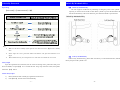
Reset the lock means initializing the information of the lock. After resetting the lock, all the
Password Users will be deleted, a new Master User Password with User Code ‘0’ and User Password
‘11111111 (8 times 1)’ will be created at the same time. The Master User Password can only be
modified, can not be deleted.
Operation:
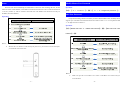
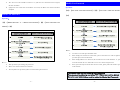
【#】+〖‘0’+‘11111111’〗+【#】+〖‘0’+‘3~12 digits new password’〗+【#】
Add User Password
Operation:
Except the unlocking, Master User mainly is used to add and delete users. Normally the lock can
support up to 9 Normal User Password which User Code are from ‘1’ to ‘9’. The password should be
3~12 digits and can not all be ‘0’.
Operation:
【#】+〖Master User Code‘0’+ Master User Password〗+【#】+〖New User Code + New User
Password〗+【#】
ØNote:
¾
Because the reset button is on the back of the front cover, you need to reset the lock before
you install the lock on the door.
ØNote:
¾
Make sure input the correct Master User Code ‘0’ and Master User Password. If not, The
lock will alarm.
-3-
-4-