1
¾
The ‘New User Code’ should be vacated ‘1~9’. If the New User Code have been occupied,
Modify User Password
the lock will alarm.
¾
If input New User Code same as the Master User Code, the Master User Password will be
Operation:
modified.
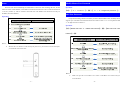
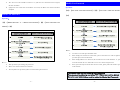
【#】+〖User Code +Old User Password〗+【#】+〖User Code + New User Password〗+
【#】
Delete User Password
Operation:
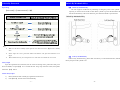
【#】+〖Master User Code ‘0’ + Master User Password〗+【#】+〖User Code want to be
deleted〗+【#】
ØNote:
¾
Two times User Code input should be same.
¾
When modify the Normal User Password, if the second time User Code is different from
first time input, the lock will alarm.
¾
ØNote:
When modify Master User Password, the second time User Code should be ‘0’, if not, the
lock will consider the new valid code as a new User Code with password.
¾
This operation is for deleting one password.
¾
Master User Password can not be deleted.
¾
You can follow the operation of Reset to delete all the password users.
-5-
¾
Know password only but do not know the User Code, please follow the advance operation
in the manual.
-6-