1
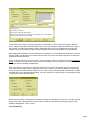
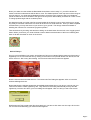
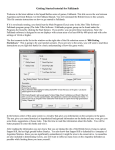
In the center of the screen is a window that gives you information on the scenarios in the game. Take the
time to read the information about this battle. Here you will see instantly the general size and time of play of
the scenario. You’ll also get the date, location and design notes to help you understand how to play this
firefight. Finally, there is historical data on the actual battle and source books listed if you are interested.
After reading the information we now know that we are taking the role of the British Royal Marines, which are
a part of Task Force Drysdale. The mission of this scenario is to rescue our fellow troops who are tied down
by Chinese Communist forces.
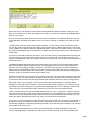
Once you hit the enter key or click on "Okay," you’ll see another menus of choices. This is the AI Selection
Dialog. In this menu you’ll pick which side you will be controlling. So choose "Manual" for the Allied AI. This
means you will be controlling the Allied side.
Next, click either on "Automatic" or "Automatic with FOW" for the Communist side. Now the computer will
control the Chinese troops. "FOW" means fog of war. If you choose it, you won’t be able to see any enemy
units until they come within the line of sight of one or more of your units. Playing with FOW turned on makes
the battle much more challenging and exciting. If you are, however, a first time player, it will be easier to play
in "Automatic" without the Fog of War.
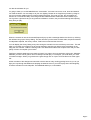
Notice the word "Rules" at the bottom of the Menu. Clicking on it will allow you to turn on or off other optional
things in the game. We’ll leave that alone for this time. After you have picked the method of play in the AI
Selection Dialog Menu, click on "Okay."
On the Battlefield
Page 2