1
Connections & Setup
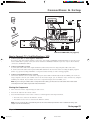
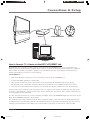
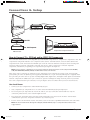
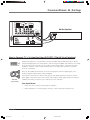
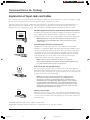
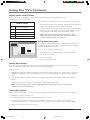
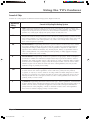
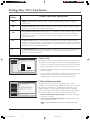
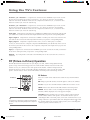
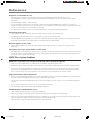
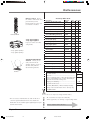
Choose Your Connection
There are several ways to connect your HDTV, depending on the components you want to connect and the quality of the
signal you want to achieve. Please use the following chart to determine which connection is best for you. Proceed to the
appropriate page and connect your TV. For more information about the relationship between the cables, jacks, and the
quality of the signal you see on your TV, go to page 18.
Components
Cables Needed
Video Connections
RE
WO
P
+L
OV
—
LO
Coaxial
Audio/video
Component
Composite
G-LINK
V
HC
HC
UN
EM
TV
DVD
VCR
WO
P
+L
OV
—
LO
V
HC
HC
UN
EM
TV
Coaxial
Audio/video
Component
Composite
G-LINK
er
RE
ite
ll
ate
iv
ece
R
VCR
S
Connection Title
Go to...
TV + DVD + VCR
page 10
TV + Satellite
Receiver + VCR
page 11
TV + Speakers Using
HDTV’s Center Channel
page 14
TV + A/V Receiver +
Speakers Using HDTV’s
Center Channel
pages 12,
13
TV + Router +
Computer + Cable
Modem
page 15
Audio Connections
Speaker wire
RE
W
OP
+L
OV
—
LO
V
HC
HC
UN
EM
TV
Spe
ake
rs
Coaxial
RE
WO
P
+L
OV
—
LO
V
HC
HC
UN
EM
TV
A/V
Audio/video
ver
ei
Rec
S
ke
pea
Speaker wire
rs
Digital/Network Connections
Coaxial
RE
WO
P
+L
OV
—
LO
V
HC
HC
UN
EM
TV
RE
WO
P
+L
OV
—
ter
Rou
Co
dem
Mo
r
e
ute Cabl
mp
Coaxial
LO
V
HC
HC
UN
EM
+L
OV
—
omp
1394 C
LO
V
HC
HC
UN
EM
TV
s
onent
TV
RE
WO
P
Ethernet
HD
p
t-to
Se
Box
1394 6-pin
(no power)
Coaxial
TV + Digital VCR1 +
Digital DVD1 + Digital
Video Recorder +
Digital VCR2 + Digital
DVD2
TV + HD Set-top Box
page 17
Digital Visual
Interface (DVI)
Chapter 1
RCA_DLP_CX
page 16
9
9
9/23/03, 2:49 PM