1
4.
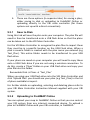
There are three options (in separate tabs) for saving a plan, either saving to disk or uploading to FieldMAP Online or uploading directly to the VRI main controller (for those systems set up with a direct connection). 9.3.1 Save to Disk
Using this tab will save the plan onto your computer. The plan file will need to then be transferred onto a USB flash drive so that the plans can be taken out to the VRI Main Controller. For the VRI Main Controller to recognise the plan files to import them they must be in a specific location on the USB Flash drive. When a plan is saved a folder is created with the plan name you entered (e.g Test_Plan). This entire folder needs to be transferred to your USB flash drive. If your plans are saved on your computer you will need to copy these onto a USB Flash drive if you are not using a wireless connection. To do this, create a ‘Plans’ folder on your USB Flash drive and copy your plan file into this folder. Removable Disk → Plans → ‘Test_Plan’ When you plug your USB flash drive into the VRI Main Controller and click ‘Upload Plan’ you should see your plan (e.g Test_Plan) in the list of plans available to import. For further details on uploading, selecting and deleting plans refer to your VRI Main Controller Instruction Manual supplied with your VRI system. 9.3.2 Uploading to FieldMAP Online
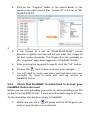
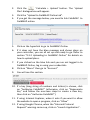
You can upload your map to FieldMAP Online so that you can control your VRI system from any internet connected device. To upload a plan to FieldMAP Online and your VRI controller, in FieldMAP: