1
Chapter 1: Getting Ready for Aqua Connect Terminal
Server
Preparing Your Mac OS X Server
Some Mac OS X Server Services should be turned off when using Aqua Connect
Terminal Server (ACTS). Below is a list of OS X Server Services that works with and
are supported by Aqua Connect, along with any special instructions that apply.
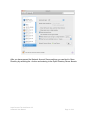
In order to prepare your Mac Snow Leopard Server, please ensure that the unsupported
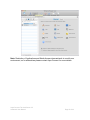
services are disabled. This may be done through applications within the Apple operating
system, such as Server Admin, System Preferences, etc. Please refer to Apple’s
documentation for further details. If you have any questions or need clarification, please
feel free to contact us.
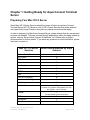
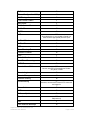
Mac OS 10.6 Server
Services Works with/Supported by Aqua
Connect Address Book Server Y AFP Client N AFP Server Y Airport N Auto Login Y Bonjour
Y DHCP Y DNS Y DVD & CD Sharing N Fast User Switching N Filesharing Y FileVault Y*
However, any System Administrator can view
any logged in user’s FileVault Firewall Y*
The appropriate ports must be open FTP Y iCal Server Y iChat Server Y Aqua Connect Terminal Server 3.5
Advanced User Manual
Page 3 of 42