1
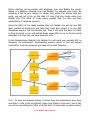
Before starting, let me explain with diagrams, how Link Builder Pro works.
Below is a diagram showing how Link Builder Pro submits your Links. By
including a link to your money (or target site) within the articles that you
write, you will get a link on the Web 2.0 sites that you create using Link
Builder Pro. The URL's of those newly created Web 2.0 sites are then
submitted to 2 'dispersal services'.
Using the URL's of the newly created sites Link Builder Pro will get one RSS
feed created at Hostmyrss and take that Feed and submit it to the RSS
directories listed in the Link Booster tab. Then it will send the Web 2.0 URL's
to Ping.fm which in turn will submit those same URL's to up to 40 plus social
sites/web 2.0 sites that you have accounts with.
In the Bookmarking Module, Link Builder Pro will send your website URL to
Onlywire, the automated bookmarking service, which in turn will submit
those URL's to all the accounts you have set up with Onlywire.
Note: To keep the diagram simple, it shows how the submissions work from
one Web 2.0 site in the Link Wheel (Open Link Wheel in this case), but in fact
you will be submitting the URL's of all the Web 2.0 sites that you just created.
Link Builder PRO Manual