1
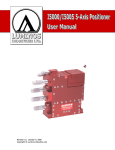
I3000/I3005 3-Axis Positioner User Manual
Getting Started
Actuator Control
The documentation for actuator control is included in the accompanying compact disc (if
applicable). This format allows easy access from within most software development
environments.
Mounting the Positioner
The I3000/I3005 mounts using ¼-20 screws on 1 inch and 4 inch centers (see Figure 5 –
I3000/I3005 Positioner (manual) Dimensions - Top & Bottom, pg 11)
Mounting Devices and Accessories
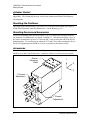
The device mounting plate (shown in Figure 2, pg. 4) is where devices and accessories
are mounted. For dimensions, see Figure 5 on page 11. Also shown in Figure 2 (pg. 4),
the center of rotation for all axes is 1 inch out and ½ inch up from the end of the device
mounting plate. To avoid having to adjust the X,Y and Z axes when rotating the device,
the device alignment point should be as close as possible to the rotation center.
Accessories
There are many accessories available including a contact sensing system for sensing very
small forces in the Z (focal) direction. Contact us if there is an accessory you require.
Device
Mounting
Plate
Y
Z
X
X Coarse
Adjustment
Y Coarse
Adjustment
Figure 2 – I3000/I3005 3-Axis Positioner
4
Luminos Industries Ltd.