1
13. Playback and Edit Converted Image Files
1. Press Left or Right key to highlight "Playback".
2. Press OK/Enter key to playback saved files on the viewer at 2
second intervals.
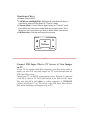
Playback Mode
Playback in Pause
3. Press OK/Enter key to pause slide show. Press Left/Right key to
advance image forward or backward manually.
4. Press OK/Enter key one more time to go to Edit menu.
In the Edit menu, highlight Exit, then press OK/Enter key to
resume Playback.
20
After the image is edited, select Save icon to save edited image. The
edited image will replace the original image in memory.
Highlight Home icon, press OK/Enter key to exit Playback mode,
or press Convert key two times to go to Home menu.
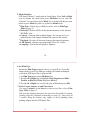
Playback/Edit Menu
Exit Edit menu, resume
Playback mode
Save edited image
Go to Home Menu
(Exit Playback)
Rotate +90
Rotate -90
Delete
21