1
9 Environment
5.2. How to set DIP on Wireless Smoke / Gas Sensors
(Transmitter)
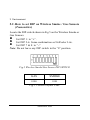
Locate the DIP switch shown in Fig.5 on the Wireless Smoke or
Gas Sensors.
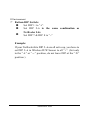
Œ Set DIP 1: to “+”.
• Set DIP 2-6: Same combination as NetFeeler Lite.
Ž Set DIP 7 & 8: to “–”
Note: Do not leave any DIP switch in the “0” position.
Fig.5 Wireless Smoke/Gas Sensor DIP SWITCH
GAS
SMOKE
0100
0101
Fig.5.1 Sensor Default Code
NetFeeler Lite