1
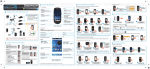
Handset set-up
1
2
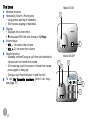
Take the batteries provided in the packaging.
Turn over your handset and press the top of the hatch to
release it.
3 Insert the batteries one by one according to their polarities as
indicated in the illustration opposite.
4 Fit the hatch to the handset by pushing it up until it is
completely closed.
5 The screen turns on. Place your handset on its base and fully
charge the batteries.
6 A beep sounds when you place the handset on the base.
The battery charging icon
moves to inform you that
charging is in progress. The icon display stops moving when the
batteries are charged.
Switching the handset on / off
To switch on the handset, give a long press on the key
.
To switch off the handset, give a long press on the key
The message Switch off HS? is displayed.
.
Press the key
11
to confirm.