1
www.sensis.ru
BST-3100 User’s Manual
5 Troubleshooting
When a malfunction occurs, refer to this chapter for solution. If you cannot find a solution in this
chapter, please contact your local dealer or manufacturer for assistance.
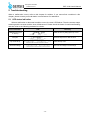
5.1 LED status indication
When a malfunction or abnormal condition occurs, the error LED flashes. Then the scanner stops
scanning and the scanner and the host will disconnect. Please check the times of continuous flashing,
and then refer to the following methods for solution.
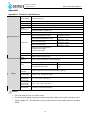
Error information
LED
Recovery
Calibration error (CIS
or sensor)
Clear the error by lifting up the top cover
Lift up the top cover, take the card away and
close the top cover to clear the error.
Card jam
Close the top cover.
Top cover lift-up
Recover the voltage to normal range
Abnormal voltage
- 13 -