1
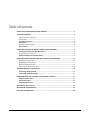
Table of Contents
LION’S GUIDE TO RESEARCH & THE LIBRARY ......................................................................1
TUTORIAL CONTENT ...............................................................................................................1
Tutorial Content Overview ................................................................................................................................. 1
Point Values ............................................................................................................................................................. 1
Learning Outcomes ............................................................................................................................................ 2
Key Points ................................................................................................................................................................ 3
Detailed Content Outline ..................................................................................................................................... 3
Quiz Content ........................................................................................................................................................... 7
USING THE TUTORIAL IN MYLMU CONNECT (BLACKBOARD) ............................................7
Locating the Tutorial in MyLMU Connect ............................................................................................... 8
Preparing Your Course Site ................................................................................................................................ 8
Default Settings and Customizations ....................................................................................................... 9
USING THE GRADE CENTER IN MYLMU CONNECT (BLACKBOARD) ................................. 12
Reading the Grade Center................................................................................................................................ 12
Modifying the Grade Center ............................................................................................................................ 13
Manually Entering Grades............................................................................................................................... 17
Export the Grade Center to Excel .................................................................................................................. 18
TROUBLESHOOTING TECHNOLOGY ..................................................................................... 18
Technology Requirements ........................................................................................................................... 19
Technology Troubleshooting ..................................................................................................................... 19
INCORPORATING THE TUTORIAL INTO COURSE CONTENT.............................................. 21
Sample Syllabus Text ..................................................................................................................................... 21
Discussion Topics ............................................................................................................................................. 22
Sample Assignments....................................................................................................................................... 25
APPENDIX A – KEY POINTS ................................................................................................... 26
APPENDIX B – ASSIGNMENTS ............................................................................................... 31
CONTACT INFORMATION ...................................................................................................... 38