1
8101/8102
User Manual
Initial Instrument
Setting
To avoid confusion as to which initial setting is to be used for each
test, it is required that the instrument be reset to factory default values
prior to each test. To reset the Model 8102 to factory defaults, use the
Factory Rest option in the Utility menu.
Recommended
Test Equipment
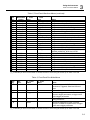
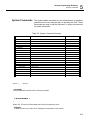
Recommended test equipment for troubleshooting, calibration and
performance checking is listed in Table 6-1 below. Test instruments
other than those listed may be used only if their specifications equal or
exceed the required characteristics.
Table -1, Recommended Test Equipment
Equipment
Model No.
Manufacturer
Oscilloscope (with jitter
package)
LT342
LeCroy
Distortion Analyzer
6900B
Krohn Hite
Digital Multimeter
2000
Keithley
Freq. Counter
6020R
Tabor Electronics
Spectrum Analyzer
E4411
HP
Pulse Generator (with
manual trigger)
8500
Tabor Electronics
Test Procedures
Use the following procedures to check the Model 8102 against the
specifications. A complete set of specifications is listed in Appendix A.
The following paragraphs show how to set up the instrument for the
test, what the specifications for the tested function are, and what
acceptable limits for the test are. If the instrument fails to perform
within the specified limits, the instrument must be calibrated or tested
to find the source of the problem.
Frequency
Accuracy
Frequency accuracy checks tests the accuracy of the internal
oscillators. Both channels same the same output frequency and the
same reference oscillators and therefore, the accuracy is tested on
channel 1 only.
6-4