1
MobilePro-Anschalte-Installations-Handbuch_4_2_13_EN
10/19/09 16:23:19
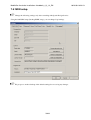
In the following example, an Mobile Pro 60/160 becomes an Mobile Pro 30/160 by changing the
configuration as outlined below. The handling with Mobile Pro 4/4 and Mobile Pro 8/8 is correspondingly.
As shown below, deactivate the last 2 boxes (corresponds to 2 ISDN controllers) and change the text in rows 2
and 8 of the "Name" column to "to PBX".
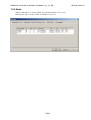
Then, set the operating mode NT under the ISDN tab in the Endpoint column, in rows 2.
41/63