1
Connections
Step
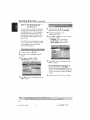
1: Set-up
the
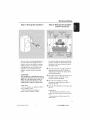
You _11/choose
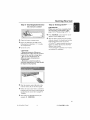
Eo hang die
the wall
the
fh'mly
A_ch
_o the rear
supplied
gcl_ewg
(no_ supplied}
securely
onto
using
H]oung
on the wall
For best possible surround
o[i
a[_d hook
the
the
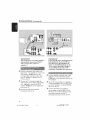
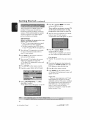
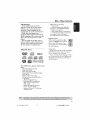
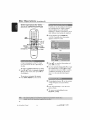
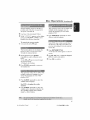
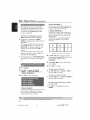
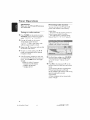
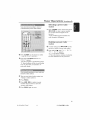
Place the fl'on_ left and rlgh_ speakers at
the
equal distances fl'om theTV
the mou[/_ed
SCFf_W
angle of approximately
the listening posldon
CAUTiONt
or injury
001 053 ht_5500_37
Eng47
Place the rear speakers at normal
Iis_ning ear level facing each other or
hang on the wall¸
to personnel
Hebful Hints:
The r_or _peol<er_are Inbeledos REARL
(_ or REARR (right]
The front spe_er_ are labeled as
FRONTL _
or FRONTR h_ht_
g
or
the DVD system so that the center
channel's sound ls localized
do it by yourself
in order
to
unexpected
damage
to the
equipment
and at an
45 degrees from
Place the cen_er _perukes-above theTV
You should get a qualified
person
to
attach the brackets
to _'he wail
DO
NOT
_void
the
listening po_ldon
a gCr_W
where
sound,all
speakers (excep_AV subwoofer) should
be placed at the _ame dis_nce from the
bracke_
of speakers
Then
spea K_F [g to be hung
speaker
speakers
supplied
|
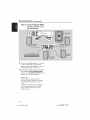
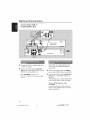
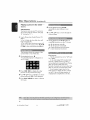
Step 2: Placing the speakers
and AV subwoofer
speakers
O
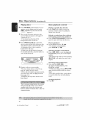
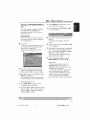
Place theAV subwoofer
on the floor
near
theT_
Hebfi2t Hints:
ovoidmag_eti( interference,do not
po_t_n the Frontspeal<ersmo dose _ y_r
T_
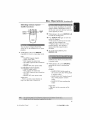
AIbw odequatevenerationaround _e
DVD sy_tem
13/04/0_4_*_ 5 14781