1
6.4 Status Monitor
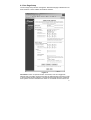
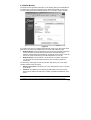
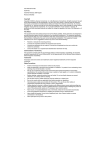
The status monitor provides information on the working status of the PalmRouter.
It contains the connection information for the WAN and LAN side of the router.
The term WAN (Wide Area Network) refers to the connection going to the ISP.
Figure 16
If you select the “Get an IP address automatically” option in the One Page Setup
page, then you will see two addition buttons on the Status Monitor page:
WAN IP Release: This will release the ISP connection information preparing
it to be renewed. Although several values will be cleared including IP
Address, Subnet Mask, Default Gateway and DCHP Server values, some will
remain the same because they are static addresses from the ISP.
WAN IP Renew: This will update or renew the ISP connection information.
For ISPs that have short DHCP lease times, this can help maintain the
connection.
On the bottom of the page are two other buttons that allows you to view other
statistics related to the connection.
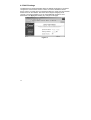
DHCP Clients Table: This allows you to view DHCP clients on the LAN side
of the router.
Statistics: This allows you to view the general traffic on the route, and to
display the IP address as well as the number of packets translated for each
client.
Note: The screens shown above for the Status Monitor do not show actual
connection. During an actual connection, IP address information will be listed.
19