1
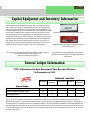
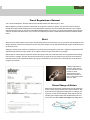
Page 5 Capital Equipment and Inventory Information Capital equipment has always been tagged with a capital ID tag number that is a white color and says “UW Platteville Capital.” This summer Infor- mation Technology Services started tagging their assets. The ITS asset tag number is a burnt orange color and says “Property of UW-Platteville.” This has become a confusing issue to campus employees because they think that the equipment is already capitalized for capital inventory when they see the burnt orange ID tag on the equipment. The equipment has not been capitalized in the UW Capital Inventory System until the white “UW Platte- ville Capital” ID tag is on the equipment. As it turns out, some pieces of equipment may end up with both of these ID tag numbers on one piece of equipment. To the right is an example of the two ID tag numbers. The website for Capital Equipment and Inventory has been updated. You can visit the website and check it out at: http://www.uwplatt.edu/inventory Capital Equipment Inventory ID Tag (white color) ITS Asset ID Tag (Information Technology Servicesburnt orange color) Any questions on Capital Equipment and Inventory, please contact Susie Rowe at: [email protected] or call 342-6171. General Ledger Information FYI - A Reminder On New Procedures That Became Effective In November of 2013 Authorized Individual Manager Additional Signator Direct Retro (Salary Transfer) X X General Ledger Transfer Form X X Catering Invoices X X Supervisor WebNow VC Admin Services General Ledger An “X” in a column indicates which individual is authorized to sign. Only one authorized individual is required to sign the document. For example, on the General Ledger Transfer Form, the manager OR additional signator can sign. If the manager of an account wishes to designate someone as an additional signator, please e-mail Lindsey VanMatre at [email protected] with the change. Approvals that are accepted are written signatures on the documents that are then scanned and sent via e-mail to the General Ledger e-mail, an e-mail approval, or an electronic signature. All above listed forms must be electronically sent, no more paper copies.