1
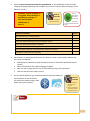
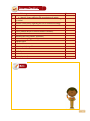
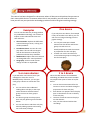
3. Open the Peer-Assessment Role Play spreadsheet in your Module 3 resource folder using the Kingsoft Office app and complete the scores in Column B by awarding a mark between 1 and 5. Excellent, cannot be better: 5 Very good, above average: 4 Satisfactory, average: 3 Fair, but not quite satisfactory: 2 Poor: 1 How-to tutorials How to use Kingsoft Office User Manual. Role Play checklist This an example of formative assessment. This assessment tool is a scoring checklist done by peers. Score You can identify a main problem They are convincing in their roles They are demonstrating variety of relevant issues They are working toward to a solution The speech was clear with appropriate volume and tone The role play captured and maintained audience interest You learnt a lot from this role play 4. Participate in a whole group discussion om how to create a school policy addressing the issues role played: Should learners be able to take the tablets home or should the tablets be kept at school? What should we do if a student damage a tablet? How can we arrange the fair use of the mobikit among all the teachers? How can we deal with safety issues? 5. Use the ES File Explorer app and bluetooth the role play videos to the facilitator (or the facilitator will collect the videos using a USB Cable and his/her laptop). How-to tutorials How to Bluetooth a file using ES File Explorer. How to transfer files and folders between your tablet and PC. 7