1
Chapter 11
Loops and Charts
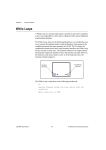
terminal. As a reminder, G places a gray dot, called a coercion dot, on the
terminal where the conversion takes place.
For example, consider the For Loop count terminal. The terminal
representation is a long integer. If you wire a double-precision,
floating-point number to the count terminal, G converts the number to a
long integer. Notice the gray dot in the count terminal of the first For Loop.
Gray Dot
Note
When the VI converts floating-point numbers to integers, it rounds to the nearest
integer. If a number is exactly halfway between two integers, it is rounded to the
nearest even integer. For example, the VI rounds 6.5 to 6, but rounds 7.5 to 8. This
is an IEEE standard method for rounding numbers. See the IEEE Standard 754
for details.
Activity 11-7. Use a For Loop
Your objective is to use a For Loop and shift registers to calculate the
maximum value in a series of random numbers.
Front Panel
1.
BridgeVIEW User Manual
Open a new front panel and add the objects shown in the following
illustration.
11-22
© National Instruments Corporation