1
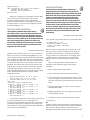
The Last Name and First Name fields are sorted
alphabetically and made invisible so they control the sort
order but don’t appear in the report. A unique field such as
ID Number must be included for this technique to work.
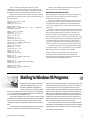
When you’ve filled out the Column/Sort Spec, press F8
for the Derived Columns screen, and create the following 10
derived columns:
Heading: Duplicate Last Name
Formula No. 1: #1
Column/Sort Spec: 500,I
Heading: Name & Code
Formula No. 2: @Txt(#1=#500, #1+", "+#2+" - "+@Str(#4))
Column/Sort Spec: 25,I
Heading: Prior First Name
Formula No. 3: #2
Column/Sort Spec: 490,I
Heading: Prior Code
Formula No. 4: #4
Column/Sort Spec: 480,I
Heading: Matching Last Name
Formula No. 5: @Txt(#25<>#470,#500)
Column/Sort Spec: 30,C
Heading: This NC Dupe
Formula No. 6: #25
Column/Sort Spec: 470,I
Heading: Prior City
Formula No. 7: #3
Column/Sort Spec: 460,I
Heading: City
Formula No. 8: @Txt(#25<>#470,#460)
Column/Sort Spec: 33
When you’ve added all 10 derived columns, press F10,
select your printer, and print the report.
How the derived columns work
Three techniques come into play in this report design. First,
you have to sort the records by last name, which your
Column/Sort Spec takes care of.
Second, you must have Q&A check to see if the current
record has the same last name as the previous record. You
accomplish this with a duplicate last name field (derived
column 1) that Q&A doesn’t evaluate until it processes the
next record.
Third, you delay the printing. If the records match, then
Q&A creates a column value consisting of the last name, first
name, and ID number (derived column 2). The data you
want to print from each subsequent record is prepared in
derived columns 1 (Last Name), 3 (First Name), 4 (ID), and 7
(City). The delayed printing is controlled by checking that in
a record where the last name is the same as the previous
record, the combination value created in derived column 2
doesn’t match the one in the last record (@Txt(#25<>#470).
Admittedly, the logic isn’t for the timid. But the results
are accurate and easy to work with when you can’t afford to
risk tossing out the wrong duplicate records. QA
Bill Halpern is executive vice president of Professional Computer
Technology Associates in Newtown, Pennsylvania. Bill has been
designing and installing Q&A business applications for the past nine
years. 215-598-8440, [email protected].
Heading: Code
Formula No. 9: @Txt(#25<>#470,@Str(#480))
Column/Sort Spec: 36
Heading: First Name
Formula No. 10: @Txt(#25<>#470,#490)
Column/Sort Spec: 31
Quick
Tip
Shelling to Windows 95 Programs
With Windows 95 and Q&A 5.0’s External
Programs and @Shell features, you can
shell out to a Windows program from
Q&A, do some work in the other program,
then return to Q&A and the screen you were on. You might want
to run a mail merge using MS Word for Windows, or transfer data
to or from an Excel spreadsheet this way.
If you’re running Q&A in full-screen mode, you’ll find yourself
on the Windows 95 desktop with Q&A minimized on the task bar
when you exit the external program you launched from Q&A.
You’ll have to click on the Q&A button on the task bar to return to
Q&A.
If you’re launching a Windows program from a specific Q&A
record, you might like to return to that record automatically
The Quick Answer
●
February 1997
when you exit the Windows program—avoiding the task bar and
the additional mouse click.To do this, run Q&A in a window, not
in full screen mode.You can toggle between full screen and
window mode by pressing Alt-Enter. When you first toggle Q&A
into a window, it might be in too small a window. To enlarge the
window, click on the Maximize/Restore icon (the middle icon in
the upper right-hand corner of the title bar). You can then select
a larger font for your Q&A window by clicking on the font tool
(the leftmost selection on the tool bar).The 10 x 18 and 10 x 20
fonts look similar enough to Q&A running full screen.
If you exit Q&A while it’s running in a window, Windows 95
starts Q&A in the same window the next time. But you can always
toggle between window and full screen mode at any time. QA
Gordon Meigs, PCTA, Newtown, PA
9