1
557
Digital Image Processing for Quality Control on Injection Molding Products
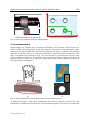
for camera, zoom and lights (that have been stored earlier), and all the information about the
analysis, like calibration, templates for image alignment and so on.
USER INTERFACE
BACKGROUND
SOFTWARE
DATA
STORAGE
PARAMETER
SETTINGS
IMAGE
ACQUISITION
IMAGE
PROCESSING
a)
b)
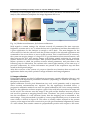
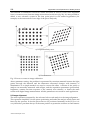
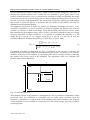
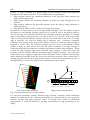
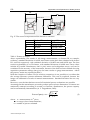
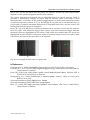
Fig. 1. a) Hardware architecture; b) Software architecture
With regard to camera settings, the software controls all parameters like time exposure,
brightness, contrast and so on, so when the best mix of parameters had been determined for
a given application, for the analysis is enough to call it back. The same happens for the
zoom control; in fact the software loads the position stored for the selected application and
commands to the zoom driver to move in that position. This is useful because, if necessary,
the system can acquire images of a large FOV to get information about certain features, and
then narrows the FOV and acquire images with higher spatial resolution for capturing
smaller details in the observed object. Each position utilised has been calibrated sooner.
When a position is called, the software restores related parameters, and pass them to the
following step for elaboration. The software also control light intensity, in the same way of
previous components. So, all the information are passed to the acquisition step and then
stored in the acquired images.
After this overview of the system, it’s proper to describe two functions that are used in all
applications before any other operation: image calibration and image alignment.
2.1 Image calibration
Using digital images, two kind of calibration are necessary: spatial calibration (always ) and
illumination and acquisition parameters calibration (depending on material and shape of
the pieces to be analysed).
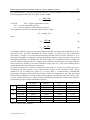
Spatial calibration convert pixel dimensions into real world quantities and is important
when accurate measurements are required. For the application described below, a
perspective calibration method was used for spatial calibration (NI Vision concept manual,
2005). So, the calibration software requires a grid of dots with known positions in image and
in real world. The software uses the image of the grid and the distance between points in
real world to generate a mapping function that “translates” the pixel coordinates of dots
into the coordinates of a real reference frame; then the mapping can be extended to the
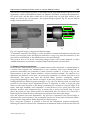
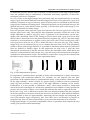
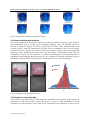
entire image. Using this method is possible to correct perpendicularity error of camera and
scene which is showed in figure 2a. This effect is actually rather reduced in the present
system, as the support has been conceived to provide good mechanical alignment by means
of a stiff column, that sustains camera in perpendicular position with respect to the scene.
www.intechopen.com