1
Subscribe and Install: (A Quick Start guide)
Due to some limitations within Google Wallet,
we recommend signing up from a computer
rather than from a mobile device. Retain the
receipt page for the initial subscription order
and set a reminder to periodically update
payment information, as required.
Airport Database and Chart Subscription:
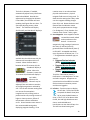
1. Manage Google Wallet Access wallet.google.com/manage in a
computer browser to verify payment
information is up to date. Credit card
and password information is
confidential to Google Wallet and is
never provided to DroidEFB. staff.
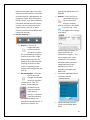
2. Choose a Subscription Option – One
data subscription is valid for a single
user on multiple devices, such as a
tablet and a phone. Use the link below
or visit www.droidefb.com to choose a
subscription option (subscriptions may
be cancelled at any time):
Option 1, standard:
A 30 day free trial is available per user,
for evaluation prior to purchase.
Option 2, standard: (only www.droidefb.com)
A monthly subscription, renewed
automatically, priced at $6.99/mo.
Option 3, standard:
An annual subscription, priced at
$74.99/yr.
Option 4, premium:
A premium subscription, with Georeferenced approach plates and taxi
diagrams priced at $149.99/yr.
Note:
Visit our website for special offers and
promotional activity!
Upgrade your subscription at any time. If you
start a new subscription, remember to cancel
the previous one via Google Wallet to prevent
duplicate billing. Need help or have questions
about a refund for an unused portion of a
purchase? Contact [email protected] if
you ever have questions or need help managing
your account.
Whether purchasing through Google Play, in
app or via our website, all users are authorized
via Google.
DroidEFB Application Installation:
1. Download - After choosing a standard
or premium data option, download and
install DroidEFB with your device. If
downloaded from our website, the
required DroidEFB.apk can be found in
your devices downloads folder.
OR
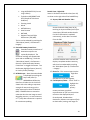
Install - Touch the DroidEFB.apk to
install DroidEFB. Optionally, DroidEFB
can be downloaded and installed from
the Google Play Store. The Play Store
icon is located in device
applications and will direct
you to the Google Play Store,
where you can search the
keyword “DroidEFB” and choose the
install option.
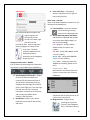
Open -Touch “Open” after installation
or locate the DroidEFB launcher icon on
your device. After installation, the
DroidEFB icons will be located in the
device “Applications”. Long press an
icon to move it to your device home
screen. Touch the icon to launch the
app, accept the EULA and navigate
through the brief tutorial.
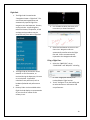
2. Authentication – Your subscription is
authenticated using the Google account
associated with your device or devices.
If the Google account used for the
subscription is different than the one on
*Subscription options and pricing are as of June, 2015.
5