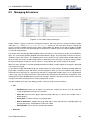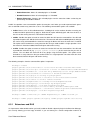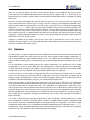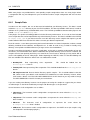
1
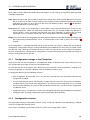
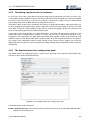
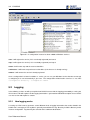
Quest One Quick Connect
Virtual Directory Server
6.0.3
User’s Reference Manual
c 2012 Quest Software, Inc.
ALL RIGHTS RESERVED.
This guide contains proprietary information protected by copyright. The software described in this guide is
furnished under a software license or nondisclosure agreement. This software may be used or copied only in
accordance with the terms of the applicable agreement. No part of this guide may be reproduced or transmitted
in any form or by any means, electronic or mechanical, including photocopying and recording for any purpose
other than the purchaser’s personal use without the written permission of Quest Software, Inc.
The information in this document is provided in connection with Quest products. No license, express or implied,
by estoppel or otherwise, to any intellectual property right is granted by this document or in connection with
the sale of Quest products. EXCEPT AS SET FORTH IN QUEST’S TERMS AND CONDITIONS AS SPECIFIED IN THE LICENSE AGREEMENT FOR THIS PRODUCT, QUEST ASSUMES NO LIABILITY WHATSOEVER AND DISCLAIMS ANY EXPRESS, IMPLIED OR STATUTORY WARRANTY RELATING TO ITS PRODUCTS INCLUDING, BUT NOT LIMITED TO, THE IMPLIED WARRANTY OF MERCHANTABILITY, FITNESS
FOR A PARTICULAR PURPOSE, OR NON-INFRINGEMENT. IN NO EVENT SHALL QUEST BE LIABLE FOR
ANY DIRECT, INDIRECT, CONSEQUENTIAL, PUNITIVE, SPECIAL OR INCIDENTAL DAMAGES (INCLUDING, WITHOUT LIMITATION, DAMAGES FOR LOSS OF PROFITS, BUSINESS INTERRUPTION OR LOSS
OF INFORMATION) ARISING OUT OF THE USE OR INABILITY TO USE THIS DOCUMENT, EVEN IF QUEST
HAS BEEN ADVISED OF THE POSSIBILITY OF SUCH DAMAGES. Quest makes no representations or warranties with respect to the accuracy or completeness of the contents of this document and reserves the right to
make changes to specifications and product descriptions at any time without notice. Quest does not make any
commitment to update the information contained in this document.
If you have any questions regarding your potential use of this material, contact:
Quest Software World Headquarters
LEGAL Dept
5 Polaris Way
Aliso Viejo, CA 92656
email: [email protected]
Refer to our Web site (www.quest.com) for regional and international office information.
Trademarks
Quest, Quest Software, the Quest Software logo, Simplicity at Work are trademarks and registered trademarks of Quest Software, Inc. For a complete list of Quest Software’s trademarks, see
http://www.quest.com/legal/trademarks.aspx. Other trademarks are property of their respective owners.
Contacting Quest Software
Email:
[email protected]
Mail:
Quest Software, Inc.
World Headquarters
5 Polaris Way
Aliso Viejo, CA 92656
USA
Web site:
www.quest.com
Refer to our Web site for regional and international office information.
Quest Support:
Quest Support is available to customers who have a trial version of a Quest product or who have purchased
a Quest product and have a valid maintenance contract. Quest Support provides unlimited 24x7 access to
SupportLink, our self-service portal. Visit SupportLink at http://support.quest.com.
From SupportLink, you can do the following:
• Retrieve thousands of solutions from our online Knowledgebase
• Download the latest releases and service packs
• Create, update and review Support cases
View the Global Support Guide for a detailed explanation of support programs, online services, contact information, policies and procedures. The guide is available at: http://support.quest.com.
About Quest Software
Quest Software simplifies and reduces the cost of managing IT for more than 100,000 customers worldwide.
Our innovative solutions make solving the toughest IT management problems easier, enabling customers to
save time and money across physical, virtual and cloud environments. For more information about Quest go to
www.quest.com.
User Reference Manual
iii
Contents
1 GENERAL INFO
1
1.1 Who Should Read This Manual . . . . . . . . . . . . . . . . . . . . . . . . . . . . . . . . . .
1
1.2 Conventions Used In This Manual . . . . . . . . . . . . . . . . . . . . . . . . . . . . . . . . .
1
2 INTRODUCTION
2
2.1 What is QC VDS ? . . . . . . . . . . . . . . . . . . . . . . . . . . . . . . . . . . . . . . . . .
2
2.1.1 What can you do with QC VDS? . . . . . . . . . . . . . . . . . . . . . . . . . . . . . .
2
2.2 What is DSGUI? . . . . . . . . . . . . . . . . . . . . . . . . . . . . . . . . . . . . . . . . . .
3
2.3 How DSGUI works . . . . . . . . . . . . . . . . . . . . . . . . . . . . . . . . . . . . . . . . .
3
2.3.1 Local configurations
. . . . . . . . . . . . . . . . . . . . . . . . . . . . . . . . . . . .
2.3.2 Remote instance by copying configuration files
4
. . . . . . . . . . . . . . . . . . . . . .
4
2.3.3 Remote instances with the Remote Administration Tool . . . . . . . . . . . . . . . . . .
5
3 FIRST STEPS
7
3.1 Starting DSGUI . . . . . . . . . . . . . . . . . . . . . . . . . . . . . . . . . . . . . . . . . . .
7
3.1.1 Linux / Solaris / AIX . . . . . . . . . . . . . . . . . . . . . . . . . . . . . . . . . . . . .
7
3.1.2 Windows . . . . . . . . . . . . . . . . . . . . . . . . . . . . . . . . . . . . . . . . . .
7
3.2 DSGUI main window . . . . . . . . . . . . . . . . . . . . . . . . . . . . . . . . . . . . . . . .
7
3.2.1 The Menu . . . . . . . . . . . . . . . . . . . . . . . . . . . . . . . . . . . . . . . . . .
8
3.2.2 The Toolbar . . . . . . . . . . . . . . . . . . . . . . . . . . . . . . . . . . . . . . . . .
10
3.2.3 The Configuration Selector . . . . . . . . . . . . . . . . . . . . . . . . . . . . . . . . .
12
3.2.4 The Navigator . . . . . . . . . . . . . . . . . . . . . . . . . . . . . . . . . . . . . . . .
12
3.2.5 The Configuration Panel . . . . . . . . . . . . . . . . . . . . . . . . . . . . . . . . . .
13
3.2.6 The Message Output Area . . . . . . . . . . . . . . . . . . . . . . . . . . . . . . . . .
14
3.3 Preferences . . . . . . . . . . . . . . . . . . . . . . . . . . . . . . . . . . . . . . . . . . . . .
15
3.3.1 Environment
. . . . . . . . . . . . . . . . . . . . . . . . . . . . . . . . . . . . . . . .
15
. . . . . . . . . . . . . . . . . . . . . . . . . . . . . . . . . . . . . . . . . .
17
3.3.3 Recent Config . . . . . . . . . . . . . . . . . . . . . . . . . . . . . . . . . . . . . . . .
18
3.3.4 Editing
18
3.3.2 Warning
. . . . . . . . . . . . . . . . . . . . . . . . . . . . . . . . . . . . . . . . . . .
iv
CONTENTS
3.3.5 Running . . . . . . . . . . . . . . . . . . . . . . . . . . . . . . . . . . . . . . . . . . .
18
3.3.6 LDAP Browser Preferences . . . . . . . . . . . . . . . . . . . . . . . . . . . . . . . . .
19
3.3.7 Admin Server Preferences . . . . . . . . . . . . . . . . . . . . . . . . . . . . . . . . .
20
3.4 LDAP Browser . . . . . . . . . . . . . . . . . . . . . . . . . . . . . . . . . . . . . . . . . . .
23
3.4.1 Starting the LDAP Browser . . . . . . . . . . . . . . . . . . . . . . . . . . . . . . . . .
23
3.4.2 The Internal LDAP Browser . . . . . . . . . . . . . . . . . . . . . . . . . . . . . . . . .
24
3.5 Generic Attribute Editor
. . . . . . . . . . . . . . . . . . . . . . . . . . . . . . . . . . . . . .
26
3.5.1 Adding new Attributes or Values . . . . . . . . . . . . . . . . . . . . . . . . . . . . . .
26
3.5.2 Removing Attributes or Values . . . . . . . . . . . . . . . . . . . . . . . . . . . . . . .
27
3.5.3 Inserting Attributes or Values . . . . . . . . . . . . . . . . . . . . . . . . . . . . . . . .
27
4 CONFIGURATIONS
29
4.1 Creating Configurations . . . . . . . . . . . . . . . . . . . . . . . . . . . . . . . . . . . . . .
29
4.1.1 Configuration storage in the Filesystem . . . . . . . . . . . . . . . . . . . . . . . . . .
30
4.1.2 Configuration selector
. . . . . . . . . . . . . . . . . . . . . . . . . . . . . . . . . . .
30
4.1.3 Opening a Configuration in DSGUI from the Command Line . . . . . . . . . . . . . . . .
31
4.2 Global Parameters . . . . . . . . . . . . . . . . . . . . . . . . . . . . . . . . . . . . . . . . .
32
4.2.1 Debug Level for automatic servergroups . . . . . . . . . . . . . . . . . . . . . . . . . .
32
4.2.2 Global Paramaters . . . . . . . . . . . . . . . . . . . . . . . . . . . . . . . . . . . . .
32
4.2.3 Running Parameters . . . . . . . . . . . . . . . . . . . . . . . . . . . . . . . . . . . .
34
4.2.4 SASL . . . . . . . . . . . . . . . . . . . . . . . . . . . . . . . . . . . . . . . . . . . .
35
4.2.5 Supervisors . . . . . . . . . . . . . . . . . . . . . . . . . . . . . . . . . . . . . . . . .
35
4.3 Health Monitoring . . . . . . . . . . . . . . . . . . . . . . . . . . . . . . . . . . . . . . . . . .
37
4.3.1 How Health Monitoring works
. . . . . . . . . . . . . . . . . . . . . . . . . . . . . . .
37
4.3.2 The LDAP Health Monitoring Configuration Panel . . . . . . . . . . . . . . . . . . . . .
37
4.3.3 The HTTP Health Monitoring Configuration Panel . . . . . . . . . . . . . . . . . . . . .
39
4.4 The Administration Port
. . . . . . . . . . . . . . . . . . . . . . . . . . . . . . . . . . . . . .
40
4.4.1 Graceful shutdown . . . . . . . . . . . . . . . . . . . . . . . . . . . . . . . . . . . . .
41
4.4.2 Statistics . . . . . . . . . . . . . . . . . . . . . . . . . . . . . . . . . . . . . . . . . .
41
4.4.3 Controlling Log Levels for live instances . . . . . . . . . . . . . . . . . . . . . . . . . .
42
4.4.4 The Administration Port configuration panel . . . . . . . . . . . . . . . . . . . . . . . .
42
5 INPUT
44
5.1 Creating a Listener . . . . . . . . . . . . . . . . . . . . . . . . . . . . . . . . . . . . . . . . .
45
5.2 Listener Configuration . . . . . . . . . . . . . . . . . . . . . . . . . . . . . . . . . . . . . . .
45
5.2.1 Main Listener Properties . . . . . . . . . . . . . . . . . . . . . . . . . . . . . . . . . .
45
5.2.2 Canonicalization . . . . . . . . . . . . . . . . . . . . . . . . . . . . . . . . . . . . . .
48
User Reference Manual
v
CONTENTS
5.2.3 SSL Parameters . . . . . . . . . . . . . . . . . . . . . . . . . . . . . . . . . . . . . .
49
5.2.4 SASL Parameters . . . . . . . . . . . . . . . . . . . . . . . . . . . . . . . . . . . . . .
51
5.2.5 SPNEGO Parameters
. . . . . . . . . . . . . . . . . . . . . . . . . . . . . . . . . . .
52
5.2.6 Stages attached to this Listener . . . . . . . . . . . . . . . . . . . . . . . . . . . . . .
52
5.2.7 Virtual Tree . . . . . . . . . . . . . . . . . . . . . . . . . . . . . . . . . . . . . . . . .
54
5.3 How To Use Virtual Trees
. . . . . . . . . . . . . . . . . . . . . . . . . . . . . . . . . . . . .
55
5.3.1 Building a tree on a listener . . . . . . . . . . . . . . . . . . . . . . . . . . . . . . . . .
56
5.3.2 Mount Point Roots . . . . . . . . . . . . . . . . . . . . . . . . . . . . . . . . . . . . .
57
5.3.3 Mount Points and Virtual Entries inside of existing Mount Points . . . . . . . . . . . . . .
57
5.3.4 How searches below the root base are treated . . . . . . . . . . . . . . . . . . . . . . .
57
5.3.5 How to handle searches on the Root DSE . . . . . . . . . . . . . . . . . . . . . . . . .
57
5.3.6 Dealing with BIND requests
. . . . . . . . . . . . . . . . . . . . . . . . . . . . . . . .
58
5.3.7 Virtual Tree Sample . . . . . . . . . . . . . . . . . . . . . . . . . . . . . . . . . . . . .
58
6 OUTPUT
61
6.1 What is a servergroup . . . . . . . . . . . . . . . . . . . . . . . . . . . . . . . . . . . . . . .
61
6.2 Why use servergroups . . . . . . . . . . . . . . . . . . . . . . . . . . . . . . . . . . . . . . .
62
6.3 Types of servergroups . . . . . . . . . . . . . . . . . . . . . . . . . . . . . . . . . . . . . . .
63
6.4 Automatic Servergroups . . . . . . . . . . . . . . . . . . . . . . . . . . . . . . . . . . . . . .
63
6.4.1 LDAP and LDAPS Server Groups . . . . . . . . . . . . . . . . . . . . . . . . . . . . .
64
6.4.2 HTTP and HTTPS Server Groups . . . . . . . . . . . . . . . . . . . . . . . . . . . . .
64
6.4.3 List of Servers
. . . . . . . . . . . . . . . . . . . . . . . . . . . . . . . . . . . . . . .
65
6.4.4 SSL Parameters . . . . . . . . . . . . . . . . . . . . . . . . . . . . . . . . . . . . . .
65
6.4.5 SASL . . . . . . . . . . . . . . . . . . . . . . . . . . . . . . . . . . . . . . . . . . . .
67
6.4.6 Reliability / Performance . . . . . . . . . . . . . . . . . . . . . . . . . . . . . . . . . .
68
6.4.7 Connection Pooling . . . . . . . . . . . . . . . . . . . . . . . . . . . . . . . . . . . . .
72
6.4.8 Session Server Affinity . . . . . . . . . . . . . . . . . . . . . . . . . . . . . . . . . . .
75
6.4.9 Health Check . . . . . . . . . . . . . . . . . . . . . . . . . . . . . . . . . . . . . . . .
76
6.4.10 Relational Database Access . . . . . . . . . . . . . . . . . . . . . . . . . . . . . . . .
77
6.4.11 ODBC Datasource Sample . . . . . . . . . . . . . . . . . . . . . . . . . . . . . . . . .
84
6.5 Manual Servergroups
. . . . . . . . . . . . . . . . . . . . . . . . . . . . . . . . . . . . . . .
85
6.5.1 Servers tab . . . . . . . . . . . . . . . . . . . . . . . . . . . . . . . . . . . . . . . . .
85
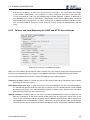
6.5.2 Failover and Load Balancing for LDAP and HTTP Server Groups . . . . . . . . . . . . .
86
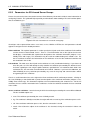
6.5.3 Parameters for SSL-based Server Groups . . . . . . . . . . . . . . . . . . . . . . . . .
87
User Reference Manual
vi
CONTENTS
7 PROCESSING
88
7.1 Stage Model . . . . . . . . . . . . . . . . . . . . . . . . . . . . . . . . . . . . . . . . . . . .
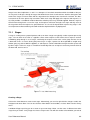
7.1.1 Stages
. . . . . . . . . . . . . . . . . . . . . . . . . . . . . . . . . . . . . . . . . . .
7.1.2 Condition Model
88
89
. . . . . . . . . . . . . . . . . . . . . . . . . . . . . . . . . . . . . .
90
7.2 Types of stages . . . . . . . . . . . . . . . . . . . . . . . . . . . . . . . . . . . . . . . . . . .
91
7.2.1 Automatic Stages . . . . . . . . . . . . . . . . . . . . . . . . . . . . . . . . . . . . . .
91
7.2.2 Manual Stages . . . . . . . . . . . . . . . . . . . . . . . . . . . . . . . . . . . . . . .
94
8 PLUGINS AND SAMPLES
100
8.1 Plugin Protocols and Groupings . . . . . . . . . . . . . . . . . . . . . . . . . . . . . . . . . . 100
8.2 Plugin Documentation and Help . . . . . . . . . . . . . . . . . . . . . . . . . . . . . . . . . . 101
8.3 Managing Extensions
. . . . . . . . . . . . . . . . . . . . . . . . . . . . . . . . . . . . . . . 102
8.3.1 Extensions and RAS . . . . . . . . . . . . . . . . . . . . . . . . . . . . . . . . . . . . 103
8.4 Samples . . . . . . . . . . . . . . . . . . . . . . . . . . . . . . . . . . . . . . . . . . . . . . 104
8.4.1 Sample Data . . . . . . . . . . . . . . . . . . . . . . . . . . . . . . . . . . . . . . . . 105
8.4.2 Working with Samples . . . . . . . . . . . . . . . . . . . . . . . . . . . . . . . . . . . 106
8.4.3 Complex Scenario . . . . . . . . . . . . . . . . . . . . . . . . . . . . . . . . . . . . . 106
9 RUNNING
108
9.1 How to Start / Stop an Instance . . . . . . . . . . . . . . . . . . . . . . . . . . . . . . . . . . 108
9.1.1 How configurations are started . . . . . . . . . . . . . . . . . . . . . . . . . . . . . . . 108
9.1.2 How configurations are stopped . . . . . . . . . . . . . . . . . . . . . . . . . . . . . . 108
9.1.3 Running a QC VDS Instance as a Windows Service . . . . . . . . . . . . . . . . . . . . 109
9.2 Logging . . . . . . . . . . . . . . . . . . . . . . . . . . . . . . . . . . . . . . . . . . . . . . . 110
9.2.1 How logging works . . . . . . . . . . . . . . . . . . . . . . . . . . . . . . . . . . . . . 110
9.2.2 Controlling log levels on-the fly . . . . . . . . . . . . . . . . . . . . . . . . . . . . . . . 111
9.2.3 Managing logging . . . . . . . . . . . . . . . . . . . . . . . . . . . . . . . . . . . . . . 111
10 REMOTE ADMINISTRATION SERVER (RAS)
113
10.1 Overview . . . . . . . . . . . . . . . . . . . . . . . . . . . . . . . . . . . . . . . . . . . . . . 113
10.1.1 Purpose Of RAS . . . . . . . . . . . . . . . . . . . . . . . . . . . . . . . . . . . . . . 113
10.1.2 What You Can Do With RAS . . . . . . . . . . . . . . . . . . . . . . . . . . . . . . . . 114
10.1.3 How RAS Works . . . . . . . . . . . . . . . . . . . . . . . . . . . . . . . . . . . . . . 114
10.2 Operation (start / stop) . . . . . . . . . . . . . . . . . . . . . . . . . . . . . . . . . . . . . . . 115
10.2.1 Using the command line . . . . . . . . . . . . . . . . . . . . . . . . . . . . . . . . . . 115
10.2.2 Using the GUI . . . . . . . . . . . . . . . . . . . . . . . . . . . . . . . . . . . . . . . . 116
10.3 Configuration . . . . . . . . . . . . . . . . . . . . . . . . . . . . . . . . . . . . . . . . . . . . 120
10.3.1 Main Configuration File . . . . . . . . . . . . . . . . . . . . . . . . . . . . . . . . . . . 121
User Reference Manual
vii
CONTENTS
10.3.2 Listener SSL Certificates . . . . . . . . . . . . . . . . . . . . . . . . . . . . . . . . . . 123
10.3.3 WRAS Web Pages . . . . . . . . . . . . . . . . . . . . . . . . . . . . . . . . . . . . . 124
10.4 Users & Roles . . . . . . . . . . . . . . . . . . . . . . . . . . . . . . . . . . . . . . . . . . . 124
10.4.1 users.ldif . . . . . . . . . . . . . . . . . . . . . . . . . . . . . . . . . . . . . . . . 124
10.4.2 roles.ldif . . . . . . . . . . . . . . . . . . . . . . . . . . . . . . . . . . . . . . . . 125
10.5 Auditing . . . . . . . . . . . . . . . . . . . . . . . . . . . . . . . . . . . . . . . . . . . . . . . 125
10.6 Log . . . . . . . . . . . . . . . . . . . . . . . . . . . . . . . . . . . . . . . . . . . . . . . . . 126
10.7 DSGUI Interface . . . . . . . . . . . . . . . . . . . . . . . . . . . . . . . . . . . . . . . . . . 126
10.7.1 How it works . . . . . . . . . . . . . . . . . . . . . . . . . . . . . . . . . . . . . . . . 127
10.7.2 How to configure the GUI to work with a remote administration server
. . . . . . . . . . 128
10.7.3 Operation IDs . . . . . . . . . . . . . . . . . . . . . . . . . . . . . . . . . . . . . . . . 129
10.8 Web Remote Administration Server (WRAS)
. . . . . . . . . . . . . . . . . . . . . . . . . . . 129
10.8.1 How it works . . . . . . . . . . . . . . . . . . . . . . . . . . . . . . . . . . . . . . . . 130
10.8.2 Operation IDs . . . . . . . . . . . . . . . . . . . . . . . . . . . . . . . . . . . . . . . . 130
10.8.3 Main Page
. . . . . . . . . . . . . . . . . . . . . . . . . . . . . . . . . . . . . . . . . 131
10.8.4 Instance Page
. . . . . . . . . . . . . . . . . . . . . . . . . . . . . . . . . . . . . . . 132
10.8.5 Log Display . . . . . . . . . . . . . . . . . . . . . . . . . . . . . . . . . . . . . . . . . 134
User Reference Manual
viii
List of Figures
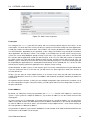
2.1 DSGUI in a local environment. . . . . . . . . . . . . . . . . . . . . . . . . . . . . . . . . . . .
4
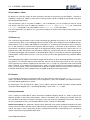
2.2 DSGUI in a remote environment. . . . . . . . . . . . . . . . . . . . . . . . . . . . . . . . . . .
5
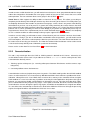
2.3 Managing remote instances using the Remote Administration facility . . . . . . . . . . . . . . .
6
3.1 DSGUI Main Window . . . . . . . . . . . . . . . . . . . . . . . . . . . . . . . . . . . . . . . .
8
3.2 The Menu . . . . . . . . . . . . . . . . . . . . . . . . . . . . . . . . . . . . . . . . . . . . . .
8
3.3 The Toolbar . . . . . . . . . . . . . . . . . . . . . . . . . . . . . . . . . . . . . . . . . . . . .
10
3.4 The Configuration Selector . . . . . . . . . . . . . . . . . . . . . . . . . . . . . . . . . . . . .
12
3.5 The Navigator
. . . . . . . . . . . . . . . . . . . . . . . . . . . . . . . . . . . . . . . . . . .
12
3.6 A Generic Entry within the configuration . . . . . . . . . . . . . . . . . . . . . . . . . . . . . .
13
3.7 The Configuration Panel . . . . . . . . . . . . . . . . . . . . . . . . . . . . . . . . . . . . . .
14
3.8 Message Output Area . . . . . . . . . . . . . . . . . . . . . . . . . . . . . . . . . . . . . . .
14
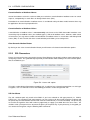
3.9 Preferences Window . . . . . . . . . . . . . . . . . . . . . . . . . . . . . . . . . . . . . . . .
15
3.10 Environment Preferences
. . . . . . . . . . . . . . . . . . . . . . . . . . . . . . . . . . . . .
17
3.11 Warnings Preferences . . . . . . . . . . . . . . . . . . . . . . . . . . . . . . . . . . . . . . .
17
3.12 Recent Configs Preferences . . . . . . . . . . . . . . . . . . . . . . . . . . . . . . . . . . . .
18
3.13 Running Preferences . . . . . . . . . . . . . . . . . . . . . . . . . . . . . . . . . . . . . . . .
19
3.14 LDAP Browser Preferences
. . . . . . . . . . . . . . . . . . . . . . . . . . . . . . . . . . . .
20
3.15 RAS Servers List . . . . . . . . . . . . . . . . . . . . . . . . . . . . . . . . . . . . . . . . . .
21
3.16 Remote Admin Selector . . . . . . . . . . . . . . . . . . . . . . . . . . . . . . . . . . . . . .
21
3.17 LDAP Server Selector Panel . . . . . . . . . . . . . . . . . . . . . . . . . . . . . . . . . . . .
24
3.18 The Internal LDAP Browser
. . . . . . . . . . . . . . . . . . . . . . . . . . . . . . . . . . . .
25
3.19 Generic Attribute Editor in View Mode . . . . . . . . . . . . . . . . . . . . . . . . . . . . . . .
27
3.20 Generic Attribute Editor in Edit Mode
. . . . . . . . . . . . . . . . . . . . . . . . . . . . . . .
28
4.1 Configuration Selector . . . . . . . . . . . . . . . . . . . . . . . . . . . . . . . . . . . . . . .
31
4.2 Global Parameters Panel - Global properties
. . . . . . . . . . . . . . . . . . . . . . . . . . .
32
4.3 Running Parameters . . . . . . . . . . . . . . . . . . . . . . . . . . . . . . . . . . . . . . . .
34
4.4 SASL Parameters
35
. . . . . . . . . . . . . . . . . . . . . . . . . . . . . . . . . . . . . . . . .
ix
LIST OF FIGURES
4.5 Supervisor Parameters . . . . . . . . . . . . . . . . . . . . . . . . . . . . . . . . . . . . . . .
36
4.6 The LDAP Health Monitor Configuration Panel . . . . . . . . . . . . . . . . . . . . . . . . . . .
38
4.7 The HTTP Health Monitor Configuration Panel
. . . . . . . . . . . . . . . . . . . . . . . . . .
39
4.8 The Administration Port Configuration Panel . . . . . . . . . . . . . . . . . . . . . . . . . . . .
42
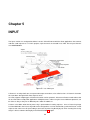
5.1 QC VDS Input . . . . . . . . . . . . . . . . . . . . . . . . . . . . . . . . . . . . . . . . . . .
44
5.2 Main Listener Properties . . . . . . . . . . . . . . . . . . . . . . . . . . . . . . . . . . . . . .
46
5.3 Canonicalization Options . . . . . . . . . . . . . . . . . . . . . . . . . . . . . . . . . . . . . .
48
5.4 Listener SSL options . . . . . . . . . . . . . . . . . . . . . . . . . . . . . . . . . . . . . . . .
49
5.5 Listener SASL Options . . . . . . . . . . . . . . . . . . . . . . . . . . . . . . . . . . . . . . .
51
5.6 Stages attached to this Listener for a Default ServerGroup . . . . . . . . . . . . . . . . . . . .
52
5.7 Stages attached to this Listener for a Virtual Tree . . . . . . . . . . . . . . . . . . . . . . . . .
53
5.8 Virtual Tree Properties . . . . . . . . . . . . . . . . . . . . . . . . . . . . . . . . . . . . . . .
54
5.9 A virtual tree can be constructed to represent an organizational unity.
. . . . . . . . . . . . . .
55
5.10 A virtual tree is attached to a listener and includes a Virtual Entry as well as a number of Mount
Points. . . . . . . . . . . . . . . . . . . . . . . . . . . . . . . . . . . . . . . . . . . . . . . .
56
6.1 QC VDS Output
. . . . . . . . . . . . . . . . . . . . . . . . . . . . . . . . . . . . . . . . . .
62
6.2 List of servers configuration tab . . . . . . . . . . . . . . . . . . . . . . . . . . . . . . . . . .
65
6.3 SSL Certificates configuration tab . . . . . . . . . . . . . . . . . . . . . . . . . . . . . . . . .
65
6.4 SASL configuration tab . . . . . . . . . . . . . . . . . . . . . . . . . . . . . . . . . . . . . . .
67
6.5 The Servers configuration tab when SASL has been enabled . . . . . . . . . . . . . . . . . . .
68
6.6 Reliability / Performance configuration tab . . . . . . . . . . . . . . . . . . . . . . . . . . . . .
68
6.7 Load Balancing algorithms . . . . . . . . . . . . . . . . . . . . . . . . . . . . . . . . . . . . .
70
6.8 Failover algorithms . . . . . . . . . . . . . . . . . . . . . . . . . . . . . . . . . . . . . . . . .
70
6.9 Multisite algorithm . . . . . . . . . . . . . . . . . . . . . . . . . . . . . . . . . . . . . . . . .
71
6.10 Connection Pool options . . . . . . . . . . . . . . . . . . . . . . . . . . . . . . . . . . . . . .
72
6.11 Servergroup specific Session Server Affinity options
. . . . . . . . . . . . . . . . . . . . . . .
75
6.12 LDAP/S Servergroup specific Health Check options . . . . . . . . . . . . . . . . . . . . . . . .
76
6.13 HTTP/S Servergroup specific Health Check options . . . . . . . . . . . . . . . . . . . . . . . .
77
6.14 Database Access Configuration Wizard . . . . . . . . . . . . . . . . . . . . . . . . . . . . . .
78
6.15 Database connection information
. . . . . . . . . . . . . . . . . . . . . . . . . . . . . . . . .
78
6.16 Defining a destination mountpoint . . . . . . . . . . . . . . . . . . . . . . . . . . . . . . . . .
79
6.17 Mapping a table
. . . . . . . . . . . . . . . . . . . . . . . . . . . . . . . . . . . . . . . . . .
79
6.18 Setting an RDN for the table . . . . . . . . . . . . . . . . . . . . . . . . . . . . . . . . . . . .
80
6.19 Configuration verification . . . . . . . . . . . . . . . . . . . . . . . . . . . . . . . . . . . . . .
80
6.20 Database Access Configuration . . . . . . . . . . . . . . . . . . . . . . . . . . . . . . . . . .
81
6.21 LDAP Info for a Relational Database . . . . . . . . . . . . . . . . . . . . . . . . . . . . . . . .
82
User Reference Manual
x
LIST OF FIGURES
6.22 List of servers configuration . . . . . . . . . . . . . . . . . . . . . . . . . . . . . . . . . . . .
85
6.23 Fail-over / Load Balancing options . . . . . . . . . . . . . . . . . . . . . . . . . . . . . . . . .
86
6.24 SSL Parameters for a manual servergroup . . . . . . . . . . . . . . . . . . . . . . . . . . . . .
87
7.1 QC VDS Processing . . . . . . . . . . . . . . . . . . . . . . . . . . . . . . . . . . . . . . . .
89
7.2 The Plugin Selector
. . . . . . . . . . . . . . . . . . . . . . . . . . . . . . . . . . . . . . . .
92
7.3 The condition selector . . . . . . . . . . . . . . . . . . . . . . . . . . . . . . . . . . . . . . .
93
7.4 Debug Level Configuration . . . . . . . . . . . . . . . . . . . . . . . . . . . . . . . . . . . . .
94
7.5 The Hook Selector . . . . . . . . . . . . . . . . . . . . . . . . . . . . . . . . . . . . . . . . .
95
7.6 The Hook Configuration Panel . . . . . . . . . . . . . . . . . . . . . . . . . . . . . . . . . . .
96
7.7 The Condition Editor . . . . . . . . . . . . . . . . . . . . . . . . . . . . . . . . . . . . . . . .
98
7.8 Conditions in the configuration navigator . . . . . . . . . . . . . . . . . . . . . . . . . . . . . .
98
7.9 DirectoryScript Editor Window . . . . . . . . . . . . . . . . . . . . . . . . . . . . . . . . . . .
99
8.1 The DSGUI Extension Manager . . . . . . . . . . . . . . . . . . . . . . . . . . . . . . . . . . 102
9.1 A configuration instance has been added to Windows Services.
. . . . . . . . . . . . . . . . . 110
9.2 Managing logging in the Message Output Area . . . . . . . . . . . . . . . . . . . . . . . . . . 112
10.1 The RAS Monitor in the System Tray . . . . . . . . . . . . . . . . . . . . . . . . . . . . . . . . 116
10.2 The RAS Monitor Menu
. . . . . . . . . . . . . . . . . . . . . . . . . . . . . . . . . . . . . . 117
10.3 The RAS Monitor icon changes as the status changes to stopped. . . . . . . . . . . . . . . . . 117
10.4 The General Configuration panel for RAS Administration. . . . . . . . . . . . . . . . . . . . . . 118
10.5 The Auth Configuration panel for RAS Administration. . . . . . . . . . . . . . . . . . . . . . . . 119
10.6 The Debug Configuration panel for RAS Administration. . . . . . . . . . . . . . . . . . . . . . . 120
10.7 The Audit Configuration panel for RAS Administration. . . . . . . . . . . . . . . . . . . . . . . 121
10.8 Instances can be managed using the WRAS Interface
. . . . . . . . . . . . . . . . . . . . . . 132
10.9 Each instance has its own WRAS page where logs can be viewed and configuration files can be
edited . . . . . . . . . . . . . . . . . . . . . . . . . . . . . . . . . . . . . . . . . . . . . . . . 133
10.10Editing a configuration file in the WRAS editor . . . . . . . . . . . . . . . . . . . . . . . . . . . 134
10.11Viewing log files in the WRAS . . . . . . . . . . . . . . . . . . . . . . . . . . . . . . . . . . . 135
User Reference Manual
xi
List of Tables
6.1 Database connection Strings . . . . . . . . . . . . . . . . . . . . . . . . . . . . . . . . . . . .
81
6.2 Simple Database mapping example . . . . . . . . . . . . . . . . . . . . . . . . . . . . . . . .
83
7.1 Condition Model Samples . . . . . . . . . . . . . . . . . . . . . . . . . . . . . . . . . . . . .
91
7.2 Fields used to define a condition . . . . . . . . . . . . . . . . . . . . . . . . . . . . . . . . . .
93
7.3 LDAP Hooks . . . . . . . . . . . . . . . . . . . . . . . . . . . . . . . . . . . . . . . . . . . .
95
7.4 HTTP Hooks . . . . . . . . . . . . . . . . . . . . . . . . . . . . . . . . . . . . . . . . . . . .
96
7.5 Fields used in a condition
97
. . . . . . . . . . . . . . . . . . . . . . . . . . . . . . . . . . . . .
xii
Chapter 1
GENERAL INFO
1.1
Who Should Read This Manual
The target audience of this manual includes Quest One Quick Connect Virtual Directory Server (QC VDS)
administrators and anyone wanting to learn how to use the graphical user interface (GUI) of the product.
1.2
Conventions Used In This Manual
The following typographical conventions are used throughout this manual to indicate:
Italic is used in text when referring to variables and function names that are contained in the example routines
or standard libraries. If a function name is followed by a number in parentheses, this refers the reader to that
section in the relevant on-line Unix manual pages. When referring to Unix manuals we use the System V
and Solaris convention. The BSD convention is similar in major section numbering. Section 1 refers to user
commands, section 1m (section 8 for BSD) refers to system administration commands (i.e., /sbin), section 2
refers to system calls, and section 3 refers to API calls. For example, more information on printf(3c) can be
found by typing
man printf
at the shell command prompt and referring to section 3c. Italics are also used when referring to the names of
directives or the DirectoryScript executables themselves.
Underlined is used generally throughout for emphasis, and also to highlight significant new terms when they first
appear in the text
Bold is used to refer to reserved words in the language. Reserved words are keywords in the DirectoryScript
language and cannot be used as variable names or function names.
Constant width is used in the text and in examples to show any literal code. It is also used to show commands
and their required command-line switches. Data values in code examples are represented by constant width in
quotes (""), which are not part of the value.
Whenever C or C language is mentioned in this book, we mean ANSI C.
We will use the abbreviation DS Proxy / QC VDS to represent DirectoryScript Proxy and Quest One Quick
Connect Virtual Directory Server respectively.
1
Chapter 2
INTRODUCTION
2.1
What is QC VDS ?
QC VDS is a powerful tool to customize your identity infrastructure and to integrate it with your overall architecture. QC VDS was designed to overcome the limitations of identity data repositories and identity consuming
applications by creating a highly versatile layer between them. QC VDS functions as an LDAP proxy, as well as
providing a virtual directory facility. In addition to its extensive support for the LDAP protocol, QC VDS offers
support for a number of other protocols as well, making it a valuable tool for developers and administrators alike.
For a complete description of all the features of the QC VDS engine, please read the Administration and Developer guides.
2.1.1
What can you do with QC VDS?
QC VDS is an open platform that allows you to customize and program a wide variety of actions. As a result,
the number of things you can do with QC VDS is virtually endless. The following is not a complete list, but it will
give you an idea of how QC VDS is currently being used:
• Mapping of attributes, values and suffixes
• Integrating multiple directories
• Joining of directory and identity data
• Access control
• Validating data before it gets written to the Directory
• Operation target routing (i.e. route read requests to replicas, route write requests to master servers)
• Data distribution / Partitioning
• Creating virtual directories that span multiple data sources
• Enforcing referential integrity
• Triggering external actions
• Integrating directories with web services (XML / SOAP)
2
2.2. WHAT IS DSGUI?
• Integrating or enabling single-sign-on architectures
• Operation load balancing
• Failover
• Extended operation filtering
• Filter processing
• Backend monitoring / health checking
• And many more
2.2
What is DSGUI?
DSGUI is a graphical configuration utility for QC VDS that simplifies the creation and management of configurations for QC VDS engine. The application has been developed in Java to ensure cross-platform compatibility.
It was developed as a tool to assist administrators and developers with the creation and configuration of QC VDS
instances. The program effectively provides an intuitive graphical user interface to the configuration files that QC
VDS uses, allowing end users to configure, start and test configurations with a few click and drag operations.
DSGUI can be used to manage configurations both locally and remotely. In order to better facilitate the remote management of configurations across multiple instance on several servers, DSGUI has been designed to
interface with a specially developed Remote Administration Server that comes bundled with QC VDS.
DSGUI also contains a simple LDAP browser that provides an easy way to view and modify data on LDAP
directory servers.
Although the use of DSGUI is recommended, especially for beginners, it is completely optional. As QC VDS is
capable of reading configuration files directly and makes no distinction between those created using DSGUI and
those created manually, the option of directly editing configuration files is still valid. Certainly, we recommend
that even if you intend to manually edit your configuration, you start out by setting up a basic configuration
with DSGUI and then manually edit the resulting configuration files, as this will reduce the likelihood of errors
appearing within your configuration.
2.3
How DSGUI works
DSGUI creates and manages the configuration files that are used by the QC VDS core engine. It also has the
capability to start and stop local instances of QC VDS for testing purposes.
As already mentioned, DSGUI can interface with configuration files both locally and remotely. Remote configurations can now be created and managed using the Remote Administration Server component that comes
bundled with QC VDS. The Remote Administration Server, or RAS, is a stand-alone server that can listen to
requests made by DSGUI and will interface appropriately with the configuration files on the remote filesystem,
so that a user is capable of editing configurations remotely. Naturally, due to the nature of the configuration files
and the way that QC VDS interfaces with them, it is also possible to edit configurations locally and then copy
them across to remote servers as required.
Thus, DSGUI can effectively be used in three ways to manage instances of QC VDS: locally, locally to copy
remotely, and remotely using the Remote Administration Server. A brief summary of these three modes of
operation follows:
User Reference Manual
3
2.3. HOW DSGUI WORKS
2.3.1
Local configurations
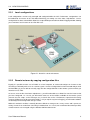
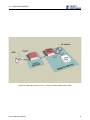
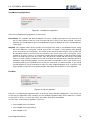
Local configurations can be easily managed and configured within the GUI. Furthermore, configurations can
be loaded into an instance of QC VDS within DSGUI by just making use of the Start / Stop buttons. Once a
configuration has been started within DSGUI, its output will be presented in the DSGUI logging window, allowing
you to monitor a local instance of QC VDS with ease.
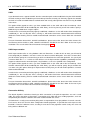
Figure 2.1: DSGUI in a local environment.
2.3.2
Remote instance by copying configuration files
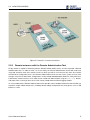
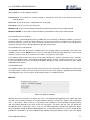
Equally, it is possible to make use of DSGUI on a local computer, to create and configure an instance of QC
VDS that you ultimately wish to run on a remote system. Once the configuration has been created and you have
finished editing it, you are able to manually copy all of the configuration files to the remote system on which you
intend to run QC VDS.
Of course, once the files have been copied across, you will not be able to use DSGUI to start the instance that
you have configured. As a result, you will need to make use of the facilities available on the remote system
(manual start, init scripts, service manager, etc.) to launch the service. Furthermore, output from the running
instance will obviously not be returned to DSGUI, so if you require any form of logging, you will need to add this
functionality into the configuration that you create.
While this method is feasible, it naturally becomes difficult to manage across many servers and is prone to a
variety of errors that can be time-consuming to troubleshoot. As a result, we recommend that where possible,
remote instances are managed using the Remote Administration Server.
User Reference Manual
4
2.3. HOW DSGUI WORKS
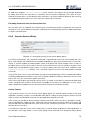
Figure 2.2: DSGUI in a remote environment.
2.3.3
Remote instances with the Remote Administration Tool
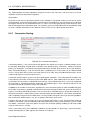
Finally, DSGUI is capable of interfacing with the Remote Administration Server, or RAS, to provide a Remote
Administration Tool. In order to make use of this facility, the Remote Administration Server will need to be
setup and started on each of the remote servers for which you will run an instance of QC VDS. Also, DSGUI
will need to be configured to access the Remote Administration Server for each of the systems that you wish
manage. Once this has been done, configurations can be created and edited within DSGUI as if they were local.
Furthermore, remote instances of QC VDS can be started from within DSGUI using the Start/Stop buttons,
and output from a running instance of QC VDS can be viewed within the DSGUI logging window.
It is also notable that the Remote Administration Server provides a basic web-based interface that will allow you
to perform simple administration tasks (including directly editing configuration files) through the use of a web
browser as client.
User Reference Manual
5
2.3. HOW DSGUI WORKS
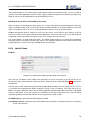
Figure 2.3: Managing remote instances using the Remote Administration facility
User Reference Manual
6
Chapter 3
FIRST STEPS
3.1
3.1.1
Starting DSGUI
Linux / Solaris / AIX
In order to start the Graphical User Interface of QC VDS run "bin/dsgui" from /opt/quest/qcvds/std/ directory with the following command:
bin/dsgui
In order for DSGUI to run with its complete functionality it is important that you change into the
/opt/quest/qcvds/std/ directory first, as DSGUI will not be able to find the dsproxy binary if the GUI has
been loaded from a different path.
3.1.2
Windows
You can launch DSGUI using the QC VDS shortcut in your Start Menu (under Quest Software > QCVDS >
RX.X.X). You can also run dsgui.bat in the root of the installation directory to launch DSGUI.
3.2
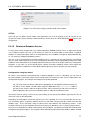
DSGUI main window
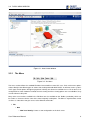
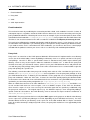
When you open the DSGUI application, you will notice that the application window is divided into several parts:
• The Menu
• The Toolbar
• The Configuration Selector
• The Navigator
• The Configuration Panel
• The Message Output Area
Each of these parts will now be discussed in a fair amount of detail to ensure that there is no confusion, as they
will be referred to frequently throughout this manual.
7
3.2. DSGUI MAIN WINDOW
Figure 3.1: DSGUI Main Window
3.2.1
The Menu
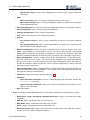
Figure 3.2: The Menu
The menu section follows the standard File Menu format familiar to most GUI users. Each of the menu options
relates directly to the different types of actions that can be performed within DSGUI. As with most menu systems
of this type, certain options will appear greyed out until they are relevant or available for use. For instance, if no
configuration has been loaded or created, the Save Config and Close Config options are not available as they
are not relevant at this point.
Many of the core functions available in the File Menu are also available on the Toolbar (see below), which can
be used as a shortcut to invoke some of the more frequently used options. The Menu is organized into several
sections as subsections that give access to the different commands:
• File
– New
∗ New Local Config: Creates a new configuration on the local server.
User Reference Manual
8
3.2. DSGUI MAIN WINDOW
∗ New Remote Config: Creates a new configuration in a remote server using the remote administration.
– Open
∗ Open Local Config: Opens an existing configuration from the local server.
∗ Open Remote Config: Opens an existing configuration stored in a remote server through the
remote administration tool.
– Recent Configurations: Lists the five most recent configurations that you have opened in DSGUI.
– Close Configuration: Closes currently selected configuration.
– Close All Configurations: Closes all open configurations.
– Save: Saves recent changes in the selected configuration.
– Save As
∗ Save Config Locally As: Saves current configuration on the local server with a different
name.
∗ Save Config Remotely As: Saves current configuration on a remote server using the remote
administration tool with a different name.
– Remove Configuration: Deletes the current configuration from the local or remote server. This
option is only available if the configuration instance is not running. When clicked, a confirmation
prompt will be shown before the operation is completed. It is important to note that this option will
delete the configuration directory from the filesystem, removing any logs and scripts in the process.
– Export Configuration: Creates a zipped archive of all configuration files, scripts and log files,
and saves locally to the file system. This zip file can be unzipped in the configuration directory
for any server system, or can be imported using the Import Configuration option. Note that it is
possible to exclude passwords and log files from an exported configuration, to help ensure that
your infrastructure is kept secure.
– Import Configuration: Imports a zipped archive of a configuration folder and installs it locally. It is
important to note that if the instance will be run on a remote system, the configuration file will need
to be opened, and then Saved Remotely.
– Preferences: Opens Preferences dialog (Preferences 3.3)
– Evaluation
∗ Check Evaluation Information: Presents a dialog displaying the information stored in the
evaluation.key file (if any).
∗ Update Evaluation Information: Allows you to install an evaluation key to update your evaluation version information.
– Quit: Exits DSGUI
• Entry: Context based menu depending on the selected node (equivalent to right clicking on an entry).
– New Listener / Stage / Servergroup / Database Connection: Creates a new node in the configuration tree.
– Move Up: Moves selected tree item up in the structure.
– Move Down: Moves selected tree item down in the structure.
– Delete : Deletes selected item from the configuration tree.
– New Generic Entry: Adds a new custom entry to the selected manual stage within the configuration tree (useful for custom configuration options).
User Reference Manual
9
3.2. DSGUI MAIN WINDOW
– Launch LDAP browser: Launch LDAP browser to the selected listener or servergroup.
– New Virtual Entry: Add a new virtual entry for a virtual tree within a listener.
– New Virtual Mount Point: Add a virtual mount point root for a virtual tree within a listener.
– Rename Node: Allows you to rename a node within a virtual tree attached to a listener
– Add Hooks: Add a hook to a listener or manual processing stage.
– New Condition: Add a condition to a Hook within a manual processing stage.
– Add Plugin: Adds a plugin to an automatic processing stage.
• Extras
– Show LDIF: Opens a new window with the configuration LDIF file corresponding to the currently
selected configuration.
– LDAP Browser: Opens the built-in LDAP browser.
– Manage DSGUI Extensions: Allows you to import, enable and disable plugins or extensions (see
Plugins8.3).
• Process: Process related commands
– Run: Starts an instance of QC VDS using the currently selected configuration.
– Restart: Stops and restarts an instance of QC VDS using the currently selected configuration.
– Graceful Shutdown: Sends a "graceful shutdown" signal (see Graceful shutdown 4.4.1) to the
instance of QC VDS using the currently selected configuration.
– Forceful Stop: Kills the currently running process without checking if all processing has been
completed.
– Hide / Show Log Window: Hides (if shown) or shows (if hidden) the log window of the currently
selected configuration.
• Help
– About: Shows product / version number details.
– Help Contents: Opens the HTML based User Manual at the front page. Note that a PDF version
of this manual is available within the docs folder at the root of your installation.
– Help: Opens the HTML based User Manual at the page relevant to the selected element in the
Navigation tree.
– Getting Started: Opens the Quest One Quick Connect Virtual Directory Server Getting Started
Guide in an HTML browser. Note that a PDF version of this manual is available within the docs
folder at the root of your installation.
3.2.2
The Toolbar
Figure 3.3: The Toolbar
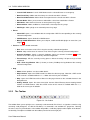
The toolbar allows you to quickly access commonly used commands. Each icon is assigned to a function using
commonly used pictograms. As with the File Menu, if a command is not available it is greyed out. Hovering
the mouse over any of the buttons in the toolbar will provide a small blue popup text description of the button’s
functionality. The options available from the toolbar (from the left to the right) are:
User Reference Manual
10
3.2. DSGUI MAIN WINDOW
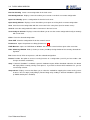
New Local Config Create a new configuration in the local server.
New Config Selector Displays a menu that allows you to create a new local or a remote configuration.
Open Local Config Opens a configuration file from the local server.
Open Config Selector Displays a menu that allows you to open an existing local or remote configuration.
Save Save the current configuration with the same name in the same place (local or remote server).
Save As Save the configuration file under a new name in the local server.
Save Config As Selector Displays a menu that allows you to save the current configuration locally or remotely
with a new name.
Close Close the selected configuration.
Show LDIF Show the configuration file for the current instance.
Preferences Opens the preferences dialog (Preferences 3.3).
LDAP Browser Opens an LDAP Browser Window. You can have several of these open at the same time.
Hide / Show Log Window Hides (if shown) or shows (if hidden) the log window of the currently selected configuration.
Run Starts the QC VDS server process, with the selected configuration.
Restart Provides the option to restart a running instance of a configuration (useful if you have made a few
changes and have saved them).
Stop If ’Graceful Shutdown’ is enabled, a graceful shutdown request will be submitted. Otherwise, this button
will simply kill the currently running server process. If you wish to choose which method to use, you can
use the Stop selector.
Stop selector Displays a menu that allows you to select the method for stopping the current running server
instance. You can stop it just by killing it (Forceful Stop) or by sending a "Graceful Shutdown" signal to it
(if Administration port is enabled).
User Reference Manual
11
3.2. DSGUI MAIN WINDOW
3.2.3
The Configuration Selector
Figure 3.4: The Configuration Selector
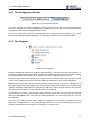
An instance of DSGUI can handle several different configurations at the same time. Each opened configuration
will have it’s own tab in this section, labelled with the configuration name as well as the configuration location
(name@host), and can be selected by clicking on the tab.
All the menu actions unless otherwise specified apply to the currently selected configuration. The selected
configuration will be indicated by highlighting its tab in light blue, while the rest of the tabs will be white.
3.2.4
The Navigator
Figure 3.5: The Navigator
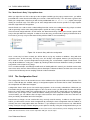
Under the Configuration Selector, the window is split into two parts. The part on the left is the Navigator. It is
arranged as a hierarchical tree viewer. When you click on any node in the tree, the panel on the right is updated
with a configuration panel that allows you to set preferences for the node that you have selected.
Select items by clicking on them with the main (usually the left) mouse button. When you select items, you will
usually see the configuration panel area change to display the properties for the currently selected item.
Nodes that have child nodes within the configuration tree can be collapsed, so that these subnodes are not
displayed. Usually, when a configuration opens, only the primary nodes of the configuration are visible. To view
subnodes, expand the configuration tree at the primary node that you wish to view, by clicking on the expansion
icon to the left of the node icon / name, or double-click on the node name.
Clicking with the secondary (usually the right) mouse button on an item will make a small context menu pop
up from which you can select several actions related to the item that you have selected. Often, this menu will
allow you to add additional items, move items up or down, delete items, etc. Most commands in this menu are
self-explanatory.
Items within the navigator that may require additional configuration, such as processing Stages that are not
attached to a configured Listener, are usually highlighted in red as a visual cue that although the entry exists
within the configuration it may not function correctly within a running instance.
User Reference Manual
12
3.2. DSGUI MAIN WINDOW
The "New Generic Entry" Pop-up Menu Item
When you right-click QC VDS at the top of the navigator and bring up the pop-up context menu, you will be
presented with a menu item that will allow you to create a "New Generic Entry". This will create a generic item
within your configuration. Note that you will also be provided with the New Generic Entry option, when right
clicking on a manual stage. This allows you to store configuration entries that are specific to a stage, together
with that stage within the configuration.
Generic Entries are used to create a "data holding" item that can be accessed by processing scripts at runtime
and are generally used to store configuration options specific to running scripts.1
Since the actual configuration file is in LDIF format, the "New Generic Entry" allows you to create a generic LDIF
entry at that part within the config file. In order to create the entry, you will need to specify a Relative DN for it.
For instance, you may assign a New Generic Entry with the RDN of "ou=CustomEntry".
Figure 3.6: A Generic Entry within the configuration
Once a new entry has been created, you will be able to assign any number of attributes, along with their
respective values, for the new entry. For many users, this facility is not required, however, you may want to do
this in order to create a special configuration entry that only your custom-written scriptlet understands. This
entry will be available for use by your scriptlets by selecting it within the Param field when creating a condition
entry within a manual processing Stage.
This is an advanced topic, and although we will touch on it briefly within this manual, you should also refer to the
Quest One Quick Connect Virtual Directory Server Developer’s Reference Manual and the Quest One Quick
Connect Virtual Directory Server Scripting Guide for further information.
3.2.5
The Configuration Panel
The Configuration Panel can be found in the area of the window on the right hand side of the application. This
area is used to display the available settings or configuration options for the item that has been selected from
the configuration tree within the Navigator.
Configuration Panels allow you to view and change properties of the currently selected item. Whenever you
have made changes to the configuration options in this area of the screen, you will need to click the "OK" button
before you select another node in the configuration tree. If you fail to do this, DSGUI will ask you whether you
want to save your changes to the current item before moving on to the newly selected item. By clicking the
"Cancel" button, you can undo the latest changes and restore the item’s properties to the ones that were set
when you initially selected the item in the Navigator.
Note that these changes are not saved to disk, they are only saved in memory. In order to save the changes
to disk, you will need to save the entire configuration by selecting the Save Config button from the Toolbar, or
selecting the Save Config option within the File Menu. If you attempt to run the instance of QC VDS without
having saved your changes, DSGUI will give you the option of actually saving the configuration before you run
1
This is covered in more detail within the Quest One Quick Connect Virtual Directory Server Scripting Guide which
details how Generic Entries can be used in conjunction with your custom scripts.
User Reference Manual
13
3.2. DSGUI MAIN WINDOW
Figure 3.7: The Configuration Panel
the instance. If you choose not to save the configuration, QC VDS will still run the instance, but with the last
saved configuration. It is important to note that if DSGUI is closed for some reason without your saving the
configuration to disk, all of your changes will be lost.
3.2.6
The Message Output Area
Figure 3.8: Message Output Area
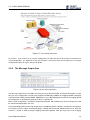
The Message Output Area is located in the lower part of the DSGUI window, and automatically pops up each
time you start a configuration. The Message Output Area will display a tabbed set of logging windows, displaying
output from both STDOUT and STDERR. Additionally, it is possible to display the content of any logging file that
the configuration is generating by opening the file in a separate tab.
When a local configuration is started, the output (both STDOUT and STDERR exits) of the running process will
be collected and displayed in this area.
The log data displayed in the Message Output area is read directly from the log files stored for the configuration.
For remote instances, DSGUI automatically begins a dialog with the Remote Administration Server, when the
instance is started, in order to keep the logging information updated. Note that if you have a lot of logging
User Reference Manual
14
3.3. PREFERENCES
options enabled, this can generate a large amount of network traffic between DSGUI and the remote instance
of dsproxy.
You can find a more detailed explanation on how DSGUI handles logging in the section titled Logging 9.2.
3.3
Preferences
The preferences browser allows you to configure all of the default settings that influence the behavior of QC
VDS. When you start DSGUI for the first time, all preferences will be set to their default values. When you make
changes to the preferences, you can then save them so that they will be remembered for each subsequent restart
of DSGUI. The preferences are stored in a file called .dsgui-QCVDS-X.X.ldif within your home directory in
Unix environments (e.g. /home/johndoe/.dsgui-QCVDS-X.X.ldif) or in your %USERPROFILE% directory
within Windows environments (e.g. C:\Documents and Settings\John Doe\.dsgui-QCVDS-X.X.ldif).
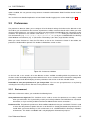
When you select "Preferences" from the "File" Menu or click on the "Preferences" button in the toolbar, the
preferences window will be opened. This window is divided into several sections.
Figure 3.9: Preferences Window
On the left side, a tree contains all of the different sections available for editing within the preferences file.
Sections can be selected by clicking on them within the tree. Once a section has been selected, the configuration
panel on the right hand side will display all of the parameters that can be set for the selected section.
Remember to save your preferences if you change them. You can save your preferences at any time by
selecting the Save entry from the File menu in the preferences editor.
3.3.1
Environment
Within the environment section, you can define the following items:
Save preferences on dsgui exit This checkbox can be used to ensure that preferences are always saved
when you exit DSGUI. This is particularly useful if you are likely to define new LDAP Browser Connection
information, or if you are likely to define new Remote Administration Server connections.
Preferences File Full path to the preferences file that will be loaded each time you start DSGUI. This file is used
to store all of the preference options that are set for DSGUI. As already mentioned, the preference file is
stored within your home directory in Unix environments or in %USERPROFILE% directory in Windows
environments. This field is not editable and is only displayed for informational purposes.
User Reference Manual
15
3.3. PREFERENCES
Configurations Directory Path to where local configurations will be stored.
CA Store Path to the CA (Certification Authorities) certificates store file that will be used in communications
with remote administration instances running on remote servers. By default the JRE CA store, that is
bundled with QC VDS, is used. However, this can be changed to match your own running requirements.
CA Store Password Password to use for the CA Store files. The default password is "changeit" and should be
changed to something more secure if you plan on setting up your own CA infrastructure.
Use Custom Help Browser Use an alternate web browser to view the help files for the product.
How to set up certificates for communication with Remote Administration Server instances
By default, DSGUI will use the CA (Certification Authorities) certificates file of the JRE that is being used to
run DSGUI, typically the one that comes bundled with QC VDS. The CA file of the JRE (cacerts) includes a
standard set of CA certificates, however, it is possible to choose an alternative CA file to secure communication
with remote QC VDS Administration Servers. DSGUI will automatically store the CA certificates of any of the
servers you instruct it to connect to.
A "Test Certificates File" button on the panel will allow you to ensure that your CA Store is correctly configured
and will give you the option to use the default JRE CA store (or to use a new empty one). If the CA Store is
correctly configured, the button will list all of the certificates within the store. The following actions are initiated
when the button is pressed:
Password Checking The CA Store Password is checked. If the passwords do not match you will be informed
and processing will be aborted. You will need to enter the correct password for the store into the CA Store
Password field. If you do not know the password, you will need to create a new CA Store by specifying a
new CA Store Path before clicking on the "Test Certificates File" button again.
Store Checking If the file, that is specified in the CA Store field, does not exist you will be asked if you want to
copy JRE’s cacerts certificates to this new store file. If you confirm, please bear in mind that the password
that is currently specified in the CA Store Password field will be used for the new CA Store. If you do not
want to copy the CA certificates (the most secure option) DSGUI will start with an empty CA store, until
you add certs from the Remote Administration Servers that you choose to use.
List Store Contents Finally, if the store is not empty, and the password to the store is correct, the list of
available CA certificates will be shown.
Once you are satisfied with your store, you can use the "Test Certificates File" button to check your certificates,
as described above.
To connect to a Remote Administration Server, you will need to add the configuration for each Administration
Server to DSGUI, either using File->Preferences->Admin Server Preferences-> Add, or by trying to create or
access a remote instance using "New Administration Server" in the "Server Selection" dialog.
See ( Admin Server Preferences 3.3.7 ) Frequently Used Remote Administration Instances for information about
adding Remote Administration Servers to DSGUI.
Specifying a custom web browser for the Help Manual
By default, clicking on any Help button in DSGUI will open your default web browser to a locally hosted URL,
which makes use of a set of GET variables to determine which page to show within the Help system. The Help
pages require JavaScript to be enabled within your browser. If you wish to use an alternate web browser to
display help pages, you can change the browser here in the Environment Preferences.
User Reference Manual
16
3.3. PREFERENCES
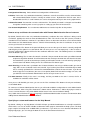
Figure 3.10: Environment Preferences
Use Custom Help Browser This checkbox will allow you to specify the path to an alternate browser, which will
be invoked when a Help button is clicked. In the field following the checkbox, you should provide the full
path to the web browser application that you intend to use. In general, you should follow the browser path
with a quoted "%u". This will cause the browser to be invoked with the full URL to the help page required,
and this URL will be quoted to ensure that it opens to the correct destination. Some browsers may not
require this additional option.
3.3.2
Warning
The Warning preferences node allows you to disable particular warning messages that will be displayed in the
DSGUI application where a configuration entry may not be created in the expected manner. By default, all
warning messages are enabled, however this may become irritating if there is some reason for you to create a
configuration which does not conform to the usual approach. In these cases, you are able to disable the warning
message when it appears.
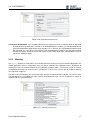
The table in this panel displays the warning messages that you are able to enable or disable. The column on the
right will display ’yes’ for enabled messages, and ’no’ for disabled messages. You can change these settings at
any time and save your preferences.
Figure 3.11: Warnings Preferences
User Reference Manual
17
3.3. PREFERENCES
3.3.3
Recent Config
The Recent Config preferences node allows you to view the paths to recently opened configurations and to
clear Recent Configurations from DSGUI’s history.
Figure 3.12: Recent Configs Preferences
3.3.4
Editing
The preferences in the Editing section define the settings for editing DirectoryScript programs with an editor
when configuring a manual stage.
While we have included its own internal editor to edit scripts, we have provided an option here to allow more
advanced users to choose a preferred external editor. You will need to specify the path to the application that you
wish to use if you decide to make use of this option. It is important to note, that when using an external editor,
new functions will not be automatically generated when you open a file. When using an external editor, the
editor must be capable of being called from the command line with a filename or filepath as the only argument.
Further options are available here if you choose to make use of the internal editor. These include a font selector
(which allows you to choose the font type and font size) and the option to choose the number of spaces that will
be used for each tab stop.
3.3.5
Running
The Running preferences contain the parameters used by DSGUI to start the dsproxy program, which is the
actual QC VDS proxy server process. You can run dsproxy by either clicking the respective icon on the main
DSGUI toolbar, or by selecting Run from the Process menu. Except for the last two options on this panel, the
options specify the Default parameters that will be used to fill the field in the "Global Parameters" section of
each new configuration created with this specific copy of DSGUI. After these settings have been applied to a
new configuration, the configuration will make use of its own store "running" options specified within the Global
Parameters section of the configuration. In this way, these preferences serve only to provide a default template
for future configurations of QC VDS.
The Running Preferences configuration panel contains the following options:
Default Options It stores the list of optional parameters that will be passed to the dsproxy process on startup.
For a complete description of the possible parameters accepted by QC VDS engine please refer to the
Quest One Quick Connect Virtual Directory Server Administrator’s Reference Manual.
User Reference Manual
18
3.3. PREFERENCES
Figure 3.13: Running Preferences
Default STDOUT Redirection Path, relative to the configuration directory, where STDOUT output of the running process will be sent to.
Default STDERR Redirection Path, relative to the configuration directory, where STDERR output of the running process will be sent to.
Delete logs on start Defines if the running process should delete both STDOUT and STDERR outputs each
time it is restarted.
Size of Log Buffers (KB) Maximum size of data "chunk" that will be exchanged between DSGUI and a Remote
Administration instance when reading the contents of log files.
Remote Status Check Interval (ms) Amount of time between successive status check requests sent by DSGUI to the Remote Administration server when managing a remote instance.
3.3.6
LDAP Browser Preferences
DSGUI is capable of integrating with any external LDAP Browser that you choose to make use of. By default, QC
VDS is packaged with the standalone Quest One LDAP Browser, however using the options provided here, you
may change the browser to any external browser that you prefer. If no external browser is configured, DSGUI
will fallback to a very simple internal browser, which does not support any write functionality and has limited
search capabilities.
External Browser This field expects the path to the external browser application that you wish to use as your
LDAP Browser. By default, the path to the startup script for the Quest One LDAP Browser should be
specified here, however you may change this to point to any other browser of your preference. Note that
if this field is left empty, DSGUI will fallback to its own internal browser which has very limited functionality.
Open Args When the LDAP Browser is opened, you are able to use this field to specify command line arguments that should be passed to the browser when it is opened, if your browser supports this facility. In
most cases, you will more than likely leave this field blank as you will only require the browser to open in
its default state. Note that if you wish to specify parameters here, you can use the key below these fields
to determine what variables are available to you to pass on to the browser.
Connection Args At particular points in DSGUI, such as when a listener or output node is selected and a
destination address and port is specified, when you click on the LDAP Browser menu or toolbar option,
User Reference Manual
19
3.3. PREFERENCES
the browser can be configured to actually open a connection to the expected location. If your browser
supports command line arguments to initiate a connection, you are able to specify these within this field.
Where these fields are populated by DSGUI, the appropriate command line argument will be passed to
the browser when it is opened. The settings that are presented in this field by default apply to the Quest
One LDAP Browser. Note that if you wish to specify parameters here, you can use the key below these
fields to determine what variables are available to you to pass on to the browser.
Figure 3.14: LDAP Browser Preferences
Frequently Used Servers
Note that the settings in this section will only apply if you have not specified a path to any external LDAP
Browser (including the Quest One LDAP Browser). In this case, a low-level and very simplistic browser with
limited functionality will become available, and the following settings will apply to this internal browser.
Within this section you can configure a "shortlist" of frequently accessed LDAP directory servers. This list will
then be available from the combo box in the server selector. Instead of having to enter the same values over
and over again, it makes sense to create shortcuts for LDAP servers that you intend to access frequently.
In order to create a new entry, click the "Add" button. The LDAP Server Selector window will pop up and will
allow you to define the settings for a new server. More information on the LDAP Server Selector can be found
in the section titled, LDAP Server Selector3.4.2.
You can also delete entries from the shortlist by selecting them and clicking the Delete button. In order to
modify a server’s definition, select the server and click the Edit button.
Sometimes it is convenient to copy an existing definition and subsequently edit it instead of entering all parameters from scratch. For this purpose you can use the Duplicate button that will create a copy of the currently
selected entry. Once this is done, you can then select the new entry and click the Edit button in order to rename
the copied entry and to modify the the copied parameters as you require.
3.3.7
Admin Server Preferences
Frequently Used Remote Administration Instances
This panel allows you to configure a "shortlist" of frequently accessed Remote Administration Server (RAS)
instances. The instances configured here will then be available each time you wish to connect to a remote
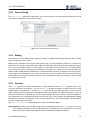
User Reference Manual
20
3.3. PREFERENCES
server using DSGUI. Using the Remote Administration Server will allow you to connect to remote instances of
QC VDS to perform a variety of operations, including opening and editing a configuration, as well as starting a
configuration remotely. In an environment where you are likely to have multiple systems running QC VDS, it is
worthwhile specifying the RAS details required to connect to them within this panel, in order to save yourself
from repeatedly entering the connection information.
Figure 3.15: RAS Servers List
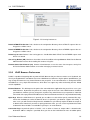
In order to create a new entry, click the "Add" button. The Remote Admin Selector will appear and will prompt
you to provide the details that define the settings for this server. You will be required to enter the following fields:
Figure 3.16: Remote Admin Selector
Name A name to identify the RAS configuration (optional).
Hostname Remote host where the RAS is installed.
Port Port on which the remote administration server is listening (default 9443).
User Credentials for connecting to the Remote Administration Server (default demanager).
Password Password for the credentials.
You can also delete entries by selecting them and clicking the Delete button. In order to modify a server’s
definition, select the server and click the Edit button.
User Reference Manual
21
3.3. PREFERENCES
Sometimes it is convenient to copy an existing definition and subsequently edit it instead of entering all of the
parameters from scratch. For this purpose, you can use the Duplicate button, which will create a copy of the
currently selected entry. Once this is done, you can select the new entry and click the Edit button in order to
rename the copied entry and modify the parameters to meet your requirements.
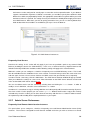
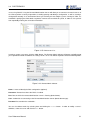
In order to work with a remote administration instance you must press the Test button at least once to properly
configure and test the communication channel. When you press Test the following actions will take place:
Check RAS configuration If the needed fields have not been completed or contain invalid information the
process will be aborted.
Check existence of server certificate in CA store If the newly configured RAS provides a certificate not
present in the trusted CA store it will be added to it.
Connect to RAS A connection to the RAS will be opened and a list of the roots provided by the server will be
displayed.
Remember that if you do not test the configuration of each new RAS (or if you change the CA certificates) the
certificate provided by the RAS may not be trusted and the connection will fail until it has been tested.
User Reference Manual
22
3.4. LDAP BROWSER
3.4
LDAP Browser
QC VDS is packaged to include the Quest One LDAP Browser, a freely available LDAP Browser developed by
Quest Software. This feature-rich standalone browser provides a range of powerful features, including:
• LDAP v2 and V3 support
• SSL support to connect to LDAPS systems
• An intuitive LDAP Tree Browser
• The ability to create, delete and modify entries within an LDAP Tree
• Browse the schema of an LDAP server
• View the Root DSE for an LDAP server
• Perform advanced search queries, and save frequent searches
• Create bookmarks to particular entries within a tree
• Open multiple simultaneous connections and switch between them using tabs
• Export LDIF data for entries within any branch
• Support for command-line switches to open the browser with particular connection parameters
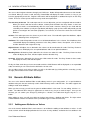
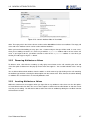
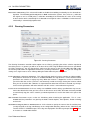
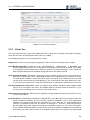
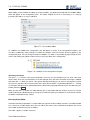
• Integration with QC VDS
As a standalone browser, the Quest One LDAP Browser includes its own thorough documentation, which can
be found within the /doc folder at the root of your installation. Please refer to the Quest One LDAP Browser
User Manual for any further help with this browser.
QC VDS is designed to be able to work with any external browser of your choosing. While we recommend
that you use Quest One LDAP Browser, due to its ability to integrate with DSGUI, you may wish to change the
browser that is initiated by DSGUI to suit your own requirements. You may do this by setting the path to an
alternate browser in the LDAP Browser Preferences3.3.6.
DSGUI also includes a very simple built-in read-only LDAP Browser. If no path is specified for an LDAP Browser
within the LDAP Browser preferences, QC VDS will drop back to using the internal LDAP Browser. This internal
browser will be discussed in more detail shortly.
3.4.1
Starting the LDAP Browser
You can start the configured LDAP browser by either selecting the LDAP Browser from the Extras Menu in the
main DSGUI window, or by clicking on the LDAP browser icon on the toolbar.
If you have selected either a Listener or Output node within your configuration, and this node has an IP address,
port number or BIND credentials specified, and your browser supports command line parameters, the browser
will open a connection to the specified parameters automatically. This functionality is controlled by specifying
the appropriate parameters within the LDAP Browser Preferences3.3.6.
User Reference Manual
23
3.4. LDAP BROWSER
3.4.2
The Internal LDAP Browser
If you have not specified a path to an external LDAP Browser in the LDAP Browser Preferences, DSGUI will
automatically fallback to using a very simple internal browser. This browser has very limited functionality and
only supports read-only operations. If DSGUI is configured to use the internal browser and you click on the
LDAP Browser button in the toolbar, or the LDAP Browser option in the Extras Menu, the LDAP Server Selector
window will open. You can use the LDAP Server Selector to either select a pre-configured server or to provide
the details for the server that you wish to connect to.
LDAP Server Selector
The Server selector allows you to select a predefined server configuration shortcut, or enter the details required
to connect to a server. If you plan on connecting to a specific server frequently, you should either configure
the details of the server in the Preferences, or opt to save the details for the server when you are prompted.
Server details that have been saved within the DSGUI Preferences, or from previous sessions, will be available
for easy selection using the combo box shortlist in the LDAP Server selector. Alternatively, you can input new
parameters, or change parameters from a previously selected shortcut.
Figure 3.17: LDAP Server Selector Panel
If you select a server shortcut from the combo-box, the properties for the server will be populated in the fieldentry boxes on the Server Connection Properties panel. Otherwise you will need to fill out these details from
scratch. The parameters are as follows:
Name A shortcut name for the server. If you are not working with shortcuts, or do not intend to save the server
details that you are working with, you can leave this field blank.
Hostname The host name or IP address of the server.
User Reference Manual
24
3.4. LDAP BROWSER
Port The port number on which the server listens. For LDAP, this is usually 389, unless you have a different
set-up.
Root Suffix The root of the Directory Server, or the tree on which you want the browser to work on. You can
fetch a list of trees that are contained by the LDAP server by clicking on the Suffixes... button below.
Bind DN The distinguished name that should be used to authenticate the LDAP Browser to the LDAP server
that you are connecting to.
Password The password that LDAP Browser should use when authenticating.
There are also two buttons available that can assist you while filling in the Server Connection Properties, as well
as making sure you can actually connect to your server:
Suffixes When you click the Suffixes button, the LDAP Server Selector will connect to the server and fetch a
list of suffixes (trees) that this
server contains. To do this, you will need to specify at least the host name and the port. If your LDAP server is
configured to require authentication to list the contained suffixes, you may also need to enter a Bind DN and a
password before this will work. When the LDAP Server Selector has connected to the server and fetched the
contained suffixes, you will be presented with a dialog in which you can select one of the contained trees. By
clicking on the "OK" button in the list of contained trees, the selected tree will then be taken into the "Root Suffix"
field.
Test As the name implies, the Test button will test connectivity to the server, and therefore check whether all
of your parameters work to properly start the LDAP Browser. Testing will connect to the hostname and
port specified, attempt to BIND either anonymously or using the credentials provided, and finally read the
Root Suffix that has been specified. If any error is returned while carrying out these steps, you will be
informed about the error and can then take appropriate action.
The Internal Browser Window
The internal LDAP browser is a separate window that will load outside of the main DSGUI window. It consists
of a split panel with two sides: the Navigator on the left side and the Entry Viewer on the right side.
Figure 3.18: The Internal LDAP Browser
User Reference Manual
25
3.5. GENERIC ATTRIBUTE EDITOR
You can use the Navigator to browse through your LDAP trees. Nodes will expand and contract as their handles
are clicked. When you select a node, the Entry Viewer/Editor will display the node’s contents, as long as you
have the appropriate permission. Regular LDAP entries will be displayed as attribute/value pairs on the Entry
Viewer. There are several special nodes that may need some explanation:
The root entry of the tree This node represents the server object that you have configured and connected to.
When you select it with the left mouse button, a blank panel will load in the Entry Viewer, as there are
naturally no entries associated directly with the server node. However, clicking on this node with the
secondary mouse button (usually the right button) will display a pop-up menu which will provide you with
options to reconfigure the connection properties, to reconnect, or to refresh the entire tree in the LDAP
Browser.
Schema This node represents the schema of your LDAP server. The node will expand into Attributes, Object
Classes, Matching Rules and Syntaxes.
Attributes This node will expand to reveal a list of all defined attributes in the schema. Each Attribute, when
selected will display the following parameters in the Entry Viewer: Name, Description, a list of aliases
and the "obsolete" and "single-value" flag.
Object Classes All object classes defined in the schema can be found under this node. The Entry Viewer for
object classes will display a list of required attributes and a list of optional attributes.
Matching Rules All Matching Rules defined in the schema are under this node. The Entry Viewer for these
nodes will display the name, OID, description and the "obsolete" flag.
Syntaxes All Syntaxes defined in the schema are visible under this node. The Entry Viewer for these nodes
will display the name, OID and description.
Finally, the Root Suffix that you have connected to with the LDAP Browser will be displayed as an expandable
node, from which you can view all of the child entries for that suffix.
You are able to refresh each of these nodes (as well as all child nodes) by clicking with the secondary (usually
the right) mouse button on the node in the Navigator.
3.5
Generic Attribute Editor
You can use the Generic Attribute Editor to edit arbitrary entries in your configuration. It is a special editor for
attribute-value pairs that are commonly used in LDAP Directory entries and LDIF files. The editor supports the
editing of multi-value attributes.
When you view an entry, you will see the generic attribute editor in view mode. To start editing, click the Edit
button. The editor will then change its appearance to make it easy for you to make changes. Once you are
finished, you can confirm your changes by clicking the OK button, or to abort them by pressing the Cancel
button.
When editing an entry, you will see a table consisting of two columns: Attribute and Values. The right column
entitled Attribute contains the attribute name (or Attribute Type in LDAP nomenclature).
3.5.1
Adding new Attributes or Values
One of the Generic Attribute Editor ’s main features is to facilitate the adding of new attributes or values. In edit
mode, a blank cell will be displayed below the last value of every attribute, and below the last attribute in the
User Reference Manual
26
3.5. GENERIC ATTRIBUTE EDITOR
Figure 3.19: Generic Attribute Editor in View Mode
table. The empty cells in the Values column can be used to add additional values to an attribute. The empty cell
at the end of the Attribute column can be used to add new attributes.
When you have finished editing an entry, press the OK button and your changes will be saved. In some cases,
when you are adding new entries, it is necessary to add the objectclass attribute and to set it to at least one
value. If you forget to do this, you will be asked for a value for the objectclass attribute as soon when you
finalize your edits by pressing the OK button.
3.5.2
Removing Attributes or Values
To delete a value, click with the secondary (usually right) mouse button on the cell containing the value and
select the option to delete from the pop-up context menu that appears. You are able to delete values one by
one.
You are able to delete whole attributes from the table in a similar manner, by right clicking on the cell containing
the attribute type and then selecting the delete option from the context menu. Note, however, that when deleting
an attribute all associated values are naturally deleted as well.
3.5.3
Inserting Attributes or Values
Within the context menu, that appears when you right click on any attribute or value, there are also the options
to Insert Before and Insert After. You can use these options to add a new row either before or after the current
one that you are editing. You will then be able to add a new value or attribute by editing the new blank row that
will have been created.
User Reference Manual
27
3.5. GENERIC ATTRIBUTE EDITOR
Figure 3.20: Generic Attribute Editor in Edit Mode
User Reference Manual
28
Chapter 4
CONFIGURATIONS
4.1
Creating Configurations
Configurations are created or modified using the Menu buttons or shortcuts provided within the GUI. To create
a new configuration, you can click on the New Config button in the shortcut menu, or you can click on File, New
and then select the appropriate type of configuration (e.g. Local or Remote). To open an existing configuration
for editing, click on the Open Config button in the shortcut menu, or click on File, Open and then select the
appropriate type of configuration (e.g. Local or Remote). When multiple configurations have been loaded, a
tabbed menu appears along the top of the panels, allowing you to switch between the different configurations.
Each configuration will load in the navigation panel on the left of the GUI as a ’configuration tree’ with a collection
of nodes. The nodes on the tree represent the different sections that comprise the complete configuration for
any instance of QC VDS. You can navigate to the different sections by clicking on the appropriate node in the
configuration tree, which will load the configuration panel in the frame on the right of the GUI.
There are six nodes in the configuration tree. Many of the default settings for a new instance of the QC VDS
will be sufficient to create a fully functioning configuration, however you may want to revisit some of the optional
settings to provide further services. The first three nodes in the configuration tree represent core and optional
features. An initial configuration does not require any settings in these nodes to be modified. The next three
nodes will require modification in order to create a functional configuration of QC VDS.
The first three nodes of the configuration could be grouped together to cover general configuration requirements,
all of which are covered in this chapter. These are:
Global Parameters This includes global settings that will affect the entire instance of the QC VDS and which
will affect the overall performance of the service. Changes to this node should be made with a clear
understanding of the repercussions to the service.
Health Checking While the settings for this component are considered to be optional, this is an important
component when making use of the load-balancing and failover services provided by QC VDS. Health
checking is responsible for checking the availability of the servers defined within the configuration.
Administration As an optional node of the configuration tree, the Administration Port currently provides facilities for graceful shutdown and basic statistics indicating the health and performance of an instance of
QC VDS. Additionally, the Administration port can be used to change logging levels for various components while an instance is running. This node is under active development and more features are likely
to appear in this part of the configuration in future versions of the product.
The following three nodes in the configuration tree could be grouped together to describe the functional configuration requirements, in that each of these sections will require settings for the instance of QC VDS to function.
29
4.1. CREATING CONFIGURATIONS
Each of these sections will be described in their own chapters as their settings are required in order to provide
a working configuration.
Input Within the Input node, you are able to configure the settings which allow external applications to interact
with an instance of QC VDS. From this node you can configure the port and protocol settings that external
applications will make use of to connect to QC VDS. The following chapter, ( INPUT 5 ), will provide a
detailed explanation on how this done.
Processing This section of the configuration is used to define various functionalities that this instance of QC
VDS will implement. Within this node of the configuration tree, you are able to define the different elements (plugins, stages and hooks) that will allow your client applications to interact with your data
repositories. This is a complex section and is discussed in detail in the PROCESSING 7 chapter.
Output This final node on the configuration tree deals with the definition of the different data repositories that
the instance being created will make use of. A full explanation on this node is given in the OUTPUT 6
chapter.
Each configuration is stored directly within the filesystem and the GUI interacts directly with the file-based
configuration. Configuration changes can be made directly to the individual files themselves for greater control
over the final setup. Although we recommend that you make use of the GUI to create or edit a configuration,
the next section will discuss briefly how the configurations are stored in the filesystem to provide more clarity on
what is actually taking place in the GUI.
4.1.1
Configuration storage in the Filesystem
Since version 4.0, QC VDS configurations are mapped into folders or directories that contain all the necessary
files (configuration and scripts) to make the configuration work.
QC VDS will take care of the creation of the directory structure whenever a new configuration is created, or an
existing configuration is saved with a different name or copied from another server.
A configuration directory has the following elements:
• Main configuration file (main.ldif). This is the file that is passed to the QC VDS binary whenever the
configuration is loaded.
• Custom scripts directory (local). This directory is used to store the source files of all custom functionalities
used by the Processing section of the configuration. If for some reason the configuration uses a source file
that is not in this directory, the source file will NOT be moved if the GUI is used to move the configuration
to a different server.
• Log directory (logs). This directory is used to store the logging output files generated by the configuration.
All logging scripts should be configured to generate their output to this directory.
4.1.2
Configuration selector
Every operation affecting a configuration (creation, saving, saving with a different name and opening) is handled
using the "Configuration Selector" panel.
In the image, it should be clear that there are three sections to the configuration selector:
User Reference Manual
30
4.1. CREATING CONFIGURATIONS
Figure 4.1: Configuration Selector
• The source selector. As several different configuration directories can be defined for each instance (configurations or samples), this "drop-down" selector allows you to quickly choose from the available existing
configuration directories.
• The file tree. The filesystem information for the selected configuration directory is shown here. There
are three different filesystem elements in the list: files (indicated with an icon that resembles a piece of
paper), normal directories (indicated with an icon that resembles a folder) and complete configuration
directories (indicated with an icon of a grey cylinder). The file tree is used to select among the different
elements within the selected source.
• The command section. This section includes the configuration name and the command buttons. The
line will show the currently selected item in the file tree, and can also be used to specify a name when
creating a new configuration. The two buttons below the line are used to issue a Configuration Selector
command, such as creating a new configuration or opening a selected one.
4.1.3
Opening a Configuration in DSGUI from the Command Line
DSGUI supports a few command-line options that may make it easier to work with in some environments. With
regard to configurations, DSGUI can be opened with one or more specified configurations loaded. This is
achieved using the openConf command line switch, used in the following way:
bin/dsgui -openConf myconfig@localhost -openConf [email protected]
This example will open DSGUI with two configurations loaded and ready to work with. The first configuration is
hosted locally on the same system as the DSGUI application, while the second configuration will open a RAS
connection to a remote system (server1.mydomain.com) and will open a configuration named ’production’
hosted at this location. In order to open a configuration from the command-line, you need to know the configuration name beforehand. If you specify a configuration name that does not exist, you will be presented with an
error message once DSGUI has opened. In order to open a remote configuration, you must ensure that RAS is
enabled on the remote system before you attempt to connect to it. Please see How to configure the RAS 10.3
for more information.
User Reference Manual
31
4.2. GLOBAL PARAMETERS
4.2
Global Parameters
The Global Parameters configuration panel allows you to set several parameters that affect the operation of the
QC VDS instance for which the configuration will apply. These parameters define how the QC VDS application
will interact with the system that it runs on, and its general operational behavior. These settings can be changed
to tweak the overall performance of the application, and for debugging purposes.
WARNING: Before changing these parameters, make sure you understand their meaning exactly. Misconfiguration of global parameters can have wide-ranging and potentially adverse effects on the manner
in which QC VDS operates.
Figure 4.2: Global Parameters Panel - Global properties
The Global Parameters Panel is separated into four distinct sections.
4.2.1
Debug Level for automatic servergroups
This ’slider’ option allows you to specify the level of verbosity that the QC VDS will generate as logging output
when it handles the initial setup of your configuration. The log output specifically relates to the initialization
process of the automatic servergroups (creation of connection pools, creation of health checking infrastructure,
etc.) and with the process of routing PDUs on to back-end servers.
The level of detail returned in the logs can be controlled by moving the slider from left to right to increase
verbosity, or from right to left to decrease verbosity. Please also see the section on Debug Logs 4.4.3 for live
instances.
Debugging options are usually turned off in production environments, as the amount of printing that a process
must go through can impact on the overall performance of the application.
4.2.2
Global Paramaters
Poll Timeout QC VDS uses the epoll(4) I/O event notification facility, provided on UNIX systems, to check
many file descriptors at once for input and output. The value that you specify here will be passed directly
to the timeout parameter of the epoll_wait system call. See the manual page for epoll by typing man
User Reference Manual
32
4.2. GLOBAL PARAMETERS
epoll on your UNIX system. In general, if you set this number lower, QC VDS may do more iterations
of epoll_wait, which under certain circumstances, will improve the responsiveness of QC VDS to a single
synchronous client, however as a trade-off more system CPU time will be used. Note that since this
option makes use of a UNIX facility, changing this option will have no effect on an instance installed on
Windows.
Max.
Simultaneous Connections Regardless of the maximum open file descriptors limit that is set
by the operating system, this is the maximum number of connections that QC VDS will accept. So the
maximun number of simultaneous connections will be limited by the lowest of these two parameters.
Max.
PDU Length (Kb) Specifies the maximum size of a PDU that will be accepted by the proxy. The
lowest possible value is 4Kb, and the default value is 1024Kb.
Number of CPUs The number of CPUs available on the system where the configuration will run. This value
is used to calculate the appropriate thread limits for the values specified below.
Writer Threads The number of writer threads, responsible for all write operations (such as writing a PDU
to an outgoing stream). The default value should be sufficient in most use cases, however if this value
needs to be adjusted, it should be a power of two. This value should only be adjusted on multi-processor
systems, and should ideally be equivalent to the number of processors available divided by 4. i.e. for 8
processors, you might change this value to 2. Setting this value outside of the recommended values will
prompt a warning, but will nevertheless store the value that you have set.
Reader Threads The number of reader threads, responsible for handling all read operations (such as
reading an incoming PDU to memory). The default value for this field should be sufficient for most use
cases, however if this value needs to be adjusted, it should be a power of two. The general rule is that this
value should not exceed a number higher than half the number of processors available on the system. i.e.
for 8 processors, the value should not exceed 4. Setting this value outside of the recommended values
will prompt a warning, but will nevertheless store the value that you have set. This option will not appear
within DSGUI on a Windows system, due to a performance requirement that results in a slightly different
approach to threading.
Consumer Threads The number of consumer threads (by reader thread). Consumer threads are used to
handle processing on the data held for any PDU and will read the entire PDU for processing, releasing
the file descriptor for use by another consumer thread. This setting is per reader thread, thus the actual
number of consumer threads will be equivalent to this value multiplied by the number of reader threads
that are running. The default number of consumer threads should be sufficient in most use cases, but
where an adjustment is required, on Linux and Unix systems it should not be set to below 2 and should
generally not be greater than 8 times the number of processors within the system. On Windows systems this value may be set up to 10 times the number of processors. Setting this value outside of the
recommended values will prompt a warning, but will nevertheless store the value that you have set.
Define Default FE Timeout This checkbox will enable a default timeout value for frontend connections. This will allow the proxy to drop an idle connection on the client facing side after a specified period.
To the right of this checkbox the value in seconds can be defined after which an idle frontend connection
will be dropped (if the Define Default FE Timeout option is checked).
Tcp No-Delay This selector will enable or disable Tcp No-Delay functionality for the selected configuration.
The Tcp No-Delay option may improve network latency. Network packets are sent immediately after
the application submits them. This may decrease the latency for each packet, but often does so at the
expense of efficiency. When this option is disabled, the default state, Nagle’s algorithm is employed to
reduce the number of actual packets being sent over the network, reducing network load and potential
congestion issues.
User Reference Manual
33
4.2. GLOBAL PARAMETERS
Activate Watchdog This selector will enable or disable the watchdog functionality for the selected configuration. The watchdog option only works in Unix environments (Solaris, Linux, AIX, etc.), and it tells
the engine to start a second process called the "watchdog" that will monitor the status of the running
instance and restart it automatically if it is detected to no longer be active. In Windows environments this
functionality is automatically implemented.
4.2.3
Running Parameters
Figure 4.3: Running Parameters
The Running Parameters override runtime options for QC VDS by specifying the various switches required to
launch the process. In general, you will run an instance of QC VDS using the default values that are specified in
QC VDS’s Preferences. You can change these settings for all instances of QC VDS by editing the fields under
the Running node within the application Preferences ( Running Preferences 3.3.5 ). Or you can change the
settings for a single instance of QC VDS by editing the fields within this part of the panel.
Lock Windows Service Details This setting will only apply to instances running on a Microsoft Windows platform. Each time an instance is started on Windows, it is registered as a service and the runtime
parameters are stored as a registry key entry. When the instance is stopped, the service is removed. If
you wish to lock the service (so that it is not removed), in order to manage starting the instance at boot
time, you can check this box. However, it is important to be aware that if this box is checked, any changes
to the run-time parameters will not be effective until the service is removed and re-registered.
Load from Preferences As these settings are modifiable and the settings specified here may not conform to the default values that you have set to run all instances of QC VDS, this button has been provided
to conveniently copy the values stored in your default preferences to all of the fields in this part of the
panel.
GUI Params Parameters to pass to the QC VDS binary when launching the application. This is a nonwritable field, the parameters are given by the fields: Default Options, Extra Options, Enable afr debug
and afr size.
Standard Output/Error Redirection A file selector to specify the name of the file and the place
(usually the path to the log sub-directory of the configuration directory) where the QC VDS binary will
send its STDOUT / STDERR output. These logs are displayed in The Message Output Area 3.2.6, when
an instance is started within DSGUI.
User Reference Manual
34
4.2. GLOBAL PARAMETERS
Default Options Parameters required by the QC VDS binary when launching the application. The allowed parameters are: -SI, -C, -I and -ek. Their values can be edited, but it’s not recommended. Make
sure you understand what you are doing, the application could not work.
Extra Options Optional parameters to pass to the QC VDS binary when launching the application. For
a full list of available parameters please refer to Quest One Quick Connect Virtual Directory Server
Administrator’s Reference Manual
Enable afr debug Turn on Application Flight Recorder. This is a debugging system that collects internal
information live, so that if a crash ever happens, support engineers can analyze its causes.
afr size Size in MB of Application Flight Recorder buffer per thread. Allowed values are from 1 to 10,
default is 3.
Delete Logs on start Defines if the configuration will delete both STDOUT and STDERR outputs every time it is restarted or will just append information to existing files.
4.2.4
SASL
Figure 4.4: SASL Parameters
The following options are available to control SASL behaviour within QC VDS.
Use Default SASL Values Enabling this checkbox will cause the proxy engine to use the default SASL
values expected for your operating system and the corresponding SASL library. In the case of a Windows
system, it points to the library delivered with the product (../../lib/symgss.dll). In the case of a Linux system
the default value is libgssapi_krb5.so; MIT Kerberos library should be installed and available within the
system path for dynamic libraries.
SASL Library The SASL library that should be used to provide Kerberos support via GSSAPI. It should
only be changed if you are using an alternative SASL library or the one that you are using is not available
within the system path for some reason (see default values before). While it is possible to use an alternate Kerberos implementation with QC VDS, we highly recommend that you use the default supported
libraries.
SASL Prefix By default this setting should be empty. It should only be changed if an alternate SASL Library
has been used and the particular GSSAPI implementation uses prefixes within its function names.
4.2.5
Supervisors
This panel allows you to configure as many supervisor scripts for your configuration as you need. Supervisors
are a fairly advanced topic that you will probably not require unless you are implementing your own back-end
management algorithm or custom health-checking system.
User Reference Manual
35
4.2. GLOBAL PARAMETERS
Figure 4.5: Supervisor Parameters
Supervisors are the feature that will allow you to activate daemons within the engine. A daemon in this context is
a script that is automatically invoked when you start a configuration, thus allowing you to create any functionality
that does not need a PDU to trigger it. There are a few rules that you should be aware of if you want to implement
your own supervisor:
• The supervisor process uses one of the consumer threads and never releases it. So you must make sure
that you have a working thread for each defined supervisor, as well as the ones that you need for your
"normal" processing.
• Exiting from a supervisor function (either with a return or with an exit call) will make the whole configuration that you are running to exit, so as a general rule your supervisor function must be an infinite loop
that never finishes.
• Instances created using the GUI will automatically create a supervisor invoking the "BEsupervisor" function. This supervisor controls the pools and health-checking facilities for automatic servergroups, so
it must not be removed. The addition of an HTTP ServerGroup will automatically create a supervisor
that invokes the "HTTPBEsupervisor" function, responsible for managing the health-checking and server
session affinity options related to HTTP servergroups.
The supervisor function can launch subrequests to any and all back-ends and server groups defined just like a
normal scriptlet. The most common uses for supervisors are:
• Implementing your own health-checking and monitoring system
• Implementing long slow background processes that should not affect the overall running of the system
• Opening connections pools with manual servergroups that are using "sg" load balancing algorithms
You can define as many supervisor functions as you want by adding rows to the table that you see when you
select the Supervisor tab. The meaning of the different fields is:
File Path to file name holding the supervisor function that will be invoked at startup. Note that it would usually
be best to provide the full path to the file, and that it is generally a good idea to store configuration specific
scripts within the ’local’ folder inside the configuration directory.
Function Name of the function that will be invoked as a daemon on start-up of your configuration.
Parameters As with any other script, supervisor scripts can also be provisioned with an external parameter.
This field configures the value of that parameter.
Number In some situations, you would need to start several identical instances of the same supervisor script
(each one using a different working thread). This parameter specifies the number of times that this
supervisor script should be invoked. In most situations it will keep the default value of 1.
The Edit button can be used to open an editor to edit the supervisor script that you have attached here.
User Reference Manual
36
4.3. HEALTH MONITORING
4.3
Health Monitoring
Health checking is an important feature of QC VDS and you will need to enable it if you make use of QC VDS’s
load-balancing or fail-over options for your server groups. In other words, any solution that makes use of more
than one server within a ServerGroup, should really have Health Monitoring enabled.
The principle behind the health checking component is simple. QC VDS will periodically check each server in
the group by sending simple requests to it. If QC VDS notices that a server loses availability, or comes online
again, the server status will change accordingly. QC VDS makes use of this state information to decide where
to send each next request.
4.3.1
How Health Monitoring works
Health Monitoring works by periodically triggering a health check cycle in QC VDS. This is done automatically
by the BE Manager supervisor scripts that are installed within your configuration by the DSGUI application, and
the cycle is run every few seconds. The parameter that controls how often this happens can be set in the Health
Monitoring Configuration Panel for each configuration of QC VDS.
When QC VDS decides to start a health check cycle, a health check on all servers is initiated. This is done by
sending a number of requests to each server. The health check is run against each server independently and
in parallel to all of the other running health checks. In other words, QC VDS does not wait for a health check to
complete on one server before health-checking other servers.
The regular operation for a health check is:
1. Send request to server
2. Wait for response up to the timeout
3. Repeat this process a configured amount of times
If at the end of this health check the server has not responded to any of the requests, the server is considered
to be down. If a server that was previously considered down responds to any of the requests during the health
check, the server’s state is changed to up. Note that as the health check consists of several requests to the
server, only a single response to any of these queries during one health check cycle is required to set the status
of the server to up. All requests must fail for a server to change to down status.
The reason for sending several requests within one health-check iteration is that it is possible that a server is
just slow to respond, or that there is a very transitory failure in the network that may cause a server to appear
down for a small amount of time, but does not necessarily imply the complete failure of a server.
Health Monitoring is currently available for LDAP/S and HTTP/S Automatic ServerGroups. The Health Monitoring configuration is separated into two tabs according to the differences between these two protocols.
4.3.2
The LDAP Health Monitoring Configuration Panel
QC VDS allows you to configure several parameters related to LDAP Health Monitoring. These fall into the
following categories:
1. Global health checking service settings
2. Operational parameters for each health checking instance
User Reference Manual
37
4.3. HEALTH MONITORING
Figure 4.6: The LDAP Health Monitor Configuration Panel
Global health checking service settings
The following parameters can be configured in this section:
Enable Health Checking This controls the presence of the health checking service within an instance of QC
VDS. Health checking should only be disabled for testing purposes or for very simple backend configurations that do not use any automatic servergroup facilities (like connection pooling, fail-over or load
balancing algorithms, etc.).
Interval (seconds) Number of seconds of delay between the end of a health check cycle and the beginning of
the next.
Cycles until pool refresh QC VDS includes a sanity method for connection pools accessing a set of loadbalanced servers. To keep the connections properly balanced among the different servers, a random
connection of the pool is closed and reopened in a safe way periodically. This parameter controls the
amount of time between the resetting of these connections, expressed as the number of health check
cycles that must been completed between each pool refresh. Special value "1" means the pools are
refreshed every health check cycle, and "0" disables the pools refresh.
Configuring operational parameters for each health checking instance
The next section in this configuration panel includes debugging parameters to allow you to troubleshoot health
checking operations. Debugging should generally be disabled on production servers.
Debug Level If you want to turn on debugging of health-checking, you may specify the debug level here by
shifting the slider to determine the verbosity of the logging output. The level of detail provided is increased
by moving the slider from left to right. Please also see the section on Debug Logs 4.4.3 for live instances.
The next section in the configuration panel contains the following operational parameters, which relate to the
settings for each health check instance:
Operation for Health-Check Can be BIND or SEARCH. This determines the type of operation that is sent to
each back-end servergroup for health checking unless otherwise stated in each servergroup’s Health
Check configuration tab. See ServerGroup Health Check 6.4.9.
User Reference Manual
38
4.3. HEALTH MONITORING
Timeout The maximum time in seconds that QC VDS will wait for one health check request to be answered.
Once this timeout has been exceeded and no response has been received from the back-end, the operation is considered to have failed. By default this is 20.
Number of iterations How many times within a health check operation the request should be repeated. By
default this is 3.
The final section in the configuration panel will change depending on whether you have selected BIND or SEARCH
as the health check operation that will be used. If you have chosen to use BIND as the type of operation to be
used, you will be required to provide authorization information for the BIND request to take place. If you have
chosen to use SEARCH as the type of operation to be used, you will be required to provide the Search DN
and Filter to use to perform the search request. These settings can be overridden for individual servergroups
by specifying these parameters within each servergroup’s Health Check configuration tab. See ServerGroup
Health Check 6.4.9 for more information.
For BIND requests Specify the Bind DN and the password.
For SEARCH requests Specify the Search DN and the Filter. By default, each SEARCH request is anonymous
and of scope 0 (Base).
4.3.3
The HTTP Health Monitoring Configuration Panel
QC VDS allows you to configure several parameters related to HTTP Health Monitoring. These fall into the
following categories:
1. Global health checking service settings
2. Operational parameters for each health checking instance
Figure 4.7: The HTTP Health Monitor Configuration Panel
User Reference Manual
39
4.4. THE ADMINISTRATION PORT
Global health checking service settings
The following parameters can be configured in this section:
Enable Health Checking This controls the presence of the health checking service within an instance of QC
VDS. Health checking should only be disabled for testing purposes or for very simple backend configurations that do not use any automatic servergroup facilities (like connection pooling, fail-over or load
balancing algorithms, etc.).
Interval (seconds) Number of seconds of delay between the end of a health check cycle and the beginning of
the next.
Configuring operational parameters for each health checking instance
The next section in this configuration panel includes debugging parameters to allow you to troubleshoot health
checking operations. Debugging should generally be disabled on production servers.
Debug Level If you want to turn on debugging of health-checking, you may specify the debug level here by
shifting the slider to determine the verbosity of the logging output. The level of detail provided is increased
by moving the slider from left to right. Please also see the section on Debug Logs 4.4.3 for live instances.
The next section in the configuration panel contains the following operational parameters, which relate to the
settings for each health check instance:
Operation for Health-Check Can be GET or HEAD. This determines the type of operation that is sent to each
back-end servergroup for health checking unless otherwise stated in each servergroup’s Health Check
configuration tab. See ServerGroup Health Check 6.4.9. Note that using the HEAD operation makes
more sense to keep down network traffic overheads.
Timeout The maximum time in seconds that QC VDS will wait for one health check request to be answered.
Once this timeout has been exceeded and no response has been received from the back-end, the operation is considered to have failed. By default this is 20.
Number of iterations How many times within a health check operation the request should be repeated. By
default this is 3.
The final section in the configuration panel requires that you provide the URL that should be used to query the
HTTP server. This URL will be queried using the Operation type that is specified for the health monitor. As long
as the Health Monitoring process receives a response code of 200, the server will be considered to be ’up’.
4.4
The Administration Port
The administration port is an optional feature of QC VDS that provides an alternative port and infrastructure
capable of accepting LDAP requests that will provide an administrator with the ability to change the behavior of
a running instance of QC VDS. In order to do this, the administrator will need to connect to the port using a set
of predefined credentials.
Currently, the administration port is used to perform a graceful shutdown of a running instance of QC VDS, as
well as to provide the facility to display some basic running statistics. The administration port is also capable of
accepting requests to change the log-levels on the fly. This part of QC VDS is under active development, and
future releases are likely to have new functionality provided by this port.
User Reference Manual
40
4.4. THE ADMINISTRATION PORT
4.4.1
Graceful shutdown
Graceful shutdown is a process used for sending a shutdown signal to a running instance of QC VDS, that will
try to resolve all pending requests before killing the running process.
The graceful shutdown process is triggered by sending an LDAP_ADD request with the credentials configured
in the admin port to a virtual entry with cn=gracefulshutdown as DN. The ADD operation can have an additional
attribute called shutdowntime with a value that will control the maximum number of seconds that the running
instance will wait for all requests to be processed before terminating. If the shutdowntime attribute is not included
in the ADD request, the predefined configuration value will be used. If a shutdowntime value has not been
defined in the configuration and this attribute has not been passed to the running QC VDS in the ADD request,
a default value of 240 seconds (4 minutes) will be used.
When a graceful shutdown request is received by a running instance of QC VDS, all of the listeners attached to
that instance are closed, so that no new requests are accepted by it. The graceful shutdown process then starts
checking periodically for the number of pending requests that the process has not yet sent a response to. It will
do this until the number of pending responses reaches 0, or until the maximum number of seconds defined by
the shutdowntime variable have passed. At this point the QC VDS process is terminated.
The graceful shutdown can be initiated manually by sending an LDAP request as explained above, but as an
alternative, DSGUI is also capable of triggering a graceful shutdown process using the Menu as explained in (
The Toolbar 3.2.2 )
As the administration port provides a facility to remotely terminate the service provided by an instance of QC
VDS, it is recommended that for production environments you change the credentials used to access this facility. This can be done by editing the Bind DN and Password fields in the Administration Port panel for the
configuration, as described below.
4.4.2
Statistics
The administration port offers a simple method for getting some basic statistics from a running instance of QC
VDS. These statistics can be viewed from within the DSGUI, or can be accessed directly using LDAP requests.
By sending an LDAP_SEARCH request, with the appropriate credentials, to the administration port using
cn=stats as base with the scope set to ’base’ (filter, attribute lists etc. are ignored) a collection of statistics
will be returned as a single LDAP entry. The statistics are collected using the dsconfig_query_shuffler dsproxy
API function (See Quest One Quick Connect Virtual Directory Server Developer’s Reference Manual for details),
and offer the following fields:
Active Listeners Number of listeners accepting requests
Open Frontends Number of open clients to listener connections
Open Backends Number of connections opened between QC VDS and backend data repositories
Backends with outstanding requests Number of backend connections that are waiting for responses from
data repositories
Outstanding requests Number of requests across the whole instance that are waiting for responses from
Backends.
These statistics can also be viewed directly from within the DSGUI, by viewing the Administration Port configuration panel for the running instance of QC VDS. This offers a convenient way of viewing the statistics for a
running instance by simply clicking on the "Statistics" button.
Note that it is possible to obtain additional statistical information through the Administration Port by making use
of particular plugins, like the LDAP Statistics Generator (LDAPStats) plugin.
User Reference Manual
41
4.4. THE ADMINISTRATION PORT
4.4.3
Controlling Log Levels for live instances
As of version 5 of QC VDS, it is possible to change the verbosity of log output while an instance is running. This
is achieved by sending a MODIFY request to the administration port, which will update the log level in the global
hash for the service that requires a change in log verbosity. In order for this facility to work, the administration
port naturally needs to be enabled and running alongside the instance.
All log level settings for the various components that make up a configuration provide a ’slider’ which allows you
to set the verbosity of the logging output. Options range from ’Critical’ on the left, through to ’Dump’ on the right
of the slider. Critical messages will always show in the logs, however the logging output for any component can
be increased gradually by moving the slider toward the right.
On the right of each log-level slider is an ’Apply Now’ button. This button will generally be greyed out. If the
administration port is enabled and the instance is running, and you make a change to the log level for any
component in the configuration, the ’Apply Now’ button will become available. Clicking on this button will send
a MODIFY request to the administration port to update the log level for that component within the configuration.
The change to the configuration will be instantly affected on the running instance, allowing you to alter the
debug level while an instance is running to improve your ability to debug any possible problems with a particular
configuration.
4.4.4
The Administration Port configuration panel
The Administration Port configuration panel is used to set the parameters that control the administration port,
and also to view statistical information directly.
Figure 4.8: The Administration Port Configuration Panel
The following fields can be configured:
Enable / Disable Admin Port This check box controls whether the instance of QC VDS will provide the Administration Port functionality at all.
User Reference Manual
42
4.4. THE ADMINISTRATION PORT
Debug Level If you want to enable debugging of admin port functionality, you may specify the debug level here
by changing the position of the slider to increase log verbosity. Please also see the section on Debug
Logs 4.4.3 for live instances.
Bind DN In this field, you are able to set the credentials to be used when connecting to the admin port to issue
commands or get data.
Port This value is the TCP Port that you wish the Administration Port to be available on. It must not be in use
by any other application.
Password Password to validate the admin port user credentials.
Enable / Disable Graceful shutdown This setting determines whether the graceful shutdown functionality will
be available on this instance of QC VDS.
Maximum wait (seconds) This is used to set the shutdowntime variable (explained in previous section) if a
gracefulshutdown request does not specify a value.
On-the-fly debug level change This check box controls whether or not it is possible to change debug levels
for configuration components while the instance is running. If enabled, changes to debug levels in DSGUI
can be applied to a running instance directly through the admin port to effect an immediate change.
Statistics button This button will trigger a statistic collection query to the running instance and will present the
results in the text area beneath it.
User Reference Manual
43
Chapter 5
INPUT
The Input section of a configuration defines how QC VDS will interact with the client applications that connect
and then send requests to it. For this purpose, input channels are created in QC VDS. These input channels
are called listeners.
Figure 5.1: QC VDS Input
A listener is an entity that listens on a port and accepts connections, also called sessions. A listener is therefore
the "front door" through which client requests arrive.
QC VDS supports multiple types of listeners based on various protocols. At least one listener needs to be active
for QC VDS to be used by client applications. Multiple listeners, either using the same or different protocols, can
be active as long as they are on different ports and/or IP addresses.
Listeners also define what kind of processing is performed on incoming requests. Once a Processing Stage
has been defined in the Processing node of the configuration, it can be attached to a particular listener so that
requests that come in on this port undergo some form of processing directly by QC VDS. Creating Processing
Stages is discussed more thoroughly in the PROCESSING 7 chapter.
44
5.1. CREATING A LISTENER
For each listener, a default server group can be assigned to process requests if a processing stage script
attached to the listener does not set a destination for these requests or simply to route traffic to a destination if
no processing is to be performed on requests coming into the listener.
As an alternative to providing a default server group, a "virtual tree" can be constructed and attached to a
listener. This virtual tree will be presented to any client that connects to the listener. The virtual tree can contain
virtual mount points, onto which a DN in a defined servergroup can be mounted or attached. This provides the
possibility of constructing a single virtual tree that is comprised of nodes from a variety of backend servergroups,
to present a single unified view of the data. This facility is discussed at length in this chapter, particularly in the
section How To Use Virtual Trees 5.3.
5.1
Creating a Listener
In order for your QC VDS configuration to do anything useful, you will need to create at least one listener. To do
this, select the node called Input in the tree navigator and do either one of the following:
• Click on the New Listener button in the configuration panel
• Right-click on the Input node in the tree Navigator
• Select New Listener from the Entry menu
You will then be asked for the name of your new listener, and a listener node will be created in the tree. Once
you have done this, select your new listener node in the Navigator to configure it.
5.2
Listener Configuration
Each listener must be configured with a unique name. This name is set when the listener is created, but can
be changed within the configuration panel. If you attempt to create a listener with an existing name, a warning
dialog will pop up and you will be prevented from creating the listener.
The listener configuration panel is split into several parts indicated using tabs. The first tab is used to define
the main configuration of listener-specific parameters. The second (optional) tab is used for the definition of the
SSL parameters that the listener will use for listeners using a TLS (LDAPS and HTTPS) layer. The third tab
(optional) will allow you to enable SASL/GSSAPI support on the listener interface. The fourth tab allows you to
list processing stages that packets can be routed to before going out to a server group. And finally, a fifth tab is
used to configure options specific to the use of virtual trees.
5.2.1
Main Listener Properties
In the first tab, entitled "Main Listener Properties", you will need to set the properties that describe the listener,
such as the protocol, the port, and a number of other options that control the listener’s behavior.
Protocol
Select the protocol that the listener should support from the combo box. Some protocols will disable some of
the other required configuration parameters in this panel, as they will no longer be relevant. For instance, for
protocols not using TLS, such as ’LDAP’ or ’HTTP’, the options on the SSL tab will be greyed out as they are
not relevant to these protocols.
User Reference Manual
45
5.2. LISTENER CONFIGURATION
Figure 5.2: Main Listener Properties
Listen port
This configures the TCP/UDP port that this listener will use to receive protocol requests from clients. As the
name implies, a listener will "listen" on the port that you specify here for traffic coming from client applications.
A valid port number must be entered here. Port numbers can in theory be between 1-65534, however there
are some limitations, depending on your operating system. Many port numbers may already be reserved for
other applications that actively use them. For example, if you already have an LDAP server running on your
system, this server will probably be already running on port 389. If you specify "389" here as well, there will
be a conflict, and the application started last (which may be, in this case, QC VDS) will not work as expected.
On UNIX systems QC VDS will not be allowed to open the port, and the instance will just fail to start. On
Windows systems, however, the instance will seem to start normally, but requests sent to the conflicting port will
be accepted by the application that is already bound and listening on the specified port. As a result, QC VDS
will not receive anything until the fist application "frees" the port or stops running.
Another limitation, on UNIX systems, is that only the super-user (root) is allowed to listen on ports below 1024.
If you are starting QC VDS as a non-root user, you will have to use ports higher than 1024 or the instance of
QC VDS will not run.
Finally, if you are going to create multiple listeners in an instance of QC VDS, they will either need the port
number to be different in each case, or the Listen Address will need to be specified as a differing IP address for
each listener.
An important thing to note here, is that if you have multiple configurations open and listeners have been set up
for each configuration using the same port numbers, you will only be able to run one configuration at a time, as
the ports will conflict.
Listen Address
By default, QC VDS listens on the port specified in the Listen Port Field on all IP addresses used for your
system. If your system has multiple IP addresses, any of these IP addresses can be used to connect to the
listening port.
On some systems, this is not desirable. If you want to listen only on a specific IP address, you can specify this
address in this field, and QC VDS will only listen on the IP address entered here. If you want to selectively listen
on some IP addresses, but not on others, you will need to create multiple listeners - each of them listening to
the same port but on a different IP address.
This parameter is optional. If you leave this field blank, or enter "0.0.0.0" in this field, the behavior will be for QC
VDS to listen on all IP addresses for this port.
User Reference Manual
46
5.2. LISTENER CONFIGURATION
Client Address / Mask
By default, QC VDS will accept all client connections arriving on the listener port and address. However, if
needed, the range of IP addresses from which incoming requests will be accepted can be filtered using these
two configuration parameters.
These parameters work as any other IP address / mask combination, so if for example you want to accept
only queries that arrive from IP addresses between 192.168.1.0 and 192.168.1.255 you should have
192.168.1.1 configured as the Client Address and 255.255.255.0 as the Client Mask.
These two parameters are optional, so if you leave them blank, the listener will accept incoming requests from
everywhere.
TCP Back Log
The "TCP Back Log" parameter is only used for connection-type protocols that make use of TCP (Transmission
Control Protocol), which is the underlying protocol for LDAP, HTTP, SIP, including their SSL-enabled versions.
Other protocols such as Radius and SNMP are connection-less, in that they do not require a client to "connect"
per se, but instead just send and receive packets without requiring a connection to be maintained. These
connection-less protocols are based on UDP (User Datagram Protocol), which like TCP is part of the TCP / IP
protocol suite used in the Internet. This parameter is optional. If you do not fill it out, the system defaults for the
TCP Back Log will apply. This parameter, as described above, only has a meaning for connection-type protocols
(LDAP, LDAPS, HTTP, HTTPS, SIP, etc). If you are not using a connection-type protocol, the parameter will be
ignored.
The backlog parameter defines the maximum length that the queue of still unanswered (pending) connections
may grow to. If a connection request arrives while the queue is full, the client may receive an error. Since QC
VDS is typically very efficient accepting new connections, this is usually not a parameter to be overly worried
about. However, if you find that occasionally clients send a very high number of new connection requests in
bursts, you may want to set this value higher than its default of 100. Be aware that increasing the value for this
parameter will make QC VDS somewhat more susceptible to denial-of-service type attacks.
FE Timeout
If "Use Default FE Timeout" is selected, this will cause the Listener to make use of the Default FE Timeout
options specified in the Global Parameters for the configuration. If these are disabled in the Global Parameters,
no timeout will be applied to the Listener.
By selecting the "Use FE Timeout of" option, you are able to specify the period after which an idle frontend
connection will be dropped, this is controlled by providing a value in the Seconds field.
Routing Information
In this section you will be able to choose how traffic should be routed by default (i.e. where no processing
directive specifies an alternative routing option). There are two options here, and they are mutually exclusive.
You may either route traffic to a default servergroup, or you may route it to a predefined "virtual tree". Note that
for the second option to work, you will need to define at least a Virtual Tree Root Node.
Default Servergroup This parameter specifies which back-end server group should be the default for traffic
coming from this listener. Note that it is possible for processing that happens in the stages to override the backend for any request, so this setting only specifies a default back-end to be used if nothing else is specified by
special stage processing attached to the listener.
User Reference Manual
47
5.2. LISTENER CONFIGURATION
In order to make a valid selection here, you will need to have at least one server group defined under the Output
node of the configuration. Remember that server groups contain at least one or more servers that are assumed
to be equivalent. You can read more about server groups in the OUTPUT 6 chapter.
Virtual Tree QC VDS supports the ability to define a virtual tree for any listener. This allows you to design a
completely virtual directory that will be presented to any client connecting to the listener. This facility allows you
to completely abstract the data stored in any backend servergroups so that a client is only aware of the directory
information that you have set out to present. In general this facility would only be used for listeners that have
been configured for the LDAP/S protocol. Although it might be possible to use a Virtual Tree with an alternate
protocol such as HTTP (if building an HTTP to LDAP bridge) if you perform the appropriate processing in a
stage before the Virtual Tree is implemented (see the section Attached Stages 5.2.6). However, the complexity
of such a solution would be an advanced topic and may require support from Quest Software.
In order to use this facility, you will need to create a Virtual Root for your tree and then construct virtual nodes
as you require. Finally, if you wish to include data stored within external repositories, you will need to create
virtual mountpoints, that can be used to import the data into your virtual tree. The ’New Virtual Root’ button can
be used to start constructing your virtual tree. The ’New Virtual Mount Point Root’ button can be used to create
a virtual root that maps directly onto a DN within a particular ServerGroup.
Please see the section How To Use Virtual Trees 5.3 for more information.
5.2.2
Canonicalization
This tab is only meaningful when the LDAP or LDAPS protocol is defined for this listener. Otherwise, this
section will be inactive and unused. It is possible for QC VDS to canonicalize entries coming into QC VDS.
Canonicalization basically means:
1. Trimming spurious whitespaces (i.e. removing whitespaces between DN elements and the commas separating them)
2. Converting attribute names into lowercase
Canonicalization can be very helpful when processing entries. The LDAP model specifies that all LDAP attribute
names are to be treated in a case-insensitive way. Well-behaved LDAP clients will have no problem with canonicalization, although there are a few LDAP clients out there who, contrary to the standard, will not recognize
LDAP attributes in a case-insensitive way. If problems arise with your client applications that point to this type of
behavior, you may want to disable canonicalization or alternatively you can select the check-box which allows
you to ’Canonicalize DN only for processing stages’. If this option is checked, the DN in each PDU will only be
canonicalized as it moves through the processing engine, and will be converted back to its original form before
it is sent either to the ServerGroup or client that it is destined for. While the PDU moves through the processing
engine, the original DN will be stored within the PDU hash for use later.
Figure 5.3: Canonicalization Options
User Reference Manual
48
5.2. LISTENER CONFIGURATION
Canonicalization of Attribute Names
Several check boxes exist in this section to allow you to switch on canonicalization of attribute names for certain
requests, and optionally in search filters or distinguished names (DNs).
Remember that canonicalization of attribute names is considered safe by the data model, however there may
be applications that are not prepared for this.
Canonicalization of Attribute Values
Canonicalization of attribute values is not necessarily safe, because the LDAP data model mandates case
insensitivity only for attribute names (aka "attribute types"), and not for attribute values. However, under certain
circumstances you may want to enable canonicalization for attribute values in search filters and distinguished
names (DNs) as well. The left side of the canonicalization panel allows you to configure this.
Clear Canonicalization Button
By clicking on the "Clear Canonicalization" Button you will remove all selected canonicalization options.
5.2.3
SSL Parameters
Please also refer to the Quest One Quick Connect Virtual Directory Server SSL Guide for more information on
configuring TLS/SSL. This guide will help to provide you with a better understanding of TLS/SSL and the options
that are available to you.
Figure 5.4: Listener SSL options
This tab is used to define all parameters regarding SSL, should you have selected a protocol that uses SSL-type
encryption, such as LDAPS or HTTPS. The following parameters can be configured for SSL:
SSL Certificate
The SSL certificate path only needs to be filled in if you have selected an SSL-type protocol (i.e. LDAPS,
HTTPS, etc.). For configuring SSL-type protocols, you must select a file that contains both the certificate and
the private key concatenated into one file. Both must be in PEM format (i.e. base64 encoded). The private key
must not be encrypted as there will not be any opportunity to supply a password when the server starts. You
should use file system permissions to protect the privacy of the private key. If your private key is encrypted, you
can remove the encryption using the following UNIX commands:
User Reference Manual
49
5.2. LISTENER CONFIGURATION
openssl rsa -in key.pem -out keyout.pem
chmod a-w key.pem
chmod -r ...
If you do not have a certificate you should obtain one from a certificate authority. Ask them to supply it in format
suitable for Apache or OpenSSL (i.e. the PEM format). If, for some reason, it is supplied to you in some other
format, you may be able to convert it to the correct format using OpenSSL. Please read the openssl manual
pages for details.
For testing purposes, you can also generate your own self signed certificate, on UNIX systems, with the following
commands:
openssl req -new -x509 -nodes -keyout pkey.pem -out cert.pem
cat cert.pem pkey.pem >certpkey.pem
If
you
are
a
Windows
user,
the
OpenSSL
Project
does
provide
a
link
(http://www.openssl.org/related/binaries.html) to a binary installer of the openssl software for
Windows. You may find that you are able to use this software to perform the tasks mentioned above on a
Windows based operating system.
There is a small information icon to the right of the text area that displays a new window with a partial text
description of the certificate information (Subject, Issuer, Validity Times and Usage). This information might be
useful for troubleshooting SSL related issues.
CA Certificate
The path to the CA (certification authorities) certificates file that will be used to validated certificated presented
to the listener. This should also be in PEM format.
There is a small information icon to the right of the text area that displays a new window with a partial text
description of the certificate information (Subject, Issuer, Validity Times and Usage). This information might
be useful to troubleshoot SSL related issues. For the CA certificate, the area contains the information for the
certificates of each of the certificate authorities that are contained in the CA file.
Supported Ciphers
Since QC VDS uses OpenSSL, you can use this parameter to specify a list of specific ciphers that OpenSSL
should use. In order to find out about the ciphers supported by OpenSSL, you can type the following command:
openssl ciphers -v
By default, this field is empty. You need only use it if you need to specifically restrict the ciphers used.
SSL Version
By default, QC VDS will allow connections to use SSL version 2 and 3, and TLS version 1. You can override this
behavior by specifying the allowed SSL or TLS versions using the radio buttons.
User Reference Manual
50
5.2. LISTENER CONFIGURATION
Client certificate validation
Controls the behavior of the listener regarding the client certificate. There are four different possible values for
this field:
none No client certificate is requested, and mutual/bilateral authentication is disabled.
fail The client certificated is requested. If the client presents a certificate, the certificate is validated. If the
certificate is not valid, the errors are logged and the connection is terminated.
present The client certificate is requested. If the client does not present a certificate, or the certificate is not
valid, the connection will be terminated, and the reason logged.
5.2.4
SASL Parameters
It is important that you are aware that in order for the SASL interface to work, you should have the appropriate
Kerberos libraries installed and properly configured. For Windows systems, we recommend that you also install
MIT’s Kerberos for Windows. For Linux systems, you must install MIT’s Kerberos Libraries and tools, to ensure
that your system is capable of using Kerberos. Please also refer to the Quest One Quick Connect Virtual
Directory Server Guide to SASL, GSSAPI and Kerberos, for more information on configuring SASL. This guide
will help to provide you with a better understanding of SASL, GSSAPI and Kerberos, and the options that are
available to you.
When a SASL bind is completed, one important parameter is obtained. It is the Client Name, which is the
Principal that sent the operation as client. This information is stored in the BIND_DN entry of subsequent pdus
to allow access control.
Figure 5.5: Listener SASL Options
This tab is used to define all parameters to configure SASL/GSSAPI support on a Listener interface. Options
presented here include:
SASL Mechanism This will be used in future to choose a different SASL Mechanism such as DIGEST-MD5.
Currently only GSSAPI is supported
Confidentiality Mode with this setting it is possible to specify the mode in which the confidentiality of the
communication will be handled. there are three values to choose from:
• negotiate: either integrity or privacy will be accepted. this is the default setting.
• integrity: only integrity will be offered and accepted.
• privacy: only privacy will be offered and accepted.
User Reference Manual
51
5.2. LISTENER CONFIGURATION
Acquire client delegated credentials With this option selected, whenever an incoming SASL connection is
processed, QC VDS will try to obtain delegated SASL credentials sent by the client. These credentials
are stored in the session and can be used later to open a SASL connection to the backend (provided the
Enable client delegation option is active)
5.2.5
SPNEGO Parameters
The SPNEGO Parameters are to HTTP what the SASL Parameters are to LDAP: The place where a listener
can be configured to support SPNEGO(Negotiate)/GSSAPI/Kerberos communication. However the Kerberos
support at HTTP listeners is simpler, since it is used just as an authentication method, while in LDAP it is also
used to cipher the operations.
This support for Kerberos authentication in an Active Directory environment is often referred to as "Integrated
Windows Authentication" (IWA).
As before, it is important that you are aware that in order for the Kerberos interface to work, you should have the
appropriate Kerberos libraries installed and properly configured. For Windows systems, we recommend that you
also install MIT’s Kerberos for Windows. For Linux systems, you must install MIT’s Kerberos Libraries and tools,
to ensure that your system is capable of using Kerberos. Please also refer to the Quest One Quick Connect
Virtual Directory Server Guide to SASL, GSSAPI and Kerberos, for more information on configuring Kerberos.
This guide will help to provide you with a better understanding of SASL, GSSAPI and Kerberos, and the options
that are available to you.
An important difference is that while in LDAP the Kerberos support is an extended capability of the listener, in
the sense that it can still receive and process simple LDAP operations, in HTTP when Kerberos is activated it
will be required and if the authentication is not successful, the operation will be rejected.
This tab will be used to define all parameters to configure SPNEGO/Kerberos support on a HTTP Listener
interface.
When a SPNEGO authentication is completed, one important parameter is obtained. It is the Client Name,
which is the Principal that sent the operation as client. This information is stored in the CLNAME entry of the
pdu to allow access control.
5.2.6
Stages attached to this Listener
By selecting the tab called "Attached stages" you are able to attach different processing stages that you have
defined to the current listener. The layout of this tab will depend on which Routing option you have selected for
the listener. If you have selected to make use of a Default ServerGroup you will see a table of stages that will
be processed for each and every packet received by this listener. Packets will be processed by stages in the
order that they were received, and the stages will be applied in the order that they are listed. Note that once a
stage has been attached to a listener, all packets received by the listener will be passed on to the stage to be
processed. If there are particular packets that you do not want processed, you will need to filter these using the
condition options within each attached processing plugin or hook.
Figure 5.6: Stages attached to this Listener for a Default ServerGroup
User Reference Manual
52
5.2. LISTENER CONFIGURATION
If you have selected to make use of Virtual Trees, this tab will display two separate tables. These tables allow
you to define where processing takes place on either side of the virtual tree. That is to say, you can either select
to attach a processing stage that occurs on the client-side of the virtual tree; or you can attach a processing
stage that occurs on the server-side of the virtual tree. The rules for these tables are essentially the same in
that each processing stage is handled sequentially (unless a processing directive or filter determines that some
other action should take place). When designing your solution and in determining how processing should be
ordered, it may be useful to think of the Virtual Tree as a processing stage in itself. You can then visualize at
which stage the processing to create the virtual tree would take place in relation to other processing stages that
you may define. For example, if you have a processing stage that logs incoming requests, you are likely to place
this stage before the Virtual Tree. On the other hand, if you have created a processing stage which performs
some form of attribute mapping for requests to a particular ServerGroup you would most likely place this stage
after the Virtual Tree.
Figure 5.7: Stages attached to this Listener for a Virtual Tree
In order to attach a processing stages to a listener, you need to have created the stage in the processing
section of the configuration already. If you have not done this yet, create new processing stages following the
instructions in the PROCESSING 7 chapter, and then revisit this configuration panel later to attach them to your
listener.
By default, any tables in this tab will be empty as no stages have been attached to the listener. The tables that
you see will only have one field entitled "double-click to define". By double-clicking into the field, a combo-box
will pop up allowing you to select the stage that you want to attach. As soon as you’ve attached a stage, this will
be reflected in the table.
The option to attach a new stage is always available at the bottom of the table. If you have incorrectly selected
a stage, you can change it by double-clicking on it and selecting a different one from the list.
Processing stages that have not been attached to any listener within a configuration will be highlighted in red
under the Processing section of the configuration within the configuration Navigator. This sould help to quickly
identify any pieces of configured functionality that will be inactive within a running configuration.
Deleting a stage from the list
If you want to delete a stage, click the right mouse button over it. A pop-up menu will appear. Select "Delete
Stage". The stage is then deleted from the table. Keep in mind that this will not delete the actual stage itself - it
will merely detach the stage from your listener.
Inserting a stage in the middle
If you want to attach a stage at a particular point in the table, you can use the pop-up menu to insert a blank field
before or after a specific stage. Right click on a stage in the list, and then select "Insert Before" or "Insert After"
from the pop-up menu. Once you have done this, an empty stage will appear as specified. You can double click
on this row in the table to select the appropriate stage to be used here.
User Reference Manual
53
5.2. LISTENER CONFIGURATION
Figure 5.8: Virtual Tree Properties
5.2.7
Virtual Tree
The Virtual Tree tab can be used to set the debug level for the Virtual Tree functionality, and to define exceptions
where the virtual tree functionality will not be used if it is enabled.
The following parameters can be configured in this section:
Debug Level can be set for this plugin by dragging the slider to the level of verbosity that you require.
Skip PDU with destination for PDUs that have a _SERVERGROUP_, _DATASOURCE_ or _BACKEND_ type
magic key defined in the PDU hash, usually due to some previous processing by a scriptlet. If this option
is not checked, the PDU will be processed by the virtual tree and if the destination is not resolved, the
PDU will not be delivered to the intended servergroup and an error will be returned.
Store frontend credentials will allow the virtual tree to store credentials used to connect to the frontend for a
BIND request. While Virtual Trees support BIND operations, the credentials that are stored for a session
can either be the credentials used to authenticate against a backend, or the credentials that are used to
connect to the virtual tree (by the client application). This is particularly useful when defining ACL rules,
as you may wish to control access using the virtual DN that is used to perform a BIND via the virtual tree.
Password attribute for virtual entries allows you to define which attribute should be used to validate a BIND
request for an entry within a virtual tree. This attribute applies to all entries within the virtual tree, so you
can only select one attribute across the tree to store the password.
Hide password on responses will prevent the specified password attribute from being returned in the results
for any search request.
Entry Exceptions are defined by providing the credential DN or entry DN and the ServerGroup to which the
request should be forwarded. You may need this if particular credentials (such as your administrator
credentials) are stored outside of the tree offered by your server. Moreover, it is recommended that at
minimum, you provide an entry here for searches on empty bases. To do this, simply leave the Base
DN field empty and provide a default ServerGroup to forward the request to. This means that queries
on the rootDSE will be forwarded to a particular ServerGroup and will be handled by that ServerGroup.
Alternatively, you could resolve searches on an empty base by making use of a processing stage invoked
User Reference Manual
54
5.3. HOW TO USE VIRTUAL TREES
before the virtual tree and including processing functionality to handle rootDSE searches, such as the
RootDSE Plugin.
Branch Exceptions are defined by providing the branch DN and the ServerGroup that should be used to
forward the requests that match this suffix. For example, if you still want requests to go to your original
tree structure you will need to create at exception for your original domain name.
5.3
How To Use Virtual Trees
While QC VDS supports the ability to define a virtual tree for any listener, it is not compulsory to make use of
this facility when defining a configuration. In fact, a large number of configurations will not use this facility and
will simply make use of the routing capabilities built into the core engine and defined within customized scripts
within the processing layer to handle how requests and responses move through the system. However, Virtual
Trees can significantly reduce frustration when attempting to create a solution that presents a virtual view of
data stored across a multitude of repositories.
The facility is essentially provided by a built-in plugin that functions in such a way as to allow you to completely
abstract the data stored in any backend servergroups so that a client is only aware of the directory information
that you set out to present. Technically, it is possible to create a working configuration that only makes use of a
listener and a virtual tree, and does not present any data stored within a directory in a ServerGroup. However
the functionality of such a configuration would be exceedingly limited and would serve little purpose. In most
cases, the plugin will be configured to present a virtual tree structure that can be used to mount data structures
stored within different directories.
Figure 5.9: A virtual tree can be constructed to represent an organizational unity.
In the figure presented here, the virtual tree is constructed to represent an organizational unity. Directory trees
stored on different servergroups can then be ’mounted’ onto nodes within the virtual tree. In this example, the
virtual node ou=org1,o=unitedorg maps onto ou=People,o=org1 in ServerGroup1, ou=org2,o=unitedorg maps
onto ou=People,o=org2 in ServerGroup2 etc.
User Reference Manual
55
5.3. HOW TO USE VIRTUAL TREES
This facility is commonly used in environments where discrete entities or organizations may work together in
some form of federation or unity. While each organization or entity may control their own servers and core
data, all members of the federation or unity may want to access a central point that contains information for all
members. In earlier versions of QC VDS, this was easily achieved using the Attach Trees plugin; however, this
resulted in each attached tree appearing as a subsidiary of a Default ServerGroup. Using Virtual Trees you
can now create a new virtual tree that all ServerGroup entities can belong to equally, effectively creating a new
virtual directory containing entries populated from one or more directories.
5.3.1
Building a tree on a listener
In order to define a virtual tree for a listener within the DSGUI configurator, go to the Main Listener Properties
tab within the Listener configuration panel and select the ’Virtual Tree’ option in the Routing Information box,
then click on the ’New Virtual Root’ button. Alternatively, you can right click on the listener entry in the navigator
tree and select the option to create a ’New Virtual Root’, but you will need to ensure that the Routing Information
option is set to use a Virtual Tree. A dialog box will appear which will allow you to specify the root DN for your
virtual tree. Once you have entered this detail, the root DN will be listed within the navigator tree beneath the
specified listener. You will need to edit this entry to provide basic ObjectClass attribute values, the Naming Attribute for the RDN pair, and any other attributes that may be specific to the schema that your client applications
may expect.
Once a Virtual Root has been defined in your configuration, you can add a new virtual entry by right clicking
on the virtual root that you have created and selecting the option to create a ’New Virtual Entry’. For each
virtual entry that you create you will need to also define an attribute for the Naming Attribute of the RDN and the
ObjectClass.
Figure 5.10: A virtual tree is attached to a listener and includes a Virtual Entry as well as a number of Mount
Points.
Using these tools, you will be able to create an LDAP tree within which you will be able to present particular data
stored within your backend repositories. Additionally, you can create static entries within your virtual tree as you
require.
It may be useful to note, at this point, that canonicalization is automatically applied to all virtual tree nodes,
so that all requests are automatically converted to lower case, essentially rendering the Virtual Tree as caseinsensitive.
Once you have set up your backend servergroups, you will be able to create "Mount Points" within your tree.
Each Mount Point must map onto an available DN within a predefined ServerGroup. To create a mount point,
simply right click on a virtual entry and select the option to create a ’New mount point’. You will need to specify
an RDN for your mount point. Once you have created a mount point, you will need to specify the ServerGroup
that should be used for the mapping, and the DN that should be queried within that ServerGroup.
As incoming LDAP requests are intercepted by the listener, they are decoded and the DN for each request is
read directly from the PDU. If a search request contains a mount point, a subquery is generated to retrieve the
User Reference Manual
56
5.3. HOW TO USE VIRTUAL TREES
data from the appropriate DN on the appropriate ServerGroup. These responses are then manipulated so that
they appear to conform to the structure of the virtual tree. The responses are finally returned to the client.
5.3.2
Mount Point Roots
An alternate approach to building a Virtual Tree can be taken by creating a Mount Point Root. This approach
allows you to build a Virtual Tree structure using one of your backend servers as the core of the virtual tree.
A Mount Point Root can be created in a similar way to a Virtual Root, with the difference that it allows you
to specify the backend server and base DN that will be used to create the virtual tree. Once configured, any
query on the Virtual Tree will be transformed into a query within the DIT structure on the backend server. The
advantage is that you can quickly add other Mount Points and Virtual Entries to the Virtual Tree, allowing you
to easily integrate data from other backend servers or branches within the directory. You are also able to use
plugins within processing stages, either in front of the virtual tree, or behind it, to further manipulate how data is
presented and how requests and responses are handled.
This approach is similar to specifying a Default Server Group and then using a set of processing stages to
achieve the functionality that you require. Certainly building a virtual tree around a Mount Point Root is no
different to creating a Listener with a default ServerGroup and then implementing processing stages that use
the Attach Trees and Add Entries plugins. However, by creating a Virtual Tree around a Mount Point Root you
can achieve much of this functionality in a single point within your configuration and without using a collection of
plugins to achieve the blueprint against which you want to add more complex processing functionalities.
5.3.3
Mount Points and Virtual Entries inside of existing Mount Points
It is possible to create a Virtual Entry or to add a Mount Point as a child node within a Mount Point that you
have already created. This is a very powerful feature but is not without its own drawbacks. Depending on
the data stored below the parent Mount Point, you may need to add a Manual Processing stage to intercept
redundant searches that could cause one of the Backend systems to return an untruthful error message, since
the Backend system used by the parent Mount Point will be unaware of the virtual contents contained within the
virtual branch.
5.3.4
How searches below the root base are treated
An interesting behavior that results from the use of a Virtual Tree is the manner in which searches below the
root base are treated. Consider a Virtual Tree with its virtual root set to "dc=onecorp,dc=com". In the case of a
level one search on the base DN "dc=com", QC VDS will return a result populated with "dc=onecorp,dc=com".
In the case of a subtree search on the base DN "dc=com", the search will be propagated to the root and all of
the results from "dc=onecorp,dc=com" will be returned.
This behavior is different from most LDAP servers in that usually a search below the root base or namingContexts will result in an error code 32, with a message like "No such object".
5.3.5
How to handle searches on the Root DSE
It is possible that an LDAP application might perform a search on the Root DSE. This is certainly true of many
LDAP clients. Unfortunately, in the case of a virtual tree, the contents of the tree are virtually constructed based
on various LDAP mount points. This makes it difficult to automatically determine what information should be
returned for these search requests, as the attributes for the Root DSE entry may vary depending on the servers
User Reference Manual
57
5.3. HOW TO USE VIRTUAL TREES
within your different ServerGroups. As a result, a search on the Root DSE, for a virtual tree, will return an error
response: "No such object".
There are a variety of ways to overcome this problem. The first option, is relatively simple as long as the
tree structure (and naming contexts) of an LDAP server within one of your configured ServerGroups matches
the base of your Virtual Tree. In this situation, you can simply re-route Root DSE requests directly to the
ServerGroup. To do this, you can go to the "Virtual Tree" tab within the listener, and configure a Search Request
Exception. The ’Base (DN)’ for the entry should remain blank, and the ServerGroup that the request should be
forwarded to should be selected.
An alternative approach, which is possibly more suited to more complex scenarios, would be to make use of
the RootDSE plugin, included with the product. This plugin allows you to specifically define the result that will
be returned for a search request on the Root DSE. To use the plugin, you will need to define an automatic
processing stage and attach the plugin to this stage. The stage can then be attached to the listener on the
"Attached Stages" tab of the listener configuration. Of course, as this processing activity will take place on the
client side of the Virtual Tree, you should attach the processing stage in the "Pre Virtual Tree Stages" table.
Of course, it is also possible to design your own solution to handle Root DSE searches, using a manual processing stage and a custom developed script. However, this is a fairly advanced topic and we would recommend
that you make use of the already available functionality.
5.3.6
Dealing with BIND requests
There are frequently instances where a particular BIND DN is stored outside of the regular tree presented by
an LDAP server. Furthermore, in particular situations you may wish for certain BIND requests to be handled by
a particular ServerGroup. In these situations, it is simple to add an exception under the "Virtual Tree" tab for the
listener. In the "Entry Exceptions" or "Branch Exceptions" tables, simply list the BIND DN or the BIND DN suffix
and the ServerGroup to which the request should be forwarded.
Naturally the Virtual Tree plugin is not aware of how you might intend to treat anonymous requests. As a
result, anonymous requests will be presented with an "Invalid Credentials" error message. A quick method of
circumventing this and using the settings available on a particular server is to add a Bind Request Exception for
an empty Bind DN, forwarding these requests to a particular ServerGroup. Alternatively, the Add Credentials
plugin included with the product, can be used to force anonymous requests to authenticate as a designated
user.
Once again, it is always possible to define a custom script in a manual processing stage that will assign a
DATASOURCE destination to the incoming request PDU if it has not been allocated a Bind DN. The ’Skip PDU
with destination’ checkbox can then be checked in the Virtual Tree tab of the listener configuration to re-route
PDUs that are using an anonymous BIND. This is an advanced approach to the problem that may require you
to refer to the Quest One Quick Connect Virtual Directory Server Developer’s Reference Manual for further
scripting support.
5.3.7
Virtual Tree Sample
QC VDS includes a sample configuration that is used to demonstrate how Virtual Trees can be used within an
actual configuration. In order to make use of the sample configuration, you will need to set up a demonstration
environment capable of working with the sample configuration. Please see the Samples8 section in the Plugins
and Samples chapter of the User Manual for more information.
User Reference Manual
58
5.3. HOW TO USE VIRTUAL TREES
Plugins
The sample configuration makes use of the Virtual Tree component along with the Naming Context plugin.
Details for the Naming Context plugin can be viewed by clicking on the Help button in the configuration panel for
this plugin.
Location
The sample configuration will be accessible within DSGUI in the Open Config dialog, by clicking on the dropdown selector at the top of the dialog window, and changing the value from ’confs’ to ’samples’. The sample
configuration is named:
samples.virtualtree
If you wish to view the actual LDIF file that makes up this configuration it is located in the samples folder at the
root of your installation.
samples/samples.virtualtree
Objective
The scenario presented in this sample shows the definition of a virtual tree and its potential. It also includes
a sample of the Naming Context plugin which is very convenient to use with a virtual tree to define its virtual
naming contexts.
Virtual Trees are often used as a means to unify data stored across several different repositories in a manner
that appears seamless and that provides a presentation layer where all component repositories are treated
equally. Another advantage to making use of a virtual tree is that you are able to present data in a tree that
potentially uses a different structure to those used by any particular component repository.
Configuration
To configure a Virtual Tree the different nodes, virtual roots and virtual entries are attached to the listener that will be responsible for serving the Virtual Tree. In the sample we have created a very simple virtual tree with a virtual root entry as ’dc=onecorp,dc=com’. Attached to the root is the virtual entry ’ou=ComercialDepartment,dc=onecorp,dc=com’. Within this virtual entry, two virtual mount points have
been created. The first mount point, ’ou=clients,ou=ComercialDepartment,dc=onecorp,dc=com’, will be used
to attach the data stored in the DN ’ou=clients,dc=twocorp,dc=com’, available from the ServerGroup ’sgTwoCorp’. The second virtual mount point or node, ’ou=sales,ou=ComercialDepartment,dc=onecorp,dc=com’,
will be used to attach the data stored in the DN ’ou=sales,dc=onecorp,dc=com’, available from the ServerGroup
’sgOneCorp’.
In the Virtual Tree tab you can configure bind and search exceptions for cases that are not contemplated in
the virtual nodes. In this sample we have defined a bind exception that will allow you to bind to the virtual tree
with the credentials cn=dirmanager routing the bind request directly to sgOneCorp. You need to change this
field to match the credential you will be authenticating with unless your server allows anonymous binds in which
case you can leave it blank and just select the appropriate server on the right column. There is also a search
exception that takes care of the rootDSE entry routing it to the server sgOneCorp.
User Reference Manual
59
5.3. HOW TO USE VIRTUAL TREES
In the Processing section you can find an Automatic Stage which holds the Naming Context plugin, the configuration of this plugin requires that you list the Naming Context and select whether you want them to be appended
or overwritten.
Note that in the Attach Stages tab you can specify if the Naming Context Stage is attached to the listener before
the virtual tree is implemented, or after it. In this case, it doesn’t really matter on which side of the virtual tree
the Naming Context Stage appears, as it will intercept RootDSE responses and overwrite them regardless of
which side of the virtual tree the plugin appears. If, on the other hand, you decided not to make exceptions
for RootDSE queries and implemented the RootDSE plugin instead, this would need to be attached before the
virtual tree was implemented in order to work properly.
Test
To test this sample you can perform any LDAP request to any of the virtual nodes. To test the naming context
functionality you just need to query the root DSE entry by doing a base-level search with a null BaseDN, with
filter (if present) objectClass=* and attribute namingcontexts. You will received dc=onecorp,dc=com as the
virtual tree naming context.
User Reference Manual
60
Chapter 6
OUTPUT
The Output part of the configuration is used to define the connections to backend systems within your solution.
Within the Output configuration, you are able to define different ServerGroups that are used to group together
repositories that contain the same data (i.e. replica LDAP repositories). ServerGroups that provide built-in
health-checking, load-balancing and connection pooling functionality are referred to as Automatic ServerGroups
(and should be used by default in most cases). Manual ServerGroups offer a little more flexibility, but do not
provide commonly used functionality out-of-the-box and you will need to develop custom supervisor scripts to
manage any of this functionality if you require it. We do not recommend using Manual ServerGroups without the
express support of Quest Software.
Servergroups allow you to group multiple identical repositories, to take advantage of load-balancing and failover
services. The underlying proxy engine will take care of the routing of all of your backend traffic depending on
the algorithms that you choose to make use of.
Usually, you will define a default ServerGroup within the Input Listener configuration, to define where traffic
should be routed by default. Alternatively, if you choose to make use of a Virtual Tree, you may attach particular
branches from any of your backend ServerGroups as virtual mountpoints within your Virtual Tree.
Finally, particular Processing directives may control the routing of requests to a particular ServerGroup that
you have defined. For instance, the Route On Filter, Join Entries and Merge Trees plugins will all impact on
the routing of requests, so that you may require multiple ServerGroups to be configured to achieve a particular
solution.
6.1
What is a servergroup
The Output section of a configuration defines how QC VDS will interact with back-end data repositories. QC
VDS essentially sits between client applications and one or more back-end servers. The connections between
QC VDS and individual servers, are referred to as Output connections. As QC VDS may be configured to
perform a variety of processing stages on data requests, and also on responses, it is useful to provide a level of
abstraction to the processing stages. This abstraction is provided by defining a servergroup.
Output channels in QC VDS are defined by servergroups, and all data repositories (RDB servers, LDAP Directories, Web servers, etc) that a configuration will use must belong to one of these servergroups.
A servergroup is essentially a group of servers that share the same data and communicate using the same
protocol, such as all of the replicas in an LDAP environment, or all of the Masters in a Multi-Master LDAP
environment. Equally, if you have replicated servers that make use of one of the other supported service
protocols (such as HTTP, Radius, etc.), these should belong to their own servergroups.
61
6.2. WHY USE SERVERGROUPS
Figure 6.1: QC VDS Output
6.2
Why use servergroups
Servergroups provide an abstraction layer between the scripts and plugins used in the processing section of
the configuration and the data repositories themselves. The servergroup provides a single trivial reference point
that will take care of the protocol type and the various servers for which processing should take place.
The main advantage to this approach, is that when choosing a destination for a request or functionality, all
that a script needs to do is send packets to the appropriate servergroup, and QC VDS will take care of all the
functionality attached to how the information is physically deployed. This means that QC VDS will deal with data
replication, retrying a request in the case of a failure, etc.
Additionally, by logically grouping servers together, QC VDS can manage load-balancing and failover facilities for
any particular servergroup. Furthermore, connection pooling can be enabled for any servergroup to efficiently
manage the number of connections that are opened to back-end servers.
In the INPUT 5 chapter, we explained that every listener can have a default servergroup configured in
the listener configuration panel (see Listener Properties 5.2.1 ). If this is configured for a listener, all
traffic received by this listener is sent to this server group, unless a script or plugin, in the stage processing
configuration, sets a different server group for specific requests.
If you choose to make use of a Virtual Tree within a listener, you will not have configured a default servergroup, as the Virtual Tree will attempt to resolve the routing of incoming PDUs to the appropriate servergroups
that are mapped onto different mountpoints within the tree. In this way, the Virtual Tree can be seen as a connector between the Input and Output layer of the configuration. Nonetheless, the configuration of a Virtual Tree
is able to use servergroups to easily reference particular repositories and to route traffic to them with ease.
User Reference Manual
62
6.3. TYPES OF SERVERGROUPS
6.3
Types of servergroups
There are two types of server group: automatic and manual. In almost all cases, automatic server groups should
be used, as these include a full set of built-in functions that are easily configured, including load-balancing,
fail-over, optional connection pooling and health checking facilities. Automatic servergroups can also be used
to access a table or view in a relational database and present the data as virtual branches within an LDAP
environment.
Manual server groups come without any of these features built-in, and should therefore only be used if you
plan on implementing your own specialized load-balancing, fail-over or connection pooling mechanism. Manual
server groups will provide a lot more flexibility in terms of specialized implementations of QC VDS and support
a much wider range of protocols, but are more complicated to configure and their use is therefore discouraged.
We will provide further detail on how to configure both of these servergroup types presently, but first, to create
a new server group, click on the New Server Group button or, alternatively, select the "Output" node, rightclick on it, and in the navigator select New Server Group. It is also possible to create a new servergroup by
selecting the "Output" node, and then choosing New Server Group from the Entry menu.
A pop-up dialog will request the name to be used to represent the new server group. In this window, you can
also select whether your servergroup should be automatic or manual. Remember that unless you really know
what you are doing, you should refrain from using manual servergroups. Servergroups require unique names,
and you will not be able to enter a name that is already in use. Servergroup names can be changed once the
group has been created. Once you have created your server group, it will be listed as a node beneath the Output
node in the navigation tree. Select it to load the configuration panel on the right-hand side of the GUI.
6.4
Automatic Servergroups
Automatic server groups are used to configure back-ends for QC VDS. You can configure multiple server groups,
and then configure QC VDS to send traffic to, and fetch information from these server groups.
Automatic server groups come with a variety of built-in features, namely:
• Load-Balancing (Support available for LDAP/S and HTTP/S ServerGroups)
• Fail-Over (Support available for LDAP/S and HTTP/S ServerGroups)
• Connection Pooling (Offered only for LDAP/S. HTTP/S is not a connection based protocol and therefore
does not require this facility)
• Session server affinity (Offered only for HTTP/S, where the concept of cookie-based session make sense)
• Health Checking (Support available for LDAP/S and HTTP/S ServerGroups)
• SASL/GSSAPI Support (Offered only for LDAP/S, enables GSSAPI to access LDAP/S servers protected
using Kerberos)
• Database Access (Offered only for relational database types)
When configuring automatic server groups, you must first define a name and a protocol. The name field should
already be populated with the name that you specified when the servergroup was created, however, if required,
you are able to change it here in the future. The protocol specifies what type of backend service the server group
actually contains: LDAP , LDAPS, HTTP, HTTPS or Relational Database. The parameters that are available for
configuration within this configuration panel will change depending on which protocol you select here.
User Reference Manual
63
6.4. AUTOMATIC SERVERGROUPS
6.4.1
LDAP and LDAPS Server Groups
If you have chosen the LDAP or LDAPS protocol, you will need to specify additional information in the following
tabs.
Servers You must configure at least one server in a server group. When you configure more than one server,
you will be able to make use of the built-in load-balancing or fail-over facilities, and should enable and
configure Health Monitoring. Remember that all servers in the server group must be equivalent, i.e. must
contain the same data and communicate using the same protocol. This means that in typical scenarios,
you must enable replication between your LDAP servers. Configuring LDAP replication is beyond the
scope of this document and you will need to refer to the documentation provided with your LDAP server
software for instruction on how to do this.
SSL Certificates If you are using SSL for LDAPS, you will need to configure SSL settings and attach the SSL
certificates that you will be using in your communications.
SASL This tab allows you to configure SASL authentication via GSSAPI for backend servers protected using
Kerberos. These settings are particularly useful to interface with Active Directory, which uses Kerberos as
its default authentication protocol. Note, that you should have MIT’s Kerberos installed for non-Windows
operating systems.
Reliability / Performance This tab provides the options to select fail-over load-balancing or multisite services
for your server group. These settings are only relevant if you have more than one server configured in
your server group.
Connection Pooling Using this tab you can enable or disable connection pooling. Connection pooling is described in more detail later in this section.
Health Check This tab allows you to define specific health check parameters for each server group.
6.4.2
HTTP and HTTPS Server Groups
HTTP and HTTPS automatic servergroups are configured in a similar manner to LDAP/S servergroups, with a
few minor differences. You will need to specify information in the following tabs:
Servers You must configure at least one server in a server group. When you configure more than one server,
you will be able to make use of the built-in load-balancing or fail-over facilities. Remember that all servers
in the server group must be equivalent, i.e. must contain the same data and communicate using the
same protocol.
SSL Certificates If you are using SSL for LDAPS, you will need to configure SSL settings and attach the SSL
certificates that you will be using in your communications.
Reliability / Performance This tab provides the options to select fail-over load-balancing or multisite services
for your server group. These settings are only relevant if you have more than one server configured in
your server group.
Session Server Affinity Due to the way in which sessions are handled for HTTP servers, load balancing and
failover handling can become complicated. If your servers do not share a single common session infrastructure, you will need to decide what should be done should a server become unavailable to a client that
has a session established. This tab provides some options to deal with this type of scenario.
Health Check This tab allows you to define specific health check parameters for each server group. This option
differs from an LDAP health check in that it will check whether a particular URL is accessible via either
an HTTP GET or HEAD request.
User Reference Manual
64
6.4. AUTOMATIC SERVERGROUPS
6.4.3
List of Servers
Figure 6.2: List of servers configuration tab
By selecting the tab entitled Servers you can define a list of servers that should be used in the servergroup. At
least one server must be listed for the server group to work. If you specify more than one server, you may wish
to also configure load-balancing or fail-over options on the Reliability / Performance tab, which is discussed
in more detail later in this section. If you have multiple servers you should also enable and configure Health
Monitoring.
To edit the list of servers within your servergroup, you can simply click into the Host name / IP Address table
column and enter the host name or IP address of a server within the group. Click into the port table column and
specify the TCP port that the server is listening on. A new row will automatically appear beneath the one that
you are editing, to allow you to list another server, as required.
If you make use of the weighted load-balancing algorithm or make use of multisite, discussed later in this section,
an additional column will be added to the server-list table called Priority. You will need to specify the "weight" of
each server in the list to control the fraction of the traffic that the server will receive.
If you make use of SASL authentication for LDAP/S servers, discussed later in this section, an extra column will
be added to the server-list table called SPN. You may leave these fields blank to use the default setting, or you
may specify a particular SPN if you have one for a particular server in the servergroup.
6.4.4
SSL Parameters
Please also refer to the Quest One Quick Connect Virtual Directory Server SSL Guide for more information on
configuring TLS/SSL. This guide will help to provide you with a better understanding of TLS/SSL and the options
that are available to you.
Figure 6.3: SSL Certificates configuration tab
If your servergroup is going to consist of servers running LDAPS (LDAP using SSL), or HTTPS (HTTP with
SSL enabled), the options on the SSL Certificates tab will become available to you. You will have the option
to configure the path to a client certificate that will be used to connect to the backend servers. This setting is
optional.
There is a small information icon, to the right of the text area that will display a new window with a partial text
description of the certificate information (Subject, Issuer, Validity Times and Usage). This information might
User Reference Manual
65
6.4. AUTOMATIC SERVERGROUPS
be useful for troubleshooting SSL related issues. For the CA certificate, the area contains information for the
certificates of all of the certificate authorities that are contained in the CA file.
You will also be able to optionally specify the path to the certificate of a CA (Certification Authority). If you
choose to do this, QC VDS will attempt to verify whether the certificate presented by the backend server has
been signed by the CA using the public certificate, specified in the "CA Certificate Path" field. If the verification
fails, the connection to the backend server will fail. However, if you leave this field blank, QC VDS will blindly
trust any certificate presented by any server in the group and communications will be encrypted against this
certificate.
The exact behavior of the QC VDS for server certificate validation can be controlled with the "Server certificate
validation" option, whose possible values are:
none The certificate presented by the server is blindly trusted and communications will be encrypted using the
certificate presented, regardless of whether it can be validated against a CA or not. This is useful if you
are using self-signed certificates.
log Like none, but the engine will write an error log if the verification process fails.
fail If the certificate verification process fails, then the connection is closed.
match Line fail, but the subject of the certificate is also checked, closing the connection if it does not match.
IMPORTANT!
SSL Certificates issued by a Windows Certificate Authority (the common way to create an SSL certificate for a
Domain Controller) are made with the hostname in uppercase inside the Subject of the certificate. For example,
the hostname will appear as follows:
CN=W2K3DCQA.onecorp.com
When working with Windows certificates, it is very important that you check how the hostname is stored within
the certificate, as the certificate validation process within the core engine treats this data in a case-sensitive
manner.
Therefore, when using SSL for backend connections, if you decide to use the match validation option, you
should enter the server hostname into the "Hostname/IP Address" field on the Servers tab of a ServerGroup,
EXACTLY as it appears within the certificate. So, in this example case, you would enter the hostname as:
W2K3DCQA.onecorp.com
This is very important, or the certificate will not validate due to the hostname match failure. In general, it is better
to ensure that the hostname matches identically anyway, in case you decide to change your validation options
in the future.
It is also important to understand that while Windows does not generally treat hostnames in a case-sensitive
manner, Linux and Unix systems do. This means that if you are running your QC VDS instance on a Linux or
Unix system, you should ensure that the hostname specified in this way can actually be resolved. If not, you
may need to edit your hosts file in /etc/hosts.
User Reference Manual
66
6.4. AUTOMATIC SERVERGROUPS
6.4.5
SASL
The SASL tab is used to enable and configure the GSSAPI parameters used when a connection is opened to
backend servers within a servergroup.
It is important that you are aware that in order for the SASL interface to work in Linux systems, you should
have the appropriate Kerberos libraries installed and properly configured. You must install MIT’s Kerberos
Libraries and tools, to ensure that your system is capable of using Kerberos. In Windows systems QC VDS is
distributed with a library developed by Quest Software, so there is no need to install additional software. For
more information on SASL, GSSAPI and Kerberos and how it should be configured on the different systems
that make up your infrastructure, please refer to the Quest One Quick Connect Virtual Directory Server Guide
to SASL, GSSAPI and Kerberos document included in the docs folder of your installation.
The SASL tab includes a checkbox that allows you to enable SASL authentication for a servergroup. It also
includes a set of SASL configuration options:
SASL Mechanism This will be used in future to choose a different SASL Mechanism such as DIGEST-MD5.
Currently only GSSAPI is supported
Confidentiality Mode Similar to the confidentiality mode option for a SASL Enabled listener, this option specifies the mode in which the confidentiality of the communication will be handled towards the servergroup.
There are three possible values to choose from:
• Negotiate: Both Integrity and Privacy are acceptable, but Privacy is preferred. This is the default
option.
• Integrity: Only Integrity will be used and the communication will not be established if not possible.
• Privacy: Only Privacy will be used and the communication will not be established if not possible.
Enable client delegation In configurations without connection pooling, if the client sent credentials for delegation it is possible to use them to open connections to the backend. In order to do this, this option must be
checked, as well as Acquire client delegated credentials in the corresponding listener
Enable constrained delegation This setting activates an alternative delegation method that makes use of the
S4U protocol extensions to achieve delegation. The main difference is that in this case, the client does
not need to forward its credentials for delegation to happen. When both delegation methods are active,
the former one (client delegation) takes precedence
Figure 6.4: SASL configuration tab
Note that enabling SASL will add an extra column to the table of servers listed on the Server tab, the SPN
column. This will allow you to specify the Service Principal Name for which tickets will be requested when
initiating a security context with the backend. If this field is left empty, the default "ldap@HOST" SPN will be
used. An example SPN entry might look like this: [email protected]
User Reference Manual
67
6.4. AUTOMATIC SERVERGROUPS
Figure 6.5: The Servers configuration tab when SASL has been enabled
Figure 6.6: Reliability / Performance configuration tab
6.4.6
Reliability / Performance
The Reliability and Performance tab is used to specify the behavior of QC VDS when accessing the servers
within a servergroup. In particular, these settings will define how QC VDS behaves with regard to handling
errors or timeouts sending requests to servers, as well as the distribution of requests and connections among
them.
Action when response is unavailable
Timeout in seconds Number of seconds that the QC VDS instance will wait for a response from a backend
server before generating an error.
Retry Forever If a request fails due to a server unavailability or any other connectivity problem, QC VDS will
retry the PDU for all of the other servers in the servergroup, continually until an available server is found.
Naturally, this option only makes sense if you are using a load-balancing algorithm.
Die if all servers are down If a request fails due to a server unavailability or any other connectivity problem,
QC VDS will retry the PDU until it has exhausted all of the other servers in the servergroup. At this point,
an error will be returned. This option really only makes sense if you are making use of a load-balancing
algorithm. If you are making use of a failover option, you should set a PDU Retries value (mentioned
below) instead.
Number of tries When a request fails due to server unavailability or any other connectivity problem, QC VDS
will retry the PDU endlessly until it gets a response for it. This setting will tell the engine that the request
should be retried for a specified number of times before generating an error response for it.
User Reference Manual
68
6.4. AUTOMATIC SERVERGROUPS
PDU Retries before error If the ’Number of tries’ option is set, this parameter will function to allow you to
specify the number of retries that should be attempted before returning an error.
Reauth Failure Behaviour
When a connection to a backend LDAP server is closed and the proxy recieves traffic that should make use
of that connection, the proxy will attempt to reopen the connection and will reauthenticate with the BIND credentials that were last used to successfully authenticate with that backend. This behaviour may occur where
you are making use of Connection Pooling and a timeout has been configured within your environment to close
connections that have been idle for a particular period of time. Where Connection Pooling is not used, you may
equally find that this behaviour occurs where you have a client application that is designed to keep a single
connection open for all requests.
Although unlikely, it is possible that when the proxy attempts to reauthenticate to reopen a connection, the BIND
is unsuccessful. This would typically happen if the password has been changed for the user that the connection
is authenticated as, since the connection dropped. The settings in this panel allow you to define the appropriate
behaviour of the proxy if this reauthentication should fail. There are two options:
Keep on anonymous The proxy will reopen the connection and continue handling requests for this connection, but the connection will effectively be anonymous and the permissions available for all subsequent
requests through that connection will be limited to those available for an anonymous BIND. This may
cause unpredictable behaviour for processing scripts, plugins or for client applications that are not aware
that the credentials for the connection have changed.
Close connection The proxy will close the connection. This will force a client application to attempt to open
a new connection and to attempt to reauthenticate. In this case, the client will become aware of the
authentication failure. For Connection Pooling, the proxy will continue to make use of the connections
that are still open, but as these are eventually all closed the Connection Pool will ultimately fail due to its
inability to reauthenticate.
Load Balancing / Fail Over properties
Automatic server groups allow you to choose among load balancing, fail-over or multisite configurations. This
functionality is only relevant when you have more than one server specified within your server list for the servergroup. Note that depending on whether you have selected Load Balancing, Failover or Multisite in this section,
the algorithms available to you will change.
Load Balancing
Load balancing is a feature that allows you to increase throughput and overall performance by distributing
requests over multiple servers. Therefore, overall throughput is no longer limited to what one backend server
is capable of handling. Instead, the maximum load that you can achieve using load-balancing depends on the
combined throughput capability of all backend servers, and on QC VDS itself.
QC VDS is very efficient, and in most cases faster than any LDAP Directory server alone. Keep in mind,
however, that QC VDS has to handle double the traffic: from the client applications to QC VDS, and then from
QC VDS to the backend servers. Therefore, if you choose to make use of the load-balancing facilities, to handle
extremely heavy traffic, ensure that the machine that QC VDS is running on has sufficient resources in terms
of CPU and network. As an example, it is possible that QC VDS’s performance can be inhibited because it has
saturated a 100 Mbit / sec Ethernet connection with traffic. Upgrading the connectivity to a 1 Gbit / sec Ethernet
switched infrastructure will improve performance significantly.
User Reference Manual
69
6.4. AUTOMATIC SERVERGROUPS
Load-Balancing Algorithms
Figure 6.7: Load Balancing algorithms
There are two load-balancing algorithms to choose from:
Round-Robin This algorithm will alternate between all servers, sending each request to the next server in
the list, and restarting at the first server once the end of the server list has been reached. Using this
algorithm, you should expect to get an even distribution of requests between all servers configured in this
server group.
Weighted This algorithm works like the previous one except that the traffic is not distributed evenly among
the servers within the servergroup. Instead, each server is assigned a "server priority" value (defined
in the server list for the servergroup). The fraction of the amount of traffic that the server receives will
be calculated using this value over the sum of priority values for all servers in the servergroup. So for
example, if we have 3 servers in a servergroup, and we give them priorities of 100, 60 and 40, roughly
50% of the traffic will go to the first server, 30% will go to the second and 20% will go to the third.
There is a certain amount of randomness in how connections are opened, which is important to bear in
mind when using connection pooling, since the connections are opened less often. If you choose to use
connection pooling, you should either ensure that your connections are refreshed often, or you should
consider whether or not you really want to make use of the weighted algorithm at all. In general, using
larger numbers to represent server priority weights, will improve the effectiveness of this algorithm.
Fail-Over
Figure 6.8: Failover algorithms
Fail-over is a fundamentally important feature of all mission critical Directory deployments. This feature can
ensure that your applications keep running if you have multiple equivalent LDAP servers and there is a failure
on one of these servers (i.e. one of the servers goes down, or becomes unavailable).
QC VDS offers several fail-over algorithms. These are:
• First available server, no fail-back
• First available server, with fail-back
• Next available server
User Reference Manual
70
6.4. AUTOMATIC SERVERGROUPS
Every algorithm uses the following concepts:
Current server The server that is currently marked as active by QC VDS. This is the server that will receive
traffic by default.
Server list The list of all servers configured in the server group.
First server The First server in the Server List.
Marked as UP A server that has been found to be up and running last time it was health-checked.
Marked as DOWN A server that has been found to be unavailable last time it was health-checked.
First available server, no fail-back
This algorithm is selected by default and is probably the most commonly used failover algorithm in most production environments. It works as follows: When the current server becomes unavailable, QC VDS will check
the status of the first server in the server list, then the second server, and so on, until a server is found that is
marked as UP. That server is then designated as the new current server.
First available server, with fail-back
This algorithm works like the previous algorithm, but it also includes fail-back functionality. This means that
should the current server NOT be the first server, QC VDS will automatically switch back to the server closest
to the first server as soon as it is marked as UP, until it is using the first server again.
For example, if there are two servers in the server group, and Server1 is the first, and current server. If Server1
becomes unavailable, traffic is automatically redirected to Server2, which is second in the server list. As soon
as QC VDS notices that Server1 has become available (through its health check mechanism), traffic will be
redirected back to Server1.
Next Available server
This algorithm simply selects the next active server in the server list and makes it active when the current active
server goes down. If there are no more servers left in the current server group, the algorithm will start looking
at the beginning of the server list again. So that failover works in a rotational manner.
Multisite
Figure 6.9: Multisite algorithm
Multisite takes into account the case where your servers are distributed geographically. This implies that some
sites are easier to reach than others or are more important (primary or master sites, replicas, low or high-traffic
sites ...) than others. Each server has a site priority value ranging from 0 to 9 (0 being the highest priority
and 9 the lowest) defined in the server list for the servergroup. All servers with the same site priority are
considered to form a "logical site", and, as such, are considered equivalent. Multisite then implements both a
fail-over algorithm among the different defined logical sites (using fail-back when one server in a site with higher
precedence is detected as up) and a load-balancing algorithm among the different servers in the same logical
User Reference Manual
71
6.4. AUTOMATIC SERVERGROUPS
site. Implementation of fail-over algorithms among the servers in the same site is not necessary, as it can be
achieved using the existing fail-over algorithms.
Round-Robin
Each PDU is sent to one of the highest priority servers available, in round-robin fashion (as they are all considered equivalent). If all of the highest priority servers become unavailable, then, the next priority servers become
the target of the PDU also in round-robin fashion. As soon as one of the higher priority servers becomes available all subsequent PDUs will target it again. So, in practice, you have round-robin over the most powerful group
of servers available, with failover to less powerful servers in the case of a whole priority level failure.
6.4.7
Connection Pooling
Figure 6.10: Connection Pool options
Connection pooling is a very useful feature that optimizes the efficiency of requests to backend LDAP servers
by effectively decoupling frontend client connections from backend server connections. Without connection
pooling, QC VDS opens a connection to the backend whenever an LDAP client connects to QC VDS. However,
when connection pooling is used, QC VDS will open a predefined set of connections to the LDAP backend
servers, so that when clients connect and send requests to QC VDS, the pre-established connections can be
used to send requests on to the backend servers.
Connection Pooling requires special care when dealing with credentials. The LDAP protocol mandates that
each and every connection is bound using the LDAP BIND request. Until a BIND request has been issued on
a connection, the connection is authenticated anonymously. Once a BIND request has successfully completed,
the connection is authenticated with the credentials of that BIND request. Each subsequent request on that
connection will then be carried out using those credentials.
In addition to the number of connections specified in the Pool Connections field, QC VDS will additionally open
the number of connections specified in the Bind Pool Connections field to the back-end servers for the exclusive
purpose of sending LDAP BIND operations. The reason for this is that BIND requests change the credentials of
a backend connections, and therefore reset the connection pool’s default credentials. This is done automatically
and is completely transparent to the LDAP clients. You may need to change this value if you are having problems
with asynchronous BIND requests, or if you are getting LDAP_BUSY error results.
In order to test that you have correctly set up your connection pool, always use the ’Test Connection’ button to
establish a connection using the credentials and configuration options that you have provided. If you are unable
to establish a connection using these options and you have connection pooling enabled, you will have trouble
using QC VDS once it is running.
Since a connection pool is pre-established, credentials must be treated in a special way, so that connections
remain authenticated. QC VDS supports four mechanisms to do this:
User Reference Manual
72
6.4. AUTOMATIC SERVERGROUPS
1. Fixed Credentials
2. Proxy-Auth
3. SASL
4. SASL impersonation
Fixed Credentials
This mechanism works by establishing the connection pool with a fixed, static credential. Once this is done, all
subsequent requests, regardless of how the LDAP client has bound, are sent to the connection pool using the
pool’s predefined credentials. Effectively this means that, for example, if your connection pool has been established with the fixed credentials cn=ldapuser,dc=onecorp,dc=com, every request from the LDAP client to QC
VDS that is sent on to the backend servers will run under the credentials cn=ldapuser,dc=onecorp,dc=com.
This mechanism will defeat the standard authorization model for Directory Servers. If you choose to use it, you
must be aware of the implications: you effectively by-pass an important security model of your backend servers.
If you need to enforce access control based on client credentials, you should use the Access Control plugin
included with the product to enforce your access rules or use the Proxy Auth method explained below.
Proxy-Auth
Proxy-auth is an extension of the LDAP protocol defined in RFC4370 and is implemented in most directory
servers out on the market today. It works by binding to a directory server as a special user that has the proxyauth privilege. Once this is done, a special LDAP Control is attached to every LDAP request advising the
directory server to carry out the request under the credentials of another user. In order for this proxy-auth
mechanism to work, you will need to create a special user on your LDAP backend servers and provision the
user with the proxy-auth privilege. Many LDAP servers will use their internal access control facilities to give the
proxy-auth privilege to a specific user.
The following scenario describes how proxy-auth actually works with QC VDS. Consider that you have created the user cn=proxyauth,dc=onecorp,dc=com and assigned this user the proxy-auth privilege on all of
your LDAP backend servers. In DSGUI, you have defined a server group that uses a connection pooling with
proxy-auth credentials. When QC VDS starts, it creates the connection pool by opening the defined number
of connections to the back-end server and authenticates these connections using the BIND DN that you have
specified in you connection pooling configuration (i.e. cn=proxyauth,dc=onecorp,dc=com).
When an LDAP client connects to QC VDS and binds as uid=user1,dc=onecorp,dc=com, the BIND is successful and the LDAP client can send a request, such as a MODIFY request, to QC VDS. QC VDS determines that this request is to be sent out using the connection pool that was previously established using
the proxy-auth mechanism. The original request (e.g. the MODIFY request) is then changed by adding a
special control to it that advises the LDAP directory server to execute the request under the credentials of
uid=user1,dc=onecorp,dc=com.
IMPORTANT: The proxy-auth mechanism usually does NOT support running requests on behalf of the directory
server "super-user" (cn=Directory Manager or cn=root, depending on your LDAP back-end servers). You must
therefore define the DN of your directory server super-user in the table entitled "DNs to skip the connection
pool". Also, while commonly used by many LDAP servers, the proxy-auth mechanism is not supported by Active
Directory.
User Reference Manual
73
6.4. AUTOMATIC SERVERGROUPS
SASL
If your backend servers support GSSAPI, then the connection pool can be established using the SASL/GSSAPI
mechanism that you have enabled for your ServerGroup. Note that currently, QC VDS only supports the GSSAPI
mechanism in order to handle Kerberos authentication and security, although other mechanisms may be added
in the future.
This option will be greyed out unless you have enabled SASL on the SASL tab for the ServerGroup. Since
GSSAPI authentication will be handled by the SASL library, and is key based, you will not need to specify a
BIND DN or password when using this option.
In order for the connection pool to be properly established, a Kerberos session will need to have already been
established (i.e. the user that QC VDS is running as, will need to have been authenticated and should have
obtained a Ticket Granting Ticket to establish authenticated connections to the servers within the Connection
Pool).
For more information about SASL, GSSAPI and Kerberos, please refer to the Quest One Quick Connect Virtual Directory Server Guide to SASL, GSSAPI and Kerberos included in the ’docs’ folder at the root of your
installation. Also see the SASL Tab for Automatic Servergroups6.4.5.
SASL Impersonation
SASL Impersonation relies on using Kerberos with S4U Extensions. In order for this to work, you will need to
have configured your Kerberos so that the service has been trusted for delegation. Once this has been done,
you will need to specify the username that you wish to authenticate the connection pool with. You specify the
username within the Bind DN field. QC VDS will then use the impersonation capabilities provided by the S4U
support to authenticate the connection pool, using Kerberos, as the user specified in the configuration.
This option will be greyed out unless you have enabled SASL on the SASL tab for the ServerGroup. Since
GSSAPI authentication will be handled by the SASL library, you will not need to specify the password of the
user when using this option, although for impersonation to take place you will still need to provide a username
within the Bind DN field.
In order for the connection pool to be properly established, a Kerberos session will need to have already been
established (i.e. the user that QC VDS is running as, will need to have been authenticated and should have
obtained a Ticket Granting Ticket to establish authenticated connections to the servers within the Connection
Pool).
For more information about SASL, GSSAPI and Kerberos, please refer to the Quest One Quick Connect Virtual Directory Server Guide to SASL, GSSAPI and Kerberos included in the ’docs’ folder at the root of your
installation. Also see the SASL Tab for Automatic Servergroups6.4.5.
Connection Affinity
The default algorithm used when choosing to which connection in the pool the operations are sent is round
robin. This means that when a client opens a connection to QC VDS and starts sending operations, each one
will potentially be routed to a different connection established with the servers.
This behaviour is usually correct and everything works as expected, but it can give problems in certain scenarios.
For instance, when QC VDS has been configured to handle pagination, it’s possible that each request to the
backend is routed to a different server, resulting in errors due to the pagination cookie set by one server not
being valid at a different one.
User Reference Manual
74
6.4. AUTOMATIC SERVERGROUPS
To avoid these problems, Connection Affinity can be selected. This replaces the round robin algorithm
by affinity, which makes QC VDS stick to a connection once it has been established. This is done on a perfrontend connection basis, so that different client connections can still go to different backends; but once they
are established they will continue to use the same one until the client is finished.
Excluding Credentials from the Connection Pool
You can define a list of credentials that should skip the connection pool and be assigned their own exclusive
connections. This can be done by entering the credential(s) that should skip the pool in the table entitled "DNs
to skip the connection pool".
6.4.8
Session Server Affinity
Figure 6.11: Servergroup specific Session Server Affinity options
For HTTP/S Servergroups, the Connection Pooling tab is replaced with the Session Server Affinity tab. This
tab is used to define how load balancing should be handled by the proxy with regard to HTTP session information. A common problem encountered within HTTP servergroups that contain multiple servers is that it is
possible that these servers do not share a common session infrastructure. In these situations, the proxy server
should make sure that different requests within a session are always sent to the same server, regardless of the
load-balancing/fail-over selection. This is achieved using the session-server affinity options presented
on this tab.
If your HTTP servers share session information, possibly via a backend database, there should be little problem
in handling load-balancing or failover as any server should be capable of matching a client to the correct session
data. In this case, you can leave this option unchecked.
If the servers that comprise the group do not have access to shared session data, you will need to define what
actions should be taken should a server become unavailable once a client has established a session. These
options will become available once you check the Activate Session Server Affinity checkbox.
Cookie Timeout
If you choose to make use of the Session Server Affinity option, QC VDS will submit a cookie to the client
application, containing a unique session identifier which will be used by the proxy engine to continue to route
requests to that same backend server that the client application originally accessed.
In this section, you are able to specify a timeout or expiry value for this cookie. The value is specified in seconds,
and is set by default to ’14400’ or 4 hours. Setting this value to zero will ensure that the cookie never expires and
the client will always be redirected to the same server on each subsequent connection. It is not recommended
that this value is set to zero.
It is important to note that session server affinity relies on cookies being enabled on the client application. If
the client does not accept cookies, session server affinity will not work and each subsequent request by the
User Reference Manual
75
6.4. AUTOMATIC SERVERGROUPS
client will be treated as a new client request and could be routed to any backend server. If you are unable to
guarantee that client applications will have cookie support enabled, we highly recommend that you explore the
option of sharing session data between your backend HTTP servers.
Behavior if server fails in the middle of a session
When a request is intercepted by the proxy engine, the session cookie will be evaluated to determine where the
request should be routed. If the server that the request should be routed to is no longer available, you have two
options to handle the failure. The first is to attempt failback to another server in the ServerGroup.
Failback will allow the client to continue to access the site, but the server that the client switches to will not
have access to the session data stored for the client application. This means that a new session will need to be
established, and the client will be treated as if it was accessing the site for the first time.
The second option is to simply Drop Connection. This option will do exactly this, so that the client application
will simply receive no response from the proxy engine. This would be equivalent to the situation that the client
would experience if it were accessing the individual web server directly.
6.4.9
Health Check
LDAP/S
Figure 6.12: LDAP/S Servergroup specific Health Check options
In this tab you can define specific health check parameters for each servergroup, if you do not wish to use
the generic health check parameters defined under the LDAP tab in the Health Monitoring 4.3 section of the
configuration.
The final section in the configuration panel will change depending on whether you have selected BIND or SEARCH
as the health check operation that will be used for the servers in this servergroup. If you have chosen to use
BIND as the type of operation to be used, you will be required to provide authorization information for the BIND
request to take place. If you have chosen to use SEARCH as the type of operation to be used, you will be
required to provide the Search DN and Filter to use to perform the search request.
For BIND requests Specify the Bind DN and the password.
For SEARCH requests Specify the Search DN and the Filter. By default, each SEARCH request is anonymous
and of scope 0 (Base).
User Reference Manual
76
6.4. AUTOMATIC SERVERGROUPS
Figure 6.13: HTTP/S Servergroup specific Health Check options
HTTP/S
In this tab you can define specific health check parameters for each servergroup, if you do not wish to use
the generic health check parameters defined under the HTTP tab in the Health Monitoring 4.3 section of the
configuration.
6.4.10
Relational Database Access
A server group can be configured to use a relational database (RDBMS) for data access as opposed to making
use of LDAP or LDAPS. You can use this feature to connect to and treat tables or views within a relational
database as if they were regular entries in an LDAP directory server. RDBMS servergroups work bi-directionally,
i.e. for searching, modifying and deleting entries.
You can set up a ServerGroup for Relational Database Access manually for any new Automatic ServerGroup
that you create. Alternatively you may use the configuration wizard that can be initialized by clicking on the "New
Database connection" button in the Configuration Panel when you click on the Output node in the configuration
Navigator. If you make use of the wizard, please continue to read the following sections which explain the
various configuration components in more detail and will help you to further configure your ServerGroup.
Configuration using the wizard
To create a new automatic ServerGroup with a relational database server as a backend, you can click on
the "New Database connection" button in the Configuration Panel when you click on the Output node in the
configuration Navigator. This will open the Database ServerGroup Wizard.
Tip: You may need to install the JDBC driver appropriate for your database platform before you
are able to use the wizard. You will need to copy the JDBC driver to the jre/lib/ext/ folder at
the root of your install in order for the driver to work. Please note that you will have to restart the
DSGUI application after you have installed the driver, in order for the wizard to load it.
You will first need to specify a name for your ServerGroup and to specify the database type that you wish to
connect to. Click on the Next button.
Depending on the database connection type that you have specified, the next screen will present the various connectivity options required in order to construct a connection string that will be used to connect to the
database type. These connection strings are discussed in more detail in the forthcoming sections. In the
example screenshot, we are required to enter the hostname, port, database name, username and password.
Once you have entered these details and clicked on the Next button, you will be presented with the destination
mountpoint configuration options. These options define where data retrieved from the database will be mounted
User Reference Manual
77
6.4. AUTOMATIC SERVERGROUPS
Figure 6.14: Database Access Configuration Wizard
Figure 6.15: Database connection information
onto an LDAP tree. If you have already defined a ServerGroup, comprised of LDAP servers, you may wish to
map this data onto a DN within the LDAP tree presented by this ServerGroup. Alternatively, if you have created
a VirtualTree, you might specify a mountpoint that maps onto this tree. In the Destination Tree field, you should
specify the full DN that will be used to access this data using an LDAP client. It is important that the DN that you
choose to use as a mountpoint for this data is unique and not already used within your DIT structure.
On this screen, you also have options to control how particular requests are handled. You can determine how to
handle unknown attributes in Search requests. You can optionally return an error message notifying the client
that the attribute does not exist, or you can simply ignore any unknown attributes within a request, or you can
return an empty result for any request that includes an unknown attribute.
You are also able to control how BIND requests should be handled if you have not specified a password attribute1
against which the request can be authenticated. In this case, you can simply ignore the request and return a
successful response or you can return an error notifying the client that the BIND request failed.
Once you have made your changes on this screen, click Next to continue with the configuration. The next screen
allows you to select a table to attach to the LDAP tree. Select one of the tables in your database and you will be
able to see the fields that are available for that table. You can select one field to use as the naming attribute for
entries as they will appear in your LDAP tree. You may also optionally select an attribute to use as a ’password
attribute’. The ’password attribute’ is used to authenticate BIND requests for entries in this part of the LDAP
tree. So, if your table contains a field called ’username’ and a field called ’password’, you may set ’username’
1
We discuss password attributes in more detail later.
User Reference Manual
78
6.4. AUTOMATIC SERVERGROUPS
Figure 6.16: Defining a destination mountpoint
to be your naming attribute and ’password’ to be the password attribute. If your table is mapped to the DN
’ou=users,ou=webdb,dc=onecorp,dc=com’, BIND requests for:
username=bob,ou=users,ou=webdb,dc=onecorp,dc=com
will be authenticated using the ’password’ field in the database.
Figure 6.17: Mapping a table
Naturally, the password attribute is optional as many tables may not contain authentication type information. If
you leave this option empty, BIND requests will not be serviced.
Although you can currently only map one table in the wizard, you will be able to attach more database tables to
your LDAP tree later, by editing your configuration manually. See the Table Mapping section6.4.10 later in this
chapter.
Once you have finished defining a table map, click on the Next button to configure the RDN where the table will
map to. The RDN will define the mapping for each table that you attach. These RDNs will all be nodes within
the mountpoint that you defined earlier.
On this screen, you are also able to define an ’objectclass’ for the table. Often it is rare that a database table
will conform to your LDAP schema, and it is common to use the ’extensibleObject’ objectclass for any database
table.
The final step in the wizard will verify all of the configuration data that you have entered and will ensure that
a syntactically correct configuration entry can be created with the data. If there are any errors, you will be
User Reference Manual
79
6.4. AUTOMATIC SERVERGROUPS
Figure 6.18: Setting an RDN for the table
notified here. You can use the ’Previous’ button to navigate back through the wizard to correct any errors.
If the configuration is usable, you will be able to click on the ’Last’ button to complete the wizard. Your new
ServerGroup will be created and you will be able to navigate to it in the configuration Navigator to edit it further.
Figure 6.19: Configuration verification
Configuration Panel
Any newly created Automatic ServerGroup can be set up for relational database access by setting the protocol
option to Relational Database.
When the protocol has been set to ’Relational Database’ you will be presented with two tabs, within the configuration panel, that present the various parameters that you will need to configure in order to facilitate RDBMS
connectivity. The first tab is titled ’Database Info’ and is concerned with providing the options that should be
used to connect to a backend database. The second tab is titled ’LDAP Info’ and is concerned with providing
options that control how data stored in a backend database will be presented within an LDAP environment.
Database Info
On the ’Database Info’ tab, you will need to configure the various options that facilitate RDBMS connectivity.
These options are as follows:
User Reference Manual
80
6.4. AUTOMATIC SERVERGROUPS
Figure 6.20: Database Access Configuration
Database Type will present a drop-down list from which you will be able to select a supported database type
that you may wish to connect to. In Windows Operating Systems, only ODBC database type will be offered.
If you choose to make use of an ODBC driver, you will need to make sure that it is correctly installed on your
system and that the connection is already configured. If you are unsure as to how to go about this, please refer
to the README.txt file at the root of your installation.
Connection String takes a value that is dependent on your relational database client interface. Typically it is
a string that is used by the database driver to identify a database resource, and then connect to it. This could
either be a service handle (in the case of Oracle, etc.), or a host name and port combination (used by MySQL).
Typical examples of connection strings are:
Table 6.1: Database connection Strings
Database
Connection String
Description
Oracle
ORACLE_SID
Oracle
//hostname[:port]/DB_NAME
MySQL
hostname:port:DB_NAME
Solid
tcp hostname port
DB2
DB2_SID
The service name must be defined in the tnsnames.ora file.
To check if you can use this service, try the following commands:
tnsping service and sqlplus
user/password@service. If you
cannot get them to work, it is very
unlikely that your server group will
work either.
Oracle databases can also be connected to directly. In most cases you
will not need to specify the ’port’ in the
connection string as the default will be
used.
The MySQL connection string is a
colon (:) separated string.
Specify the protocol, hostname and
port. In general the protocol will
nearly always be ’tcp’.
The service name must be defined in
the tnsnames.ora file.
User Reference Manual
81
6.4. AUTOMATIC SERVERGROUPS
Table 6.1: (continuation)
ODBC
ODBC_Source
The ODBC_Source will be whatever
you have defined it as. In Windows,
this will be the Name of your User
DSN that you define in your User Data
Sources for ODBC. Note that in order to use "User DSN" data sources,
the QC VDS service must be run as
the correct user. By default, the QC
VDS instances run as the LocalSystem Account, which usually does not
have the permissions to work with
User DSN’s created by other users.
An alternative approach is to define a
System Data Source accessible to all
users.2
Username takes the user name that should be used to connect to the database server.
Password is used to specify the password for the Username that you set in the previous field.
LDAP Info
Figure 6.21: LDAP Info for a Relational Database
The ’LDAP Info’ tab is used to control how data that is stored within tables inside a relational database should
be presented in an LDAP framework.
The Destination Tree field defines the node in the LDAP tree where all of your RDBMS data is made visible.
Each table / view will be mapped into its own contained entry using its own RDN. This should be the name of
an entry that does not yet exist in your directory servers, but whose parent entry exists. For example, if your
directory server contains the tree dc=onecorp,dc=com you could enter ou=db,dc=onecorp,dc=com here. It
is very important that the actual DN that you specify here is not already used in the tree, or access to data stored
within this branch may not be accessible.
The Unknown Attributes in SEARCH filter setting will simply define how QC VDS will behave when a
SEARCH filter of a request contains attributes that are not defined in the mapping table below. QC VDS can be
2
Since dsproxy is a 32-bit application, in a Windows 64-bit operating system the ODBC data sources must
be created by using the 32-bit ODBC Administrator tool located in %windir%\SysWOW64\odbcad32.exe. See
http://support.microsoft.com/kb/942976
User Reference Manual
82
6.4. AUTOMATIC SERVERGROUPS
configured to ignore search filters containing unknown attributes, or it can return an error, or alternatively it can
return an empty result.
The Authentication request on tables without Password Attr settings are responsible for handling
how BIND requests should be handled in case the Password Attr is not provided in the table configuration. The
options are to return a successful response or to return an error.
The QC VDS is not able to route anonymous request to a table. As a result, anonymous requests will be
presented with a "Server is unwilling to perform" error message. To avoid this, the Add Credentials plugin,
bundled with the product, can be used to force anonymous requests to authenticate as a designated user.
Also, it is always possible to define a custom script in a manual processing stage that will take care of these
anonymous requests.
Table / View Mapping
Last, but not least you will need to enter the tables that should be mapped from the RDBMS into the virtual
server group. Every table and view will be exposed as a virtual entry in the previously defined destination tree.
Every row in the table will then be visible as a sub-entry to that virtual entry.
Notably, the Password Attr field provides you with the option to define a password attribute that can be used
to map BIND requests. Thus, if a field in the database is used to store passwords, this field can be entered here
so that attempts to BIND can be authenticated against this field.
We will illustrate RDBMS connectivity with the following example. Assume that you have a table or view called
"users" in your relational database. This table contains a column called LAST_NAME that is unique and not
NULL (it could even be the primary key for that table, but the latter is not really a requirement for QC VDS). You
can map this table into your RDBMS server group by having the servergroup expose this table / view within the
virtual entry ou=people in the previously defined Destination Tree. Therefore, every row in the table would be
visible as DNs such as:
LAST_NAME=lastname,ou=people,ou=db,dc=onecorp,dc=com
To
make
this
happen,
you
would
configure
your
destination
tree
field
to
have
the
value
ou=db,dc=onecorp,dc=com and configure the following mapping information:
Table 6.2: Simple Database mapping example
Mapping field
Mapping Value
DB Table / View
Relative DN
Naming Attr
Objectclasses for entry
Password Attr
users
ou=users
LAST_NAME
person
PASSWORD
In the above table, we also assume that the ’users’ table contains a PASSWORD field that we can use to
authenticate BIND requests against. Thus, if a user attempts to BIND with the DN
LAST_NAME=bloggs,ou=people,ou=db,dc=onecorp,dc=com
the password used in the BIND request will be tested against the password stored in the PASSWORD field for
the entry in the database table where the LAST_NAME is ’bloggs’. If the password matches, the BIND request
will be authenticated.
User Reference Manual
83
6.4. AUTOMATIC SERVERGROUPS
6.4.11
ODBC Datasource Sample
QC VDS includes a sample configuration that can be used to demonstrate how the product can be configured
to make use of an ODBC driver to access a relational database as a backend repository. In order to make
use of the sample configuration, you will need to set up a demonstration environment capable of working with
the sample configuration. Please see the Samples8.4 section in the Plugins and Samples chapter of the User
Manual.
It is obviously fairly important that you have a database that you intend to connect through via the ODBC
connection in this sample. In our configuration, we expect the following conditions to be met:
*
*
*
*
*
An ODBC connection with the DSN: MySQL-test
The username for the ODBC connection should be: odbcuser
The password for the ODBC connection should be: odbcpwd
The database should contain a table named: offices
The ~offices~ table in the database should contain a field: name
As long as these conditions are met, the sample configuration should start without any trouble, and you will be
able to browse data from the offices table within the LDAP branch: ou=db,dc=onecorp,dc=com
Location
The sample configuration will be accessible within DSGUI in the Open Config dialog, by clicking on the dropdown selector at the top of the dialog window, and changing the value from ’confs’ to ’samples’. The sample
configuration is named:
samples.odbc
If you wish to view the actual LDIF file that makes up this configuration it is located in the samples folder at the
root of your installation.
samples/samples.odbc
Objective
This sample shows how to aggregate data in a relational database with data from a directory. The access to the
datasource is through an ODBC driver.
Configuration
You will need to create a database and add a node to your directory. The sample uses a MySQL database
but other databases can equally be used as long as there is a recent ODBC driver for it. In unix you can
use unixODBC (note: iODBC has not been tested yet but it should also work). Use the provided sql file in
the samples/data directory to create and populate a table ’offices’ in your MySQL test database. Then you
need to create a DSN (Datasource Name) in your ODBC directory (/etc/odbc.ini in linux; use the ODBC
Datasources administrative tool interface in windows) that points to the created database. The DSN (connection
string) as well as the username and password should match the values in the odbc server group configuration.
The sample uses MySQL-test, odbcuser and odbcpwd respectively. To be able to see the data in the relational
database as a node under your directory tree, add the node (Organizational Unit, ou) db under the onecorp root
object (so that it matches the destination tree used in the sample: ou=db,dc=onecorp,dc=com).
User Reference Manual
84
6.5. MANUAL SERVERGROUPS
Test
Expand the ou=db,dc=onecorp,dc=com node. You should see a list of records corresponding to the rows in
table of your database. You can make changes to the records and check that they are propagated to the rows
of the table.
6.5
Manual Servergroups
Warning: Before you use manual servergroups you should be aware of their limitations and differences with automatic servergroups. Automatic server groups contain built-in functions to deal with all of the features required
in modern data-centers such as fail-over and load-balancing support. Unless you need to implement your own
specific load-balancing or fail-over algorithm, or you need to make use of an alternative protocol, you should
always use automatic servergroups for accessing servers that are supported by them.
The main reason you may consider using a Manual servergroup is to configure backend servers that are not
supported by the automatic servergroups.
Manual servergroups, just like automatic server groups, are used to define and configure the backend servers
that will be used by QC VDS. The difference between both types of server groups is that manual servergroups
do not provide built-in health-checking, load-balancing or fail-over features. Instead, they make use of QC
VDS’s core server group algorithms in combination with your own custom written DirectoryScript code that
will ultimately get your mechanism working. Further detail on customizing servergroups is provided in the
Administration and Developer manuals.
When configuring manual servergroups, you must first define a name and a protocol. The name field should
already be filled since you will have already been asked for a name when the servergroup was created, however,
if required, you are able to change it here in the future. The protocol setting can be used to specify what type
of backend servers the servergroup contains. You will need to configure more parameters depending on which
protocol you have chosen for your server group.
6.5.1
Servers tab
Regardless of your protocol setting, you will need to list each of the backend servers that you wish to connect
to within your servergroup. You can do this under the Servers tab.
Figure 6.22: List of servers configuration
Servers You must configure at least one server in your servergroup. When you configure more than one server,
you will be able to make use of your own customized load-balancing or fail-over facilities. Remember that
all servers within the servergroup must be equivalent, i.e. must contain the same data and communicate
using the same protocol. To configure a server you must provide an internal server name, and the
User Reference Manual
85
6.5. MANUAL SERVERGROUPS
hostname (or IP address) as well as the port on which it is listening. The server table also includes
a column titled, ’Dead Penalty’. This parameter is used to control how long after a connection fails,
a server should not be used if using a load balancing or failover algorithm. However, its behaviour is
very dependent on a variety of other factors, and generally should not be edited without a thorough
understanding of the consequences. For radius servergroups, an additional parameter, labelled "secret",
must also be provided to specify the shared secret key used to encrypt all communications with the
server.
6.5.2
Failover and Load Balancing for LDAP and HTTP Server Groups
Figure 6.23: Fail-over / Load Balancing options
When you select LDAP or HTTP protocols (with or without SSL), your manual servergroup configuration panel
will show a new tab that will let you configure some additional parameters for load balancing or for failover.
The new tab is divided into two sections in which the following items can be configured:
Timeout in seconds Number of seconds that the QC VDS instance will wait for a backend response before
generating an error for a request.
PDU Retries before error When a request fails due to server unavailability or any other connectivity problem,
QC VDS will retry the PDU endlessly until it gets a response for it. This default behavior can be modified
by setting this parameter. This setting will tell the engine the number of times that the request should be
retried before generating an error response for it.
lbfoalgo / belbalgo Using these tabs you can choose the internal load-balancing or fail-over algorithm to use
within the servergroup. These values change the behavior of the QC VDS core in how it accesses the
servers in the servergroup, and they frequently require additional DirectoryScript code to implement a
fully-fledged fail-over or load-balancing service. Explanations for the the different values presented here
can be found in the Quest One Quick Connect Virtual Directory Server Administrator’s Reference Manual.
User Reference Manual
86
6.5. MANUAL SERVERGROUPS
6.5.3
Parameters for SSL-based Server Groups
Please also refer to the Quest One Quick Connect Virtual Directory Server SSL Guide for more information on
configuring TLS/SSL. This guide will help to provide you with a better understanding of TLS/SSL and the options
that are available to you.
Figure 6.24: SSL Parameters for a manual servergroup
Should you select a protocol that makes use of SSL, such as LDAPS or HTTPS, the "SSL parameters" tab will
appear to configure the SSL related parameters.
Client certificate This optional parameter is used to specify the full path to the client certificate file that will be
used to connect to the backend servers. There is a small information icon to the right of the text area
that displays a new window with a partial text description of the certificate information (Subject, Issuer,
Validity Times and Usage). This information may be useful for troubleshooting SSL related issues. For
the CA certificate it contains the information on the certificates of each of the certificate authorities that
are contained in the CA file.
CA certificate This field stores the full path to the certificate of a CA (Certification Authority). If you choose to
enter this path, QC VDS will attempt to verify whether the certificate presented by the backend server
has been signed by the CA using the public certificate, specified in the "CA Certificate Path" field. If the
verification fails, the connection to the backend server will fail. However, if you leave this field blank, QC
VDS will blindly trust any certificate presented by any server in the group and communications will be
encrypted against this certificate.
There is a small information icon, to the right of the Client certificate and CA certificate parameters. Clicking on
this icon will display a new window with a partial text description of the certificate information (Subject, Issuer,
Validity Times and Usage). This information might be useful for troubleshooting SSL related issues. For the CA
certificate, the area contains information for the certificates of all of the certificate authorities that are contained
in the CA file.
Server certificate validation Controls the way in which the certificate presented by the server will be validated.
The four available options are:
• none: The certificate presented by the server is blindly trusted.
• log: The certificate is blindly trusted, but the engine will write an error log if the verification process fails.
• fail: If the certificate verification process fails, then the connection is closed
• match: Like fail, but the subject of the certificate is also checked, closing the connection if it does not
match.
User Reference Manual
87
Chapter 7
PROCESSING
The Processing section of the configuration contains all of the processing directives that should be implemented
as network traffic traverses the proxy engine. This means that you are able to define particular processing
functionality that should be applied to different operations as they move through the system, implementing
transformations to the data contained within a PDU, routing a PDU to a particular location, or simply logging the
transaction.
The Processing Configuration makes use of a ’stage model’ whereby different processing functions can be
grouped together to create discrete processing modules that can be re-used and ordered in a particular way
within a processing pipeline. Stages may either be ’Automatic’ or ’Manual’. Automatic processing stages allow
you to make use of bundled plugins and extensions that are included with QC VDS. Manual stages require you
to define custom configuration rules and to script your own custom solution.
All processing stages include particular conditional rules that allow you to define exactly when a particular piece
of functionality should be triggered.
Although all processing configuration is grouped together in the Processing part of the configuration, actual
implementation is handled by the Input Listenerand requires that you attach Processing Stages to a Listener
configuration. This allows you to re-use stages within your processing pipelines and to order the stages in
different ways depending on the Listener that is being used to handle a connection. In this way, you may have
different listeners that have different processing functionality defined for them.
7.1
Stage Model
The Stage Model has been created to help implement solutions using QC VDS to produce modular designs.
This allows you to reuse particular functional modules throughout a solution, and also to choose the order in
which those functions are applied.
Stages, effectively, contain "function holders", in that they provide an area for different scripts and plugins to be
attached. Requests sent by a client application, and accepted by a listener, are automatically routed through all
of the stages defined in the "attached stages" list for that listener. As the request moves through each stage,
it will trigger the functions attached to each stage holder. So the list of stages attached to a listener provides
a "processing stack" that will make use of each modular function that you want to apply to requests that are
accepted by that listener.
QC VDS permits you to configure any number of stages per listener in a design. Processing Stages are handled
sequentially, so that the results of the functionality implemented in one stage are passed on to the next stage
for further processing. This allows you to take a complex directory customization task and reduce it into a set of
simpler subtasks that can be implemented independently.
88
7.1. STAGE MODEL
Stages have other implications as well. If a subrequest is launched somewhere within the middle of the processing stack, it will pass through all stages that follow the one it was launched from. And the subresponse will
traverse the stages in inverse order until the stage where the subrequest was launched is reached. This does
not mean that all of the processing instructions within each stage will apply to the request and response, as
QC VDS provides a conditional model to determine whether processing should be applied. However, requests
will still move through each successive stage, and responses will return through each stage until they arrive at
the stage from which the request was generated from. As a result, the organization of processing stages is the
most important architectural design that will need to be implemented in any deployment.
7.1.1
Stages
A stage is used to process protocol packets and act on them. Stages are typically used to separate processing
steps. You can think of QC VDS as a pipeline: clients make requests to the listener, these requests are then
handled by going through a set of stages, and finally the requests arrive at the server group and are sent to
a back-end server. Of course, during the processing in a stage, a packet can be responded to straight away
without going any further down the pipeline, or sub-requests can be emitted that are by themselves processed
by other stages. Think of a stage as a module of functionality that acts on requests on the way from the client to
the back-end, and vice versa.
Figure 7.1: QC VDS Processing
Creating a Stage
Click on the "New" button to create a new stage. Alternatively, you can also right-click the "Stages" node in the
Navigator and select "New". You can also click the "New" button on the toolbar, or select "New" from the "Entry"
menu.
A window will pop up asking you for a name for your new Stage. Make sure the name is different from other
stages that you create - every Stage must have a unique name. You will also need to select whether you want to
User Reference Manual
89
7.1. STAGE MODEL
create a automatic, or a manual stage. Once you have created your Stage, it will appear in the navigator. Select
it in order to configure it, and then start attaching plugins (for automatic stages) or hooks (for manual stages).
QC VDS provides a set of pre-written scripts that can be used as plugins within any stage. To easily facilitate
the use of these plugins, DSGUI provides the option of setting up either Automatic or Manual stages. These
different stage types are fairly artificial in that all stage definitions appear identical to QC VDS and the actual
configuration will not make any differentiation between them. Automatic stages simply provide an easy method
to implement any of the built-in plugins, while Manual stages are more complex to configure, but will allow you
to define your own scripts and processing to be performed on PDUs. We will discuss the differences between
these stage types and how to configure them later.
7.1.2
Condition Model
In order to add more control to the different attached functionalities within a stage, QC VDS offers a condition
model that can be used to control the execution of each function. This provides fine-grained control over whether
a particular function applies to the data passing through the stage, and helps to avoid unnecessary processing.
The condition model consists of a set of conditions that are evaluated each time a PDU reaches the function
holder within a stage. In manual stages, the function holder is described as a ’Hook’, while in automatic stages
the function holder is described as a Plugin. All function holders will include a condition line which will be used to
evaluate whether or not the functionality provided should be invoked. So, for example, if a configuration requires
a mapping functionality for entries stored in a certain branch, the condition model can be used to specify that
the mapping functionality should only be invoked if the PDU is accessing that particular branch.
The are three different conditions that can be defined for both automatic and manual stages and another optional
one that can be used only in manual stages:
Suffix / Base DN / Prefix For LDAP operations this string specifies the DN suffix that must match the DN of
the PDU for the functionality to be triggered. If the string is empty the suffix match is not made at all.
If the string begins with an exclamation mark, the functionality is triggered if the DN of the PDU does
NOT match the suffix. For LDAP operations that do not have a natural DN (unbind, queries responses,
extended...) the evaluation of any suffix will always return false. For HTTP operations a prefix match on
the URL is performed unless the first character of the string is an asterisk in which case, a suffix match
is performed instead.
Bind DN Specifies the credential DN that must been in use in the client connection for the attached plugin or
script to be executed. An empty value means that the credential is not checked, and an exclamation mark
at the beginning of the string indicates that the credential DN must NOT match the specified one. Also, a
special value "anon" indicates that only non-authenticated connections will trigger the functionality (with
"!anon" meaning ANY authenticated connection). For HTTP requests the "Host:" header of the PDU is
matched.
IP / Mask Specifies the range of client IPs that must match. An exact IP match can be obtained by specifying
a 255.255.255.255 mask. The match can be omitted by leaving both fields empty or by specifying a
mask of 0.0.0.0. Adding an exclamation mark will invert the checking as it does for the other conditions
Condition Can only be used in conditions of HOOKs in manual stages. This field holds an expression that
uses a syntax similar to that used to filter LDAP search requests, and is able to check values of PDU
hash keys, checks on existence, using exact value or wild card matches. Only attributes present within
the PDU can be checked.
User Reference Manual
90
7.2. TYPES OF STAGES
Table 7.1: Condition Model Samples
Prot.
Suffix / Base DN
LDAP
ou=market,dc=com
LDAP
Bind DN
IP / Mask
Description
uid=Smith,dc=com
LDAP
192.168.1.1 /
255.255.255.0
Only LDAP operations
sent to "ou=market,
dc=com" subtree.
Only LDAP operations
on connections authenticated with "uid=Smith,
dc=com" user
Only
LDAP
operations from IPs between
192.168.1.0
and
192.168.1.254
LDAP
!ou=groups,dc=com
LDAP
127.0.0.1
/ Only LDAP operation
255.255.255.255 sent from localhost that
!anon
10.2.8.157
255.255.0.0
/
are NOT trying to work
on "ou=groups, dc=com"
Only
LDAP
operations sent from a client
between
10.2.0.0
and 10.2.254.254 IP
address using an authenticated connection
Configuring condition model
Conditions can be applied to both types of stages (automatic and manual), but are applied to each function
holder within a stage. The configuration panel for the function holders in an automatic stage looks different to
the configuration panel for the function holders in a manual stage.
To configure the conditions for automatic stages see Plugin configuration 7.2.1
For manual stages, please see Adding Conditions to a Hook 7.2.2
7.2
Types of stages
QC VDS supports two types of stages: Automatic stages and Manual stages. This differentiation is provided
only by QC VDS’s configuration tool, DSGUI. QC VDS itself only treats both stage types as identical in terms of
how they function. However, DSGUI allows you to easily configure many predefined functions by using plugins.
To do this, DSGUI, presents the concept of an Automatic Stage.
7.2.1
Automatic Stages
An automatic stage can be used to attach the predefined modules written by Quest Software, and bundled
with QC VDS. These predefined modules provide a wide range of commonly used functions, including mapping
database interfaces and merging multiple directory trees. Configuring Automatic Stages is, as the name implies,
a relatively easy task. Automatic stages simply require you to select the modules that you’d like to install within
the stage.
User Reference Manual
91
7.2. TYPES OF STAGES
Once you have created a Automatic Stage, you can directly attach functional modules, called plugins, into the
stage. These plugins implement specific functionality and come with their own configuration panels to provide
an interface that will allow you to configure their specific parameters.
Selecting a plugin
The Plugin Selector dialog allows you to select the Plugin that you wish to attach to an Automatic Stage. Plugins
are generally grouped by protocol, allowing you to select the protocol for which the plugin is relevant, so that it
is easier to find the plugin that you are looking for. The Plugin Selector lists the available plugins and allows you
to select one from the list. A description of each plugin is provided on the right-hand side of the selector, when
you click on any of the plugins listed.
Figure 7.2: The Plugin Selector
The Plugin Selector will automatically create a name for the Plugin within the text field on the top. You can
change this name if required. You will certainly need to choose a new name if you decide to attach the same
plugin more than once in a particular stage, as each attached plugin requires a unique name.
Once you have selected and named the plugin, you can attach it by clicking the OK button. Alternatively, you can
cancel the operation by clicking the Cancel button.
Each plugin provides its own Help file which fully documents the plugin’s purpose and its configuration options.
You can access this information either by clicking on the Help button in the configuration panel for each plugin,
or by looking at the PDF documents that are included with QC VDS.
User Reference Manual
92
7.2. TYPES OF STAGES
Configuring a Plugin
Once a plugin has been inserted into an automatic stage, you will be able to use DSGUI to configure it. As the
settings for each plugin are different, each plugin has its own unique configuration panel, however there are a
couple of sub-panels that are common to all plugins and that we will explain here:
The condition selector
This sub-panel is available for every plugin and allows you to specify values for the different conditions used to
determine whether the processing functionality provided by the plugin is applied to a PDU. The settings that are
specified here will configure exactly what traffic should be processed by the plugin. The methodology behind
this is explained in more detail in the section titled Condition model 7.1.2.
Figure 7.3: The condition selector
The condition selector consists of a table with the following fields:
Table 7.2: Fields used to define a condition
Field
Description
Suffix
A suffix of the request that should be matched. This has
meaning only for protocols that support the notion of a suffix, such as LDAP and HTTP. For LDAP, this is typically the
DN (distinguished name) of the request. For HTTP, this is
typically the URL. For other protocols, the meaning of "suffix" can be found on the Quest One Quick Connect Virtual
Directory Server Developer’s Reference Manual.
The credentials of the current client session that this protocol
packet belongs to. For LDAP, this is the DN that was used by
the client to BIND (authenticate).
An IP range together with a subnet mask. You can use this
mechanism to match a specific client range.
Bind DN
IP / Mask
User Reference Manual
93
7.2. TYPES OF STAGES
The Debug Level
Most of the plugins support a debug level that, when set, makes the plugin return messages that may assist in
diagnosing problems or tracing and debugging the plugin itself. As with most components in the configuration,
log levels for debugging can be controlled using a slider control to determine the verbosity of logging output.
The debugging options are as follows:
Critical System critical messages which cannot be disabled.
Warning Returns messages when something unforeseen that is not yet an error, happens.
Info Returns informational messages, describing normal actions within the plugin.
Trace Returns messages whenever key parts of the plugin are entered and exited.
Processing Returns messages during significant processing steps of the plugin.
PDU Dumps the entire PDU when the plugin is called.
Debug Returns detailed debugging messages (verbose!).
Dump Dumps contents of internal structures as they are used (very verbose!).
Figure 7.4: Debug Level Configuration
As the slider moves from left to right, the verbosity will increase. Selecting a particular log level will output this
detail to the log, along with all of the log data for the preceding log levels (i.e. those to the left of the selected
level). Please also see the section on Debug Logs 4.4.3 for live instances.
7.2.2
Manual Stages
Manual stages intercept each packet based on a condition. This condition is evaluated for each packet
arriving at the stage, and when it matches, a scriptlet written in DirectoryScript is called and will take custom
action. DirectoryScript is a simple, but very powerful scripting language that permits you to do virtually anything
that you need to do in order to process your packet. With DirectoryScript, you can completely rewrite a packet,
adding, deleting or changing attributes as you require. You may also make sub-requests in any of the protocols
supported by QC VDS, including the ability to call external libraries.
All of the plugins that are bundled with QC VDS and which are available for automatic stages, are also written in
DirectoryScript. As such, the only difference between an automatic stage and a manual stage, is that the DirectoryScript scriptlets in an automatic stage have been written by Quest Software and include some configuration
tools to make the scriptlets easier to use.
Once you have created a manual stage, you can attach hooks to it. Each hook supports a different protocol
operation. For instance, when using the LDAP protocol, there is one hook for each LDAP operation type.
Requests and responses are considered to be different operation types. So there would be a hook available
for BIND requests, and a separate hook available for BIND responses. Hooks are used to trigger your custom
written functions, based on the operations defined by the requests and responses that move through QC VDS.
User Reference Manual
94
7.2. TYPES OF STAGES
Selecting HOOKs to add to your manual stage
The hook selector allows you to add hooks to your manual stage. Hooks are grouped by protocol. Every protocol
operation will have its appropriate hook. For many protocols that implement a request-response mechanism, you
will see a different hook for each request type, as well as its reciprocal response type. For a detailed description
of what types of hooks are available, consult the chapter "Stages, Hooks and Condition" in the Quest One Quick
Connect Virtual Directory Server Developer’s Reference Manual.
Figure 7.5: The Hook Selector
The following commonly used hooks are available1 :
LDAP and LDAPS protocols
Table 7.3: LDAP Hooks
Request
Response
REQ_BIND
REQ_SEARCH
RES_BIND
RES_SEARCH_ENTRY
RES_SEARCH_DONE
RES_SEARCH_REF
RES_MODIFY
RES_ADD
RES_DELETE
RES_MODDN
RES_COMPARE
n/a
n/a
REQ_MODIFY
REQ_ADD
REQ_DELETE
REQ_MODDN
REQ_COMPARE
REQ_UNBIND
REQ_ABANDON
Explanation
There are multiple
possible responses to
REQ_SEARCH
Connection closes
No response for this req
1
For a complete list of available hooks and how they work, you should refer to the chapter titled Stages, Hooks and
Conditions in the Quest One Quick Connect Virtual Directory Server Administrator’s Reference Manual.
User Reference Manual
95
7.2. TYPES OF STAGES
Table 7.3: (continuation)
REQ_EXTENDED
RES_EXTENDED
HTTP and HTTPS protocols
Table 7.4: HTTP Hooks
Request
Response
Explanation
REQ_HTTP_GET
REQ_HTTP_POST
REQ_HTTP_HEAD
RES_HTTP
The RES_HTTP response
hook works for all HTTP
requests.
ditto
ditto
Changing the Protocol
Before selecting a hook, you first need to select the protocol. When the hook selector comes up, the LDAP
protocol is chosen by default. You may change the protocol by selecting it from the combo box at the top of the
hook selector dialog.
Selecting one or more Hooks from the List
The list of hooks will always display the available hooks that you can add to your stage, based on the protocol
that is selected. You can only add a specific hook once to each manual stage. If a certain hook is already added
to the stage that you are adding hooks to, it will not appear in the list. You can select multiple hooks from the list
before adding them to the stage. Once you have selected the hooks that you require, clicking the "OK" button
will add the selected hooks to your stage. Alternately, you can cancel out of the hook selector by clicking on the
"Cancel" button.
Adding Conditions to a Hook
A hook can contain zero or more conditions that determine what should happen when a packet matches certain
characteristics. For example, if you are using LDAP, you may create a condition based on a SEARCH request
that matches a specific search base, or that comes from a certain IP address. Whenever this condition matches
a protocol packet, a Scriptlet (function written in DirectoryScript) is called. You specify this by providing the
path to the file containing the DirectoryScript code, and the function name within the condition. The conditions
available to Manual Stages are a superset of the condition model of Automatic Stages.
To define a condition for any hook, you will need to click on the hook in the configuration navigator. You will
be able to see a list of currently attached conditions, as they are stored in the configuration file, and an "Add
Condition" button that can be clicked to add a new condition.
Figure 7.6: The Hook Configuration Panel
Each condition consists of several fields which are used to construct a dollar separated string which is stored in
the configuration file as a ’cs’ entry. The Hook Configuration Panel displays each ’cs’ entry as it appears in the
configuration file. The fields that make up the dollar separated strings that are presented are as follows:
User Reference Manual
96
7.2. TYPES OF STAGES
Table 7.5: Fields used in a condition
Field
Description
Seq
Running Sequence. This is managed by dsgui. You cannot change the sequence number, however you can move
conditions up and down to order them sequentially to your
preference.
The name of the file containing the DirectoryScript function
that you want to call when the condition matches.
The name of the DirectoryScript function that is to be called
when the condition matches.
An optional priority that should be assigned to the current
packet that is being matched. For a list of all priorities, refer
to the chapter titled "Configuration file format for dsproxy" in
the Quest One Quick Connect Virtual Directory Server Administrator’s Reference Manual. Priority values are listed in
the table entitled "Priority values" in the section "Hooks and
Condition".
A suffix of the request that should be matched. This has
meaning only for protocols that support the notion of a suffix,
such as LDAP and HTTP. For LDAP, this is the destination
DN (distinguished name) or base of the request. For HTTP,
this is typically the URL. For other protocols, the meaning
of "suffix" can be found on the Quest One Quick Connect
Virtual Directory Server Developer’s Reference Manual.
The credentials of the current client session that this protocol
packet belongs to. For LDAP, this is the DN that was used by
the client to BIND (authenticate).
An IP range together with a subnet mask. You can use this
mechanism to match a specific client range.
A special condition written in the QC VDS’s versatile condition language. You can use this field to specify a highly
flexible and customized condition that cannot be expressed
by using the other fields. Information about QC VDS’s condition language can be found in the Quest One Quick Connect
Virtual Directory Server Developer’s Reference Manual.
An optional parameter that will be made available to the function that is called whenever the condition matches. Your
function will have access to this parameter typically by a special field (aka magic attribute) in the PDU structure.
An optional comment that you can use for informational purposes. Comments can be one line only.
Source
Function
Prio
Suffix
Bind DN
IP / Mask
Condition
Parameter
Comment
Note that nearly all of these fields are optional, and can be used in any combination that you like, to achieve
the functionality that you require. This provides an exceedingly flexible way of controlling access to data. For
instance, a condition entry that looks like this:
cs: 1$$$13$ou=protected,dc=mycompany,dc=com$$192.168.0.1$255.255.255.255$$$
will drop all connnections from the IP address 192.168.0.1 if the request is trying to access the
ou=protected,dc=mycompany,dc=com branch.
User Reference Manual
97
7.2. TYPES OF STAGES
When adding a new condition or editing an existing condition, you will be presented with the Condition Editor,
which will appear in the configuration panel. This editor simplifies the task of constructing a ’cs’ string by
presenting the fields in an easy to edit form.
Figure 7.7: The Condition Editor
As conditions are added to the configuration, they will appear as entries in the configuration navigator. You
can edit a condition by simply clicking on it within the navigator, and accessing the form that appears in the
configuration panel. You can change the order of conditions (i.e. edit the ’seq’ number) by right clicking on these
entries and selecting the option to either move an entry up or down in the configuration.
Figure 7.8: Conditions in the configuration navigator
Specifying the Source
The input Source field has some extra functionality. It consists of a text field where you can enter a file name
into the field. There are also two buttons to the left and right of the text field. The button to the right is labelled
with three dots (...). When you click it, a file selector will pop up allowing you to select an existing file or to write
the name of a new file to be used in this field. To the left of the text field is a small button labelled Edit. Clicking
on this button will open up the specified file with the default DirectoryScript editor that you have defined in your
DSGUI preferences3.3.4.
When you click the Edit button, the editor will pop up in a new window with the contents of your file. If the file
could not be found, a dialog will pop up asking you to confirm whether you would like to create the file, and the
file will be created without any content.
DirectoryScript Editor
The built-in DirectoryScript editor is a simple editor that supports the basic editing of text files. The editor window
has a menu bar, an editor field in which you can edit the text, and a status line below that indicates the current
line number and column that you are editing.
The editor supports a number of features:
User Reference Manual
98
7.2. TYPES OF STAGES
Figure 7.9: DirectoryScript Editor Window
Preferences for Font and Tab Size This is described in more detail in Editing preferences 3.3.4. Note that
if you change the font, you need will need to reopen the file for the change to take effect. All tabs are
automatically converted to spaces, so tab size is only significant for new lines (and autoindent).
Syntax coloring Supports numbers, strings, comments, reserved words, punctuation.
Autoindent Blocks of code are automatically indented.
Brace matching Positioning the cursor after a brace highlights both the opening and closing brace.
Incremental Search Press Control+I, enter text, use the up and down keys to navigate. Press Esc to continue
editing.
Unlimited undo / redo available from the Edit menu.
Current line highlighting The line where the cursor is positioned is highlighted.
Automatic insertion of function declarations When opening a scriptlet, if the function declaration is present,
the editor will position the cursor in its body. If the function declaration cannot be found, a default declaration will be inserted automatically.
The following menu options are available:
File The save command will save the changes to your file.
Edit The standard cut, copy, paste, undo and redo commands are available from this menu.
User Reference Manual
99
Chapter 8
PLUGINS AND SAMPLES
QC VDS comes with a rich library of plugins that implement a wide range of useful functionality. As already
described previously in this document, plugins are essentially pre-written DirectoryScript scriptlets that can be
bundled with QC VDS. These scriptlets have their own configuration panels and are available within the DSGUI
application to be used within Automatic Stages. Thanks to the staged processing model within QC VDS, plugins
can be chained together to create very complex solutions. As of the version 6 Release of QC VDS, all plugins are
independent ’modules’ or ’extensions’ that can be installed within DSGUI as required. By default, all bundled
plugins provided with the release will be installed and enabled, so that they are ready to use out of the box.
However, since the plugins are separate components that can be installed into the GUI, you no longer have to
wait until a new release of the core software to obtain an updated or modified version of a plugin that better suits
your environment. Furthermore, new extensions can be made available to you as they become available. The
extension model that is used to handle plugins also allows Quest Software to quickly develop a GUI configuration
panel for Manual processing stages, to convert them into ’easy to use’ configuration components that can be
used within Automatic stages in the future. This means that customers, who require bespoke processing scripts
and configuration options, can be catered for in a way that simplifies configuration of the product in the future.
While Manual Stages will still prove useful to more advanced users, who wish to develop their own custom
solutions, the extension model offers a way for Quest Software to develop custom scripts that can be used
within Automatic Stages and which will include an intuitive configuration panel for your solution, so that they can
be more easily configured and controlled.
For more detail on how to actually use plugins within an Automatic Processing Stage, please see the section on
Automatic Stages 7.2.1.
8.1
Plugin Protocols and Groupings
Note that plugins will appear in the DSGUI application according to the protocol selected in the protocol selector
and grouped by category. Currently the protocol selector provides options for LDAP, HTTP and Radius protocols.
Plugins that apply to more than one protocol will appear in each protocol list. The list of protocols for which
plugins are listed will change dynamically as extensions that support other protocols are added. Categories
attempt to group plugins into logical usage scenarios. There are many situations where a plugin may not fall
into a particular category very well, and there are a few categories that attempt to act as ’catch-all’ categories
to cover these plugins. The plugin categories are as follows:
• Logging: All plugins that are designed to log protocol events are grouped into this category.
• Authentication: Plugins that assist with Authentication issues, such as adding credentials to an anonymous BIND request, are grouped here.
100
8.2. PLUGIN DOCUMENTATION AND HELP
• Mapping and Transformation: Plugins that map attributes or suffixes and transform the contents of
PDUs accordingly, are usually found here.
• Security: Security related plugins that control data access or views can be found grouped into this
category.
• Data Validation: Plugins that control data input and presentation, such as the Enumeration and Limits
plugins, appear here.
• Caching and Virtual Content: This category is used for plugins that are used to store content in memory
and serve it directly in response to requests.
• Tools: This category acts as a ’catch-all’ and is used for plugins that extend the functionality or behavior
of a backend directory.
• Directory Integration: Plugins that are commonly used to integrate data from multiple directories, or
that solve problems for particular directory types will generally appear in this category.
• Pagination: Plugins that resolve pagination issues for various LDAP servers and clients, are found here.
• Routing: Plugins that control the routing of requests and responses based on particular variables are
stored in this category.
Note that the categories that are listed will depend on which plugins are installed and enabled within your DSGUI
configuration tool. The list may extend as new plugins are released and added to the product, and may diminish
if you have removed or disabled some of the default plugins that are installed with the product.
8.2
Plugin Documentation and Help
For default plugins bundled with QC VDS, documentation is available formatted as individual PDF files, stored
within doc/plugins off the root of your installation. For your convenience, the files are named in the following
way:
<grouping>-<plugin_name>.pdf
For example:
Directory_Integration-JoinEntries.pdf
For all extensions, documentation is also provided in HTML format, and can usually be accessed directly by
clicking on the Help button within the configuration panel for the plugin. If, for some reason, you are unable to
access the file in your browser by clicking on the Help button, you will find the file located within:
extensions/plugins.symlabs.com/<extension_name>/files/help_<extension_name>.html
For example:
extensions/plugins.symlabs.com/accesslog/files/help_access_log_plugin.html
User Reference Manual
101
8.3. MANAGING EXTENSIONS
8.3
Managing Extensions
Figure 8.1: The DSGUI Extension Manager
DSGUI includes a plugin or extension management interface, which can be accessed from the Menu Toolbar
under the Extras menu as Manage DSGUI Extensions. Clicking on this menu item will open a dialog that
lists the currently available dynamic plugins within a table. Within this dialog you are able to enable or disable
different versions of each of the dynamic plugins that DSGUI has loaded. You are also able to Add New plugins,
or Uninstall existing plugins.
The DSGUI Extension Manager dialog window contains two panels. In the first panel, plugins are listed within a
table. The second panel provides detailed information about the plugin. The plugin table shows three columns:
’Enabled’, ’Name’ and ’Version’. The Enabled column shows whether or not a plugin will be available within the
plugin list when you choose to Add a Plugin within an Automatic Processing Stage. The Name column provides
the name of the plugin. Finally, the Version column is used to display the version number of the plugin.
When any row in the table is selected, detailed information including a full description for the plugin is displayed
in the panel on the right.
It is possible to enable and disable plugins by simply checking or unchecking the ’Enabled’ checkbox within the
plugin table. Disabling a plugin will remove it from the plugin list when you choose to Add a Plugin within an
Automatic Processing Stage. It is important to note that if a configuration already makes use of a plugin within
a processing stage, the plugin will remain active and can be configured for that particular configuration, even
if the plugin has been disabled within the extension manager. However, removing a plugin from the extension
manager, will remove that plugin for an existing configuration as well.
The Menu toolbar, at the top of the dialog, provides a File menu and an Extension Menu:
• File
– Add Extension: Allows you to import a new extension / plugin in the form of a ’jar’ file, which will
usually be provided to you by Quest Software
– Select All: Selects all of the plugins within the plugin table (this is useful to mass-enable or massdisable plugins).
– Select None: Unselects all items in the plugin table.
– Refresh Extensions: Updates the plugin table with a newly acquired list of available plugins by
querying the plugins stored within the extensions folder.
– Close Window: Closes the Etension Manager window.
• Extension
User Reference Manual
102
8.3. MANAGING EXTENSIONS
– Enable Extensions: Marks all selected plugins as ’Enabled’.
– Disable Extensions: Marks all selected plugins as ’Disabled’
– Remove Extensions: Removes the selected plugins from the extensions folder so that they are
permanently unavailable to DSGUI.
DSGUI also provides some command-line options that may be useful when you need to perform batch operations to add and remove many extensions at once. The following command line options are available:
• listExt: Returns a list of all installed extensions, including their version number, whether or not they are
enabled and which protocols they apply to. Note that this option will briefly open and close the GUI, so
that it is not left running after it has returned this information.
• addExt: Provides the option to install an extension within the GUI from the command line. You will need
to provide the path to the JAR file for the extension. The extension will not be enabled by default, although
this can be easily achieved within the extension manager inside the GUI once the extension is installed.
This option can be invoked for as many extension files that you need to add in a single operation. Once
the extensions have been added, DSGUI will open and remain running.
• remExt: Provides the option to remove an extension from the GUI from the command line. You will need
to provide the extension ID (e.g. plugins.symlabs.com/deltree) for the extension that you wish to
remove. You can obtain the extension ID for any plugin using the listExt option. This option can be
invoked for as many extensions that you need to remove in a single operation. Once the extensions have
been removed, DSGUI will open and remain running.
The following examples show the command line options in operation:
bin/dsgui -listExt
plugins.symlabs.com/victimattribute:1.1:true:Victim Attribute:VictimAttribute:LDAP
plugins.symlabs.com/routeonip:1.1:true:Route On Client IP Address:IPRoute:LDAP:HTTP:Radius
plugins.symlabs.com/memberof:1.0:true:User Entry Membership Control Plugin:MemberOf:LDAP
plugins.symlabs.com/routeonbind:1.1:true:Route On Bind:RouteOnBind:LDAP
plugins.symlabs.com/loghttp:1.2:true:Http Log:HttpLog:HTTP
plugins.symlabs.com/routeonfilter:1.1:true:Route On Filter:RouteOnFilter:LDAP
plugins.symlabs.com/rootdse:1.1:true:Root DSE:RootDse:LDAP
plugins.symlabs.com/mapdnvalues:1.1:true:Map DN values:MapDNValues:LDAP
plugins.symlabs.com/changelog:1.1:true:Change Log:ChangeLog:LDAP
plugins.symlabs.com/hidepage:1.0:true:Hide Page:Hide Page:LDAP
plugins.symlabs.com/inmemoryattr:1.2:true:In Memory Attribute:InMemoryAttr:LDAP
plugins.symlabs.com/enforceschema:1.0:true:Enforce Schema Plugin:EnforceSchema:LDAP
plugins.symlabs.com/showpage:1.0:true:Show Page:Show Page:LDAP
bin/dsgui -addExt JoinEntries.jar -addExt MapSuffixes.jar -addExt DataView.jar
bin/dsgui -remExt plugins.symlabs.com/loghttp -remExt plugins.symlabs.com/routeonip
8.3.1
Extensions and RAS
It is important to understand that when you install, enable or disable a dynamic plugin in the Extension Manager,
you are only affecting your local copy of DSGUI. If you are working on a remote configuration and wish to
User Reference Manual
103
8.4. SAMPLES
make use of a dynamic plugin, you need to ensure that this plugin is also available on the remote system.
Since extensions are largely designed to provide a GUI interface to a plugin script, it is still possible to use
dynamic plugins for a remote system that does not have DSGUI installed (and therefore is incapable of installing
Extensions).
To do this, you will need to identify the script file that the extension is using, and ensure that you copy this file
to the same location on the remote system. As long as this file is in place, any configuration generated using a
dynamic extension will work perfectly well on a remote system. In general, this can usually be achieved by simply
copying the /extensions folder at the root of your local installation, to the root of your remote installation. The
extensions are stored as separate folders within this directory, so it is possible to only copy a particular extension
across to a remote system, if this is all you require. Finally, it is also possible to determine the path to the script
that a particular extension is using by looking at the details for a plugin within the extension manager. By simply
copying this script to the identical location on a remote system, any configuration generated using the extension
will be able to run on the remote system.
If DSGUI is available on the remote system and you have shell or command line access to this system, it
should be relatively simple to use the command line options within DSGUI to ensure that you have the correct
extensions installed on the remote system.
8.4
Samples
QC VDS includes a number of samples that can be loaded into an environment in order to help you understand
how the different plugins work and how they can be used. These samples include example configurations, as
well as sample data that can be loaded into LDAP servers. The samples that are provided with QC VDS are
largely for demonstration purposes and should help you to understand the different functionalities that QC VDS
offers.
It is very important to note that while trying out the sample configurations, you should only run one sample
configuration on a system at a time. When you have finished testing a sample configuration, you should stop it
or shut it down before running the next sample. If you do not do this, the next sample that you run will be unable
to bind to the various ports required in the configuration and will fail to run as expected.
In order to make use of the samples included with QC VDS, you will need to install and set up one or more
LDAP servers into which you will need to load the sample data. Once this has been done, you will be able to
load the example configuration files using the QC VDS GUI (DSGUI) in order to gain an understanding of how
the different standard functionalities (or plugins) are configured and how they work.
Please note that setting up and configuring an LDAP server is not necessarily a simple task. The sample data,
although provided in LDIF format (which will help facilitate loading the data into an LDAP server) may require
some work to import into an existing LDAP setup. The sample data was exported from a SUN LDAP server
and may require some work to import into other Unix-based LDAP servers and will almost certainly require a lot
of work to import into an Active Directory setup. The data has been successfully imported into the SUN LDAP,
OpenDS and IBM LDAP servers without too much trouble in the past, but the operation is not always simple. If
you are importing the sample data, we highly recommend that you consult an LDAP specialist for help with this
before continuing.
This section is NOT designed to provide detailed help for each functionality. Documentation for the sample
that is provided for each plugin is provided, where a sample is available, within the plugin’s independent help
file or manual, along with a detailed description of the plugin and how it is configured. If you load a sample
configuration and you want to see associated documentation and find help for the configuration of the plugin/s
used within the sample, expand the Automatic processing stage where the plugin is contained, click on the plugin
and then click on the Help button in the configuration panel for the plugin.
User Reference Manual
104
8.4. SAMPLES
While most plugins are provided with a corresponding sample configuration, there are some plugins where
a configuration will very much depend on your environment and no sample configuration will exist for these
plugins.
8.4.1
Sample Data
In order to use the samples, two sets of data must be loaded into your Directory Servers. This data is stored
inside the samples/data directory of your QC VDS installation. The data is provided in LDIF format, in order to
facilitate an easy load into any standard LDAP server. The LDIF files provided for demonstration purposes are
named OneCorp.ldif and TwoCorp.ldif.
A few plugins are specific to handling problems in Active Directory environments. As a result, we have included
some sample data that can be imported into any Active Directory instance. This data is available in the LDIF file
AD-sample-users.ldif. If you choose to make use of this data to try out the samples that require it, you will
need to edit the LDIF file to alter the DN suffixes to match your domain requirements.
Each file contains a set of data representing the internal information of a fictional corporation, and was created
following standard schema attributes and objectclasses, in order to make it easy to load on virtually every
directory server platform available without any changes to the schema definitions.
In order to maximize the benefit of using the sample data, and to gain a complete understanding of how QC
VDS works, we recommend that the data is loaded into two separate directory server instances. However, the
samples will also work perfectly well if they are stored in the same instance, although you may not be able to
see the full capability of the QC VDS plugins. Before importing the LDIF file, make sure that the following root
DNs are available in the directories where each set of data will be stored:
• OneCorp.ldif:
Data representing "One" corporation.
dc=onecorp,dc=com branch.
This should be loaded into the
• TwoCorp.ldif: Data representing "Two" corporation. This should be loaded into the dc=twocorp,dc=com
branch.
• AD-sample-users.lidf: Data for Active Directory specific samples. This should be edited so that the
DN suffixes match your domain, and should then be loaded into an Active Directory instance, where
it will create a branch ’OU=Tests2,DC=MYCOMPANY,DC=LOCAL’. Note that you may need to change
’DC=MYCOMPANY,DC=LOCAL’ to match your environment.
If you are creating new directory instances for the purpose of testing the sample we suggest that you choose
"cn=dirmanager" as the DN of the directory manager and "dirmanager" as the password.
Server hostnames in all configurations are as follows:
• ldapserver1: The hostname used in configurations to represent the server where the OneCorp.ldif
data is loaded
• ldapserver2: The hostname used in configurations to represent the server where the TwoCorp.ldif
data is loaded
• ADserver:
The hostname used in configurations to represent the server where the
AD-sample-users.ldif data is loaded
• SUNserver: The hostname used in configurations to represent a Sun DSEE server (for samples using
the Simple2VLV and Showpage plugins)
User Reference Manual
105
8.4. SAMPLES
It may be useful to add these entries to your hosts file if you are trying out the samples. For all LDAP server
configuration entries, the port number is set to ’389’. You may need to edit these to match the ports actually
used by your server instances.
After loading the data, and if your environment does not match the one described above, you will find it useful
to write down the information of the instance(s) where the data is stored (host name and port number), as you
will need to provide this information when setting up the "Output" section of the example configurations in order
to make them work.
Once the data has been loaded, you may wish to check that your LDAP instances are running and accessible
and that you are able to access the data. You can do this using any standard LDAP Browser application. You will
also be able to do this using the built-in LDAP Browser provided with QC VDS by opening DSGUI and selecting
the LDAP Browser button from the toolbar, or selecting Extras from the File menu and then selecting LDAP
Browser from the list of options presented.
8.4.2
Working with Samples
All example configurations are stored in the samples directory and can be accessed from DSGUI by opening a
local configuration and changing the root of the configurations to the "samples" directory.
Each sample configuration is meant to show how one of the plugins works. All of them consist of a single listener
accepting requests on port 3890 (where test LDAP queries should be sent), a processing stage with a single
functionality (except the logging samples where the logging functionality is added to one of the already defined
samples) and an "Output" definition where the destination directory servers are configured.
In order to make the samples work, the only change required for each configuration is the redefinition of the
"Output" section so that requests can be routed to the directory servers that you have used to load the sample
data (as explained in the previous section).
By default, the configurations will have defined two "Automatic Servergroups" called sgOneCorp and sgTwoCorp
within the Output section of the configuration tree. Each servergroup will need to be configured to point to
the place where the OneCorp.ldif and TwoCorp.ldif files were loaded respectively. You should edit the
servergroup information within this part of the configuration so that it contains the server information (host name
and port) that we suggested that you write down in the previous section.
Each plugin, for which a sample has been configured, will come with its own documentation explaining what
the sample does, how it works and how to test it. Since plugins can be chained together within the staged
processing model used within the product, some sample configurations will make use of more than one plugin,
typically to show common usage scenarios.
8.4.3
Complex Scenario
QC VDS includes a sample configuration designed to show how multiple plugins can be used in conjunction to
create a more complex solution handling a variety of functionalities at once.
Plugins
The following plugins are used in this sample configuration:
• Operation Dumper: Used to log operations moving through the virtual directory
• Max / Min Limits: Used to control the maximum and minimum values that can be entered for attributes
User Reference Manual
106
8.4. SAMPLES
• Attach Trees: Used to mount a branch from a backend directory onto the DIT structure of the virtual
directory
• Join Entries: Used to merge data from entries that share a common attribute within separate branches
of the virtual directory
• Suffix Mapping: Used to transform a suffix or DN used in one directory to appear as if it belongs to
another
• Merge Trees: Used to create a virtual branch consisting of entries from one or more different branches
within one or more backend directories
Location
The sample configuration will be accessible within DSGUI in the Open Config dialog, by clicking on the dropdown selector at the top of the dialog window, and changing the value from ’confs’ to ’samples’. The sample
configuration is named:
sample.complex
If you wish to view the actual LDIF file that makes up this configuration it is located in the samples folder at the
root of your installation.
samples/sample.complex
Objective
Most of the samples included with the bundled plugins, use a single plugins within their respective example
configurations. This sample, however, will attempt to show how multiple plugins can be used in more complex
configurations.
This scenario uses six of the bundled plugins, each of which performs the functionality presented in their independent samples. Documentation for each plugin, including how the plugin is configured within the sample,
can be found by clicking on the Help button in the configuration panel for the respective plugin. The six plugins
are joined in a single configuration to show how they can interact among themselves, and also to show how
QC VDS has created a modular processing system that allows you to manipulate and control data as it moves
between client applications and server repositories.
Configuration
All of the plugins in this example configuration use the configuration settings that are used in their independent
sample configurations. More detail on how they are configured can be found by clicking on the Help button in
the configuration panel for the respective plugin The only difference in this configuration is that the plugins are
now all grouped together in a single configuration. Each plugin is attached to its own stage, which is labelled in
such a way as to indicate the functionality that we are trying to achieve using the plugin.
Test
All of the tests explained in the samples for the different plugins that are used in this configuration can be used
to test this sample, and all of them should work in the Virtual Directory created by this configuration.
User Reference Manual
107
Chapter 9
RUNNING
9.1
How to Start / Stop an Instance
In this section, our main purpose will be to explain the necessary steps in order to start and stop instances of
QC VDS using the configurations that you have created within DSGUI. In particular we will explain how DSGUI
can be used to start a configuration either locally, or remotely using the Remote Administration Server.
9.1.1
How configurations are started
DSGUI provides two alternative methods of starting a configuration. The process is the same, regardless of
whether you wish to start a configuration locally or remotely. The first method simply requires that you click on
the "Run" button situated on the toolbar. Alternately, you can start a configuration by selecting the "Run" option
from the "Process" menu at the top of the DSGUI main window.
As soon as a configuration has been started, the dsproxy core process will start reading the configuration file
that you are working with. Instantly, the "Message Output Area" will become available and will start to display
output generated by the running process. This output section is explained in the section ( Logging 9.2 ).
It is important to note that while multiple configurations can be managed by DSGUI, if you are working on two
separate configurations running on the same physical system, it is possible that the two configurations may have
port conflicts that you are unaware of. If you try to start two configurations on the same system, you may find
that one configuration does not run as expected as it may be unable to bind to some of the ports that it has been
configured to use. When running a configuration, it is essential that you ensure that all configured ports for that
configuration are available for the system that you intend to run the configuration on.
9.1.2
How configurations are stopped
In order to stop a configuration that has been started by DSGUI, you have two different options, you can either
use the "Stop" button on the toolbar or you can select one of the two different methods ("Graceful Shutdown" or
"Forceful Stop") under the "Process" menu at the top of DSGUI window or under the drop down menu on the
toolbar.
The stopping method that will be used when you choose to stop the running instance with the "Stop" button will
be determined by the availability of the Administration port and its "Graceful Shutdown" functionality. If both are
enabled (see "Administration" configuration in Administration Port Configuration 4.4.4 ), "Graceful Shutdown"
will be used. If not, a "Forceful Stop" will be triggered when the "Stop" button is selected.
108
9.1. HOW TO START / STOP AN INSTANCE
Forceful Stop
Forceful Stop simply kills the running dsproxy process. This will, of course, stop all processing instantly. This
means that all requests that are still being processed within the running instance will be killed along with QC
VDS. As a result, we recommend that where possible, you make use of the Graceful Shutdown option.
Graceful shutdown
Graceful Shutdown provides an alternative method to stop a running instance of dsproxy. When the Graceful
Shutdown feature is used, a special signal is sent to the dsproxy process, notifying it of the shutdown request.
QC VDS will then cease to accept any new requests on all of its listeners. It will then attempt to complete all of
the processing for existing requests within the system. Once QC VDS has finished processing all requests, or
after the configured timeout period has been exceeded, the running process will terminate. You can find more
detailed information on how the "Graceful Shutdown" process works in Graceful Shutdown 4.4.1
This method is of course safer than Forceful Stop, as it allows for "hot" instances (instances that are still processing requests) to finish processing before they terminate. Moreover, no additional steps are required (like
stopping all client applications), to ensure that no data is lost.
On Unix systems, it is possible to configure a Watchdog service 1 , which is a process that will ensure that any
dsproxy process that stops is automatically restarted. Therefore, if the Watchdog is enabled and you perform
a Graceful Shutdown the instance you are trying to stop will be restarted. You will recieve a Warning dialog,
notifying you that you should perform a Forceful Stop to actually terminate the instance. To perform a Forceful
Stop when the Graceful Shutdown is enabled, instead of using the "Stop" button of the toolbar, you need to
select "Forceful Stop" from the drop down menu right next to the "Stop" button of the toolbar or the "Process"
menu at the top of DSGUI window.
9.1.3
Running a QC VDS Instance as a Windows Service
For Windows Operating Systems, it is possible to run individual instances either manually from the shell, or to
have them registered as Windows Services that can be invoked at system startup.
An instance created with DSGUI can be started manually using the "init-dsproxy.bat" batch script that you can
find in the QC VDS installation directory. This script is used by the Remote Administration Server to start and
stop instances, and it works by registering the configuration as a service and then using the OS facilities to
manage (start / stop / restart) it.
Before running the batch script, it is important to check that the script is searching the right location for your
configuration. In the file located at:
C:\Program Files\Quest Software\QCVDS\RX.X.X\admrem\admconf
check that the line containing the "configdir" directive contains the correct path containing your configuration. If
you are using a pre-R4.5 version of the software, you may need to edit this line to reference a local configuration.
So, to register your configuration as a service simply run the bat file. The syntax for this command is:
init-dsproxy.bat <configuration name> <action>
In the above example, <action> can be:
check It will register the service (if it is not already registered) and check if it is running
1
See Section 4.2 on Global Parameters to find out more about Watchdog processes.
User Reference Manual
109
9.2. LOGGING
Figure 9.1: A configuration instance has been added to Windows Services.
start It will register the service (if it is not already registered) and start it
stop It will register the service (if it is not already registered) and stop it
restart It will invoke stop and the start functionalities
condrestart It will invoke stop and start functionalities (if the instance is already running).
remove It will remove the service if already registered
Once a configuration has been installed as a service, you can use your Windows Service interface to manage
it, configuring it to start automatically if you want. The configuration will be listed in Services as "QC VDS
<configuration directory - configuration name>".
9.2
Logging
In the following sections we will try to explain how DSGUI interacts with the logging generated by a running QC
VDS instance. We will explore how the logging information is generated and the different options that a DSGUI
user has to view and explore its content.
9.2.1
How logging works
A running QC VDS instance generates several different kinds of logging information that can be viewed in the
DSGUI that is managing it. The log data is generally stored within the ’logs’ directory inside the directory for the
instance configuration. Log data may be stored for these 3 different destinations:
User Reference Manual
110
9.2. LOGGING
STDOUT This destination will receive the information that the QC VDS instance "prints" while it is running. Most
information generated by the scripts and plugins ( Plugin configuration 7.2.1 ) is sent to this destination
and should be checked here. Changing the debug level (verbosity) of a plugin or calling "print" functions
inside your scripts, will affect the output written to this destination.
STDERR This destination is mainly used by the "core" of the QC VDS engine. All internal engine processing
information (opening of ports, decodification errors, script compilation problems, etc.) is written here.
Plugins do not use this destination at all, but if you want, a custom script can write to this output using
the "perr" function.
File Any custom script can use API functions to write information to any file within the filesystem where the QC
VDS engine that is processing the script can write. Also, all the logging plugins can optionally write their
output to files instead of using STDOUT or STDERR. It is a good idea to always place files where logging
information will be written inside the "logs" directory of your instance, as they will be easier to access.
The STDOUT and STDERR logs are automatically presented as separate tabs within the Message Output area
in DSGUI when an instance is started. A folder icon toward the top of the Message Output are can be used
to open any other external log file that you wish to watch. By default, the file explorer will open within the logs
directory for the configuration that you are working with.
Log files are also accessible via the Web-based Remote Access Server (WRAS) if this service has been configured correctly and is running.
9.2.2
Controlling log levels on-the fly
Log levels can be changed on-the-fly by sending a modification request through the Administration port. As
a result, any of the log levels specified within the DSGUI application are capable of being changed while the
instance is running without requiring a restart.
To change the log-level on the fly, using the DSGUI application, the appropriate log item should be navigated to
within the configuration tree. A button titled "Apply Now" will be visible next to the logging options. This button
will only be available if the instance is actually running. If you change the log level while the instance is running,
you will be able to click on the "Apply Now" button to change the log level for the live instance.
9.2.3
Managing logging
As already discussed, the logging facility will capture data destined for STDERR and STDOUT and will output
this data to log files stored within the ’logs’ directory for a configuration. These files are displayed inside the
Message Output Area when an instance is started within DSGUI. The Message Output Area allows you to open
other custom log files, and to control how you view logging output.
The lower section if the Message Output Area is a tabbed panel with each of the different logging destinations
configured for the different plugins, including the STDOUT and STDERR outputs. This panel allows you to select
the destination logging that you want to see, and you can change the output that you are viewing just by clicking
on a different tab.
The upper section is used to send commands to the currently selected output destination using the different
buttons. The commands that you can send are:
Show a new log file Opens a file selector that allows you to add a new file to the tabbed panel.
Close this log file Removes the currently selected destination from the tabbed panel.
User Reference Manual
111
9.2. LOGGING
Figure 9.2: Managing logging in the Message Output Area
Fetch this log from the start Restart reading the selected destination logging file form its beginning.
Fetch this log from now on Start reading the file from now and stop sending past information.
Text field + RegEx + Highlight Tells DSGUI to highlight (in red) each instance of the text selected in the text
field as it appears in the log. If the RegEx option is selected, the contents of the text field will be interpreted
as a regular expression and matches will be highlighted within the log.
Regular Expression Basics
The syntax used for regular expressions within DSGUI is the same as that supported by Java (which is quite
similar to that used in Perl). Some basic examples follow, but you should check the documentation of class
java.util.regex.Pattern.
.
\d
\w
\s
[ab]
^a
a$
a+
a*
a?
a{2,4}
(\w*=\w*,)+dc=org[^\w,]
User Reference Manual
Matches
Matches
Matches
Matches
Matches
Matches
Matches
Matches
Matches
Matches
Matches
Matches
any char
any digit
an alphanumeric char
any space
’a’ or ’b’ characters
lines that start with an ’a’ char
lines that end with an ’a’ char
1 or more ’a’ chars
0 or more ’a’ chars
0 or 1 ’a’ chars
2, 3 or 4 ’a’ chars
canonical dns hanging from dc=org (approx.)
112
Chapter 10
REMOTE ADMINISTRATION SERVER (RAS)
10.1
Overview
The Remote Administration Server (also known as RAS) is an agent process that runs, along with QC VDS, on
a server with the purpose of allowing the instances to be operated and managed remotely.
The RAS is basically composed of two tools or functionality sets:
DSGUI Interface Receives and executes commands sent from a DSGUI instance running on another computer. This process effectively makes an instance of QC VDS manageable by remote DSGUI instances.
Web Remote Administration Server (WRAS) Offers a web interface to users accessing the RAS using a web
browser. While it offers a more basic set of operations, it has the advantage that nothing other than a
web browser is needed as a user agent.
Both the DSGUI Interface and the WRAS are handled by the same QC VDS process and are configured in the
same file, but each can be partially or completely deactivated by configuring the Role Settings.
10.1.1
Purpose Of RAS
The Remote Administration Server is a feature that was included within version 4 of QC VDS. Prior to the
implementation of this feature, a remote instance could only be managed by manually connecting to the instance
to copy configurations, edit files or run programs, or by running DSGUI in each of these instances (which is not
allowed in many production environments).
In order to overcome these difficulties RAS was developed to facilitate the administration of configurations across
a range of environments and servers:
- With the DSGUI Interface functionality of RAS, a single DSGUI instance, installed on a local computer,
can be used to manage instances of QC VDS across completely separated development, testing, and
production platforms within your organization. DSGUI and RAS will collaborate to make development,
testing and monitoring seamless across various environments and servers. An introduction to the different options to support multiple environments can be found in the section titled How DSGUI works
2.3.
- The Web Remote Administration Server (WRAS) functionality offers a simpler alternative to remote administration: The user can access the remote instance and perform a basic set of operations directly
using a web browser. This removes any requirement to install or run DSGUI or any kind of software
(besides the web browser itself).
113
10.1. OVERVIEW
The usual approach is that in the development and testing phase of a project the instances are created, debugged and put to work using DSGUI with the RAS interface. Once the functionality is stable and during the
production phase, the instances can be remotely accessed with WRAS for monitoring and to perform occasional
basic operations as well as the debugging of minor problems.
10.1.2
What You Can Do With RAS
A RAS instance is primarily responsible for taking care of the management and operation of a QC VDS instance.
These tasks represent the following actions:
Management Create / Load / Save / Remove Configurations
Operation Start / Stop / Check Status / Show logs
When working with RAS via the DSGUI interface, DSGUI will create a virtual filesystem space that allows you
to treat remote and local configurations in a unified way, so that you can manage all of your configurations from
a single instance of DSGUI regardless of where they are located.
Although the WRAS interface makes it possible to edit existing configurations and functionality scripts, it currently
does not support the option to create new configurations or scripts.
RAS, either through DSGUI or WRAS, also facilitates the option to execute specialized commands related to
the management and monitoring of QC VDS instances.
10.1.3
How RAS Works
RAS is built as a specialized local configuration that is included in the QC VDS package and that can be run
by the QC VDS core process. As a result, any server on which QC VDS has been installed can run the RAS
service. The RAS configuration is used to facilitate communications with a user that is accessing the server
remotely. In this way, the monitoring and management of configurations will take place locally on the RAS
server, but can be managed remotely by an instance of DSGUI or through a web browser.
The RAS instance listens for HTTP requests on a specified port, targeted for a given set of URLs.
For interactions with DSGUI, the RAS instance receives POST requests sent by DSGUI at the "/main" URL. The
content of these requests is an XML message that corresponds to any of the different operations that composes
this interface.
The WRAS functions by receiving GET or POST requests sent by the web browser of the user at "/wras.htm",
"/wins.htm" or "/wlog.htm". These request have information encoded about the operation to be performed.
Both tools make use of a session-based authentication layer that presents a login screen to an unauthenticated
connection, and issues a session identifier in the form of a cookie when the user logs in. The session identifier
is used to track the session and to handle an automatic timeout facility. Once a user has been authenticated, the
authentication layer ensures that the user has the appropriate permissions to perform the operations that the
user attempts via either DSGUI or via the WRAS. If no action has been performed by the user for a configured
period, the session on the WRAS will expire and the user will be required to login again in order to perform any
further actions.
User Reference Manual
114
10.2. OPERATION (START / STOP)
10.2
Operation (start / stop)
Only one instance of RAS should be running per server. Although it would be possible to start more than one
instance listening on different ports for the same server, this option is NOT supported. The management (start
/ stop / restart) of the RAS instance on a server can be done at the command line or by using a small GUI. The
following sections will detail how this is accomplished.
10.2.1
Using the command line
*NIX
All managing operations of the RAS instance are accessed using the "init-admrem.sh" script located in
/opt/quest/qcvds/std/ directory that has the following syntax:
./init-admrem.sh <command>
Windows
All managing operations of the RAS instance can be accessed using the command-line BAT file called "initadmrem.bat". This file is located in the directory where QC VDS was installed (which is:
C:\Program Files\Quest Software\QCVDS\RX.X.X\admrem\admconf
by default) and has the following syntax:
init-admrem.bat <command>
Commands
The different available commands are:
start Starts the RAS after checking that no other instance of RAS is already running.
stop Stops the RAS instance.
restart Stops and then starts RAS, typically used when you have changed the configuration of RAS.
condrestart Stops and then starts RAS after checking that the instance is already running.
check Will display whether an instance of RAS is running or not. The return code of the invocation can also be
used to determine whether or not the instance is running.
User Reference Manual
115
10.2. OPERATION (START / STOP)
10.2.2
Using the GUI
On Windows systems, an application labeled as the RAS Monitor will be listed in the Start menu (under Quest
Software > QCVDS > RX.X.X). This application interacts with the batch script discussed above.
The equivalent application on *NIX systems is the rasmonitor executable which can be run from
/opt/quest/qcvds/std/. This application interacts with the shell script discussed above. The actual binary triggered when you run rasmonitor is located in /opt/quest/qcvds/rasmonitors/. Due to packaging
differences across distributions, and a compatibility issue with the wxgtk toolkit library, there are two binary files
provided. During installation, the installer will attempt a ’best guess’ as to which binary should be linked in
/opt/quest/qcvds/std/. If you are having trouble running the rasmonitor, it may help to change the symlink
to point to the alternate binary.
Note: On *NIX systems the application may not run right away and may require some extra libraries
to be installed. Under Linux installing wxGTK should be sufficient. 1 Under Solaris the situation is
more complicated. For Solaris x86 there is the SUNWwxwidgets package from the OpenSolaris
project. For Solaris SPARC there is the wxgtk package from the sunfreeware.com site, which
also requires installing all the dependent packages.
In the following example, we will demonstrate the use of the rasmonitor GUI on a Windows system. Once
running, however, the GUI will behave in the same way on *NIX systems as well.
Opening the RAS Monitor will result in a small applet appearing in the system tray.
Figure 10.1: The RAS Monitor in the System Tray
On Windows when the RAS Monitor is started for the first time, the RAS Service will be registered as a regular
Windows Service with the name "Quest Software QCVDS RX.X.X RAS" and can be controlled either using the
RAS Monitor applet, or by using the Windows Services environment.
On Windows the RAS instance is also installed as a "Windows Service" the first time you run the "initadmrem.bat" batch process. Essentially, this is what happens when you first run the RAS Monitor. Thereafter,
all of the commands work by reproducing the request to the Windows Service Manager, which is ultimately
responsible for starting, stopping and checking the status of the instance. Although you can use the batch script
to manage the process, you may prefer to continue managing your local RAS instance either using the RAS
Monitor applet, or through the Windows Service Manager, which can be launched in Start–> Administrative
Tools–> Services.
Right clicking on the RAS Monitor applet will present you with a menu that will allow you to control the RAS
service.
From here, you will be able to start or stop RAS. Note that when you stop RAS, the icon in the system tray will
change to indicate the status.
The RAS Monitor can also be used to configure various RAS parameters without the requirement to edit underlying configuration files2 . To take advantage of this functionality, simply right click on the RAS Monitor icon
1
You may need to add extra software sources if you do not find it as a package for your Linux distribution.
We will discuss each of these configuration files and the options within them in a lot more detail in the next section of
this document. We highly recommend that even if you intend to use the RAS Monitor to manage the configuration, you
read through the following section thoroughly first.
2
User Reference Manual
116
10.2. OPERATION (START / STOP)
Figure 10.2: The RAS Monitor Menu
Figure 10.3: The RAS Monitor icon changes as the status changes to stopped.
in the System Tray and select the ’Admin’ option from the menu. This action will open the RAS Administration
configuration panel.
The RAS Administration configuration panel is comprised of six tabs:
General allows you to configure core functionality such as the TCP port used and the directory used to store
instance configurations.
Auth allows you to add, remove and edit users and roles.
Debug allows you to set the various debug levels for each of the RAS components.
Audit allows you to set auditing options to track actions made through the RAS.
Web provides parameters to control the layout of WRAS, allowing for full customization.
Web Logs provides parameters to control the layout and presentation of log files using the WRAS.
Each panel includes a Save and Revert button. The Save button can be used to save changes to the RAS
configuration as you make them. Note that you should save changes before switching between tabs, or any
changes that you have made may be lost. Clicking on the Revert button will simply reset all values to the
original values that are stored in the configuration files.
General Configuration
The General configuration panel allows you to specify the directory that is used to store instance configurations.
The value specified here needs to be relative to the root of your installation. As a result, we recommend that
you leave this setting at the default value.
User Reference Manual
117
10.2. OPERATION (START / STOP)
Figure 10.4: The General Configuration panel for RAS Administration.
You are also able to specify the TCP port that is used by the RAS to listen on. Changing this value will affect the
WRAS, as well as the core RAS service. If you change this value, be aware that you will need to reconfigure
your DSGUI clients in order for them to be able to access it. As this may affect the ability for you to connect to
the RAS, we do not recommend that you change this setting unless you are well aware of the implications.
Auth Configuration
The Auth configuration panel allows you to add, delete and edit users and roles for your RAS service. Note that
roles are used to define the permissions that a user has within the RAS. There are three predefined users and
roles in the RAS configuration by default. The users have varying levels of access to the RAS, defined by the
roles that they belong to. The demanager user has full access to the RAS, as defined by the administrator
role. The deoperator user is not able to modify a configuration (i.e. has no write access) but is able to perform
all other actions. This is defined within the operator role. Finally, the deguest user is only able to view a
configuration and its logs, but has no control over the instance. This is defined by the guest role.
Passwords are stored in plain text, and as a result, you can view the password and role for each of these users,
by selecting the user and clicking on the Edit button. Equally, if you wish to view or edit the permissions available
to any of the existing roles, you can select the role and click on the Edit button.
Generally, if you are going to add a user to the RAS, you will need to assign that user to a particular role. If the
permissions that you wish to allocate a user have not been defined within an existing role, you will first need to
add a role. This can be done by clicking on the Add button in the ’Roles’ section of the panel. This will bring
up a window where you will be able to define the role name, and each of the permissions available for that role.
The predefined roles should cover most of your requirements by default.
To add a user to the RAS, simply click on the Add button in the ’Users’ section of the panel. This will bring up a
window that will allow you to provide a username and password, as well as presenting a drop-down list of roles
that you can assign to the user.
User Reference Manual
118
10.2. OPERATION (START / STOP)
Figure 10.5: The Auth Configuration panel for RAS Administration.
Debug Configuration
The Debug Configuration panel allows you to specify debug levels for the various RAS components. This
effectively controls the amount of output that is logged for the RAS instance.
Log levels increase from left to right, with Warning logging only the most critical messages, and Dump logging
all possible output for the component.
In general, other than for auditing purposes, you should not need to change the log level for any of these
components. If you are concerned about auditing, please view the Audit tab.
Audit Configuration
The Audit Configuration panel can be used to configure an audit log that will track actions performed through
the RAS instance. In particular it allows you to choose the log level, whether the log file changes with each start
of the RAS, the output of the log file, and where it is stored.
When editing the log level:
None will prevent any audit logging.
Changes will log any configuration changes made through the RAS.
Operations will log configuration changes as well as start, or stop requests.
Debug will log all activity that occurs as a result of the RAS, and should not be used other than for problem
resolution, usually with the aide of a Quest Software support technician.
User Reference Manual
119
10.3. CONFIGURATION
Figure 10.6: The Debug Configuration panel for RAS Administration.
Web Configuration
The Web Configuration panel allows you to specify various settings that are specific to the WRAS component.
In most cases, the settings provided here should be sufficient.
Nonetheless, there may be instances where a fully customized version of the WRAS may be required. The
entire WRAS system is built using HTML templates that can be modified or customized to fit any branding.
These settings will allow you to configure alternate locations for these templates, and to set the page information
as required.
Web Logs Configuration
The Web Logs Configuration panel is used to define various parameters used to control the layout and presentation of the Log viewer in the WRAS. These settings will allow you to control things like the frequency that a log
file will be refreshed within the viewer, the size of the viewer (in rows and columns), and the maximum number
of log lines that can be viewed within the viewer.
10.3
Configuration
Each QC VDS installation comes with a properly configured RAS that can be used out of the box. This section
will discuss the configuration, as well as any modifiable options that can be used to alter RAS functionality.
User Reference Manual
120
10.3. CONFIGURATION
Figure 10.7: The Audit Configuration panel for RAS Administration.
10.3.1
Main Configuration File
In order to change the default configuration of the RAS instance, you may either make use of the "Admin" GUI
that is included with the RAS Monitor application that can run out of your system tray; or you may edit the RAS
configuration file directly by hand.
The RAS configuration file is stored with all of the other files related to RAS, within the admrem subdirectory of
the root directory of your installation. The RAS configuration file, (admconf.ldif ), is an LDIF file with the following
format:
#define PORT 9443
dn: cn=conf,o=dsproxyremote
installdir: /opt/quest/qcvds/RX.X.X
configdir: confs
allowdir: local
checkCredDebug: 3
auditDebug: 3
adminDebug: 3
wrasDebug: 3
auditloglevel: changes
auditfilechanges: 1
auditoutdest: filedate
auditfilename: admrem/log/RAS_audit
#WRAS variables
productname: Web Remote Admin Server: QC VDS
mainpagetitle: WRAS Adm Top
User Reference Manual
121
10.3. CONFIGURATION
instpagetitle: WRAS Instance Control
logrefresh_secs: 5
logdisplay_rows: 30
logdisplay_cols: 150
popupwidth: 1125
popupheight: 540
sleepsecs: 1
logmaxsize: 200000
logdbgblocksize: 50000
loglivblocksize: 8000
default_url: /
session_timeout: 1200
wras_hdr:<<<admrem/templates-wras/wras_hdr.html
wras_top:<<<admrem/templates-wras/wras_top.html
wras_bot:<<<admrem/templates-wras/wras_bot.html
wras_cpr:<<<admrem/templates-wras/wras_cpr.html
You can customize the following items by changing the values for the described attributes:
PORT Sets the port number where the RAS instance is listening.
installdir Stores the root installation directory of the product.
configdir Sets the directory where configurations will be stored. All the configurations that an instance of RAS
will manage are stored in this directory. If you set this directory to the same one that you are using
for local configurations, and launch a local RAS instance, then all of those configurations will also be
accessible remotely.
allowdir Controls the roots where DSGUI can additionally modify or link files. This allows you to control where
DSGUI can link to or store files that are not local to a configuration. This allows you to create shared
script libraries common to multiple configurations, and also to log to a common log directory. Please note
that using allowdir to store files, will result in your configuration NOT being automatically portable across
servers.
checkCredDebug, auditDebug, adminDebug, wrasDebug Debug level of the different RAS functionality
stages. Its value is the integer obtained from the bitmask defined as follows:
#define
#define
#define
#define
#define
#define
#define
#define
L_CRITICAL
L_WARNING
L_INFO
L_TRACE
L_PROCESSING
L_PDU
L_DEBUGGING
L_DUMPING
0
1
2
4
8
16
32
64
/*
/*
/*
/*
/*
/*
/*
/*
Errors causing running stops */
Errors that let the processing go on */
Informational messages for administrators */
Enter o exit functions */
Branch decisions and other info messages */
PDU entering and exiting a function */
Variable contents and other debugging info */
High verbosity in debug */
For instance, the checkCredDebug value would be 3 if you wanted Critical, Warning and Info messages in the
Credentials Check stage. All possible messages would be enabled with a value of 127.
auditloglevel Set of operations to be audited. Allowed values are "none", "changes", "operations", and "debug"
User Reference Manual
122
10.3. CONFIGURATION
auditfilechanges If set, a copy of all files stored with the PutFile command will be stored in the auditing
directory.
auditoutdest Controls the kind of file to which the auditing information is printed. Allowed values are "STDOUT", "STDERR", "newfile", "append2file" and "filedate".
auditfilename Sets the file name or pattern to which the auditing information is printed.
productname Product Name Information displayed in the WRAS web pages.
mainpagetitle Title displayed in the WRAS Main Page.
instpagetitle Title displayed in the WRAS Instance Page.
logrefresh_secs Seconds after which the log is reloaded in the "Live Mode" log display mode of WRAS.
logdisplay_rows Amount of rows displayed in the text area of the WRAS log popup window.
logdisplay_cols Amount of columns displayed in the text area of the WRAS log popup window.
popupwidth Width of the WRAS log popup window.
popupheight Height of the WRAS log popup window.
sleepsecs Amount of seconds that the WRAS waits between a instance operation (start, stop, restart) and the
display of its result.
logmaxsize Maximum size, in bytes, of log information displayed in Full and Debug Modes of WRAS Log
Display.
logdbgblocksize Maximum size, in bytes, of log information appended in Debug Mode of WRAS Log Display.
loglivblocksize Maximum size, in bytes, of log information refreshed in Live Mode of WRAS Log Display.
default_url Used to determine where a user should be forwarded after authentication, if an alternative URL
has not been provided.
session_timeout Value, in seconds, is used to determine the maximum period of inactivity before the session
is expired and requires authentication renewal.
wras_hdr, wras_top, wras_bot, wras_cpr html fragments common to the WRAS web pages.
After making any changes to this file, RAS will need to be restarted to use the new values.
10.3.2
Listener SSL Certificates
The default certificates that are used to set up the network listener for HTTPS communications can be found in
the admrem/pem directory of the root directory of your installation.
symadm.pem The Common Name of the certificate in the demo is "*.symdemo.com", so the browser will
display a warning if the tool is not accessed by a matching hostname (typically by IP address). This
certificate should be replaced with a valid one in pem format and not protected by password, so that the
domain used to access the tool matches. Alternatively, you can edit the hosts file of the client machine or
configure the DNS resolution in your environment to access the WRAS at admin.symdemo.com.
ca.crt CA Certificate that issued the former certificate.
User Reference Manual
123
10.4. USERS & ROLES
Note: The certificate issued for *.symdemo.com is self-signed. This means that for some applications, such as the average web-browser, you may receive a warning or error message notifying
you that the application does not recognise the CA or that the CA is invalid. Most browsers include
a set of certificates from well-known commercial CAs. If you choose to continue to use the bundled certificate, you can choose either to add a security exception in your browser to ignore the
missing CA. Or you can import the CA certificate into your browser in your browser preferences.
However, we recommend that for production servers you purchase a valid signed certificate from
a commercial certificate authority and replace the included certificate.
After making any changes to these files, RAS will need to be restarted to use the new values.
10.3.3
WRAS Web Pages
All of the web pages of the WRAS tool can be fully customized for a local Look And Feel. The html files, css
and other templates can be found under the following directory: admrem/templates-wras.
Note that the WRAS web pages make use of the ’BangBang’ HTML templating language used by DirectoryScript
to easily render HTML templates. You can find more detail on this templating system in both the Quest One
Quick Connect Virtual Directory Server Developer’s Reference Manual and in the Quest One Quick Connect
Virtual Directory Server Scripting Guide.
After making any changes to these files, RAS will need to be restarted to make use of the new values.
10.4
Users & Roles
All the information on what users can invoke the RAS and what operations they are allowed to perform can be
found in the following two files: users.ldif and roles.ldif. To edit user permissions, you may either make
use of the "Admin" GUI that is included with the RAS Monitor application that can run out of your system tray;
or you may edit the users.ldif and roles.ldif configuration files directly by hand.
10.4.1 users.ldif
The users and passwords for RAS access, together with the roles configured for each, can be found in the
following file: admrem/users.ldif. This file can be edited with any text editor to add or modify the users that have
access to the tool.
Attributes uid and passwd are the credentials a DSGUI instance will need to pass (via Basic HTTP Authentication) to the RAS to identify itself as a user allowed to send commands. After changing them in your RAS
configuration, you obviously need to change them in your DSGUI Preferences (see Admin Server Preferences
3.3.7 ).
These values are also used to set the authentication of users accessing the WRAS tool, using a web browser.
Typically, the browser will automatically cause an Authentication dialog window to pop up when a page is accessed, and will expect matching username/uid and password/passwd values to be provided.
This is the fragment that corresponds to the user "demanager", who has the "administrator" role:
dn: uid=demanager,ou=users,cn=conf,o=dsproxyremote
objectclass: RASuser
uid: demanager
passwd: admin123
role: administrator
User Reference Manual
124
10.5. AUDITING
10.4.2 roles.ldif
The file which describes the different roles that can be assigned to each user is: admrem/roles.ldif. This file can
be edited with any text editor to configure existing roles or to add new ones.
Each role is described as a set of permissible operations. allowopgui values refer to commands sent by the
DSGUI interface; while allowopras are related to WRAS operations. For a complete list with description of the
operations please check sections DSGUI, Operation IDs10.7.3 and WRAS, Operation IDs10.8.2.
This is the fragment that corresponds to the "administrator" role, which has all operations enabled by default:
dn: role=administrator,ou=roles,cn=conf,o=dsproxyremote
objectclass: RASrole
role: administrator
allowopgui: ListRoots
allowopgui: CreateDir
allowopgui: GetFile
allowopgui: PutFile
allowopgui: ListDirectory
allowopgui: GetFileInfo
allowopgui: PutConf
allowopgui: RmConf
allowopgui: GetConf
allowopgui: GetStatus
allowopgui: Start
allowopgui: Stop
allowopgui: FetchLog
allowopwras: access
allowopwras: start
allowopwras: stop
allowopwras: restart
allowopwras: remove
allowopwras: rfile
allowopwras: wfile
allowopwras: rlog
10.5
Auditing
As seen in the section titled Main Configuration10.3.1, RAS can be flexibly configured to output audit information
of the operations it performs. The directory where the auditing files are stored is admrem/log. This is a sample:
20081024192441|deguest|127.0.0.1|GUI|ListRoots|200|OK
20081024192457|deoperator|127.0.0.1|GUI|ListRoots|200|OK
20081024195707|demanager|127.0.0.1|WRAS|access,CacheSearchesDesign|200|OK
20081024195710|demanager|127.0.0.1|WRAS|rlog,live,/opt/quest/qcvds/R6.0.3/confs\
/CacheSearchesDesign/logs/STDOUT|200|OK
The audit information is formatted in columns separated by the "|" character, each having the following meaning:
1- Date and time of the operation, in "YYYYMMDDHHMMSS" format
User Reference Manual
125
10.6. LOG
2- Uid of the user performing the operation
3- IP of the machine from which the access is performed
4- Identifier of the tool that performs the operation (GUI if DSGUI interface, or WRAS)
5- Operation identifier and parameters
6- HTTP result
7- Operation result (OK or Error message)
10.6
Log
The RAS tool emits logs of its own, where the the verbosity can be configured as seen in the section titled Main
Configuration10.3.1. The (standard) output can be found by default in the admrem/log/admrem.out file. This is
a sample of information found in this file:
[20081107200850]: L_INFO: PTR(6:0xd094df8): checkBasic (187): Valid/
credentials found on request for user demanager URL(/wras.css).
[20081107200855]: L_INFO: PTR(6:0xd094df8): checkBasic (187): Valid/
credentials found on request for user demanager/
URL(/wlog.htm?conf=CacheSearchesDesign&lfilename=RAS_audit.20081107.log).
[20081107200855]: L_TRACE: PTR(6:0xd094df8): wras_log_get (939): Starting/
wras_log_get...
[20081107200855]: L_PROCESSING: PTR(6:0xd094df8): wras_log_get (959):/
Managing Configuration (CacheSearchesDesign)
[20081107200855]: L_PROCESSING: PTR(6:0xd094df8): wras_log_get (965):/
Reading Log File
[20081107200855]: L_PROCESSING: PTR(6:0xd094df8): wras_log_get (989): Log/
File Read
[20081107200855]: L_TRACE: PTR(6:0xd094df8): wras_log_get (1019): Ready To/
Display Log Page
In each line you can find the following information:
1- Date and time of the operation, in "YYYYMMDDHHMMSS" format
2- Debug level
3- PDU pointer
4- Function that displays the information and line
5- Debug message
The admrem/log/admrem.err file by default stores the standard error output of the process.
It is not usual that the user needs to worry about these files, but it is possible that in order to properly resolve a
support issue, the user will be asked to send them to Quest Software as part of a support event.
10.7
DSGUI Interface
The DSGUI Interface of the Remote Administration Server is a part of the agent process that runs, along with
QC VDS, on a server with the purpose of receiving commands from a DSGUI instance running on another
computer. This process effectively makes an instance of QC VDS manageable by remote DSGUI instances.
User Reference Manual
126
10.7. DSGUI INTERFACE
DSGUI distinguishes between "local", "sample", and "remote" configurations depending on how the configuration is stored and accessed. These different configuration types are described below:
Local configurations These are the configurations that are created locally by DSGUI on the same server that
is running the DSGUI instance. They are stored in the "Configurations Dir" defined in the Environment
Preferences (see Environment Preferences 3.3.1 ). By default, this is the "confs" directory inside your
QC VDS installation path.
Sample configurations These configurations are a set of predefined configurations that have been created to
help you understand how the different plugins work, and are installed as part of the QC VDS product. For
DSGUI, they behave like local configurations, but they are stored inside the "samples" directory inside
your QC VDS installation path. Documentation for each Sample is usually found in the accompanying
plugin’s help file.
Remote configurations These are configurations that a DSGUI instance manages using a Remote Administration server running on another server. They are physically stored on the filesystem of the remote server
where the RAS instance is running. The configuration files can be found inside the directory configured
in the "configdir" value of the RAS configuration entry (see the section entitled: Main Configuration 10.3.1
). By default, this directory is also set up as the "confs" directory inside your QC VDS installation path, so
unless you change it, the local configurations created on a server, will be available when accessing that
server through the RAS and vice-versa
By and large, you can copy configurations among the different roots managed by a DSGUI instance. Using
DSGUI you can copy configurations from your Local or Sample root to any Remote root on any server where a
RAS instance is running. Equally, it is possible to copy a configuration from one remote server to another, using
DSGUI and RAS, without keeping a "local" copy of the configuration.
10.7.1
How it works
DSGUI and RAS mutually authenticate each other to assure correct protocol implementation. The protocol that
RAS and DSGUI uses to communicate makes use of XML over HTTPS. Firewall configurations should allow for
TCP connections between the DSGUI instance and the server where RAS is running for the port on which it
is listening (usually 9443). The communication channel between DSGUI and RAS must be reliable, or DSGUI
may perform very slowly. When managing remote configurations, DSGUI will request that the RAS instance
sends a heartbeat within a configured number of milliseconds (the setting for this can be found within DSGUI’s
Preferences, see Running Preferences 3.3.5). It is also important to note that additional load will be incurred
when monitoring running configurations, as logging data is sent from RAS to DSGUI over the network.
The standard scenario for RAS usage is:
Several servers with QC VDS configurations Each server box will have a running RAS instance, properly
configured ( How to configure the RAS 10.3 ). Note that a new QC VDS installation includes a properly
configured RAS instance ready to be run.
A client box with DSGUI Each RAS instance will need to be configured in DSGUI ( Configuring the GUI to
work with a RAS instance 10.7.2 ).
From version 4 onwards, all QC VDS configurations have been standardized to support unified management
within DSGUI, independent of the server type, filesystem or operating system. To DSGUI, a configuration is
identified by the name and IP address of each RAS instance. For local and sample configurations, the RAS id
"127.0.0.1" is used, so that all configurations are identified in the same way. Configuration names do not contain
User Reference Manual
127
10.7. DSGUI INTERFACE
file path information, so they are effectively independent of their location on the server box filesystem by design.
For further details about configurations please see Configuration Storage in the Filesystem 4.1.1
The following sections will cover how to start working on a remote configuration using DSGUI. A summary of
the process follows:
Start RAS Configure and start RAS on the remote server.
Start DSGUI Configure DSGUI’s Preferences to access the RAS on the remote server.
Open the remote configuration Open / Create the remote configuration through DSGUI.
Work with the configuration From now on, you can work with the remote configuration within this instance of
DSGUI.
Limitations and Caveats
- If the current configuration that you are editing in DSGUI is a RAS monitored configuration under heavy
load (or with verbose output), and you request to see its logs, remember that they must be sent across
the network, which can generate a lot of traffic.
- RAS is the only agent process, within QC VDS, that is allowed to interact with DSGUI. If the RAS of a
server is down then DSGUI will not be able to manage configurations for that server. Changes can always
be saved locally and, when the RAS is available for a server, the changes can be uploaded to the server
in the standard way.
- Bear in mind that individual DSGUI instances do not communicate among themselves, so all security
and checking is handled individually by each DSGUI and RAS instance. For example, it is possible to
concurrently edit the same configuration from two DSGUI instances. However, there is no support to
coordinate concurrent modifications at the DSGUI level. NEVER edit the same configuration with two
instances of DSGUI at the same time. Results are unpredictable.
10.7.2
How to configure the GUI to work with a remote administration server
In order for DSGUI to be able to communicate with a RAS, DSGUI will need to be configured to do so. To
configure a new RAS in DSGUI:
Open Preferences File -> Preferences
Select Admin Server Preferences In the left navigation panel, select the entry named Admin Server Preferences. A list with the defined Administration Servers will appear in the panel on the right.
Add a new Server Click the Add button in the panel on the right. A dialog will be presented, prompting you with
the details for the RAS instance that you wish to add. The details that you provide here should match
the details for the server on which the RAS instance is running, and should use the same username,
password and port that you have configured for RAS on the remote server. Note that the default username
is "demanager" and the default password is "admin123". Note, also, that you are able to either enter the
hostname or the IP address within the Hostname field. Once you have entered all of the required details,
you can click on the Test button to check that DSGUI is able to connect to the RAS that you are adding.
If your connection was successful, click OK to accept the changes.
User Reference Manual
128
10.8. WEB REMOTE ADMINISTRATION SERVER (WRAS)
You can find a more detailed description on how to work with this panel in Admin Server Preferences 3.3.7
Now that DSGUI has the RAS configured you can open / create / save configurations with this RAS.
It may be useful to know that you do not necessarily need to add the RAS information to this list within your
DSGUI Preferences. Instead, when you execute either New, Open or Save As remotely, you are presented with
a Server Selection dialog with a combo box that contains the list of defined RAS instances. The last entry of the
combobox (New Admin Server ) allows you to go directly to a dialog to fill the properties of a new RAS directly.
10.7.3
Operation IDs
This is a basic list with all the Operation IDs that the DSGUI Interface is composed of. Each one is the name of
the main XML element sent in the HTTP request to the RAS server, as well as the identifier that appears in the
audit files and the name configured in the roles file (see roles.ldif10.4.2).
ListRoots Returns directory paths for functionality files storage defined in the configuration file.
CreateDir Creates a new directory.
GetFile Reads the content of a file.
PutFile Writes content to a file.
ListDirectory Returns the content of a directory.
GetFileInfo Finds out basic information on a given file.
PutConf Creates a configuration instance.
RmConf Removes a configuration instance and the entire configuration directory.
GetConf Reads the main configuration file in a given instance.
GetStatus Returns the status of a instance (Up or Down)
Start Starts an instance.
Stop Stops an instance.
FetchLog Returns the content of a certain log file.
10.8
Web Remote Administration Server (WRAS)
The WRAS is a part of the agent process that runs, along with QC VDS, on a server with the purpose of offering
a web interface for users to remotely manage and operate the instance with a web browser. While it offers
a more basic set of operations than the DSGUI Interface, it has the advantage that nothing other than a web
browser is needed as a user agent.
User Reference Manual
129
10.8. WEB REMOTE ADMINISTRATION SERVER (WRAS)
10.8.1
How it works
The RAS tool is a stand-alone application capable of handling the serving of web pages without the need for an
external web server to work. It uses HTTPS protocol to provide additional confidentiality.
The usual start page is https://admin.symdemo.com:9443. The host name ’admin.symdemo.com’ should
resolve to 127.0.0.1, so with this URL you will be accessing the administration process that runs on your local
system. Naturally you can substitute ’admin.symdemo.com’ with the host name or IP address of your remote
server, but you should be aware that by doing so you may get an SSL error in your web browser as the certificate
will not match. Alternatively, you can override the IP translation of ’admin.symdemo.com’ to the actual IP where
your server is running within your environment. This is commonly achieved by editing the hosts file used by your
operating system.
Note: The certificate issued for *.symdemo.com is self-signed. This means that for some applications, such as the average web-browser, you may receive a warning or error message notifying
you that the application does not recognise the CA or that the CA is invalid. Most browsers include
a set of certificates from well-known commercial CAs. If you choose to continue to use the bundled certificate, you can choose either to add a security exception in your browser to ignore the
missing CA. Or you can import the CA certificate into your browser in your browser preferences.
However, we recommend that for production servers you purchase a valid signed certificate from
a commercial certificate authority and replace the included certificate.
Additionally, since most of the functionality is also accessible via GET requests, you can for example open the
"test" instance screen directly by opening the https://admin.symdemo.com:9443/wins.html?conf=test
URL.
The user authentication method is a session based authentication layer that uses cookies to track a session identifier, and makes use of the users.ldif10.4.1 file to define legitimate users and roles. The default username/password for administrator roles are the same as those defined for the RAS server in the
users.ldif file (namely, "demanager" and "admin123"), but these details should be changed on production
servers.
Limitations and Caveats
- The WRAS was not designed as a tool for configuration creation, so even if it is possible to access and
modify functionality files, it can not create instances or script files.
- As happens with the DSGUI Interface, if the current configuration that you are monitoring is under heavy
load (or with verbose output), and you try to access its log content, this can generate a lot of traffic since
they must be sent across the network.
10.8.2
Operation IDs
This is a basic list with all the Operation IDs that WRAS can perform. Each one is the identifier that appears in
the audit files and the name configured in the roles file (see roles.ldif10.4).
access General WRAS access (main page or instance page opening, with no operation in context). In the roles
file it acts as a global switch because when it is off, all the following functionality becomes unavailable as
well.
start Instance start
User Reference Manual
130
10.8. WEB REMOTE ADMINISTRATION SERVER (WRAS)
stop Instance stop
restart Instance restart
remove Removes a configuration instance by deleting the configuration directory
rfile Read functionality file (configuration or script)
wfile Write functionality file (configuration or script)
rlog Read log file
10.8.3
Main Page
Access the Main Page, using any web browser, at: https://admin.symdemo.com:9443. It is also accessible
with the following URL: https://admin.symdemo.com:9443/wras.html. Please note that as explained in
the ’How it works’ section, in these examples we are accessing the WRAS interface using the localhost on which
it is configured, naturally you can substitute ’admin.symdemo.com’ with the IP address of your server to access
it remotely.
The amount of information displayed and the actions available depend on the allowed set of operations that are
defined for the role of the user. In this chapter it is assumed that the user is logged in with all the permissions
set, as in the default roles available for the "demanager" user. If this is not the case, some of the following items
may not be available.
The web interface sections can be hidden or revealed by clicking on the corresponding "hide/show" links.
Management Session Section
The first section, called "Management Session", displays the userid that corresponds to the credentials that
were input when accessing the tool. To logout from the tool, close your browser.
Instances Section
The second section, "Instances", displays a list of Instances that can be configured and operated (started,
stopped, restarted) with this tool. The current status of each instance (Up or Down) is displayed. The Up status
is shown when the instance is running, while the Down status is presented when the instance has been stopped.
From the Main Page an administrator with the right permissions can perform the following operations on each
instance:
- up: Start the instance
- down: Stop the instance
- restart: Stop then start the instance
- manage: Configure the instance (See the following section)
- remove: Remove the instance by deleting its configuration directory. This option will only be available
for non-running instances, and a javascript confirmation dialog will be presented before the operation is
completed.
Note: Start, Stop and Restart actions are also available in the Instance Pages.
User Reference Manual
131
10.8. WEB REMOTE ADMINISTRATION SERVER (WRAS)
Figure 10.8: Instances can be managed using the WRAS Interface
10.8.4
Instance Page
By clicking on the "Manage" link for any Instance on the Main Page, or by directly accessing the instance URL
as in https://admin.symdemo.com:9443/wins.html?conf=test, you will be able to use WRAS to access
the Instance Page. From the Instance Page, it is possible to operate and configure an instance, and to access
its log files.
Your browser will obviously request your credentials if the Instance Page is the first one you access and you
have not authenticated during the session.
As with the Main Page, the amount of information displayed and the actions available depend on the allowed set
of operations that are defined for the role of the user. In this chapter it is assumed as well that the user logged
in with all the permissions set, as in the default roles available for the "demanager" user. If this is not the case,
some of the following items may not be available.
The actions within the Instance Page are separated into different logical sections that can be hidden or revealed
by clicking on the corresponding "hide/show" links.
Before the sections there is a "Back To Top" link that will redirect the browser to the Main Page.
Control Section
The first section displays the current status of the instance (Up or Down). The Up status is shown when the
instance is running, while the Down status is presented when the instance has been stopped.
The following operations can be performed on the instance:
- up: Start the instance
- down: Stop the instance
- restart: Stop then start the instance
Note: Start, Stop and Restart actions are also available in the Main Page.
User Reference Manual
132
10.8. WEB REMOTE ADMINISTRATION SERVER (WRAS)
Figure 10.9: Each instance has its own WRAS page where logs can be viewed and configuration files can be
edited
Functionality Files Section
In the second section you can find the functionality files of the instance for display or edition. The section is
arranged into two sub-sections: Configuration (which is only represented by the main.ldif file, and is always
present) and Scripts (all *.ds files, if any).
To the right of each file you will find a link called "open", which opens the File Edit interface with the current
contents of the chosen file. If the user belongs to a role that has the "wfile" operation enabled (see roles.ldif10.4),
the user will be able to modify the contents of the file and save changes using the "Done" button. If the user only
has the "rfile" operation enabled, the user will be able to see the contents but not to modify them. The "Cancel"
and "Done" buttons, for such a user, will effectively close the file without changes.
It is also possible to jump from one open file to another by clicking on the "open" link of the destination file, but
any changes within the already open File Editor will be lost.
Log Files Section
In the last section you can find the log files of the instance for display. In this case the files will open in a different
popup window. It’s possible to open multiple log files at the same time, in different windows.
Please review the next section for an explanation on the Log Display and its functionality.
User Reference Manual
133
10.8. WEB REMOTE ADMINISTRATION SERVER (WRAS)
Figure 10.10: Editing a configuration file in the WRAS editor
10.8.5
Log Display
As seen in the former section, the Instance Page has links that cause Log Display popup windows to
open. It’s also possible to access these windows directly in the browser, by opening a URL similar to
https://admin.symdemo.com:9443/wlog.htm?conf=test&lfilename=STDOUT.
Your browser will obviously request your credentials if the Log Display Page is the first page you access and you
have not authenticated during the session.
The main area of the Log Display Window is where the log content is displayed. Beneath this area you can find,
from left to right:
- Three buttons (Full Mode, Live Mode and Debug Mode). This permits the user to switch the Display Mode
among the three of them.
- Filesize: Amount in bytes of the log file at the time it was last read
- Error display: Although it is very rare, if there is any processing error related to the log display, it will
appear here.
- Mode display: You will see in blue color the current Log Display Mode you have enabled.
The three Log Display modes will be explained below. When the User first opens the Log Display Page, it enters
Live Mode.
User Reference Manual
134
10.8. WEB REMOTE ADMINISTRATION SERVER (WRAS)
Figure 10.11: Viewing log files in the WRAS
All the settings related to these three Display Modes, as well as the popup window height, can be configured in
the admconf.ldif10.3.1 file or using the RAS Monitor tool.
Full Mode
In this mode, the full log file will be displayed starting from its beginning. Given that the potential size of the log
file can be very large, there is a setting that controls the maximum number of bytes (200000 by default) that will
be displayed. If exceeded, the end of the file will be cut out, and a warning will be shown inside the box.
To reload the file, simply click on the "Full Mode" button again.
Live Mode
In this mode, only the last bytes of the log file are read (8000 by default). From these, just the last lines (30 by
default) are displayed. The window automatically gets refreshed regularly after a certain number of seconds (5
by default).
If the amount of bytes read are not enough to fill the display columns, you will see "..." at the beginning of the
display. In this case, you should increase the block size in the configuration file.
This mode is typically intended for an administrator that is waiting to see an event appear in a log that does not
grow too quickly.
Debug Mode
When the Debug Mode is activated, the last (50000 by default) bytes of the log file will be displayed (or fewer if
not available). When the user clicks on the "Debug Mode (Update)" button, the following block (of at most the
same size) will be read and displayed with an indication where the block break happened. This way the user will
be able to follow the log events not missing any information in the process.
User Reference Manual
135
10.8. WEB REMOTE ADMINISTRATION SERVER (WRAS)
This mode will be typically used when the administrator wants to see the effect of a certain event in the log.
Debug Mode will be activated, an event triggered, and finally this page will be refreshed to follow the event’s
consequences as the log file is updated.
User Reference Manual
136