1
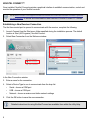
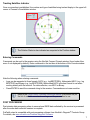
Tracking Satellites Indicator Once a connection is established, the number and type of satellites being tracked display in the upper left corner of Connect’s Constellation window. The Solution Status is also indicated as computed in the Position window. Entering Commands Commands can be sent to the receiver using the NovAtel Connect Console window (found under View menu if not displayed by default). Enter commands in the text box at the bottom of the Console window. Note the following when entering commands: • Logs can be requested in three formats: ASCII (e.g., log BESTPOSA), Abbreviated ASCII (e.g., log BESTPOS) and Binary (e.g., log BESTPOSB). Abbreviated ASCII is the best format to use when working directly with the receiver. For data collection, use ASCII or Binary. • Press ENTER to send the command string to the receiver. Commands are not case sensitive. Refer to the OEM6 Family Firmware Reference Manual (OM-20000129) for the list of available commands and logs and the parameters to use. POST PROCESSING Post-mission data processing refers to cases where GNSS data collected by the receiver is processed after the entire data collection session is complete. ProPak6 output is compatible with post-processing software from NovAtel’s Waypoint® Products Group. For details, see www.novatel.com/Products/Waypoint Software. 7