1
06(G'
Management Services for Education Data
Defining your SP Group
NOTE: If you are going to create your own Mass SP Codes, you should
coordinate this with the state site so that everyone has the correce codes.
The first thing you have to do is tell MIS2000 which SPs you want to add to the students. For
example, let’s say that you want to add Even Start and Needs Assessment to a group of students.
You will tell MIS2000 that you are making an SP Group consisting of Even Start and Needs
Assessment, and that you are calling this group Group A. Once you have defined your group, you
don’t have to do it again. MIS2000 will always know that Group A consists of Even Start and
Needs Assessment.
You define your SP groups with the Edit Codes dialog. (If you do not have a basic understanding
of Edit Codes, see page 53 to learn more).
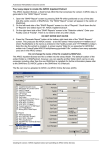
1. Go to the Procedures menu, and choose Edit Codes.
2. In the Select Code Table field, select the SP Group Code code table.
3. Make up a one-character code (it can be a letter or numeral) for your group and type
it in the GroupCode field in the grid.
4. In the Description field, make up a name for your group.
5. In the SPCode field, type in the SP code for the first SP you want to add to the group
(if you need to look up an SP code, you can find a list of SP codes in the
Supplemental Program Code code table).
6. In the Funding field, type in funding code of the SP (Migrant, Title 1, etc)
7. To include more than one SP in the group, click anywhere in the right grid and press
the Insert button. MIS2000 will give you blank fields. Fill in the new blanks with the
second SP Code and its funding.
Example: I want to add two SPs to a group of students: Even Start and Needs Assessment.
•
I would go to Procedures| Edit Codes and choose the SP Group Code table.
•
I would then make up a code for my SP group: A, and enter it in the Group Code field.
•
Next I would make up a Description: Even Start and Needs Assessment.
•
In the SP Code fields I would enter my SP Codes: 001 for Even Start and 002 for Needs
Assessment.
MIS2000 User’s Guide
51