1
Q-Proto System
www.qprotos.com
--------------------------------------------------------------------------------------------------------------------------------2
3
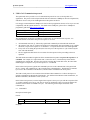
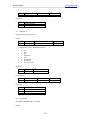
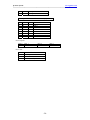
Invalid QuickCAN command
Invalid Checksum
9.5. Command I
Description: Get Rx status
This command is intended for QuickCAN firmware use even it is listed here. Developers should use the
Status byte in the ‘J’ command to determine the RX buffer number and matched filter.
The ISR (interrupt service routine) in the QuickCAN firmware is active all the time. It copies the RxStatus
to the software receiver FIFO along with the data when message arrives, so it can be retrieved later with the
‘J’ command. The RxStatus returned from the ‘I’ command may not be real time because this value is
refreshed each time a new message arrives.
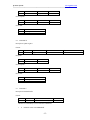
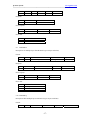
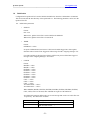
Format:
Byte 0
@
Byte 1
I
Byte 2
Checksum
Byte 1
I
Byte 2
Status value (see MCP2515 <SPI
interface> for details)
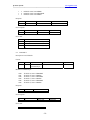
Response:
Byte 0
@
Byte 3
Checksum
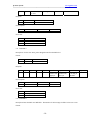
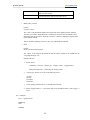
Error response:
Byte 0
@
Byte 1
E
Byte 2
Error code
Byte 3
Checksum
Error code:
1
2
3
MCP2515 Error
Invalid QuickCAN command
Invalid Checksum
9.6. Command A:
Description: Reset MCP2515
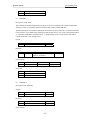
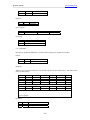
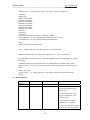
Format:
Byte 0
@
Byte 1
A
Byte 2
Checksum
Byte 1
A
Byte 2
Checksum
Response:
Byte 0
@
Error response:
- 15 -