1
SETTING THE TYPEWHEELS
Your Acroprint stamp is equipped with a typehead consisting of six or more
typewheels which print specific information such as year, month, date, etc. It is
necessary to set each typewheel to the desired position prior to operating the
machine.
CAUTION: Be sure the machine is disconnected from the wall outlet
when setting typewheels.
To set the typewheels, insert the key into the lock and turn it clockwise. Tilt the
cover upward. Pull the release pin from the right-hand side to remove it. Lift the
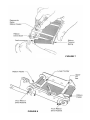
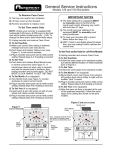
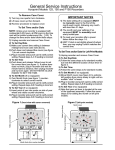
typehead assembly. (See Figure 2) Set each typewheel to the desired character
by pushing the typewheel RATCHET beside each typewheel in a downward
direction with a pointed object such as a ball point pen. (See Figure 3) Make
sure the typewheel ratchet is correctly seated. You will hear a distinct click when
it is rotated into place. Lower the typehead assembly; insert the release pin from
the right-hand side. Lower the cover so that the cover latches to the typehead
assembly. Plug the unit in and insert a piece of paper into the throat until the
stamp prints to verify the registration. The machine is now ready for normal use.
TIME/DATE STAMPS (Models ET and ETC) — After setting the typehead the
machine will automatically rotate the wheels. It will be necessary for you to
manually change the month wheel each month, reset the date wheels each
month, and advance the year wheels on the first day of each year.
DATE STAMPS (Model ED) — It will be necessary for you to manually reset the
date wheels daily.
NUMBERING MACHINES (Models
EN, END, and EDN) — The first six
typewheels will advance automatically after each registration. All
additional number wheels must be
manually changed. If your numbering machine is equipped with a date
section, the date wheels must be
manually reset daily.
FIGURE 3