1
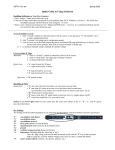
3. Press the QuickKey assignment for the respective macro.
If a preloaded field (fields on a form that are populated with data when the form opens, i.e., ORI)
is included in a Macro definition, then you do no need to enter the information into the Command
Bar. The preloaded information will automatically be incorporated when the macro is executed. If
a value is entered for a preloaded field in the Command Bar, this value will override the preloaded
value.
Macros and Quick Keys
It is necessary that
all MFC data be
entered into the
Command Bar in
the order that it
was created in the
Macro Wizard for
the macro to
execute properly.
Macros and Quick Keys
2. Enter data for each Message Field Code (MFC) for the macro, followed by
the respective delimiter that was used in the creation of the macro using the
Macro Wizard. For example:
53