1
Imaging
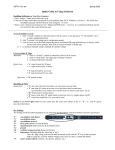
4. Click the Load File button to open the browser box to search for the image
file on your computer’s hard drive.
5. Highlight the desired file, then click the Open button to insert the file.
6. The Image Loading dialog box will then display the selected image in the
upper left-hand corner.
A
B
C
D
E
F
A. Load File – Opens a browser to allow the user to search for the file to
be transmitted.
B. Crop Image – Allows the user to crop the image if it is too large to be
transmitted.
58
Datamaxx Group, Inc.