1
[DS40/DS80
Printer Driver]
Instruction Manual for Windows 2000,XP
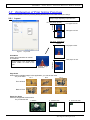
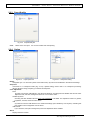
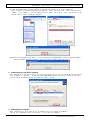
2.2.3 Paper/Quality
Fig 2.2.3 Paper/Quality tab
Color
2.2.4
Please set to color print. Do not use for black and white printing.
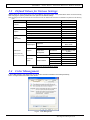
Option
Fig 2.2.4.1 Paper option tab
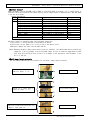
Fig 2.2.4.2 Sharpness setting
Border
Designates yes or no for border (check means with border). Synchronous with Border in the Advanced Settings.
Sharpness
Processes for 11 sharpness levels (Fig 2.2.4.2). 0(Initial setting) means there is no sharpness processing.
Minus(-) blurs the image, and plus(+) increases the sharpness.
Color Adjustment
None
Synchronous with the ICM Method in the Advanced Settings. Checking this item disables ICM and the Color
Adjustment tab, and color management does not occur from the driver.
Handled by Driver
Checking this item disables ICM and 2.2.5 Color Adjustment is enabled. The adjustment values for gamma,
brightness, contrast, and chroma are shown.
ICM
Synchronous with the ICM Method in the Advanced Settings (ICM Handled by Host System). Checking this
item enables color management from the driver.
ICM & Driver
If you check this, ICM (color management) and color adjustment will be enabled.
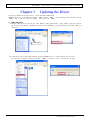
About
Displays the driver version.
18
Dai Nippon Printing Co.,Ltd.