1
[DS40/DS80
2.2.5
Printer Driver]
Instruction Manual for Windows 2000,XP
Color Adjustment
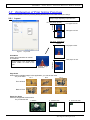
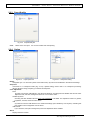
If you check Handled by Driver in 2.2.4 Option, the respective color adjustment values in the Color
Adjustment tab are reflected in the image.
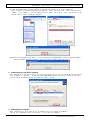
Fig 2.2.5 Color Adjustment tab
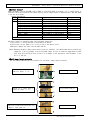
Setting ranges in the Color Adjustment tab are as follows:
Adjustment Item Adjustment Value
Gamma
-100(dark) ~ 100(light) (0 means no adjustment, Gamma 2.0 ~ 0.5)
Adjusts the density of the highlights in the image. The greater the gamma value, the brighter the
highlights.
Synchronous check box
ON : Sets RGB at the same value
OFF:Sets RGB at a different value
Brightness
-100(dark) ~ 100(light) (0 means no adjustment)
Adjusts the brightness of the image. The larger the value, the greater the overall brightness of
the image.
Synchronous check box
ON :Sets RGB at the same value
OFF:Sets RGB at a different value
Contrast
-100(weak) ~ 100(strong) (0 means no adjustment)
Adjusts the contrast of the image. The larger the value, the greater the contrast.
Synchronous check box
ON : Sets RGB at the same value
OFF: Sets RGB at a different value
Chroma
-100(weak) ~ 100(strong) (0 means no adjustment)
Adjusts the color saturation of the image.
19
Dai Nippon Printing Co.,Ltd.