1
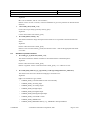
Linux driver development User’s Manual Edwin Version: <2.4> Date: 8/3/2004 2.1.11 Hack The newer kernels have the concept of module licenses. Comedi releases do not cover this point. So update amcc5933.c to avoid ‘taint the kernel’ prompting. Packages provided are configured properly with this, no problem when installing. If console did not display kernel config messages, type #echo 8 > /proc/sys/kernel/printk 2.2 Comedilib-0.7.19 installation Compile using 'make'. If this doesn't work, make sure you have the basic tools installed to compile. If you can successfully compile other things, consult the author, as he has probably made a mistake. Install using 'make install' as root. This installs the files: /usr/lib/libcomedi.so.0.3 /usr/include/comedi.h /usr/include/comedilib.h and other things... if your OS is redhat 9, run ‘ldconfig /usr/local/lib/’ If you run Debian GNU/Linux, comedilib is packaged as the packages libcomedi0 and libcomedi-dev. These are available as part of woody. 3. Package configuration 3.1 The existent drivers Driver name Supported cards pci1710.o PCI-1710, PCI-1710HG, PCI-1711, PCI-1713, PCI-1720, PCI-1731 pci1712.o PCI-1712 pci1716.o PCI-1716 Pci1721.o PCI-1721 Pci1730.o PCI-1730, PCI-1733, PCI-1734 Pci1750.o PCI-1750 Pci1751.o PCI-1751 Pci1753.o PCI-1753, PCI-1753E, MIC-3753 Pci175x.o PCI-1752, PCI-1754, PCI-1756, MIC-3756 Pci1760.o PCI-1760 Pci1761.o PCI-1761, MIC-3761 Pci1762.o PCI-1762 Pci1780.o PCI-1780 Pci1784.o PCI-1784 Pcl711.o PCL-711 Confidential Advantech Automation Corporation, 2001 Page 12 of 41