1
application to full functionality and restore any configuration that was changed by their profile.
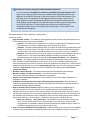
Wipe all mobilEcho data on removal - When user removal of profiles is enabled, this option can be
selected. If enabled, all data stored locally within the mobilEcho application will be erased if it is
removed from management, ensuring that corporate data does not exist on a client not under
management controls.
Allow iTunes to back up locally stored mobilEcho files - When this setting is disabled, the
mobilEcho client will not allow iTunes to back up its files. This will ensure that no files within mobilEcho's
secure on-device storage are copied into iTunes backups.
Application Policy settings
Require confirmation when deleting files - When enabled, the user will be asked for confirmation
each time they delete a file. If you would like the user to be able to later modify this setting, select Allow
user to change this setting.
Set the default file action - This option determines what will happen when a user taps a file in the
mobilEcho client application. If this is not set, the client application defaults to Action Menu. If you
would like the user to be able to later modify this setting, select Allow user to change this setting.
Allow files to be stored on the device - This setting is enabled by default. When enabled, files will be
permitted to remain on the device, within mobilEcho's sandboxed storage. Individual features that store
files locally (My Filesfolder, sync folders, recently accessed file caching) can be enabled or disabled
using additional profile settings. If this option is disabled, no files will be stored on the device, ensuring
that no corporate data is on the device if it is lost or stolen. If this setting is disabled, the user will not be
able to save or sync files for offline use, cache files for improved performance, or send files from other
applications to mobilEcho using the "Open In" function.
Allow user to store files in the 'My Files' on-device folder - If enabled, files can be copied into
the 'My Files' folder for offline access and editing. This is a general purpose storage area within
mobilEcho's on-device storage sandbox.
Cache recently accessed files on the device - If enabled, server-based files that have been
recently access will be saved in a local cache on the device, for use if they are accessed again
and have not changed, providing performance and bandwidth conservation benefits. Maximum
cache size can be specified and the user can optionally be allowed to change this setting.
Allow file copies / creation - If this option is disabled, the user will not be able to save files from other
applications or from the iPad Photos library to a mobilEcho server. They will also be unable to copy or
create new files or folders on the mobilEcho server. This setting supersedes any NTFS permissions that
client may have that allow file creation.
Allow folder copies - If this option is disabled, the user will not be able to copy folders on or to the
mobilEcho server. This setting supersedes any NTFS permissions that client may have that allow folder
creation. File copies / creation must be enabled for this setting to be enabled.
Allow file / folder deletes - If one of these options is disabled, the user will not be able to delete files or
folders from the mobilEcho server. This setting supersedes any NTFS permissions that client may have
that allow file or folder deletion.
Allow file moves - If this option is disabled, the user will not be able to move files from one location to
another on the mobilEcho server, or from the server to the mobilEcho application's local My Files
storage. This setting supersedes any NTFS permissions that client may have that allow file or folder
moves.
Allow folder moves - If this option is disabled, the user will not be able to move folders from one
location to another on the mobilEcho server, or from the server to the mobilEcho application's local My
Files storage. This setting supersedes any NTFS permissions that client may have that allow file or
folder moves. Folder copies must be enabled for this setting to be enabled.
Allow file / folder renames - If one of these options is disabled, the user will not be able to rename files
or folders from the mobilEcho server. This setting supersedes any NTFS permissions that client may
have that allow file or folder renames.
Allow adding new folders - If this option is disabled, the user will not be able to create new, empty
GroupLogic © 2002-2012 Acronis International GmbH. All rights reserved. | 1100 N Glebe Rd, Suite 800 Arlington, VA 22201 USA | www.grouplogic.com
Page 72