1
11
QC - Density Version 4 User’s Guide
Test Date:
The data entered as the date must be convertible to a valid date. It will be converted to the format
MM/DD/YY from any valid date representation entered. If the year is left off, the current year will be
assumed. Two digit years, smaller than 91, are assumed to be in the next century. To enter 1990 or earlier
years, you must enter the entire 4 digits. After it is entered, the date will be converted to the format
selected in Windows Regional Settings, found in your Windows Control Panel.
Proctor Reference:
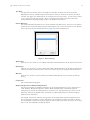
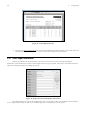
This number identifies which Proctor test’s results should be used with this test. If a Proctor test with this
number has not yet been entered, the program will prompt the user to enter the new Proctor test. Double
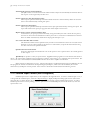
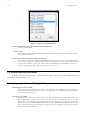
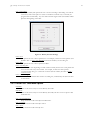
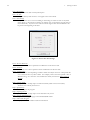
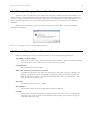
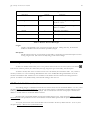
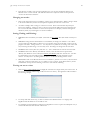
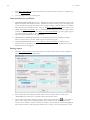
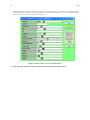
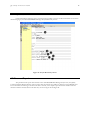
click (or press F3) the Proctor Reference cell to pop-up a list of Proctor References:
Figure 7 - Proctor Pop-up
Wet Density:
Enter the test’s wet density, or leave it blank and it will be calculated based on the dry density and moisture.
Dry Density:
Enter the test’s dry density, or leave it blank and it will be calculated based on the wet density and moisture.
After the dry density is entered, if there is a Proctor reference, the percent compaction will be calculated.
Moisture:
Enter the test’s moisture, or leave it blank and it will be calculated based on the wet density and the dry
density.
Compaction:
This is calculated by the program.
Required Compaction and Moisture Requirement:
The program compares the calculated compaction to the required compaction to set the “Pass/Fail” test
result. Both the “Required Compaction” and the “Moisture Requirement” automatically repeat for
subsequent tests with the same specification key as previous tests. The specification key can be set to be
almost any of the density database fields. See Section 3.5.1 Menu Options That are the Same for Both
Tables for more information.
For example, if the Proctor reference is being used as the key field, and the required compaction for the
first test using Proctor number 1 is 90%, then all new tests entered that use Proctor reference 1 will have
90% automatically copied as the required compaction. The key field is selected on the options screen. Note
that you can select "NONE" to disable this feature.