1
English
Intramuscular Injection Simulator
1. Quick Instructions
1
2
3
4
5
6
7
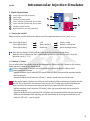
Status light (red LED) for battery
Start button
T button (training mode)
Status indicator (yellow LED) for T button
Status indicator (yellow LED) for C button
C button (control mode)
Result indicator (red and green LED)
1
7
2
6
3
4
5
1.1 Turning the unit ON
Before using the unit for the first time please insert the supplied batteries (2x AA), (see p. 4/ 2.4).
Info: Status light (battery)
Status light (battery)
Status light (battery)
is off
shows solid red
flashes red
battery is okay
battery is running low
please exchange battery
Press the Start button. All LEDs will now light up for the functional control phase.
When the Status indicator (for the T button) lights up this is a signal that the unit is ready for
operation (see p. 6/ 3.1.2).
1.2 T button / C button
You can select either the training mode or the control mode. Please press the T button for the training
mode and the C button for the control mode.
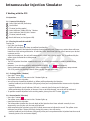
T In the training mode (T button), you will immediately receive feedback as follows while
administering the injection:
•positive feedback (result indicator (LED green) when you have performed the injection into the
muscle correctly,
•negative feedback (result indicator (LED red) + acoustic signal) when you hit the bone.
®
C In the control mode (C button) you will receive no feedback while performing an injection into the
muscle. The result will be saved and you have to press the C button again to check whether you
have carried out the intramuscular injection correctly or incorrectly. You will receive
• positive feedback (result indicator (LED green)) when you have performed the intramuscular
injection correctly,
• negative feedback (result indicator (LED red)) when you have performed the injection incorrectly.
When you hit the bone while injecting, you will immediately receive negative feedback (result
indicator (LED red) + acoustic signal).
3