1
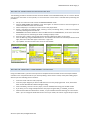
SMARTSCAN User Guide Page | 3 METHOD 1A: ASSOCIATING ATHLETES ON THE PDA The following procedure should be used to associate athlete names with RFID bands prior to a session. Please note that the association is team specific, so ensure that the correct team is selected when performing this procedure. 1.
2.
3.
4.
5.
6.
7.
8.
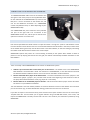
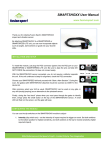
Set up one remote unit and connect the SMARTSCAN RFID reader
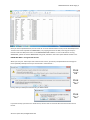
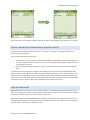
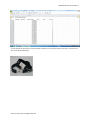
Start the SMARTSPEED PDA software. Press “Flash lights” on the front screen to ensure the gate is on and that the PDA and sleeve are connected Select “Edit/Player” from the main menu to enter the player editor Create a new player by tapping “New”, entering a name, and hitting “Save”, or edit a current player record by selecting them from the list REMEMBER: associations between names and RFID bands are TEAM SPECIFIC, so be sure to select the correct team prior to associating the band or adding the player name Press the “Scan” button, and you will see the message “Waiting for RFID” on the screen Scan the RFID tag using the SMARTSCAN unit. If successful the remote unit will beep and flash a blue light, and an ID number will appear next to the “ Tag# ” box Tap “Update” to finish and then move on to the next athlete. METHOD 1B: CREATING A TEAM IMPORT LIST IN EXCEL Using a PC‐RFID reader, open the Team Import List Template Excel file available on the Fusion Sport website members’ area. Complete the file for your team by adding a team name in cell A2, and by then adding player details as per the following Excel screenshot. 1.
2.
3.
4.
5.
Insert first name and last name (required) Insert the player weight if you wish to add these for use in the jumping protocol. If not, leave these blank and the PDA will add a default weight of 70kg. Click in the RFID_0 column next to a player, and scan the RFID band using your PC‐RFID reader If you wish, you can assign multiple bands to one player using the RFID_1 and RFID_2 columns Label the band with the “Band Label” number, so you know who each band belongs to in the session. Note – you can change the band label column to suit your needs, this column is ignored upon import. © Fusion Sport 2012, All Rights Reserved