1
July ,2009
2. MOUNT CANTALEVER on the Holder
a.
b.
c.
d.
e.
Place cantilever holder on stand and focus under microscope so that you can see where the
probe/cantilever will be placed.
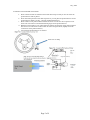
Press down clamp and move the metal clip back so you can place the probe/cantilever on the
probe/cantilever holder. See Fig. 7.3b from 3100D manual below.
Place cantilever into probe/cantilever holder and center it in the slot. Do not push it too far
back. This will result in an undesired mounting angle for the probe/cantilever.
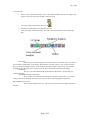
Hold down clip and move over probe/cantilever making sure the body of the probe/cantilever
does not move. Come down on the location as shown on figure below (slightly left of the
vertical line on the probe/cantilever).
Verify that the probe/cantilever is centered.
Press here on clamp
Page 3 of 9